Hello geeks, welcome to our new project. In this project, we are going to make a very interesting project which is an Up-Down counter. Most of us who have an electronics background or studied digital electronics must know the counter. Counter is a simple device which counts numbers. As per the digital electronics, there are two types of counter, the Up counter which counts in increasing order and another is Down counter which counts in decreasing order. And every counter has a reset limit, on which the counter resets to its initial value and starts the counting again. The limit of every counter depends on the bits of counter. For example, we have a 8 bit Up counter which means it will count upto 255 and afterwards it will reset and will start agai ...
Hello friends, I hope you all are doing great. In today's tutorial, we are gonna have a look at a detailed Introduction to HC-SR501. HC-SR501 is a motion detector sensor, that uses infrared waves for the detection of an object. It is an automatic control device, and also has large sensitivity and high reliability. It is used in auto-sensing control devices, where we need to perform motion detection.
HC-SR501 is used in industrial projects and buildings for security purposes. In today's post, we will have a look at its pinout, working, protocol, circuit diagram, etc. I will also share some links to projects where I have interfaced it with Arduino and some other microcontrollers. Friends if you have any questions please ask in the comments I will try my best to solve your problems and I w ...
Hello friends! I hope you all will be absolutely fine and having fun. Today, I am going to give you an elaboration on Introduction to 2N3772. I have already shared basic knowledge about different IC's and transistors in my previous tutorials e.g. Introduction to IRF540, BC547, MMBD914, LM339, LM224 and LM386. You must have alook at these tutorials before going into the details of this tutorials. It will be quite helpful in the better understanding of this article. 2N-3772 is basically a type of central semiconductor. It is basically a Negative Positive Negative (NPN) semiconductor. This semiconductor is designed by the process named as epitiaxial process. The main purpose behind its designing is to provide the high power based amplification proce ...
In today’s post, as the name suggests, we will see how to get data from online webserver using Arduino Wifi in simple steps. Getting data from web server using Arduino Wifi Shield has always remained a problem for the engineers. Its not much difficult task as its usually considered to be. In today’s post, I will create a small project in which I will control two simple LEDs via online web server. It’s really a very interesting project and when I completed it, I felt like Hurrah!!!
Arduino Wifi Shield is used to connect Arduino board with Wifi. After connectivity with Wifi, one can perform many tasks using this shield. We can built a complete server on it and can also use it as a client. Server designed on an Arduino Wifi Shield are usually quite si ...
Hi Guys! Hope you’re well today. I welcome you on board. In this post today, I’ll detail the 7 best Arduino starter kits for beginners.
Arduino boards are particularly introduced for people with little to no knowledge about programming and electronics. These boards are the improvised version of microcontrollers. If you’re a student or someone planning to get your hands dirty with some electronic projects, Arduino boards are a great way to whet your appetite.
Arduino kits house many essential components required to start working with Arduino boards. These kits are developed for people who struggle to get a hold of the nitty-gritty of programming Arduino boards. These Arduino basic kits come with instruction manuals that detail the step-by-step pro ...
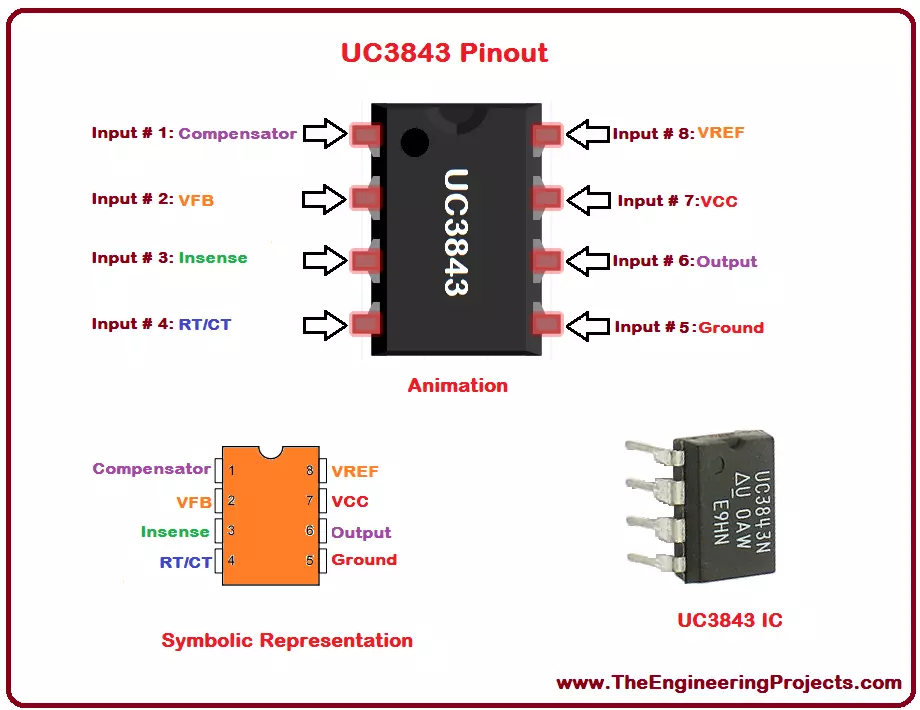
Hello everyone! I hope you all will be absolutely fine and having fun. I am going to give you the detailed discussion about Introduction to UC3843 today. UC 843 is basically a current mode Pulse Width Modulation (PWM) controller having fixed frequency. It is basically designed for DC to DC converter purposes as well as off line applications and it requires minimum external components. UC-3843 has three different packages which will be explained later.
UC-3843 has several different features which make it ideal and useful for a lot of real life applications. These features may include trimmed oscillator for the control of accurate duty cycle, high gain amplifier and to control power MOSFET, there is a high current totem-pole output. Moreover, some ...
Hello friends, I hope you all are fine and having fun with your lives. In today's tutorial, I am going to show you the Interfacing of XBee with Computer. In the previous part of this tutorial, I have given the Introduction to XBee Module. Hope you guys have read it and if not then go visit it so that you may have some idea about XBee module.
Now come to the second part about how to interface xbee with computer because its important as if you cant interface the xbee with computer then you cant interface it with any microcontroller and later I will tell you its interfacing with microcontroller. You should also check this XBee Library for Proteus which will help you to simulate XBee module in Proteus.
We will cover arduino with more detail as its ...
Hello everyone, I hope you all are doing great. In today's tutorial, I am going to give you a detailed Introduction to Arduino YUN, and we will also have a look at its basic functionalities. Arduino YUN is a latest microcontroller board, manufactured by Arduino. It's the most advanced and highly stylish arduino board. The beauty of Arduino YUN lies in having two on board processors, which I haven't seen yet in any other Microcontroller board. One of them is simple Arduino processor which is similar to that of Arduino Leonardo while the second processor is Atheros AR9331. Atheros supports Linux server, which is the new thing in Arduino YUN. Because of these two processors, one now can do anything in the world of automation as well as web servers. ...
Hi Guys! I hope you’re well today. Happy to see you around. In this post today, I’ll walk you through the Introduction to LM747.LM747 is a general-purpose dual-operational amplifier IC. This chip contains two operational amplifiers on board and belongs to the LM’xx’ family where LM stands for linear monolithic. In this chip, analog components are incorporated into silicon.
I suggest you buckle up as I’ll detail the complete Introduction to LM747 covering datasheet, pinout, features, equivalents, and applications.
Let’s jump right in.
Introduction to LM747
Designed by National Semiconductor, LM747 is a general-purpose dual-operational amplifier integrated chip.
Two operational amplifiers are incorporated that share common power supply leads and a bias network.
...
Hi everyone! Thank you for viewing this article, I welcome you on board. In this post I’ll walk you through the detailed Introduction to BC546. BC546 is a low power NPN transistor mainly used for general purpose amplification and switching applications.
In this read you’ll study all nitty-gritty of BC546 transistor i.e. from pinout, pin configuration, and working principle to power ratings, key parameters, physical dimensions and applications. Keep reading.
Introduction to BC546
BC546 is a bipolar junction NPN transistor that finds applications in switching, amplification, impedance, H-bridge and current mirror circuits.
This transistor falls in silicon epitaxial planar transistor category which is generally divided into three groups A, B &am ...