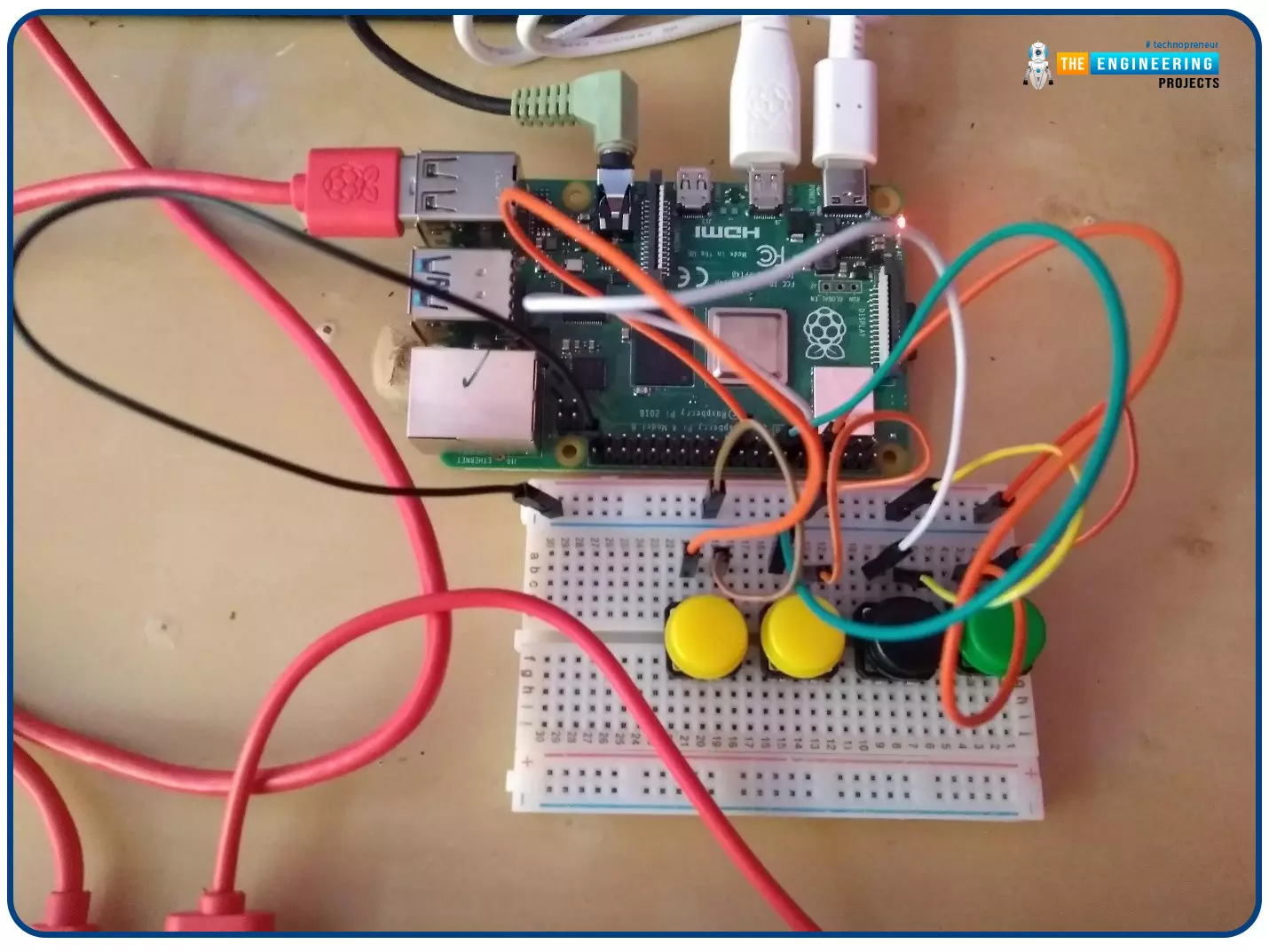
Welcome to the next tutorial of our Raspberry Pi programming course. In our previous tutorial, we learned how to create a timelapse video with still images and understand how phototimer and FFmpeg work. In this lesson, you'll make a button-controlled "music box" that plays different sounds depending on which buttons are pressed.
What you will learn
Connect button pushes to function calls using the Python gpiozero package and uses the Python dictionary data structure
Components
Raspberry Pi
Breadboard
Buttons
Jumper wires
Speaker
Set up your project
For this project, you'll need some audio samples. On Raspbian, there are many audio files; however, playing them with Python can be challenging. You can, however, transform the audio files ...
This is the third tutorial in our Raspberry Pi programming course. In the previous chapter, we learned how to install Raspbian on our Raspberry Pi mini-computer. In this chapter, we'll learn how to use a VNC server to remotely control and see its desktop from our computer.
What is VNC?
Computing over a network is known as "virtual network computing," or "VNC." To remotely control another computer, you can use this screen-sharing technology, which works on all major operating systems. As a result, a remote user can interact with a computer's display (screen, keyboard, and mouse) as if they were sitting right in front of it.
VNC takes advantage of the client/server concept. Rather than installing a VNC s ...
Hi Friends! Hope you’re well today. In this post, I’ll walk you through What is Edge Computing?
Edge computing is the extension of cloud computing. Cloud computing is used for data storage, data management, and data processing. While Edge Computing does serve the same purpose with one difference: edge processing is carried out near the edge of the network which means data is processed near the location where it’s produced instead of relying on the remote location of the cloud server.
Confused?
Don’t be.
We’ll touch on this further in this article.
Curious to know more about what is edge computing, the difference between edge computing and cloud computing, benefits, and applications?
Keep reading.
What is Edge Computing?
Edge computing is the process where data is processed near or at th ...
Hello Folks! Glad to have you on board. Thank you for clicking this read. In this post today I’ll walk you through What is Cloud Computing?
Cloud computing is not a buzzword anymore. Even though most companies are familiar with this term, they don’t know what it does and how it works. If you’re one of them, this read is for you. In simple terms, cloud computing allows you to use computer system resources over the internet. This means you can manage your data remotely over the internet from anywhere in the world. We’ll touch this further in our article.
I suggest you read this post all the way through as I’ll cover what is cloud computing, how does it work, the types of cloud computing, the advantages of cloud computing, and the future of cloud computing.
Let’s get started.
What is Cloud ...
JLCPCB (JiaLiChuang Co. Limited) is a worldwide PCB & PCBA Fabrication enterprise. It is a leading company in high-tech manufacturing products specializing in PCB and PCBA production. With over a decade of experience in PCB manufacturing JLCPCB has made over a million customers through online ordering by the customers of PCB manufacturing and PCBA production.
JLCPCB is a professional manufacturer of large-scale manufacturing of PCBs, well equipment, strict management, and superior quality. It deals with the production of all types of PCBs, Stencils, and SMT.
In this article, we are going to discuss widely how the company operates its ordering system of the PCBs by their customers for production through the online booking process.
JLCPCB SMT ...
The Industry 4.0 market size will reach $267.01 billion by 2026. Industry 4.0 depends on the secure, fast, and cost-effective data transfer between IoT devices. IoTA is designed to ensure secure communication between two devices within the IoT(internet of things) framework. Let's have a detailed look at the role of IoTA in industrial IoT.
Understanding IoTA- how it's different from blockchain
The terms MIOTA and IoTA together make up the term IoTA. While MIOTA is a cryptocurrency, IoTA is a non-profit foundation. Since its inception in 2015, IoTA has formed joint ventures with firms like
Fujitsu
Samsung
Telekom
Volkswagen
IoTA is technically different from blockchain in terms of the underlying technology. IoTA works on a technology ca ...
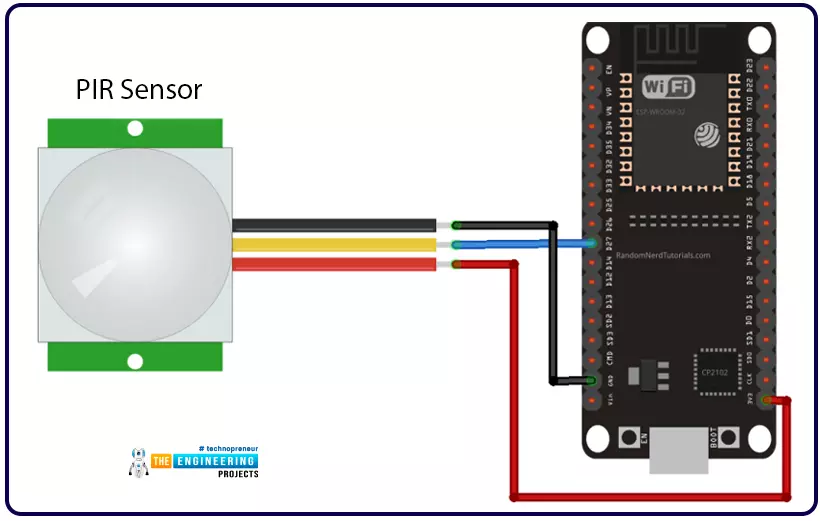
Hello readers, we hope you all are doing great. Welcome to the 4th lecture of Section 5(ESP32 Sensor) in the ESP32 Programming Series. So far, we have discussed the ESP32 built-in sensors in this section. Today, we are going to interface an external embedded sensor(i.e. PIR Sensor) with the ESP32 Microcontroller board. At the start, we will discuss the basics of a PIR Sensor(HC-SR501) i.e. its pinout and working. After that, we will design a simple project to detect the motion with a PIR sensor and ESP32. Finally, we will display the motion detection results on the ESP32 WebServer.
We will use ESP32 interrupts to detect the motion. Interrupts are used when a microcontroller needs to continuously monitor an event while executing other tasks at the same time. We have already posted a tuto ...
Hello friends. In this lecture, we are going to have a look at the different kinds of MATLAB data types.
As we have already seen in previous lectures, MATLAB stands for MATrix LABoratory and allows us to store numbers in the form of matrices.
Elements of a matrix are entered row-wise, and consecutive row elements can be separated by a space or a comma, while the rows themselves are separated by semicolons. The entire matrix is supposed to be inside square brackets.
Note: round brackets are used for input of an argument to a function.
A = [1,2,3; 4,5,6; 7,8,9];
An individual element of a matrix can also be called using ‘indexing’ or ‘subscripting’. For example, A(1,2) refers to the element in the first row and second column.
A larger matrix can al ...
Hi Guys! Happy to see you around. Thank you for clicking this read. In this post today, I’ll walk you through Types of Cloud Computing.
Cloud computing is not a new term. Companies have been using this infrastructure for the past two decades. You might be familiar with this term, in case you don’t, cloud computing is the on-demand availability of computing resources over the internet. Simply put, you can process, store and manage a large amount of data using this architecture. The companies offering these services to end-users are called Cloud Service Providers (CSP). And most of these services offer the pay-as-you-go model which means you can ask for only those computing resources required for your business; you don’t pay for the resources you don’t use in the cloud computing model. This ...
Hello readers, I hope you all are doing great. In our previous tutorial, we discussed the implementation of pulse width modulation (PWM) in Raspberry Pi Pico using the MicroPyton programming example. We also implemented the LED brightness control program to demonstrate an application of the pulse width modulation technique.
In this tutorial, we are going to implement another application of pulse width modulation technique which is ‘Direction and position control of a servo motor’ with Raspberry Pi Pico module and MicroPython programming language.
Later in this tutorial, we will also discuss how to control the position of a servo motor with push buttons (to be used as control inputs) and also to use LEDs for indication purposes.
What is Servo Motor?
Before interfacing the servo motor with ...