No. Sending Email in Visual Studio 2010 Give Your Suggestions !!! 1. Part 1 2. Part 2 Hello friends, first of all I am really bad in designing stuff. Although I have tried to design the top image for this post but I know its not much cool well try to bear it .... :)) After the Microsoft Visual Studio 2010 - COM Port and Creating a Database in Microsoft Visual Studio 2010 tutorial, here's my next tutorial on VB.net. As the name suggests, this tutorial is about sending an Email through Visual Studio. Again I will use Microsoft Visual Studio 2010 and the language will be Visual Basic for this tutorial. Usually Sending an Email through software seems quite a difficult task but in actual its really a very easy task. So at the end of this short and quick tutorial, you will be able to develop a s ...
Hello friends, I hope you all are fine and having fun. In today's tutorial, we will have a look at updating database table with Programming in VB 2010. In the previous posts of this tutorial, we have seen How to Create a database in VB 2010 and then we have added button control in VB Database in it, which was quite an easy job. But usually in such applications, its necessary that the application update its database automatically. Like in one of my project, I have designed a software for hotel management in which the data is coming from all the rooms wirelessly to the master room where the software is installed. It was quite a big project but the thing, for which I have mentioned this project, is the software installed in the master room was updating its database itself i.e. if data of room ...
Hello friends! In this tutorial, we will add Add, Save, Remove and navigation buttons to a Visual Basic database application. We will continue with the contact form from our previous lesson and use its existing dataset, binding source and TableAdapter. If you have not built that form yet, first follow creating a database in Microsoft Visual Studio . This lesson retains the original Visual Studio 2010 Windows Forms example, with clearer event handlers and explanations of what each button changes. The key distinction is that editing a bound form changes in-memory data first. Adding a row, removing a row and moving to another contact do not necessarily write anything to SQL Server. Our Save button is responsible for sending the pending changes to the database. Figure: A database illustration ...
Hello friends! In this tutorial, we will find the roots of a quadratic equation in MATLAB, calculate its minimum over a specified interval and display the results on a graph. This is a useful beginner project because it connects algebra, functions, input validation and plotting in one small program. The original project allowed you to choose roots, a minimum or both. We will keep that idea, but make the calculations more reliable. In particular, we will distinguish a function's roots from its minimum, account for interval boundaries and handle inputs that turn out to be linear or constant. You do not need Symbolic Math Toolbox for the numerical program below. We will use ordinary MATLAB arrays, roots , polyval and a little calculus. Figure: MATLAB is used to calculate the polynomial roots ...
Hello friends! Today we will create a contact database in Microsoft Visual Studio and connect it to a Visual Basic Windows Forms application. We will begin with an empty project, create a table, enter sample contacts and display those contacts in both a grid and a details form. This tutorial retains the original Visual Studio 2010 walkthrough and screenshots. Its main purpose is to explain the database, dataset and data-binding workflow used by that application. If you are maintaining an older VB project or learning how its generated components work, the same distinctions will help you understand where records are loaded, edited and saved. After completing this part, continue with button controls in a VB database application and updating a database table with VB programming . Our earlier V ...
Hello friends! In this tutorial, we will learn how to share a Simulink design without distributing its editable implementation. You may have developed a controller, a signal-processing algorithm or a plant model that another person needs to simulate. The challenge is to give that person a usable component while keeping your original design private. The original version of this tutorial used a generated S-function. We will keep that method, explain what it actually protects and then look at the protected-model workflow available in current Simulink releases. These approaches produce different deliverables, so the right choice depends on what the recipient needs to do. If you are distributing MATLAB functions rather than Simulink models, see our tutorial on converting MATLAB M-files to P-fil ...
Hello friends, I hope you are doing well. Today we will convert a MATLAB M-file into a P-file so another MATLAB user can run our function without receiving its readable implementation. We will start with one small calculation, create its P-code version, and then organize a distribution folder that includes everything needed to use it. The basic command is short, but a reliable delivery requires a few additional decisions. Where will MATLAB write the output? Which copy of the function will run? Does the recipient have a compatible MATLAB release and the required toolboxes? We will answer these questions as we work through the example. Figure: An example of readable M-file source; use the tutorial's pcode commands for conversion. What Are M-Files and P-Files? An M-file is a readable MATLAB p ...
Hello friends, I hope you are doing well. In this tutorial, we will compare alternating current and direct current, calculate power in both systems and explain why modern electrical networks use each form. AC and DC describe the direction and time variation of voltage and current. Power is the rate at which electrical energy is transferred. The phrase “AC power” therefore means power carried by alternating voltage and current, while “DC power” means power carried by quantities with fixed polarity. Figure: A conceptual image introduces the comparison of alternating and direct current. AC and DC at a Glance Feature DC AC Polarity Remains fixed Reverses periodically Typical waveform Constant or varying unidirectionally Sinusoidal or another bipolar waveform Frequency Zero for ideal steady DC ...
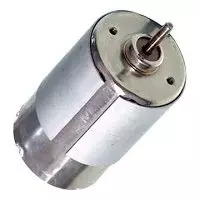
Hello everyone, I hope you are doing well. In this tutorial, we will compare DC and AC motors from their operating principles to their speed control, maintenance and applications. Both convert electrical energy into mechanical energy through electromagnetic force, but those broad labels contain several different motor families. The first important correction is that an AC motor is not simply a DC motor with continuous slip rings. Most industrial AC motors create a rotating stator field and use either induction or synchronous interaction to produce rotor torque. We will therefore compare common brushed DC motors, brushless DC motors, induction motors and synchronous AC motors. Figure: A small DC motor introduces the comparison of DC and AC motor operation. DC and AC Motor Comparison Feature ...
Hello friends, I hope you are doing well. Welcome to our Difference Between engineering series. In this series, we compare two related technologies side by side so you can understand where they are similar, where they differ and when each one should be selected. A useful comparison goes beyond short definitions. We will begin with the physical principle, compare construction and operating behavior, add equations or ratings where they clarify the subject, and finish with practical selection guidance. This format is useful for students preparing for examinations and interviews, but it is equally useful when an engineer must choose between two real design options. Figure: Banner for the engineering comparison series and its tutorial index. Difference Between Tutorial Index No. Comparison Main ...