Hello friends, I hope you all are doing great. In today's tutorial, we are gonna have a look at detailed Introduction to Namespaces in C#. Namespaces are considered as libraries in C#. If you have worked on any other programming language then you must be aware of the term library which contains all classes & methods etc. In C#, this functionality is performed by namespaces. In 12th tutorial, we have seen Introduction to Methods and in 13th part, we have seen Classes in C# . Methods are simple storage units and stores code only, Classes are slightly bigger storage units and can store methods. Now Namespaces are giant storage units, which can save anything in them i.e. classes, methods, namespaces etc. So, let's have a look at them in detail: Introduction to Namespaces in C# Namespaces are g ...
Hello friends, I hope you all are doing great. In today's tutorial, we are gonna have a look at detailed Introduction to Classes in C#. It's my 13th tutorial in C# series and now we are ready to understand this slightly complex subject in C#. In our previous tutorial, we have seen Introduction to Methods in C# which are used for organizing the code and we can add some code in separate methods to make the Main method simple. Classes are slightly bigger storage capacities than methods. Methods can store code, classes can store methods. So, let's discuss classes in detail: Introduction to Classes in C# Classes in C# are referred as storage units for different methods, fields, objects etc. and are used for organizing the code. In our previous lessons in C#, we have always taken an example of a ...
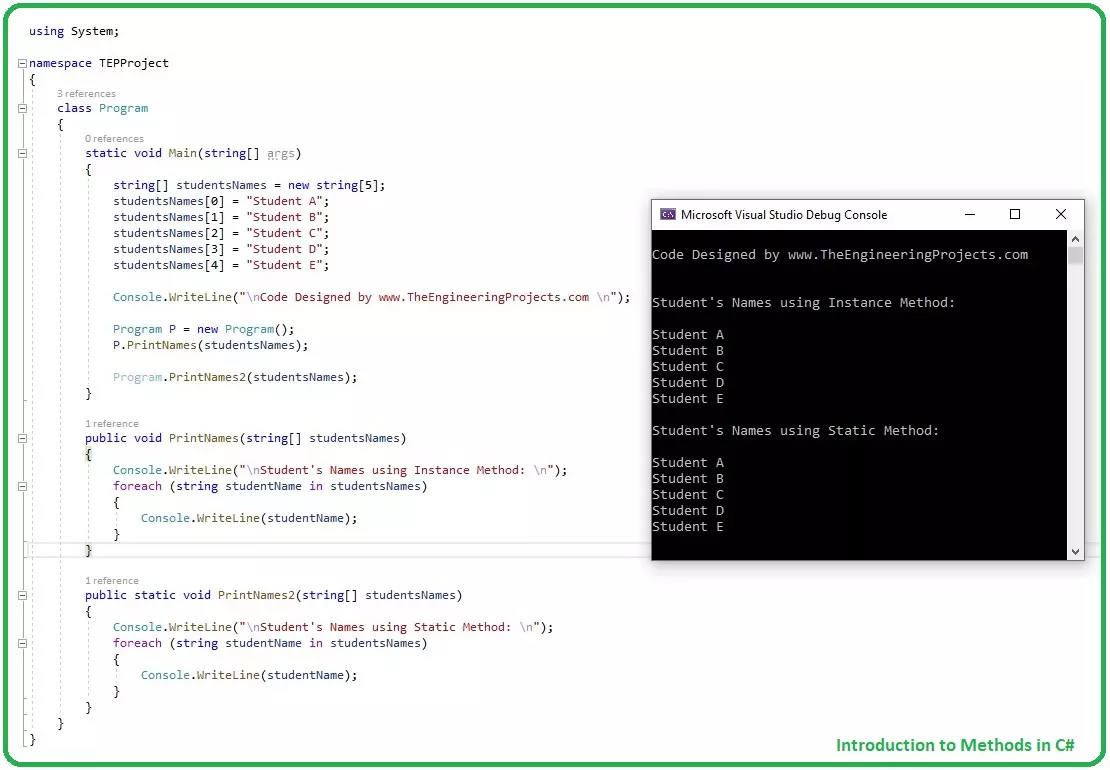
Hello friends, I hope you all are doing great. In today tutorial, I am going to give you a detailed Introduction to Methods in C#. It's our 12th tutorial in C# series. So far, we have covered all the basic concepts in C# and now it's time to move forward and have a look at some complex concepts. Methods have an important role in C# programming and if you want to be an efficient programmer then you must set your method controls correctly. Some methods have secret codes in them, which you don't want to give access to your developers, then you can set it private. We will cover such things in detail later, let's first have a look at Introduction to Methods in C#: Introduction to Methods in C# Methods in C# , also called Functions, are extremely useful in optimizing the code, normally used to c ...
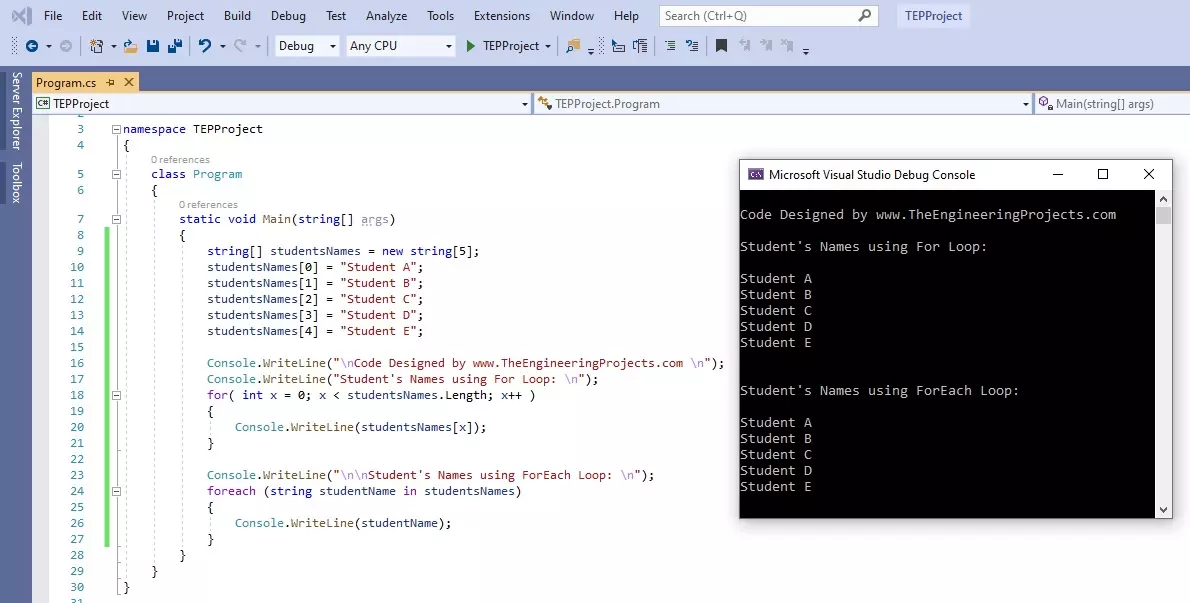
Hello friends, I hope you all are doing great. In today's tutorial, we are gonna have a look at How to use For Loop in C#. It's our 11th tutorial in C# series. Till now, we have seen two loops in C# which are IF Loop and while Loop and today we are gonna have a look at for Loop. For Loop is most commonly used loop in any programming language and if you have worked on any other language then you must be aware of its syntax. It is used to create repeated loop with specified number. Let's have a look at it in detail: How to use for Loop in C# For loop in C# takes an integer variable as a Controlling agent, initialized at value V1 and ends at value V2 , and the travel from value V1 to V2 depends on the Condition specified in () brackets. In both IF loop & while loop, the small brackets just ha ...
Hello friends, I hope you all are doing great. In today’s tutorial, we will have a look at Preparing for Engineering Certification Exams in the US. Preparing to take an engineering exam can be an intimidating process because you know that it’s going to challenge your ability to recall and use what you’ve learned. Of course, with engineering being such a complex and broad field, involving plenty of math and science, it’s not surprising that high-level engineering exams can be some of the most difficult academic tests you’ll encounter during the course of your education. However, becoming a certified engineer is well worth the hassle when you consider the high salaries and prestigious job positions that come with it. To make sure you’re adequately prepared for your engineering certification ...
Hello friends, I hope you all are great. Today, I am posting 10th tutorial in C# series and its about How to use while Loop in C#. It's gonna be a quick tutorial, as there's not much to discuss. In our 8th tutorial in C# series, we have had a look at How to use IF Loop in C# and we have seen that IF loop takes a Boolean expression and if it's TRUE then it allows the compiler to enter in it just once. While loop is quite similar to IF loop as it takes a Boolean expression as well but it will keep on executing again & again, so let's have a look at it in detail: How to use while Loop in C# While Loop in C# takes a Boolean expression as a condition and it will keep on executing as long as the conditional expression returns true, we can say Execute while condition is TRUE. Here's the syntax of ...
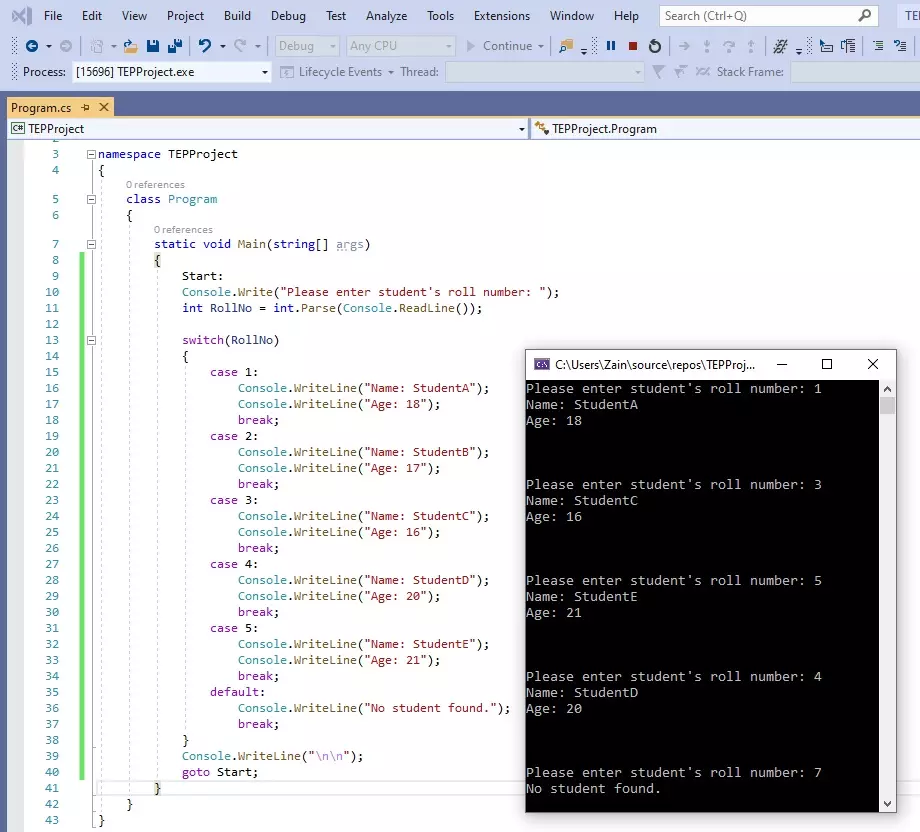
Hello friends, I hope you all are doing great. In today's tutorial, we are gonna have a look at How to use switch Statement in C# and its our 9th tutorial in C# series. In our previous tutorial, we have seen IF Loop in C# and this switch statement is also a loop but works slightly different than IF loop and it totally depends on your application, which one you want to use. First we will have a look at How to use switch statement in C# and after that we will also study goto statement, because switch and goto statements are normally used together. So, let's get started with it: How to use switch Statement in C# Switch Statement is a loop in C# which takes a variable as a condition, and then creates its different cases and we can deal each case separately. We need to use break Statement after ...
Hello friends, I hope you all are doing great. In today’s tutorial, we will have a look at What is Thyristor. The thyristor is a semiconductor component that has 4 layers of N and P materials with the sequence P, N, P, N. First thyristor was invented in 1950 by William Shockley who was a physicist and belonged to the United States of America. But first time it was practically used in 1956 due to its huge amount of current and voltage handling capability. Due to this feature, it was commonly used in different power control circuitry, fan dimmers, and speed control of different motors. There are 2 types of design in which this module available and both used according to circuit requirements first one has two leads and the second one has three leads in its structure. This electronic component ...
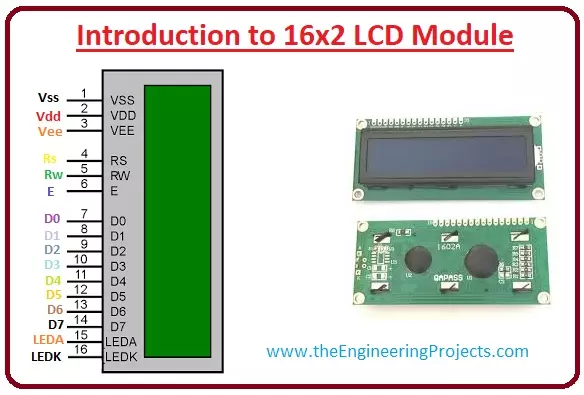
Hello friends, I hope you all are doing great. In today’s tutorial, we will have a look at Introduction to 16x2 LCD Module. LCD stands for liquid crystal display it is mostly used in different electronic projects and devices to display different values. LCD uses liquid crystals for the generation of visible images. 16 x 2 liquid crystal display is a basic LCD module used in DIY electronic projects and circuits. In this LCD module, there are two rows every row consists of sixteen numbers. With the two rows in this module, there are sixteen columns. The VA dimensions of these modules are (66 x 16) millimeters and the thickness is 13.2 millimeters. Its operating voltage is plus five or plus three volts. In today's post, we will have a look at working, applications, circuits, features, advanta ...
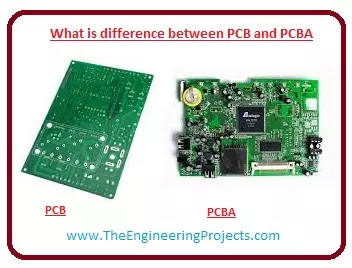
Hello friends, I hope you all are doing great. In today’s tutorial, we will have a look at what is difference between PCB and PCBA. The printed circuit board ( PCB ) is a circuitry board that used to construct engineering projects and electronic devices circuits. The invention of this board has reduced complicated wiring circuits that were used before its creation, the circuits manufactured by the complex wiring were very difficult to handle in sense of fault detection and reconstruction. The printed circuit board is manufactured by a substrate material that is constructed by material such as glass fibre, epoxy resins. On this board, a large number of conductive paths are designed on which different symbols of electronic components are sketched so we can easily connect our components to ma ...