Hey peeps! Welcome to the Engineering Projects where you are learning the basics of Python in detail. We are working a lot with the arrays as these are important concepts in most of the high-level programming languages till now, the numeric data was used in the arrays but for our practice, we are moving towards the next step where the focus will be on the string data type. The practice is done on the Jupyter notebook and every step is going to be explained well without skipping any concepts but to keep things easy, we are not emphasising unnecessary details and concepts. So, before going deep into the topic, have a look at the list of the contents that will be discussed in this lecture: What are the strings? How do we use the string in arrays? What is the list? How do we extract the charac ...
Hey, peps! Welcome to the new tutorial on the Jupyter notebook. As we are moving towards a higher level of Python, therefore, it is important to understand other ways of doing the same task. As we read in the previous lecture about 2D arrays, this time it is going to be done with the help of a famous library in Python. This time, you are going to learn different, engaging, and advanced-level concepts that not only help you deal with the 2D array but also the installation and working of the unique library of Python, which is NumPy. This lecture is going to be very useful and interesting, and therefore, we suggest you have a glance at all the goals of this lecture. Getting the introduction to NumPy Successfully installation of NumPy and knowing different methods for it Using the arrays with ...
Hi learners! Welcome to the next episode of learning the arrays using string data. We have been working with the arrays and in the previous lecture, we saw the interesting characteristics of the string arrays. In the present lecture, our target is to get knowledge about the built-in functions and we will take the strings in the array so that we may know about both of them together. String arrays are used in many officials uses and therefore, we want to use the built-in functions that every Python programmer must know. Here is the list of the concepts that will be polished in this lecture: What are the built-in methods? How do you differentiate between methods and functions in programming? Give different examples to understand different built-in methods to be used in the same code. How do J ...
Hi Guys! Hope you’re well today. I welcome you on board. In this post, I’ll walk you through How a Hobbyist Can Work on Electronic Projects in America. Working on electronic projects is a bit inundating. From selecting the topic to research work and development to execution, you need to hustle, grind and drill to keep your final product up and running. When you are new to the electronic field, you must not be afraid to get your hands dirty in diving deep into the nitty-gritty of the project. This means that no matter what kind of technical project you pick, you need to spend a significant amount of your time and money to reach your final goal. It's not just about making sure that whatever it is you're looking for is done well—it's also about making sure that your project is done right from ...
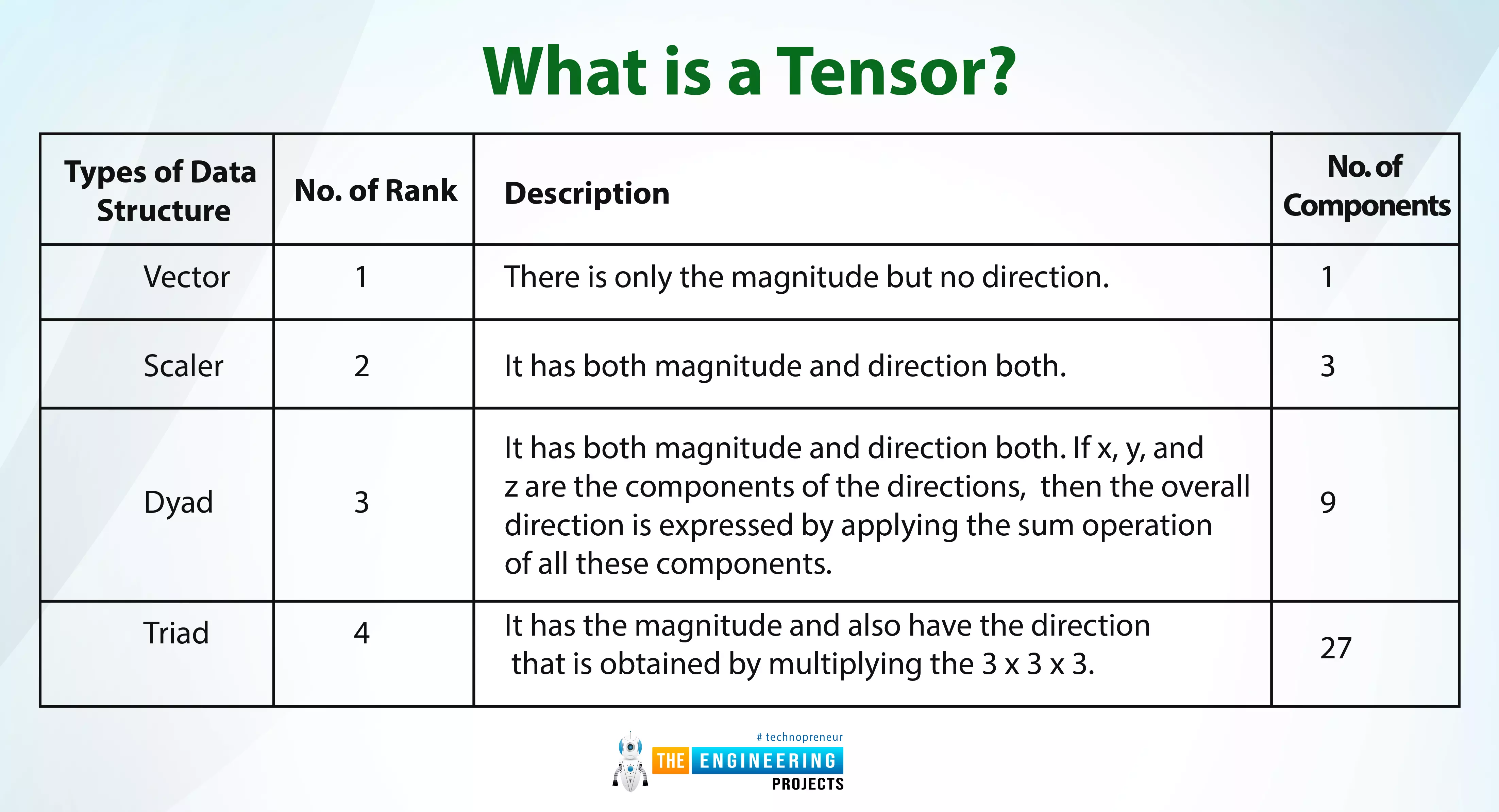
Hi pals! Welcome to the next deep learning tutorial, where we are at the exciting stage of TensorFlow. In the last tutorial, we just installed the TensorFlow library with the help of Anaconda, and we saw all the procedures step by step. We saw all the prerequisites and understood how you can follow the best procedure to download and install TensorFlow successfully without any trouble. If you have done all the steps, then you might be interested in knowing the basics of TensorFlow. No matter if you are a beginner or have knowledge about TensorFlow, this lecture will be equally beneficial for all of you because there is some important and interesting information that not all people know. So, have a look at the topics that will be discussed with you in just a bit. What is a tensor? What are s ...
Hello learners welcome to the next tutorial on MATLAB where we are learning about this excellent environment in detail without skipping anything. Last time, you have seen the data types and their detail through practical implementation and this time, you will get information about the operators used in MATLAB and the text-related information in an efficient way. By the end of this lecture, you will be able to answer the following questions: What are the operators and can we use operators in MATLAB? How can you implement the arithmetic operators in your MATLAB? What is the significance of the relational operator? What is the detail of the logical operators in MATLAB? What are bit-wise operators? How can you give a brief introduction to the short circuit operators? All of these are important ...
Hey geeks, welcome to the next tutorial about MATLAB software and language. In this series, we have been working on MATLAB with the basic information and in the previous lecture, we worked deeply with the workspace window and learned about the functions and variables that are commonly used when we are dealing with the data in the command prompt. In the present lecture, we are dealing with the data types in MATLAB. This is related to the command prompt window but the reason why I have arranged this lecture after the workspace practice is, there will be different steps where the usage of the workspace will be included. Other details will be cleared when you will take this lecture yet, have a look at the list of content that will be included in this tutorial: Introduction to the data types. W ...
Hello, readers. Welcome to the MATLAB tutorial, where you are learning the basics to advance information about MATLAB without discussing unnecessary concepts. In the last lecture, there was a discussion about variables and their declaration, usage, and types in detail using the MATLAB command prompt. This time, you are learning the workspace window of MATLAB. Usually, people while learning ignores this window because they do not bother about what is happening in it, but the experts know that by applying the simple rules in the workspace window, they can easily get better results. At the end of this lecture, you will be able to answer the following questions: What is the workspace window of MATLAB? How can you save the files from the workshop in different ways? What is the method to load th ...
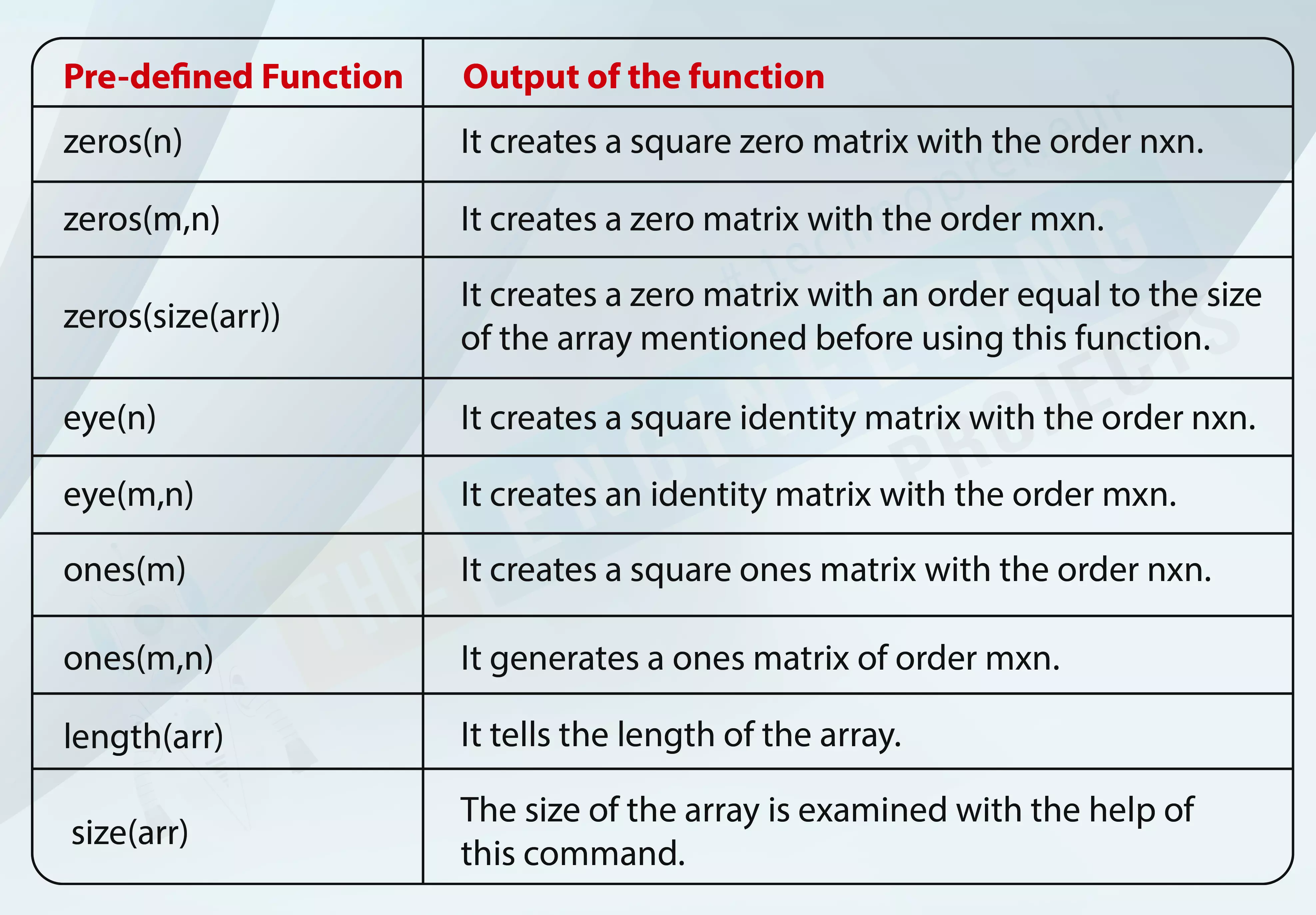
Hello peeps! Welcome to another tutorial on MATLAB where we are starting the code learning and its procedures in this lecture. In the previous sessions, we have seen the windows through which you can work in different ways for specific tasks. The focus of that lecture was on the figure window and editor window. Now, we are coding in these windows. You will see the implementation of these tasks in the command prompt because we are dealing with arrays as well. So, have a look at the topics that will be cleared in your mind after having the knowledge of this lecture. What are the variables in MATLAB? What is the relationship between the matrix and variable? How to use the built-in functions of the MALTAB in command prompt? Give the example of built-in functions. How can you input a string mes ...
Hello learners, Welcome to another tutorial on MATLAB. In the previous tutorial, we learned a lot about MATLAB's command window, saw some exciting commands related to the system, and found guidance from the pre-defined data. In this lecture, you will learn a great deal about the other two types of windows we defined in the earlier sessions. Let me discuss the points that will be discussed today. What is a Figure window? How to get started with the figure window? How can you change the background colour of the figure window? What are some functions of the figure window? Give a brief introduction to the editor window. What is the live script? How to run code on the live script? What is the difference between the run all and run section options in MATLAB? We shall discuss all these questions ...