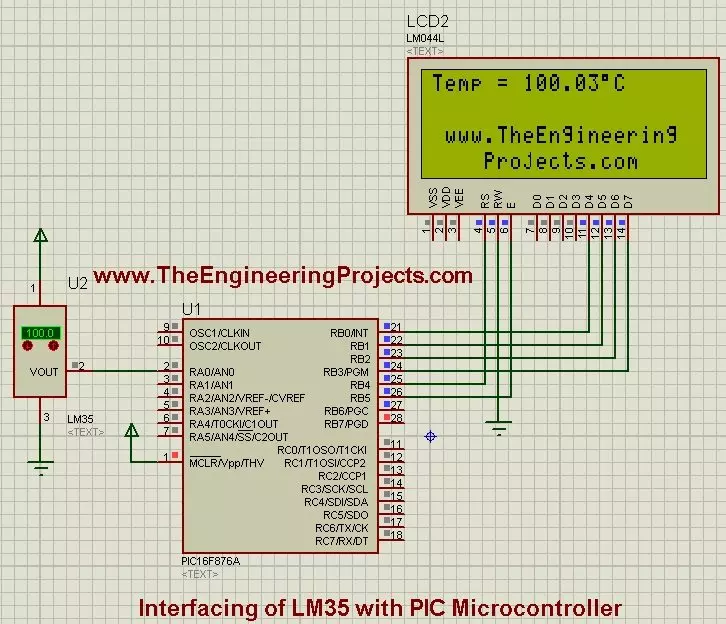
Hello friends, I hope you all are fine and having fun with your lives. In today's post, I am going to share How to interface LM35 with PIC Microcontroller. I have already shared Interfacing of LM35 with Arduino so now we are gonna interface this same temperature sensor with PIC Microcontroller. Interfacing LM35 with PIC isn't much difficult as its a simple sensor which gives us analog output and we just need to read this output and convert it into temperature format. Before going into details, you should first read the Interfacing of LM35 with Arduino as I have given the basic details of this LM35 sensor in that post. You should also have a look at How to use 18B20 in Proteus.
So, today I am not gonna go into the details of this temperature sensor ...
Hello friends, hope you all are fine and having fun with your lives. Today, I am going to share Pure Sine Wave Inverter Simulation in Proteus. I have already posted a tutorial on Pure Sine Wave Inverter Design, which got quite popular and I got a lot of requests on posting its simulation in Proteus. So, I worked on it and finally I got it working and here I am sharing it with your guys. As, it got a lot of effort to design it in Proteus that's why its not open source but I have placed a very small amount of $50 on it and you can easily buy it from shop by clicking on the below button. It include the complete code as well as the Proteus Simulation working perfectly.
Let's start with the basics of Pure Sine Wave Inverter Simulation, first of all, I ...
Hello friends, in today's post I am gonna show how to send SMS with PIC Microcontroller and SIM900. In my previous posts, we have seen how to Send SMS with Arduino and SIM900D and have also seen how to Receive SMS with Arduino and sim900D, both of them were using Arduino board. So, today I thought to post same project using PIC Microcontroller. The logics I am gonna use are exactly the sameas I did for Arduino but the only thing gonna change is the programming syntax. I am using MikroC Pro for PIC compiler for PIC Microcontroller and PIC18F452 is gonna use here. I have also posted on How to Receive SMS with AT Commands using SIM900 & PIC Microcontroller, so check it out as well if you are planning to work on PIC Microcontroller and SIM900.
The ...
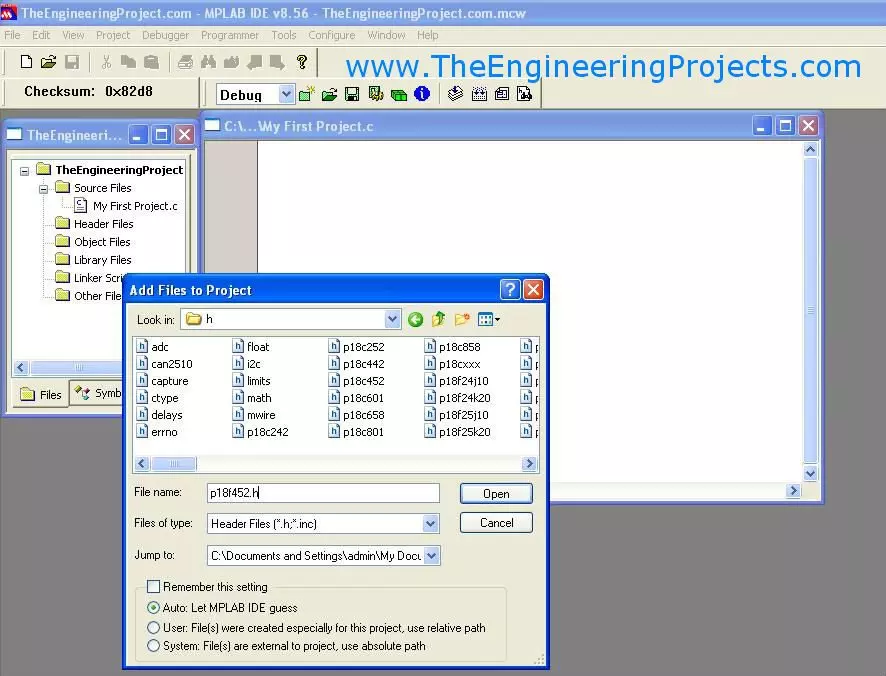
Hello friends, I hope you all are doing great. In today's tutorial, I am going to give you a detailed Introduction to MPLAB Compiler. MPLAB is used for PIC programming both in assembly and C languages. In my previous posts, I have completely explain how to install MPLAB software and also the C compiler for MPLAB.Today I am going to explain getting started with MPLAB. This chapter doesn't belong to programming but the initials required for programming. Setting a project in MPLAB is not much difficult but obviously beginners don't know much about it and they think that its a crap and very difficult. Although its not and i think its the best programming compiler for PIC Microcontroller. Easy and fully controllable. In the coming tutorial we are gonna ...
Hello friends, hope you all are fine and enjoying good health. In today's tutorial we are gonna have a look at Installation of MPLAB C Compiler in Windows. In the previous part of this chapter, I have explained How to install the MPLAB software in Windows, that part was not much tricky and we did very easily and our software was then ready to use, but as we didn't install the C compiler so we can't do C programming for PIC Microcontroller on MPLAB. We can only do assembly programming on it. Now in this post I will teach you how to install MPLAB C18 compiler so that we can do programming of PIC in C. There are many different compilers available in the market, one of them is MikroC and another famous one is CCS but they are paid compilers means you ...
No.
MPLAB Tutorials
Give Your Suggestions !!!
1.
Getting Started With Microcontrollers
2.
Getting Started with PIC Microcontrollers
3.
Functions Available in PIC18F452
4.
How to Install the MPLAB Software
5.
How to Install the MPLAB C18 Compiler
6.
Getting started With MPLAB
7.
LED Blinking Project on PIC Microcontroller
Hello friends, hope you all are fine and enjoying good health. Previously, we have seen Functions available in PIC18F452. In today's tutorial we are gonna have a look at How to install MPLAB software. Until now, we have seen only what is PIC Microcontroller and what is it capable of? Now we are gonna move a little further and will see how we can burn program into it and get it our slave. So in orde ...
Hello friends, hope you all are healthy, wealthy and wise.
First of all, I am quite sorry about not posting for a long time, actually the load of work has really increased and I don't even have time to comb my hair.
Secondly, I have a really great news for you guys and the news is we have officially set up our office. Now, we will be more professional than ever and will respond to your queries quite fast now. I will update the photos of my new office soon INSHAHLLAH.
Let's come back to our topic. Previously, I have discussed the DC Motor control in Proteus ISIS and Stepper Motor Control in Proteus ISIS. So, now we are ...
Today's post based on my personal experience so I thought of sharing it with you guys. Today I thought of using PICkit3 for programming PIC microcontroller. Before that, I was using PIC JDM Programmer for PIC , the only reason for switching is the usb port as I want to burn the PIC on my laptop instead of PC, as my laptop don't have serial port. So, I connected PICkit3 with my laptop and tested it with MPLAB and it worked well. But actually the project on which I am currently working demands MikroC (Client's requirement to use MikroC compiler but personally I always prefer MPLAB).
Anyways I thought it wont be much of an issue to connect it but when i practically did that i was kind of surprised, there was no method anywhere (at least i didn't fi ...
Hello friends , I hope you all are fine and enjoying good health. In today's tutorial, I am going to design an LED Blinking Project using PIC16F877a. In the previous chapters, we have seen all the basics of PIC Microcontroller and now we are ready to design our first project on PIC Microcontroller.
Its a very simple project so the programming level is very basic. We will just add some LEDs on all pins of PortB of PIC16F877a and then we will program it in such a way that these LEDs will blink in different pattern, we can also change the speed of blinking by adding a delay.
I will explain the whole code but if you got any problem may ask in comments.I will recommend you guys to do this project, I know a beginner can't make this project work in firs ...