


Send SMS with PIC Microcontroller & SIM900


Hello friends! Today we will send an SMS using a PIC18F452 microcontroller and a SIM900 modem. We will use mikroC PRO for PIC and the hardware UART, beginning with the electrical connection and then following the command exchange that submits a text message.
The command sequence is related to our earlier Arduino SMS sending project. The microcontroller code changes, but the modem still needs a valid supply, compatible serial signals, network registration and correctly terminated AT commands.
We will improve the original example by waiting for responses instead of assuming that fixed delays prove success. For the opposite direction, see SMS reception with Arduino and SMS reception with PIC.
What You Need for the Project
- PIC18F452 with its required power, reset, oscillator and programming circuit.
- mikroC PRO for PIC configured for the exact device and actual oscillator frequency.
- A SIM900-based carrier board with documented power and UART connections.
- A suitable modem supply, antenna and SIM with compatible network and SMS service.
- The necessary logic-level interface between the PIC and modem.
- A way to inspect UART traffic during initial setup.
SIM900 is an older GSM/GPRS-generation modem. Verify that a compatible network remains available from the intended operator in your location. A phone showing a modern mobile-data signal does not establish that this modem can register there.
The following procedure applies to your own modem and a recipient who expects the test message. Choose a short diagnostic text and send it once while establishing the interface. Repeated automatic retries can create duplicate messages and unnecessary charges.
Distinguish a Module from Its Carrier Board
The historical photograph shows a SIM900 carrier. A carrier may include a regulator, level conversion and a power-key circuit. Those additions determine its external input requirements, so finding TX and RX is only part of identifying the board.
The bare SIM900's supply is specified in the SIMCom hardware design guide as 3.2 to 4.8 V, with transmission bursts requiring substantial current, approximately 2 A. A carrier labeled for a higher input voltage must regulate that voltage before it reaches the module.
The original article's statement that the GSM module works on 12 V should therefore not be applied to the bare module. Follow the particular carrier's documented input rating. The UART input voltage is a separate specification from the carrier's power connector voltage.
Account for supply wiring resistance
If the combined supply and return path has 0.20 ohm resistance, a 2 A burst creates a 0.40 V drop. That can cause resets even when a multimeter shows an acceptable idle voltage. Inspect the voltage at the modem during activity when unexplained restarts occur.
Short, appropriate power connections and local decoupling matter. Do not route the modem's radio-current return through a thin signal jumper and then expect a stable UART reference. Power integrity and communication reliability are closely connected.
Connect the PIC Hardware UART
On the 40-pin DIP PIC18F452, RC6/TX is physical pin 25 and RC7/RX is pin 26. Confirm the package in the Microchip device datasheet; those physical numbers are not universal across every PIC package.
| PIC connection | Modem connection | Condition |
|---|---|---|
| RC6/TX | RX | Through the interface required by the modem input |
| RC7/RX | TX | Through an interface that meets the PIC input thresholds |
| GND | Signal GND | Common reference with suitable power-return wiring |
A common ground does not by itself make 5 V and lower-voltage logic compatible. Verify both directions. Also distinguish TTL-level UART signals from RS-232 voltage levels; an RS-232 adapter must not be connected directly to a bare logic input.
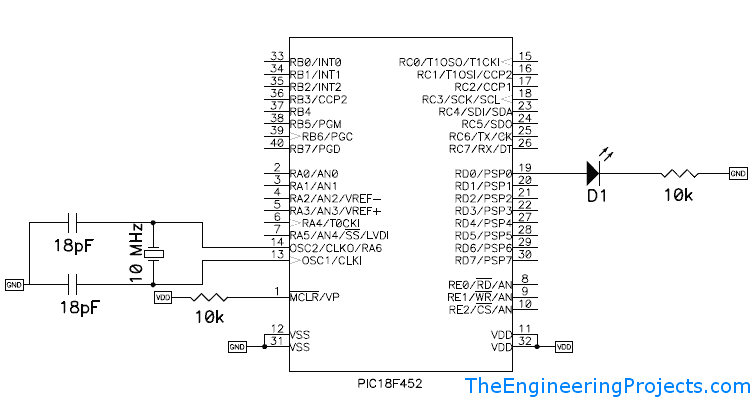
The original PIC circuit remains above as a setup reference. Use the PIC project guide if power, reset, programming and configuration are unfamiliar. The compiler's clock setting must match the oscillator actually running the device.
Check the Modem Before Automating an SMS
First communicate with the modem through a suitable terminal interface. Confirm its operating baud rate; this tutorial uses 9600 baud. Avoid connecting two actively driven transmitters to the same modem receive line while switching between the terminal and PIC.
| Command | What to inspect |
|---|---|
| AT | A complete OK response |
| ATE0 | Disable command echo after communication is established |
| AT+CPIN? | SIM readiness, normally READY when no PIN action remains |
| AT+CREG? | Registration status; home or roaming registration as appropriate |
| AT+CSQ | Reported signal-quality information, including unknown values |
| AT+CMGF=1 | Acceptance of SMS text mode |
The SIM900 AT command manual defines the response formats. An OK after a query means that the query was processed; the returned registration or SIM-status field still needs interpretation.
Complete these checks before starting the short sending example. That example assumes the modem is already powered, responsive and registered. A fully unattended product should implement startup, SIM handling, registration checks and recovery as explicit states.
Understand the SMS Submission Exchange
- Send AT+CMGF=1 followed by a carriage return and wait for OK.
- Send AT+CMGS with the intended recipient enclosed in quotation marks.
- Wait for the greater-than prompt indicating that the modem accepts message text.
- Send the message body.
- Send byte 26, hexadecimal 0x1A, to submit the message.
- Wait for the message reference and final result, or handle an error or timeout.
The characters r and n are not line-ending control characters. In a C string, \r represents a carriage return and \n represents a line feed. The original text lost these backslashes, which changes the transmitted bytes.
UART1_Write_Text("AT\r");
UART1_Write_Text("AT+CMGF=1\r");
// Quotation marks inside a C string must be escaped:
UART1_Write_Text("AT+CMGS=\"+YOUR_NUMBER\"\r");
The final line illustrates quoting only; replace the placeholder with a valid intended recipient. Do not send the body before the prompt. The prompt is not always delivered as a conventional complete line, so a parser must recognize it separately.
A Bounded mikroC Sending Example
The following example uses the documented mikroC UART library. It checks complete result lines, recognizes the text-entry prompt, rejects oversized response lines and makes only one submission attempt.
Configure the PIC18F452 project and oscillator settings in mikroC before building. Replace recipient with your intended international number. The placeholder deliberately fails validation, so leaving it unchanged does not attempt a message.
char recipient[] = "REPLACE_WITH_YOUR_NUMBER";
char message[] = "TEP PIC18F452 SMS test";
char responseLine[96];
volatile unsigned short smsStatus = 0;
// smsStatus: 0 not finished, 1 accepted, 2 failed/unknown, 3 bad number

unsigned short validNumber() {
  unsigned short i = 1;
  if (recipient[0] != '+' || recipient[1] < '1' ||
      recipient[1] > '9') return 0;
  while (recipient[i] != 0) {
    if (i > 15 || recipient[i] < '0' || recipient[i] > '9') return 0;
    i++;
  }
  return i > 1;
}

// mode: 0 = OK, 1 = text prompt, 2 = +CMGS followed by OK.
unsigned short waitReply(unsigned short mode, unsigned int budget) {
  unsigned short length = 0, seenReference = 0, n;
  char c;
  while (budget != 0) {
    if (RCSTA & 0x02) { // OERR: reset continuous receiver, then fail.
      RCSTA &= 0xEF;
      RCSTA |= 0x10;
      return 0;
    }
    for (n = 0; n < 16 && UART1_Data_Ready(); n++) {
      if (RCSTA & 0x04) { UART1_Read(); return 0; } // FERR
      c = UART1_Read();
      if (mode == 1 && c == '>') return 1;
      if (c == '\r') continue;
      if (c == '\n') {
        responseLine[length] = 0;
        if (strcmp(responseLine, "ERROR") == 0 ||
            strncmp(responseLine, "+CMS ERROR:", 11) == 0 ||
            strncmp(responseLine, "+CME ERROR:", 11) == 0) return 0;
        if (strncmp(responseLine, "+CMGS:", 6) == 0) seenReference = 1;
        if (strcmp(responseLine, "OK") == 0) {
          if (mode == 0 || (mode == 2 && seenReference)) return 1;
        }
        length = 0;
      } else {
        if (length >= sizeof(responseLine) - 1) return 0;
        responseLine[length++] = c;
      }
    }
    Delay_ms(1);
    budget--;
  }
  return 0;
}

unsigned short sendSmsOnce() {
  UART1_Write_Text("AT\r");
  if (!waitReply(0, 3000)) return 0;
  UART1_Write_Text("ATE0\r");
  if (!waitReply(0, 3000)) return 0;
  UART1_Write_Text("AT+CMGF=1\r");
  if (!waitReply(0, 3000)) return 0;
  // Keep incoming SMS notifications out of this simple demonstration.
  UART1_Write_Text("AT+CNMI=0,0,0,0,0\r");
  if (!waitReply(0, 3000)) return 0;
  UART1_Write_Text("AT+CMGS=\"");
  UART1_Write_Text(recipient);
  UART1_Write_Text("\"\r");
  if (!waitReply(1, 10000)) return 0;
  UART1_Write_Text(message);
  UART1_Write(26);
  return waitReply(2, 60000);
}

void main() {
  UART1_Init(9600);
  Delay_ms(100);
  if (!validNumber()) smsStatus = 3;
  else if (sendSmsOnce()) smsStatus = 1;
  else smsStatus = 2;
  while (1) { }
}
The polling budget approximates milliseconds but also includes instruction and parsing overhead. It guarantees a bounded number of iterations rather than a precisely measured wall-clock deadline. A production implementation should use a hardware timebase and buffered reception when other tasks must run concurrently.
The status variable can be observed with an appropriate debugger or connected to your own display logic. It is not printed back onto the modem UART, because unrelated diagnostic text would interfere with commands.
The example is revised instructional code, not a claim of a newly compiled or hardware-tested mikroC project. Verify compiler settings, library availability and actual UART behavior on your setup before integrating it.
Why These Checks Matter
A fixed delay only proves that time passed. The modem might still be registering, waiting for its supply to stabilize or returning an error. Advancing on the expected response makes the sequence follow the modem's actual state.
Checking for a complete OK line is stronger than searching for a single O or K anywhere in the incoming stream. The result parser also requires a +CMGS reference before accepting the final OK for submission.
AT+CNMI controls incoming-message indications; it is not inherently required to send an SMS. The demonstration disables those indications to keep its simple exchange separate from incoming SMS handling. A combined sender and receiver should dispatch unsolicited notifications separately instead of discarding them.
The 96-byte buffer reserves space for its terminating zero. If a line exceeds that capacity, the function fails instead of writing beyond the array. Review expected response lengths when adapting the parser to other commands.
Check Baud Rate and Timing
For the PIC18F452 asynchronous UART in high-speed mode, the baud-rate relationship is FOSC / [16 × (SPBRG + 1)]. With an assumed 20 MHz clock and SPBRG = 129, the result is approximately 9615.4 baud.
Compared with 9600, the nominal divider error is about +0.16 percent. This arithmetic assumes the stated clock and mode; oscillator tolerance adds further error. Let the compiler's UART initialization use the actual configured frequency rather than copying a divider for another board.
At 9600 baud with 8-N-1 framing, one byte occupies about 1.04 ms. A short hardware receive buffer can overflow if the application ignores it during long delays. The example services reception while waiting and detects receiver error flags, but a busy integrated application needs a more capable receive architecture.
Understand What Success Does and Does Not Mean
A +CMGS result and final OK indicate that the modem accepted the submission through its SMS procedure. They do not prove that the recipient read the message. End-to-end delivery tracking requires the appropriate network report and application interpretation.
A timeout after sending byte 26 leaves an uncertain outcome: the message may have been submitted while the response was lost. Automatically repeating the complete send can create a duplicate. Record the attempt and choose a deliberate retry policy.
If the prompt never arrives, the modem may still be in command mode or a different state. Stop and inspect the exchange rather than sending message text blindly. Recovery from an interrupted text-entry state belongs in a documented state machine for an unattended system.
Plan for Reset, Busy Periods and Uncertain Results
The example sends once during startup. That is convenient on the bench, but startup is not the same as a unique application event. A brief supply interruption, watchdog reset or programming reset starts the firmware again. If you leave a real recipient configured, each restart can initiate another message.
For an alarm application, separate the event detector from the modem task. Give each event an identifier, record when it was created, and retain its current delivery state. A sensor that remains above a threshold should not create a new event on every pass through the main loop. Require the appropriate return-to-normal condition before arming the next event.
A useful application record distinguishes queued, submitting, accepted, failed and outcome-unknown states. The last state matters because silence after Ctrl+Z cannot establish that nothing happened. Displaying every timeout as “not sent” hides this distinction and encourages accidental repeat submissions.
If recovery across power loss is required, design a small persistent record rather than writing every loop iteration to EEPROM. Consider endurance, interrupted writes and how the record is validated after reset. Include an event identifier in the message text when the recipient needs to recognize duplicates. This improves traceability without pretending that SMS is an exactly-once transport.
Keep serial reception independent of slow work
At the calculated 1.04 ms per character, a 50-character reply takes approximately 52 ms to arrive. A 100 ms blocking display update can therefore miss the entire reply if reception is not serviced independently. Increasing the software line buffer does not increase the UART peripheral's small hardware receive capacity.
For a larger program, an interrupt routine can copy received bytes into a ring buffer while foreground code parses complete responses. Keep that interrupt routine short: do not print to a display, submit another SMS or wait for a modem response inside it. Define what happens when the ring buffer fills and count overruns so the fault is observable.
The parser should associate each final response with the command currently in progress. A delayed OK from an earlier operation must not automatically complete a later operation. Maintain an explicit command state, expected intermediate response and deadline. Unsolicited notifications need their own handling path because they can arrive between command responses.
Use diagnostics that identify the failed stage
Record a short stage identifier such as waiting-for-AT, selecting-text-mode, waiting-for-prompt or waiting-for-submission-result. Combine it with the last complete error response and a timestamp. This is much more useful than one generic “GSM failed” message when distinguishing poor coverage from a quotation-mark error.
During development, also count framing errors, receiver overruns and resets. A repeated reset precisely when radio transmission begins points toward supply integrity; a steady stream of framing errors points toward baud rate, clock or signal-level problems. These are diagnostic clues, so confirm the suspected cause with measurements rather than changing several parameters at once.
Keep phone numbers, message bodies and PIN values out of routine shared logs. A minimal diagnostic record usually needs the stage, command type and modem result, not the complete recipient information. That also makes a support log easier to inspect because the relevant protocol events remain visible.
Test in Small Stages
- Confirm modem power and network readiness independently.
- Check a simple AT exchange through the intended electrical interface.
- Inspect the PIC transmit waveform or received characters at the selected baud rate.
- Confirm text-mode selection and the recipient prompt.
- Submit one short message and record the complete final response.
- Test disconnected UART and unavailable-network cases without enabling automatic retry loops.
Start with a short plain-text message. Longer texts and non-ASCII characters introduce character-set, encoding and multipart-message considerations. They should be added only after the basic command exchange is reliable.
Keep a record of which carrier board, power supply, modem firmware and SIM were used. Two SIM900 shields with different regulators or serial translation can behave differently even with identical PIC source code.
Troubleshooting and Review
| Symptom | Useful checks |
|---|---|
| No AT response | Power-on state, crossed TX/RX, ground, logic levels and baud rate |
| Garbled response | Clock configuration, baud mismatch and electrical interface |
| SIM is not ready | SIM seating, PIN state and supported card/service |
| No registration | Compatible network, antenna, coverage and service availability |
| No message-entry prompt | Text mode, command quoting, carriage return and reported error |
| Reset during sending | Modem supply voltage during radio bursts |
| Duplicate messages | Reset-triggered sends and retry policy after uncertain outcomes |
The main lesson is that SMS sending is a conversation, not a list of strings separated by delays. Track the modem's state, preserve response boundaries and distinguish a definite error from a timeout with an unknown result.
Frequently Asked Questions
Can I supply 12 V directly to SIM900?
Not to the bare module. A particular carrier may accept 12 V through its regulator, but that must be confirmed from the carrier documentation.
Are physical pins 25 and 26 correct for every PIC?
No. They refer to RC6/TX and RC7/RX on the 40-pin DIP PIC18F452 used here. Check the selected device and package.
Why does the code send the number 26?
It sends the Ctrl+Z control byte that submits the entered SMS text. It is not the two printable characters 2 and 6.
Is CNMI necessary for sending?
No. It configures incoming indications. This demonstration sets a quiet notification mode because it does not implement a complete incoming-message dispatcher.
Can another PIC use the same approach?
Yes, after adapting the UART, clock, device registers, memory use and compiler configuration. The modem protocol remains similar, but the hardware-specific code must be reviewed.

Tags


Thank you for the above information sir
Can you please tell how to send the variable values of one program through sim900a using pic16f877a also give the code
1 reply
You can buy the code for $100. If interested then add me on Skype and we will discuss it out.
Thanks.
1 reply
give me your contact number I want to buy code from u
Comments
4