


Project Files of AMG8833 Thermal Camera Library for Proteus Simulation
 Libraries
 Code
 Projects
 Simulation
c214cf361a164bd7a27ec0640ae1494a.zip
AMG8833 Thermal Camera Library for Proteus V1.0
AMG8833 Thermal Camera Library for Proteus V1.0 comes as a ZIP archive of 19 files (2.2 MB, 4.9 MB unpacked) holding Proteus library files, simulation model DLLs, a Proteus simulation, an Arduino sketch and compiled HEX firmware.
- LIBProteus library
- DLLProteus model
- DSNProteus simulation
- INOArduino sketch
- HEXHEX firmware
Description
AMG8833-Thermal-Camera-Library-for-Proteus-v1.0.zip with the AMG8833 thermal camera for Proteus simulation (TEPAMG8833.LIB and TEPAMG8833.DLL), our SSD1306 OLED, 5 mm LED and resistor libraries, our Arduino UNO V4.0, the A4 demo with its sketch and a README.

File Structure
 File Structure
11.1 KB201.9 KB16.1 KB21.8 KB112.4 KB306.9 KB328.5 KB883.5 KB289.5 KB342.5 KB311 KB25.4 KB27.2 KB328.5 KB883.5 KB289.5 KB342.5 KB311 KB15.9 KBGallery12 images from the tutorialOpen the tutorial
 Gallery12 images from the tutorial
The circuit, the board and the results as they appear in AMG8833 Thermal Camera Library for Proteus Simulation. Open an image for its full size.
README
 README
AMG8833 THERMAL CAMERA LIBRARY FOR PROTEUS SIMULATION - V1.0 (an 8 x 8 thermal camera over I2C, a pop-up)
Designed by The Engineering Projects
www.TheEngineeringProjects.com

IMPORTANT LINKS
Article (read it first - pictures, step by step, every feature explained):
  https://www.theengineeringprojects.com/2026/11/amg8833-thermal-camera-library-for-proteus.html
Report a bug or suggest a feature (our forum):
  https://www.theengineeringprojects.com/forum/category/max30205-proteus-library
The demo runs on our Arduino UNO V4.0 (included) - working LEDs, RESET and a
built-in serial monitor, no Virtual Terminal to wire - its own article:
  https://www.theengineeringprojects.com/2026/10/arduino-uno-library-for-proteus-v40.html
The heat map is drawn on our SSD1306 OLED (in this zip; its article):
  https://www.theengineeringprojects.com/2026/10/oled-ssd1306-library-for-proteus-v1-0.html
Support us (the libraries are free):
  https://www.theengineeringprojects.com/donate

FILE STRUCTURE
AMG8833-Thermal-Camera-TEP-v1.0/
|-- Proteus Library Files/
|   |-- ArduinoV4TEP.LIB                              201.9 KB   TEP Arduino boards V4.0 (UNO) -> LIBRARY
|   |-- TEPAMG8833.LIB                                 16.1 KB   the library -> LIBRARY folder
|   |-- TEPLED5MM.LIB                                  21.8 KB   a part the demo uses -> LIBRARY folder
|   |-- TEPOLED12864.LIB                              112.4 KB   a part the demo uses -> LIBRARY folder
|   |-- TEPRESISTOR.LIB                               306.9 KB   a part the demo uses -> LIBRARY folder
|-- Proteus Model Files/
|   |-- TEPAMG8833.DLL                                328.5 KB   the model -> MODELS folder
|   |-- TEPARDUINO.DLL                                883.5 KB   the Arduino board model -> MODELS folder
|   |-- TEPLED5MM.DLL                                 289.5 KB   its model -> MODELS folder
|   |-- TEPOLED.DLL                                   342.5 KB   its model -> MODELS folder
|   |-- TEPRESISTOR.DLL                               311.0 KB   its model -> MODELS folder
|-- Proteus Simulation/
|   |-- AMG8833_Demo.hex                               27.2 KB   the demo firmware
|   |-- AMG8833-Thermal-ArduinoUnoV4.pdsprj            25.4 KB   the demo project
|   |-- TEPAMG8833.DLL                                328.5 KB   copy of the model
|   |-- TEPARDUINO.DLL                                883.5 KB   copy of the board model
|   |-- TEPLED5MM.DLL                                 289.5 KB   copy of its model
|   |-- TEPOLED.DLL                                   342.5 KB   copy of its model
|   |-- TEPRESISTOR.DLL                               311.0 KB   copy of its model
|-- Arduino Code/
|   |-- AMG8833_Demo/AMG8833_Demo.ino                  11.1 KB   the demo sketch (source of the .hex)
|-- README.txt                                        ~16.4 KB   this file
Total: 4.93 MB (unzipped). The C++ source code of the models is not included.

WHAT IS IT?
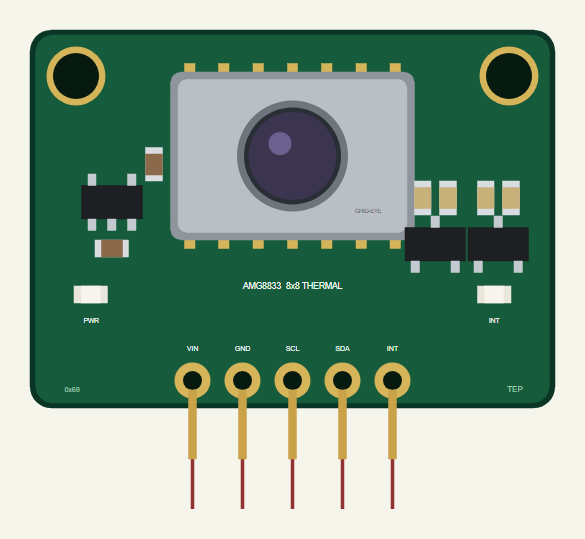
An AMG8833 (Grid-EYE) 8 x 8 thermal camera module, drawn at its real size (25 x 18 mm) from above:
the green board, the sensor
(the 11.6 x 8 mm metal package with its round silicon lens), a 3.3 V regulator, an I2C level
shifter, the pull-ups, a PWR LED and
an INT LED. The module is our own drawing (no maker's mark); the registers follow the maker's
register map:
  * I2C at 0x69 (0x68 with the ADDRESS property). The first byte of a write is the register address;
    reads auto-increment, so one
    burst from 0x80 reads the whole frame.
  * 64 pixels at 0x80 - 0xFF, row by row (pixel 1 top left): two bytes each, 12 bits, two's
    complement, 0.25 C a step, 0 - 80 C.
    The thermistor at 0x0E / 0x0F: the sensor's own temperature, 12 bits, sign + magnitude, 0.0625
    C.
  * PCTL (0x00): 0x00 normal, 0x10 sleep, 0x20 / 0x21 stand-by. RST (0x01): 0x30 flag reset, 0x3F
    initial reset. FPSC (0x02):
    10 or 1 frames a second. AVE (0x07): the twice moving average.
  * The interrupt: INTC (0x03) on, in absolute or difference mode, against the upper / lower levels
    at 0x08 - 0x0B (12 bits,
    0.25 C). INT goes LOW, STAT (0x04) shows INTF and the table at 0x10 - 0x17 has one bit for each
    pixel that crossed; SCLR
    (0x05) clears them.
  * On the sheet the module comes alive at Run: PWR lights with the supply, INT lights while the
    interrupt pin is LOW and the lens
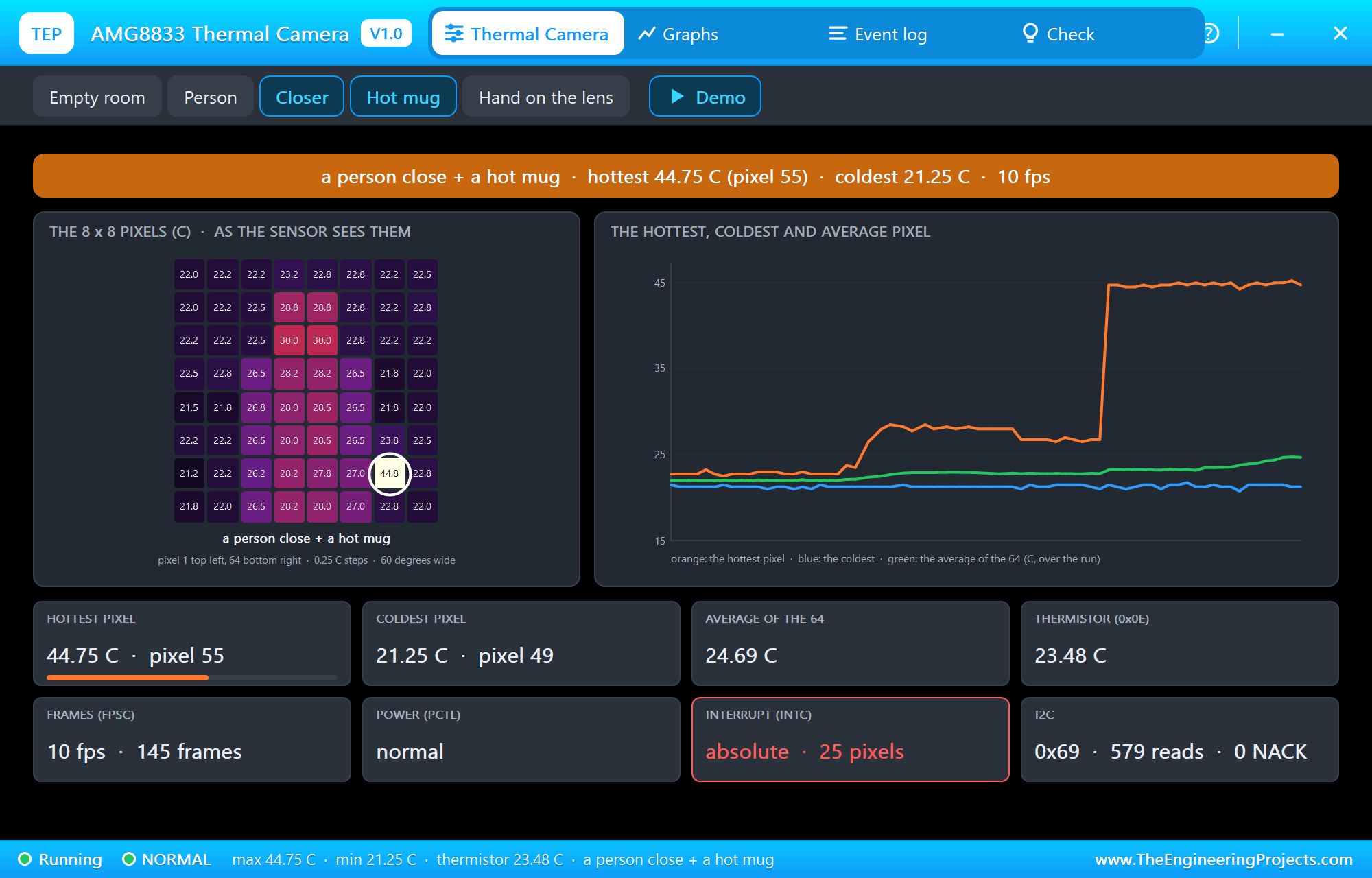
    takes the colour of the hottest thing it sees (our addition). Click it at Run for the pop-up:
    the 64 pixels as a heat map
    with their temperatures, the hottest / coldest / average over the run, the readings and the
    scene chips; graphs, an event
    log and a check page.
The body is drawn as on the real part and to true scale against our Arduino.
The TEP signature and the pop-up are TEP additions.

ONE DEVICE (search "AMG8833" or "thermal" in Pick Devices):
  THERMALAMG8833TEP  "AMG8833 Thermal Camera V1.0" in TEPAMG8833.LIB (Sensors > Temperature), prefix
  U, model TEPAMG8833.DLL
            (mixed: analog and digital). Five pins along the bottom: VIN (3.3 - 5 V), GND, SCL, SDA,
            INT (open drain, active
            LOW).

THE POP-UP
Click the part at Run. Tabs:
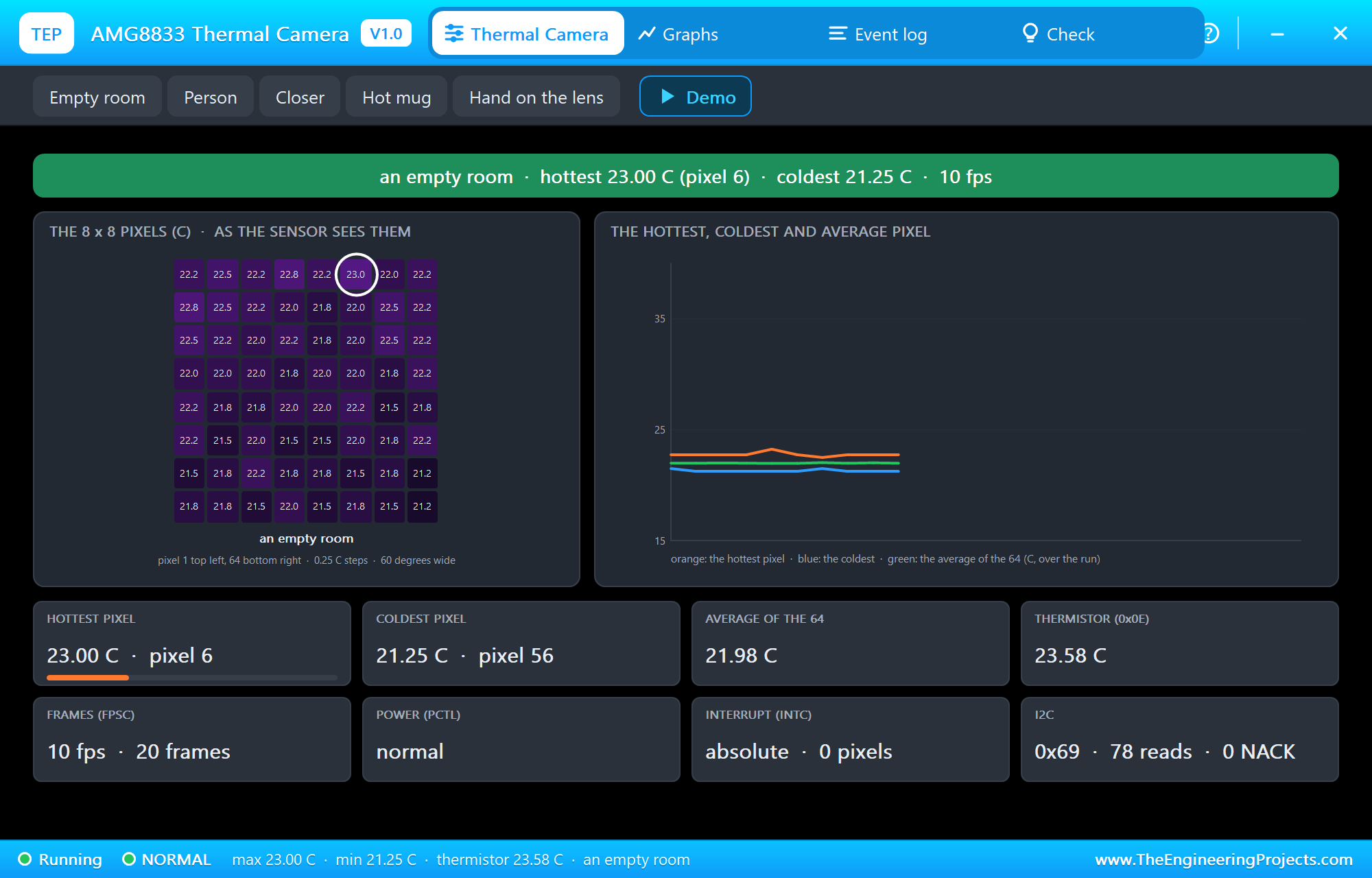
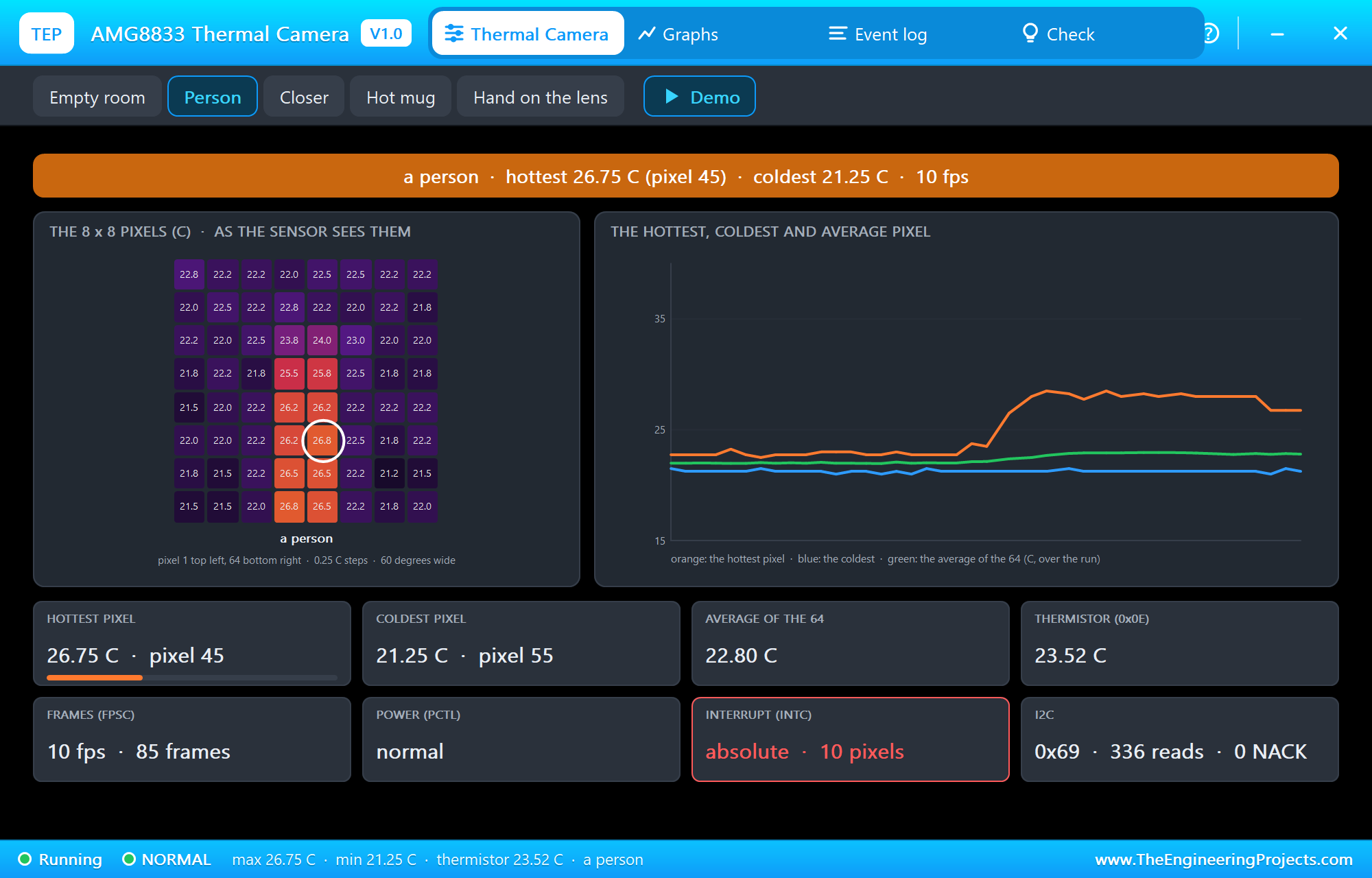
    Thermal Camera  chips: Empty room, Person (2 m away), Closer (1 m), Hot mug, Hand on the lens,
    and Demo (the scene again
                from now). The 8 x 8 pixels in a thermal palette, each with its temperature, the
                hottest framed; the hottest,
                coldest and average pixel over the run; eight tiles: the hottest, coldest and
                average pixel, the thermistor,
                the frame rate, the power mode, the interrupt and the I2C traffic.
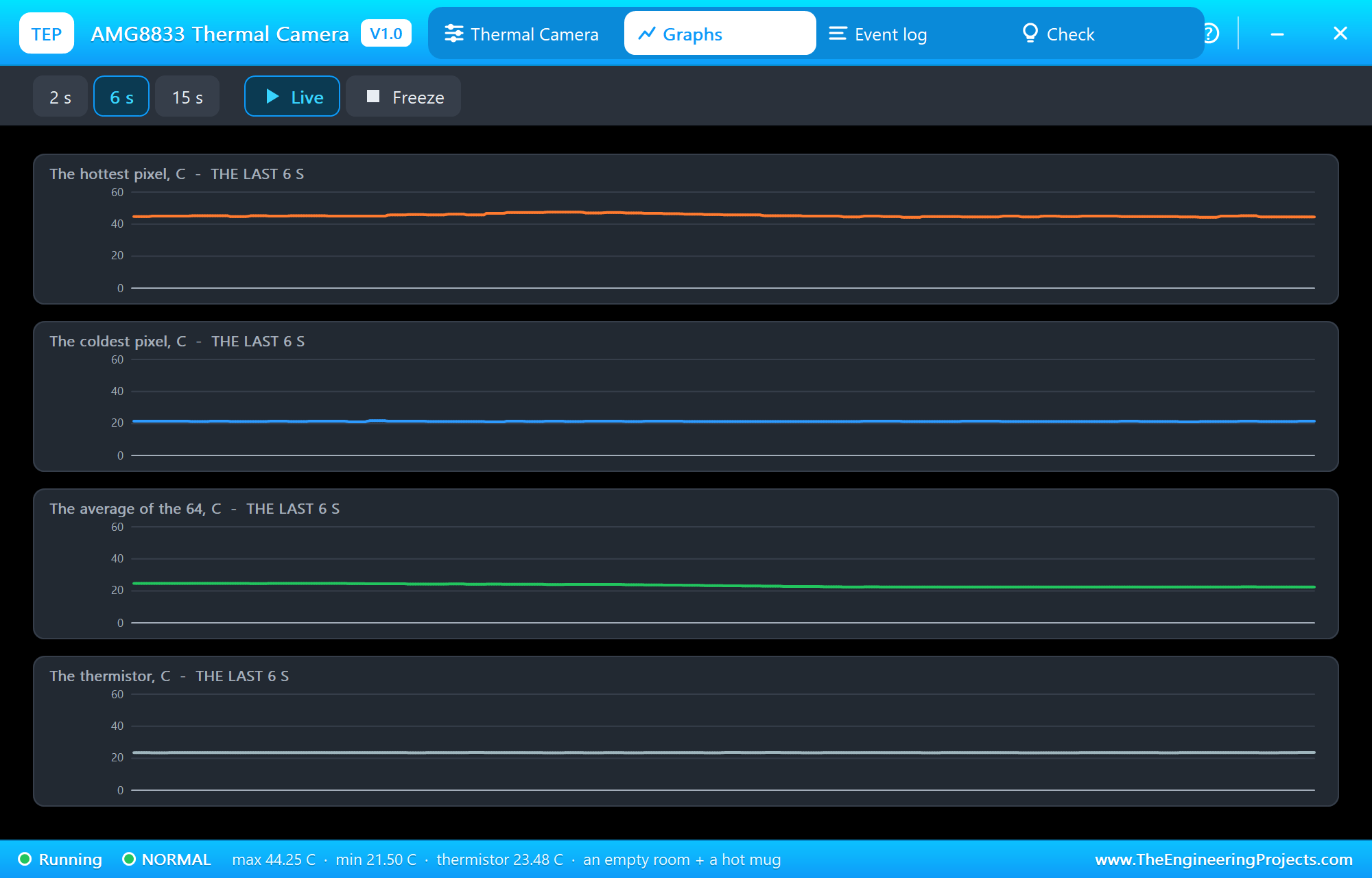
    Graphs     the live values over the last 2, 6 or 15 s. Live / Freeze.
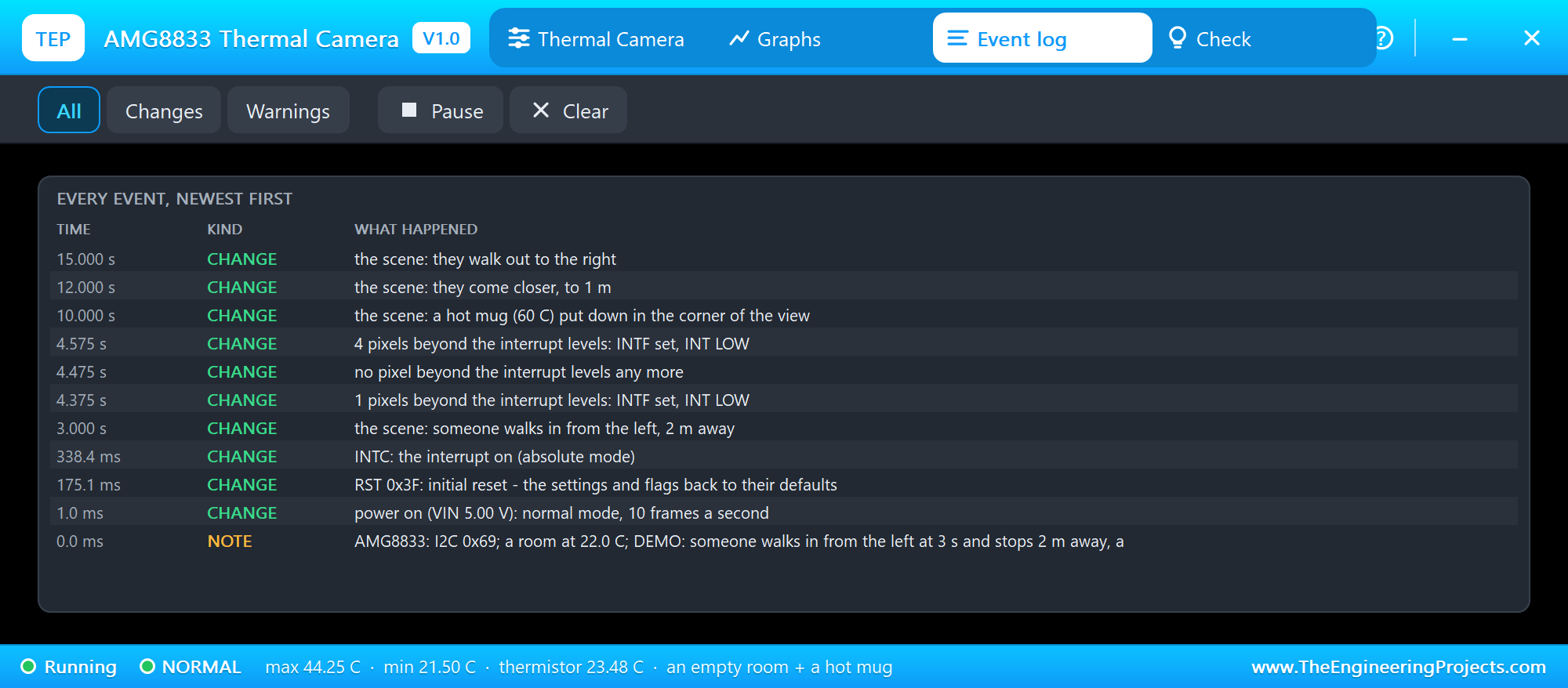
    Event log  every change and warning; filters All / Changes / Warnings, Pause, Clear
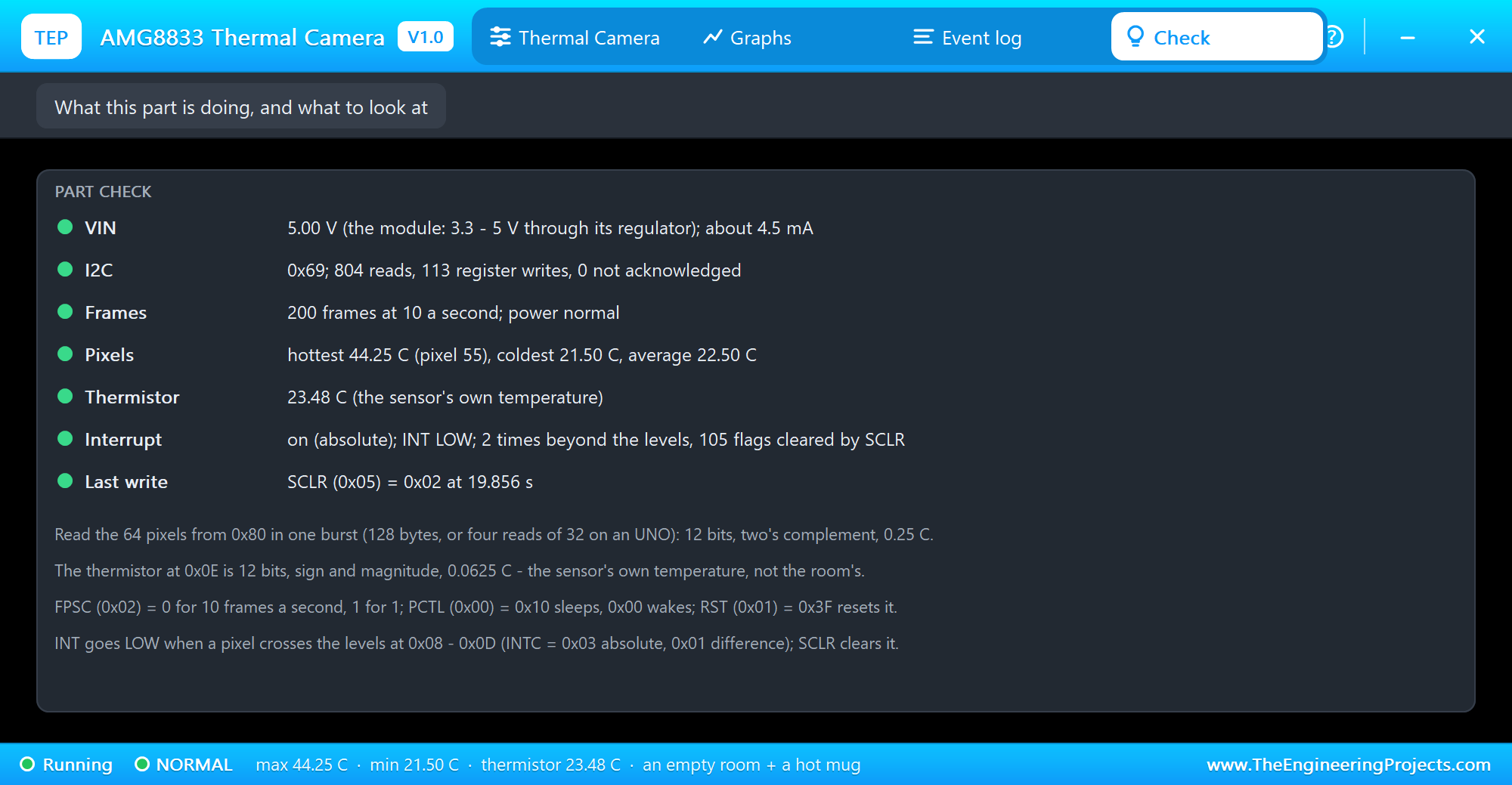
    Check      what the part is doing and what to look at, each with a verdict (green = fine, amber
    = check, red = wrong)
    Settings   theme, text size, open at Run, window size
    Help       report a bug, suggest a feature, article, updates, donate, forum; Copy diagnostics
    for a bug report

TEST STATUS
V1.0: verified in Proteus 8.5 on 20 Nov 2026 (the demo project as shipped: an A4 sheet, an Arduino UNO V4.0).
What the runs showed (the model's own numbers and the sketch's monitor):
  * The project loads and starts cleanly; the demo ran 20 simulated seconds in 257 s on our PC with
    the pop-up open and the pictures
    being taken.
  * The sketch found the sensor at 0x69, woke it (PCTL 0x00), reset it (RST 0x3F), set 10 frames a
    second, read the first frame -
    the room (the median of the 64 pixels) 22.0 C, the thermistor 23.4 C - and set the interrupt's
    upper level to 25.0 C, absolute mode.
  * An empty room (2 s): every pixel 21.25 - 23.00 C, the average 21.98 C - ROOM EMPTY, CLEAR lit.
  * Someone walks in from the left at 3 s: the first pixel above 25 C at 4.4 s - INT LOW, ALERT lit;
    at 5 s the hottest pixel
    28.25 C at the left edge - PERSON IN VIEW. Standing 2 m away (8.5 s): the hottest 26.75 C, 10
    warm pixels in a column.
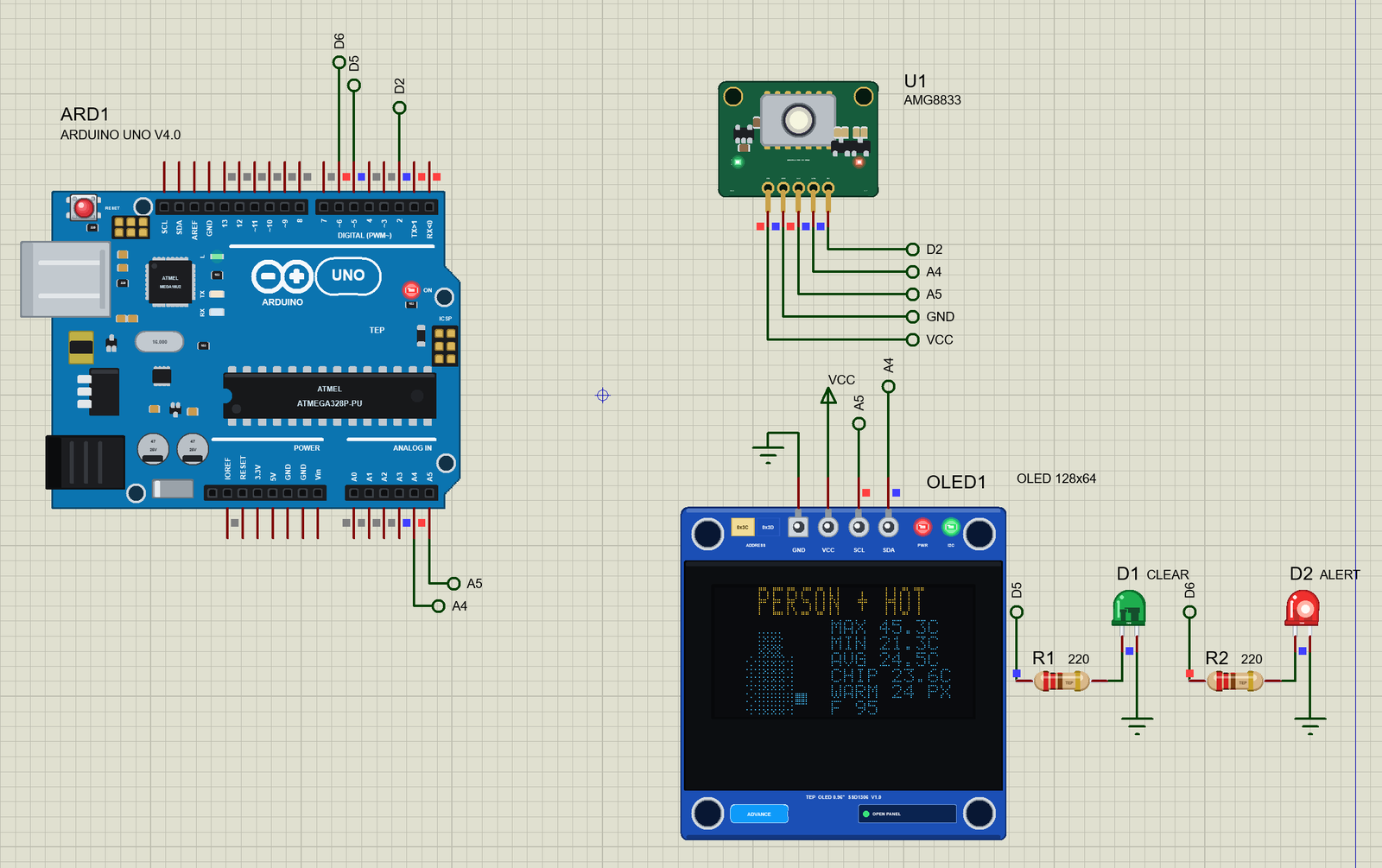
  * A hot mug at 10 s: pixel 55 (row 7, column 7) at 45.0 C - PERSON + HOT. At 1 m (14.5 s) the
    person fills three columns: 24 warm
    pixels, the average 24.69 C. They walk out at 15 s: HOT OBJECT, the mug alone at 44.5 - 45.75 C.
  * 200 frames at 10 a second, 804 reads, 0 not acknowledged; the interrupt went beyond the level
    twice and its flag was cleared
    105 times by SCLR; the thermistor 23.4 - 23.7 C. The pop-up: Thermal Camera, Graphs, Event log,
    Check - all four followed the run.

INSTALLATION (about 2 minutes)
1. Close Proteus. Extract the WHOLE ZIP to a normal folder (e.g. Desktop).
2. Copy everything in "Proteus Library Files" (TEPAMG8833.LIB, TEPOLED12864.LIB, TEPLED5MM.LIB,
TEPRESISTOR.LIB and our Arduino library V4.0, ArduinoV4TEP.LIB, with the ARDUINO UNO V4.0 used by
the demo) to the LIBRARY folder of Proteus, for example:
     C:\Program Files (x86)\Labcenter Electronics\Proteus 8 Professional\LIBRARY
   (use the folder that already holds Proteus's own .LIB files).
3. Copy TEPAMG8833.DLL, TEPOLED.DLL, TEPLED5MM.DLL, TEPRESISTOR.DLL and TEPARDUINO.DLL from "Proteus
Model Files" to the MODELS folder (...\Proteus 8 Professional\MODELS).
4. Delete TEPAMG8833.IDX from the LIBRARY folder if it is there (Proteus makes a new index).
5. Start Proteus. In Pick Devices (P) search "AMG8833".

RUN THE DEMO
"Proteus Simulation\AMG8833-Thermal-ArduinoUnoV4.pdsprj" (an A4 sheet) - keep the .hex file and the
DLLs beside the project.
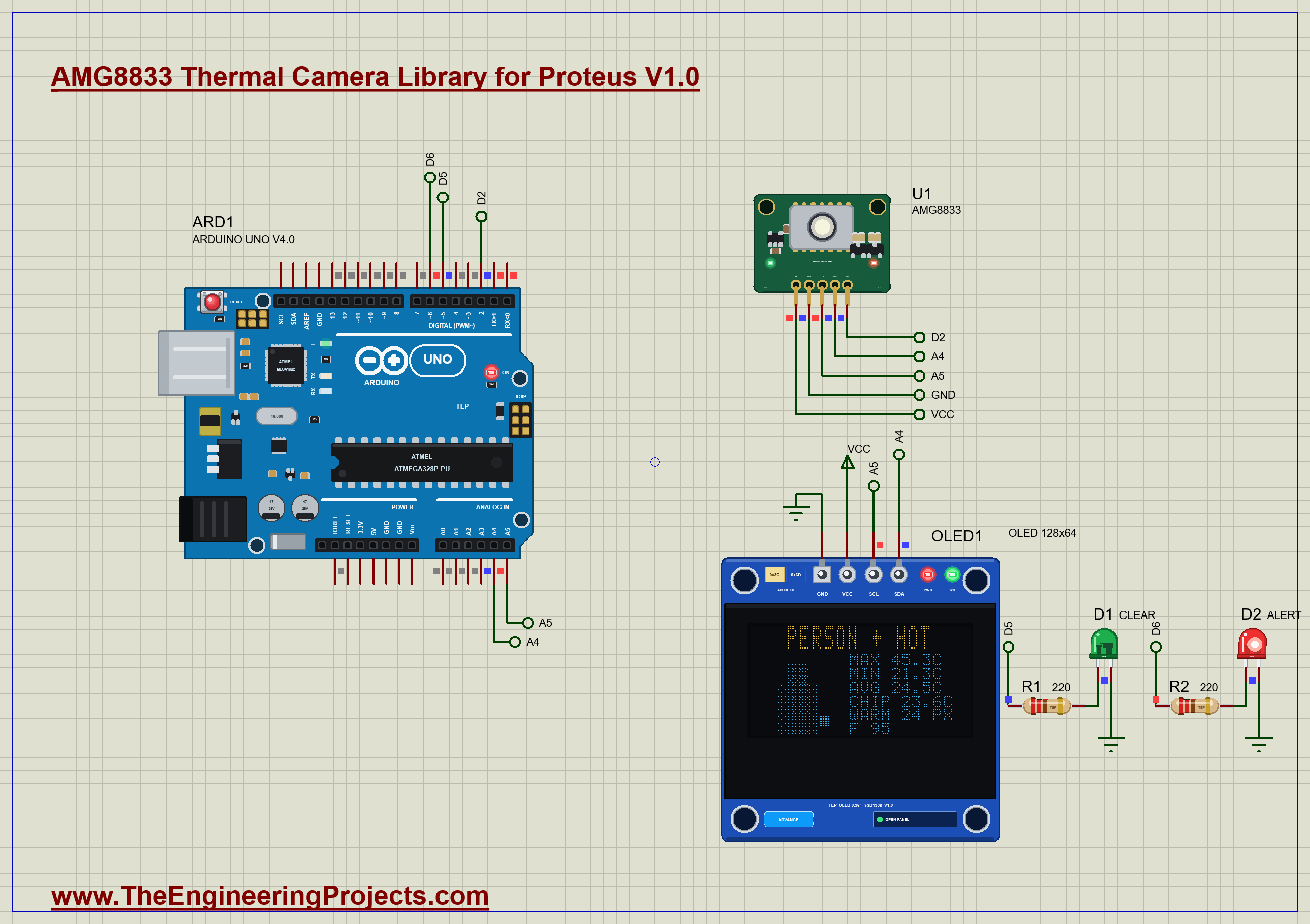
  A presence detector and hot-object alarm with a live heat map:
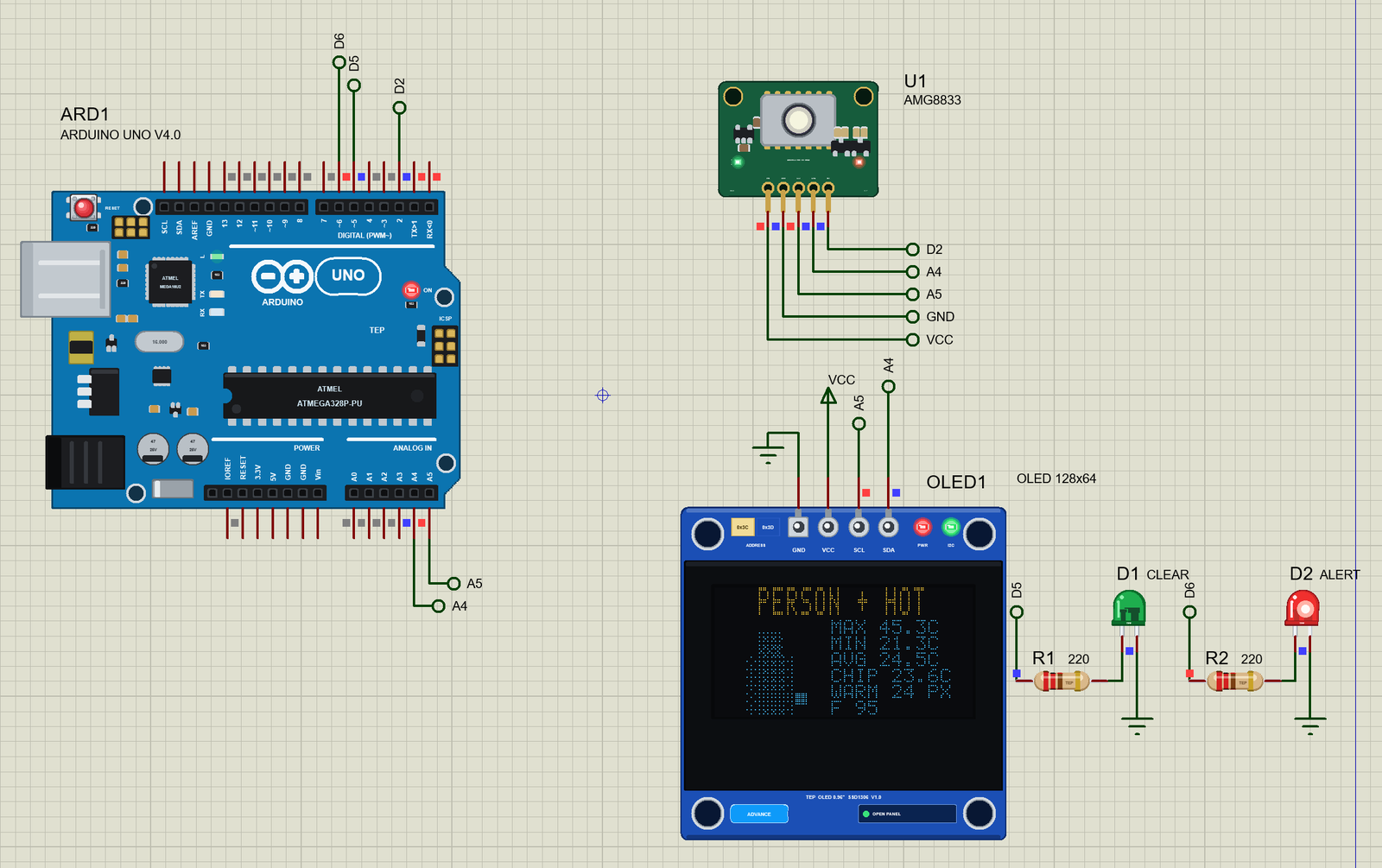
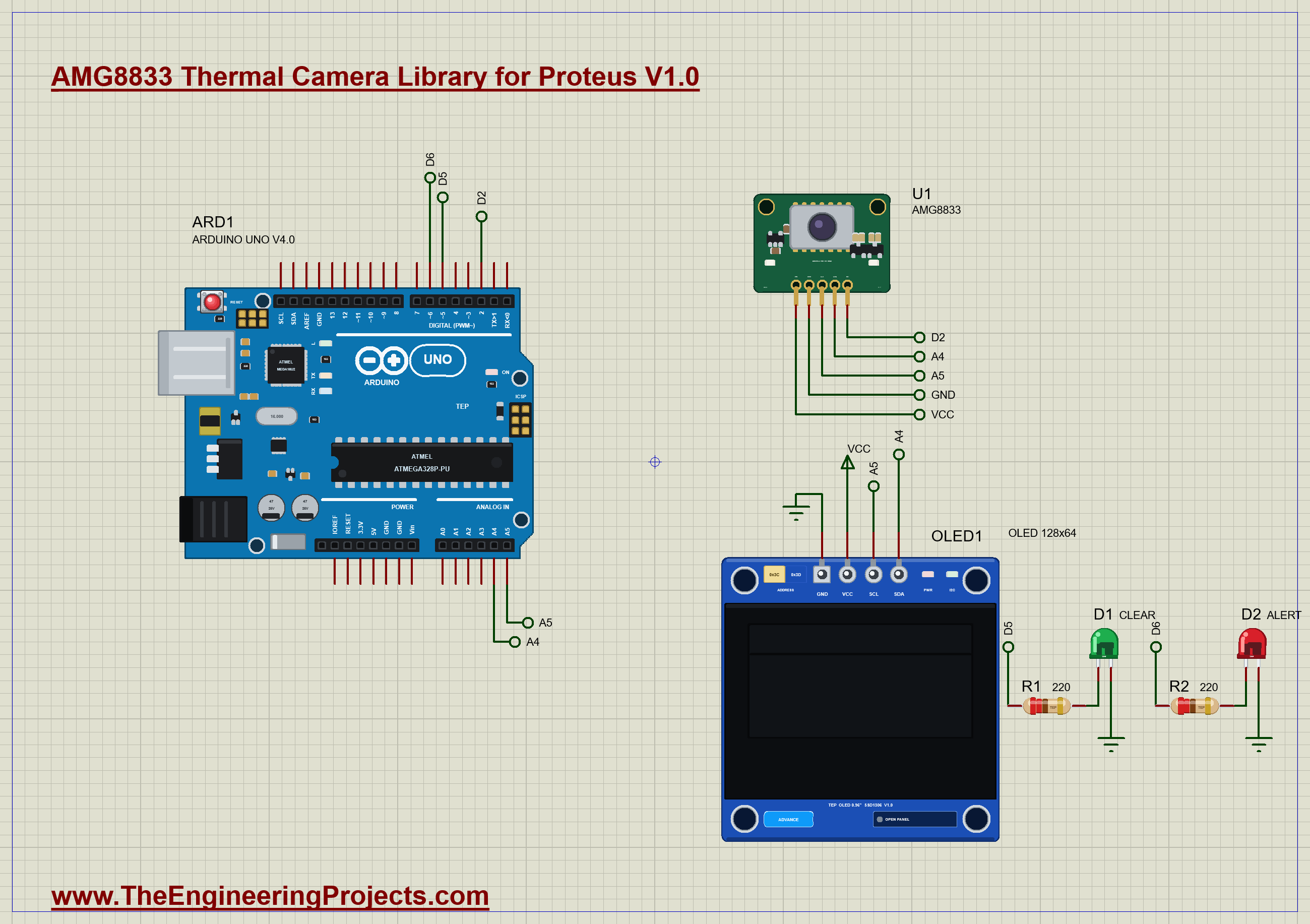
  ARD1:   Arduino UNO V4.0 running AMG8833_Demo.hex, its serial monitor built in (window "TEP
  Arduino UNO - ARD1").
  U1:     the AMG8833 module: PROFILE DEMO (an empty room at 22 C; someone walks in from the left at
  3 s and stops 2 m away, a hot
          mug at 10 s, they come to 1 m at 12 s and walk out at 15 s), ROOM_T 22, PERSON_T 32; VIN
          on VCC, GND, SCL on A5, SDA
          on A4, INT on D2.
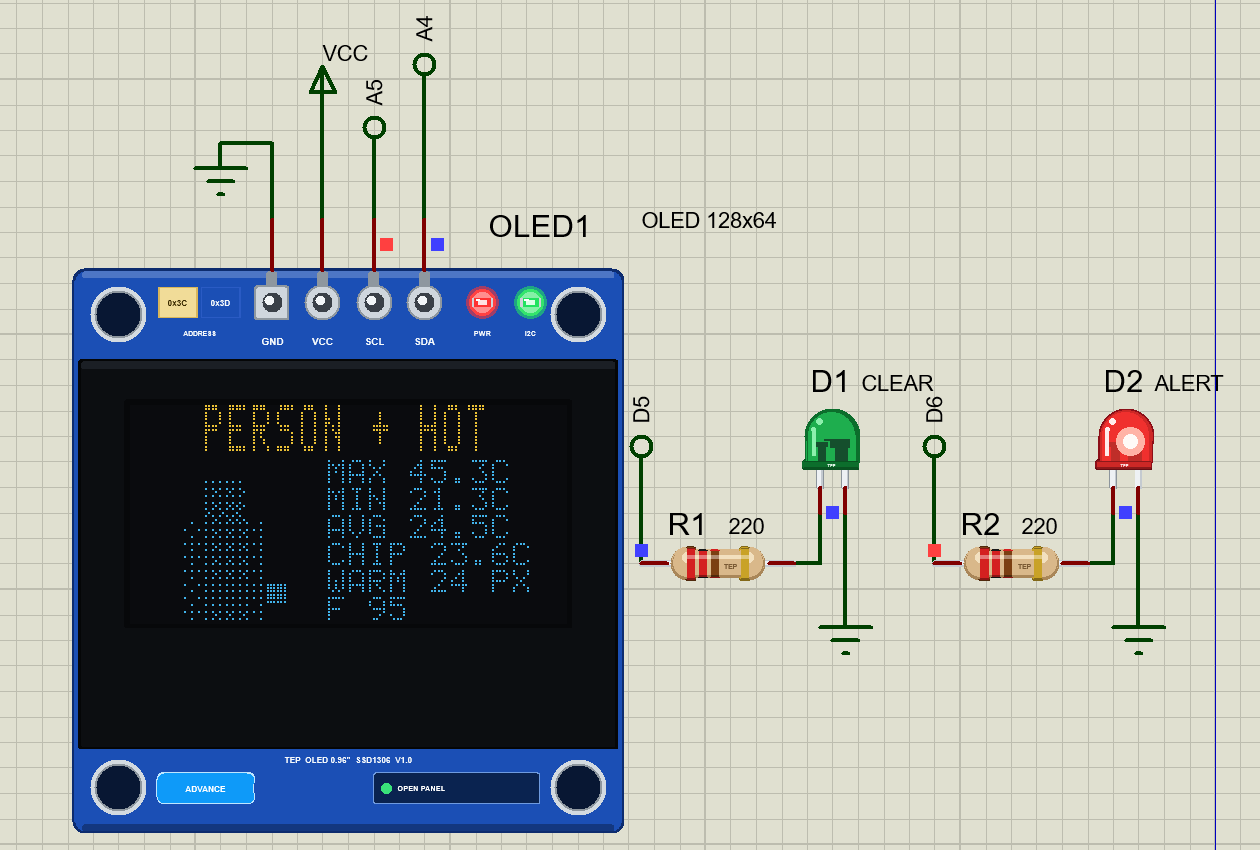
  OLED1:  our SSD1306 OLED, 128 x 64, yellow and blue (0x3C, the same I2C bus): the state in the
  yellow band, the heat map
          (6 x 6 dots a pixel, dithered) and MAX, MIN, AVG, CHIP (the thermistor), WARM (pixels
          above the room + 3 C), F (frames).
  D1, D2: CLEAR (green, D5) while the room is empty; ALERT (red, D6) for a second after INT goes
  LOW. Each through 220 ohm.
          The sketch wakes the sensor (PCTL 0x00), resets it (RST 0x3F), sets 10 frames a second,
          reads the first frame and sets
          the interrupt's upper level to the room + 3 C in absolute mode (INTC 0x03). Each loop it
          reads the 128 pixel bytes in
          four bursts of 32 and the thermistor, takes the median as the room, counts the warm pixels
          and names the scene: ROOM
          EMPTY, PERSON IN VIEW, PERSON CLOSE, HOT OBJECT (a pixel at 40 C or more) or PERSON + HOT.
Closed the monitor? Click the UNO's USB port.

WIRING (the same in Proteus and on a real board)
  VIN to 3.3 V or 5 V (the module has its own regulator and level shifter), GND to ground, SCL to
  the I2C clock (A5 on an UNO),
  SDA to the I2C data (A4); INT to an input (D2 here) if you use the interrupt.
REAL HARDWARE:
 * The UNO's Wire buffer is 32 bytes: read the 128 bytes of a frame in four bursts, as the sketch
   does.
 * A pixel sees about 7.5 degrees: a person 2 m away fills only part of a pixel or two, so the
   readings are lower than the skin's
   temperature - set alarm levels from the room, not from 37 C.
 * The thermistor is the sensor's own temperature, a little above the room; the room is better taken
   from the pixels (the median).
 * Give the sensor about 50 ms after power-up (and after RST 0x3F) before the first frame.

THE DEMO SKETCH ON THE SERIAL MONITOR (AMG8833_Demo V1.0, 9600 baud)
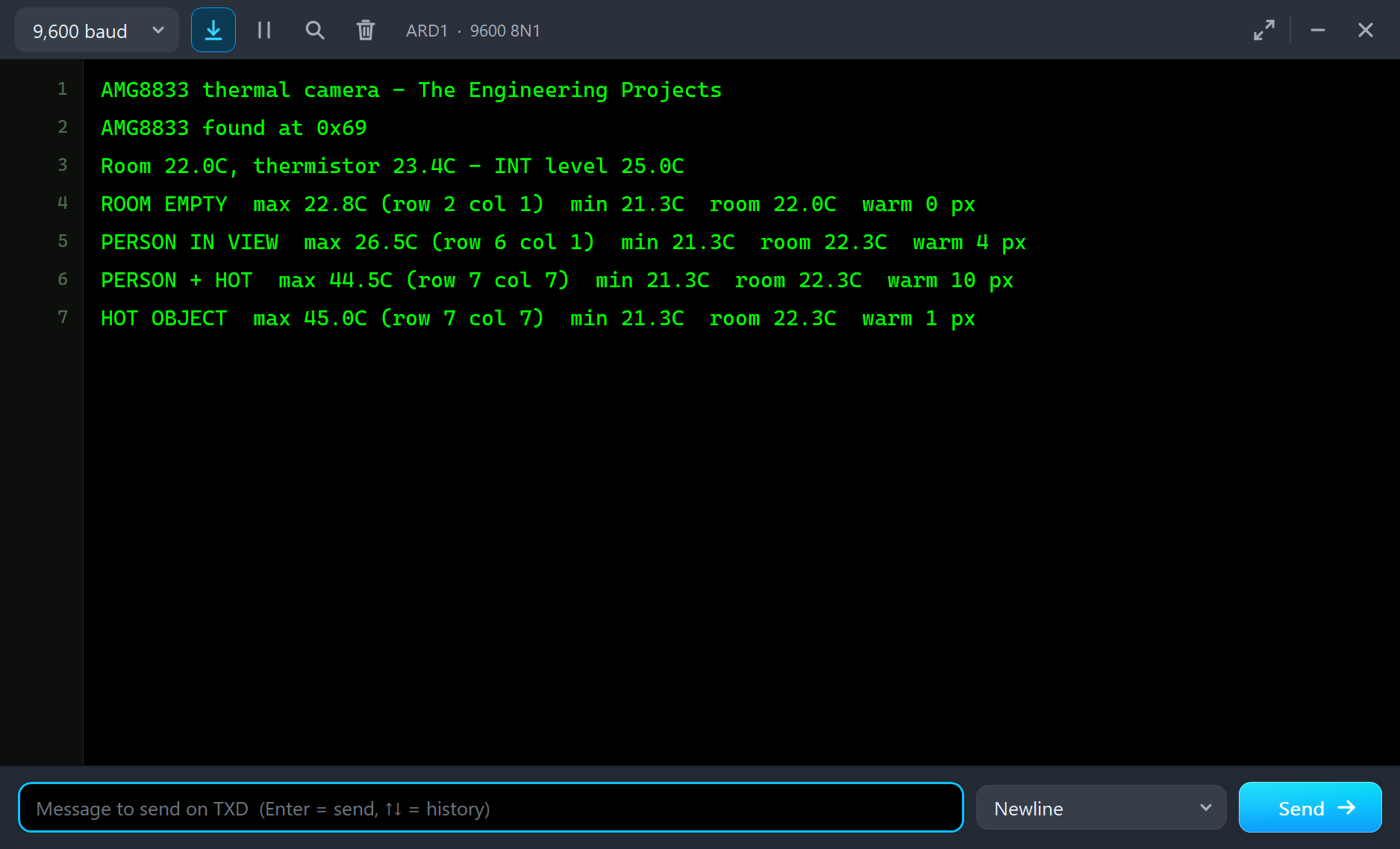
The sketch prints each change of the scene. EXPECTED MONITOR OUTPUT
  AMG8833 thermal camera - The Engineering Projects
  AMG8833 found at 0x69
  Room 22.0C, thermistor 23.5C - INT level 25.0C
  ROOM EMPTY  max ..  (row . col .)  min ..  room ..  warm 0 px
  PERSON IN VIEW  max ..  (row . col .)  min ..  room ..  warm . px

PROPERTIES (double-click the part > Edit Properties)
  The scene (PROFILE)                   DEMO (someone walks in, a hot mug, they leave) or STEADY
  (the room only; the chips add a person,
                                        a mug, a hand) (DEMO)
  The room (ROOM_T)                     0 - 40 C (22)
  The person's skin as seen (PERSON_T)  25 - 40 C (32)
  The I2C address (ADDRESS)             0x69 or 0x68 (0x69)
Every run starts again from the properties.

LINKS.INI (OPTIONAL)
The Help page cards of the pop-up open web pages. To point them somewhere else without a new DLL,
put a text file named links.ini next to TEPAMG8833.DLL with lines KEY=URL, for example:
  ARTICLE=https://www.theengineeringprojects.com/...
Keys: WEBSITE, FORUM, BUG_REPORT, FEATURE_REQUEST, ARTICLE, USER_GUIDE,
UPDATE_CHECK, DONATE. Only http:// and https:// links are used; lines starting
with # are comments.

TROUBLESHOOTING
* "No AMG8833 at 0x69": check SDA / SCL and VIN; set ADDRESS to 0x68 if your sketch uses 0x68.
* Every pixel reads 0: the sensor is asleep (PCTL 0x10) - write PCTL = 0x00, and wait for a frame.
* Wrong temperatures above 64 C or below 0: the 12-bit value is two's complement - sign-extend bit
  11.
* INT stays LOW: the flag is latched - write SCLR (0x05) = 0x02 after reading it.
* The part is not simulated: TEPAMG8833.DLL is missing from MODELS and from the project folder.
* The part is not simulated: TEPAMG8833.DLL is missing from MODELS and from the project folder. No
  UNO / no monitor window: TEPARDUINO.DLL is missing, or click the UNO's USB port.

BUG REPORTS AND FEATURE REQUESTS
Please post them in our forum with a screenshot, the Serial Monitor text, the
simulation log and the pop-up's Copy diagnostics text:
  https://www.theengineeringprojects.com/forum/category/max30205-proteus-library

SUPPORT US
This library is free. If it saves you time, please support our work:
  https://www.theengineeringprojects.com/donate

WEBSITE
  https://www.theengineeringprojects.com/

LICENCES AND THIRD-PARTY NOTES
* The model (TEPAMG8833.DLL), the symbols and artwork, the other parts of ours in the demo and the
  Arduino Library V4.0 (ArduinoV4TEP.LIB / TEPARDUINO.DLL, with its built-in TEP Serial Monitor
  Advance) are made by The Engineering Projects. The models use only standard Windows libraries; no
  Visual C++ redistributable is needed.
  The C++ source code is not included.
* Arduino UNO V4.0 (ArduinoV4TEP.LIB / TEPARDUINO.DLL, our Arduino Library V4.0 - its
  microcontroller is Proteus's own AVR model): The Engineering Projects,
  https://www.theengineeringprojects.com/2026/10/arduino-uno-library-for-proteus-v40.html
* The .hex file is built from the demo sketch and the Arduino AVR core 1.8.6, which includes
  LGPL-licensed code; its source code is available at
  https://github.com/arduino/ArduinoCore-avr/tree/1.8.6
* Proteus is a product of Labcenter Electronics and is not included. Arduino is a trademark of Arduino SA.
  This library is not made or endorsed by Arduino or Labcenter.

REBUILDING THE FIRMWARE (OPTIONAL)
The HEX file is supplied; Arduino IDE is not needed to run the demo. To edit the sketch, open
Arduino Code\AMG8833_Demo\AMG8833_Demo.ino, select Arduino Uno and use Sketch > Export Compiled
Binary. Replace the simulation's .hex with the exported HEX. The sketch needs 9,860 bytes of flash
and 711 bytes of RAM.

MODEL SCOPE AND LIMITS
Modelled: the register map and its reset values, auto-increment, the 64 pixels and the thermistor in
their formats; PCTL (normal,
sleep, stand-by), RST (flag and initial reset), FPSC (10 / 1 frames a second), AVE (the moving
average lowers the noise); the
interrupt in absolute and difference mode against the levels, STAT, the interrupt table, SCLR and
the INT pin; the scene (PROFILE,
the chips), the supply current. Our choices: the scene (a room, a person shaped by the distance -
the face at PERSON_T, the clothes
a little cooler - a 60 C mug, a hand), the lens (each pixel the average of what it sees, a little
light from its neighbours), the
noise (0.25 C), the thermistor 1.5 C above the room. Not modelled: the interrupt hysteresis, the
overflow of the thermistor, the
exact field of view of each pixel and the accuracy curve of a real part (+-2.5 C typical).

VERSION
TEP AMG8833 Thermal Camera library V1.0 (Nov 2026). Device THERMALAMG8833TEP (TEPAMG8833.LIB /
TEPAMG8833.DLL). Demo sketch AMG8833_Demo V1.0 (plain Wire, our own scene logic and OLED drawing).
The demo also uses our SSD1306 OLED library (TEPOLED12864: OLED12864YELLOWBLUEADVTEP, TEPOLED.DLL),
our 5 mm LED library (TEPLED5MM) and our resistor library (TEPRESISTOR), shipped in this package.
Demo board: ARDUINO UNO V4.0 (TEP Arduino Library V4.0) with its built-in serial monitor.Development1 release
 Development1 release
-
V1.0AMG8833 Thermal Camera Library for Proteus V1.0this page
V1.0 is the only release in the Download Center so far. When a newer version is published, it appears above with its own download page.
Installation8 steps
 Installation8 steps
From the download to a working project, in order. The steps follow what the package contains.
You will need
- Proteus Design SuiteProteus 8 or newer (Labcenter), on Windows
- Arduino IDE1.8 or 2.x, with the board of the tutorial chosen under Tools → Board
- Any archive toolWindows, macOS and Linux extract ZIP files on their own
Steps
- 1
Extract the archive
Right-click c214cf361a164bd7a27ec0640ae1494a.zip and choose Extract All (or open it with 7-Zip or WinRAR) into a folder you can find again. Keep its folder structure (AMG8833-Thermal-Camera-TEP-v1.0) as it is.
- 2
Copy the library files into Proteus
Move ArduinoV4TEP.LIB, TEPAMG8833.LIB and TEPLED5MM.LIB and 2 more and the files into the LIBRARY folder of your Proteus installation: C:\Program Files (x86)\Labcenter Electronics\Proteus 8 Professional\LIBRARY for Proteus 8, or the matching Proteus 7 folder. Older versions keep it under ProgramData\Labcenter Electronics. If Proteus is open, close it first.
- 3
Add the simulation model
Copy TEPAMG8833.DLL, TEPARDUINO.DLL and TEPLED5MM.DLL and 2 more into the MODELS folder next to LIBRARY, so the component can run, not only be drawn.
- 4
Restart Proteus and place the component
Start Proteus, open a schematic, press P (Pick Devices) and search for the component by the name used in the tutorial. It appears with its pins ready to wire.
- 5
Open the sketch in the Arduino IDE
Open AMG8833_Demo.ino, select your board and port under Tools, then Verify. Sketch → Export Compiled Binary writes the HEX file a simulation needs.
- 6
Load the HEX file
In Proteus double-click the microcontroller, set Program File to AMG8833_Demo.hex and run the simulation. For real hardware, flash the same file with your programmer.
- 7
Open the example simulation
Open AMG8833-Thermal-ArduinoUnoV4.pdsprj in Proteus to see the wiring exactly as in the tutorial. Check the controller's Program File path, then press Play.
- 8
Follow the tutorial
AMG8833 Thermal Camera Library for Proteus Simulation explains every connection and setting in order; keep it open beside the files while you build.
FAQs9 questionsContact TEP
 FAQs9 questions
How do I download AMG8833 Thermal Camera Library for Proteus V1.0?
Wait for the 30-second guest countdown on this page, then press the download button; the file comes straight from our storage. Members who are logged in skip the wait. If the browser opens the file instead of saving it, use its Save as option. The download link is made for you when the countdown ends and works for 15 minutes; a saved or shared link stops working, so share this page instead.
What is inside the archive?
AMG8833 Thermal Camera Library for Proteus V1.0 comes as a ZIP archive of 19 files (2.2 MB, 4.9 MB unpacked) holding Proteus library files, simulation model DLLs, a Proteus simulation, an Arduino sketch and compiled HEX firmware. Open the File Structure tab for the full list of 19 files.
What should I do if the download does not start?
Check the browser's download list first; an ad blocker or a company firewall can also hold it back, so try another browser or network. If the file arrives incomplete, download it again. For an installation problem, read the Install tab or tell us in the comments with your software version and the exact error message.
Is this file free?
Yes. Every file in the TEP Download Center is free for learning, personal and student projects. If you share it, link back to this page or the tutorial so others find the latest version.
How do I check that the file arrived complete?
Compare its SHA-256 with the one on this page, aee0bf394692ca5862de9662ccfce74042e82c89f8db8ad2abf60e8d503e9316. In PowerShell run Get-FileHash "c214cf361a164bd7a27ec0640ae1494a.zip"; on macOS or Linux run shasum -a 256 "c214cf361a164bd7a27ec0640ae1494a.zip". The same value means the file is exactly the one in our storage; a different one means the download broke off, so download it again.
Do I need WinRAR to open the ZIP file?
No. Windows, macOS and Linux open ZIP archives on their own (Extract All, or double-click). WinRAR and 7-Zip work too. Extract the whole archive before using the files.
Where do I put the LIB and IDX files?
Both files go into the LIBRARY folder of your Proteus installation (Proteus 8: C:\Program Files (x86)\Labcenter Electronics\Proteus 8 Professional\LIBRARY; Proteus 7 has the same folder under its own name). Restart Proteus afterwards and search for the component with P.
Which Proteus version does the library need?
The tutorial names the Proteus version the library was made and tested with. Most TEP libraries work in Proteus 7 and Proteus 8; if the component does not appear after a restart, check that both the LIB and the IDX file were copied and that Proteus was fully closed while copying.
How do I get the HEX file into the simulation?
Compile the sketch in the Arduino IDE (Sketch → Export Compiled Binary gives you the HEX next to the sketch), then in Proteus double-click the board, set Program File to that HEX and run.
Members skip the wait. Log in or join TEP.

- 0Total downloads
- 4%Popularity
- ProteusCategory
- 0Comments
- ssyedzainnasirUploaded by
- 26 Nov 2026Uploaded at


 SHA-256
aee0bf394692ca5862de9662ccfce74042e82c89f8db8ad2abf60e8d503e9316


 Need help with this file?
 Tags
Related Proteus
All Proteus tutorials





Comments
0