


LD2410 Radar Sensor Library for Proteus Simulation


Hello friends, I hope you all are doing great. Today, I am going to share the new LD2410 Radar Sensor Library for Proteus Simulation. The LD2410 is a tiny 24 GHz radar that does what a PIR sensor cannot: it knows that someone is in the room even when they sit perfectly still, because it sees them breathe. It reports the person's distance and its own confidence over a UART. With this library you can run a full Proteus simulation of it, frame by frame, so that the code you test here works with the real radar.
LD2410 Radar Sensor Library for Proteus
Latest version: V1.0 (November 2026, this tutorial)
Helping Tools
- Serial Monitor Advance: a serial terminal window for the UART of your board
- Serial Monitor Expert: the serial monitor with extra debugging tools
- LCD Library for Proteus V3.0: 16x2, 20x4 and I2C LCDs to show your readings
The module is drawn at its real size and comes alive at run time: its PWR and OUT LEDs work, and its receiving antennas warm up when an echo comes back. The demo is a presence lamp - a lamp that stays on while someone is in the room, and three LEDs that show how far away they are.
NOTICE: Our team has put a lot of effort into these small parts: the bodies, the animation and the pop-ups are all our own design, and you get them free. Your feedback is the fuel that keeps us going, so please tell us what you think in the comments below or in the motion sensor board of our forum. And if our free libraries help you, you can buy us a coffee. So, let's get started with the LD2410 Radar Sensor Library for Proteus Simulation:
What is the LD2410?
The HLK-LD2410 from Hi-Link is a human presence radar on a board of 22 x 16 mm. Its gold patch antennas send out a 24 GHz signal (FMCW - the frequency sweeps up and down) and catch its echo; the radar chip works out how far away each echo came from and how much it moves. Big movements - someone walking - give a moving target; the tiny movements of a chest breathing give a stationary target. That is the whole trick: a PIR sensor sees only warm bodies that move, so the light goes off while you read; the LD2410 keeps it on.
| LD2410 | |
|---|---|
| Detects | moving people and still people (breathing), up to about 6 m |
| Distance | in gates of 0.75 m, gates 0 - 8; distances in cm |
| Interface | UART 8N1, 256000 baud from the factory; OUT pin, high while someone is there |
| Reports | by itself, continuously: the target state, distances and energies |
| Supply | 5 V, about 80 mA; the UART and OUT are 3.3 V |
| Size | 22 x 16 mm |
Gates, Energies and Sensitivities
The radar splits the space in front of it into nine distance gates of 0.75 m. For each gate it measures two energies from 0 to 100: how much moving echo comes back from that distance, and how much still echo. Each gate has a moving and a stationary sensitivity - a threshold - and a target is reported only where the energy beats it. Tuning those thresholds per gate is how you teach the radar to ignore a fan in one corner while still seeing a sleeping person in another.
How the LD2410 Talks: Frames and Commands
The LD2410 speaks in frames. Without being asked, it sends a report about ten times a second; when you want to change something you send a command frame and it answers with an ACK.
| Frame | Bytes |
|---|---|
| Report | F4 F3 F2 F1, length (2), data, F8 F7 F6 F5 |
| Basic report data | 0x02, 0xAA, state, moving distance (2), moving energy, stationary distance (2), stationary energy, detection distance (2), 0x55, 0x00 |
| Command | FD FC FB FA, length (2), command word (2), value, 04 03 02 01 |
| ACK | FD FC FB FA, length, command word | 0x0100, status (0 = done), more, 04 03 02 01 |
The target state is 0 for no one, 1 for a moving target, 2 for a stationary one and 3 for both. Distances are in centimetres, low byte first. These are the commands that matter:
| Command | Word | What it does |
|---|---|---|
| Enable configuration | 0x00FF | value 0x0001; the reports pause until it ends |
| End configuration | 0x00FE | the reports go on |
| Max gates, unmanned duration | 0x0060 | how far it looks and how long OUT stays high after the last detection |
| Read parameters | 0x0061 | the gates, every sensitivity, the unmanned duration |
| Engineering mode | 0x0062 / 0x0063 | every report also carries the energy of each gate |
| Gate sensitivity | 0x0064 | the moving and stationary threshold of one gate or all |
| Firmware version | 0x00A0 | the type and the version numbers |
| Baud rate, restart | 0x00A1 / 0x00A3 | a new baud rate after a restart |
256000 Baud and an Arduino UNO
The radar leaves the factory at 256000 baud - fine for an ESP32 or an Arduino Mega with a spare hardware UART, too fast for a software UART on an UNO. The usual answer is to set it once to a slower rate - 9600 in our demo - with command 0x00A1 and a restart; the radar remembers it. Our model has a BAUD property for exactly that. One more Proteus detail: SoftwareSerial cannot receive in Proteus, because the simulated chip never runs pin-change interrupts, so the demo uses AltSoftSerial on D8 and D9 - it receives with a timer and works both in the simulation and on a real UNO.
Features of the LD2410 Radar Sensor Library for Proteus Simulation
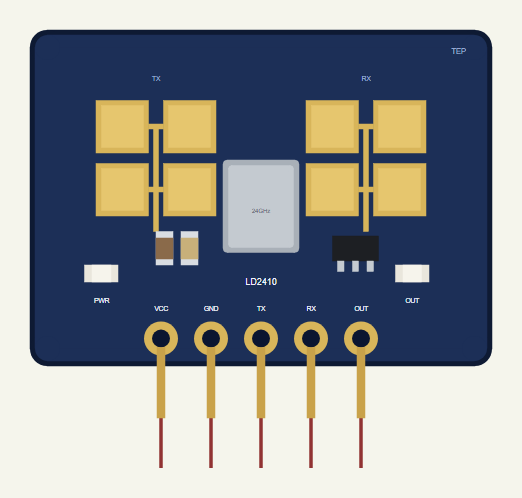
- A real-looking module: the board at its real size, 22 x 16 mm, with its eight gold patch antennas, the radar chip's shield, the regulator and our small TEP mark.
- Animated: PWR and OUT LEDs that work at run time, and the receiving antennas warming with the echo of a person.
- The real protocol: basic and engineering reports every 100 ms, the command frames with their ACKs, no reports during configuration, a new baud rate after a restart.
- The real logic: nine gates of 0.75 m with the factory sensitivities, moving and stationary targets, max gates, and OUT with its unmanned duration.
- A room: someone walks in, sits still and walks out, and chips to empty the room, walk in, sit or walk out at any time.
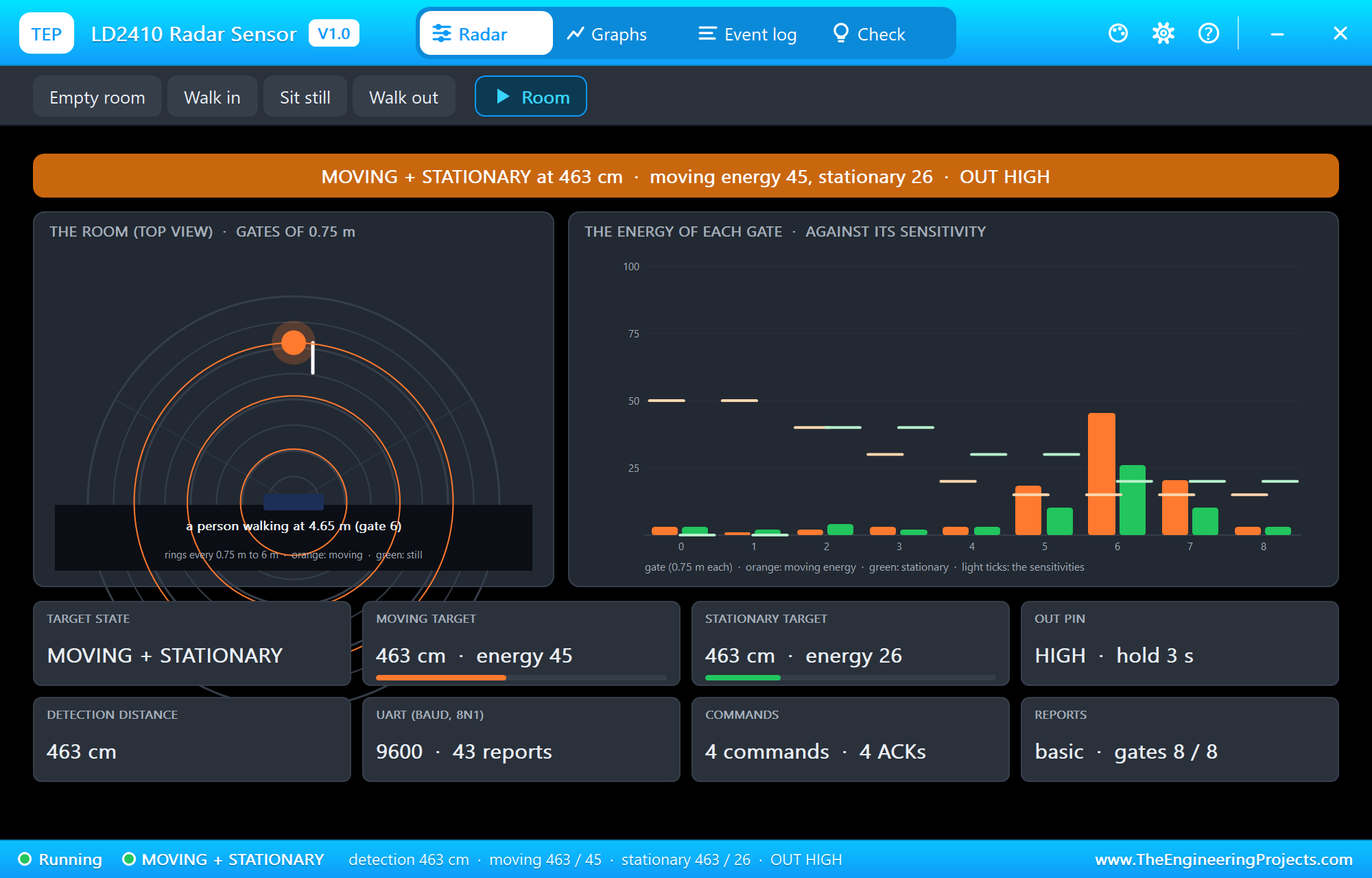
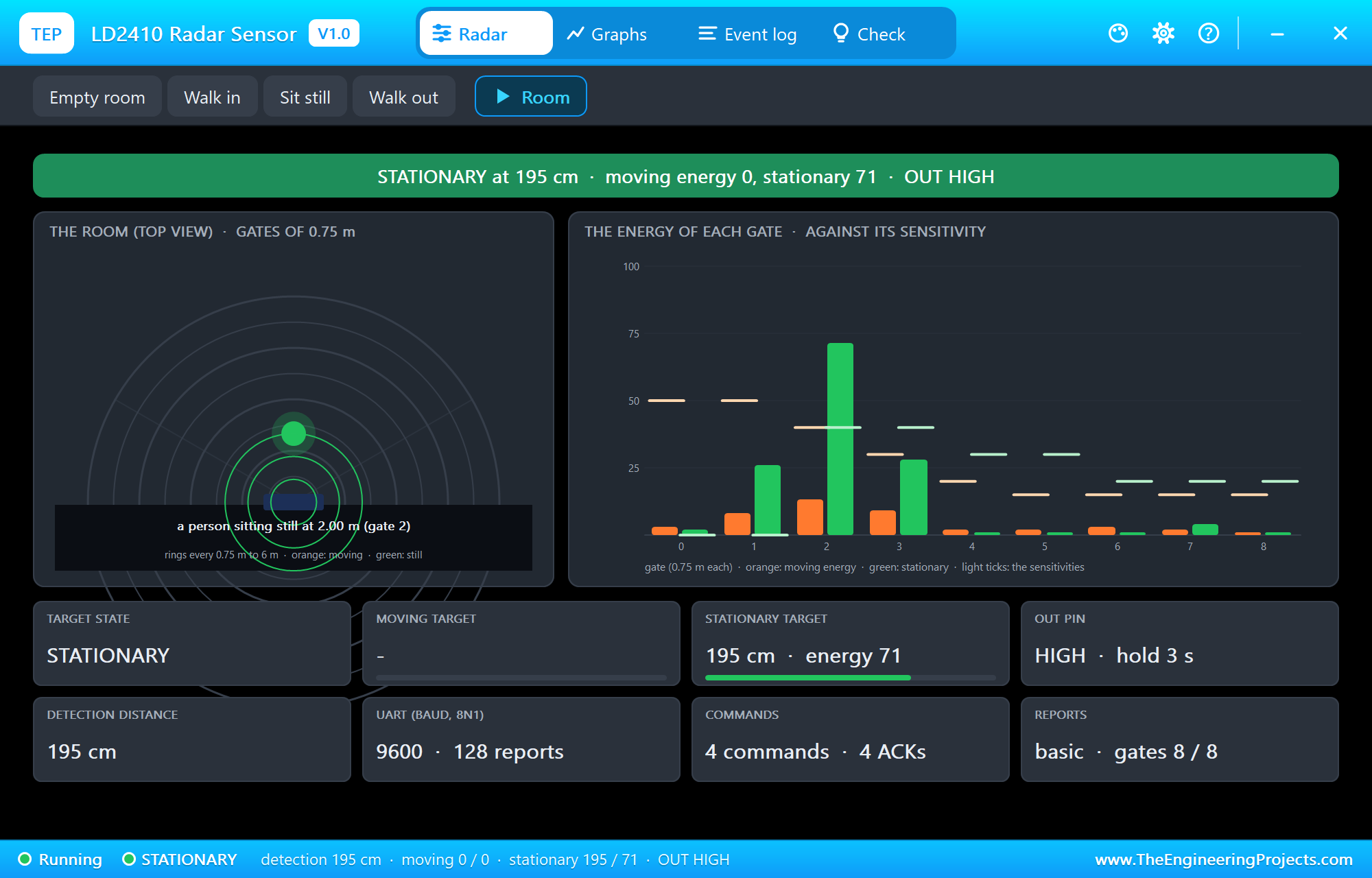
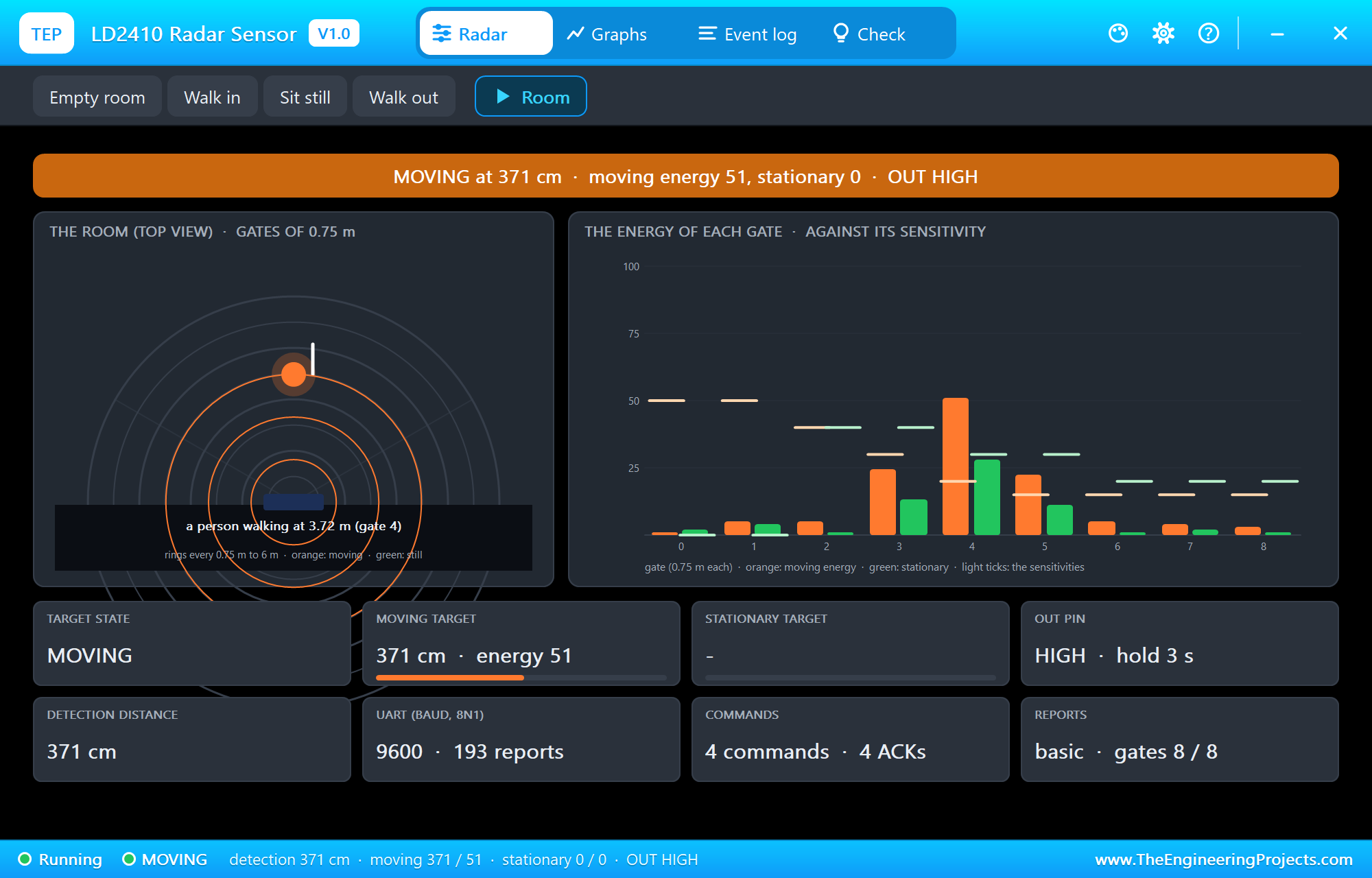
- A pop-up: the room from above with the person and the gates, the energy of every gate against its sensitivity, eight live tiles, graphs, an event log and a check page.
- A complete package: about 1.9 MB with the library, our 5 mm LED and resistor libraries, our Arduino UNO V4.0 and the demo, without the source code of the model.
The LD2410 in Proteus
The device is LD2410TEP in TEPLD2410.LIB, under Sensors > Motion, with the prefix U and the model TEPLD2410.DLL. Search LD2410 or radar in Pick Devices. It has five pins along the bottom: VCC (5 V), GND, TX, RX and OUT. Its properties: PROFILE (ROOM or STEADY), BAUD (the rate the module is set to), and for STEADY the STATE and DISTANCE of the person.
Download LD2410 Radar Sensor Library for Proteus Simulation
Click the button below to download LD2410-Radar-Sensor-Library-for-Proteus-v1.0.zip (about 1.9 MB, without the source code of the models):
LD2410 Radar Sensor Library for Proteus V1.0- README.txt: installation, the demo, the wiring, troubleshooting and the limits of the simulation.
- Proteus Library Files:
TEPLD2410.LIB,TEPLED5MM.LIB,TEPRESISTOR.LIBandArduinoV4TEP.LIB. - Proteus Model Files:
TEPLD2410.DLL,TEPLED5MM.DLL,TEPRESISTOR.DLLandTEPARDUINO.DLL. - Arduino Code: the demo sketch (it needs the AltSoftSerial library from the Library Manager).
- Proteus Simulation: the demo project, its HEX file and copies of the DLLs.
No Proteus yet? Read How to Download and Install Proteus 7 and 8. New to libraries? Follow How to Install a New Library in Proteus.
How to Install LD2410 Radar Sensor Library for Proteus Simulation
- Close Proteus and extract the whole zip file, for example to your Desktop.
- Copy the files from Proteus Library Files into the LIBRARY folder of Proteus.
- Copy the files from Proteus Model Files into the MODELS folder.
- Delete
TEPLD2410.IDXfrom the LIBRARY folder if it is there. - Start Proteus, press P and search for LD2410.
Proteus Simulation of a Presence Lamp
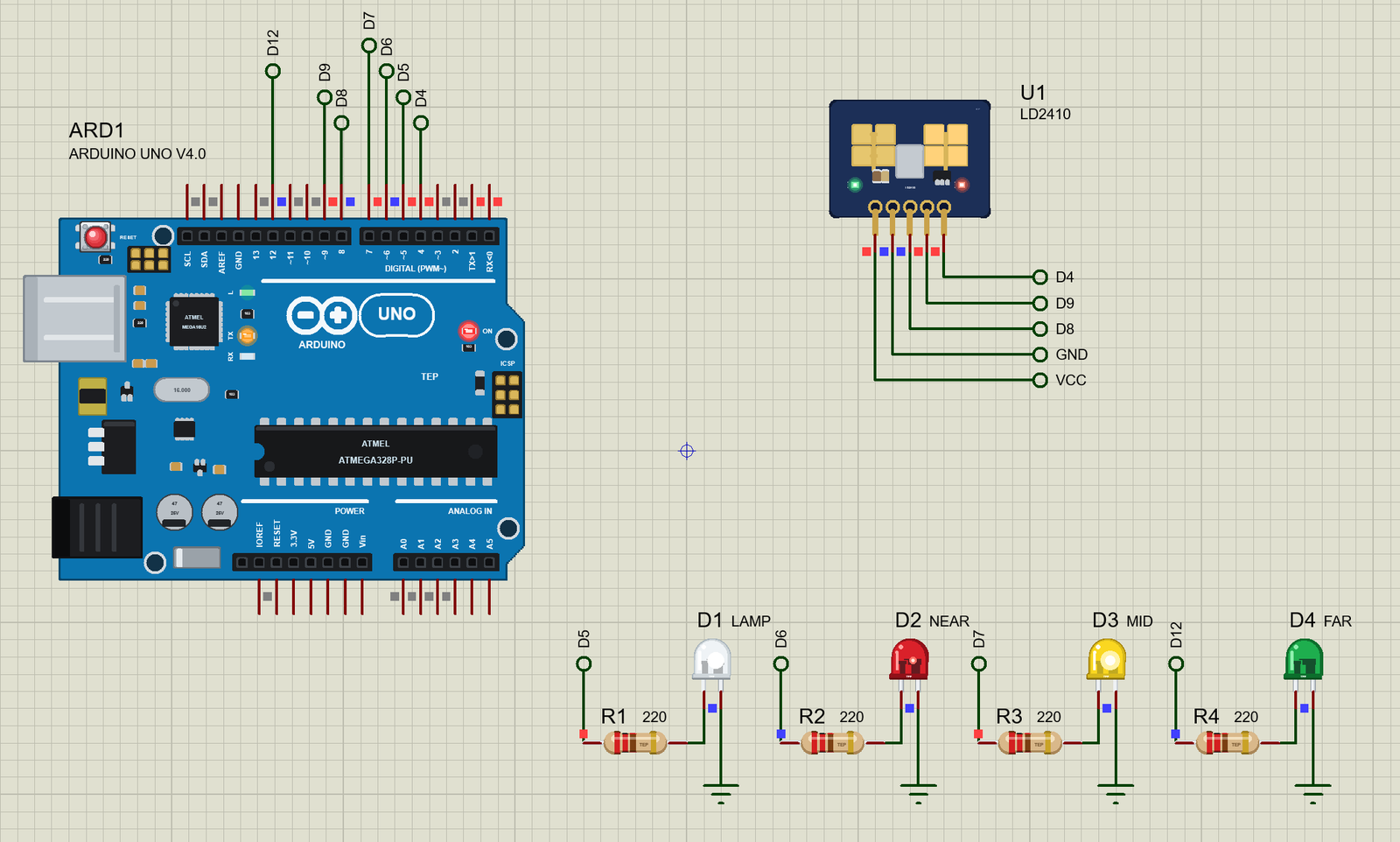
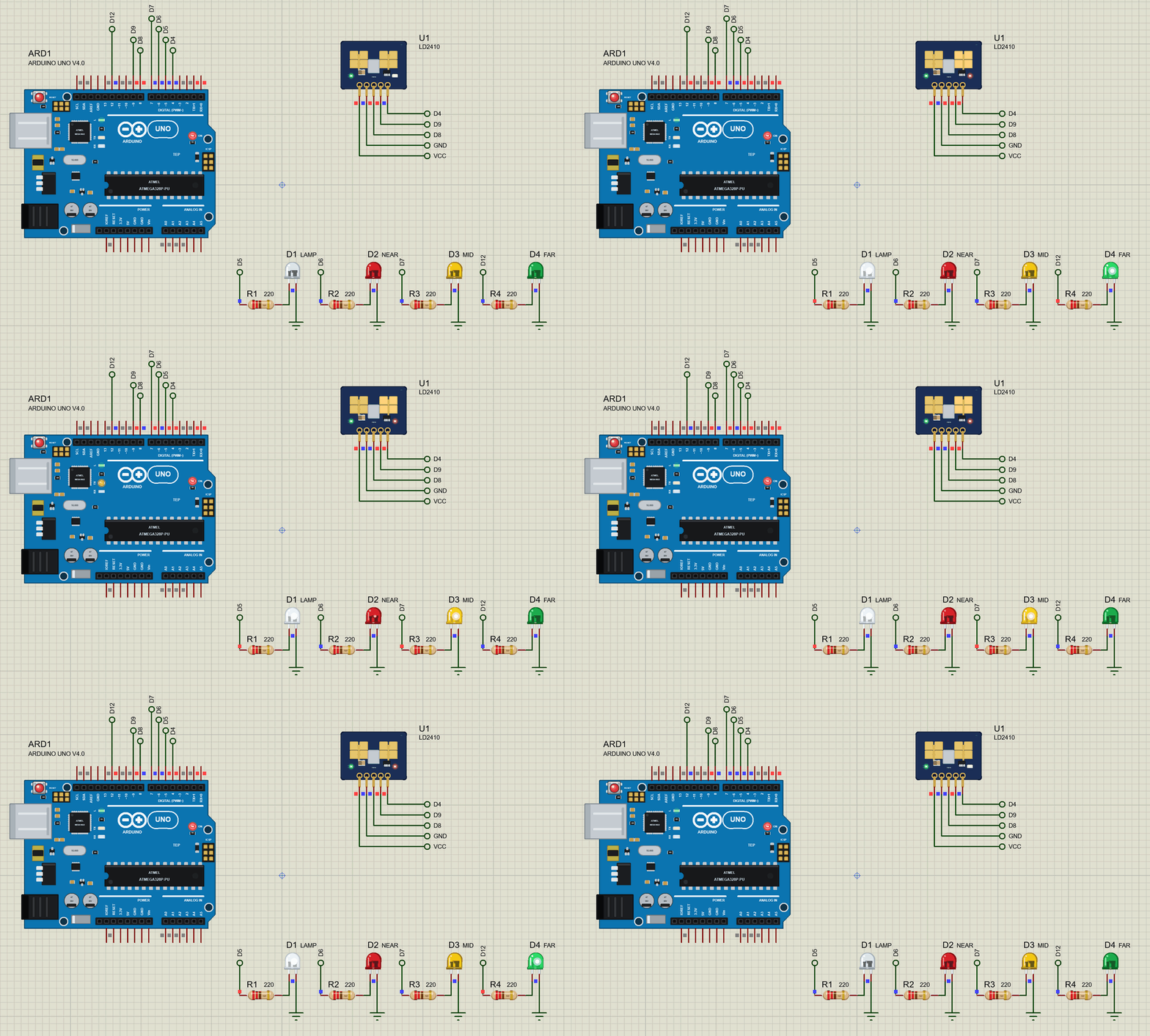
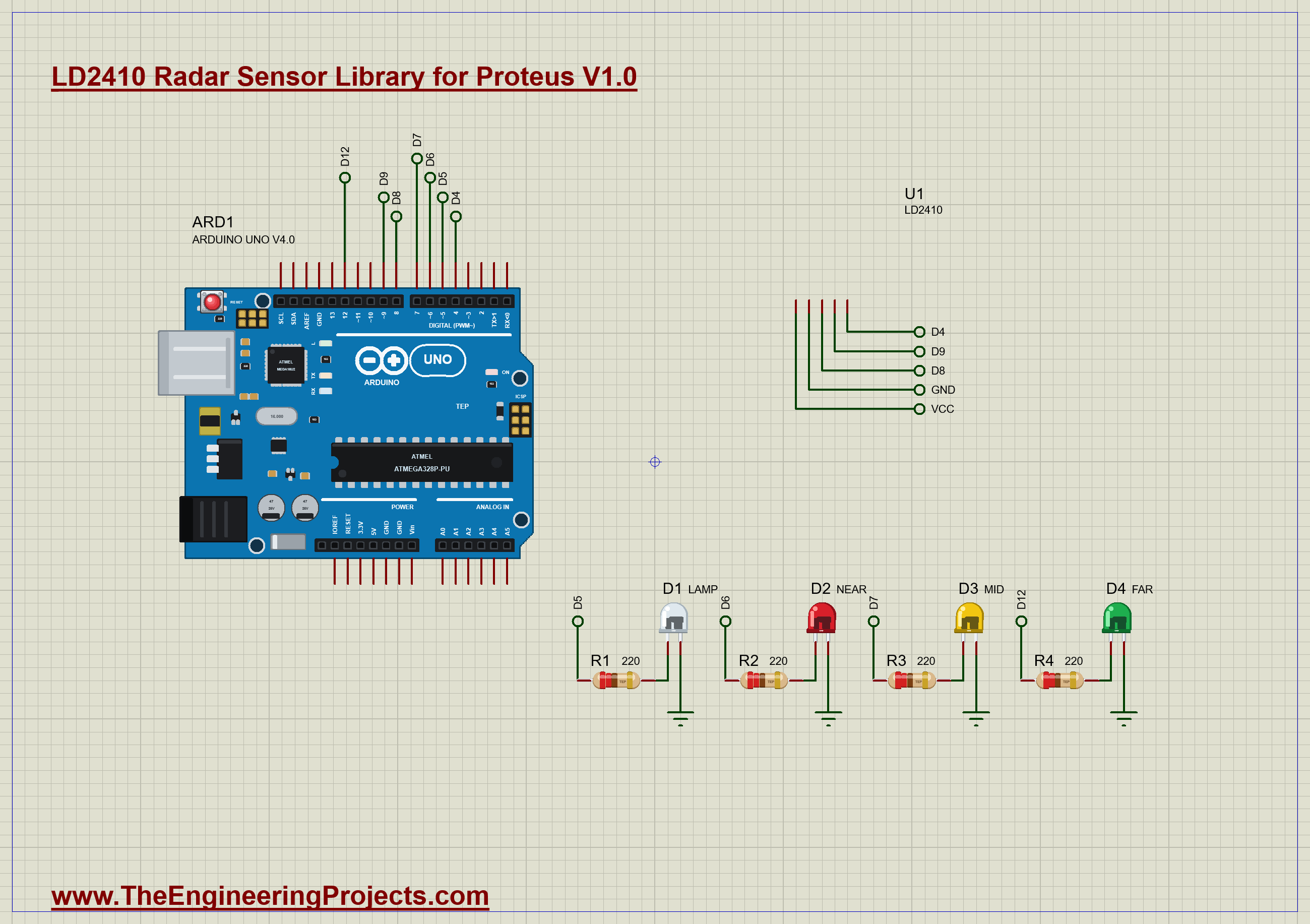
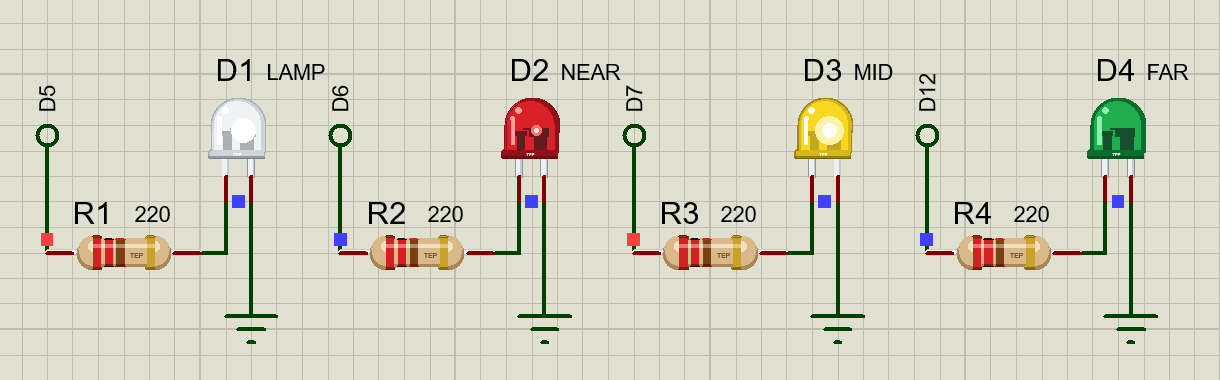
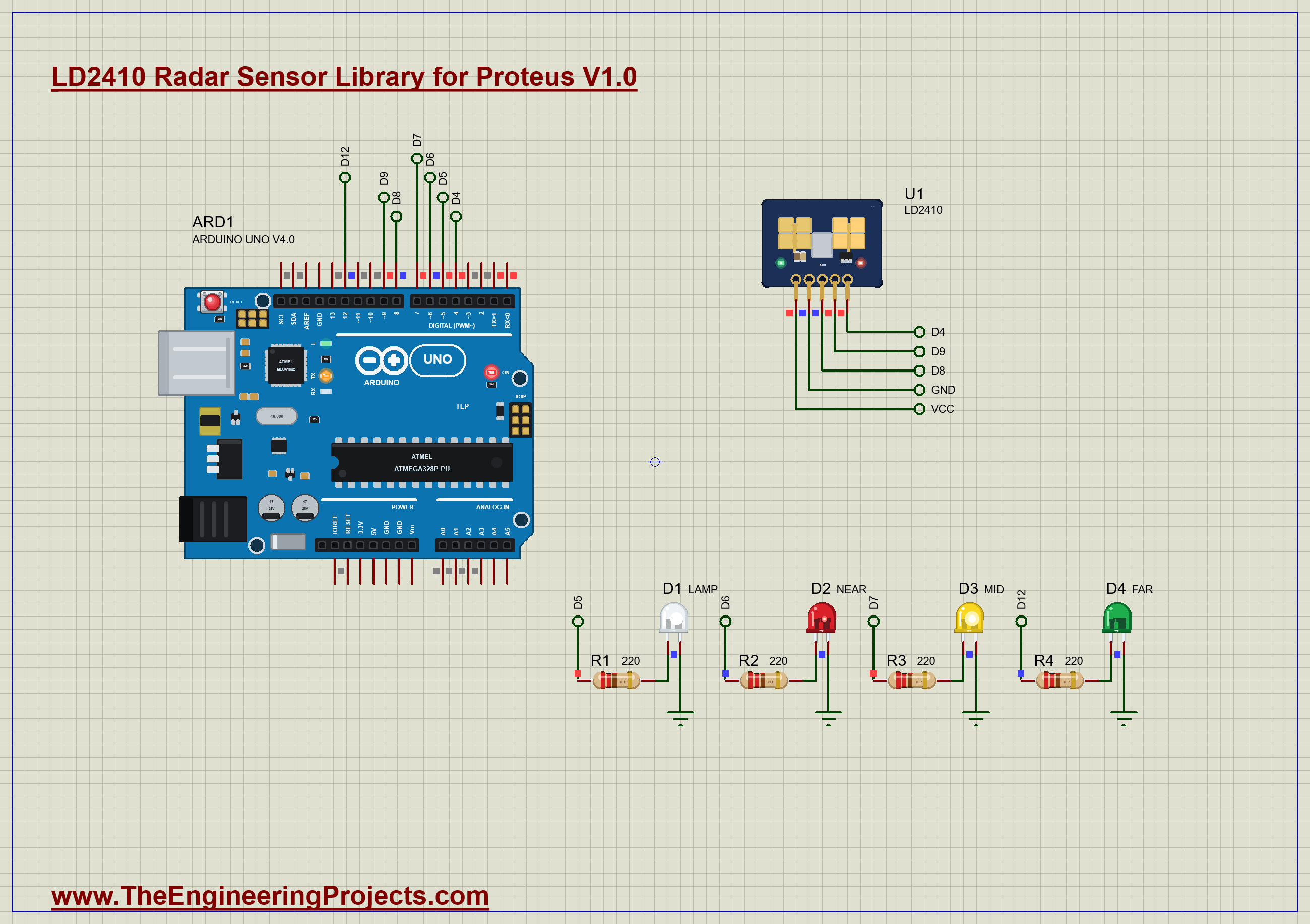
Our demo is the light that does not switch off on you. U1 is the LD2410 with PROFILE ROOM and BAUD 9600: the room is empty at first, someone walks in from 6 m at 3 seconds, sits down at 2 m and keeps still from 8 seconds, and walks out at 18 seconds. Its TX goes to D8 and its RX to D9 of our Arduino UNO Library for Proteus V4.0, its OUT to D4. Four LEDs from our 5mm LED Library for Proteus sit below: LAMP (white, D5), NEAR (red, D6), MID (yellow, D7) and FAR (green, D12), each through 220 ohm. The Arduino's built-in monitor is the same window as our TEP Serial Monitor Advance for Proteus. Open LD2410-Radar-ArduinoUnoV4.pdsprj.
The Sketch
The sketch talks to the radar through AltSoftSerial, which owns D8 and D9 on an UNO:
AltSoftSerial radar; // RX = D8 (the radar's TX), TX = D9 (the radar's RX)A small function wraps any command in its frame:
void sendCmd(uint16_t cmd, const byte* val, byte n) { // FD FC FB FA, length, command word, value, 04 03 02 01At start the sketch enables configuration, waits for the ACK, reads the firmware version, sets the gates and an unmanned duration of 3 seconds, and ends configuration:
if (command(0x00FF, on, 2)) { // enable configurationAfter that it feeds every byte from the radar into a little parser that finds the frames - F4 F3 F2 F1 for a report, FD FC FB FA for an ACK - and takes the state, the distances and the energies out of each report:
detDist = fb[15] | (uint16_t)fb[16] << 8;The lamp simply follows the radar's OUT pin; the zone LEDs follow the detection distance:
digitalWrite(LAMP, digitalRead(PIN_OUT)); // the lamp follows the radar's OUT pinLD2410 Simulation Results
Open the project and press Run. The demo runs 26.5 simulated seconds and took 251 seconds on our PC with the pop-up open and the pictures being taken. Click the module for its pop-up. Every number below comes from one simulation run, the demo exactly as it ships.
Configuration
At start the sketch enables configuration; the radar answers with protocol version 1 and a buffer of 64 bytes, and stops its reports. The firmware version comes back as V2.04.23022511, the max gates are set to 8 and the unmanned duration to 3 seconds, and configuration ends - four commands, four ACKs. The monitor shows each answer, and the pop-up's Event log shows each command arriving.
Someone Walks In
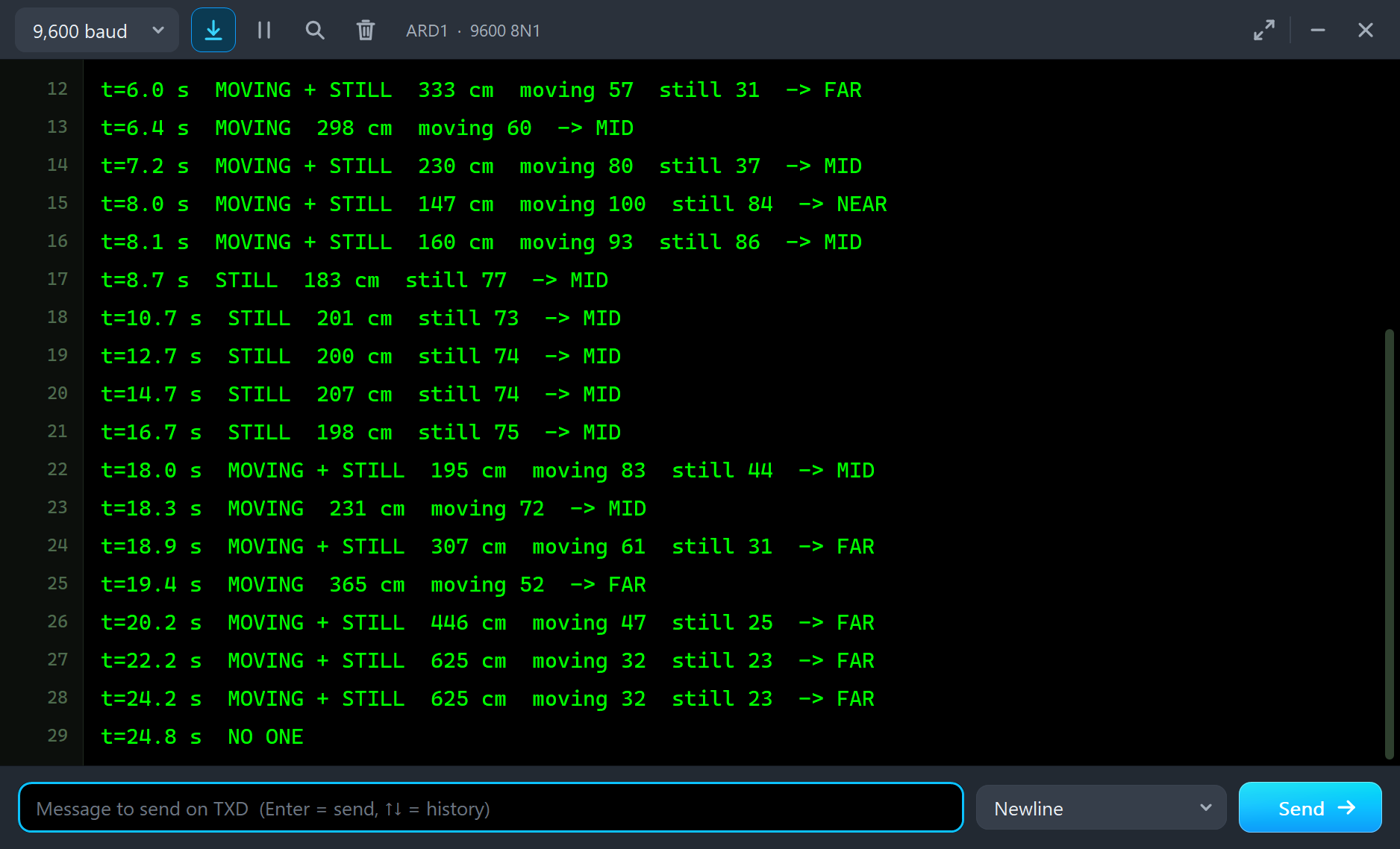
At 3 seconds someone steps in 6 m away. The first reports say MOVING + STILL at 472 cm with a moving energy of 44: the radar sees the motion, and a little still echo too. OUT goes high, the lamp comes on and the FAR LED lights. As the person comes closer the energy climbs - 298 cm and 60 (MID), 230 cm and 80 - and at 8.0 seconds they are at 147 cm with a moving energy of 100 and a stationary energy of 84: NEAR. The pop-up shows the person crossing the gates and the moving energy jumping from gate to gate.
Sitting Still
From 8.7 seconds the person sits at 2 m and keeps still. The moving target disappears from the reports; what is left is STILL at 183 - 207 cm with a stationary energy of 73 - 77 - the echo of breathing. The lamp stays on, which is the whole point: a PIR sensor would have switched it off a few seconds after the person stopped moving.
Walking Out
At 18 seconds they get up and leave: MOVING again, 231 cm, 365 cm (FAR), 446 cm, and out of range at about 21.7 seconds. The radar keeps the last target for the unmanned duration we set, and at 24.8 seconds it reports NO ONE: OUT goes low and the lamp turns off.
The Graphs, the Event Log and the Check Page
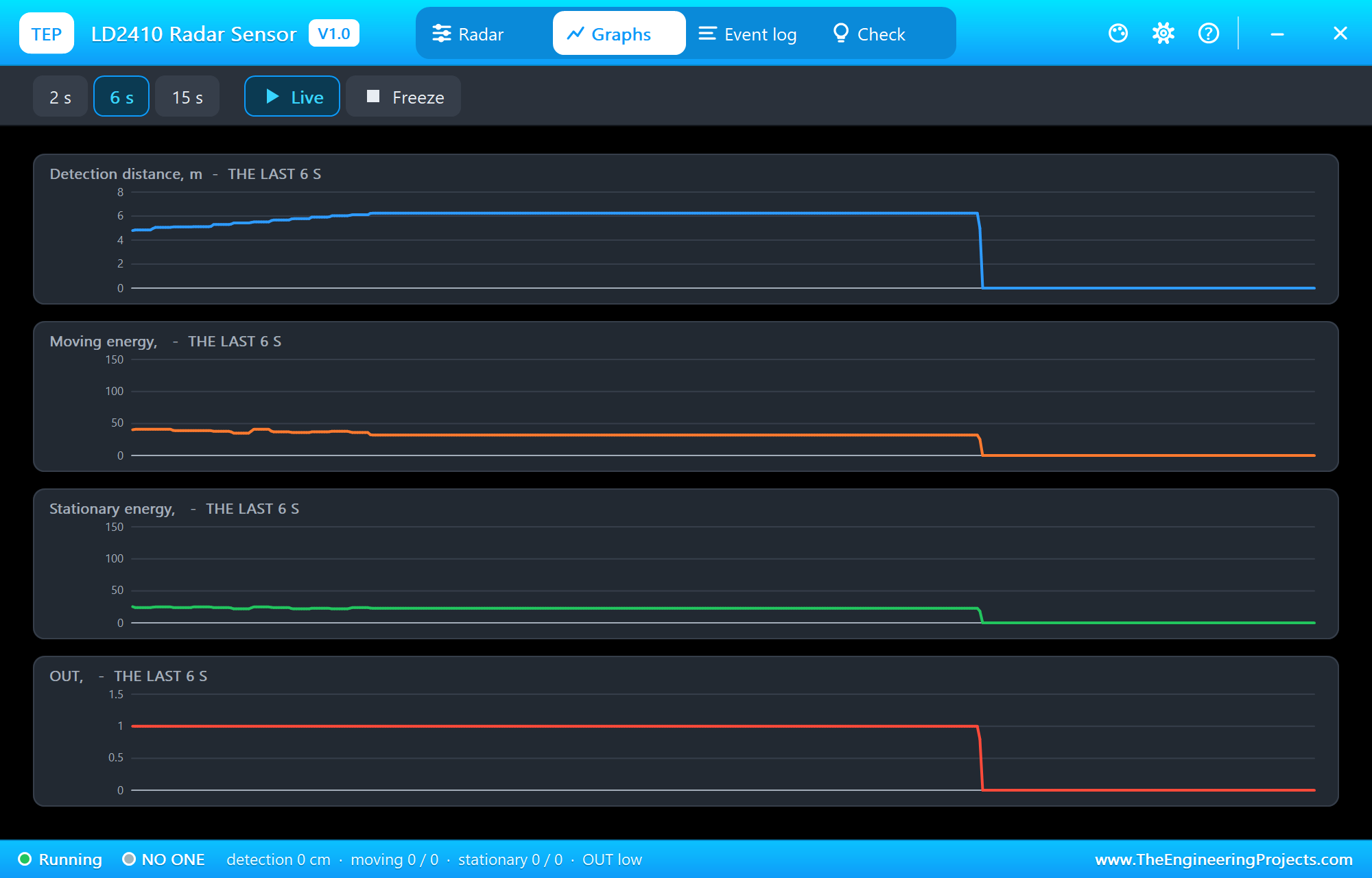
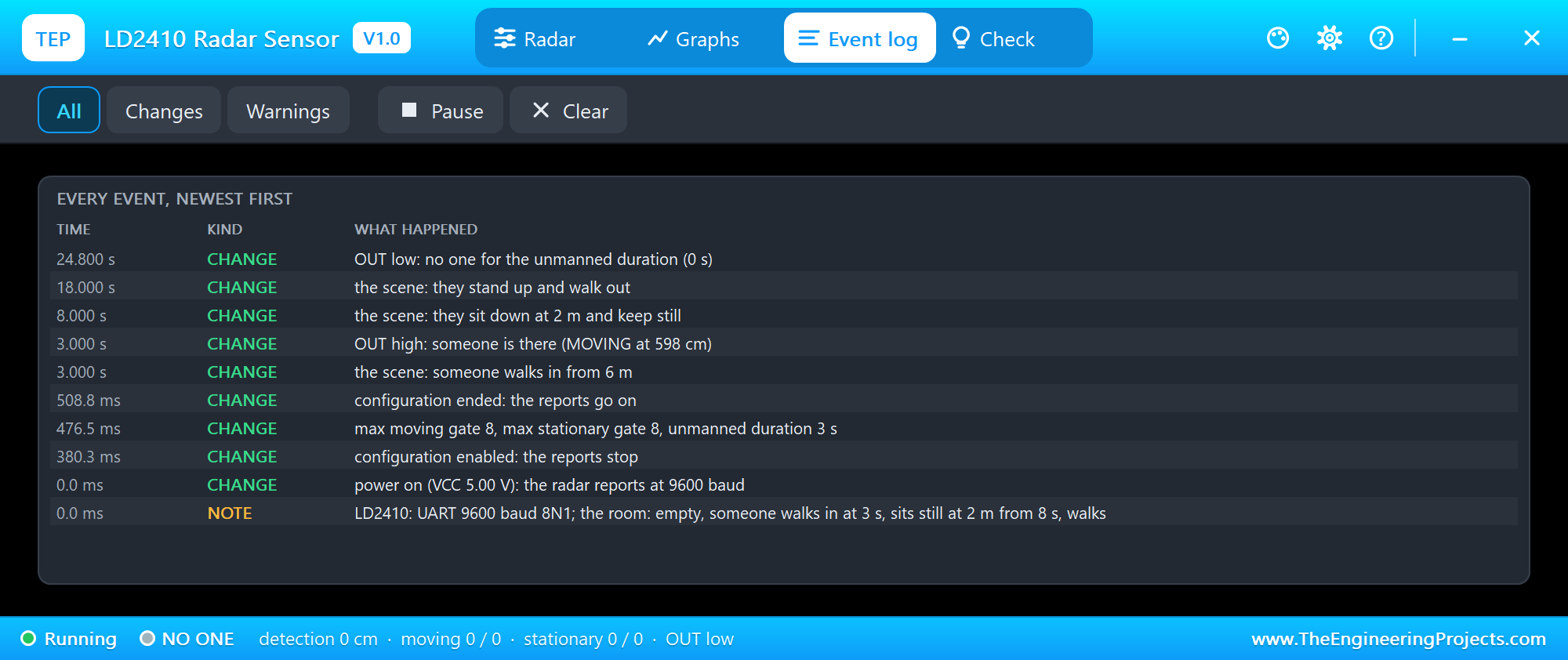
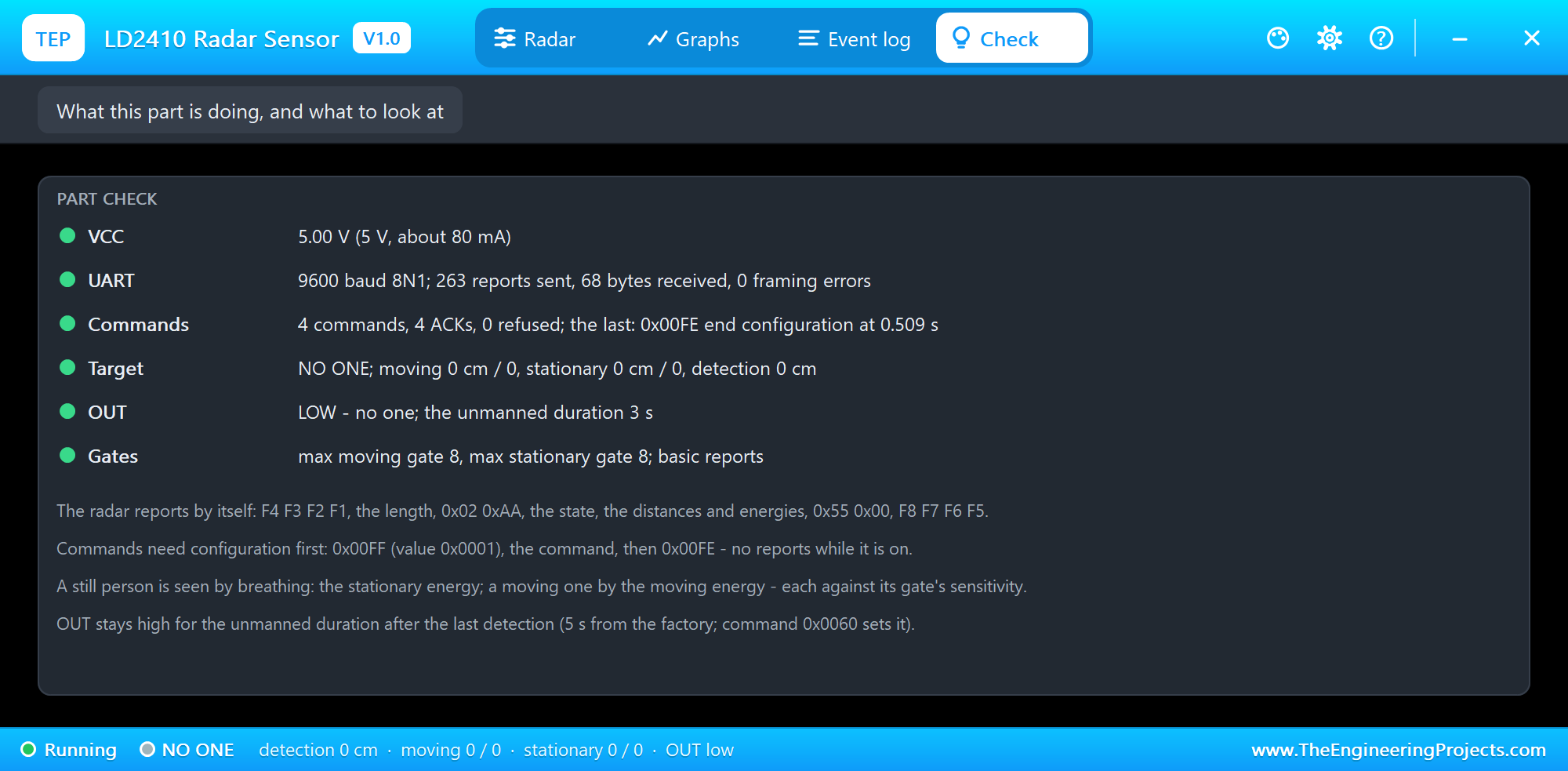
The Graphs page plots the detection distance, the moving and stationary energies and OUT. The Event log keeps the commands, the changes of OUT and the scene. The Check page sums up the run: 262 reports sent at 9600 baud with no framing errors, 4 commands and 4 ACKs with none refused, OUT low, max gates 8 / 8 and the unmanned duration 3 s.
The monitor shows the sketch's side: the configuration, then a line for every change of the target and every two seconds while someone is there.
Radar, PIR and Microwave Doppler
Three kinds of motion sensor are easy to mix up. A PIR sensor - our PIR Sensor Library for Proteus - sees warm bodies move across its zones; it is cheap and power-saving, but blind to someone sitting still. A microwave Doppler sensor such as the one in our RCWL-0516 Microwave Radar Sensor Library for Proteus sees any movement, even through walls, but gives no distance and still misses a still person. The LD2410 is an FMCW radar: it measures distance as well as motion, and it is sensitive enough for breathing. For a true range finder to an object, a time-of-flight sensor like our TF-Luna LiDAR Sensor Library for Proteus is the tool.
Try It Yourself
- Click Sit still in the pop-up: the moving energy fades and only the stationary energy keeps the lamp on.
- Raise the stationary sensitivity of gate 2 (command 0x0064) above the still person's energy: the radar loses them, and the lamp goes off after the unmanned duration.
- Set the unmanned duration to 10 s instead of 3 s: the lamp waits longer after the room empties.
- Turn on engineering mode (0x0062) and print the energy of each gate - the same bars as in the pop-up.
- Set the module's BAUD to 19200 and change the sketch's radar.begin() to match.
Ideas to Extend the Demo
- Switch a real lamp or a fan with a relay on the OUT pin.
- Count how long a desk is occupied through the day.
- Use the distance to wake a display only when someone comes close.
Your Own Sketches
The demo sketch is in the zip file, and you can change it in the Arduino IDE. New to Arduino? Start with our Arduino Tutorial for Beginners. Export the compiled binary, and set the UNO's PROGRAM property to the new file. Our guide on How to get the HEX file from Arduino shows you where the file ends up.
Things to Know Before Using a Real LD2410
- 256000 baud: use a hardware UART, or set the radar once to a slower rate for an UNO.
- 3.3 V logic: the UART and OUT are 3.3 V; drive its RX from a 5 V board through a divider.
- Mounting: fix it firmly, facing the room; fans, curtains and plants moving in the air look like people.
- Tuning: adjust the gates' sensitivities and the max gates to your room.
- Materials: the radar sees through plastic, glass and wood, not through metal.
Troubleshooting
- No reports: the baud rate differs, TX and RX are swapped, or configuration is still on - send 0x00FE.
- Nothing received on an UNO in Proteus: SoftwareSerial cannot receive there; use AltSoftSerial on D8 / D9 or a hardware UART.
- No ACK: enable configuration (0x00FF with 0x0001) before any other command.
- A still person is lost: lower the stationary threshold of that gate or raise the max stationary gate.
- The part is not simulated:
TEPLD2410.DLLis missing from MODELS and from the project folder.
Limitations of the Simulation
- The frames, the commands and their ACKs, the gates, the default sensitivities, the unmanned duration and OUT follow the maker's protocol document; the module is our own drawing of an LD2410 board.
- Our own choices: the energies a person gives at each distance, the noise, the report interval of 100 ms, the firmware number and the room scene.
- Not modelled: the beam's angle, several people at once, and the light sensor and Bluetooth of later versions.
- Arduino is a name of Arduino; this library is not made or endorsed by Arduino, Labcenter or the maker of the LD2410.
- Tested in Proteus 8.5 in November 2026 (the demo as shipped). Proteus 7 is not supported.
So, that was all about the LD2410 Radar Sensor Library for Proteus Simulation. I hope it helps you build your smart light, your occupancy counter or your touchless switch before the real radar arrives - and shows that seeing a person breathe is a simple thing at heart: nine distance gates, two energies each, and a threshold. If you have any questions, ask in the comments and I will help you out. Till the next tutorial, take care and have fun!

Comments
0