


SGP40 VOC Sensor Library for Proteus Simulation


Hello friends, I hope you all are doing great. Today, I am going to share the new SGP40 VOC Sensor Library for Proteus Simulation. The SGP40 is a tiny metal-oxide gas sensor that smells the volatile organic compounds (VOCs) in the air - cooking fumes, cleaning sprays, paint, solvents - and reports them over I2C. With this library you can run a full Proteus simulation of it, with its real command set, so that the code you test here runs unchanged on the real sensor.
SGP40 VOC Sensor Library for Proteus
Latest version: V1.0 (November 2026, this tutorial)
Helping Tools
- Serial Monitor Advance: a serial terminal window for the UART of your board
- Serial Monitor Expert: the serial monitor with extra debugging tools
- LCD Library for Proteus V3.0: 16x2, 20x4 and I2C LCDs to show your readings
The module is drawn at its real size and comes alive at run time: its LEDs work, and the hotplate inside the sensor glows through its lid while it heats. The demo is a kitchen air lamp - an RGB LED that turns green, yellow or red with the air while someone cooks, sprays a cleaner and turns the hood on.
NOTICE: Our team has put a lot of effort into these small parts: the bodies, the animation and the pop-ups are all our own design, and you get them free. Your feedback is the fuel that keeps us going, so please tell us what you think in the comments below or in the air quality sensor board of our forum. And if our free libraries help you, you can buy us a coffee. So, let's get started with the SGP40 VOC Sensor Library for Proteus Simulation:
What is the SGP40?
The SGP40 is a gas sensor in a package only 2.44 mm wide. Under its metal lid sits a hotplate - a tiny heater a few tenths of a millimetre across - covered with a layer of metal oxide (MOX). Hot metal oxide reacts with the volatile organic compounds that land on it, and its electrical resistance falls: the more VOCs, the lower the resistance. The SGP40 measures that resistance and hands it to your microcontroller over I2C as one number, SRAW_VOC.
VOCs are everywhere indoors: they come from cooking, from cleaning products, perfumes and sprays, from new furniture, paint and glue, and from people themselves. A VOC sensor in an air purifier, a range hood, a ventilation system or a smart thermostat tells when the air needs changing.
| SGP40 | |
|---|---|
| Measures | volatile organic compounds (VOCs) - the raw signal SRAW_VOC |
| Principle | metal oxide on a heated hotplate; SRAW follows the log of its resistance |
| Measurement | one every second (each takes 30 ms), the hotplate on while it measures |
| Compensation | the humidity and temperature, sent with every measurement |
| Interface | I2C at the address 0x59, every data word with a CRC-8 |
| Self-test | of the hotplate and the MOX layer: 0xD400 = passed |
| Size | the sensor 2.44 x 2.44 mm; our module 20 x 14 mm |
SRAW and the VOC Index
The SGP40 does not tell you "300 ppb of VOCs". It reports SRAW, a raw signal that follows the logarithm of the metal oxide's resistance. Clean air gives a high number, and the number falls when VOCs arrive. To turn SRAW into a friendly index from 0 to 500 - where 100 is the average air of the last day - the maker offers a VOC index algorithm that runs on the host and learns the room over hours. Our demo sketch uses a short, simple index of its own instead, so that you can follow every step of the calculation.
How the SGP40 Talks: Commands, Compensation and CRC
Like its sister sensors, the SGP40 works with commands - 16-bit words sent high byte first to the address 0x59 - and every data word in both directions carries a CRC-8 (polynomial 0x31, start value 0xFF). There are only four commands:
| Command | Word | What it does |
|---|---|---|
| measure_raw_signal | 0x260F | with the humidity and temperature words; 30 ms later, one word: SRAW_VOC |
| execute_self_test | 0x280E | 320 ms, then 0xD400 (passed) or 0x4B00 (failed) |
| turn_heater_off | 0x3615 | the hotplate off, the sensor idle |
| get_serial_number | 0x3682 | three words, the chip's serial number |
The two words after measure_raw_signal are the compensation. Humidity changes the resistance of metal oxide, so the sensor needs to know the air's humidity and temperature to keep them out of the reading: ticks = %RH x 65535 / 100 and ticks = (C + 45) x 65535 / 175. Sending 0x8000 and 0x6666 (50 %RH and 25 C) leaves the compensation off. In a real product the values come from a humidity sensor beside it.
Features of the SGP40 VOC Sensor Library for Proteus Simulation
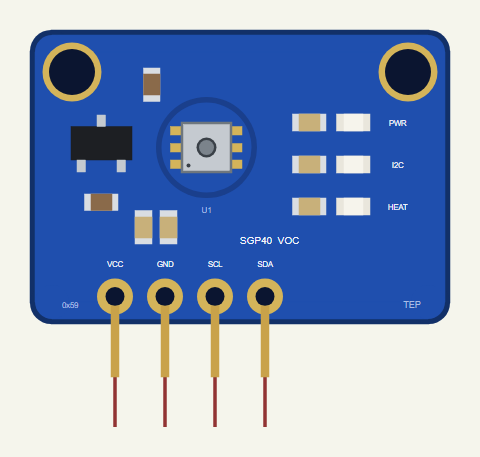
- A real-looking module: the blue board at its real size, 20 x 14 mm, with the tiny sensor, its metal lid and membrane, the regulator, the pull-ups and our small TEP mark.
- Animated: PWR, I2C and HEAT LEDs that work at run time, and the hotplate glows through the lid while it heats.
- The real command set: measure_raw_signal with the compensation words, the self-test, the heater off and the serial number, with their delays and the CRC-8 on every word.
- Real behaviour: SRAW falls with the log of the VOCs, a cold hotplate needs a few seconds to settle, humid air shifts the signal unless it is compensated, and the sensor does not answer while it is busy.
- A room to measure: a kitchen profile with cooking, a cleaning spray and the hood, a clock to speed up the room, and chips for fresh air, a lived-in room, cooking, paint, a spray and the hood.
- A pop-up: the hotplate and its MOX layer with the VOC molecules, SRAW and the VOCs over the room's clock, eight live tiles, graphs, an event log and a check page.
- A complete package: about 1.9 MB with the library, our RGB LED and resistor libraries, our Arduino UNO V4.0 and the demo, without the source code of the model.
The SGP40 in Proteus
The device is SGP40TEP in TEPSGP40.LIB, under Sensors > Gas, with the prefix U and the model TEPSGP40.DLL. Search SGP40 in Pick Devices. It has four pins along the bottom: VCC (3.3 to 5 V), GND, SCL and SDA. Its properties describe the room: PROFILE (STEADY or KITCHEN), VOC (the VOCs at the start, in ppb), TEMP and HUMIDITY, and SPEED (the room's clock - 12 makes every simulated second twelve seconds of the kitchen).
Download SGP40 VOC Sensor Library for Proteus Simulation
Click the button below to download SGP40-VOC-Sensor-Library-for-Proteus-v1.0.zip (about 1.9 MB, without the source code of the models):
SGP40 VOC Sensor Library for Proteus V1.0- README.txt: installation, the demo, the wiring, troubleshooting and the limits of the simulation.
- Proteus Library Files:
TEPSGP40.LIB,TEPRGB.LIB,TEPRESISTOR.LIBandArduinoV4TEP.LIB. - Proteus Model Files:
TEPSGP40.DLL,TEPRGB.DLL,TEPRESISTOR.DLLandTEPARDUINO.DLL. - Arduino Code: the demo sketch.
- Proteus Simulation: the demo project, its HEX file and copies of the DLLs.
No Proteus yet? Read How to Download and Install Proteus 7 and 8. New to libraries? Follow How to Install a New Library in Proteus.
How to Install SGP40 VOC Sensor Library for Proteus Simulation
- Close Proteus and extract the whole zip file, for example to your Desktop.
- Copy the files from Proteus Library Files into the LIBRARY folder of Proteus.
- Copy the files from Proteus Model Files into the MODELS folder.
- Delete
TEPSGP40.IDXfrom the LIBRARY folder if it is there. - Start Proteus, press P and search for SGP40.
Proteus Simulation of a Kitchen Air Lamp
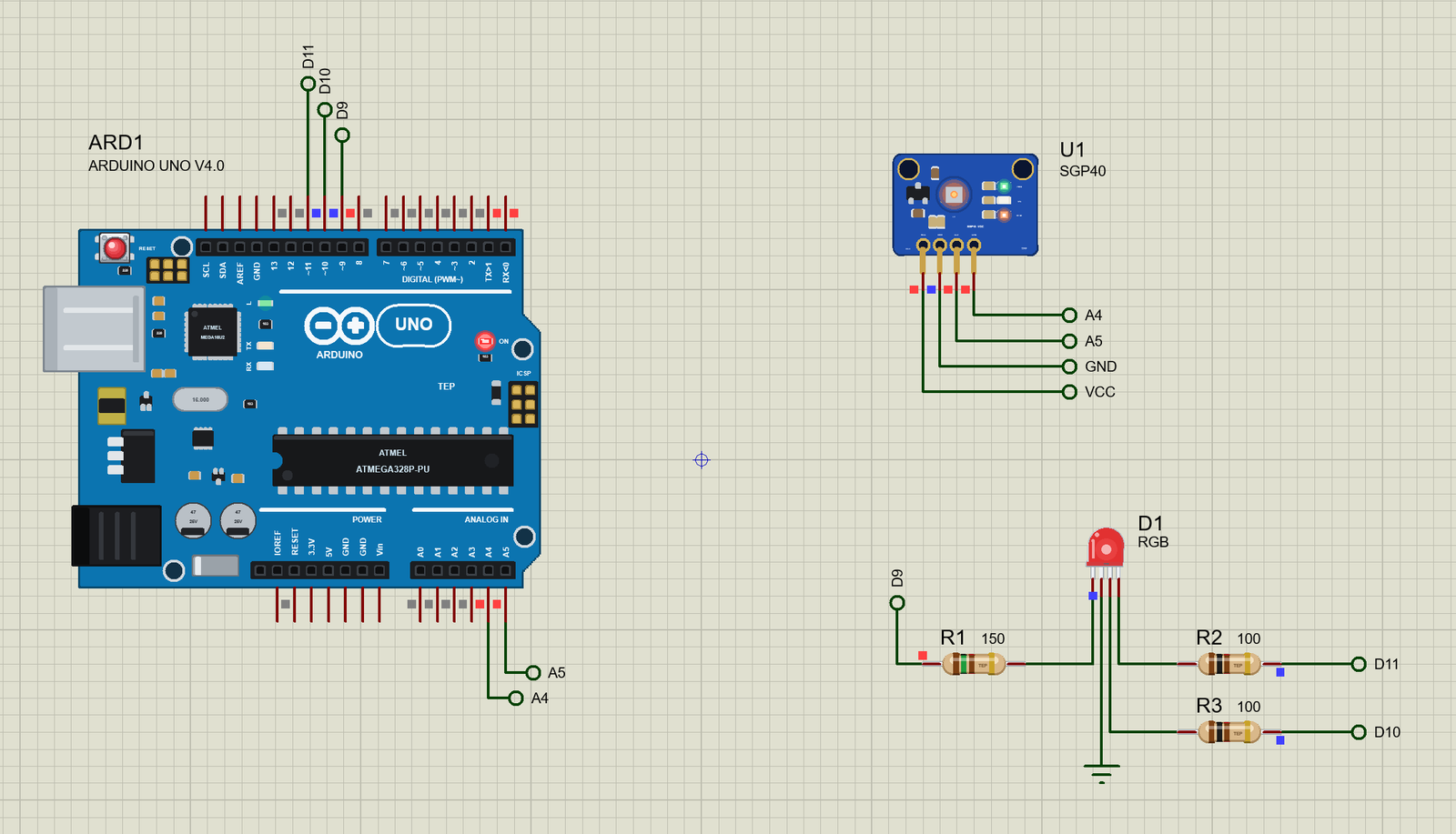
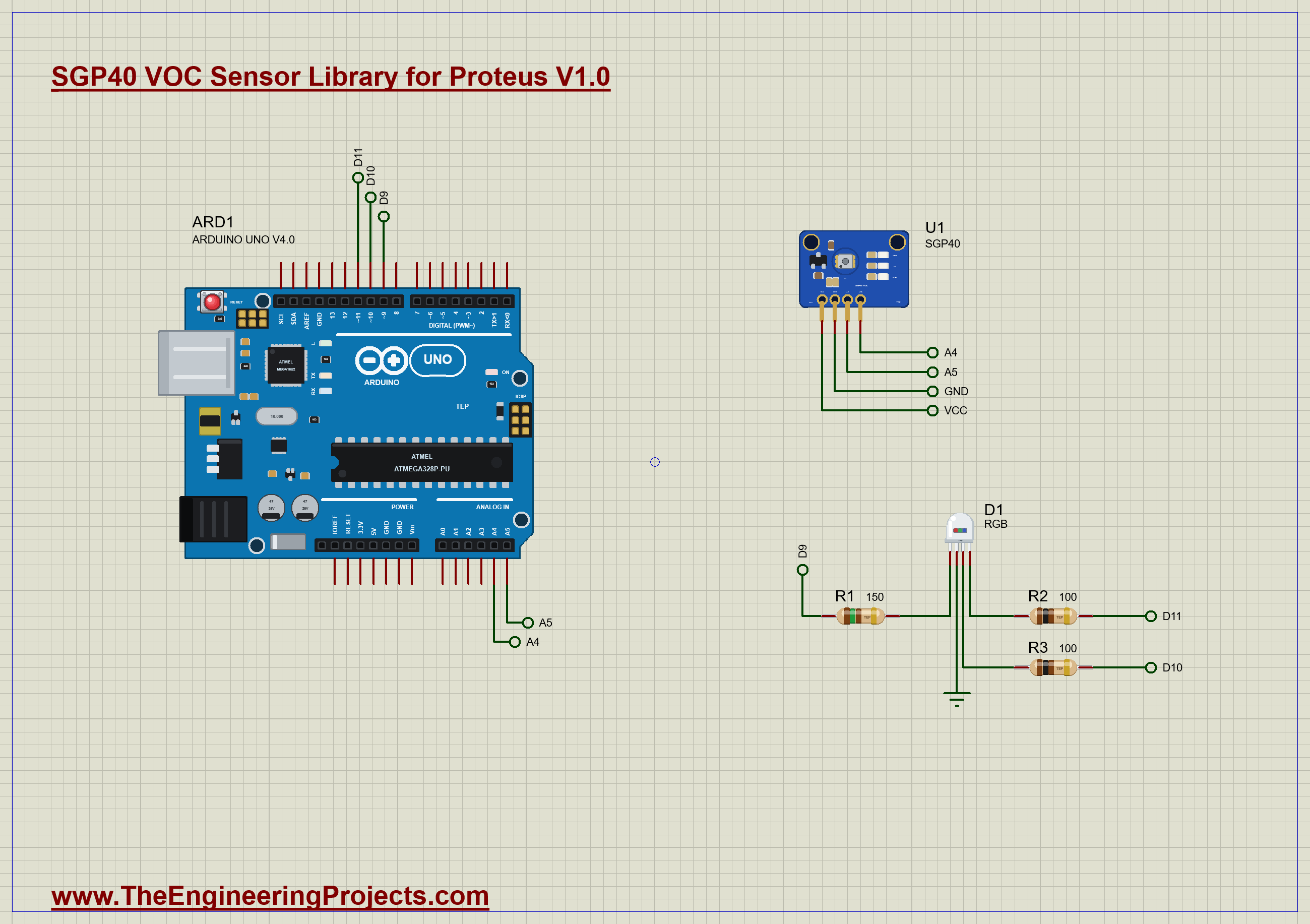
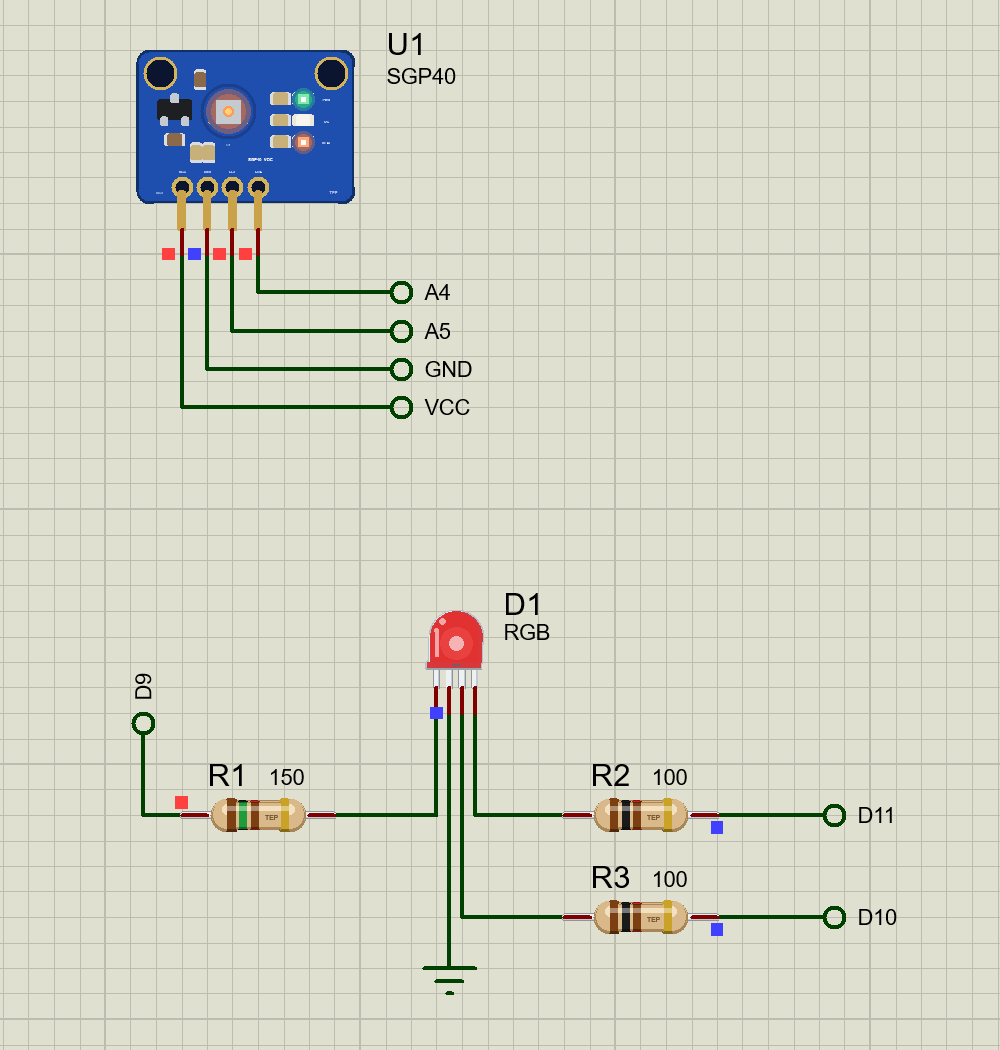
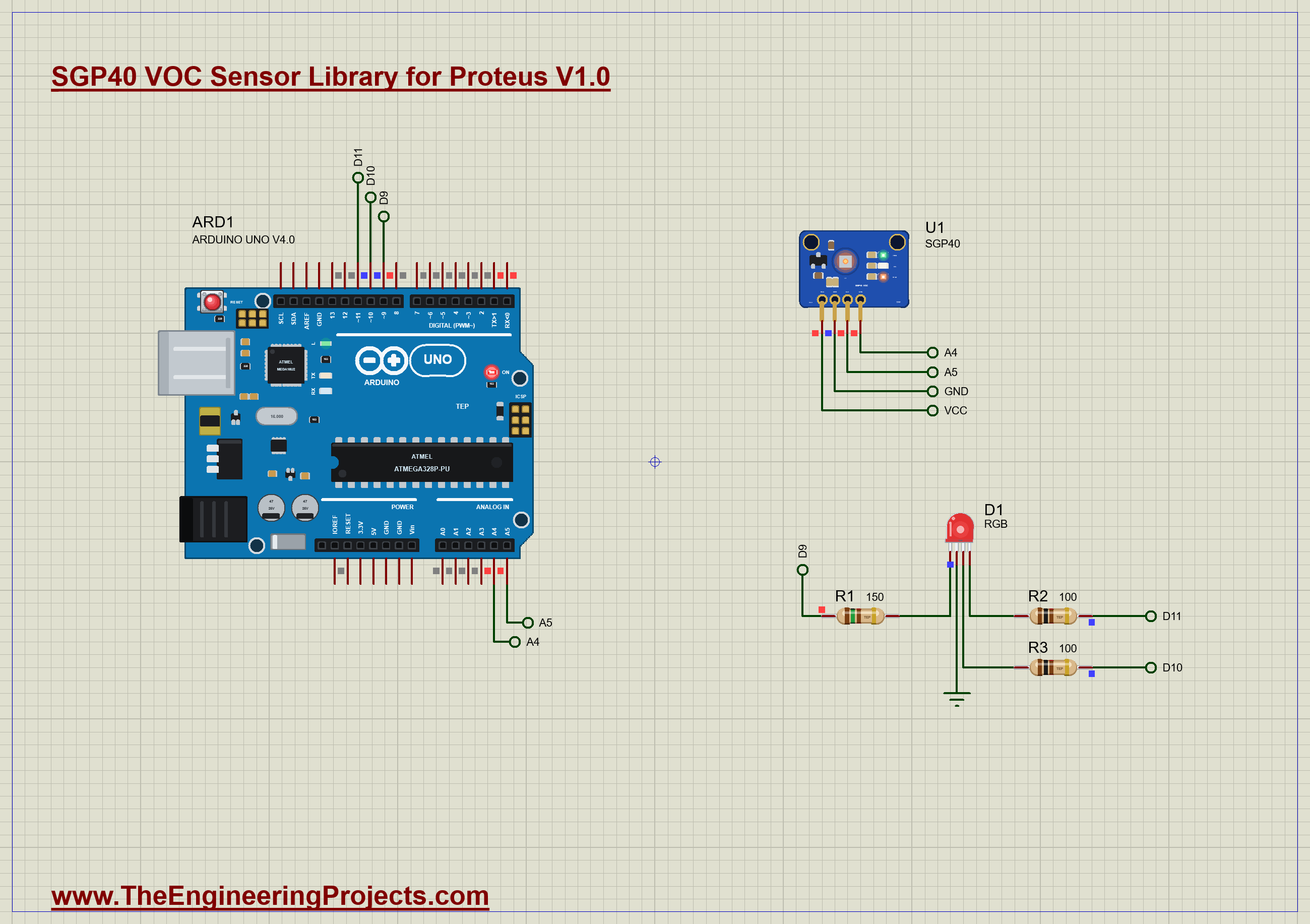
A kitchen is the room where the VOCs change the most: frying and baking fill it in minutes, a cleaning spray sends the level up in seconds, and the range hood clears it again. Our demo watches that. U1 is the SGP40 with PROFILE KITCHEN and SPEED 12: the cooking starts at room minute 3, a cleaning spray follows at minute 11 and the hood goes on at minute 14. Its SCL and SDA go to A5 and A4 of our Arduino UNO Library for Proteus V4.0. D1 is a common-cathode LED from our RGB LED Library for Proteus, with its red, green and blue legs on pins 9, 10 and 11 through 150, 100 and 100 ohm. The Arduino's built-in monitor is the same window as our TEP Serial Monitor Advance for Proteus. Open SGP40-VOC-ArduinoUnoV4.pdsprj.
The Sketch
The sketch talks to the sensor with plain Wire calls. Once a second it sends measure_raw_signal, followed by the two compensation words, each with its CRC. The room's humidity and temperature become ticks first:
const uint16_t rh = (uint16_t)(ROOM_RH * 65535.0 / 100 + 0.5); // ticks = %RH x 65535 / 100Then it waits the 30 ms the measurement takes, reads the three bytes - SRAW and its CRC - and checks the CRC:
delay(30); // the measurement takes 30 msThe first measurement switches the hotplate on, and a cold hotplate reads high for a few seconds. The sketch skips the first 12 samples and takes the next one as the SRAW of clean air - the baseline. From then on its index is 100 when the air is as usual, and higher when the SRAW drops:
int index = (int)(100.0 * exp((baseline - (float)sraw) / 4000.0) + 0.5);The baseline keeps learning, but only slowly and only while the index is low, so that cooking never becomes the new normal:
if (index < 130) baseline += ((float)sraw - baseline) / 60; // learn the clean air slowly, never during an eventThe RGB LED shows the index: green under 150, yellow up to 250, red above - and blue while the hotplate warms up.
SGP40 Simulation Results
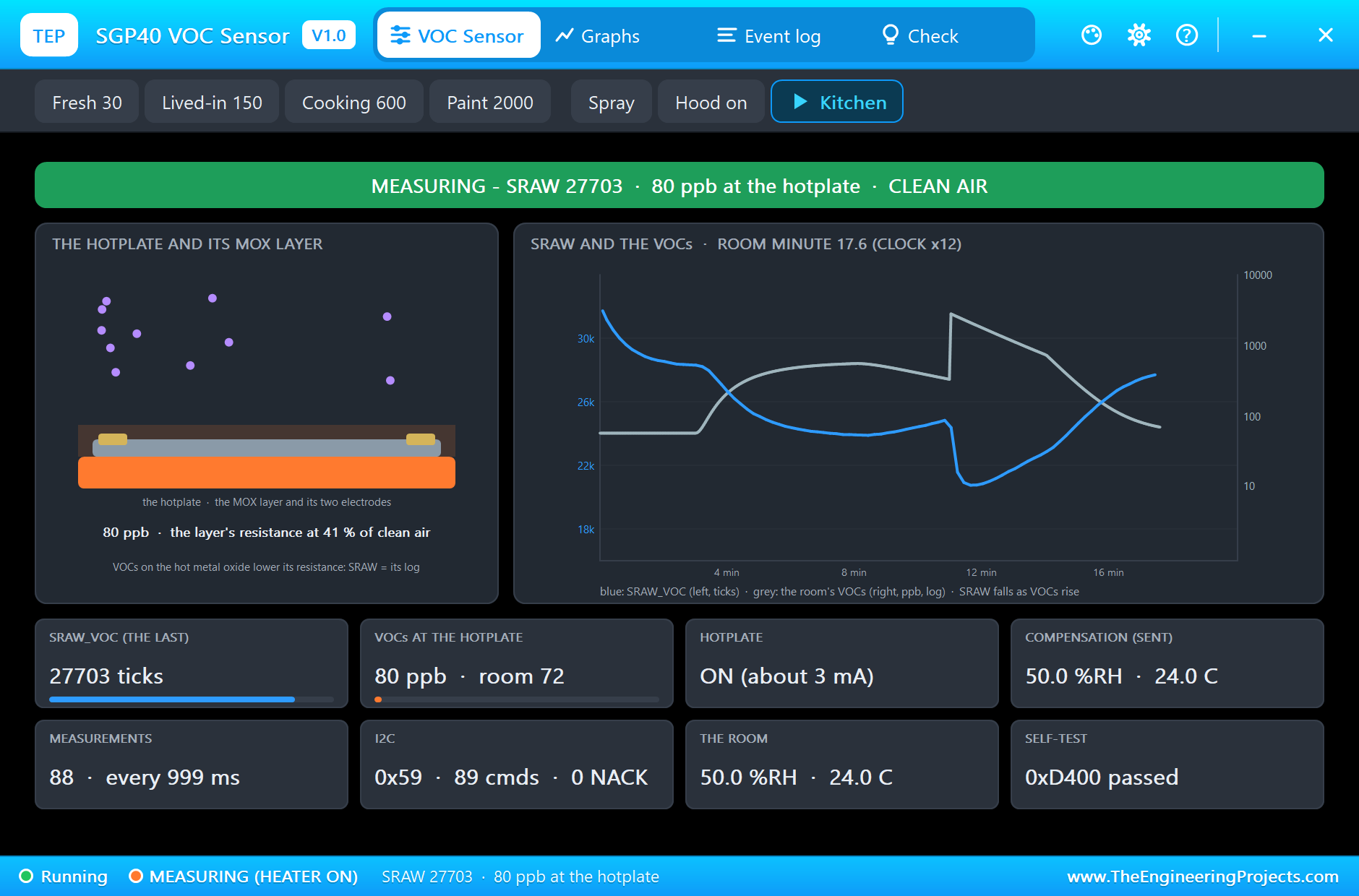
Open the project and press Run. The demo runs 88 simulated seconds - almost 18 minutes of the kitchen - and took 407 seconds on our PC with the pop-up open and the pictures being taken. Click the module for its pop-up. Every number below comes from one simulation run, the demo exactly as it ships.
The Self-Test and Clean Air
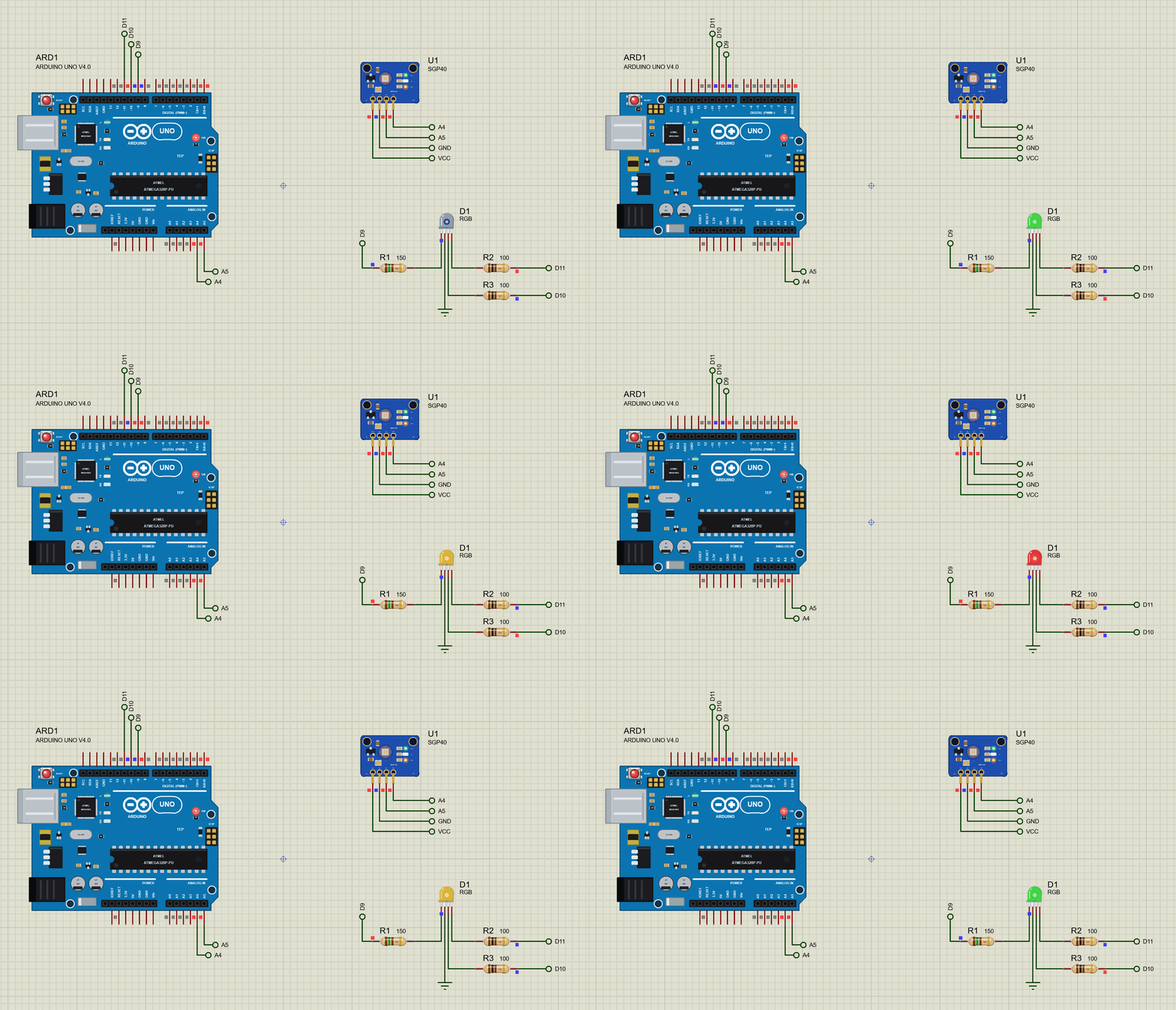
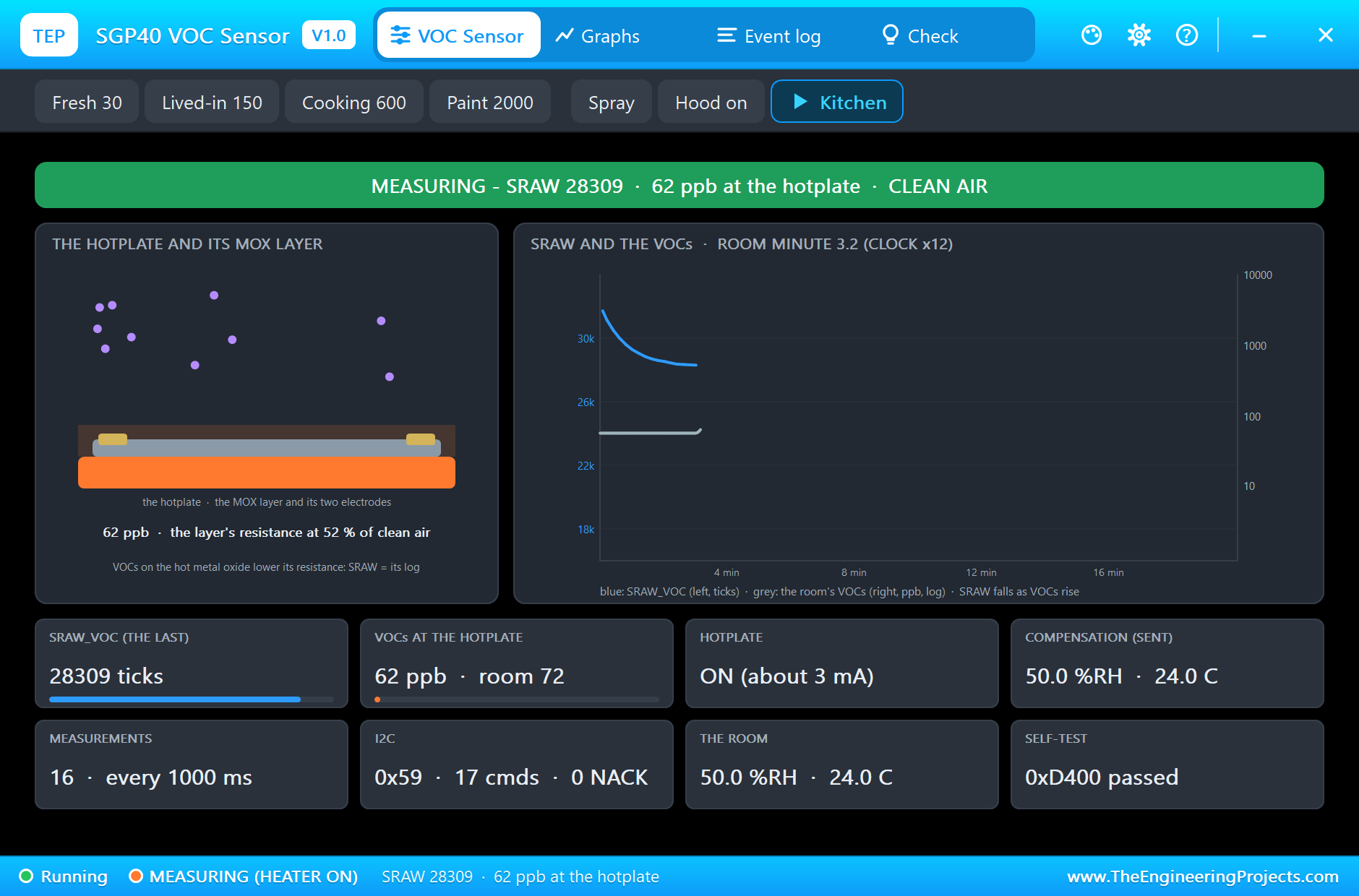
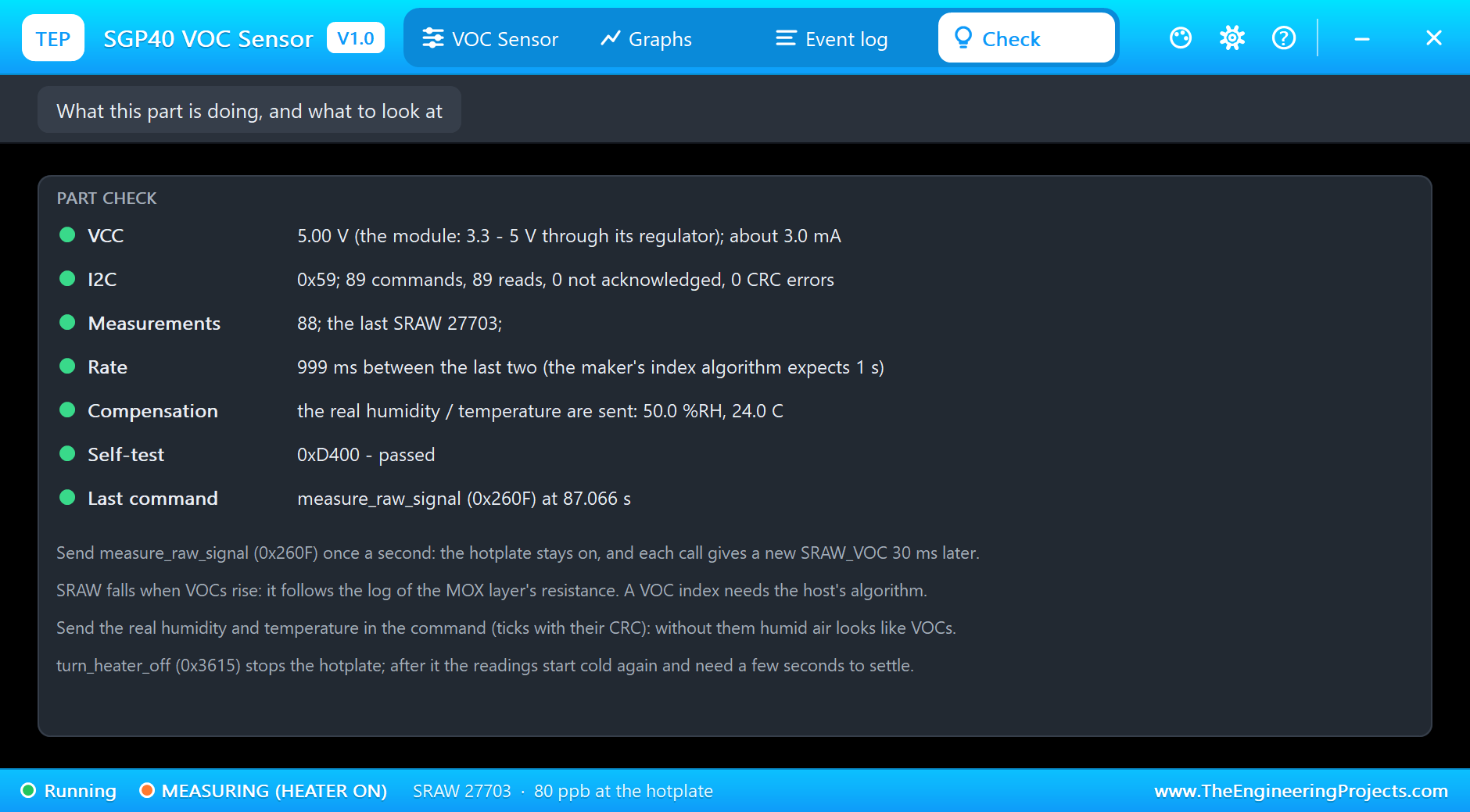
The sketch starts with the self-test: after 320 ms the sensor answers 0xD400 - passed. Then the measurements begin, one a second, and the hotplate comes on; the HEAT LED lights and the hotplate glows. The first SRAW values are high while the plate warms up - 31735, then 31152 - and the lamp is blue; the sketch takes the 12th as its baseline, about 28,400 ticks. At 16 s the air is clean: SRAW 28309, the index about 100, and the lamp is green.
Cooking
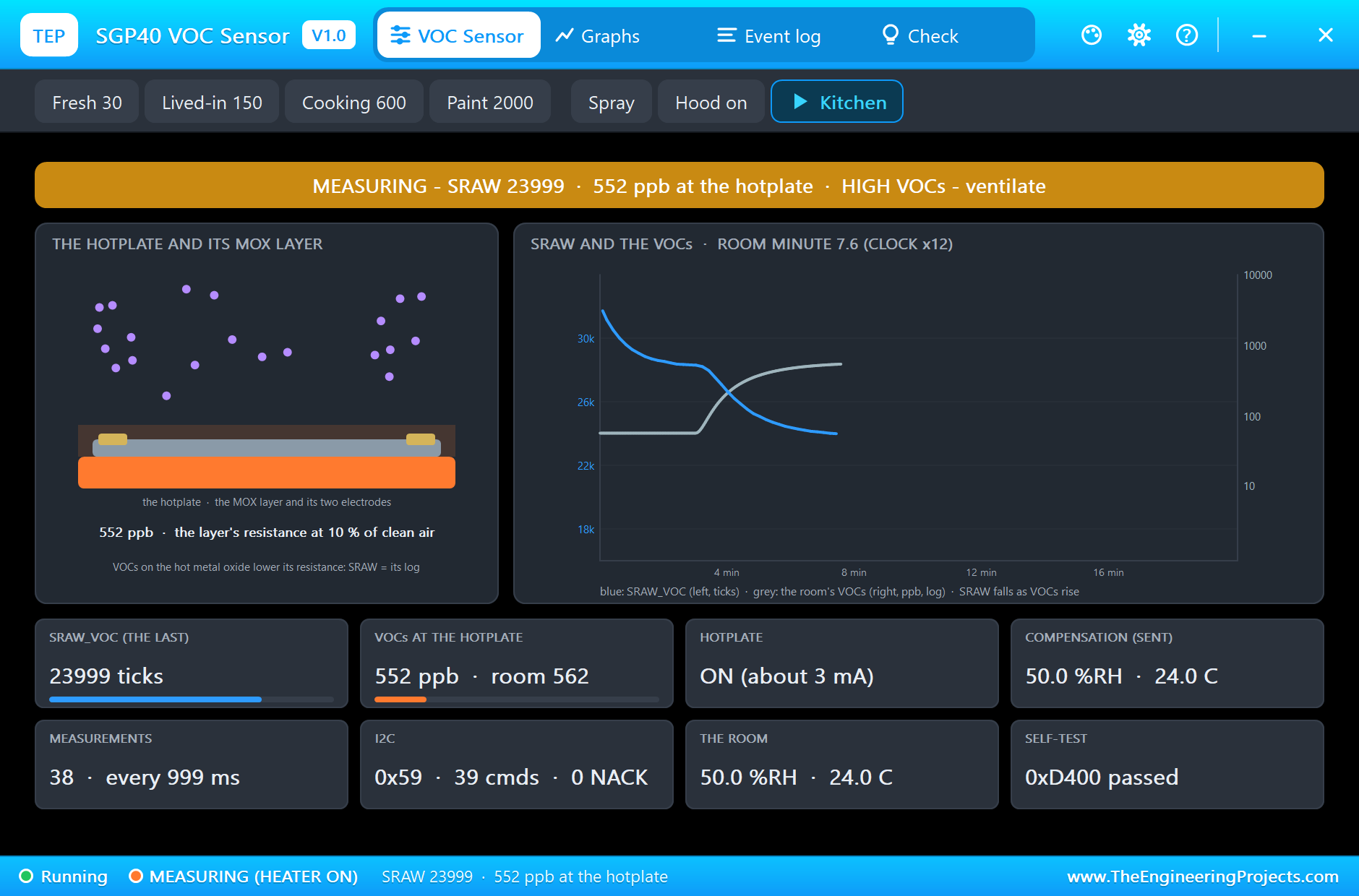
At room minute 3 the cooking starts. The VOCs climb, the metal oxide's resistance falls and so does SRAW: at 25 s it is already 25260 and the lamp yellow; at 38 s it is 23999 with 551 ppb at the hotplate. The index is about 300 and the lamp is red. In the pop-up's chart the grey VOCs rise and the blue SRAW falls - the mirror image the sensor is built on.
The Cleaning Spray
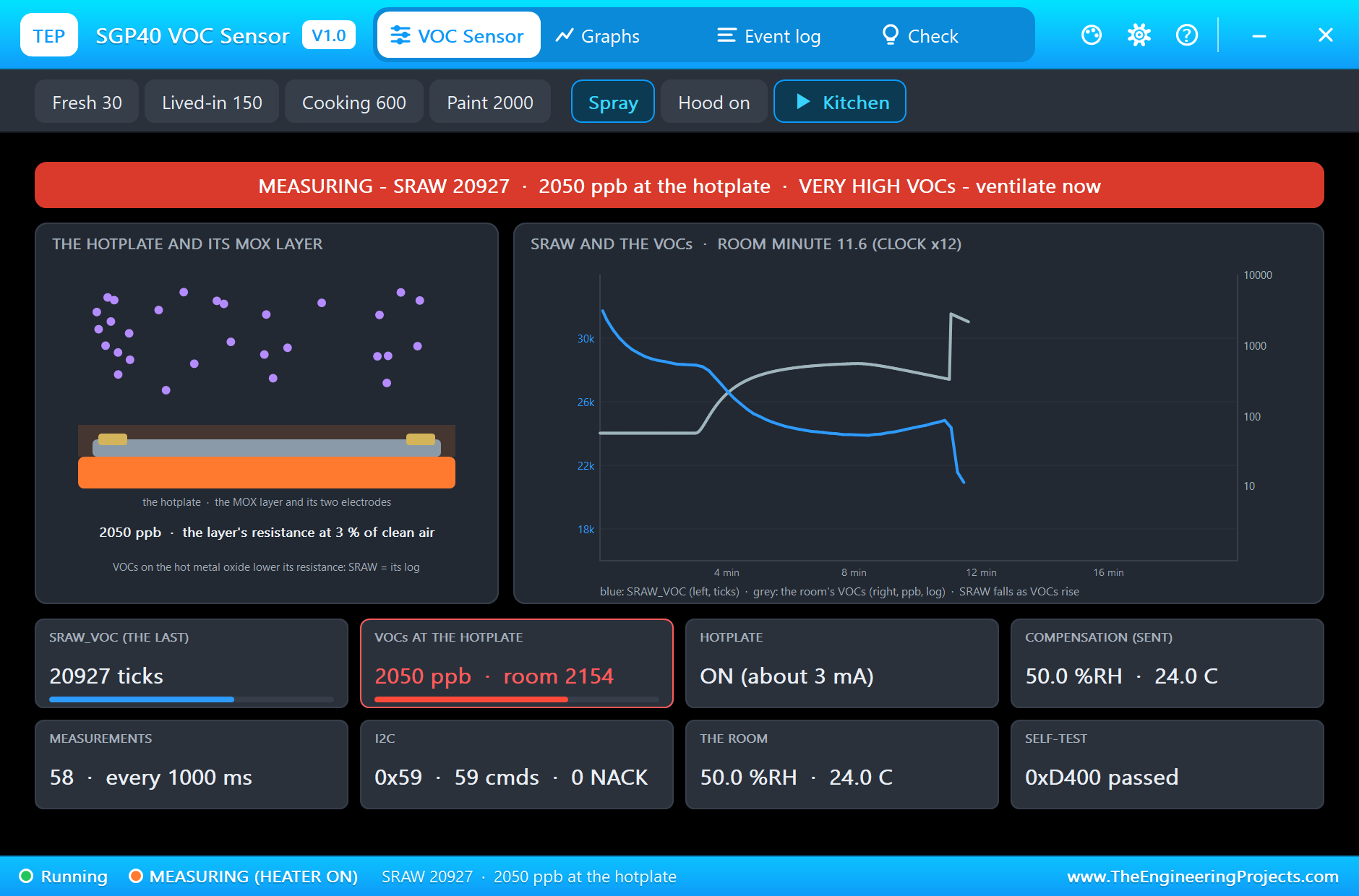
At room minute 11 a cleaning spray hits the air - the sharpest event of the day. At 58 s the hotplate sees 2050 ppb and SRAW drops to 20927; the banner turns red, and the sketch's index is at the top of its scale. The RGB LED glows red on the sheet.
The Hood Clears the Air
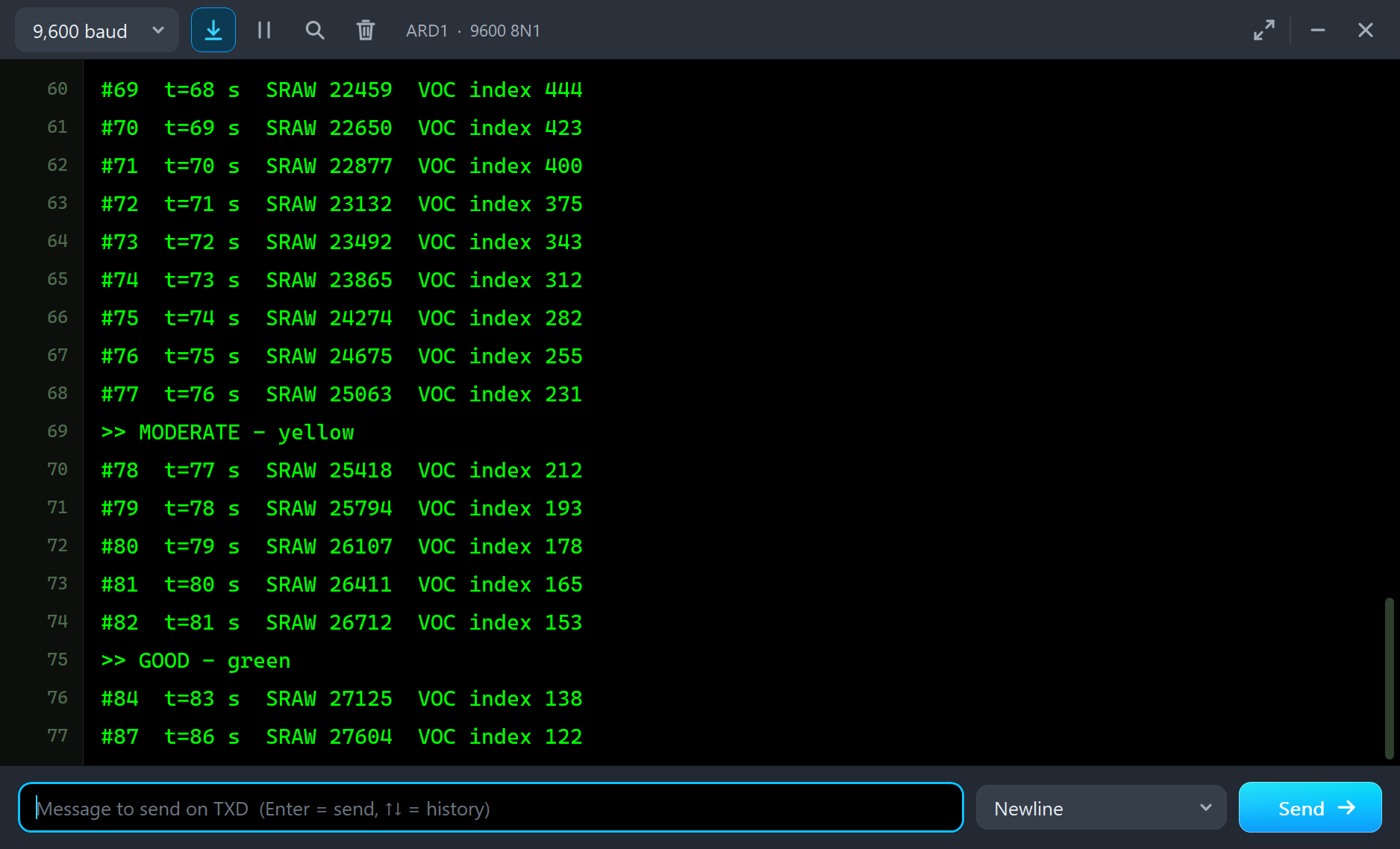
At room minute 14 the hood goes on and the VOCs are drawn out. SRAW climbs back: the index falls through yellow at 77 s and reaches green at 82 s; the last line of the monitor, at 86 s, shows SRAW 27604 and the index 122.
The Graphs, the Event Log and the Check Page
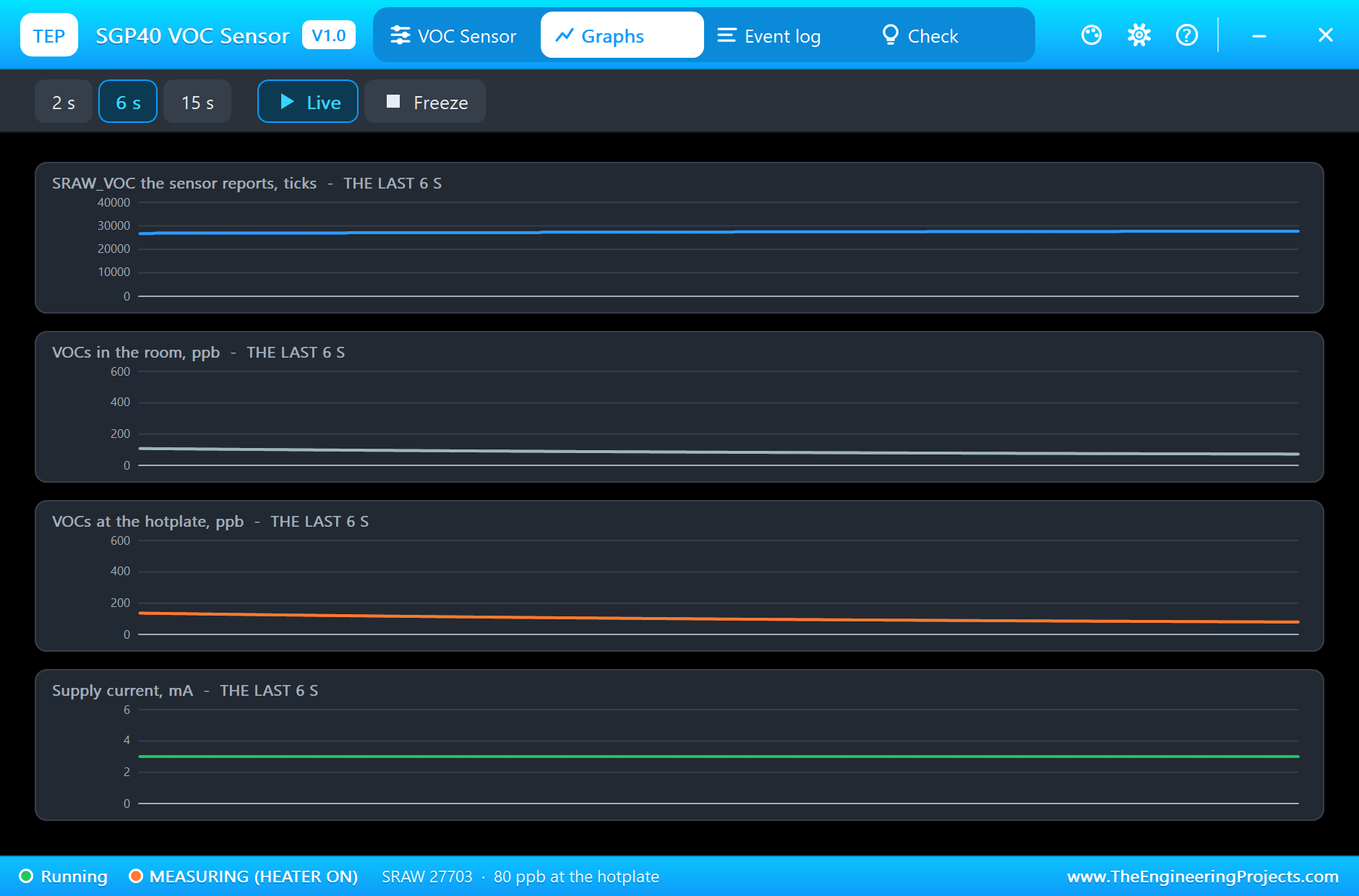
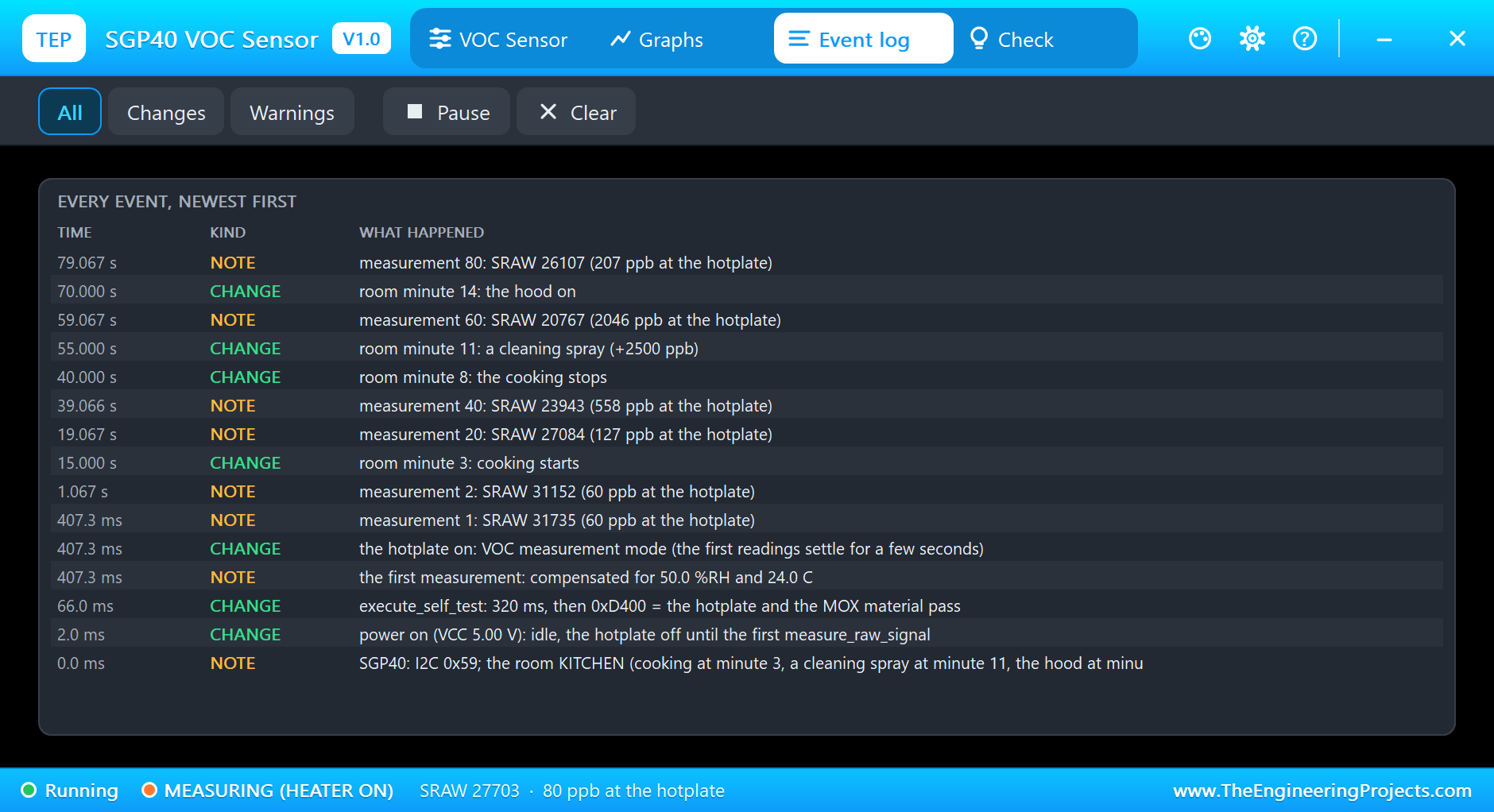
The Graphs page plots SRAW, the VOCs in the room and at the hotplate, and the supply current. The Event log keeps the self-test, the hotplate coming on and each step of the kitchen. The Check page sums up the run: 88 measurements a second apart, 89 commands, 0 not acknowledged, no CRC errors, the compensation sent and the self-test passed.
The monitor shows the sketch's side: the self-test, the baseline, every third measurement - and every one while the index is 150 or more - with its SRAW and index, and a line whenever the lamp changes colour.
VOCs, eCO2 and True CO2
VOC sensors and CO2 sensors answer different questions. Our SCD41 CO2 Sensor Library for Proteus counts the CO2 that people breathe out - a measure of ventilation. The SGP40 smells VOCs - a measure of pollution from cooking, cleaning and materials. Older metal-oxide sensors such as the CCS811 of our CCS811 Air Quality Sensor Library for Proteus turn their VOC reading into an "equivalent CO2"; the SGP40 leaves that guess out and gives the raw signal. A good air monitor often carries both kinds: CO2 for the people, VOCs for the rest.
Why the Hotplate?
Metal oxide only reacts with gases when it is hot - a few hundred degrees. The SGP40 heats a plate so small that it reaches that temperature with a few milliamps, and keeps it there while it measures. That is also why the first readings after power-on are off: the plate and the oxide need a moment to settle. Our model shows it as a high SRAW that fades within seconds after the heater comes on.
Humidity and Compensation
Water vapour changes the resistance of metal oxide too. Without compensation a humid room - a boiling kettle, a shower - looks like VOCs. Try it in the simulation: set the module's HUMIDITY to 80 while the sketch still sends 50 %RH, and SRAW drops although no VOCs arrived. Send the real humidity in the command and the error is gone.
Try It Yourself
- Click Spray in the pop-up at any time: SRAW drops within a few seconds.
- Click Hood on during the cooking: the VOCs fall at once.
- Set the module's HUMIDITY to 80 and leave the sketch's ROOM_RH at 50: humid air now looks like VOCs.
- Send turn_heater_off (0x3615) from the sketch and measure again: the readings start cold.
- Change the divisor 4000 in the index: a smaller number makes the lamp more sensitive.
Ideas to Extend the Demo
- Switch a range hood fan with a relay or a MOSFET when the index passes 250.
- Add our SHT31 or BME280 sensor and send the real humidity and temperature as compensation.
- Put the SGP40 and the SCD41 on one I2C bus: VOCs and CO2 in one air monitor.
Your Own Sketches
The demo sketch is in the zip file, and you can change it in the Arduino IDE. New to Arduino? Start with our Arduino Tutorial for Beginners. Export the compiled binary, and set the UNO's PROGRAM property to the new file. Our guide on How to get the HEX file from Arduino shows you where the file ends up.
Things to Know Before Using a Real SGP40
- Measure once a second: the maker's VOC index algorithm expects one sample a second, continuously.
- Give it time: the first minutes after power-on settle, and the maker's index learns the room over hours.
- Compensate: send the real humidity and temperature, from a sensor next to it.
- Keep it clean: silicone vapours and conformal coating poison metal oxide - keep them away from the membrane.
- Power: the hotplate draws a few milliamps while it runs; turn it off between readings only if you accept the warm-up.
Troubleshooting
- No answer right after a command: the measurement takes 30 ms and the self-test 320 ms - wait before reading.
- measure_raw_signal is ignored with a warning: it needs both compensation words with their CRCs, 8 bytes in all.
- SRAW is high at the start: the hotplate is still warming up; skip the first seconds.
- Humid air reads as VOCs: send the real humidity and temperature instead of the defaults.
- The part is not simulated:
TEPSGP40.DLLis missing from MODELS and from the project folder.
Limitations of the Simulation
- The commands, their words, their delays, the compensation ticks and the self-test codes are from the maker's own SGP40 driver; the module is our own drawing of an SGP40 breakout.
- Our own choices: SRAW = 30000 - 2600 x ln(1 + VOC / 60 ppb), the warm-up of the hotplate, the humidity effect without compensation, the noise, the kitchen and its profile, the supply current, and the LEDs and the glow on the module.
- Not modelled: the maker's VOC index algorithm (it runs on the host - our demo uses its own simple index), the sensitivity to each gas, and the drift and ageing of a real metal-oxide layer.
- Arduino is a name of Arduino; this library is not made or endorsed by Arduino, Labcenter or the maker of the SGP40.
- Tested in Proteus 8.5 in November 2026 (the demo as shipped). Proteus 7 is not supported.
So, that was all about the SGP40 VOC Sensor Library for Proteus Simulation. I hope it helps you build your air purifier, your hood controller or your air monitor before the real sensor arrives - and shows that a VOC sensor is a simple thing at heart: a hot plate of metal oxide and one number that falls when the air gets worse. If you have any questions, ask in the comments and I will help you out. Till the next tutorial, take care and have fun!

Comments
0