Hello friends, I hope you all are doing great. Today, I am going to share the Arduino UNO R4 Minima Library for Proteus. The UNO R4 Minima is the UNO of today: the same size and headers as the UNO R3 you know, but with a 32-bit Renesas RA4M1 (Arm Cortex-M4 at 48 MHz), 16 times the RAM, USB-C and a 24 V input. With this library the Minima runs your Arduino sketch in Proteus 8.5.
Arduino UNO R4 Minima Library for Proteus
Latest version: V1.0 (October 2026, this tutorial)
Other new Arduino boards: UNO R4 WiFi · Nano ESP32 · UNO WiFi Rev2 · Nano 33 IoT · UNO Q · Nano Every · MKR WiFi 1010 · Nano RP2040 Connect · STM32 Black Pill · Nucleo-F401RE · STM32 Blue Pill · Teensy 4.1 · Arduino Due · Arduino Leonardo · Arduino Micro · BBC micro:bit V2 · GIGA R1 WiFi
Ethernet libraries: Ethernet Shield · Ethernet Shield 2 · W5500 Module · W5100 Module · ENC28J60 Module · ENC28J60 Nano Shield · Ethernet Rev3 · LAN8720 Module · WT32-ETH01 · USR-TCP232-T2
Motor drivers: L298 · L9110S · TB6612FNG · BTS7960 · A4988 / DRV8825 · 28BYJ-48 + ULN2003 · PCA9685 Servo · Relay Module
Temperature and weather sensors: DHT11 / DHT22 · DS18B20 · BME280 · BMP280 · SHT31 · AHT20 · BME680 · MLX90614 · MAX6675
Helping Tools
- Laptop WiFi Monitor: a laptop on the Wi-Fi of your design: a browser, a TCP / UDP terminal and ping
- Mobile WiFi Monitor: a smartphone that opens the pages of your board and sends it commands
- Serial Monitor Advance: a serial terminal window for the UART of your board
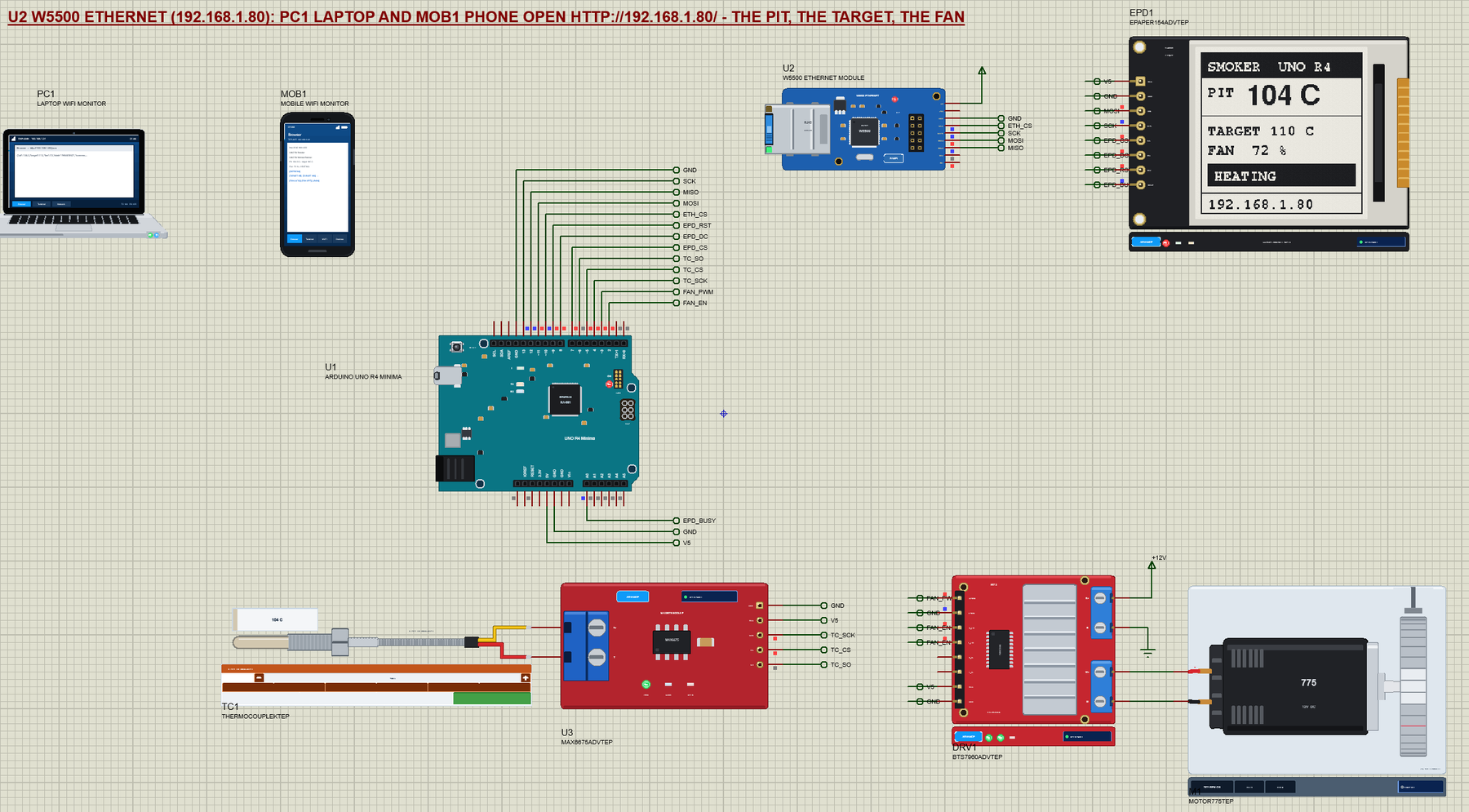
The Minima is the R4 without a radio, so we gave it a cable: a W5500 Ethernet module puts it on our virtual network. Around it we built a complete project, a BBQ smoker controller. A K-type probe on a MAX6675 reads the pit, a BTS7960 drives a 12 V blower that feeds the fire, a 1.54" e-paper shows the pit, the target and the fan, and a laptop and a phone open the smoker's web page to change the target.
NOTICE: Proteus has no RA4M1 model, so our team has put a lot of effort into building this board ourselves: the Minima's pins, LEDs and serial monitor are all our own model, and your sketch compiles with our free TEP Boards for Proteus add-on. Your feedback is the fuel that keeps us going, so please tell us what you think in the comments below or in the Arduino UNO R4 Minima board of our forum. And if our free libraries help you, you can buy us a coffee. So, let's get started with the Arduino UNO R4 Minima Library for Proteus:
What is the Arduino UNO R4 Minima?
Arduino released the UNO R4 in June 2023 in two versions: the UNO R4 WiFi with an ESP32-S3 radio and a 12 x 8 LED matrix, and the UNO R4 Minima, the plain one. Both keep the UNO's 68.6 x 53.4 mm board, its headers and its 5 V logic, so shields made for the UNO R3 still fit. Inside, the 8-bit ATmega328P makes way for the Renesas RA4M1: a 32-bit Arm Cortex-M4 at 48 MHz with 256 KB of flash and 32 KB of RAM.
| Arduino UNO R3 | Arduino UNO R4 Minima | Arduino UNO R4 WiFi | |
|---|---|---|---|
| Microcontroller | ATmega328P, 8-bit, 16 MHz | RA4M1, Cortex-M4, 48 MHz | RA4M1, Cortex-M4, 48 MHz |
| Flash, RAM | 32 KB, 2 KB | 256 KB, 32 KB | 256 KB, 32 KB |
| USB | USB-B (a 16U2 bridge) | USB-C (the RA4M1 itself) | USB-C (through the ESP32-S3) |
| Input voltage | 7 - 12 V | 6 - 24 V | 6 - 24 V |
| Extras | - | 12-bit DAC, CAN, op-amp, RTC, HID | the same, plus Wi-Fi, Bluetooth, the LED matrix, Qwiic |
Our Arduino UNO R4 WiFi Library for Proteus covers the Wi-Fi version; the Minima has the same pins and the same core, so a sketch moves between them without changes as long as it does not use the radio or the matrix.
Why the Minima?
The Minima is the board for projects that do not need Wi-Fi, or need a wired network instead. It costs less than the WiFi version, its USB-C goes straight to the RA4M1 (so it can act as a USB keyboard or mouse), and it has an SWD connector for a real debugger. Its wide 6 - 24 V input means it runs from a 12 V or 24 V supply without a separate regulator - handy next to a 12 V blower, a pump or a motor, as in our smoker.
Features of the Arduino UNO R4 Minima Library for Proteus
- The board as it looks: the teal UNO R4 Minima with its headers and labels, USB-C, the DC jack, the RA4M1, the SWD and ICSP headers, RESET and the L, TX, RX and ON LEDs.
- Your sketch: a .hex for "Arduino UNO R4 Minima (TEP Proteus)" with the UNO names - D0 to D13, A0 to A5, LED_BUILTIN, Serial, Serial1, Wire on A4 / A5, SPI on D10 to D13, EEPROM, analogRead, analogWrite and attachInterrupt.
- A network by cable: the Arduino Ethernet library with our W5500 (or W5100) module, on the same virtual network as our Wi-Fi boards, the laptop and the phone.
- The serial monitor: built in, on the USB-C, with Monitor, Plotter and Board tabs - our TEP header, no Windows title bar.
- A complete package: about 3.9 MB with the board, the add-on, the MAX6675, BTS7960, e-paper, W5500 and monitor libraries and the demo, without the source code of the models.
The Arduino UNO R4 Minima in Proteus
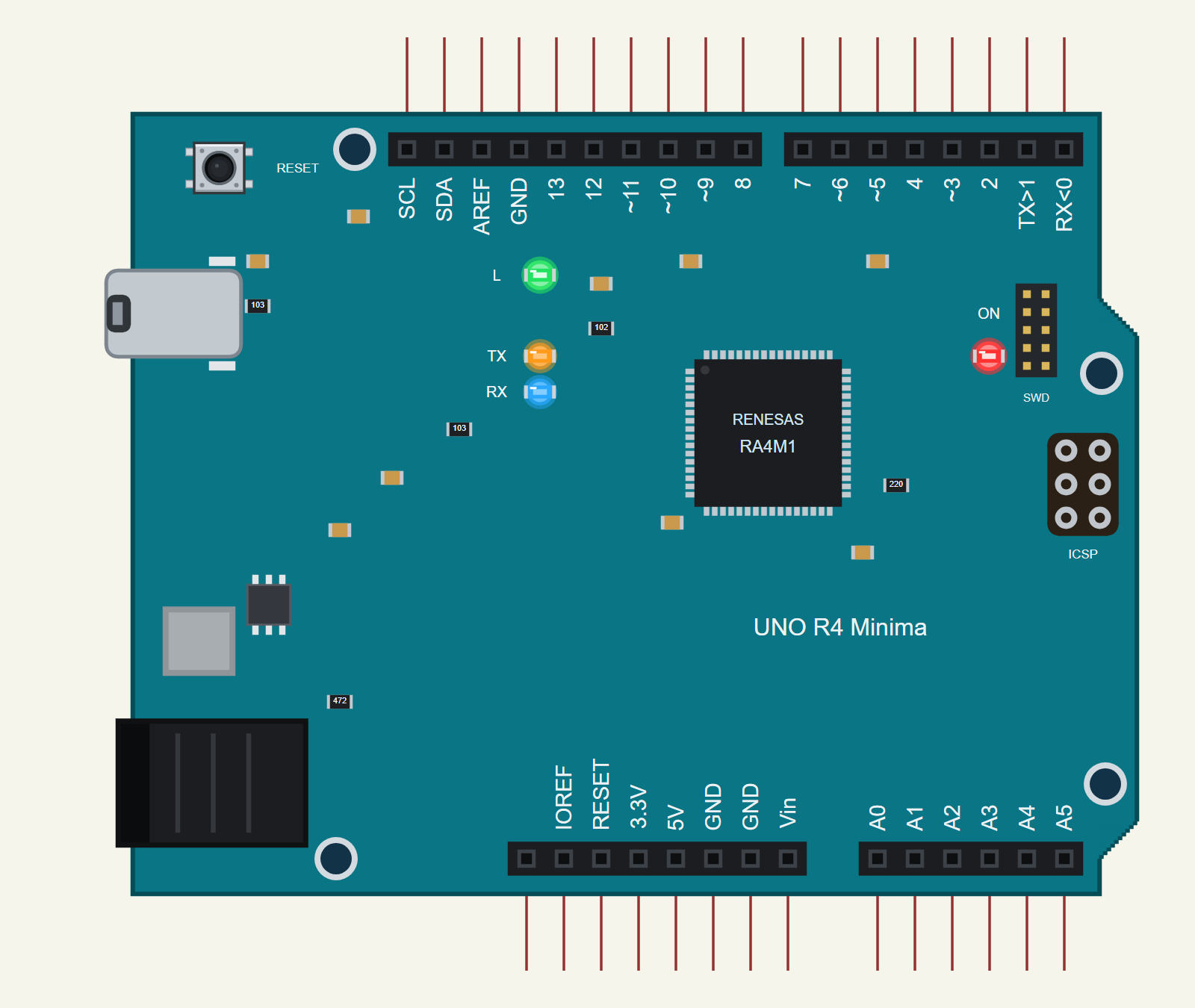
Search UNO R4 MINIMA in Pick Devices; the device ARDUINO UNO R4 MINIMA is in TEPUNOR4MINIMA.LIB (Microprocessor ICs, Arduino Boards), with the prefix U. The board lies as the UNO always does: USB-C and the jack on the left, the digital pins along the top. Click the USB-C to open the serial monitor.
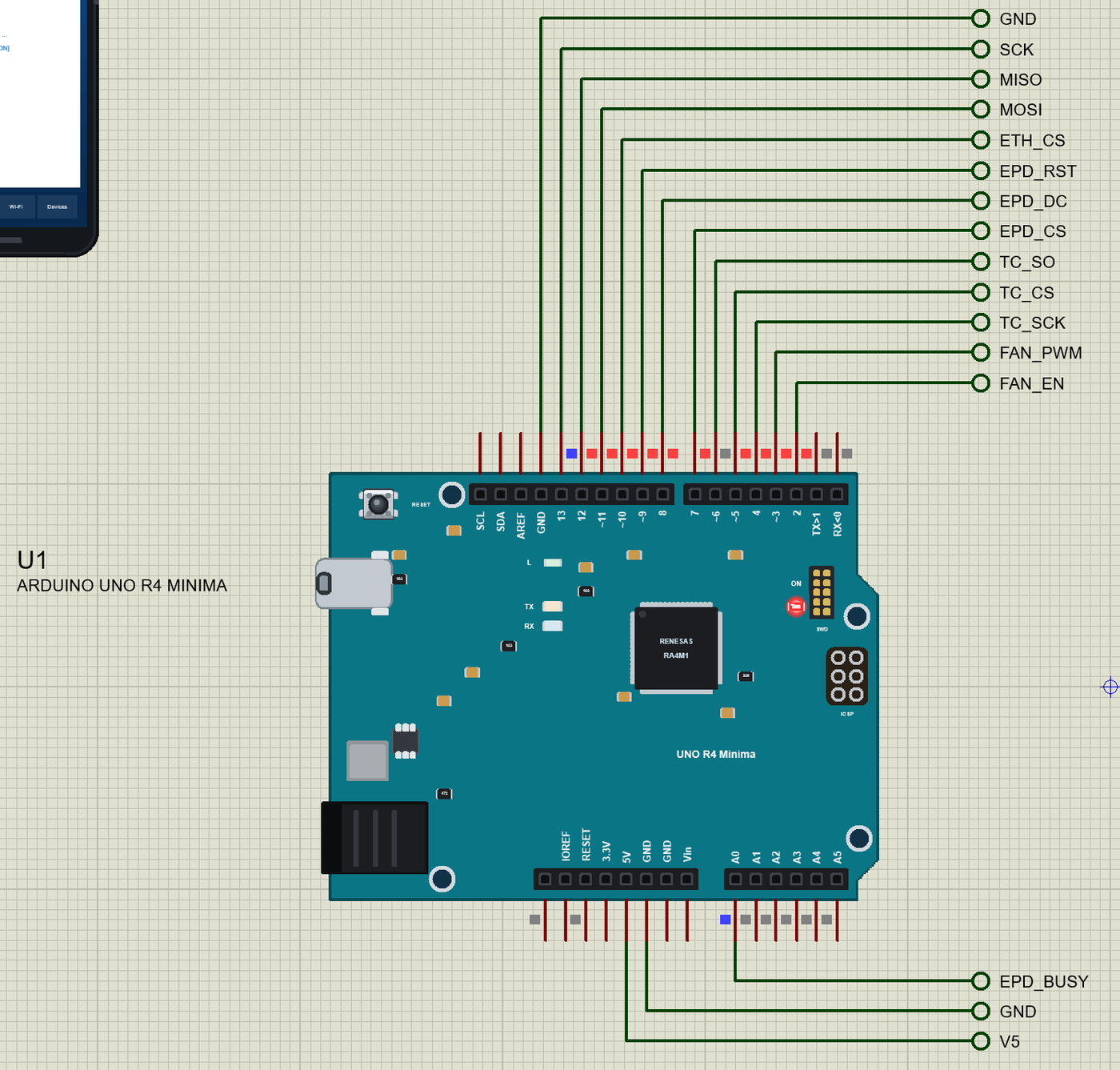
The Pins
| Pins | What the library does with them |
|---|---|
| D0, D1 | Serial1 RX / TX (not the USB), GPIO |
| D2 to D13 | GPIO, interrupt, PWM on any pin |
| D10 to D13 | SPI SS / MOSI / MISO / SCK; D13 is also the L LED |
| A0 to A5 | analogRead 0 to 1023 for 0 to 5 V; also GPIO |
| A4, A5 (SDA, SCL) | Wire (I2C) |
| 5V, 3.3V, IOREF, GND, RESET | 5 V, a 3.3 V output, 5 V, ground, reset |
| AREF, Vin, NC | drawn, not modelled |
Download Arduino UNO R4 Minima Library for Proteus
Click the button below to download Arduino-UNO-R4-Minima-Library-for-Proteus-v1.0.zip (about 3.9 MB, without the source code of the models):
Arduino UNO R4 Minima Library for Proteus V1.0- README.txt: installation, the demo, the pins, the properties, troubleshooting and the limits.
- Proteus Library Files:
TEPUNOR4MINIMA.LIBand the demo's parts:TEPMAX6675.LIB,TEPBTS7960.LIB,TEPMOTOR775.LIB,TEPEPAPER.LIB,TEPW5500MOD.LIB,TEPLAPTOP.LIBandTEPMOBILE.LIB. - Proteus Model Files:
TEPNET.DLL(the board, the W5500, the laptop, the phone and the network) and the parts' DLLs. - Arduino Code: the demo sketch and the TEP Boards for Proteus add-on 1.18.0.
- Proteus Simulation: the demo project, its HEX file and copies of the DLLs.
No Proteus yet? Read How to Download and Install Proteus 7 and 8. New to libraries? Follow How to Install a New Library in Proteus.
How to Install Arduino UNO R4 Minima Library for Proteus
- Close Proteus and extract the whole zip file, for example to your Desktop.
- Copy the files from Proteus Library Files into the LIBRARY folder of Proteus.
- Copy the DLLs from Proteus Model Files into the MODELS folder, replacing an older TEPNET.DLL.
- Delete
TEPUNOR4MINIMA.IDXfrom the LIBRARY folder if it is there. - For your own sketches, copy Arduino Code\TEP Boards for Proteus\hardware into your Arduino sketchbook (Documents\Arduino) and restart the Arduino IDE; the board is Arduino UNO R4 Minima (TEP Proteus).
- Start Proteus, press P and search for UNO R4 MINIMA.
Demo: a BBQ Smoker Controller
A smoker cooks low and slow: the meat sits for hours in smoke at about 110 C (230 F), and the only way to steer a charcoal fire is the air it gets. A pit controller does that job: a thermocouple in the cooking chamber, a small blower on the firebox's air inlet, and a controller that runs the blower harder the colder the pit is. That is our demo.
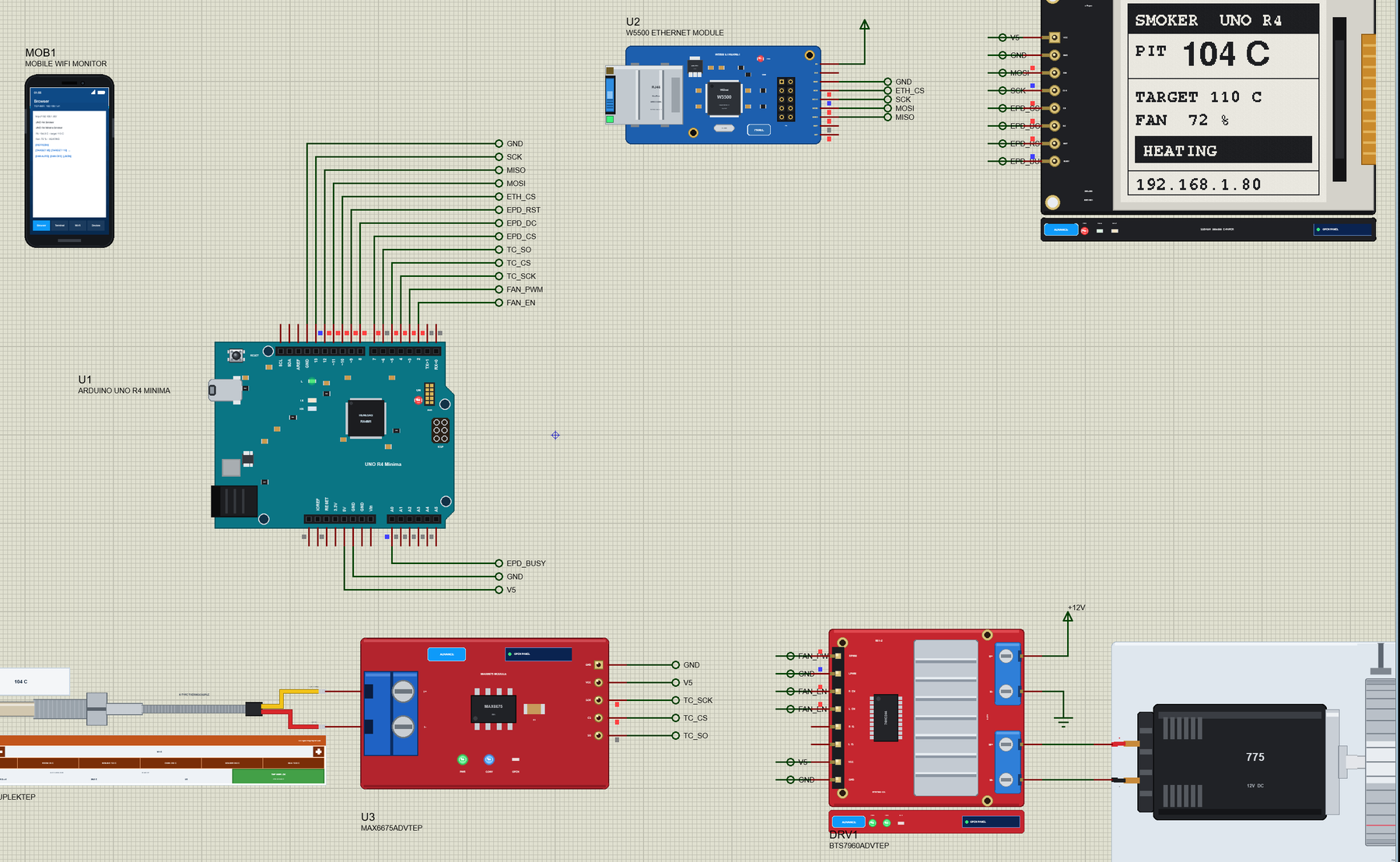
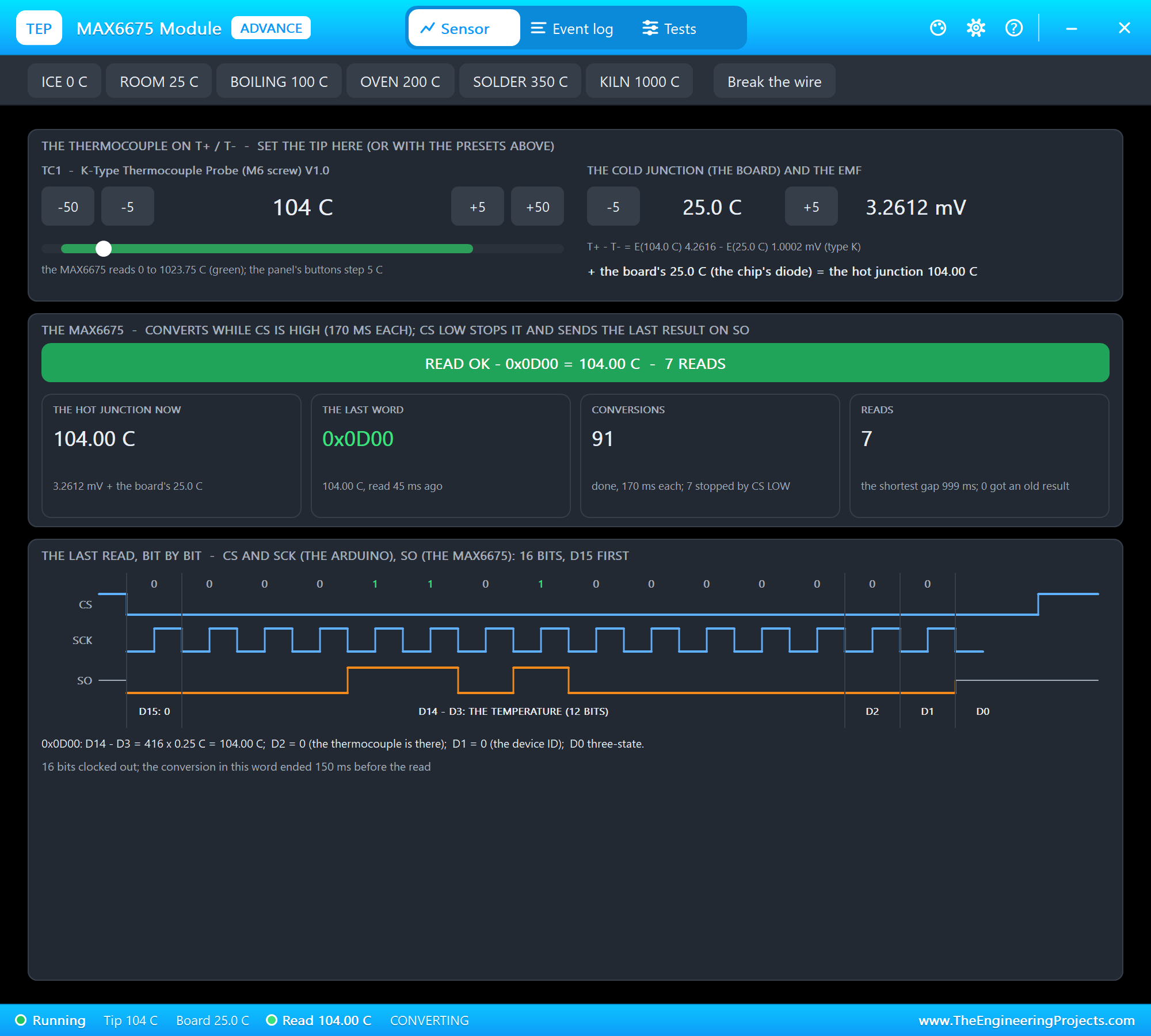
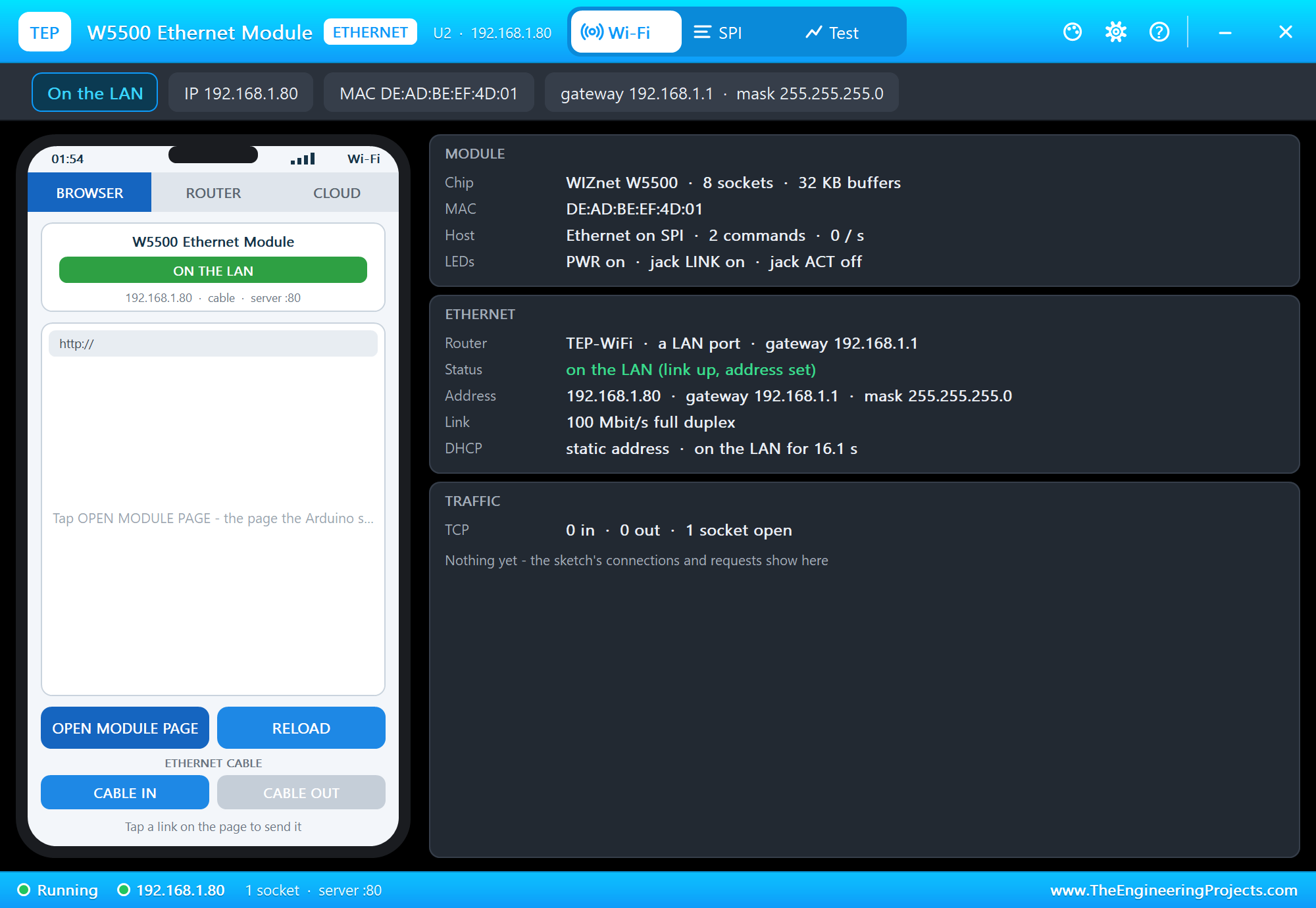
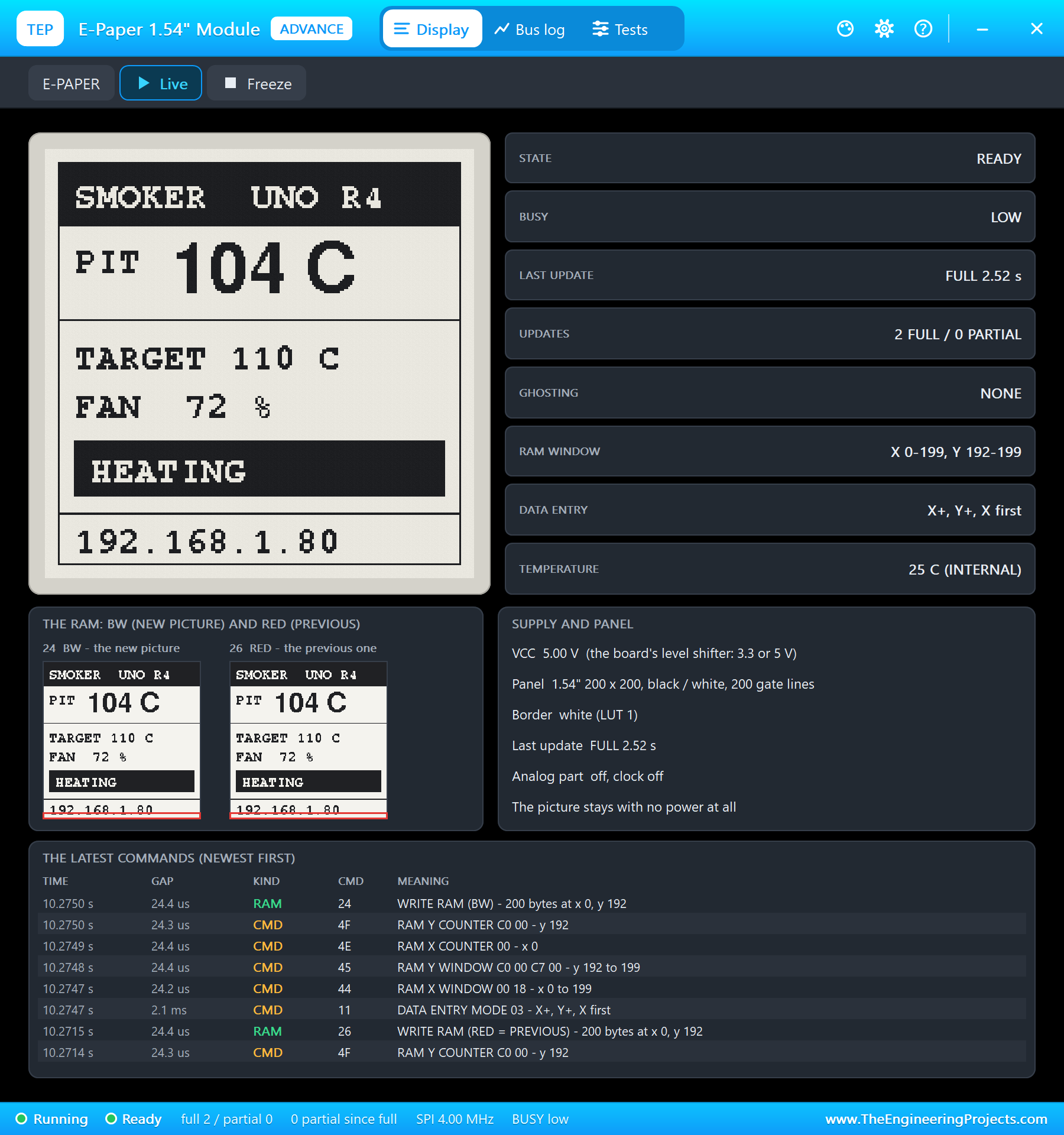
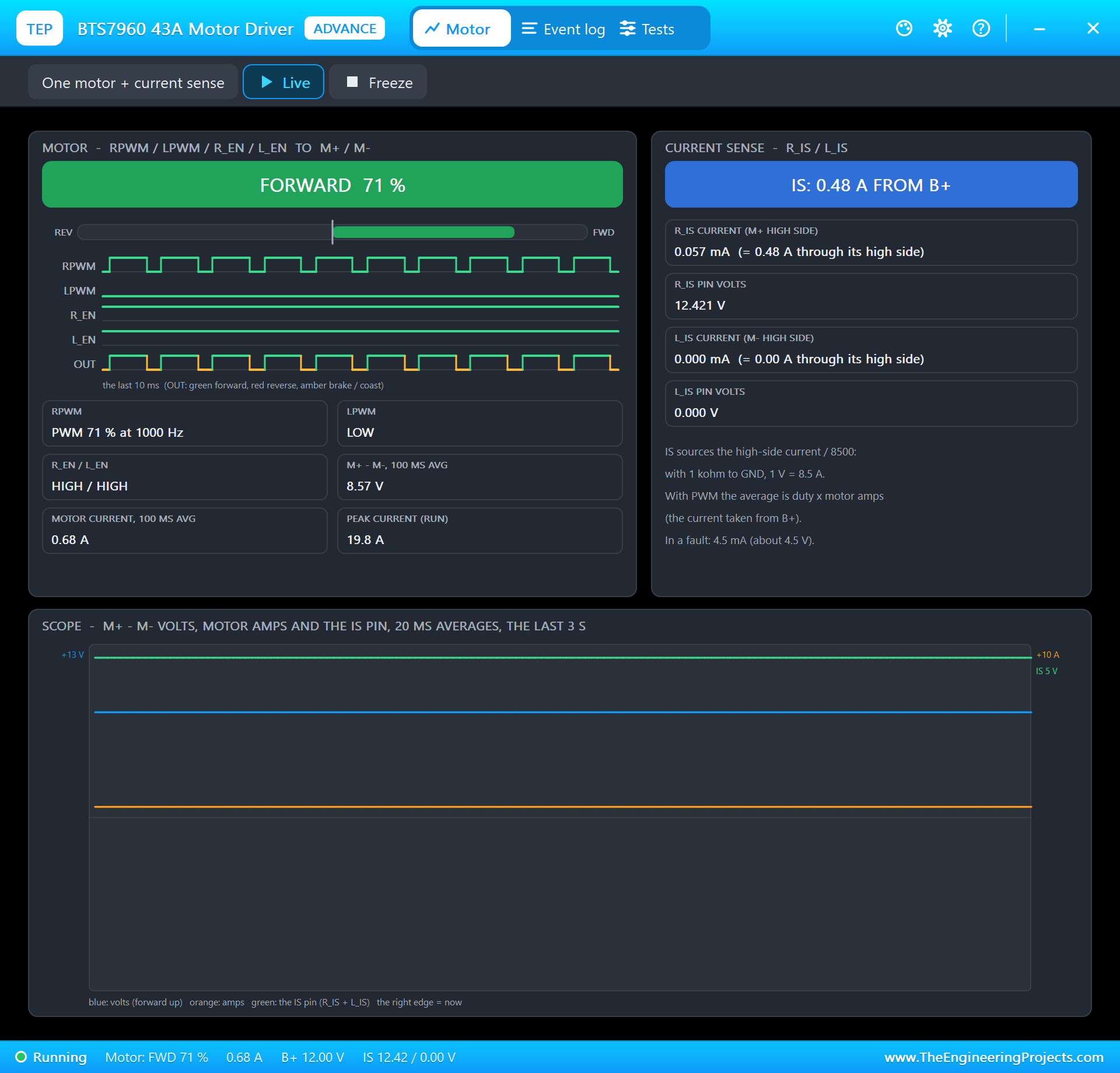
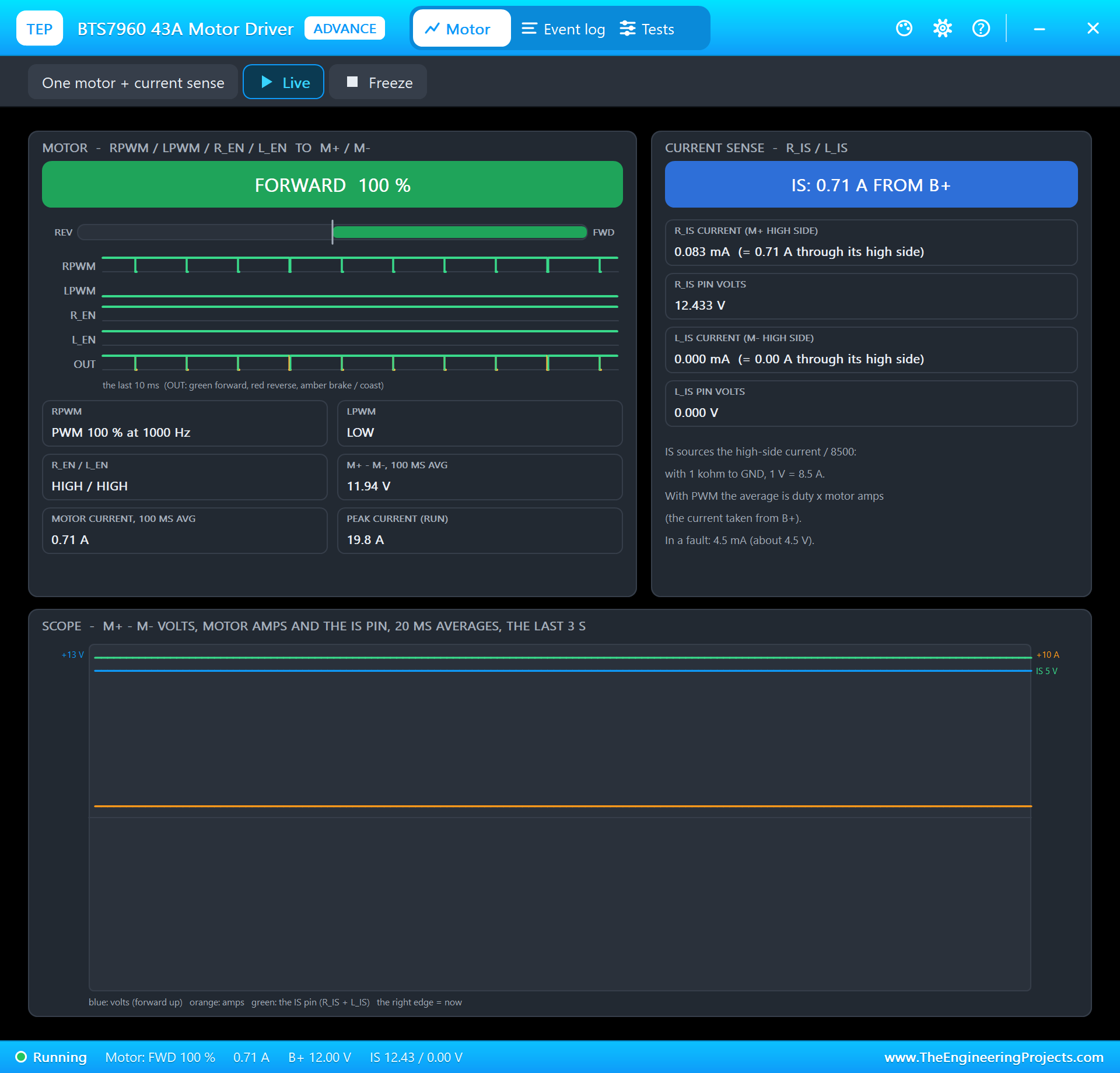
Open UNO-R4-Minima-Smoker-Controller.pdsprj. U1 runs Minima_Smoker_Controller.hex. The parts come from our own libraries, each with its article: TC1 and U3 from the MAX6675 Thermocouple Library for Proteus, DRV1 and the M1 blower from the BTS7960 Motor Driver Library for Proteus, EPD1 from the E-Paper Display Library for Proteus and U2 from the W5500 Ethernet Module Library for Proteus. The MAX6675, the BTS7960, the e-paper and the W5500 are the Advance versions: each opens a pop-up window at Run. PC1 is the Laptop WiFi Monitor and MOB1 the Mobile WiFi Monitor.
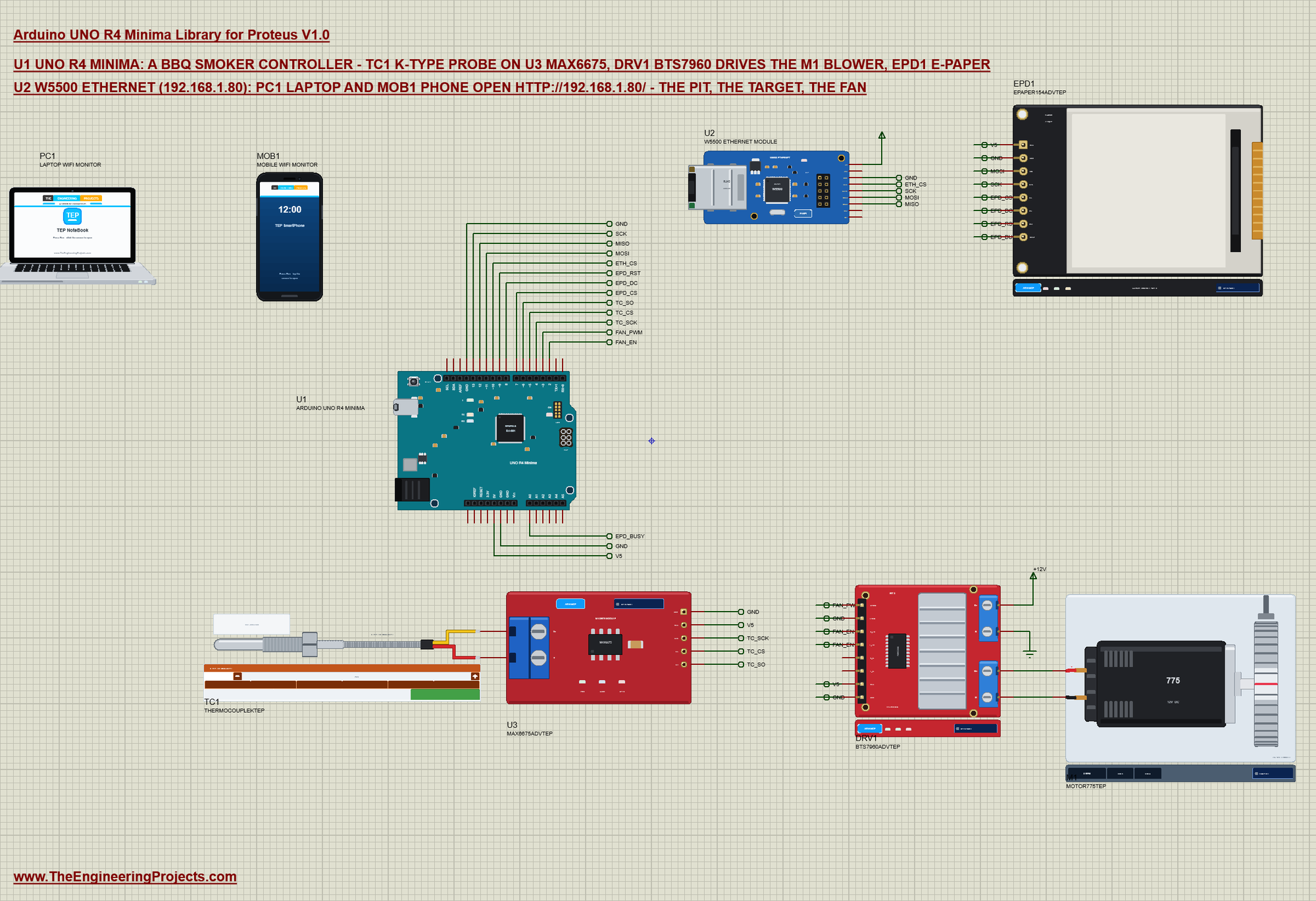
| Part pin | Net label | UNO R4 Minima pin | What it does |
|---|---|---|---|
| MAX6675 SCK, CS, SO | TC_SCK, TC_CS, TC_SO | D4, D5, D6 | the probe's converter, read bit by bit |
| BTS7960 RPWM | FAN_PWM | D3 | the blower's speed (PWM) |
| BTS7960 R_EN, L_EN | FAN_EN | D2 | the driver on or off |
| BTS7960 LPWM | GND | GND | one direction only |
| E-paper DIN, CLK | MOSI, SCK | D11, D13 | SPI data and clock |
| E-paper CS, DC, RST, BUSY | EPD_CS, EPD_DC, EPD_RST, EPD_BUSY | D7, D8, D9, A0 | chip select, data / command, reset, busy |
| W5500 SCS, SCLK, MOSI, MISO | ETH_CS, SCK, MOSI, MISO | D10, D13, D11, D12 | SPI, shared with the e-paper |
The e-paper and the W5500 share the SPI bus on D11 and D13, each with its own chip select; the MAX6675 has its own three pins. The BTS7960's B+ is on a +12V power terminal, the motor on M+ and M-. The W5500 takes its 5 V from a power terminal in the demo: its model reads the supply as a digital level, and the board's 5V is an analog source in Proteus. On a real board it sits on the UNO's 5V pin.
The Controller
Every second the sketch reads the probe, smooths the reading and sets the blower. The fan runs 12 % for each degree the pit is below the target, from 0 to 100 %; at or above the target it stops:
void control() {
  float c = probe.readCelsius();                            // NAN: the thermocouple input is open
  if (isnan(c)) pitC = NAN;
  else pitC = isnan(pitC) ? c : pitC * 0.7 + c * 0.3;
  if (!autoFan) { duty = 0; state = ST_OFF; }
  else if (isnan(pitC)) { duty = 0; state = ST_PROBE; }
  else {
    float d = (targetC - pitC) * GAIN;
    duty = d <= 0 ? 0 : d >= 100 ? 100 : (byte)(d + 0.5);
    state = duty == 100 ? ST_STOKING : duty > 0 ? ST_HEATING : pitC > targetC + 10 ? ST_HOT : ST_HOLD;
  }
  digitalWrite(FAN_EN, duty ? HIGH : LOW);
  analogWrite(FAN_PWM, (int)duty * 255 / 100);
}
This is a proportional controller. Far below the target the blower runs flat out (STOKING) and the fire grows; close to it the blower slows down (HEATING), and at the target it stops (HOLDING) - the fire calms down until the pit drops again. The NAN check catches a broken probe wire: then the fan stays off, the safe side for a fire.
The E-Paper
An e-paper keeps its picture without power, but a full update takes about 2.5 s and flashes the screen. So the sketch draws the frame once and then changes only the middle with a partial update - and only when a value really changes, at most every 4 s:
void screenTick() {
  bool pitMoved = isnan(pitC) != isnan(shownPit) || (!isnan(pitC) && fabs(pitC - shownPit) >= 1.0);
  bool changed = pitMoved || targetC != shownTarget || state != shownState || abs((int)duty - (int)shownDuty) >= 5;
  if (!drawn || !changed || millis() - lastDraw < 4000) return;
  if (partials >= 20) fullScreen(); else partialMiddle();
}
void partialMiddle() {
texts();
display.setPartialWindow(1, 33, 198, 140);
display.firstPage();
do { display.fillScreen(GxEPD_WHITE); display.drawRect(0, 0, 200, 200, GxEPD_BLACK); drawMiddle(); } while (display.nextPage());
partials++; pages++; remember();
}GxEPD2 draws in pages of 32 rows (800 bytes of RAM) - the whole 200 x 200 picture would need 5000 bytes:
GxEPD2_BW<GxEPD2_154_D67, 32> display(GxEPD2_154_D67(EPD_CS, EPD_DC, EPD_RST, EPD_BUSY));The Web Page over Ethernet
The setup deselects both SPI devices first, then starts the W5500 on a fixed address:
  pinMode(ETH_CS, OUTPUT); digitalWrite(ETH_CS, HIGH);     // both SPI devices deselected before either talks
  pinMode(EPD_CS, OUTPUT); digitalWrite(EPD_CS, HIGH);
Ethernet.init(ETH_CS);
Ethernet.begin(mac, ip, dnsServer, gateway, subnet);The page shows the pit, the target and the fan with the links; the address of a link carries the command:
void sendPage() {
  putF(F("HTTP/1.1 200 OK\r\nContent-Type: text/html\r\nConnection: close\r\n\r\n"
         "<html><head><title>UNO R4 Smoker</title></head><body><h1>UNO R4 Minima Smoker</h1><p>Pit: <b>"));
  putPit(); putF(F(" C</b> - target ")); putN(targetC); putF(F(" C</p><p>Fan: <b>")); putN(duty);
  putF(F(" %</b> - ")); put(stateText(state));
  putF(F("</p><p><a href=\"/\">REFRESH</a></p><p><a href=\"/t?c=95\">TARGET 95</a> <a href=\"/t?c=110\">TARGET 110</a> "
         "<a href=\"/t?c=125\">TARGET 125</a></p><p><a href=\"/auto\">FAN AUTO</a> <a href=\"/off\">FAN OFF</a> "
         "<a href=\"/json\">JSON</a></p></body></html>"));
}
if (!strncmp_P(path, PSTR("/t?c="), 5)) setTarget(atoi(path + 5), F("the web page"));
else if (!strcmp_P(path, PSTR("/auto"))) { autoFan = true; Serial.println(F("Fan: AUTO (the web page)")); control(); }
else if (!strcmp_P(path, PSTR("/off"))) { autoFan = false; Serial.println(F("Fan: OFF (the web page)")); control(); }The loop does four things in turn - the controller every second, a status line every 5 s, the screen and the web server:
void loop() {
  if (millis() - lastRead >= 1000) { lastRead = millis(); control(); }
  if (millis() - lastPrint >= 5000) { lastPrint = millis(); status(); }
  screenTick();
  serve();
  while (Serial.available()) {
    char c = Serial.read();
    if (c == '\r' || c == '\n') { if (lineLen) { line[lineLen] = 0; command(line); lineLen = 0; } }
    else if (lineLen < sizeof line - 1) line[lineLen++] = c;
  }
}
Run the Demo
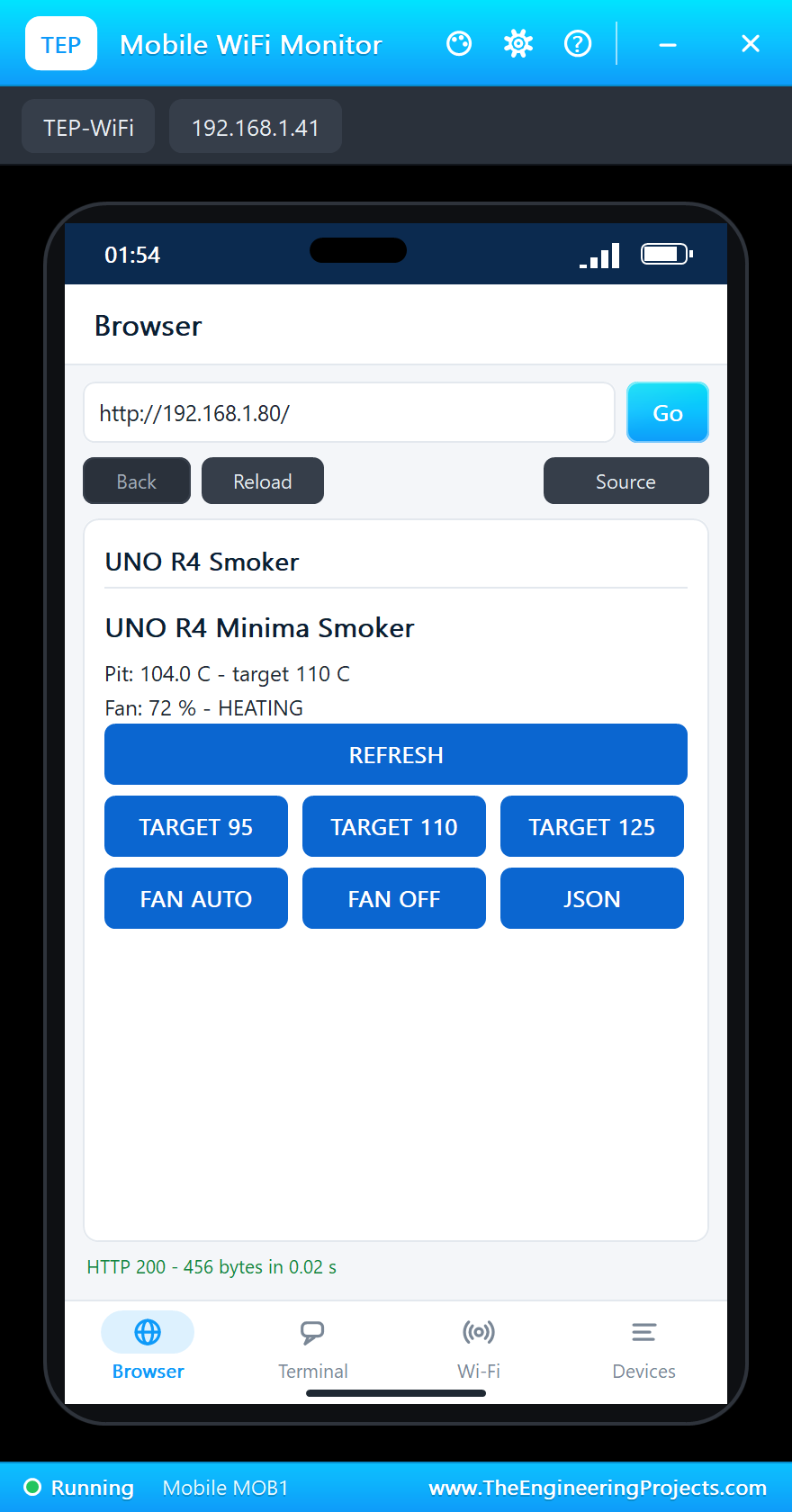
Press Run. The serial monitor opens; the W5500 comes up on 192.168.1.80 with the link ON, the e-paper makes its first full update, and the controller starts:
UNO R4 Minima Smoker Controller - The Engineering Projects
W5500: 192.168.1.80, link ON
Page: http://192.168.1.80/
E-paper: full update
Pit 104.0 C  target 110 C  fan 72 %  HEATING
Pit 104.0 C  target 110 C  fan 72 %  HEATING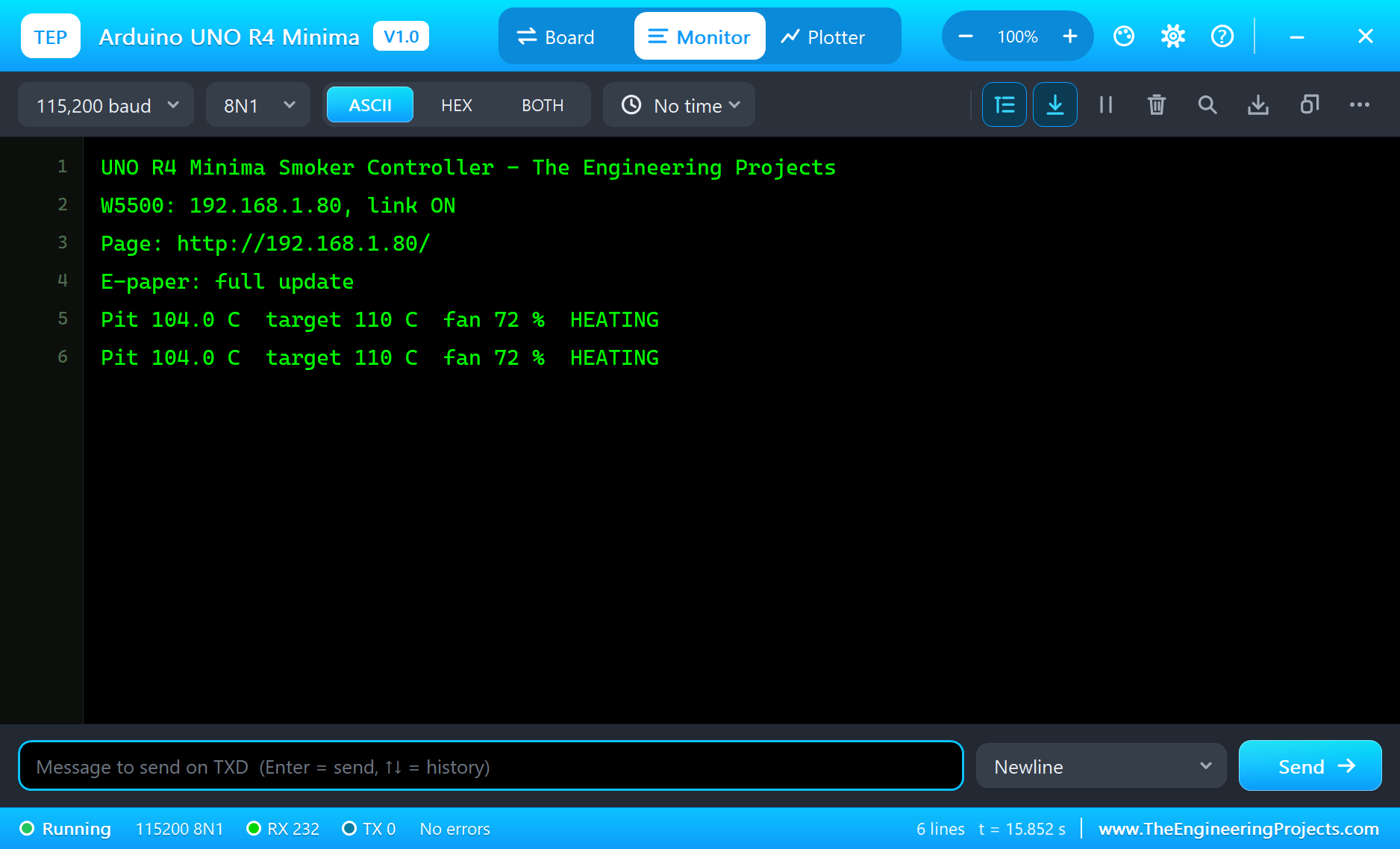
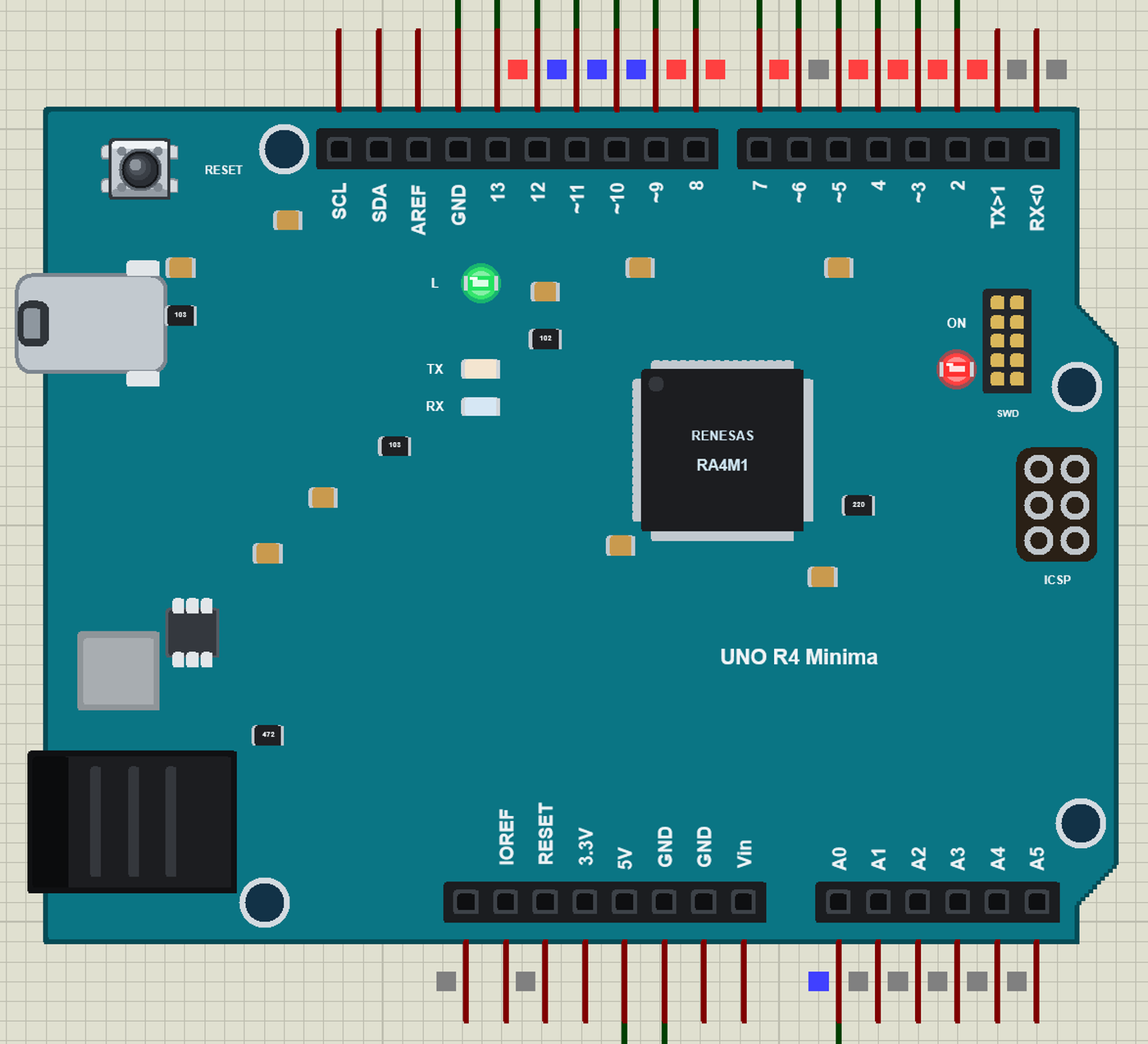
The L LED sits on D13, which is also the SPI clock - on the real board too. With the W5500 and the e-paper on the bus it glows whenever the sketch talks to them, which is all the time.
Open the Page
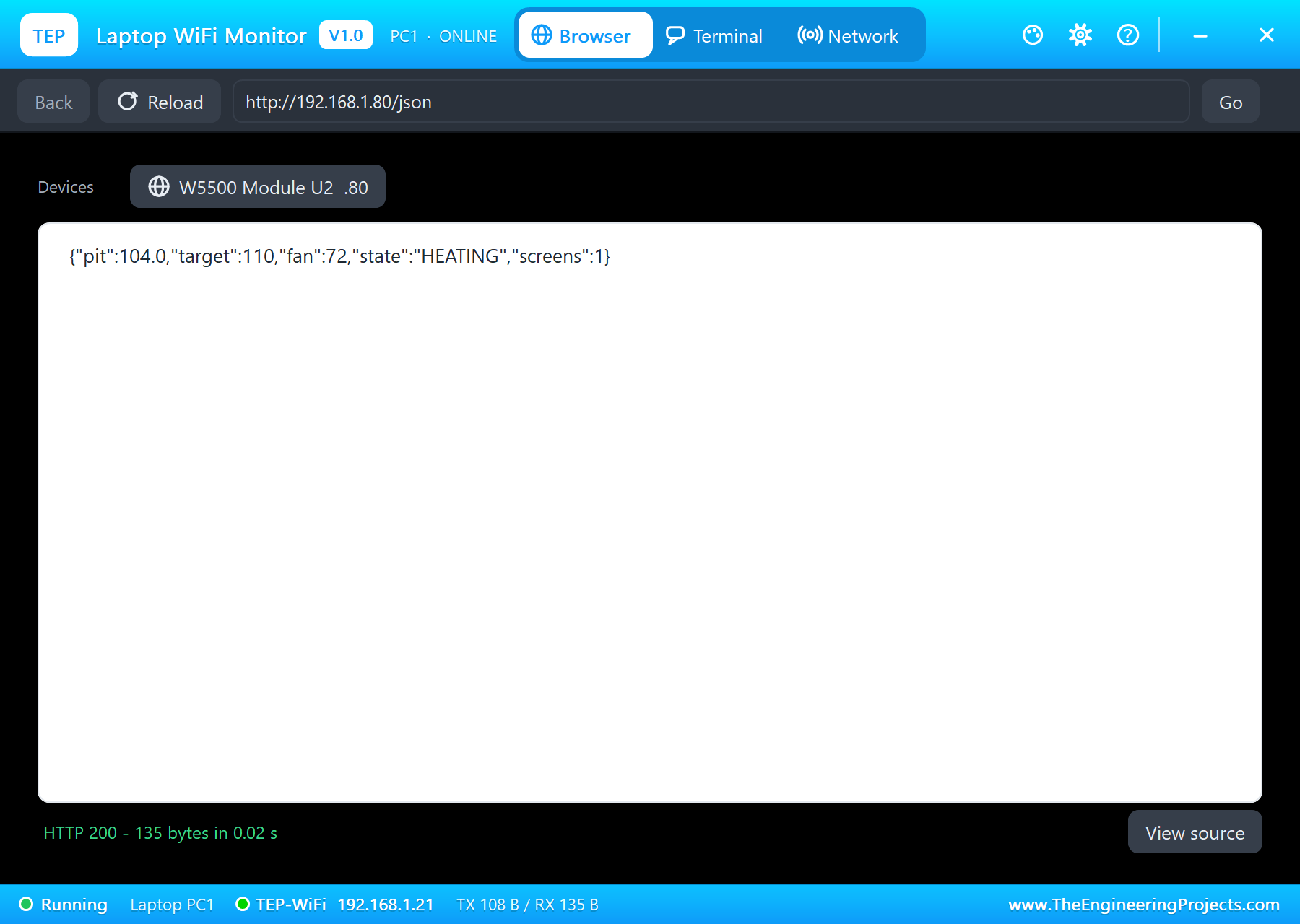
On the laptop click Browser and Go (the home page is http://192.168.1.80/json, the values for a program); on the phone the same with http://192.168.1.80/, the page with its buttons:
A Hotter Pit: TARGET 125
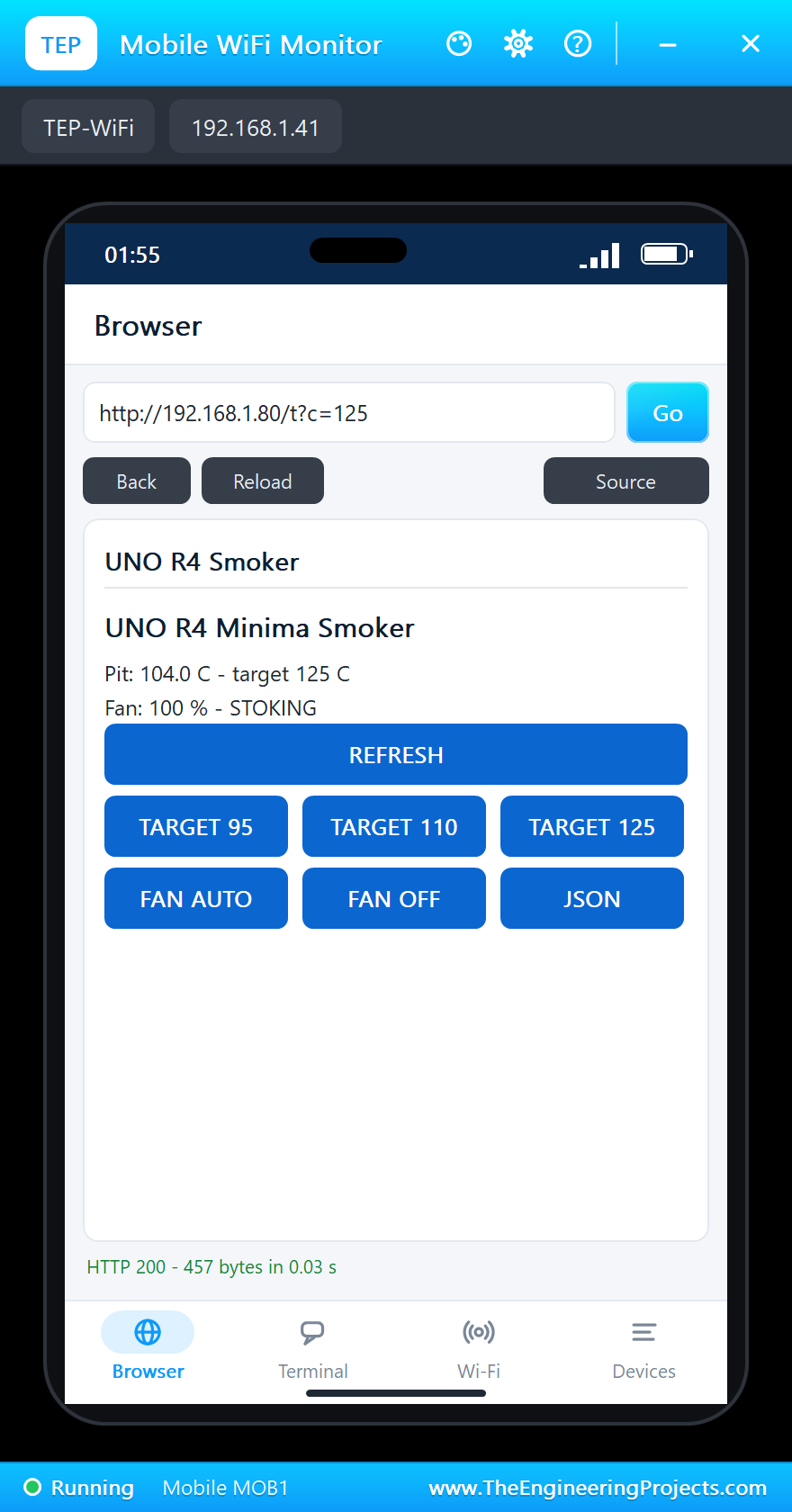
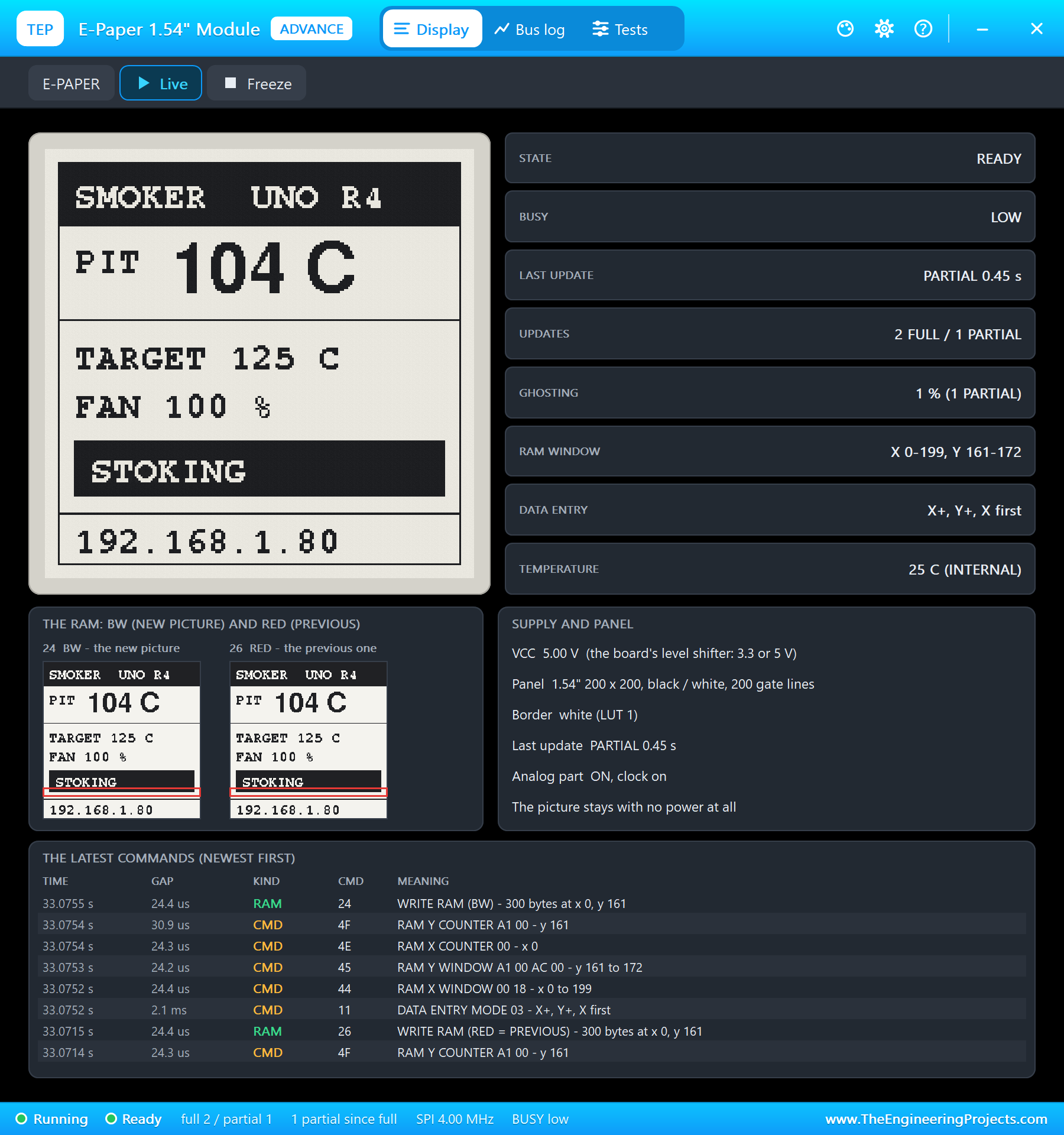
Tap TARGET 125 on the phone. Now the pit is 21 degrees short: the controller runs the blower at 100 % and the e-paper says STOKING:
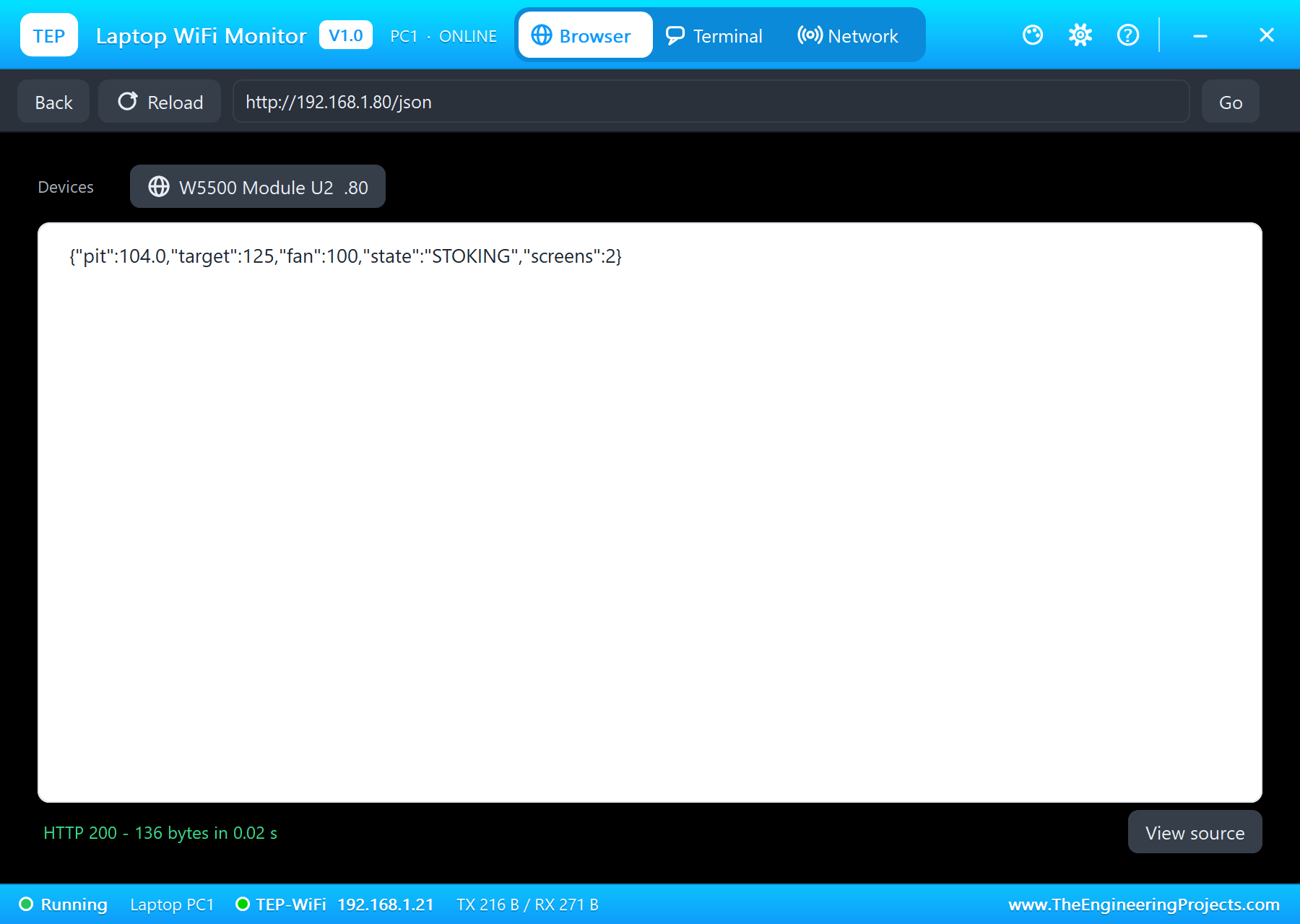
A Cooler Pit: TARGET 95
Tap TARGET 95. The pit is above the target now: the blower stops and the e-paper says HOLDING - the fire will calm down without air:
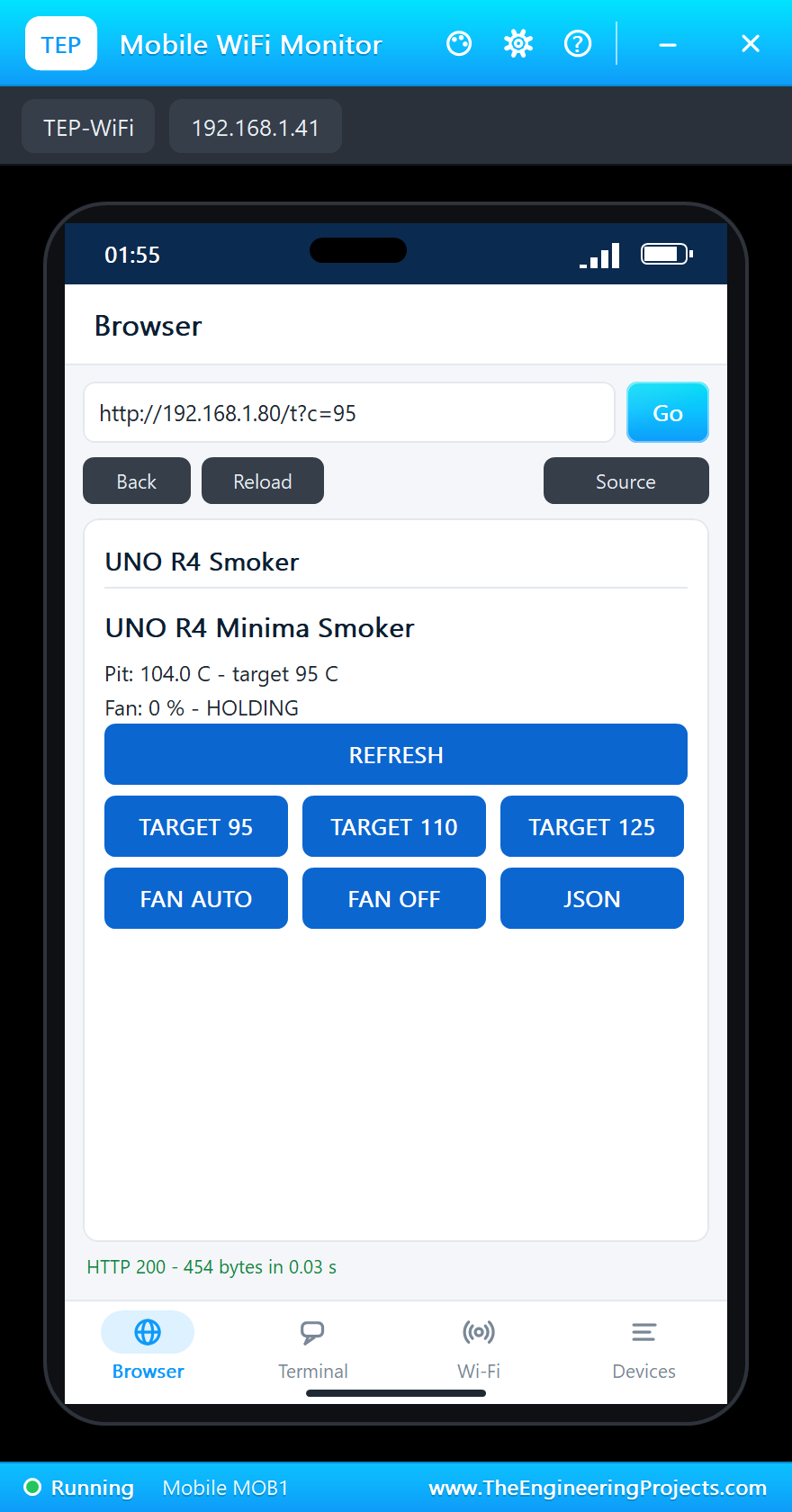
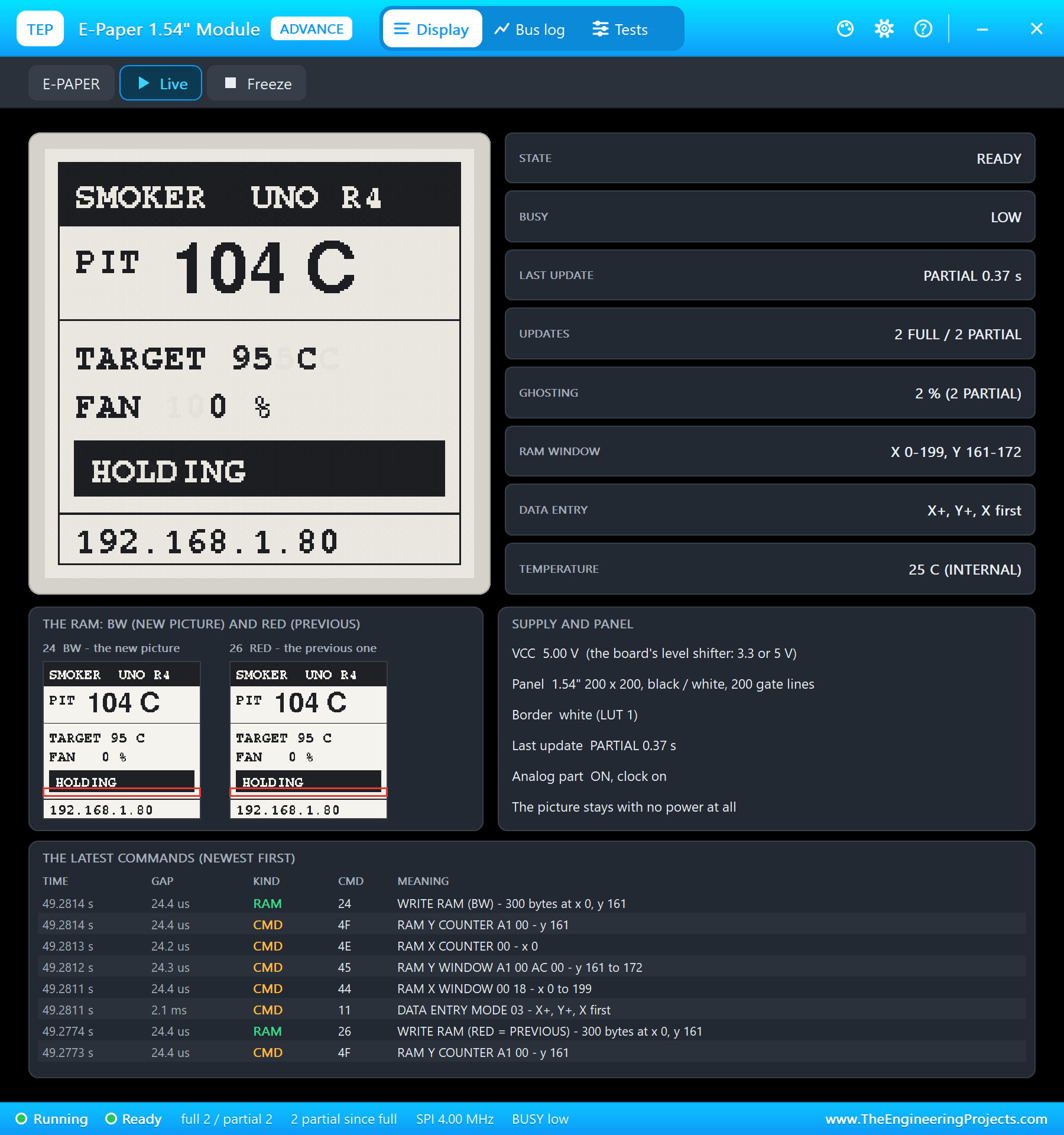
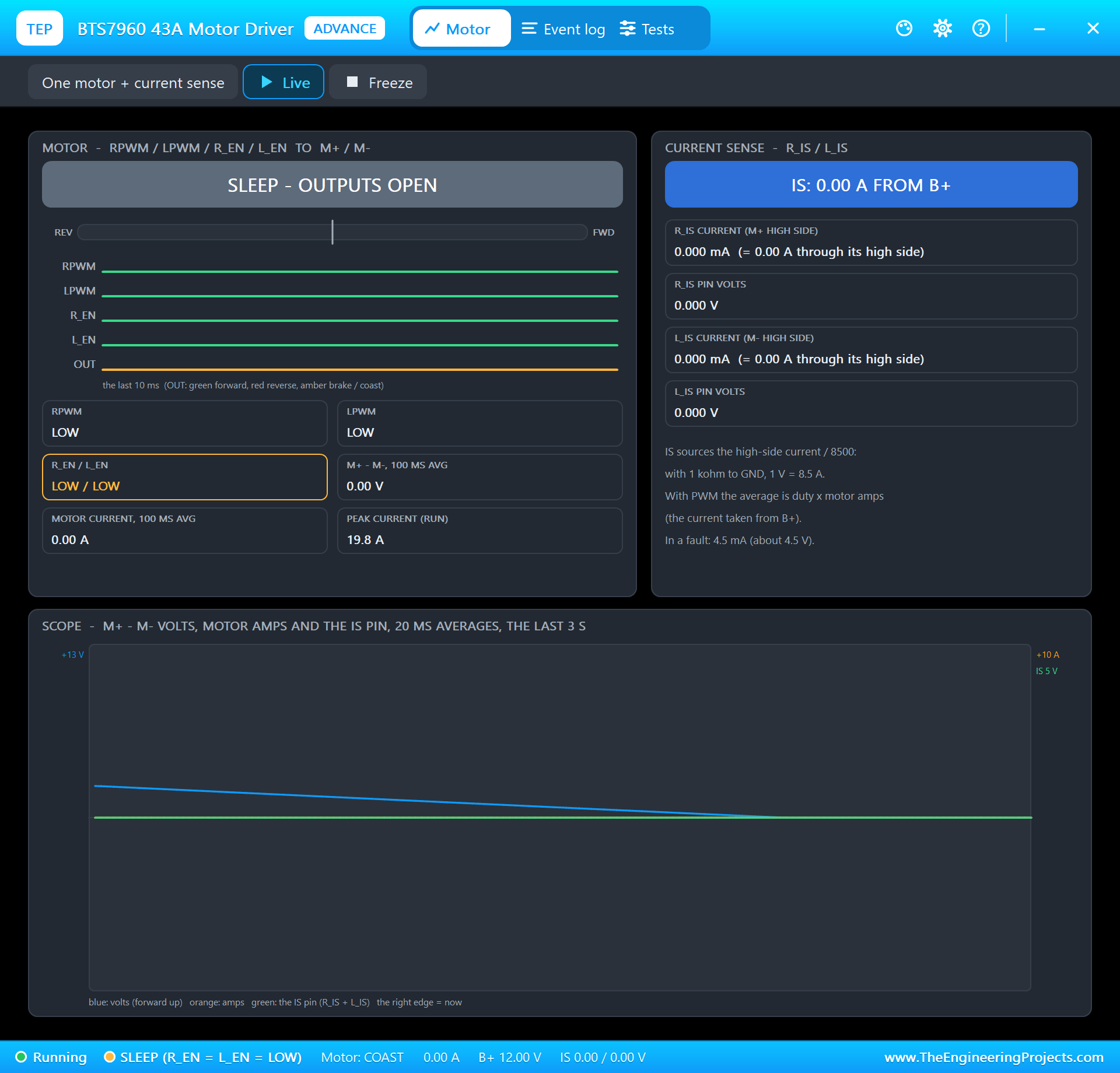
| Step | Pit | Target | Fan | State |
|---|---|---|---|---|
| Run | 104 C | 110 C | 72 % | HEATING |
| TARGET 125 from the phone | 104 C | 125 C | 100 % | STOKING |
| TARGET 95 from the phone | 104 C | 95 C | 0 % | HOLDING |
The built-in serial monitor, in the look of our TEP Serial Monitor Advance for Proteus, logs every status line and every change from the page:
Pit 104.0 C  target 110 C  fan 72 %  HEATING
Page: /t?c=125
Target 125 C (the web page)
Pit 104.0 C  target 125 C  fan 100 %  STOKING
Pit 104.0 C  target 125 C  fan 100 %  STOKING
Page: /json
Page: /t?c=95
Target 95 C (the web page)
Pit 104.0 C  target 95 C  fan 0 %  HOLDING
Pit 104.0 C  target 95 C  fan 0 %  HOLDING
Page: /
Pit 104.0 C  target 95 C  fan 0 %  HOLDING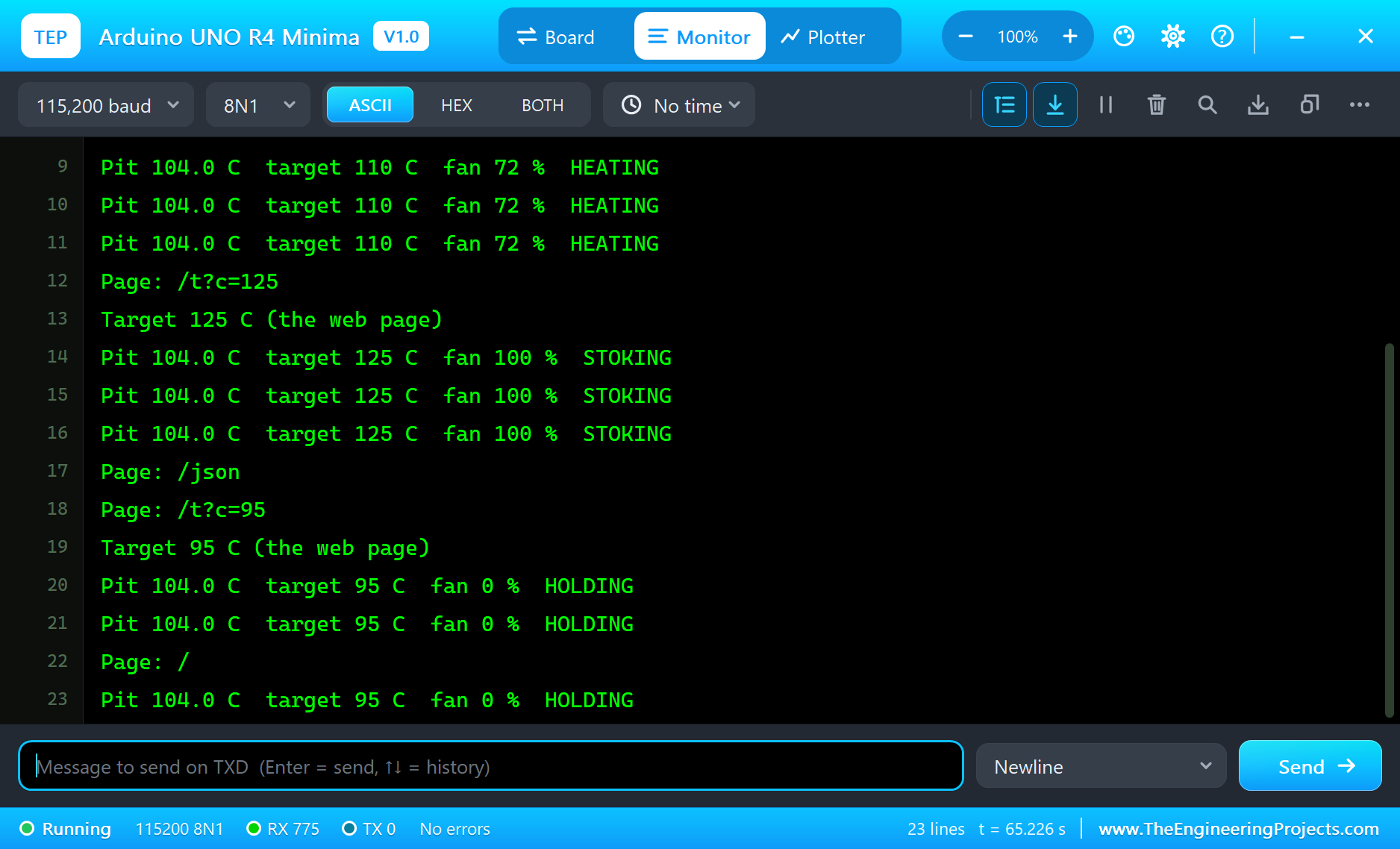
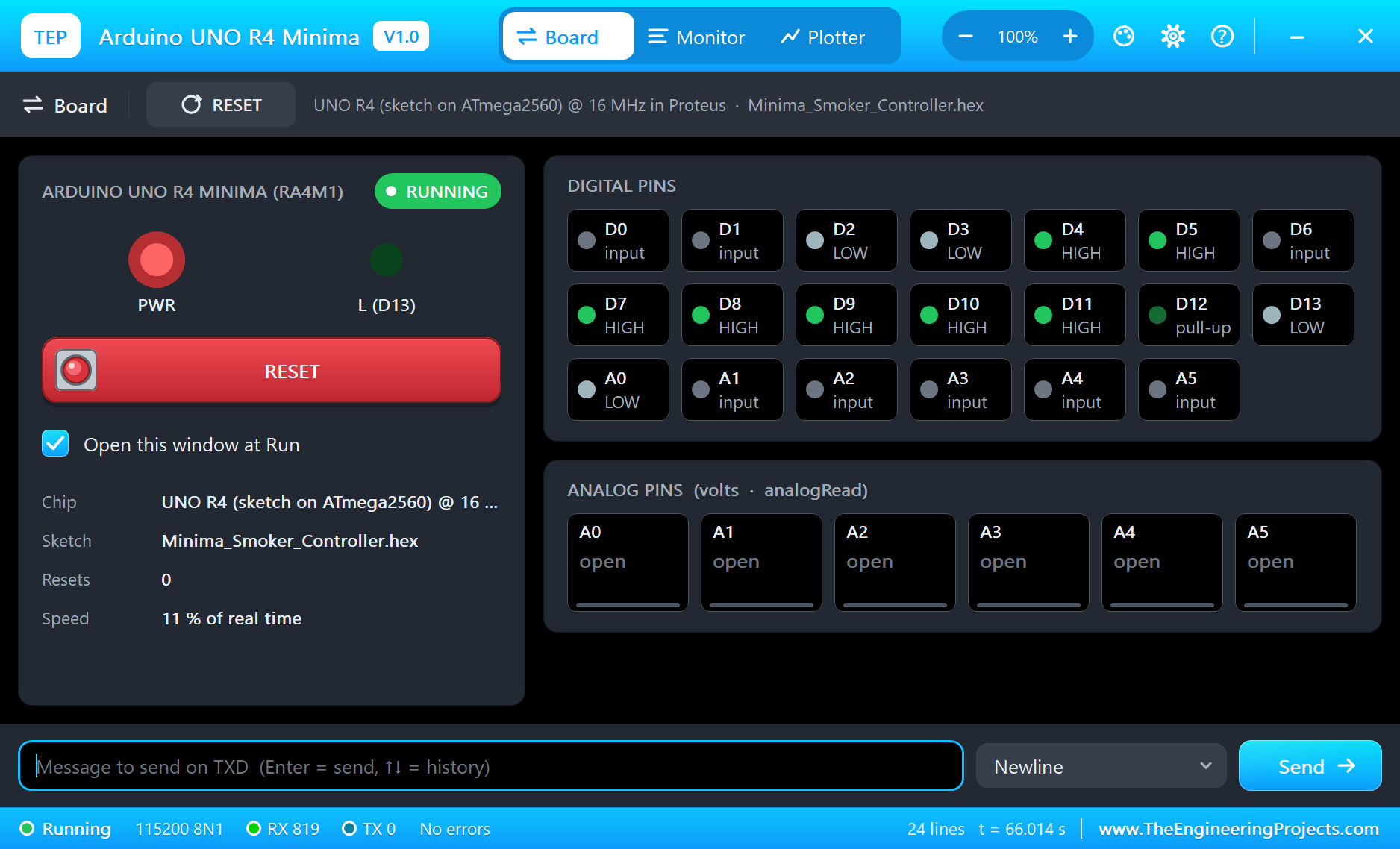
Try It Yourself
- Double-click TC1 and change its TEMPERATURE: at 120 C with the target at 110 C the e-paper says HOLDING, at 90 C STOKING.
- Set the probe's WIRE to broken: the pit shows "---", NO PROBE, and the fan stops.
- Type
TARGET 115in the serial monitor, orOFFandAUTO: the same commands as the page. - Tap FAN OFF on the phone and watch the BTS7960's pop-up: the driver turns off whatever the pit does.
Ideas to Extend the Smoker
- Add a second MAX6675 and probe for the meat, and a "done" alarm at 93 C inside a brisket.
- Use the integral of the error as well (a PI controller) so the pit settles exactly on the target.
- Keep the last hour of readings in an array and serve a small chart on the page.
- Put the target in EEPROM so a reset keeps it.
Your Own Sketches
Write the sketch in the Arduino IDE with the board Arduino UNO R4 Minima (TEP Proteus), use Sketch > Export Compiled Binary and set the board's PROGRAM property to the .hex. The same sketch compiles for a real UNO R4 Minima with the "Arduino UNO R4 Boards" package - select "Arduino UNO R4 Minima" there and upload. The Ethernet, MAX6675, GxEPD2 and Adafruit GFX libraries come from the Library Manager.
Things to Know Before Using a Real UNO R4 Minima
- 8 mA per pin: the RA4M1's pins give much less current than the UNO R3's 20 mA - drive LEDs through resistors of 470 ohms or more and anything bigger through a transistor or a driver like the BTS7960.
- Power: 6 to 24 V on the jack or Vin, or 5 V on the USB-C; the 12 V blower supply can feed the board too.
- The W5500 module: it takes 5 V or 3.3 V and its SPI pins are 5 V tolerant, so it sits on the UNO's pins without a level shifter.
- The e-paper: most 1.54" modules have a regulator and level shifters; check that yours accepts 5 V.
- The thermocouple: keep its wires away from the blower's motor wires; a K-type probe gives only about 41 microvolts per degree.
Properties of the Arduino UNO R4 Minima
| Property | What it does |
|---|---|
| PROGRAM | the sketch: a .hex from TEP Boards for Proteus (board "Arduino UNO R4 Minima") |
| MONITOR, BAUD, AUTOOPEN | the built-in serial monitor: on, its baud rate (115200), open at Run |
Troubleshooting
- "No W5500 found", NO POWER on its pop-up: the W5500's 5V needs a digital supply - the power terminal, as in the demo; SCS on D10, SCLK D13, MOSI D11, MISO D12.
- "link OFF": the W5500's CABLE property must be IN.
- The e-paper stays blank: SPI_MODE0 (GxEPD2's default, the only mode the simulation clocks), CS D7, DC D8, RST D9, BUSY A0; keep both chip selects HIGH before either device talks.
- The motor does not turn: B+ needs the +12V terminal, R_EN and L_EN HIGH, LPWM LOW.
- A number goes wrong above 32767: int is 16 bits in the simulation - use long.
- The page shows old values: use REFRESH; the monitors do not reload by themselves.
Limitations of the Simulation
- Your sketch gets 8 KB of RAM in the simulation and runs slower than on the RA4M1 at 48 MHz with 32 KB.
- The DAC, the CAN bus, the op-amp, the RTC, the USB keyboard / mouse and the SWD header are not modelled; TX and RX are drawn.
- The network, the addresses and the windows are TEP additions.
- Arduino and UNO are trademarks of Arduino S.r.l., RA4M1 a name of Renesas Electronics; this library is not made or endorsed by Arduino, Renesas or Labcenter.
- Tested in Proteus 8.5 in October 2026 (the demo as shipped, about 66 s of simulation). Proteus 7 is not supported.
So, that was all about the Arduino UNO R4 Minima Library for Proteus. I hope it helps you build and test your UNO R4 projects before you touch the hardware - the probe, the blower, the screen and the web page in one simulation. If you have any questions, ask in the comments and I will help you out. Till the next tutorial, take care and have fun!