


Engineering Graphics in Practice: How Convertio Converts SVG to PNG for Technical Workflows


Engineering teams use graphics for all sorts of practical tasks, from software interface mockups and system architecture diagrams to wiring illustrations and technical reports. These graphics often start as vector files because they can be resized, edited, and reused without losing their original sharpness.
Problems tend to appear when a graphic moves from the software where it was created into another application. A documentation platform might accept PNG but struggle with SVG. A reporting tool may render certain elements differently than expected. When a diagram needs to be shared with colleagues who use different software, a widely supported image format can be more practical than one that offers greater editing flexibility.
Convertio’s SVG to PNG converter renders vector diagrams into PNG images that engineers and developers can embed directly in technical reports, presentations, and software interfaces.
1. Why engineering projects use different image formats
Consider a systems engineer preparing a diagram of a control system. The drawing contains connected components, labels, arrows, and geometric shapes. SVG works well for this kind of graphic because it describes visual elements through vector instructions rather than storing them as a fixed grid of pixels.
The W3C SVG specification explains how the format represents two-dimensional graphics that can scale to different display sizes. This is useful when the same diagram needs to appear in several places, from a small interface panel to a detailed engineering report.
Engineering work rarely stays within a single application. A diagram might move from a design tool into a reporting system, then into a presentation or an internal knowledge base. Each application handles files differently, and SVG support can vary between programs.
PNG offers another option. It stores a rendered image as pixels and supports transparency, making it useful for graphics that need to be embedded in documents or displayed as static images. The W3C PNG specification describes the format's lossless compression, which preserves the encoded image data without introducing lossy compression artifacts.
There is one limitation: a PNG does not preserve the individual vector paths of the original SVG. If a label needs to be moved or a component reshaped, the original file remains the better starting point. Conversion makes more sense when the graphic is ready to use rather than when its individual elements still need editing.
2. What happens during SVG-to-PNG conversion
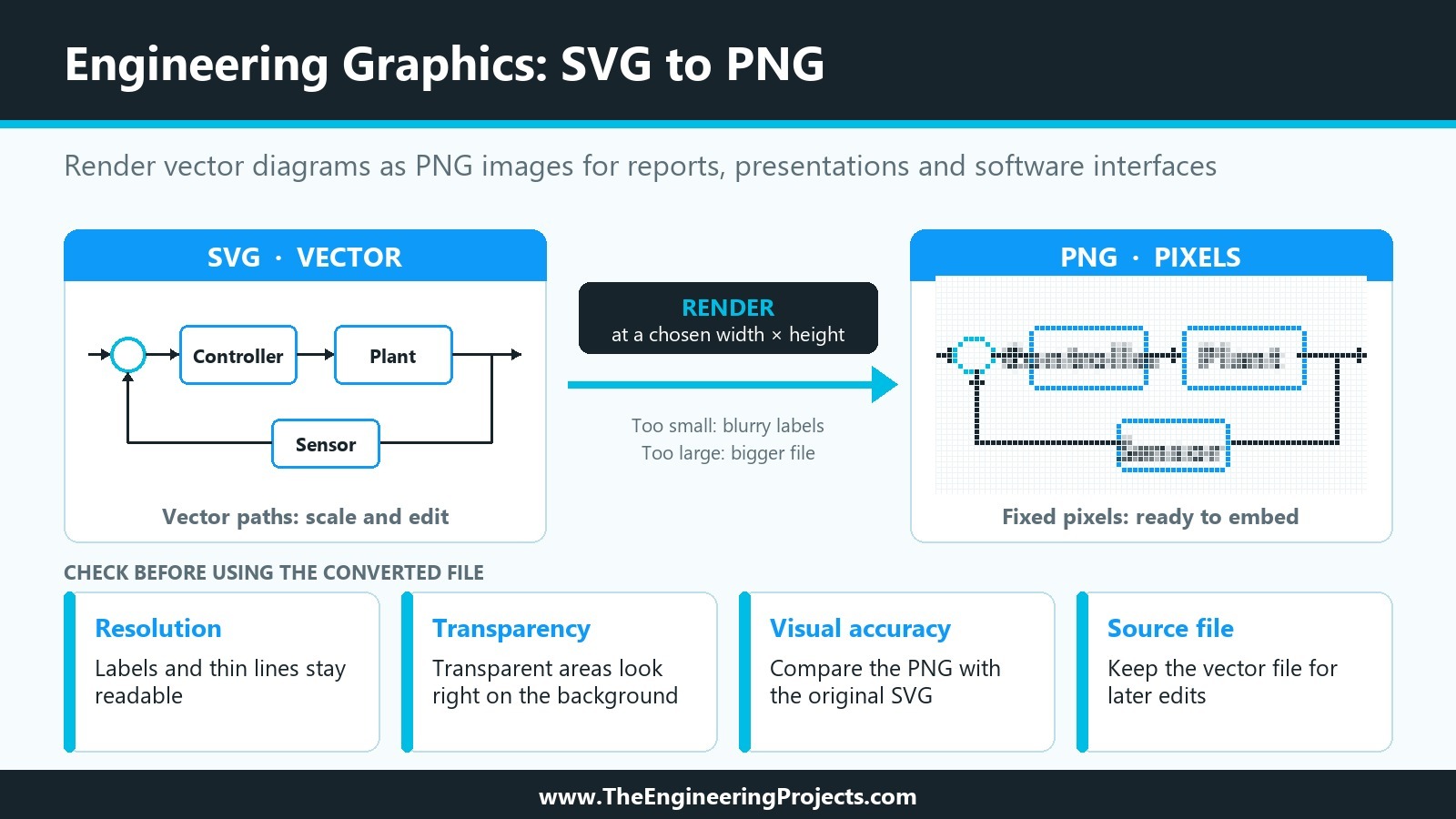
SVG-to-PNG conversion takes the instructions stored in a vector file and renders them as a pixel-based image. The output has fixed width and height values, so choosing suitable dimensions matters.
For example, a small diagram intended for a software dashboard may need a much lower resolution than a detailed illustration printed in an engineering manual. Exporting an image at too small a size can make thin lines and small labels difficult to read. On the other hand, creating an unnecessarily large image can increase its file size without providing a noticeable improvement at the intended display size.
Convertio handles this conversion online, so users don't need to install a dedicated graphics application just to change the file format. The process is straightforward: upload the SVG file, select PNG as the output format, convert the file, and download the result.
The conversion itself is simple. The real question is whether the exported image meets the requirements of the project.
| Requirement | SVG | PNG |
|---|---|---|
| Editing individual shapes | Supports vector editing in compatible software | Shapes are flattened into pixels |
| Resizing | Scales without inherent resolution loss | Quality depends on the exported resolution |
| Embedding static diagrams | Depends on application support | Suitable for applications that support raster images |
| Transparency | Supports transparent elements | Supports transparency through an alpha channel |
| Fine technical details | Retained as vector geometry | Depend on output dimensions and rendering |
Neither format is automatically better. An engineer preparing a diagram for several screen sizes may prefer to keep the SVG source. Someone adding the same diagram to a report may find a PNG more convenient.
3. Where raster graphics fit into engineering workflows
Raster images have several practical uses in technical work. A development team might need diagrams for a software manual, screenshots for a maintenance guide, or system illustrations for a presentation. PNG can be easier to distribute in these situations because recipients don't need to work with the underlying vector objects.
The same approach can be useful when preparing software interface assets. Developers may receive icons and diagrams from design teams but need pre-rendered images for specific components. Converting selected assets allows them to prepare the required files without recreating the graphics from scratch.
For a few files, an online converter may be all that's needed. Larger engineering teams might prefer to automate asset preparation, depending on their existing build tools and integration requirements.
There are limits, of course. A PNG is an image, not a replacement for a CAD model or an editable engineering drawing. It does not retain the structured geometry or technical data that specialized engineering software may store in its native format. A rasterized diagram should not replace a controlled source document when the underlying information needs to remain editable or traceable.
Confidentiality also deserves attention. Before uploading internal schematics or proprietary product designs to an online service, check the organization's data-handling requirements. An easy conversion process is useful, but project security still comes first.
4. What to check before using the converted file
Before adding a converted image to a technical report or software build, check a few details:
- Resolution: Make sure labels, symbols, and thin lines remain readable at the intended display or print size.
- Transparency: Check that transparent areas display correctly against the document or interface background.
- Visual accuracy: Compare the PNG with the original SVG, especially if the graphic contains gradients, filters, or small annotations.
- Source file: Keep the original vector file if future edits or higher-resolution exports are likely.
These checks are particularly useful for engineering diagrams, where small visual details can affect readability. An arrow that becomes difficult to distinguish or a label that looks blurry may not change the underlying technical information, but it can make a document harder to interpret.
SVG and PNG serve different purposes in engineering workflows. SVG is useful when a graphic needs to remain scalable and editable, while PNG is a practical choice when an application requires a fixed-resolution image. Convertio provides a straightforward way to switch between the two, helping engineering and development teams prepare graphics for the software and documents in which they will be used.

Comments
0