dept: Software Engineering

9 articles found.

Why Businesses Choose Custom Software Solutions Over Generic Platforms

Two software developers writing code at their workstations with large monitors

Business expansions often come with enhanced technology requirements. Off-the-shelf software only provides a quick starting point. It is not optimized for growth and specialized needs. Work with a Raleigh custom software development provider to create digital solutions. The innovative strategies will provide your business with a competitive edge. Figure: Developers at work on a custom software project (photo: Pexels). Pexels What Are Custom Software Solutions and How Do They Differ From Generic Platforms? Custom software solutions are applications specifically built to meet your business requirements. Instead of fitting your objectives into pre-made software, customized applications are fully tailored around your needs. In today’s competitive market, custom solutions can help you stay ahea ...

7 practical Claude Code skills for software and engineering projects

Seven Claude Code skills for engineering projects: code review, testing, debugging, security review, documentation, Git workflow and project standards, with what each skill can define

Claude Code can already read code, explain functions, suggest changes and help developers work through technical problems. The more interesting question is how teams can make that assistance repeatable. Instead of writing a detailed prompt every time a familiar task appears, developers can use skills that provide persistent instructions for specific workflows. A skills marketplace for Claude Code and Cowork makes it possible to discover reusable skills for different development tasks rather than creating every workflow from scratch. What is a Claude Code skill? A skill is a set of structured instructions that teaches an AI agent how to approach a particular task. In the SKILL.md format, those instructions are stored in a Markdown file with YAML frontmatter that helps describe when the skil ...

Sending Email in Microsoft Visual Studio 2010

Visual Basic email application, editable recipient and subject, Windows Forms message editor, SMTP sending tutorial

Hello friends! In this second part of our Visual Basic email tutorial, we will turn the simple sender into a usable Windows Forms application. You will enter the recipient, subject and message on the form instead of changing those values inside the source code. If you have not completed How to Send Email in Microsoft Visual Studio 2010 , start there. That lesson explains SMTP settings, permitted sender accounts, STARTTLS and the limitations of the legacy System.Net.Mail API. Here we will concentrate on the form, input validation and the send operation. We will retain the original controls and the step-by-step teaching flow, then improve the application so that a slow mail server does not freeze its interface. The sender account remains configured separately; allowing someone to type a dest ...

How to Send Email in Microsoft Visual Studio 2010

Visual Basic email tutorial, VB 2010 SMTP example, Windows Forms mail sender, email programming introduction

Hello friends! In this tutorial, we will create a small Visual Basic application that sends an email when you click a button. We will begin with a fixed recipient, subject and message so that you can understand the complete sending process before adding more controls. This is the first part of our Visual Studio 2010 email series. In part two, Sending Email in Microsoft Visual Studio 2010 , we will let the user enter the recipient, subject and message in a Windows Forms interface. Here, our main concern is understanding the mail settings and building a clear first example. The original tutorial used a Gmail account password directly in the source code. That is no longer a suitable general instruction. We will keep the original Visual Basic teaching flow, explain which parts are legacy, and ...

Updating Database Table with Programming in VB 2010

Visual Basic database update tutorial, VB 2010 programming, TableAdapter data persistence, automatic contact updates

Hello friends! In this tutorial, we will update a database table through Visual Basic code. In the previous lessons, we created a contact database and added buttons for editing its records. Now we will let the application locate a particular record, change one of its values and save that change without asking the operator to type into the form. This is useful when information arrives from another part of a system. In the hotel-management example that inspired this lesson, room information reached a central computer wirelessly. The software needed to identify the correct room and update its stored information. The same basic idea applies to a contact import, an instrument reading or a status message received through a serial port. We will continue with the Visual Basic contact database and ...

Button Control in VB Database

orange database cylinder, hand-drawn storage icon, database label, white background

Hello friends! In this tutorial, we will add Add, Save, Remove and navigation buttons to a Visual Basic database application. We will continue with the contact form from our previous lesson and use its existing dataset, binding source and TableAdapter. If you have not built that form yet, first follow creating a database in Microsoft Visual Studio . This lesson retains the original Visual Studio 2010 Windows Forms example, with clearer event handlers and explanations of what each button changes. The key distinction is that editing a bound form changes in-memory data first. Adding a row, removing a row and moving to another contact do not necessarily write anything to SQL Server. Our Save button is responsible for sending the pending changes to the database. Figure: A database illustration ...

Create Database in Microsoft Visual Studio

orange database cylinder, hand-drawn storage icon, database label, white background

Hello friends! Today we will create a contact database in Microsoft Visual Studio and connect it to a Visual Basic Windows Forms application. We will begin with an empty project, create a table, enter sample contacts and display those contacts in both a grid and a details form. This tutorial retains the original Visual Studio 2010 walkthrough and screenshots. Its main purpose is to explain the database, dataset and data-binding workflow used by that application. If you are maintaining an older VB project or learning how its generated components work, the same distinctions will help you understand where records are loaded, edited and saved. After completing this part, continue with button controls in a VB database application and updating a database table with VB programming . Our earlier V ...

Create Setup File in Visual Studio 2010

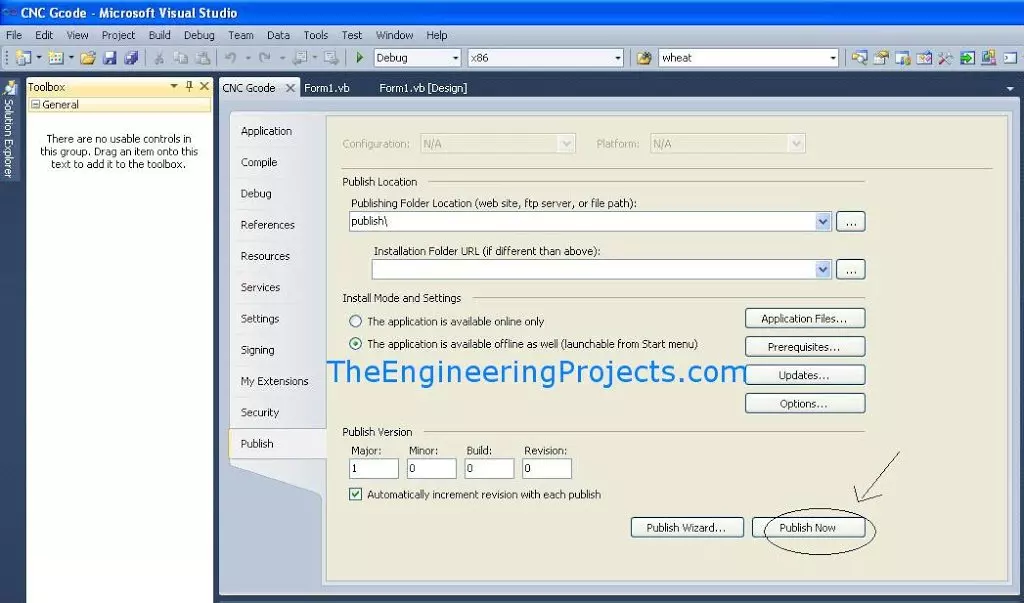
Visual Studio Publish tab, publish folder setting, prerequisites and update controls, Publish Now button

Hello friends, I hope you are doing well. In this tutorial, we will publish a Visual Basic or C# Windows Forms application from Visual Studio 2010 by using ClickOnce. This is useful when you have completed a desktop program, such as the serial terminal from our Serial Port in VB 2010 tutorial , and want to install it on another Windows computer. Visual Studio 2010 is a legacy environment whose Microsoft support ended in July 2020. We are keeping it here because the original project and screenshots use that version. For a new application, use a supported Visual Studio and .NET release and follow the current deployment workflow. Figure: The Publish tab contains the original project's ClickOnce deployment settings. Build Output, ClickOnce and MSI Are Different The phrases EXE file and setup f ...

How to use Serial Port in VB 2010

serial terminal window, COM port selector, baud rate selector, transmit and receive fields

Hello friends, I hope you are doing well. In this tutorial, we will build a simple serial terminal in Visual Basic 2010. The application will detect the COM ports available on a Windows computer, open a selected port, transmit text, receive incoming data and close the connection cleanly. This article keeps Visual Basic 2010 because that is the environment used in the original project and screenshots. According to the official Microsoft lifecycle record , Visual Studio 2010 reached the end of support in July 2020, so you should use a supported Visual Studio and .NET version for a new production application. However, the serial communication principles explained here still apply to maintenance work, laboratory computers and older engineering projects. We will begin with the electrical and pr ...