Buy This Project
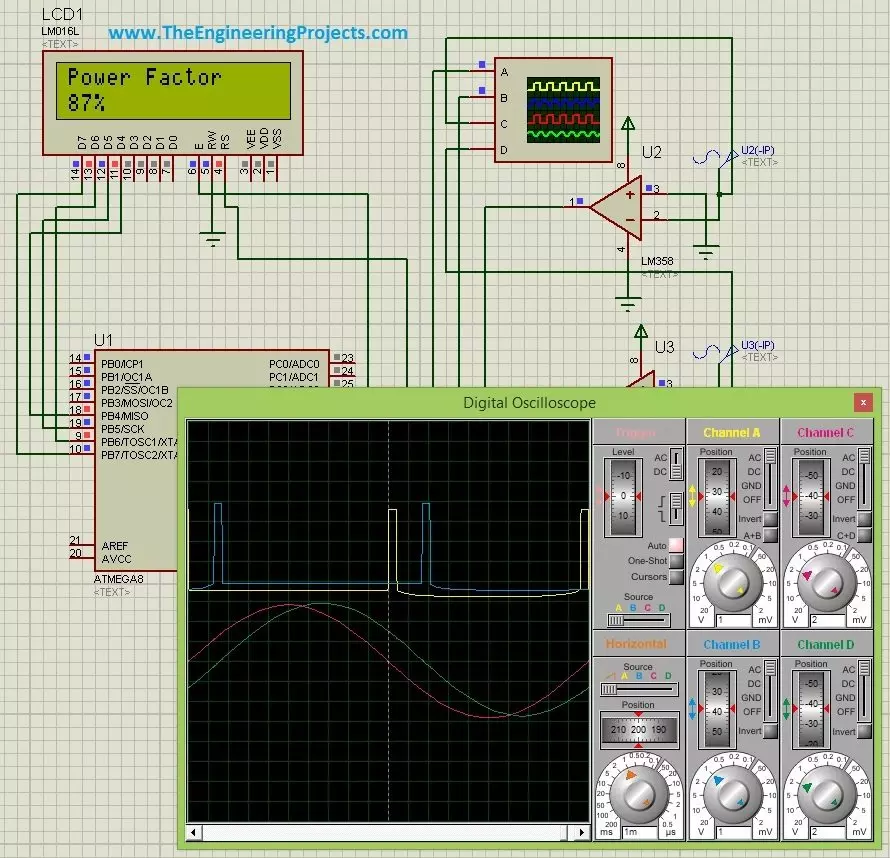
Hello friends, hope you all are fine and having fun. Today's post is about Power Factor Measurement using Microcontroller in Proteus ISIS. As usual, I have this project simulation in which I have to simulate a power factor measuring project using atmega microcontroller. So, I use atmega8 microcontroller and the used Proteus ISIS as the simulating software. Power Factor Measurement isn't that difficult but its a quite tricky and in today's post we are gonna cover it in full detail.
There are many ways for power factor measurement and today's the method we are gonna use is called zero crossing detection. We will first detect the zero crossing of our signal and then we are gonna do the power factor measurement based on the detectio ...
Hi Guys! Happy to see you around. In this post today, I’ll detail the new version of Arduino Mega 2560 Library for Proteus V2.0. I have already detailed the Arduino Mega 2560 Library for Proteus that is the previous version of the Arduino Mega 2560 board. This new version of Arduino Mega 2560 is more efficient, robust, fast, powerful, and small in size.
I keep getting messages requesting to design the library for the new version of Arduino Boards. So, today I’m willing to comply with your requests and have designed this library for the new version of Arduino Mega 2560. I have previously discussed the Arduino UNO Library for Proteus V2.0 and Arduino Mini Library for Proteus V2.0
In this tutorial, we will simulate Arduino Mega 2560 in Proteus. Ini ...
Hello everyone! I hope you all will be absolutely fine and having fun. Today, I am going to share my knowledge about how to make a simple Virtual Instrument (VI) for Stepper Motor Speed Control in LabVIEW. In my previous tutorials, I have worked on Stepper Motor Speed Control using Arduino in which I have shown how to control the stepper motor speed using Arduino. Today, I am going to share a new tutorial in which I am gonna do the Stepper Motor Speed Control in LabVIEW. Moreover, you should also have a look at Stepper Motor Speed Control in Matlab, where I am sending stepper motor speed control commands from MATLAB.
In this tutorial, I am going to work on the program for Stepper Motor speed Control using NI LabVIEW. So, before going into the de ...
Hello readers, I hope you all are doing great. This is the second tutorial of the Raspberry Pi programming series. In our previous tutorial, we discussed the basic features and hardware architecture of Raspberry Pi Pico.
In this tutorial, we will discuss the various available development environments for programming the Raspberry Pi Pico. Later, in this tutorial, we will also discuss the installation of Visual Studio Code for Pi Pico programming.
Fig. Raspberry Pi Pico
RP2040 supports multiple programming languages like C/C++, Circuit python, and MicroPython cross-platform development environments. Raspberry Pi Pico module consists of a built-in UF2 bootloader enabling programs to be loaded by drag and drop and floating point routines are bake ...
Hello friends, I hope you all are doing great. Today I am going to discuss and explain to you, Quantum Cryptography, in this article, you will learn what Quantum cryptography is and how the data was stored and transmitted by the first generation computers from one device to another.
It's going to be a long series and today, I am posting its first lecture, so I'll only cover the basics. I will briefly give you an overview of its history & we will understand How it has evolved in the past and now became an important part of digital world. So, let's get started:
Quantum Cryptography
We know that digital data is always stored in bit format i.e. 0's and 1's but first generation computers stored the data using the method of Punch Tape (you can find ...
Hello friends, I hope you all are doing great. In today's tutorial, I am going to tell you the importance of Master’s in Engineering. You don’t need a master’s degree to get a good job in engineering. Talented engineers are in high demand, and plenty of young engineers are bringing home nice paychecks and enjoying good job prospects with nothing more than a bachelor’s degree in an engineering field. And, as hard as it was to earn your bachelor’s, do you really want to go on for an advanced degree in engineering?
While you may not necessarily need a master’s degree to get a job in engineering, there are a lot of good reasons why earning this credential might be worth it. There are the obvious salary benefits, but it isn’t just a higher salary that ...
Hi Guys! Glad to see you around. I welcome you on board. In this post today, I’ll walk through the Introduction to LM2575.
LM2575 is a step-down voltage regulator mainly used to step down the voltage. It is also known as a buck converter and is used to drive load under 1A. In the customized output version of the buck converter, you can set the output voltage as you like better. It comes with an extremely good load and line regulation and is available in fixed output voltages with 3.3V, 5V, and 12V.
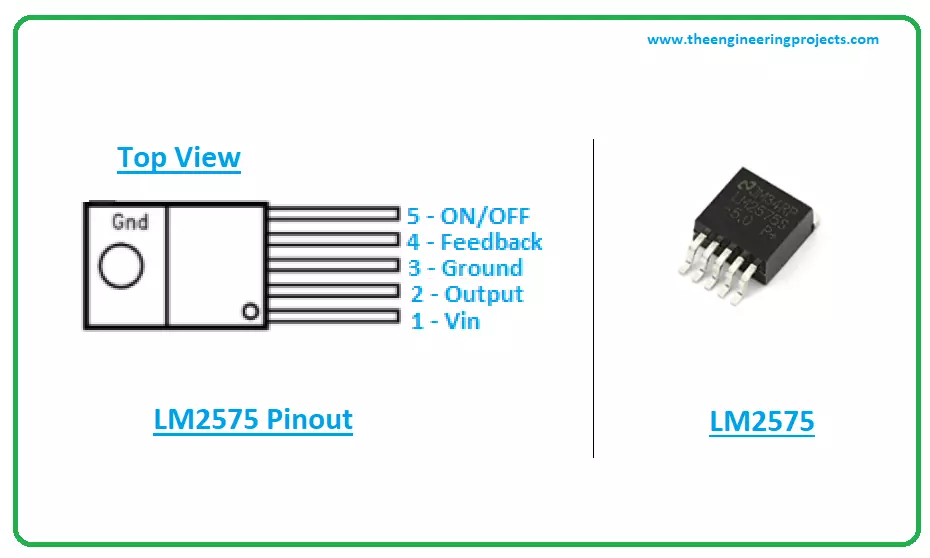
I suggest you read this post all the way through, as in this post I’ll detail the Introduction to LM2575 covering the datasheet, pinout, features, and applications of this component LM2575.
Let’s get started.
Introduction to LM2575
LM2575 is a vol ...
Hi readers! I believe you are doing fine and continuing to learn something new every day. This day marks the discussion about the diagnosis of a faulty MAP (Manifold Absolute Pressure). A MAP sensor is an important component in the engine management system of a vehicle, functioning to determine the absolute pressure inside the intake manifold and reporting back the real-time pressure to the Engine Control Unit (ECU), which then does the math to achieve an exact air-fuel mixture and timing of injection, allowing combustion to be smoother with all the variables at play and reduced emissions.
The MAP sensor detects the changes in air pressure inside the inlet manifold. The data relative to this pressure is used by the ECU to calculate fuel injection and ignition timing. The MAP sensor en ...
Hello everyone! I hope you all will be absolutely fine and having fun. Today, I am going to explain you about Introduction to LM386. Its a power amplifier specially designed for low voltage consuming applications. The gain of LM 386 is set around 20 internally. But the gain could be increased due to the insertion of external resistor and capacitor between the pin number 1 and 8. The gain could increase to any value from 20 to 200.
The LM-386 inputs are ground referenced. The output are biased to the half of the input voltage levels automatically. When LM 386 operates on 6V, its quiescent power drain is around 24mW. This property of LM-386 makes it ideal for the battery operation. Its major features include battery operation, minimum external p ...
No.
MPLAB Tutorials
Give Your Suggestions !!!
1.
Getting Started With Microcontrollers
2.
Getting Started with PIC Microcontrollers
3.
Functions Available in PIC18F452
4.
How to Install the MPLAB Software
5.
How to Install the MPLAB C18 Compiler
6.
Getting started With MPLAB
7.
LED Blinking Project on PIC Microcontroller
Hello friends, hope you all are fine and enjoying good health. Previously, we have seen Functions available in PIC18F452. In today's tutorial we are gonna have a look at How to install MPLAB software. Until now, we have seen only what is PIC Microcontroller and what is it capable of? Now we are gonna move a little further and will see how we can burn program into it and get it our slave. So in orde ...