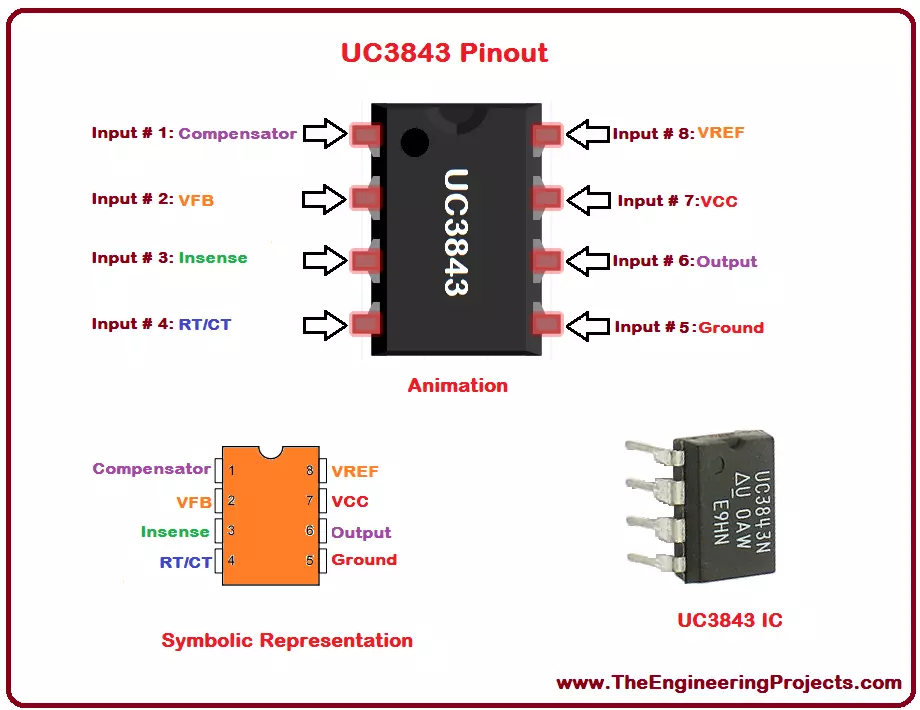
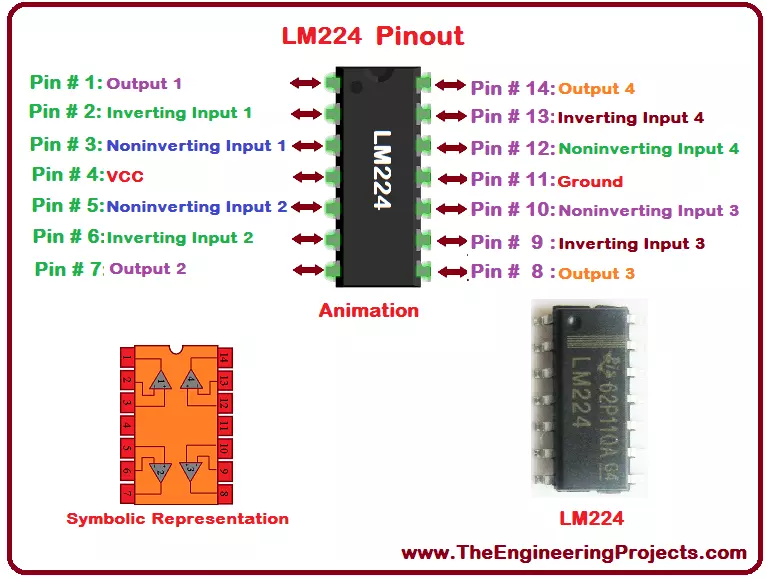
Hello everyone! I hope you all will be absolutely fine and having fun. I am going to give you the detailed discussion about Introduction to UC3843 today. UC 843 is basically a current mode Pulse Width Modulation (PWM) controller having fixed frequency. It is basically designed for DC to DC converter purposes as well as off line applications and it requires minimum external components. UC-3843 has three different packages which will be explained later. UC-3843 has several different features which make it ideal and useful for a lot of real life applications. These features may include trimmed oscillator for the control of accurate duty cycle, high gain amplifier and to control power MOSFET, there is a high current totem-pole output. Moreover, some other features include temperature compensat ...
Hello everyone! I hope you all will be absolutely fine and having fun. Today, I will share the details discussion on Introduction to LM311. LM 311 is basically a voltage comparator having high speed. It can operate over wide ranges of voltage i.e. from -15V to15V, in case of operational amplifier. LM-311 can also operate on 5V for the logic systems. LM-311 output levels has the compatibility with Transistor Transistor Logic (TTL) levels circuits. At 50mA and at 50V too, LM-311 can operate lamps and relays. LM 311 can operate from 0 degree Celsius to 70 degree Celsius. LM-311 has several different features. These features include fast response time, strobe capability, wide voltage supply ranges, maximum input current, operating at single 5V power supply ranges, low power consumption, large ...
Hello everyone! I hope you all will be absolutely fine and having fun. Today, I will provide you document on detailed discussion about Introduction to LM224. LM-224 has four internal builtin operational amplifiers. These amplifiers are frequency compensated. The basic purpose to design these type of device is to operate it from a single power supply sources. Moreover, they are also able to perform different tasks using split power supplies. Magnitude of power supply and the current current drain both are independent of each other. LM-224 has a very wide range of application areas which include DC gain blocks, transducer amplifiers etc. LM 224 has a large number of amazing features include wide power supply ranges, large bandwidth, low input offset voltage, low input biasing current, common ...
Hello everyone! I hope you all will be absolutely fine and having fun. Today, I will give an elaboration about Introduction to LF351. LF-351 is basically JFET (Junction Field Effect Transistor). It is a very high speed input Op-amp (Operational Amplifier). This device is most common in the market due to its low cost and good performance characteristics. LF-351 provides a high gain bandwidth product even though it needs a very low current supply. LM 351 also provides higher slew rates. This device is most of the times known on the basis of its applications. LM-351 is the most popular device due to its unique features. These features include low input bias current, high gain bandwidth product, loww current supply, high input impedance, internal trimmed offset voltage, quick settling time, lo ...
Hello everyone! I hope you all will be absolutely fine and having fun. Today, I am going to give a detailed discussion on Introduction to LM4040. LM-4040 is specially designed for an accurate micro-power shunt voltage reference. These voltage references includes the standards of 2.5V, 3V % 5V respectively. LM-4040 has three different grade A, B and C grades and they have o.1%, o.5% and 1% tolerances respectively. This device is available in different packages and each package has different individual dimension which will be explained later. We can achieve an excellent performance from this device when it is operating at the current ranging from 60uA to 15mA and its temperature coefficient is 20 ppm per degree. In order to maintain good stability level the device's design is much tolerant t ...
Hello everyone! I hope you all will be absolutely fine and having fun. Today, I am going to give you an elaboration on Introduction to LM293 an Integrated Circuit (IC). LM-293 is a dual independent accurate voltage comparator. LM 293 has a capability to perform its operation from a single supply source as well as from split power supply. The purpose to design LM-293 is to permit a common mode range to the ground level and it perform this operation with single power supply source. LM-293 is the most common device in the market these days due to its high performance and cost effectiveness. This device is considered to be an ideal for a lot of electronics applications. LM-293 has a lot of features which make it different from all other devices. These features include low input offset voltage, ...
Hello everyone! I hope you all will be absolutely fine and having fun. Today, I am going to share my knowledge about Introduction to LM380. LM-380 is an audio amplifier, specially designed for the customer's power audio amplification purposes. Its designers fix its gain internally up to 34dB. In LM 380, ground reference signal is allowed by a unique input stage and the output automatically maintains its level to half of the supplied input voltage. LM-380 has a copper lead frame. The three pins in the middle of the IC on both side, are basically the ground pins. These three pins on both sides makes it easy for the user to use this device for standard PC's. LM 380 has several different features e.g. wide supply voltage range, high peak current, low distortion etc. Moreover, LM 380 provides h ...
Hello everyone! I hope you all will be absolutely fine and having fun. Today, I am going to give a detailed discussion on Introduction to LF411. LF-411 is a Junction Field Effect Transistor (JFET) input Operational Amplifier (Op-amp). It is the most common module available in the market these days due to its cost efficiency. LF 411 has low input offset voltage. Input offset voltage drift is guaranteed for LF-411. A very low supply current is needed for this device. It provides higher slew rates as well as high gain bandwidth product. Moreover, LF411 also provides lower input bias current as well as lower input offset currents. It is an 8 pin operational amplifier. The details about its pins will be discussed later. Due to its low cost and high performance efficiency it is most common devic ...
Hello everyone! I hope you all will be absolutely fine and having fun. Today, I am going to provide you the discussion on Introduction to LM393. LM-393 has two internal operational amplifiers. These are internally frequency compensated. These are specifically designed to perform their tasks using a single power supply sources. LM-393 can also perform its operations properly by using split power supply. The current drain supply does not depend upon the magnitude of the power supply. One of the most amazing feature of LM 393 is that ground is included in its common mode input voltage. Moreover, LM 393 has a lot of features e.g. wide voltage supply ranges, a very small current drain supply, low input offset current, low input bias current, output voltage compatible with Transistor Transistor ...
Hello everyone! I hope you all will be absolutely fine and having fun. Today, I am going to provide a detailed discussion on Introduction to LM258. LM-258 has two internal Operational Amplifiers (Op-amps) which are frequency compensated internally. They are specially designed to perform their tasks from a single power supply source using a wide range of voltages. They can also perform different operations using split power supply. LM-258 low power supply current drain does not depend upon the magnitude of the power supply source. LM 258 has a lot of features including high DC voltage gain, large bandwidth, different input voltage equal to power supply, large output voltage swing, common mode input voltages include ground. These were the few of major features associated with LM-258 operatio ...