Web scraping is an invaluable skill in today's data-driven world. However, it must be performed responsibly and efficiently for optimal results. Here are our top 9 best practices that promise smooth execution of your upcoming web scraping projects.
Setting the Stage: Understanding Basic Rules of Python-based Web Scraping
Diving into web scraping can be a truly exciting venture, but it's crucial you understand the basic rules first, and have a handle on Python itself
. Before coding your web scraping script in Python:Do enough research on the site or API you intend to scrape.Know what kind of data is available and how that data is structured.Analyzing websites also aids in understanding the HTML tags for effective extraction.Have clarity on wheth ...
Hello everyone! I hope you all will be absolutely fine and having fun. Today, I am going to share my knowledge about Introduction to LM380. LM-380 is an audio amplifier, specially designed for the customer's power audio amplification purposes. Its designers fix its gain internally up to 34dB. In LM 380, ground reference signal is allowed by a unique input stage and the output automatically maintains its level to half of the supplied input voltage.
LM-380 has a copper lead frame. The three pins in the middle of the IC on both side, are basically the ground pins. These three pins on both sides makes it easy for the user to use this device for standard PC's. LM 380 has several different features e.g. wide supply voltage range, high peak current, lo ...
The world of human resources stretches further than hiring and keeping employee relations copasetic. There’s so much to keep track of, day in and day out. Technology lends a hand to its friend, human resources. But with ASP.NET development services, your daily human resources task just got a whole lot easier.
We’ll be examining the relationship between these HR management systems and daily tasks. Time and attendance, onboarding, and payroll management can all be integrated into one software system with asp.net development services.
Track Time and Attendance in Real-Time
Time and attendance can be tracked in real-time by logging into your HR system and approving clock-in times, based on when your employee was scheduled. The system can tell you when ...
AI in document management
is moving quickly. In 2025, it’s no longer a side story – it’s becoming the backbone of how enterprises handle their critical files. Two recent developments illustrate the trend: Filevine’s $400 million raise in the legal tech sector and Box’s release of new AI-powered features for enterprise customers. These cases point to the same conclusion: AI is reshaping the market from both ends – deep specialization and broad enterprise adoption.
Filevine: Legal Tech Betting on AIIn September 2025, Filevine, a Utah-based legal technology firm, secured $400 million in funding. The most striking part is the revenue breakdown: AI-driven products
now bring in more income than Filevine’s older modules.
The company is leaning ...
Hi Friends! Hope you are doing well. I am back to give you a daily dose of useful information so you can excel and improve as per your technical needs and requirements. Today, I'll uncover the details on the Introduction to ATmega8. It is an 8-bit AVR microcontroller that is based on RISC CMOS technology and comes with a 28-pin interface for the PDIP package. The Program memory is 8K Flash while RAM and EEPROM are 1K and 512 bytes respectively.
Microchip has been the main source for producing PIC and AVR microcontrollers that are mainly used in embedded and industrial automation systems. These modules can perform a number of functions on a tiny chip, preventing you from spending too much and purchasing external components for laying out automation ...
Hello friends, I hope you all are doing great. In today's tutorial, we are going to share a new Sound Detector Library for Proteus. It's actually the second version of our previous library Sound Sensor Library for Proteus. We have changed the name as "Sound Detector" is written on these sensors. Moreover, this new sensor is quite small-sized, compact and also has an analog output pin.
We were receiving many complaints about the large size of the previous sound sensor, as it occupies more space and there's less space left for other components. So, this new one is quite small-sized and I am hopeful students will find it helpful. So, let's first have a look at What is Sound Detector Sensor and why is it used?
What is Sound Detector Sensor???
Sound ...
Hi Friends! Hope you’re well today. Happy to see you around. In this post, I’ll walk you through How to Install PCBWay Plugin for KiCAD PCB Software.
Before we move further, let’s get a brief overview of KiCAD PCB Software.
KiCAD is a free and open-source electronic design application mainly developed to draw schematics and PCB layouts. It is open-source which means anyone can use it to develop and modify electronic designs. The tool can effortlessly run on Windows, macOS and Linux. The main window of the application comes with 8 different software tools used to make PCB layouts and schematics.
Hope you’ve got a sneak peek at the software. Now we’ll get to know how to install the PCBWay Plugin for KiCAD.
How to install PCBWay Plugin for KiCAD PCB Software?
When you install ...
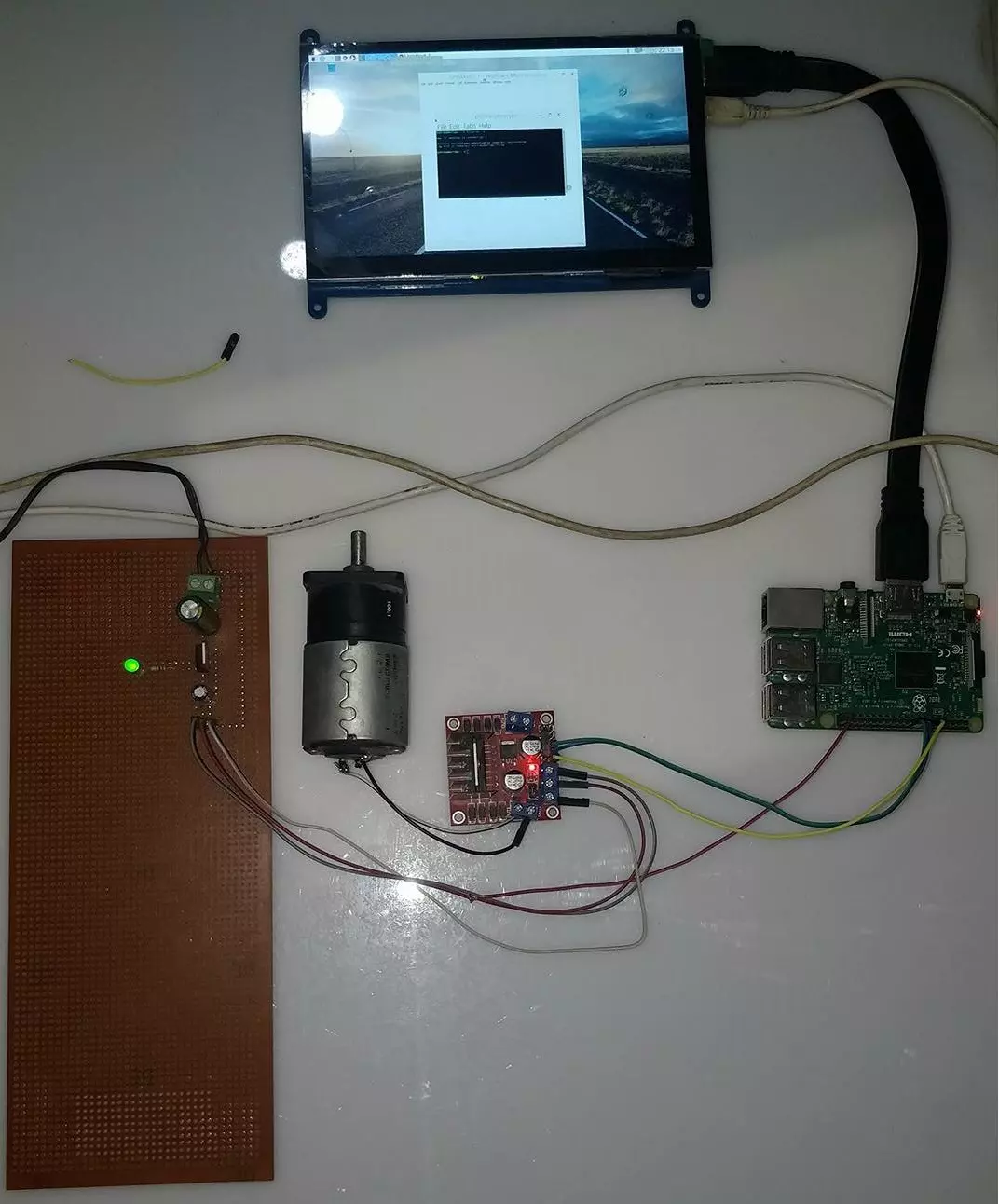
Hello friends, I hope you all are doing great. In today's tutorial, I am going to show you How to Control DC Motor with Raspberry Pi 3. We will control both the speed and direction of DC Motor. I hope you have read the previous tutorial on How to Create a GUI in Raspberry Pi 3 as we are gonna create a small GUI in this tutorial as well and then we are gonna control our DC Motor with Buttons on GUI.
In order to control the DC Motor, we have to use some drivers in between our Microcontroller and DC Motor. This driver's functionality is to control a 12V DC Motor with a 5V signal from a microcontroller. In today's tutorial, we are gonna use L298 Motor Driver. So, let's get started with How to Control DC Motor with Raspberry Pi 3:
How to Control DC Mot ...
Hi readers, I hope you are all well. In this post, we can talk about the vectors briefly. Physical quantities can be defined through magnitudes but some physical quantities can be defined through both magnitudes and direction, these types of quantities defined through both magnitude and directional properties are known as vectors, and the quantities that can be explained through magnitude, not with direction are known as scalars. some vectors are force, velocity, displacement, and acceleration. Vectors can explain the direction and magnitude of the quantity but they can't provide their position. It is an essential tool of mathematics that can be used in physics for knowing the direction or magnitude. It cant be used in the 18th century but can be used in the modern era of the 19th century ...
Hello Friends! Hope you’re well today. I welcome you on board. In this post today, I’ll walk you through the Introduction to IRF730.
The IRF730 is an n-channel MOSFET where major charge carriers are electrons and conduction in the transistor is carried out due to the motion of these electrons. It comes with a TO-220 package where the drain-to-source breakdown voltage is 400V and power dissipation is 100W.
I suggest you read this post all the way through as I’ll be discussing the complete Introduction to IRF730 covering datasheet, pinout, features, power ratings, equivalent, and applications.
Let’s jump right in.
Introduction to IRF730
The IRF730 is an n-channel MOSFET mainly used for switching and amplification applications in the electrical ...