Hello friends! I hope you are doing great. Today, we are discussing the latest version of the Arduino Mega 1280 library for Proteus. This can be used in both versions (Proteus 7 and Proteus. We have shared the previous versions, which are the Arduino Mega 1280 library for Proteus and the Arduino Mega 1280 library for Proteus V2.0 with you. With the advancement in the version, these microcontrollers have a better structure and the design is closer to the real microcontrollers.
In this article, I will discuss the introduction of the Arduino Mega 1280 in detail. Here, you will learn the features and functions of this microcontroller. Then, we’ll see how to download and install this library in Proteus. In the end, we’ll see a mini project using the Arduino Mega 1280 V3.0. Let’s move towards ...
Hello friends, hope you all are fine and having fun with your lives. Today, I am going to share a tutorial on DC Motor Speed Control using Arduino in Proteus ISIS. In my previous post, we have seen How to design a DC Motor Direction Control Project using Arduino in Proteus ISIS and if you haven't checked it out then I would recommend you to have a look at it first. Because, in today's tutorial, I am gonna extend that tutorial and will add the DC Motor Speed Control in it. So, today, we will control both the direction as well as speed of the DC Motor. Moreover, you should also have a look at How to use Arduino PWM Pins if you are not much familiar with PWM control.
In the previous tutorial, we have seen How to control the direction of a DC Motor, w ...
Hello friends, I hope you all are doing great. In today's tutorial, we are gonna have a look at detailed Introduction to DS1307. DS1307 is a real-time clock. It is a low power device and also has battery backup, which provides power when its external power supply not working or is off. It works on the I2C protocol. It is a bidirectional device and it can send and receive data on both sides.
DS1307 is used in industrial projects where constant time and date of some projects or working is required. I will give you a detailed overview of this time and date indicator IC. In today's post, we will have a look at its pinout, working, basic circuit, protocol, etc. I will also share some links of projects where I have interfaced it with Arduino and some other Microcontrollers. Friends, if y ...
Hi Guys! Hope you’re well today. In today's tutorial, we will have a look at the 2SC1345 NPN Transistor. We will also discuss 2SC1345 Datasheet, Pinout, Power Ratings, Equivalents & Applications. As this is an NPN transistor, the conductivity is mainly carried out by electrons as the major charge carriers. 2SC1345 is mainly used for switching and amplification purposes.Let's first recall NPN transistors: NPN transistor comes with 3 terminals, named:
Emitter
Collector
Base
If the voltage at the base terminal is above 0.7V, the NPN transistor gets forward biased & starts conducting i.e. current will flow from the Collector to Emitter terminal. If the Base voltage is less than 0.7V, it remains reverse-biased.So now let’s get started with the 2SC1345 NPN Transistor.
2SC134 ...
Hey Fellas! I hope you are enjoying your life with love, care and passion. Today I'm going to give you the details on the Introduction to 1n4733a. It is a Zener Diode which works similar to normal diode with only exception, it can also conduct in reverse biased condition. Zener diodes are considered as a basic building components for many electronic circuits. I will try my best to give you the details on almost every feature of this zener diode so you don't need to go anywhere for finding the information regarding this zener diode. Let's get started.
Introduction to 1n4733a
1n4733a is a normal p-n junction diode which allows the current to flow in both directions i.e. forward direction and reverse direction.
In other words, it conducts in bot ...
Hi guys, I hope you are good and doing well in your life. In this article, I am going to tell you about a new pH Sensor Library for Proteus. I hope you all will enjoy it and find it useful. We are all well aware of pH Sensors which are used for the detection of pH of different fluids. By knowing the pH of a liquid we can tell whether the liquid is acidic or basic. You can’t find a pH sensor in Proteus software, so we designed a pH sensor for simulation purposes. You can interface this pH Sensor with any Microcontroller, for example: Arduino, PIC Microcontroller, 8051 Microcontroller etc.
In this pH Sensor Library, I have added four different pH Sensors, which are used for the detection of the pH of any fluid. Since we can’t place real liquid and m ...
Thank you for being here for today's tutorial of our in-depth Raspberry Pi programming tutorial. The previous tutorial taught us how to install a PIR sensor on a Raspberry Pi 4 to create a motion detector. However, this tutorial will teach you how to connect a single seven-segment display to a Raspberry Pi 4. In the following sections, we will show you how to connect a Raspberry Pi to a 4-digit Seven-Segment Display Module so that the time can be shown on it.
Seven-segment displays are a simple type of Display that use eight light-emitting diodes to show off decimal numbers. It's common to find it in gadgets like digital clocks, calculators, and electronic meters that show numbers. Raspberry Pi, built around an ARM chip, is widely acknowledged as ...
Hello friends, hope you all are fine and having fun with your lives. Today, I am going to share a Traffic Signal Control using Arduino. Few days earlier, I have posted the same tutorial but it was Traffic Light Signal Using 555 Timer in Proteus ISIS and today we will do the same thing but using Arduino programming. Its quite a simple but good starting project on Arduino. So, if you are new to Arduino then must give it a try.
Traffic Signal Control is quite a usual thing. We see traffic signals daily on our roads and usually engineers are asked to design such projects in their initial semesters. If we look at the traffic signals then we can see they are simply turning ON and OFF lights at some fixed regular intervals. and the pattern is quite simpl ...
Hello everyone! I hope you will absolutely fine and having fun. Today, I am going to give you a detailed discussion on the topic Introduction to 4N60. I have shared characteristics of the different IC's in my previous tutorials in Introduction to 75N75, SG3524, 2N3772, L298, L293D, 2SC3320 and 20N60. You must need to go through all these tutorials for the better understanding of today's article. 4N-60 is a high voltage Metal Oxide Semiconductor Field Effect Transistor (MOSFET). It is a three pin device including drain (D), gate (G) and source (S).
4N60 is basically a power MOSFET and is able to handle the certain levels of power. It is specially designed to achieve the different characteristics e.g. high speed switching time, low charge on gate ...
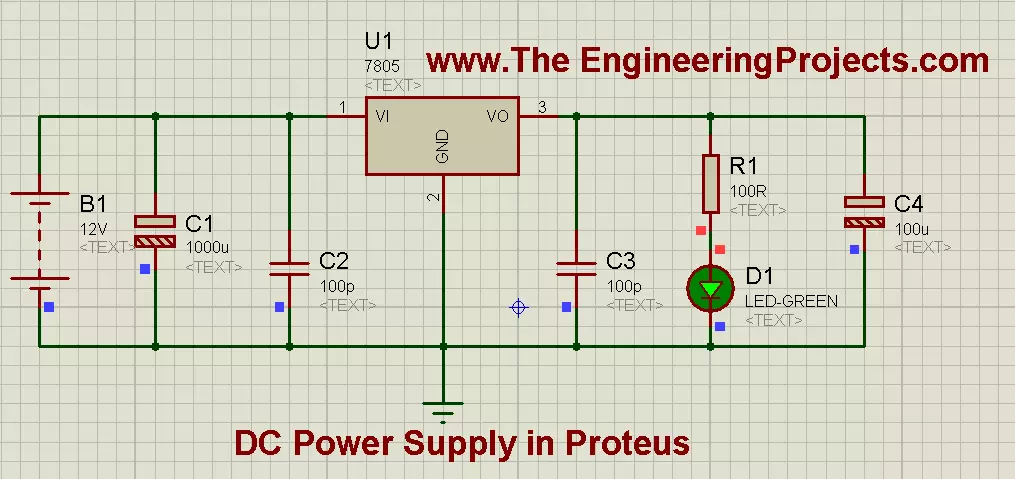
Hello friends, hope you all are fine and enjoying in your life. In the previous post, we have seen How to use Oscilloscope in Proteus ISIS, today I am going share a new and a very important Tutorial which is How to Design a 5V Power Supply in Proteus? This project is very simple and of basic level but importance of this project is that it is used as a base in almost all large electronics project, designed now-a-days. When I start working on any project then the first thing, I need to design is this DC power supply, because without powering up the components, we can't use them. :)
While designing a 5V Power Supply in Proteus ISIS, we will be using Voltage Regulator IC, which is commonly known as 7805. This voltage regulator is used to regulate or c ...