Hello everyone, today I am going to share a complete project which is DS1307 Arduino based digital Clock in Proteus ISIS. In this project, I have designed a digital clock using Arduino UNO and DS1307 RTC Module. So, first of all, if you haven't yet installed then, you should install Arduino Library for Proteus using which you will be able to easily simulate Arduino baords in Proteus. Along with Arduino Library you will also need to install DS1307 Library for Proteus , which I have shared in my previous post as we are gonna use this RTC Module DS1307 for designing our digital clock. Libraries Libraries used in this project Arduino Library for Proteus: V1.0 (2015, used in this project) · latest version: V4.0 (October 2026) DS1307 Library for Proteus: V1.0 (2016, used in this project) Newer c ...
Hello friends, hope you all are fine and having fun with your lives. In today's post, I am going to share a new DS1307 Library for Proteus. Recently, I have shared the GSM Library for Proteus , which was really appreciated by the readers so I got quite excited and have designed another new Proteus Library. Currently I am working on many Proteus Libraries. In future, I am gonna design almost all the sensors in Proteus. So stay tuned with us. Updates DS1307 Library for Proteus Latest version: V1.0 (April 2016, this tutorial) Newer clock module: DS3231 RTC Modules: Micro SD · MAX485 RS485 · MCP2515 CAN · DFPlayer Mini Helping Tools Serial Monitor Advance : a serial terminal window for the UART of your board Serial Monitor Expert : the serial monitor with extra debugging tools LCD Library for ...
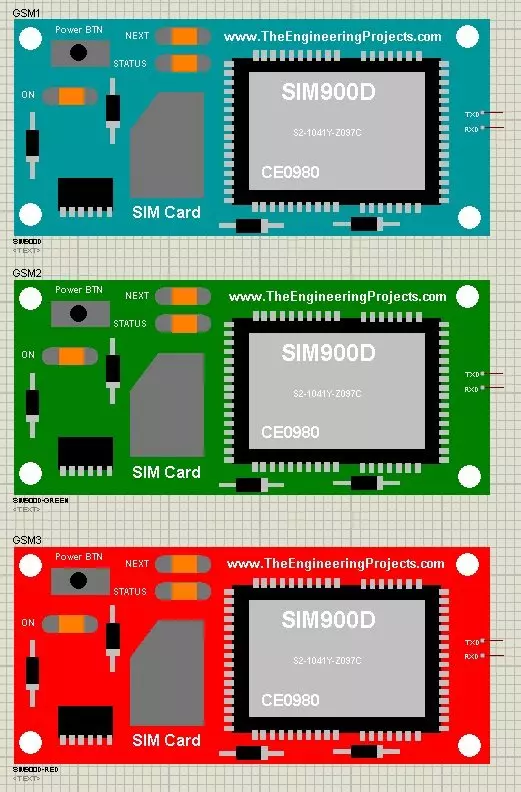
Hello friends, hope you all are fine and having fun with your lives. Today, I am going to share a new exciting post on Send SMS with SIM900D in Proteus ISIS. In my previous post, I have shared the new GSM Library for Proteus , which is the first ever designed library for Proteus, and I am quite excited while sharing its features. So, today, we will use this GSM Lirbary for Proteus and we are gonna send sms with Sim900D module available in that library. We are gonna design this whole project in Proteus ISIS. Libraries Libraries used in this tutorial GSM Library for Proteus: V1.0 (2016, used in this tutorial) Newer GSM modules: SIM800L · SIM800C · SIM900A · SIM808 Helping Tools Serial Monitor Advance : a serial terminal window for the UART of your board Serial Monitor Expert : the serial mon ...
Hello friends, hope you all are fine and having fun with your lives. In today's post, I am going to share GSM Library for Proteus. Yeah you have read absolutely fine, today I am gonna share the most awaited and most demanded Proteus Library. :) Till now, I have received hundreds of suggestions and requests about this Library and I have always told them that its under designing process and I will post it real soon. So finally the wait is over and we have our new GSM Library for Proteus, ready to download and simulate in Proteus. Using this GSM library for Proteus, now you can easily simulate your GSM module in Proteus and can test your code. :) Updates GSM Library for Proteus Latest version: V1.0 (March 2016, this tutorial) GSM modules: SIM800L · SIM800C · SIM900A · SIM808 Helping Tools Ser ...
Hello everyone, hope you all are fine and having fun with your lives. Today, I am going to share a new project named as Interfacing of Multiple Temperature sensors DS18B20 arduino. I have already shared a tutorial on Interfacing of Temperature Senor 18B20 with Arduino but in that tutorial, we have seen how to connect one temperature sensor DS18B20 arduino. But today, I am gonna interface multiple temperature sensors DS18B20 Arduino. For this project I have used two sensors but you can use more if you want. Temperature sensor DS18B20 is a one wire temperature sensor means we can get its data through a single wire and we can connect as many as we want temperature sensors with this single wire and can call them through their addressing. Each temperature sensor is allotted an address and when ...
Hello friends, hope you all are fine and having fun with your lives. Today, I am going to share a tutorial on DC Motor Speed Control using Arduino in Proteus ISIS. In my previous post, we have seen How to design a DC Motor Direction Control Project using Arduino in Proteus ISIS and if you haven't checked it out then I would recommend you to have a look at it first. Because, in today's tutorial, I am gonna extend that tutorial and will add the DC Motor Speed Control in it. So, today, we will control both the direction as well as speed of the DC Motor. Moreover, you should also have a look at How to use Arduino PWM Pins if you are not much familiar with PWM control. In the previous tutorial, we have seen How to control the direction of a DC Motor, which is important when you are working on s ...
Hello friends, hope you all are fine and having fun with life. Today, I am going to share DC Motor Direction Control with Arduino. I have designed a complete simulation in Proteus, which will help you in understanding the controlling of DC motor. I would recommend you to first read How to Control relay in Proteus ISIS which will help you in understanding the functionality of relays because in today's tutorial, I have used relays to do the DC Motor Direction Control. I have already posted a tutorial on DC Motor Drive Circuit in Proteus ISIS . Libraries Libraries used in this tutorial Arduino Library for Proteus: V1.0 (2015, used in this tutorial) · latest version: V4.0 (October 2026) Helping Tools Serial Monitor Advance : a serial terminal window for the UART of your board Serial Monitor Ex ...
Hello friends, hope you all are fine and having fun with your lives. Today, I am going to share a new Genuino Library for Proteus. Genuino boards are just the same as Arduino boards but with slight difference of color and shape. I have already posted a tutorial on Arduino Library for Proteus in which I have explained how to download the Arduino Library and use it in Proteus. Today, I am going to post a similar library but for Genuino boards. Their functionality is exactly the same as the Arduino Library but they have better look and Genuino Color. Updates Arduino Library for Proteus Latest version: Arduino Library for Proteus V4.0 (October 2026): six boards with working LEDs, a RESET button and a built-in serial monitor Earlier versions: V3.0 (2023) · V2.0 (2021) · V1.0 (2015) · Genuino bo ...
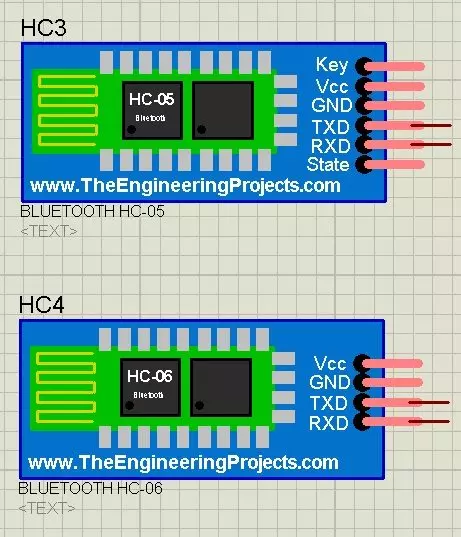
Hello friends, hope you all are fine. Today, I am going to share a new Bluetooth Library for Proteus. Using this Library, now you can quite easily use Bluetooth modules in Proteus ISIS. I have designed two Bluetooth modules which are HC-05 and HC-06. We all know about these modules. We use these modules for sending data through Bluetooth. Till now, there's no such Bluetooth Library designed for Proteus and we are the first developers of this awesome Bluetooth Library for Proteus. I hope you guys are gonna like it. I have also posted a tutorial in which I have done Arduino Bluetooth Communication using HC05 in hardware. I hope that one will also be interesting to read, if you have planned to start working on Bluetooth Module. Updates Bluetooth Library for Proteus Latest version: V1.0 (March ...
Hello friends, hope you all are fine and having fun with your lives. Today, I am going to share a new project in which we are gonna do Arduino Bluetooth communication. The Bluetooth module I have used for this project is HC-05, which is a serial Bluetooth module. We can quite easily perform the Bluetooth communication with this module using Arduino board. I have worked on many projects in which I have to send the data from sensors to my computer via Bluetooth. So, in such projects I normally use this Bluetooth module which is connected with the sensors and then Arduino gets the data from these sensors and then send this data to computer via Bluetooth module. In this project, I have used Arduino board but you can use PIC Microcontroller or 8051 Microcontroller as well. Because they both hav ...