Hello friends! This page brings our 8051 microcontroller projects together in a learning sequence. We will begin with an LED and a serial connection, then move through displays, keypads, timers and complete applications. Each linked tutorial provides the details for its own circuit and program. The purpose of this collection is to help you choose a useful next project, rather than download several unrelated simulations without understanding them. A small circuit that you can explain, modify and troubleshoot teaches more than a large circuit that only works with an unchanged HEX file. We will also discuss the practical decisions behind these projects: selecting the exact processor, matching its clock, allocating pins and checking timing. Those details determine whether examples can be combi ...
Hello friends! Today, we are going to study serial communication with an 8051 microcontroller in Proteus. We will send characters from a Virtual Terminal to an AT89C52, use those characters to control eight LEDs and send a short acknowledgement back to the terminal. If you have completed our 8051 LED blinking project , you already know how to build the basic circuit and load a HEX file. This tutorial adds a communication channel so the output changes in response to a command instead of a fixed delay. We will keep the original command scheme and project download, while correcting an important clock detail. The revised program uses an 11.0592 MHz oscillator for 9600 baud. The older screenshots show a 16 MHz crystal, so change that value and the processor clock setting when following the prog ...
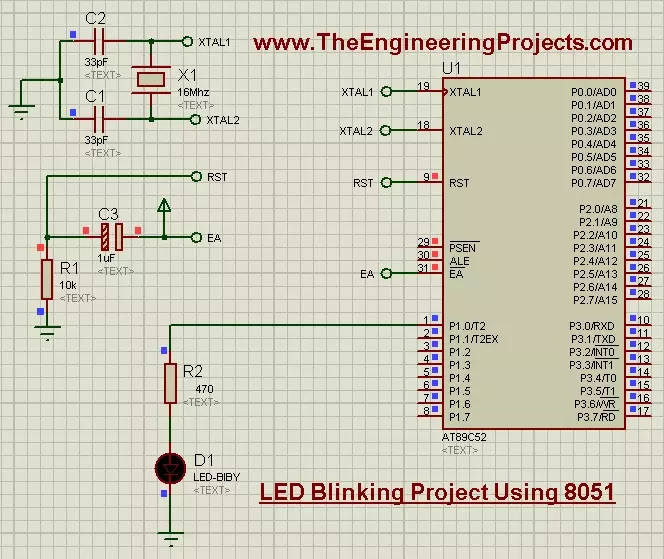
Hello friends! Today, we are going to build an LED blinking project using an 8051 microcontroller in Proteus. This is a useful first exercise because it connects a short C program with something we can immediately observe: an output pin repeatedly switching an LED on and off. We will use the AT89C52, which belongs to the 8051 family, and keep the original project's 16 MHz clock and P1.0 LED connection. I will explain the supporting circuit first, then show how to create the program in Keil, generate a HEX file and load it into the simulation. The original simulation and download remain available below. The updated example uses Timer0 for an understandable delay instead of relying on an empty software loop. That gives us a practical introduction to both digital outputs and the relationship ...