Hello friends, I hope you are doing well. This is the nineteenth tutorial in our series on how to create a Proteus library. In the previous tutorial, How to Add a Live Control Panel to a Proteus Component , our Traffic Light Module learned to show its pins and lamps on a panel and to change its LOGIC setting with a click while the simulation runs. So far, we tested every part with logic switches. Today, we test the library the way its users will use it. Our topic is how to test a custom Proteus library with Arduino . Updates Proteus Component Designing This course: Part 19 of 20, Testing and Sharing Your Library Previous part: Live Control Panel Next part: Package and Share the Library Course start: How a Proteus Library Works Add libraries to Proteus: How to Add a New Library in Proteus L ...
Hello friends! Today, we are going to study serial communication with an 8051 microcontroller in Proteus. We will send characters from a Virtual Terminal to an AT89C52, use those characters to control eight LEDs and send a short acknowledgement back to the terminal. If you have completed our 8051 LED blinking project , you already know how to build the basic circuit and load a HEX file. This tutorial adds a communication channel so the output changes in response to a command instead of a fixed delay. We will keep the original command scheme and project download, while correcting an important clock detail. The revised program uses an 11.0592 MHz oscillator for 9600 baud. The older screenshots show a 16 MHz crystal, so change that value and the processor clock setting when following the prog ...
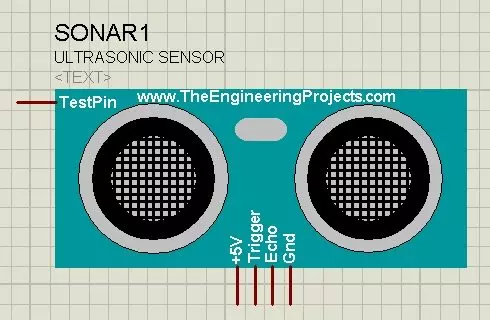
Hello friends! Today I will show you how to install our Ultrasonic Sensor Library for Proteus and use it with an Arduino Uno. We will begin with the library files, place the sensor on a schematic, connect its simulation input and then read the distance through the Virtual Terminal. This is the original HC-SR04-style library introduced in this tutorial. Updates Ultrasonic Sensor Library for Proteus Latest version: Ultrasonic Sensor Library for Proteus V2.0 (October 2026): HC-SR04 with real TRIG and ECHO timing, Simple and Advance devices, test tools and an Arduino demo Earlier versions: V1.0 (2015, this tutorial) Other distance and motion sensors: JSN-SR04T · Sharp IR · TF-Luna LiDAR · VL53L0X · PIR HC-SR501 · RCWL-0516 · IR Obstacle FC-51 Helping Tools Serial Monitor Advance : a serial ter ...
Hello friends! In this tutorial, we will learn how to use Virtual Terminal in Proteus ISIS to inspect serial data and send simple commands to a simulated circuit. It is particularly useful when working with microcontrollers, GSM modules, GPS receivers, and other devices whose behavior can be understood through a serial interface. We will begin with the simplest arrangement: a simulated microcontroller communicating directly with Virtual Terminal. Then we will return to the original article's COMPIM example, which connects a simulation to a real computer serial port. Keeping those two arrangements separate will help you choose the correct components and avoid unnecessary COM-port problems. The aim is to make serial communication visible before building a larger application around it. We wil ...