


Project Files of Raspberry Pi 5 Gas Leak and Fire Alarm - Proteus Simulation
 Libraries
 Code
 Projects
 Simulation
pi-5-gas-leak-fire-alarm-tep-v1-0-15e4292a22714556a3c5207f9a89e0fd.zip

Raspberry Pi 5 Gas Leak and Fire Alarm - Proteus Simulation V1.0
Raspberry Pi 5 Gas Leak and Fire Alarm - Proteus Simulation V1.0 comes as a ZIP archive of 153 files (15.4 MB, 30.5 MB unpacked) holding Proteus library files, simulation model DLLs, a Proteus simulation, source code and a nested archive.
- LIBProteus library
- DLLProteus model
- DSNProteus simulation
- SRCSource code
- ZIPNested archive
Description
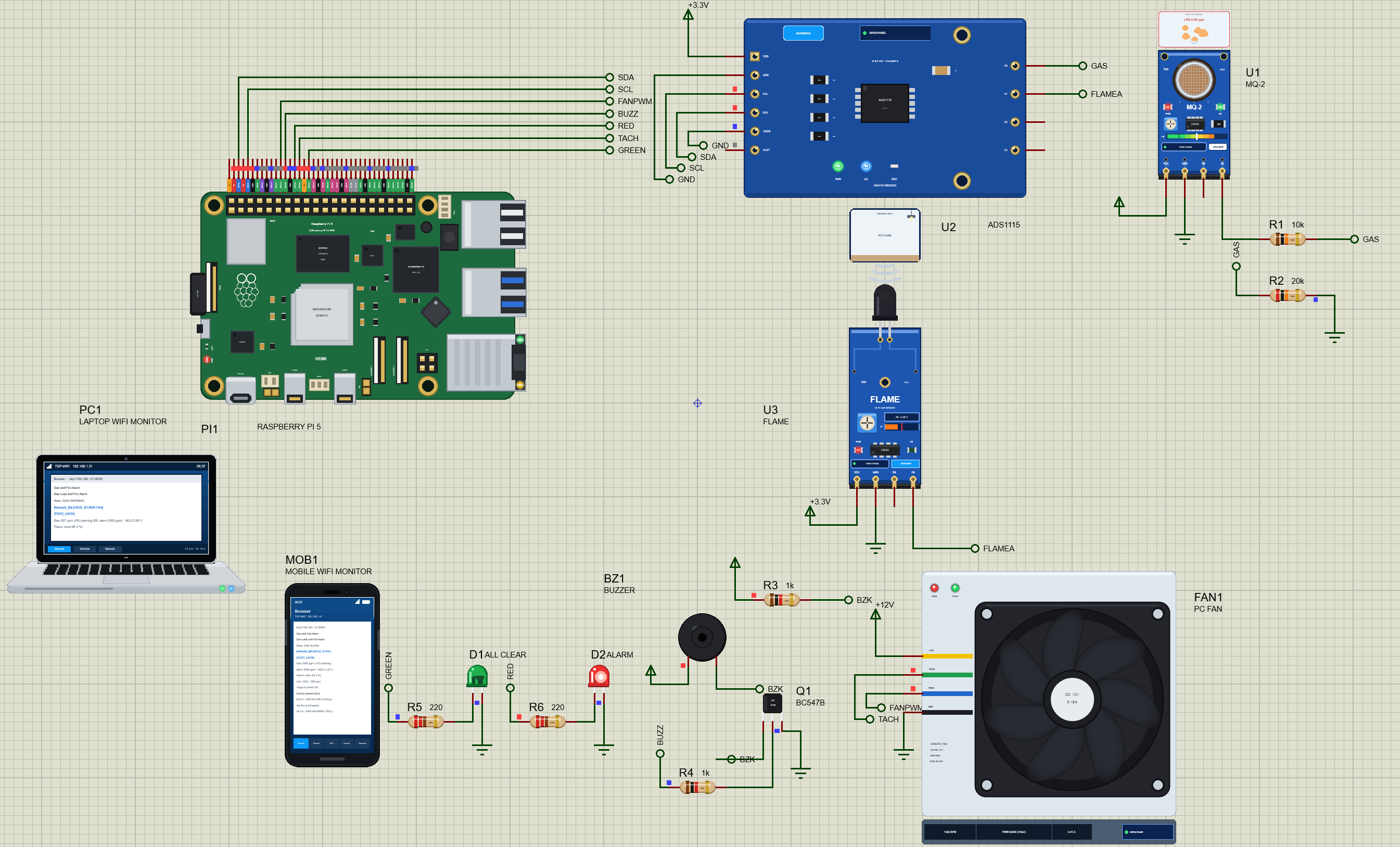
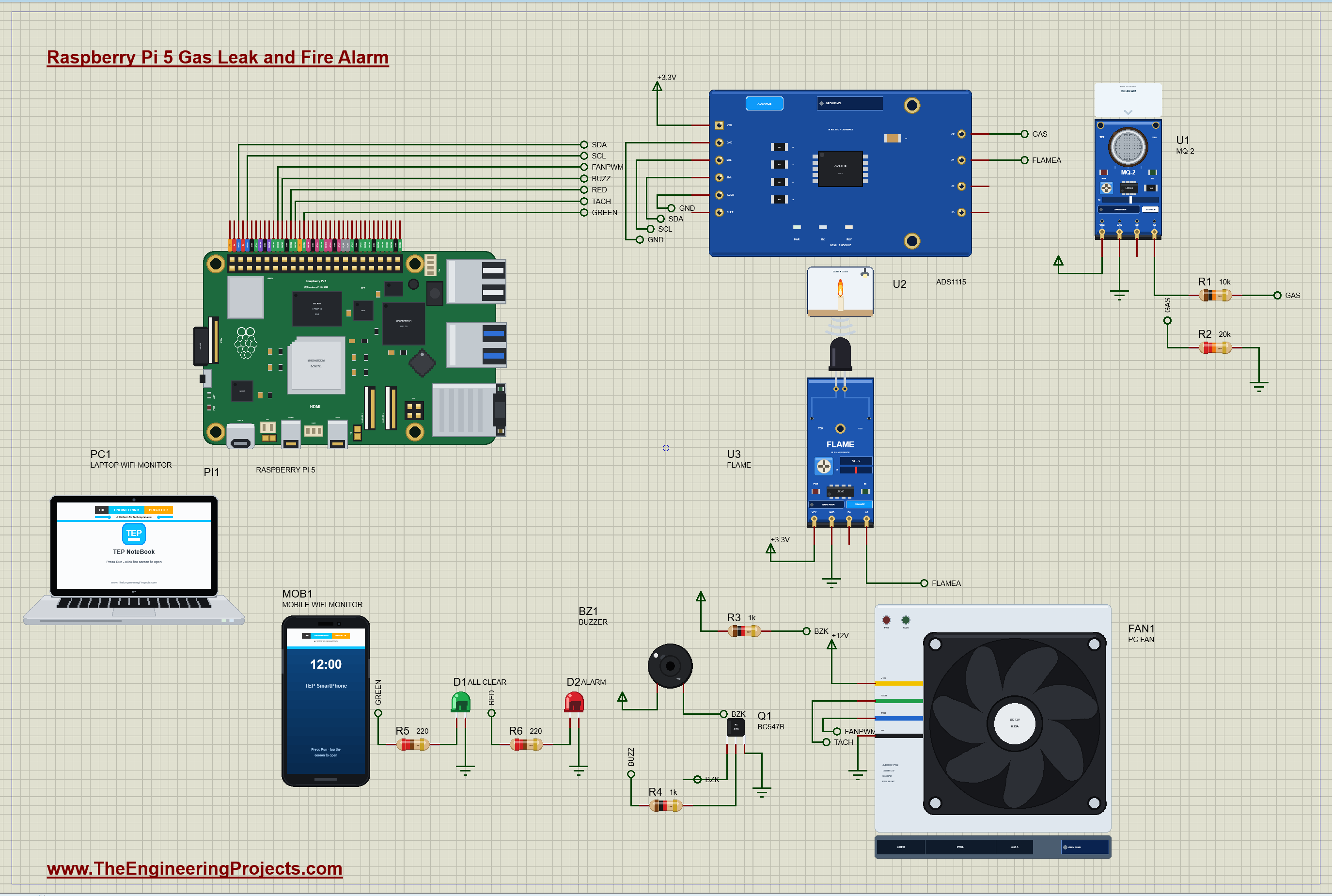
Raspberry-Pi-5-Gas-Leak-Fire-Alarm-Proteus-Simulation-v1.0.zip: the complete Proteus simulation project (Raspberry Pi 5, MQ-2 gas sensor, flame sensor, ADS1115 ADC, 4-pin PC fan, active buzzer with a BC547B, LEDs, the Laptop and Mobile WiFi Monitors), the Python program gas_fire_alarm.py, every LIB and DLL the simulation needs, the TEPPi Python runtime and a README.

File Structure
 File Structure
66.3 KB18.6 KB9.9 KB213.2 KB39.5 KB21.8 KB13.1 KB122.3 KB24.8 KB306.9 KB60.5 KB3.3 MB34.3 KB620.8 KB36 KB169.8 KB628.1 KB99.3 KB65.3 KB4.8 MB4.1 MB80 B97.8 KB26.8 KB1.2 MB1.1 MB88.9 KB27.3 KB55.8 KB79.8 KB105.8 KB193.8 KB113.8 KB48.8 KB145.8 KB36.8 KB29.3 KB42.3 KB28.8 KB67.3 KB89.3 KB153.8 KB22.8 KB38.8 KB2.1 KB9.9 KB4.1 KB1.3 KB4.7 KB431 B2.5 KB17.5 KB283 B6.5 KB37.9 KB11.1 KB5.5 KB885 B13.6 KB9 KB878 B1.5 KB4 KB1004 B10 B110 B2.6 KB1.1 KB8.9 KB58.5 KB12.4 KB6.6 KB18.5 KB20.7 KB27.8 KB21.1 KB7.1 KB7.7 KB2.7 KB51.2 KB100.9 KB1.2 KB24.3 KB7.4 KB53.6 KB26.1 KB20.5 KB60.5 KB19.6 KB1.6 KB8.4 KB20.9 KB2.6 KB539 B1.4 KB9.7 KB2.8 KB21 B92 B7.9 KB264 B3.4 KB3.8 KB17.5 KB55.2 KB3.3 KB10.8 KB1.5 KB4.2 KB7.3 KB2.5 KB32.6 KB14.5 KB283 B17.4 KB257 B691 B14.5 KB12.8 KB3.6 KB1.7 KB37 KB418 B6.2 KB7 KB37.3 KB10.6 KB23.7 KB28.7 KB8.8 KB16.9 KB326 KB292 KB276 KB389.5 KB289.5 KB414.5 KB2.9 MB303.5 KB311 KB11.8 KB45.3 KB326 KB292 KB276 KB389.5 KB289.5 KB414.5 KB2.9 MB303.5 KB311 KB11.8 KB12.7 KBGallery12 images from the tutorialOpen the tutorial
 Gallery12 images from the tutorial
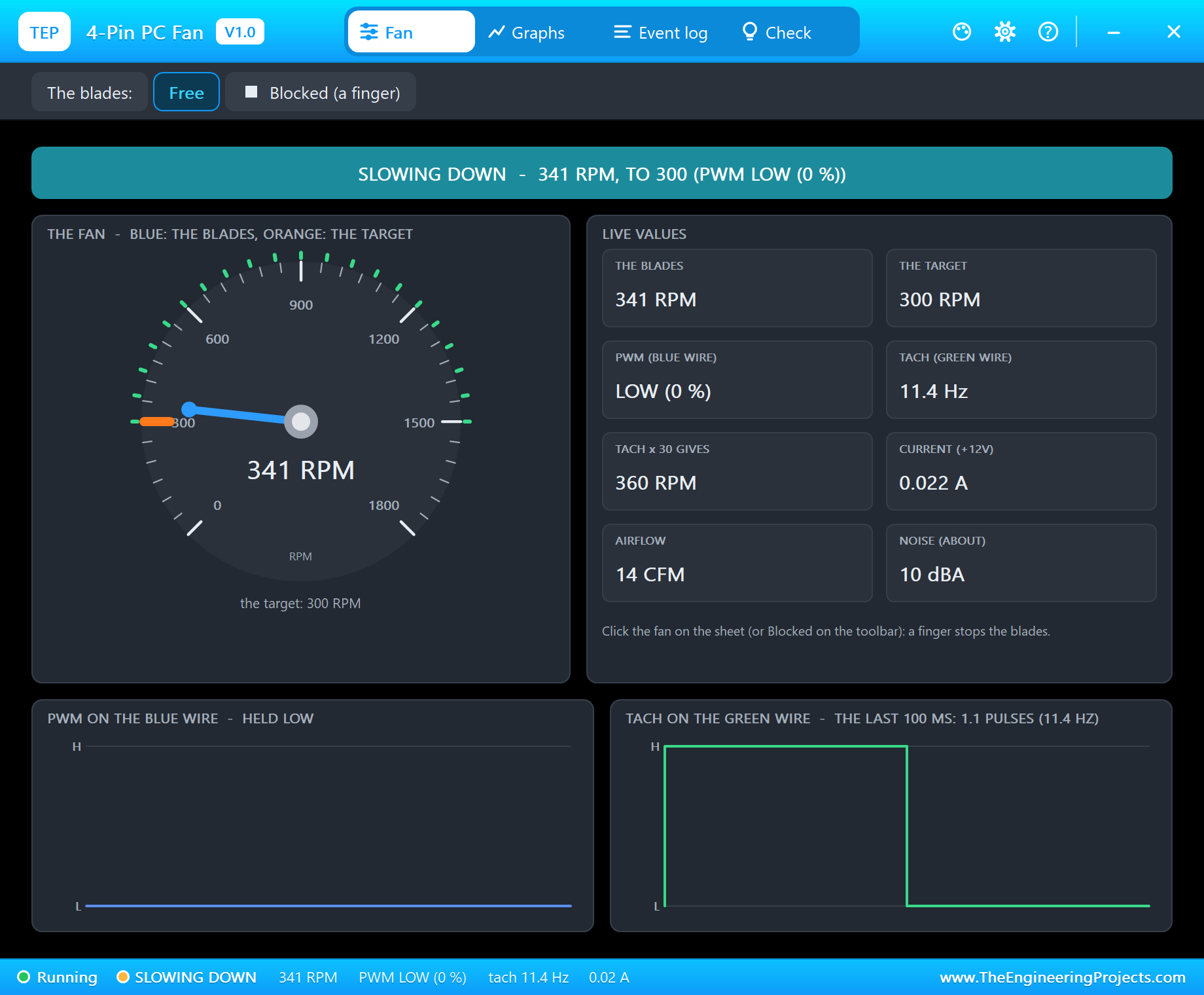
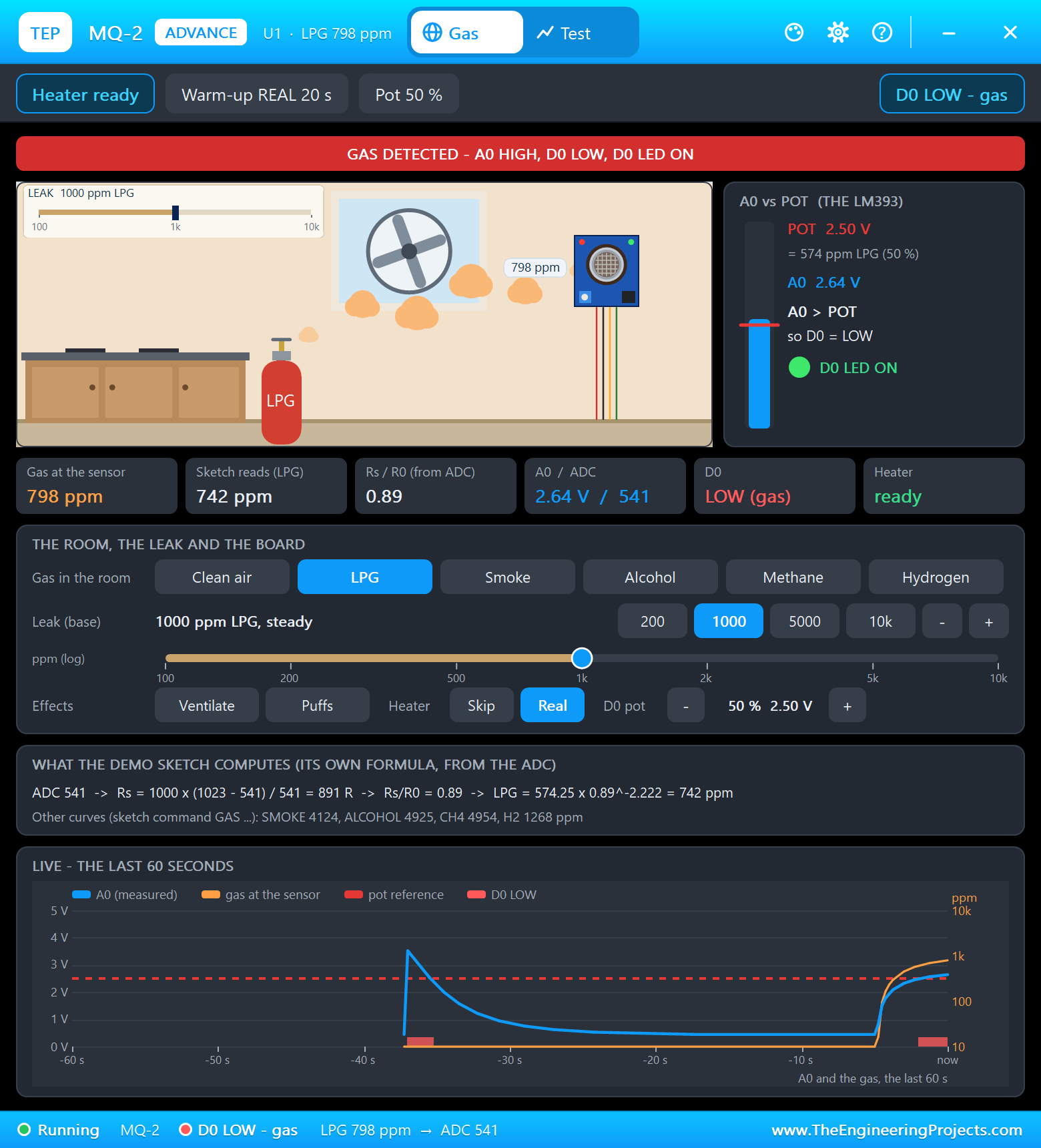
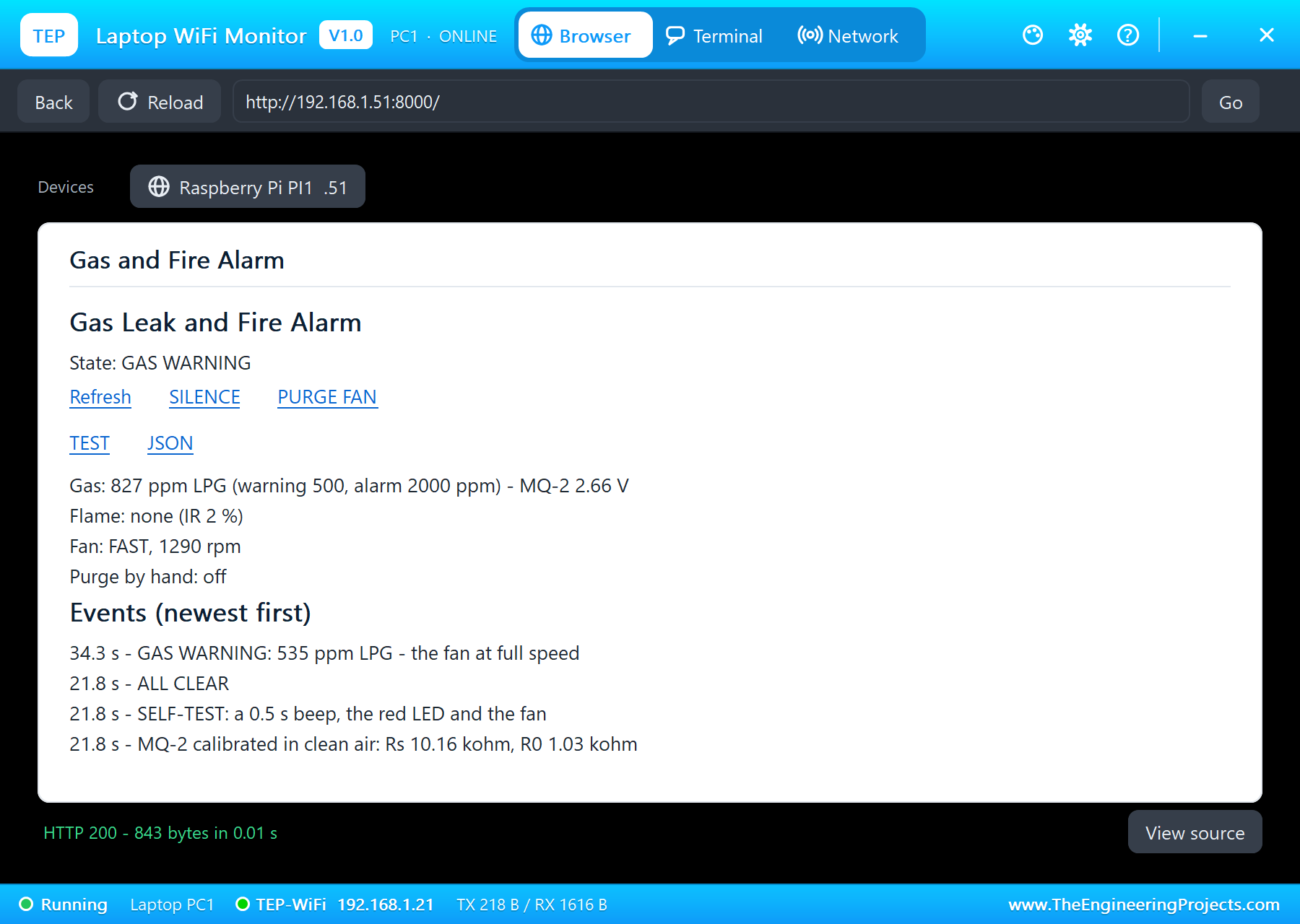
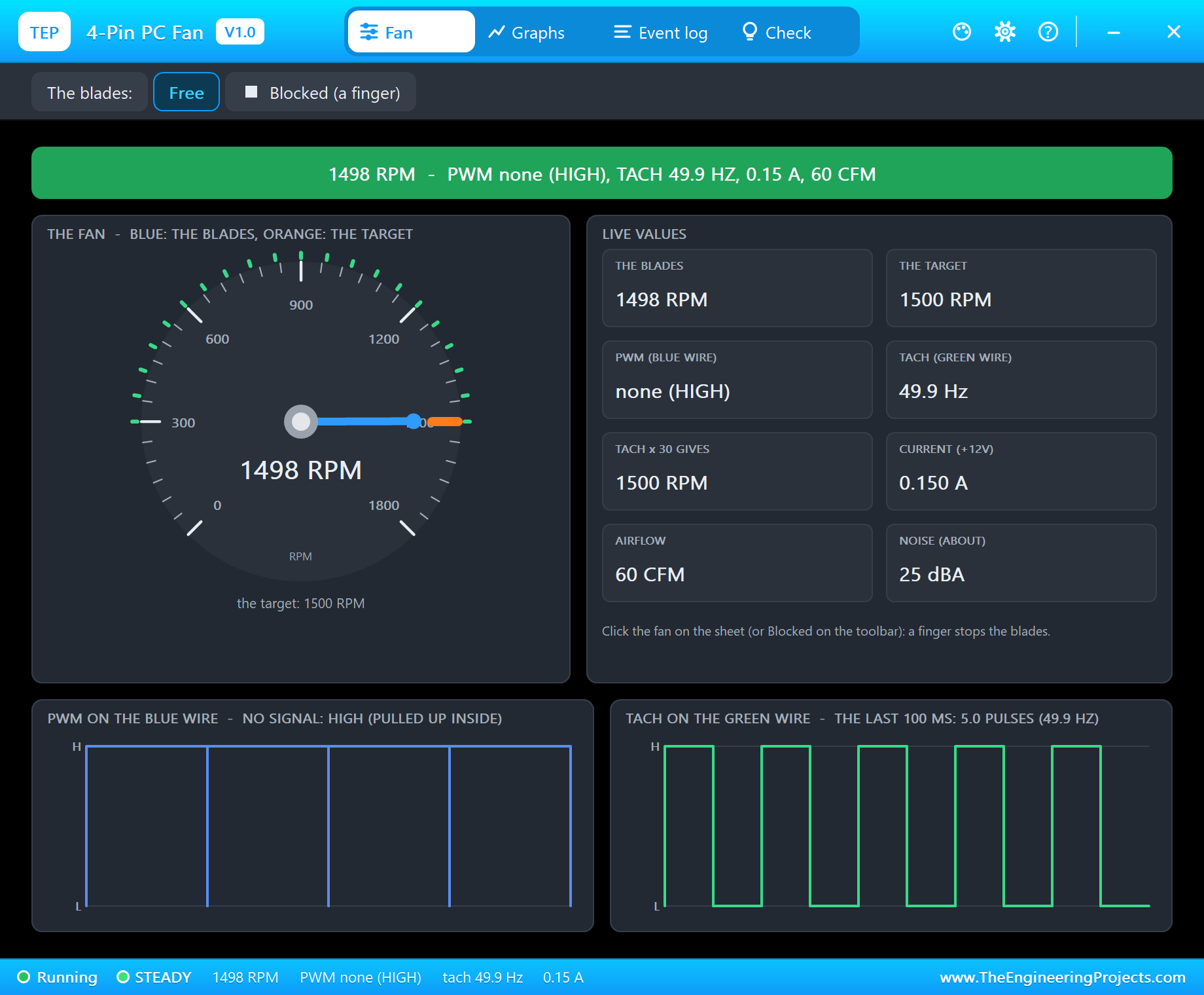
The circuit, the board and the results as they appear in Raspberry Pi 5 Gas Leak and Fire Alarm - Proteus Simulation. Open an image for its full size.
README
 README
===============================================================================================================
  Raspberry Pi 5 Gas Leak and Fire Alarm - Proteus Simulation Project V1.0
  The Engineering Projects - www.TheEngineeringProjects.com
===============================================================================================================

IMPORTANT LINKS
  The project tutorial (circuit, code, simulation results):
    https://www.theengineeringprojects.com/2026/11/raspberry-pi-5-gas-leak-fire-alarm-proteus-simulation.html
  The libraries this project is built from (each post has its own full download and tutorial):
    Raspberry Pi 5 board:
      https://www.theengineeringprojects.com/2026/10/raspberry-pi-5-library-for-proteus.html
    MQ-2 gas sensor:
      https://www.theengineeringprojects.com/2026/10/gas-sensor-library-for-proteus-v2-0.html
    Flame sensor:
      https://www.theengineeringprojects.com/2026/10/flame-sensor-library-for-proteus-v2-0.html
    ADS1115 16-bit ADC:
      https://www.theengineeringprojects.com/2026/10/ads1115-adc-library-for-proteus-v1-0.html
    4-pin PC fan:
      https://www.theengineeringprojects.com/2026/11/4-pin-pc-fan-library-for-proteus-v1-0.html
    Active buzzer:
      https://www.theengineeringprojects.com/2026/11/active-buzzer-library-for-proteus.html
    BC547B transistor (small transistors):
      https://www.theengineeringprojects.com/2026/11/small-transistors-library-for-proteus.html
    5mm LED:
      https://www.theengineeringprojects.com/2026/11/5mm-led-library-for-proteus.html
    Resistor:
      https://www.theengineeringprojects.com/2026/11/resistor-library-for-proteus.html
    Laptop WiFi Monitor:
      https://www.theengineeringprojects.com/2026/10/laptop-wifi-monitor-library-for-proteus.html
    Mobile WiFi Monitor:
      https://www.theengineeringprojects.com/2026/10/mobile-wifi-monitor-library-for-proteus.html
  Support our free work: https://www.theengineeringprojects.com/donate

FILE STRUCTURE
Pi-5-Gas-Leak-Fire-Alarm-TEP-v1.0/
|-- Proteus Library Files/
|   |-- TEPADS1115.LIB                                 66.3 KB   a part of the project -> LIBRARY folder
|   |-- TEPBJT.LIB                                     18.6 KB   a part of the project -> LIBRARY folder
|   |-- TEPBUZZER.LIB                                   9.9 KB   a part of the project -> LIBRARY folder
|   |-- TEPFLAME.LIB                                  213.2 KB   a part of the project -> LIBRARY folder
|   |-- TEPLAPTOP.LIB                                  39.5 KB   a part of the project -> LIBRARY folder
|   |-- TEPLED5MM.LIB                                  21.8 KB   a part of the project -> LIBRARY folder
|   |-- TEPMOBILE.LIB                                  13.1 KB   a part of the project -> LIBRARY folder
|   |-- TEPMQ2.LIB                                    122.3 KB   a part of the project -> LIBRARY folder
|   |-- TEPPCFAN.LIB                                   24.8 KB   a part of the project -> LIBRARY folder
|   |-- TEPRESISTOR.LIB                               306.9 KB   a part of the project -> LIBRARY folder
|   |-- TEPRPI5.LIB                                    60.5 KB   a part of the project -> LIBRARY folder
|-- Proteus Model Files/
|   |-- TEPADS1115.DLL                                326.0 KB   a model -> MODELS folder
|   |-- TEPBJT.DLL                                    292.0 KB   a model -> MODELS folder
|   |-- TEPBUZZER.DLL                                 276.0 KB   a model -> MODELS folder
|   |-- TEPFLAME.DLL                                  389.5 KB   a model -> MODELS folder
|   |-- TEPLED5MM.DLL                                 289.5 KB   a model -> MODELS folder
|   |-- TEPMQ2.DLL                                    414.5 KB   a model -> MODELS folder
|   |-- TEPNET.DLL                                     2.89 MB   a model -> MODELS folder
|   |-- TEPPCFAN.DLL                                  303.5 KB   a model -> MODELS folder
|   |-- TEPRESISTOR.DLL                               311.0 KB   a model -> MODELS folder
|   |-- TEPPi/python/                                 17.54 MB   Python 3.11 embeddable -> MODELS\TEPPi (33 files)
|   |-- TEPPi/runtime/                                 1.11 MB   TEP Pi runtime, gpiozero -> MODELS\TEPPi (87 files)
|-- Proteus Simulation/
|   |-- gas_fire_alarm.py                              11.8 KB   the program PI1 runs
|   |-- Pi-5-Gas-Leak-Fire-Alarm.pdsprj                45.3 KB   the project simulation
|   |-- TEPADS1115.DLL                                326.0 KB   copy of the model
|   |-- TEPBJT.DLL                                    292.0 KB   copy of the model
|   |-- TEPBUZZER.DLL                                 276.0 KB   copy of the model
|   |-- TEPFLAME.DLL                                  389.5 KB   copy of the model
|   |-- TEPLED5MM.DLL                                 289.5 KB   copy of the model
|   |-- TEPMQ2.DLL                                    414.5 KB   copy of the model
|   |-- TEPNET.DLL                                     2.89 MB   copy of the model
|   |-- TEPPCFAN.DLL                                  303.5 KB   copy of the model
|   |-- TEPRESISTOR.DLL                               311.0 KB   copy of the model
|-- Python Code/
|   |-- gas_fire_alarm.py                              11.8 KB   the program (the same file)
|-- README.txt                                        ~11.6 KB   this file
Total: 30.47 MB (unzipped). The C++ source code of the models is not included.

WHAT IS IT?
  A complete IoT safety project you can run in Proteus: a Raspberry Pi 5 watches for a gas leak and for a flame,
  sounds the alarm, runs an exhaust fan and shows everything on a web page for a laptop or a phone.
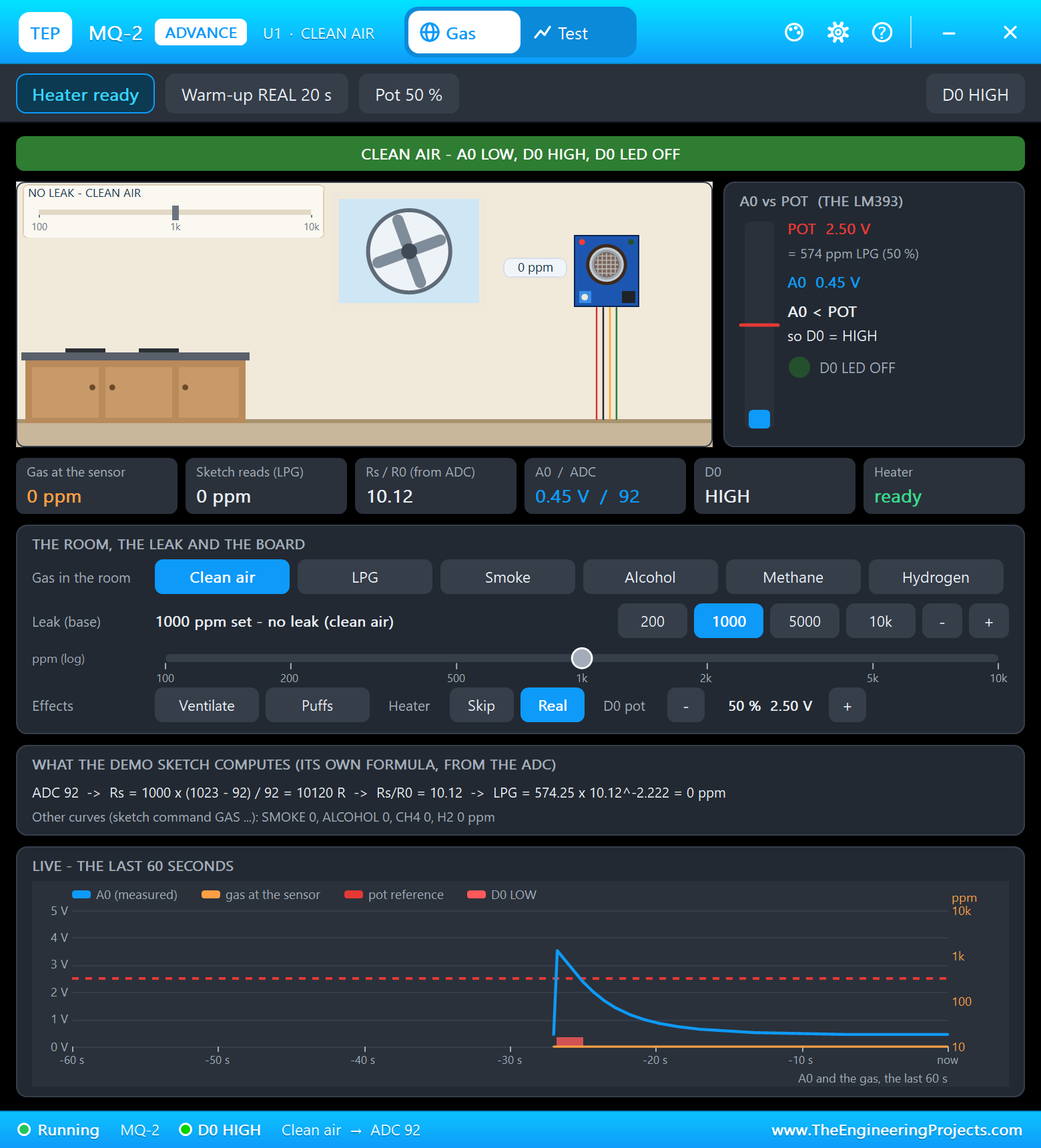
    * MQ-2 gas sensor (MQ2ADVTEP, U1) on +5V. Its analog output A0 goes through a 10k / 20k divider (R1 / R2: the ADC
      sees 2/3 of it, 5 V becomes 3.33 V) into the ADS1115's A0.
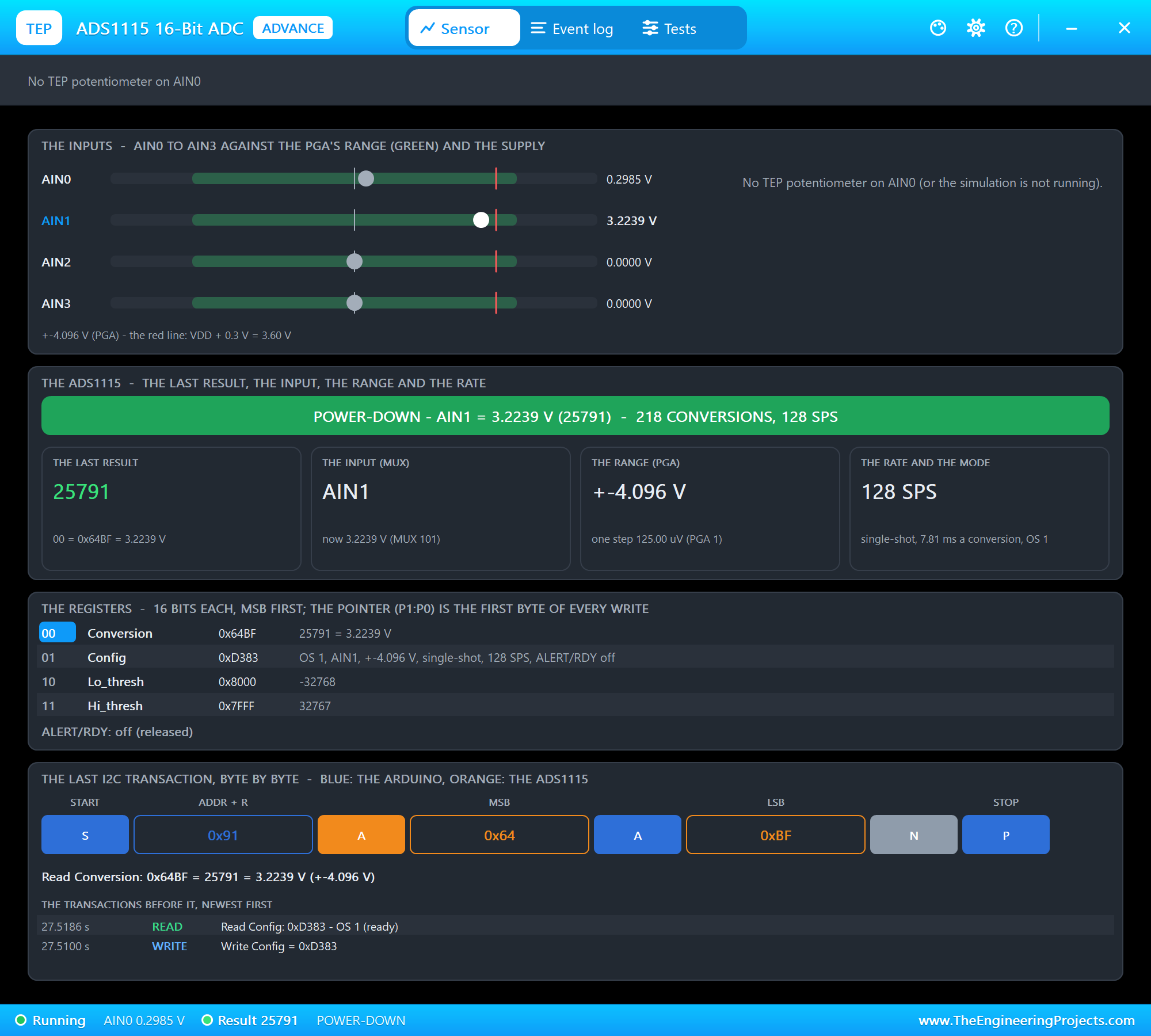
    * ADS1115 16-bit ADC (ADS1115ADVTEP, U2) on +3.3V, I2C1 (SDA GPIO2, SCL GPIO3), address 0x48 (ADDR to ground).
      The Pi 5 has no analog inputs; the ADS1115 gives it four, 125 uV a step on the +-4.096 V range.
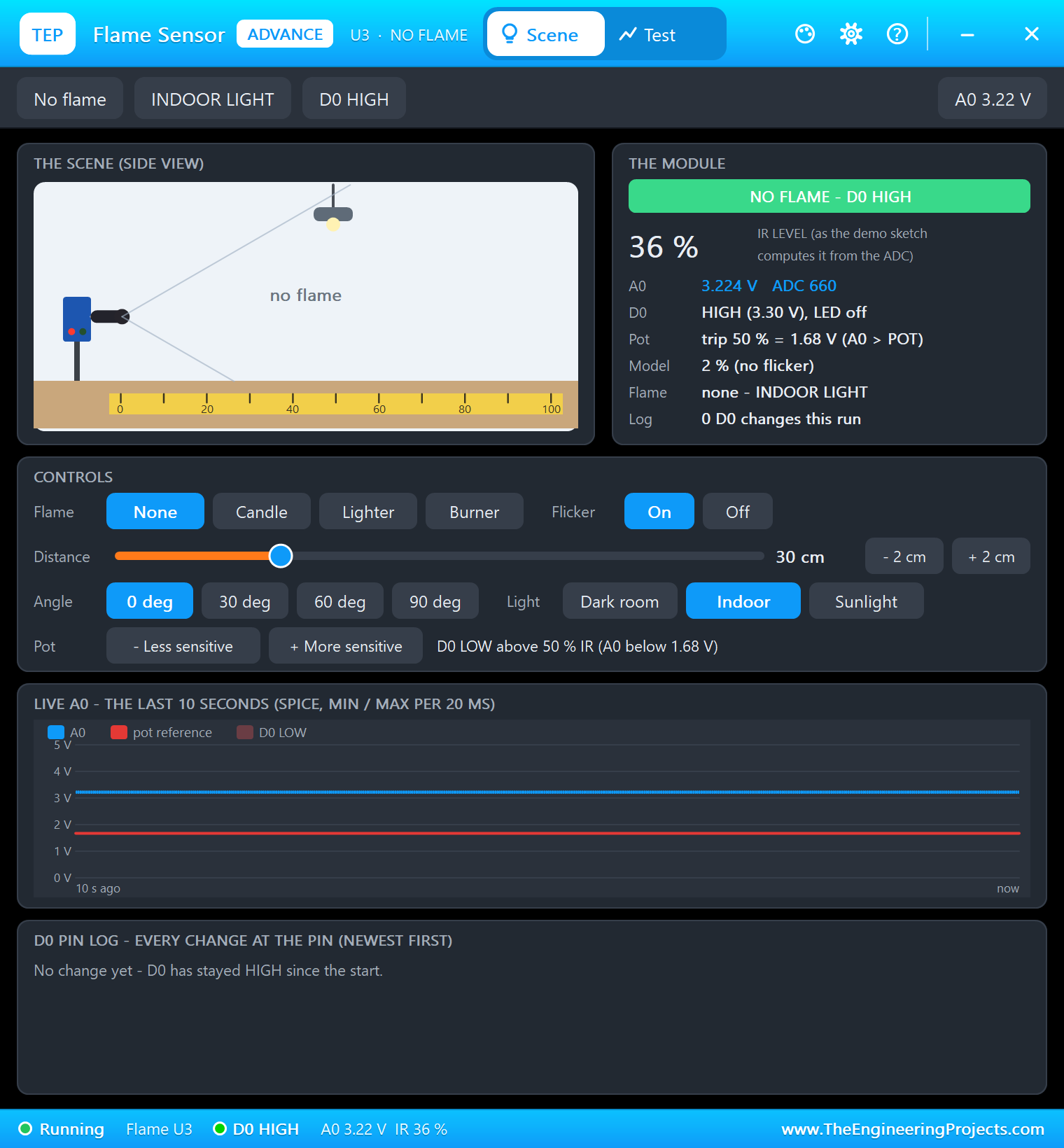
    * Flame sensor (FLAMEADVTEP, U3) on +3.3V: A0 into the ADS1115's A1. The program compares the infrared strength
      itself - a flame from 50 %, gone below 35 % (hysteresis) - so the module's D0 is not used.
    * 4-pin PC fan (PCFAN4PINTEP, FAN1) on +12V: PWM on GPIO18 (LOW = its minimum speed, HIGH = full speed), TACH on
      GPIO23, held high by the Pi's own pull-up (lgpio SET_PULL_UP) - never pull it up to 12 V. Two pulses a turn.
    * Active buzzer (BUZZERACTIVETEP, BZ1) on +5V, switched on its low side by a BC547B transistor (BC547BTEP, Q1)
      whose base takes GPIO27 through 1k (R4). R3 (1k) across the buzzer keeps the collector at 5 V while the buzzer
      is silent (an active buzzer draws almost nothing below its 2 V start).
    * Green LED on GPIO24 (all clear), red LED on GPIO22 (alarm), each through 220 ohm (R5 / R6).
    * RASPBERRY PI 5 (PI1) runs gas_fire_alarm.py on Ethernet at 192.168.1.51; the dashboard is on port 8000.
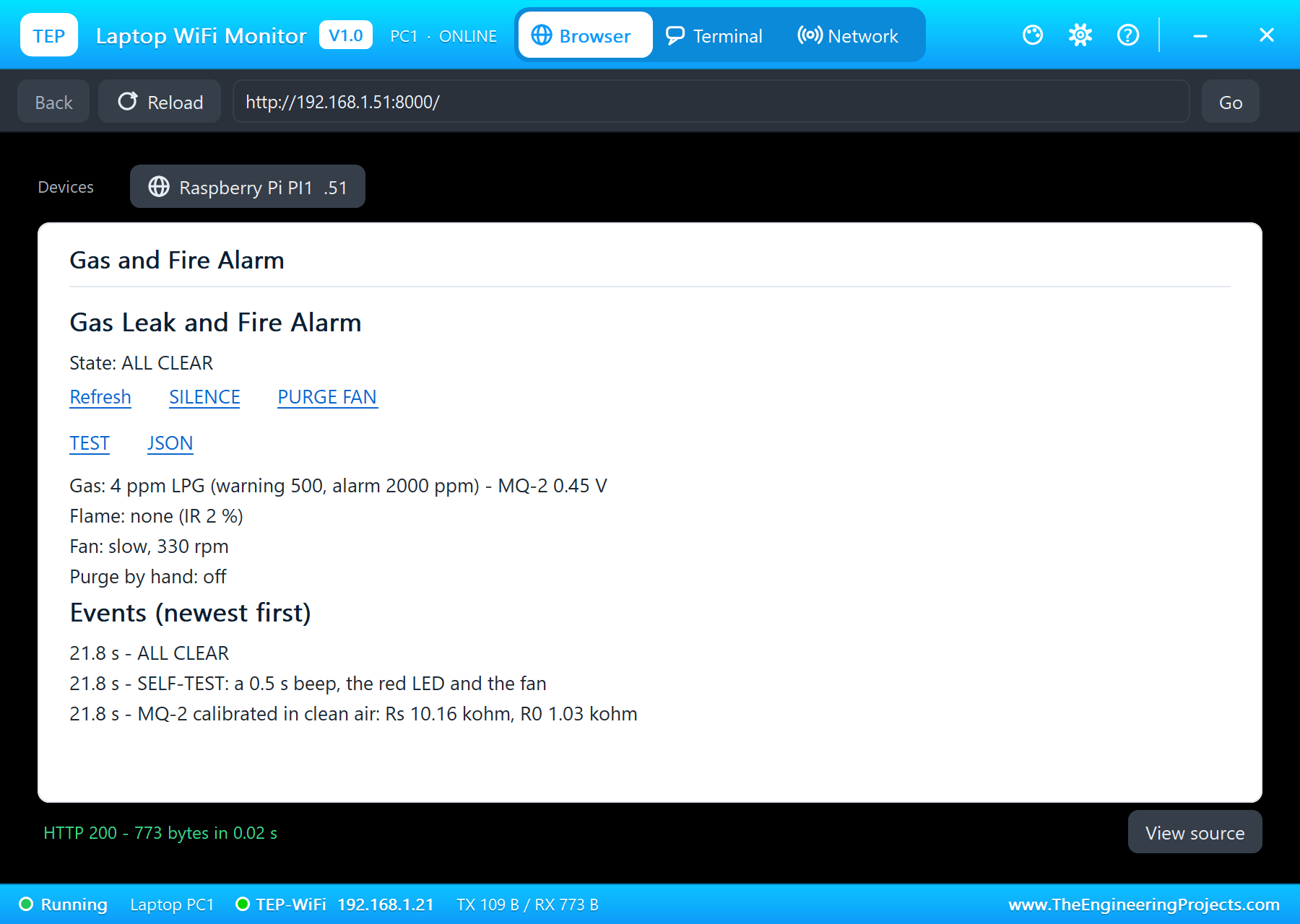
    * Laptop WiFi Monitor (PC1) and Mobile WiFi Monitor (MOB1) open http://192.168.1.51:8000/.
  The program waits 20 s for the MQ-2's heater, calibrates it in clean air (R0 = Rs / 9.83), gives a 0.5 s self-test
  beep, then turns its output
  into ppm with the MQ-2's LPG curve (ppm = 574.25 x (Rs / R0) ^ -2.222). The states:
    ALL CLEAR    green LED, the fan slow
    GAS WARNING  500 ppm or more: the red LED blinks, the fan at full speed
    GAS ALARM    2000 ppm or more (about 10 % of LPG's lower explosive limit): the buzzer beeps, red LED, fan full
    FIRE         a flame: the buzzer sounds without a break, red LED, the fan slowed (air feeds a fire)
  and it reports the fan STOPPED when the tach gives no pulses for 3 s. Its pages:
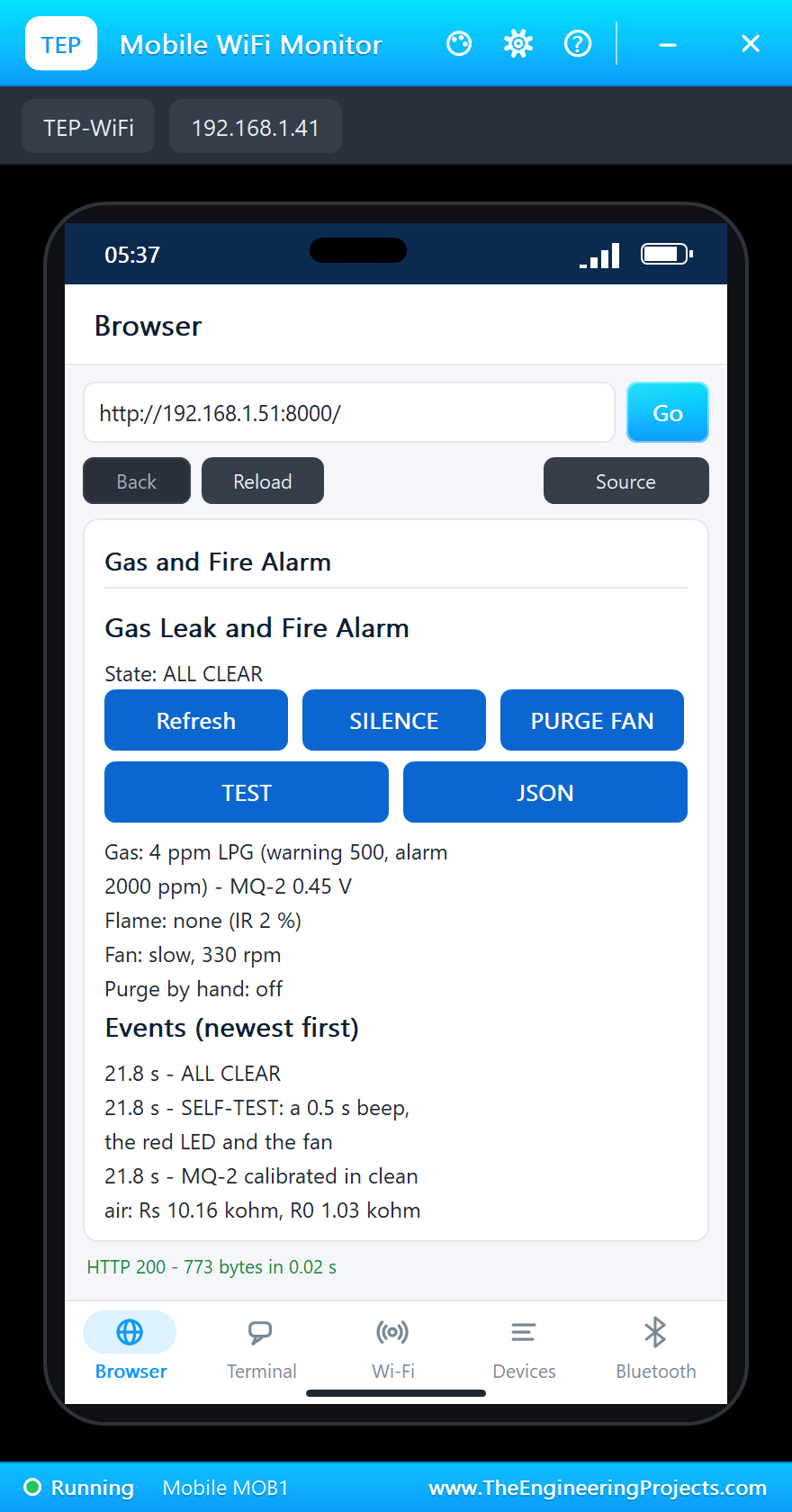
    /            the dashboard: the state, the gas, the flame, the fan and the events (newest first)
    /silence     silence the buzzer for 60 s (the alarm stays on the page and the red LED)
    /purge       the fan at full speed by hand, on / off
    /test        a 3 s test of the buzzer, the red LED and the fan
    /data        everything as JSON

TEST STATUS
  Tested in Proteus 8 Professional on Windows 11, the run that made the tutorial's screenshots:
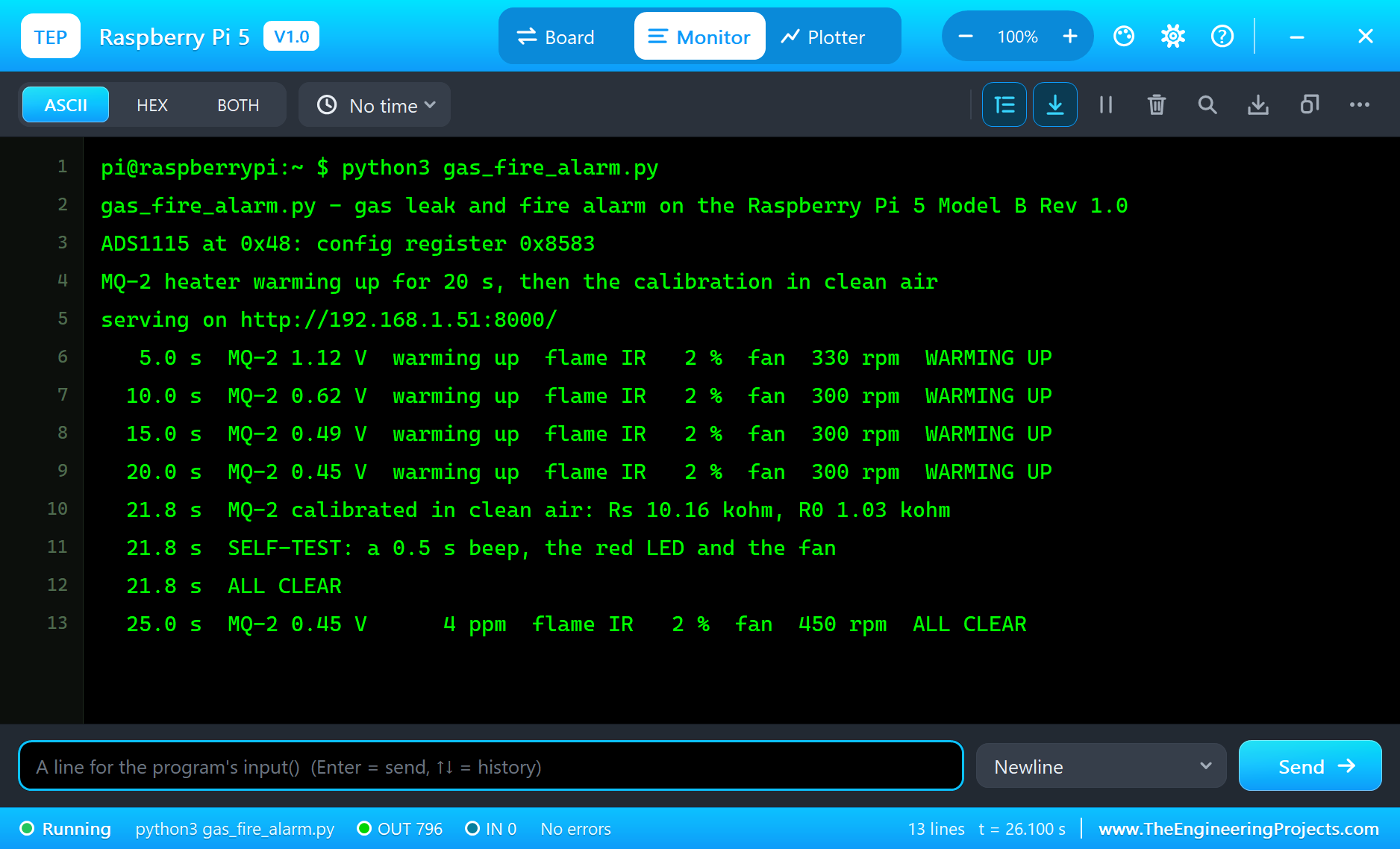
    * The ADS1115 found at 0x48 (config register 0x8583); eth0 and the server up within 2 s of simulation. The MQ-2's
      output fell from 1.12 V (5 s) to 0.45 V (20 s) while it warmed up; at 21.8 s it was calibrated in clean air:
      Rs 10.16 kohm, R0 1.03 kohm. The 0.5 s self-test beep, then ALL CLEAR: 4 ppm, the fan at 300 rpm.
    * LPG at 1000 ppm (MQ-2 pop-up): GAS WARNING at 34.3 s (535 ppm), 930 ppm at 40 s; the fan from 300 to 1470 rpm.
    * 5000 ppm: GAS ALARM at 43.8 s (2164 ppm), 4630 ppm at 50 s (MQ-2 3.56 V); the buzzer beeping, the red LED on.
    * SILENCE from the phone at 49.6 s: the buzzer quiet for 60 s, the page still "GAS ALARM (buzzer silenced)".
    * Clean air: GAS WARNING at 59.5 s (1998 ppm), ALL CLEAR at 73.5 s.
    * A candle (flame pop-up): FIRE at 78.5 s (IR 70 %); the buzzer steady, the fan slowed to 390 rpm. No flame: ALL
      CLEAR at 85.3 s.
    * The fan blocked (fan pop-up): FAN STOPPED at 93.0 s (0 rpm, no tach pulses); free again: turning at 99.0 s.
  102 s of simulation took about 9 minutes on our PC with all the captures.

INSTALLATION
  1. Close Proteus. Extract the WHOLE zip file, for example to your Desktop.
  2. Copy the files from "Proteus Library Files" into the LIBRARY folder of Proteus, for example
     C:\Program Files (x86)\Labcenter Electronics\Proteus 8 Professional\LIBRARY
  3. Copy everything in "Proteus Model Files" - the DLL files AND the TEPPi folder - into the MODELS folder
     (next to LIBRARY). TEPPi holds the Python 3.11 that the Raspberry Pi board runs and our TEP Pi runtime.
  4. Start Proteus. Press P in the schematic and search for RASPBERRY PI 5, MQ2ADVTEP or PCFAN4PINTEP to check that
     the parts are there.

RUN THE SIMULATION
  1. Open "Proteus Simulation\Pi-5-Gas-Leak-Fire-Alarm.pdsprj". Keep gas_fire_alarm.py and the DLL files beside it.
  2. Press Play. The Pi's terminal runs gas_fire_alarm.py; the green LED blinks while the MQ-2 warms up (20 s), then
     stays on: ALL CLEAR.
  3. Open the Laptop WiFi Monitor (PC1) or the Mobile WiFi Monitor (MOB1) and press Go.
  4. Click the MQ-2 for its pop-up: LPG (with the leak at 1000) gives a GAS WARNING, 5000 a GAS ALARM; Clean air
     clears it. In the flame sensor's pop-up, Candle gives FIRE and None puts it out.
  5. On the page: SILENCE quiets the buzzer for 60 s, PURGE FAN runs the fan at full speed, TEST checks the outputs.
     In the fan's pop-up, Blocked stops the fan: the page says STOPPED. Press Refresh to update the page.

PROPERTIES USED IN THIS PROJECT
  PI1 RASPBERRY PI 5   PROGRAM=gas_fire_alarm.py, ETHERNET=IN (192.168.1.51)
  U1 MQ2ADVTEP         GAS=CLEAN, PPM=1000, WARMUP=REAL, WARMUPTIME=20 (s)
  U3 FLAMEADVTEP       SOURCE=NONE, DISTANCE=30 (cm)
  U2, FAN1, BZ1, Q1    (no changes)
  PC1, MOB1            HOMEPAGE=http://192.168.1.51:8000/

TROUBLESHOOTING
  * The terminal cannot start Python: the TEPPi folder is not in MODELS (step 3 of INSTALLATION), or an older one.
  * "ADS1115 at 0x48" does not appear or the program stops at the start: the ADS1115's SDA / SCL are swapped, or ADDR
    is not on ground.
  * The gas reads high right after Play: that is the MQ-2's heater warming up; the program waits 20 s before it
    calibrates. Calibrate in clean air: gas at the calibration makes every reading too low.
  * The fan's rpm stays 0: TACH has no pull-up (the program asks for the Pi's), or the fan has no 12 V (its pop-up
    says NO 12 V).
  * The flame alarm trips in sunlight: sunlight is full of infrared; raise FLAME_ON in the program.

LICENCES
  * The project, the program, the parts (LIB files) and the models (DLL files) are made by The Engineering
    Projects and are free for learning and for your own projects. The models use only standard Windows libraries.
    The C++ source code of the models is not included; the source code is not included for any model.
  * TEPPi\python is the Python 3.11 Windows embeddable package (Python Software Foundation License); TEPPi\runtime
    holds our TEP Pi runtime with gpiozero and colorzero (BSD licences) - their licence files are inside the folders.
  * Proteus is a product of Labcenter Electronics and is not included. Raspberry Pi is a trademark of Raspberry Pi
    Ltd; MQ-2 and ADS1115 are names of their owners. This project is not made or endorsed by them.
  * A simulation is not a safety device: a real gas or fire alarm must be a certified product.

VERSION
  V1.0 - the first release of the project.
===============================================================================================================Development1 release
 Development1 release
-
V1.0Raspberry Pi 5 Gas Leak and Fire Alarm - Proteus Simulation V1.0this page
V1.0 is the only release in the Download Center so far. When a newer version is published, it appears above with its own download page.
Installation7 steps
 Installation7 steps
From the download to a working project, in order. The steps follow what the package contains.
You will need
- Proteus Design SuiteProteus 8 or newer (Labcenter), on Windows
- Pythonto build the source files into firmware
- Any archive toolWindows, macOS and Linux extract ZIP files on their own

Steps
- 1
Extract the archive
Right-click pi-5-gas-leak-fire-alarm-tep-v1-0-15e4292a22714556a3c5207f9a89e0fd.zip and choose Extract All (or open it with 7-Zip or WinRAR) into a folder you can find again. Keep its folder structure (Pi-5-Gas-Leak-Fire-Alarm-TEP-v1.0) as it is.
- 2
Copy the library files into Proteus
Move TEPADS1115.LIB, TEPBJT.LIB and TEPBUZZER.LIB and 8 more and the files into the LIBRARY folder of your Proteus installation: C:\Program Files (x86)\Labcenter Electronics\Proteus 8 Professional\LIBRARY for Proteus 8, or the matching Proteus 7 folder. Older versions keep it under ProgramData\Labcenter Electronics. If Proteus is open, close it first.
- 3
Add the simulation model
Copy TEPADS1115.DLL, TEPBJT.DLL and TEPBUZZER.DLL and 13 more into the MODELS folder next to LIBRARY, so the component can run, not only be drawn.
- 4
Restart Proteus and place the component
Start Proteus, open a schematic, press P (Pick Devices) and search for the component by the name used in the tutorial. It appears with its pins ready to wire.
- 5
Build the source code
Open gas_fire_alarm.py, attr.py and color.py and 28 more in the compiler named in the tutorial (MikroC, Keil, MPLAB, Code Composer or the Arduino IDE) and build it to get the firmware.
- 6
Open the example simulation
Open Pi-5-Gas-Leak-Fire-Alarm.pdsprj in Proteus to see the wiring exactly as in the tutorial. Check the controller's Program File path, then press Play.
- 7
Follow the tutorial
Raspberry Pi 5 Gas Leak and Fire Alarm - Proteus Simulation explains every connection and setting in order; keep it open beside the files while you build.
FAQs8 questionsContact TEP
 FAQs8 questions
How do I download Raspberry Pi 5 Gas Leak and Fire Alarm - Proteus Simulation V1.0?
Wait for the 30-second guest countdown on this page, then press the download button; the file comes straight from our storage. Members who are logged in skip the wait. If the browser opens the file instead of saving it, use its Save as option. The download link is made for you when the countdown ends and works for 15 minutes; a saved or shared link stops working, so share this page instead.
What is inside the archive?
Raspberry Pi 5 Gas Leak and Fire Alarm - Proteus Simulation V1.0 comes as a ZIP archive of 153 files (15.4 MB, 30.5 MB unpacked) holding Proteus library files, simulation model DLLs, a Proteus simulation, source code and a nested archive. Open the File Structure tab for the full list of 153 files.
What should I do if the download does not start?
Check the browser's download list first; an ad blocker or a company firewall can also hold it back, so try another browser or network. If the file arrives incomplete, download it again. For an installation problem, read the Install tab or tell us in the comments with your software version and the exact error message.
Is this file free?
Yes. Every file in the TEP Download Center is free for learning, personal and student projects. If you share it, link back to this page or the tutorial so others find the latest version.
How do I check that the file arrived complete?
Compare its SHA-256 with the one on this page, fa52638795bf6fcc692bccd6e3c0dbb7d414fd68865f6f8bdb59dace3adafe9c. In PowerShell run Get-FileHash "pi-5-gas-leak-fire-alarm-tep-v1-0-15e4292a22714556a3c5207f9a89e0fd.zip"; on macOS or Linux run shasum -a 256 "pi-5-gas-leak-fire-alarm-tep-v1-0-15e4292a22714556a3c5207f9a89e0fd.zip". The same value means the file is exactly the one in our storage; a different one means the download broke off, so download it again.
Do I need WinRAR to open the ZIP file?
No. Windows, macOS and Linux open ZIP archives on their own (Extract All, or double-click). WinRAR and 7-Zip work too. Extract the whole archive before using the files.
Where do I put the LIB and IDX files?
Both files go into the LIBRARY folder of your Proteus installation (Proteus 8: C:\Program Files (x86)\Labcenter Electronics\Proteus 8 Professional\LIBRARY; Proteus 7 has the same folder under its own name). Restart Proteus afterwards and search for the component with P.
Which Proteus version does the library need?
The tutorial names the Proteus version the library was made and tested with. Most TEP libraries work in Proteus 7 and Proteus 8; if the component does not appear after a restart, check that both the LIB and the IDX file were copied and that Proteus was fully closed while copying.
Members skip the wait. Log in or join TEP.

- 3Total downloads
- 4%Popularity
- ProteusCategory
- 0Comments
- ssyedzainnasirUploaded by
- 11 Nov 2026Uploaded at


 SHA-256
fa52638795bf6fcc692bccd6e3c0dbb7d414fd68865f6f8bdb59dace3adafe9c


 Need help with this file?
 Tags
Related Proteus
All Proteus tutorials


More Raspberry Pi project files
All Raspberry Pi tutorials




Comments
0