


Project Files of Raspberry Pi 5 Smart Parking System - Proteus Simulation
 Libraries
 Code
 Projects
 Simulation
pi-5-smart-parking-tep-v1-0-0b639d75f22d4a9eb971b50cd220420c.zip

Raspberry Pi 5 Smart Parking System - Proteus Simulation V1.0
Raspberry Pi 5 Smart Parking System - Proteus Simulation V1.0 comes as a ZIP archive of 138 files (13.6 MB, 26.6 MB unpacked) holding Proteus library files, simulation model DLLs, a Proteus simulation, source code and a nested archive.
- LIBProteus library
- DLLProteus model
- DSNProteus simulation
- SRCSource code
- ZIPNested archive
Description
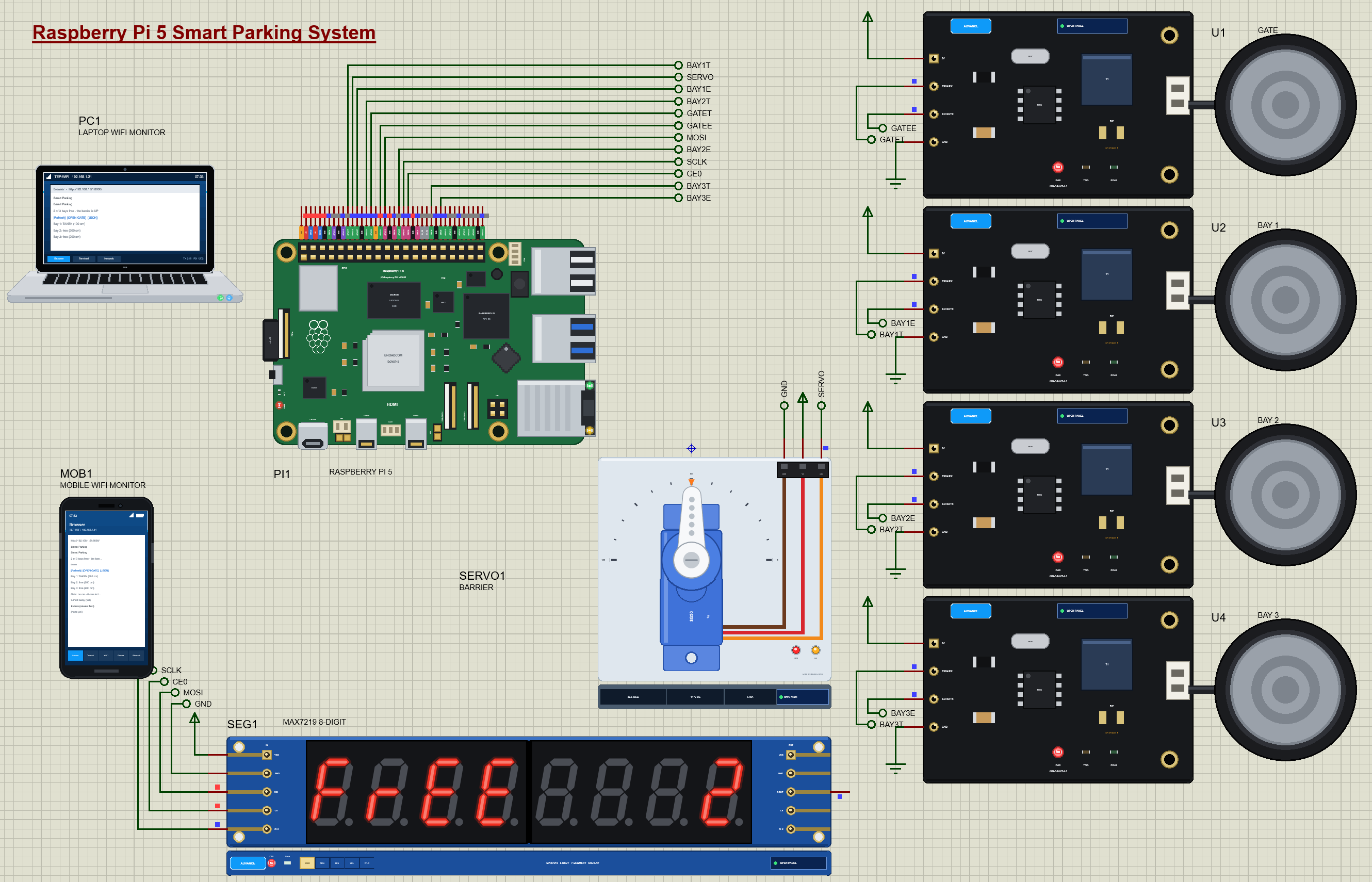
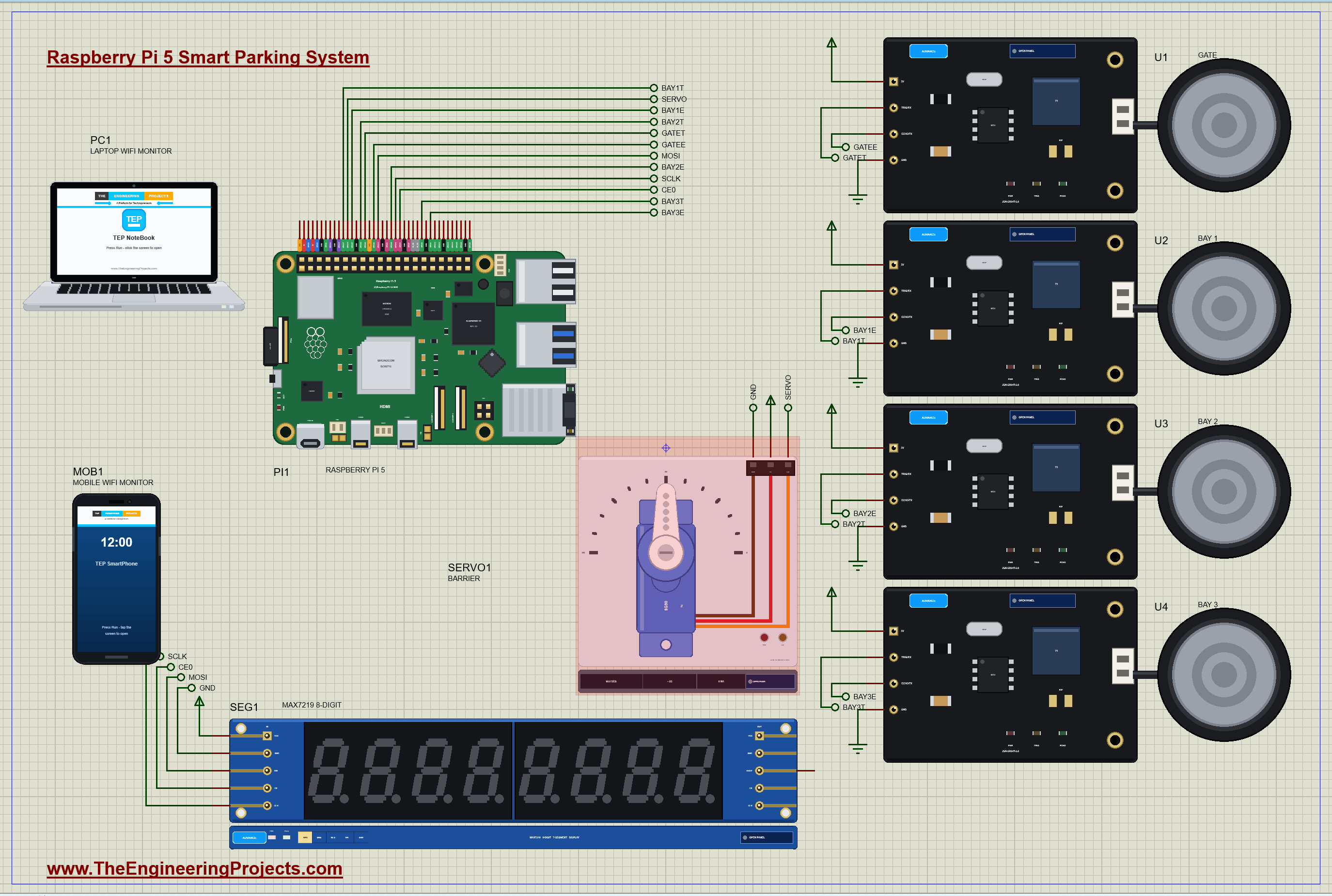
Raspberry-Pi-5-Smart-Parking-System-Proteus-Simulation-v1.0.zip: the complete Proteus simulation project (Raspberry Pi 5, four JSN-SR04T ultrasonic sensors, an SG90 servo barrier, a MAX7219 8-digit display, the Laptop and Mobile WiFi Monitors), the Python program smart_parking.py, every LIB and DLL the simulation needs, the TEPPi Python runtime and a README.

File Structure
 File Structure
61.7 KB39.5 KB134.1 KB13.1 KB60.5 KB24.5 KB3.3 MB34.3 KB620.8 KB36 KB169.8 KB628.1 KB99.3 KB65.3 KB4.8 MB4.1 MB80 B97.8 KB26.8 KB1.2 MB1.1 MB88.9 KB27.3 KB55.8 KB79.8 KB105.8 KB193.8 KB113.8 KB48.8 KB145.8 KB36.8 KB29.3 KB42.3 KB28.8 KB67.3 KB89.3 KB153.8 KB22.8 KB38.8 KB2.1 KB9.9 KB4.1 KB1.3 KB4.7 KB431 B2.5 KB17.5 KB283 B6.5 KB37.9 KB11.1 KB5.5 KB885 B13.6 KB9 KB878 B1.5 KB4 KB1004 B10 B110 B2.6 KB1.1 KB8.9 KB58.5 KB12.4 KB6.6 KB18.5 KB20.7 KB27.8 KB21.1 KB7.1 KB7.7 KB2.7 KB51.2 KB100.9 KB1.2 KB24.3 KB7.4 KB53.6 KB26.1 KB20.5 KB60.5 KB19.6 KB1.6 KB8.4 KB20.9 KB2.6 KB539 B1.4 KB9.7 KB2.8 KB21 B92 B7.9 KB264 B3.4 KB3.8 KB17.5 KB55.2 KB3.3 KB10.8 KB1.5 KB4.2 KB7.3 KB2.5 KB32.6 KB14.5 KB283 B17.4 KB257 B691 B14.5 KB12.8 KB3.6 KB1.7 KB37 KB418 B6.2 KB7 KB37.3 KB10.6 KB23.7 KB28.7 KB8.8 KB16.9 KB301.5 KB289.5 KB2.9 MB294.5 KB36.6 KB9.4 KB301.5 KB289.5 KB2.9 MB294.5 KB9.4 KB9.8 KBGallery12 images from the tutorialOpen the tutorial
 Gallery12 images from the tutorial
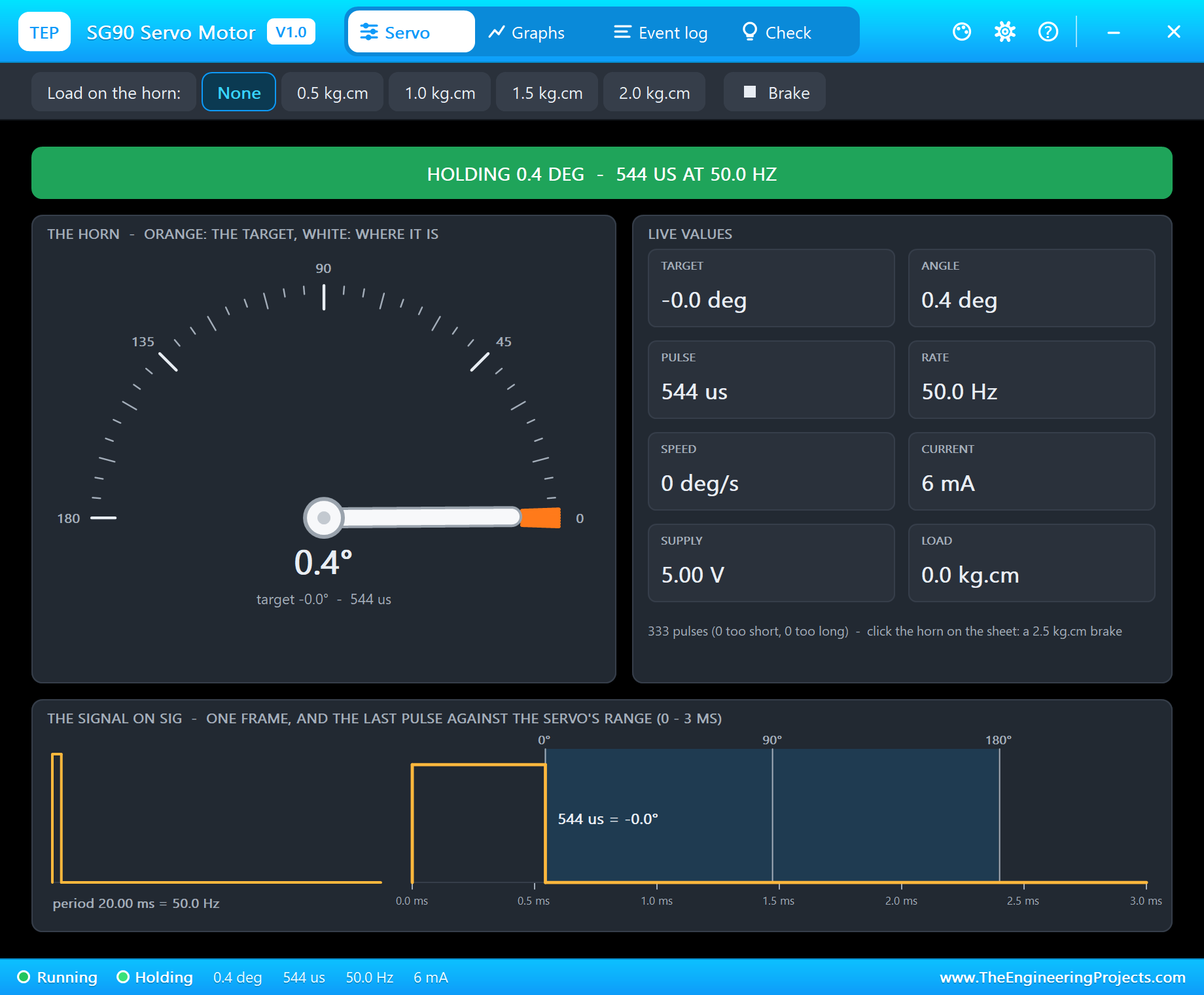
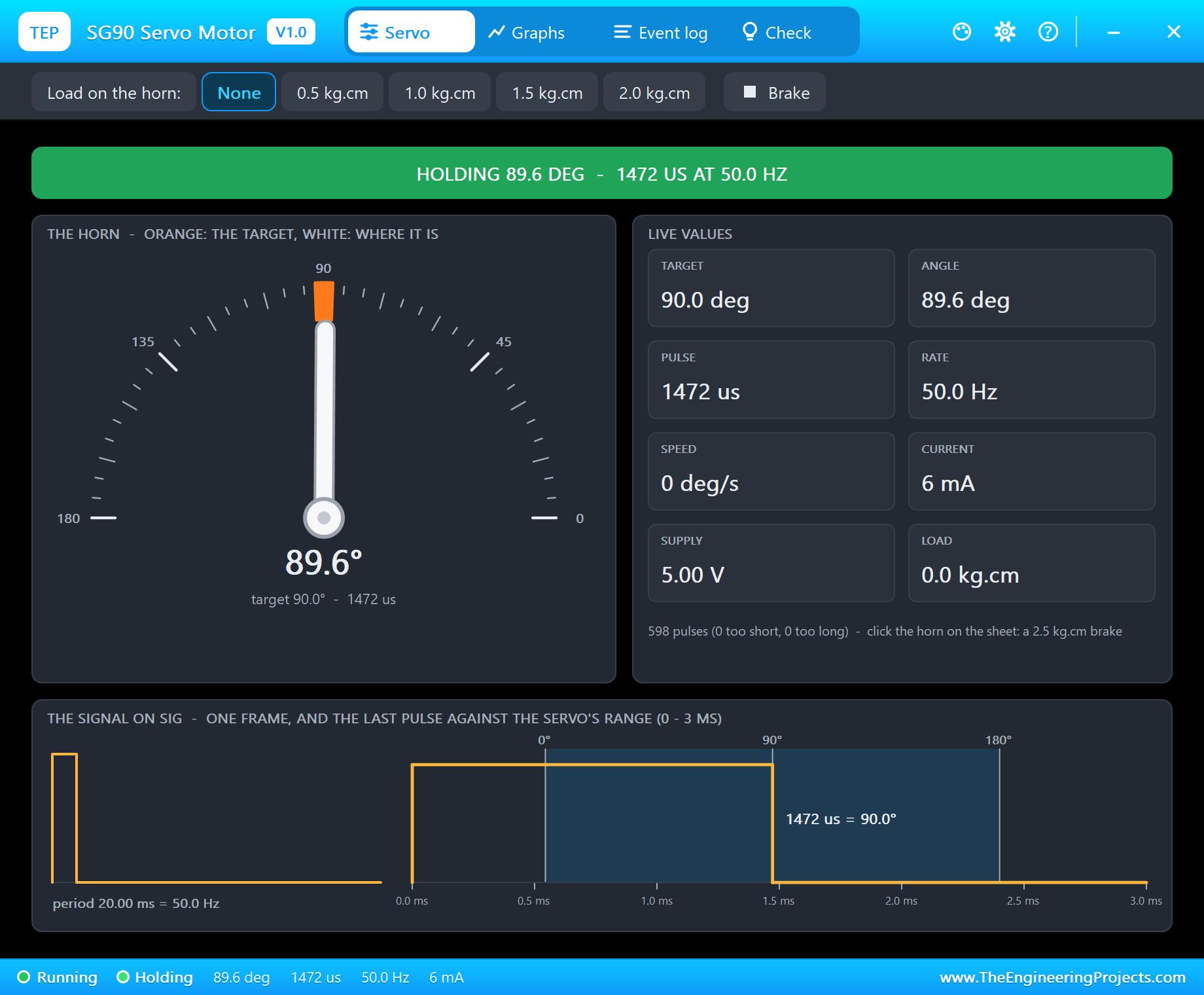
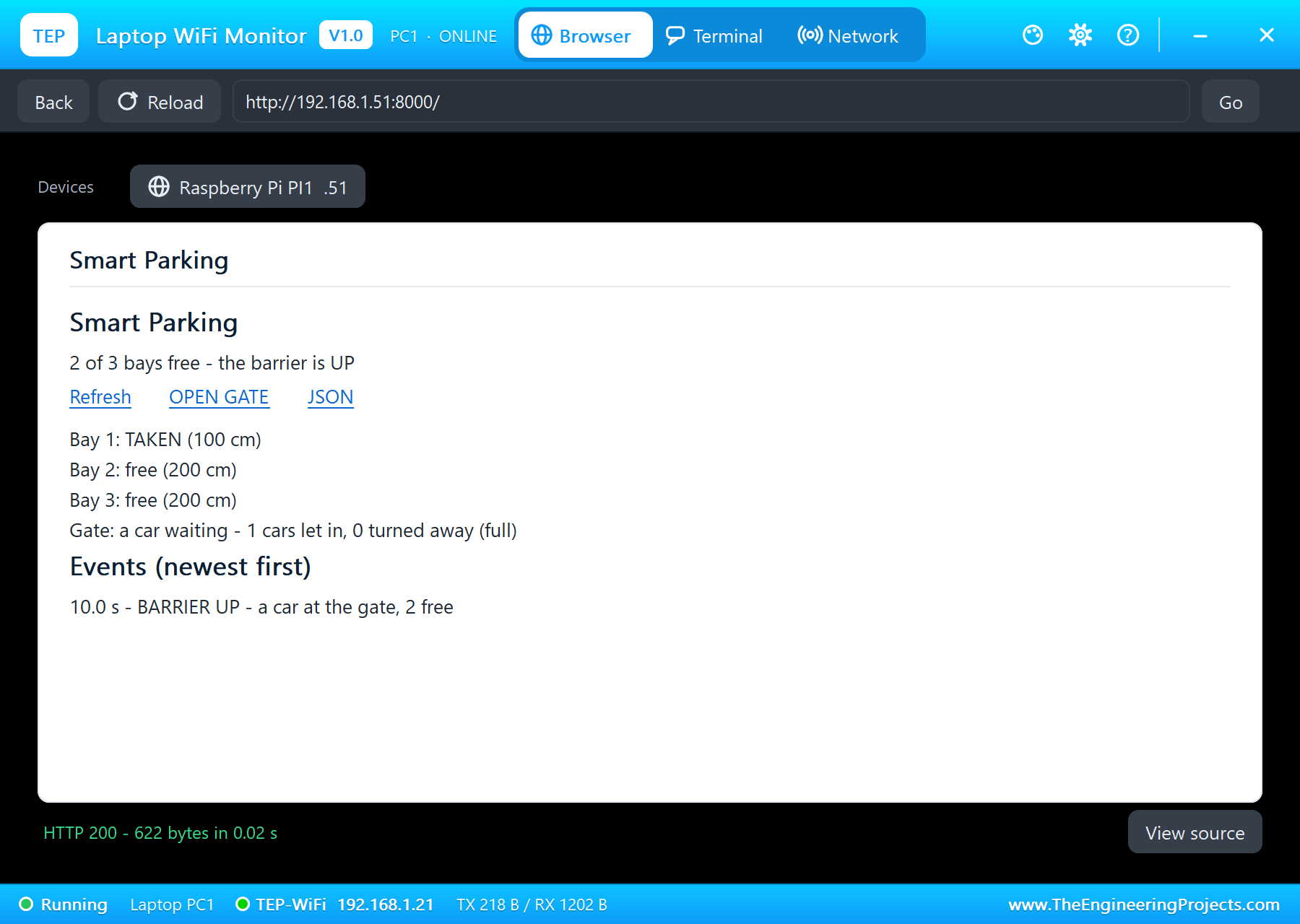
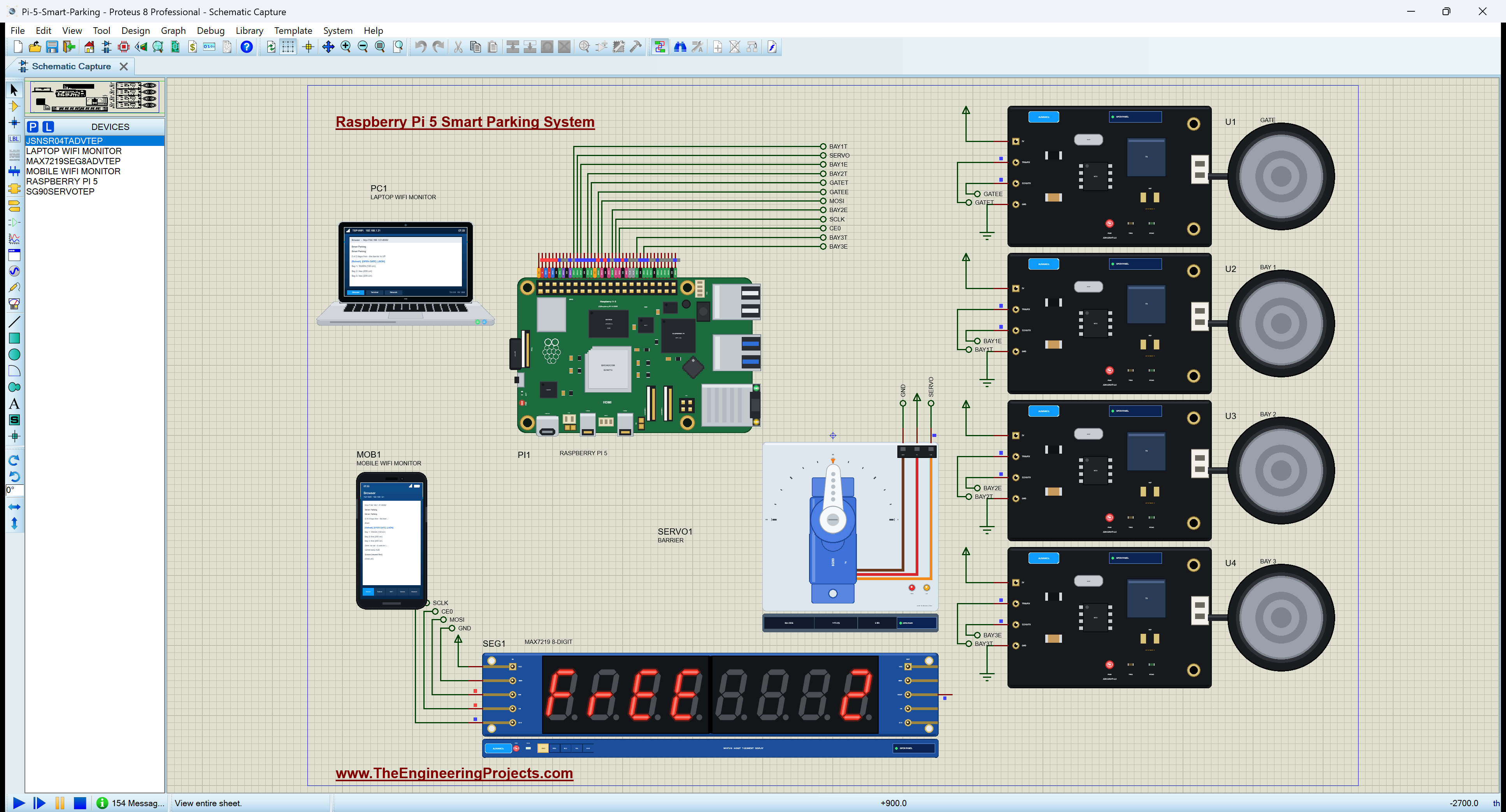
The circuit, the board and the results as they appear in Raspberry Pi 5 Smart Parking System - Proteus Simulation. Open an image for its full size.
README
 README
===============================================================================================================
  Raspberry Pi 5 Smart Parking System - Proteus Simulation Project V1.0
  The Engineering Projects - www.TheEngineeringProjects.com
===============================================================================================================

IMPORTANT LINKS
  The project tutorial (circuit, code, simulation results):
    https://www.theengineeringprojects.com/2026/11/raspberry-pi-5-smart-parking-system-proteus-simulation.html
  The libraries this project is built from (each post has its own full download and tutorial):
    Raspberry Pi 5 board:
      https://www.theengineeringprojects.com/2026/10/raspberry-pi-5-library-for-proteus.html
    JSN-SR04T waterproof ultrasonic sensor:
  https://www.theengineeringprojects.com/2026/10/jsn-sr04t-waterproof-ultrasonic-sensor-library-for-proteus-v1-0.html
    SG90 servo motor (the barrier):
      https://www.theengineeringprojects.com/2026/10/sg90-servo-motor-library-for-proteus-v1-0.html
    MAX7219 8-digit 7-segment display:
      https://www.theengineeringprojects.com/2026/10/max7219-7-segment-display-library-for-proteus-v1-0.html
    Laptop WiFi Monitor:
      https://www.theengineeringprojects.com/2026/10/laptop-wifi-monitor-library-for-proteus.html
    Mobile WiFi Monitor:
      https://www.theengineeringprojects.com/2026/10/mobile-wifi-monitor-library-for-proteus.html
  Support our free work: https://www.theengineeringprojects.com/donate

FILE STRUCTURE
Pi-5-Smart-Parking-TEP-v1.0/
|-- Proteus Library Files/
|   |-- TEPJSNSR04T.LIB                                61.7 KB   a part of the project -> LIBRARY folder
|   |-- TEPLAPTOP.LIB                                  39.5 KB   a part of the project -> LIBRARY folder
|   |-- TEPMAX7SEG.LIB                                134.1 KB   a part of the project -> LIBRARY folder
|   |-- TEPMOBILE.LIB                                  13.1 KB   a part of the project -> LIBRARY folder
|   |-- TEPRPI5.LIB                                    60.5 KB   a part of the project -> LIBRARY folder
|   |-- TEPSG90.LIB                                    24.5 KB   a part of the project -> LIBRARY folder
|-- Proteus Model Files/
|   |-- TEPJSNSR04T.DLL                               301.5 KB   a model -> MODELS folder
|   |-- TEPMAX7SEG.DLL                                289.5 KB   a model -> MODELS folder
|   |-- TEPNET.DLL                                     2.89 MB   a model -> MODELS folder
|   |-- TEPSG90.DLL                                   294.5 KB   a model -> MODELS folder
|   |-- TEPPi/python/                                 17.54 MB   Python 3.11 embeddable -> MODELS\TEPPi (33 files)
|   |-- TEPPi/runtime/                                 1.11 MB   TEP Pi runtime, gpiozero -> MODELS\TEPPi (87 files)
|-- Proteus Simulation/
|   |-- Pi-5-Smart-Parking.pdsprj                      36.6 KB   the project simulation
|   |-- smart_parking.py                                9.4 KB   the program PI1 runs
|   |-- TEPJSNSR04T.DLL                               301.5 KB   copy of the model
|   |-- TEPMAX7SEG.DLL                                289.5 KB   copy of the model
|   |-- TEPNET.DLL                                     2.89 MB   copy of the model
|   |-- TEPSG90.DLL                                   294.5 KB   copy of the model
|-- Python Code/
|   |-- smart_parking.py                                9.4 KB   the program (the same file)
|-- README.txt                                        ~10.0 KB   this file
Total: 26.56 MB (unzipped). The C++ source code of the models is not included.

WHAT IS IT?
  A complete IoT car park you can run in Proteus: a Raspberry Pi 5 sees which bays are taken, lifts the barrier only
  when a bay is free, shows the free bays at the entrance and on a web page for a laptop or a phone.
    * Four JSN-SR04T waterproof ultrasonic sensors (JSNSR04TADVTEP) in mode 1, on the 5 V rail. ECHO follows the
      supply: on a real Pi, power them from 3.3 V (they work from 3.0 V) or keep 5 V and put a 1k / 2k divider on each
      ECHO. In the simulation ECHO is a logic signal between the two models, so it goes straight to the Pi:
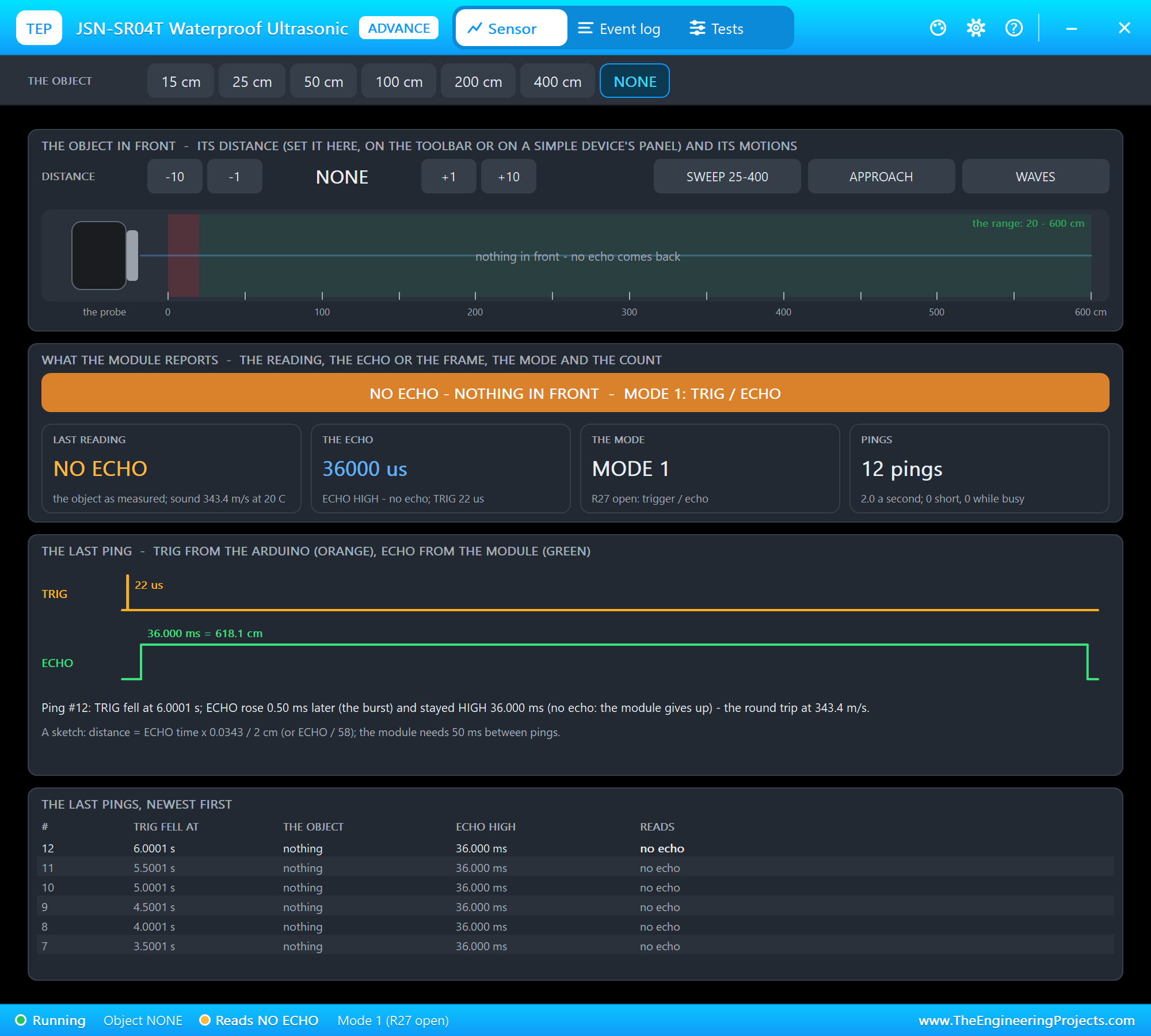
        U1 the gate (TRIG GPIO23, ECHO GPIO24): a car closer than 100 cm is waiting at the barrier.
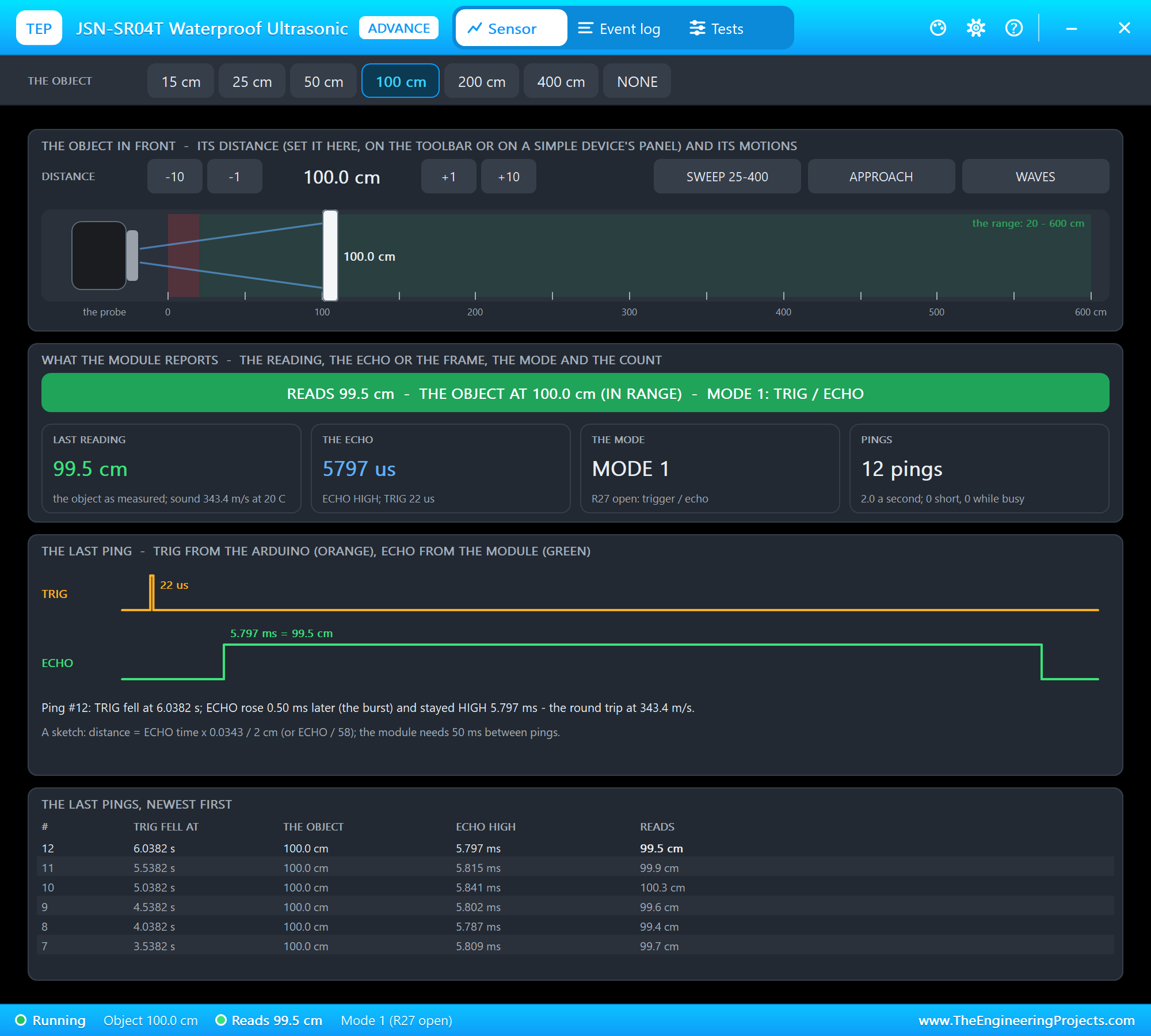
        U2 - U4 the bays, each sensor 2 m above its bay (TRIG 17 / ECHO 27, TRIG 22 / ECHO 25, TRIG 5 / ECHO 6):
        under 150 cm = a car's roof = TAKEN; the floor (200 cm) or no echo = free.
    * SG90 servo (SG90SERVOTEP, SERVO1) on 5 V, SIG on GPIO18: the barrier, 0 deg down, 90 deg up (lgpio servo
      pulses at 50 Hz: 544 us = 0 deg, 2400 us = 180 deg).
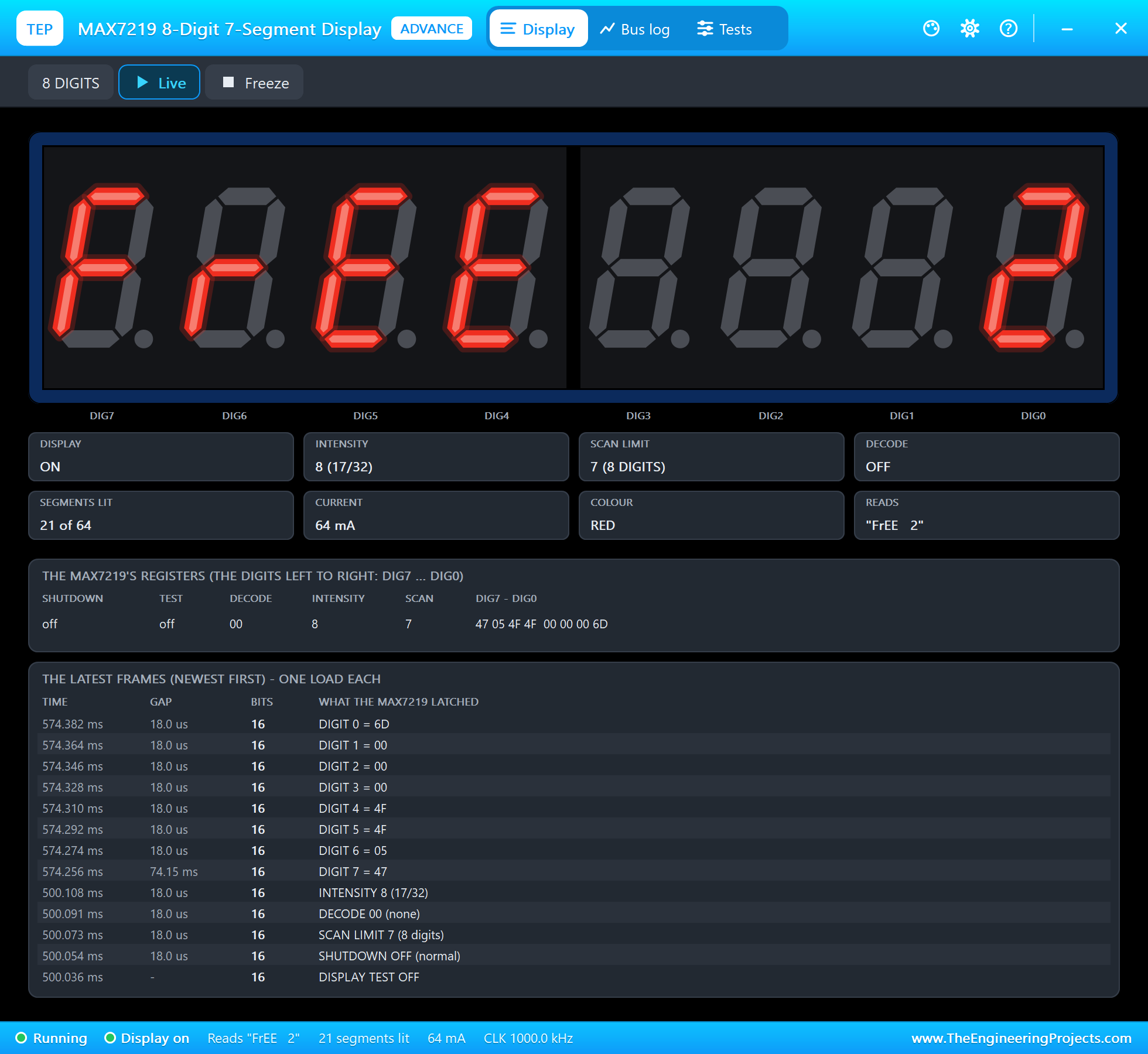
    * MAX7219 8-digit 7-segment display (MAX7219SEG8ADVTEP, SEG1) on 5 V and SPI0: DIN = MOSI GPIO10, CLK = SCLK
      GPIO11, CS = CE0 GPIO8. It shows "FrEE   2" or "FULL".
    * RASPBERRY PI 5 (PI1) runs smart_parking.py on Ethernet at 192.168.1.51; the dashboard is on port 8000.
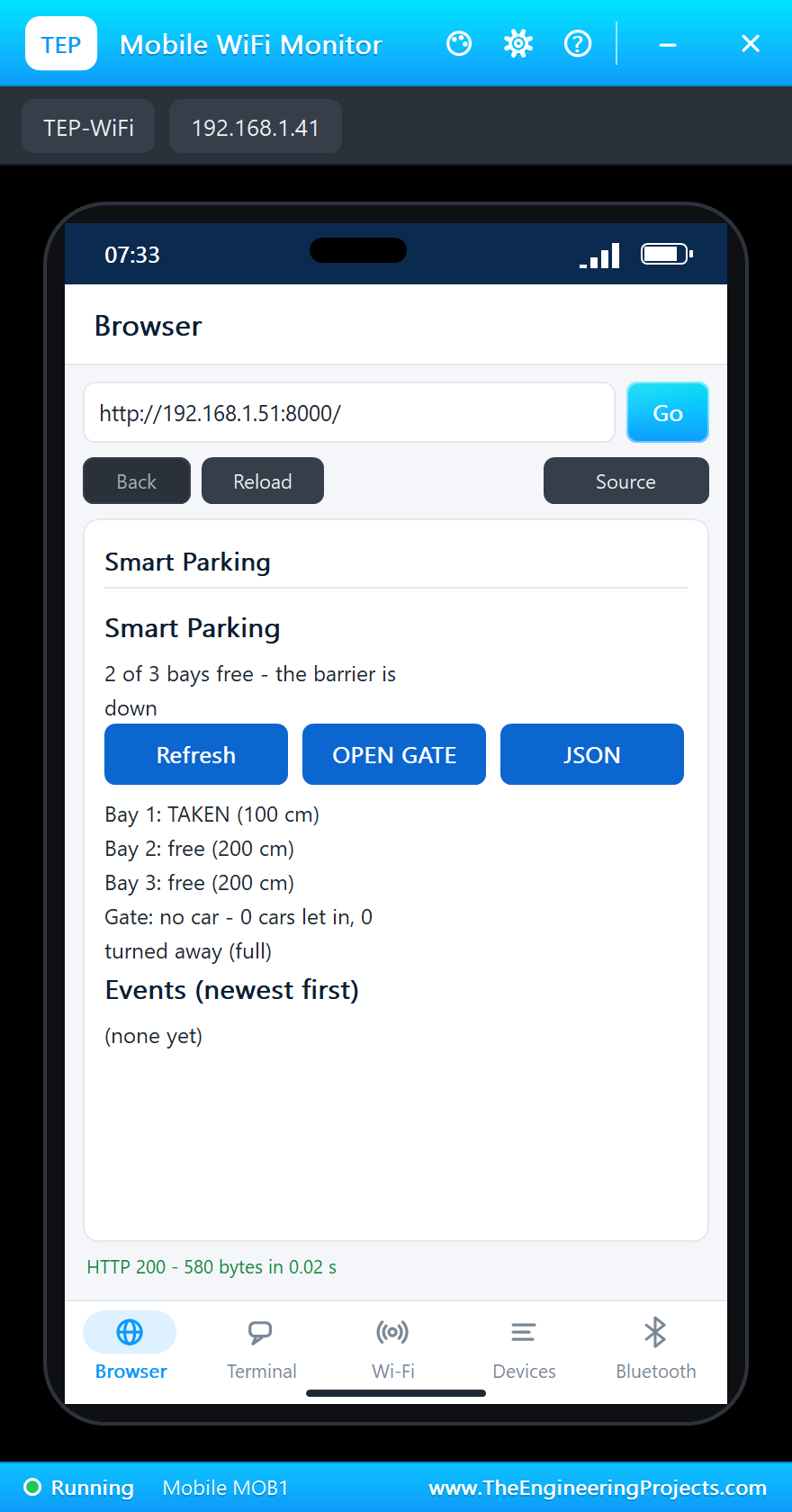
    * Laptop WiFi Monitor (PC1) and Mobile WiFi Monitor (MOB1) open http://192.168.1.51:8000/.
  The program pings the gate and the three bays twice a second, works the distance out of each ECHO pulse (the
  sound's trip there and back at 343.4 m/s), lifts the barrier for a car only while a bay is free, keeps it up until
  the car has passed plus 5 s, and logs every car let in, turned away (full), parked or gone. Its pages:
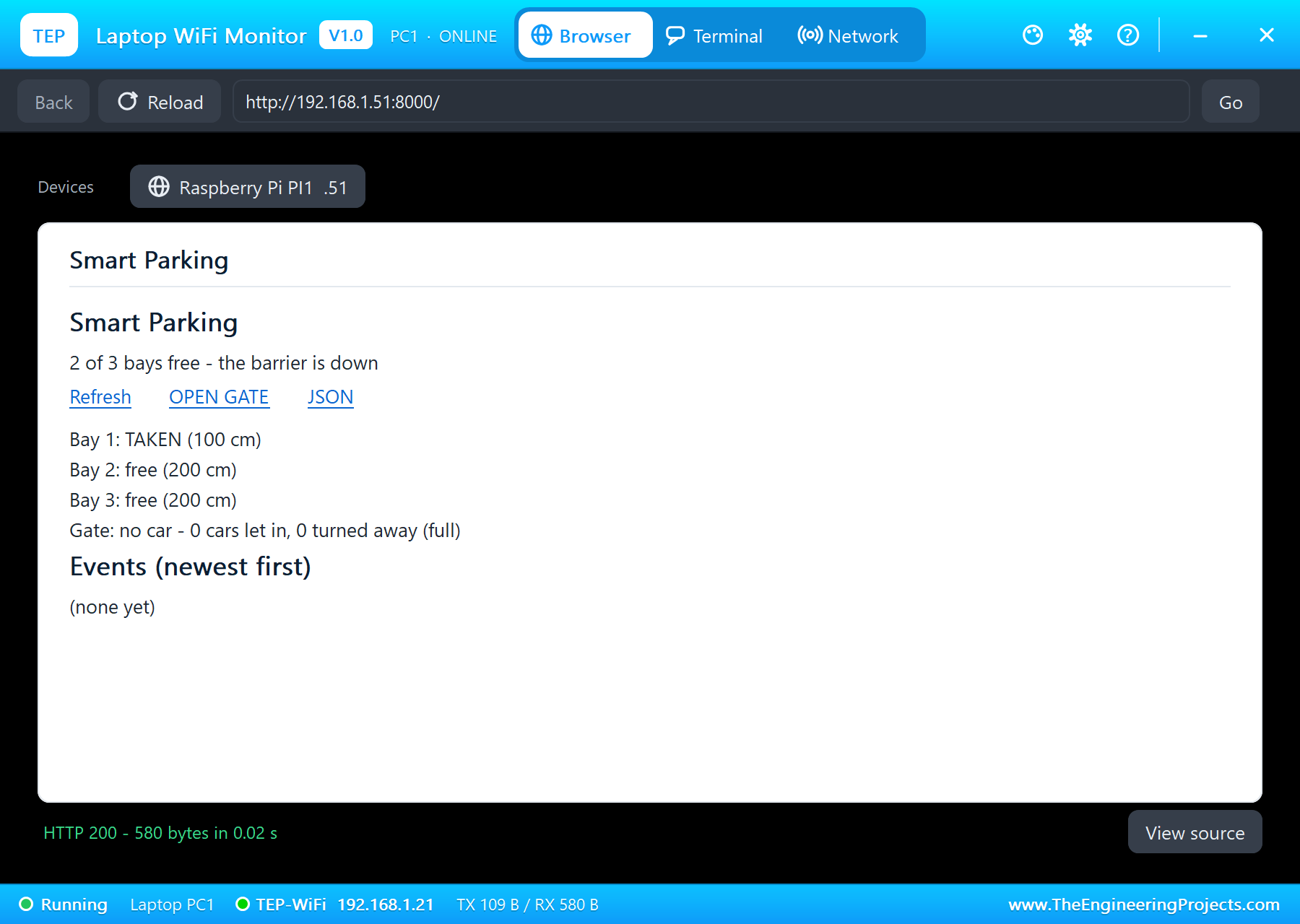
    /            the dashboard: the free bays, each bay's state and distance, the barrier, the events (newest first)
    /open        lift the barrier (the operator's button)
    /data        everything as JSON

TEST STATUS
  Tested in Proteus 8 Professional on Windows 11, the run that made the tutorial's screenshots:
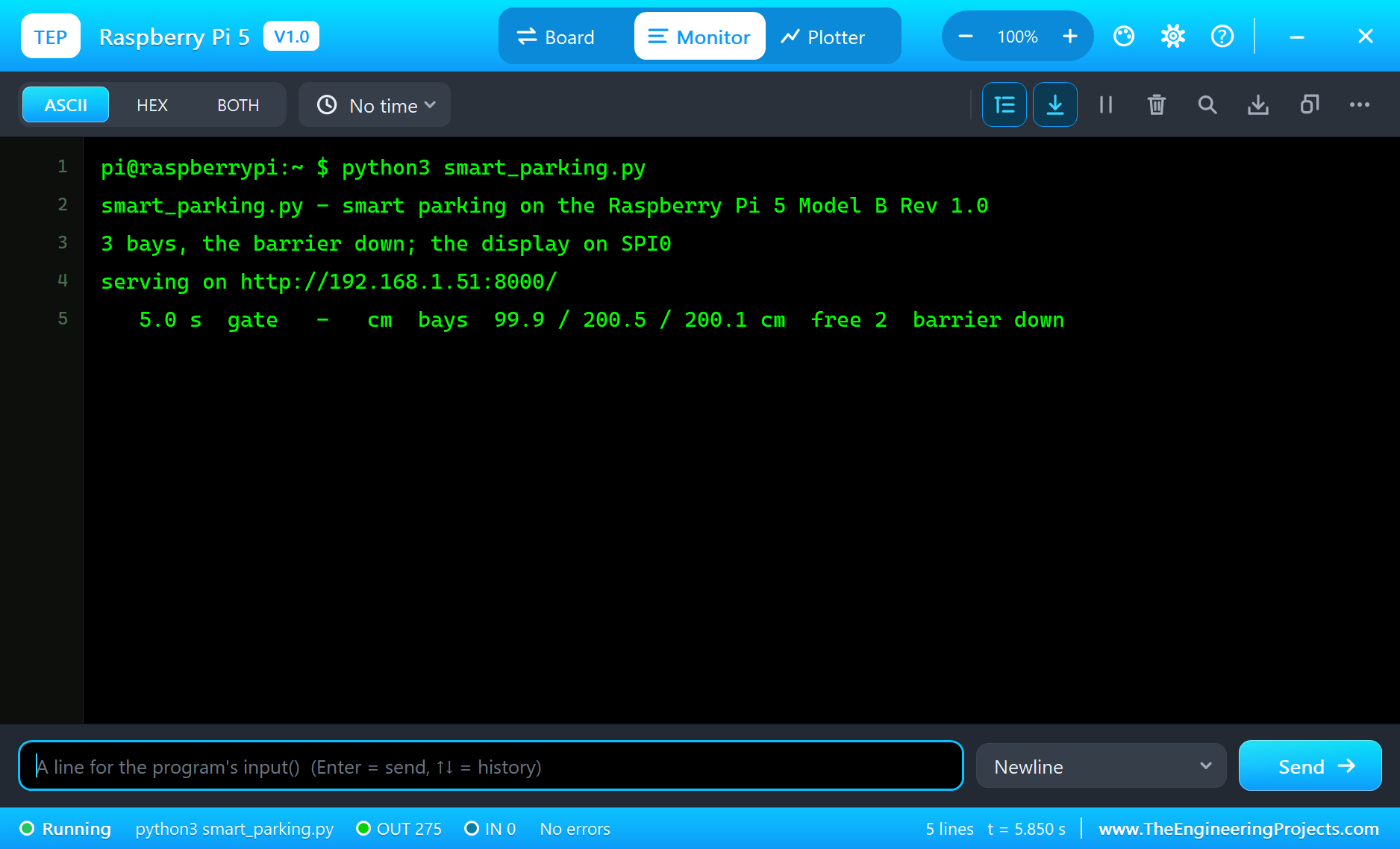
    * eth0 and the server up within 2 s of simulation. The first status line: bays 99.9 / 200.5 / 200.1 cm - bay 1
      TAKEN, bays 2 and 3 free; the gate empty; "FrEE   2" on the display; the barrier down.
    * A car at the gate (U1 at 50 cm, read 49.9 cm): BARRIER UP at 10.0 s ("a car at the gate, 2 free"); the gate
      clear: barrier down at 18.6 s; the car in bay 2 (U3 at 100 cm): "bay 2 TAKEN - 1 free" at 19.1 s.
    * A second car: BARRIER UP at 21.0 s, down at 26.6 s, "bay 3 TAKEN - 0 free" at 27.1 s: FULL on the display.
    * A third car at the gate: "a car at the gate - FULL, the barrier stays down" at 30.5 s (2 let in, 1 turned away).
    * The car in bay 1 leaves (U2 at 200 cm): "bay 1 free again - 1 free" at 35.6 s; "FrEE   1".
    * OPEN GATE from the phone: BARRIER UP at 37.8 s, down again at 43.1 s.
  46 s of simulation took about 6 minutes on our PC with all the captures.

INSTALLATION
  1. Close Proteus. Extract the WHOLE zip file, for example to your Desktop.
  2. Copy the files from "Proteus Library Files" into the LIBRARY folder of Proteus, for example
     C:\Program Files (x86)\Labcenter Electronics\Proteus 8 Professional\LIBRARY
  3. Copy everything in "Proteus Model Files" - the DLL files AND the TEPPi folder - into the MODELS folder
     (next to LIBRARY). TEPPi holds the Python 3.11 that the Raspberry Pi board runs and our TEP Pi runtime.
  4. Start Proteus. Press P in the schematic and search for RASPBERRY PI 5, JSNSR04TADVTEP or MAX7219SEG8ADVTEP to
     check that the parts are there.

RUN THE SIMULATION
  1. Open "Proteus Simulation\Pi-5-Smart-Parking.pdsprj". Keep smart_parking.py and the DLL files beside it.
  2. Press Play. The Pi's terminal runs smart_parking.py; bay 1 has a car (100 cm), bays 2 and 3 are free: the
     display says "FrEE   2".
  3. Open the Laptop WiFi Monitor (PC1) or the Mobile WiFi Monitor (MOB1) and press Go.
  4. A car arrives: in the gate sensor's pop-up (U1) choose 50 cm - the barrier goes up; choose NONE when the car
     has passed - the barrier goes down 5 s later. Park it: in a bay's pop-up choose 100 cm.
  5. With all bays taken the display says FULL, and a car at the gate is turned away. A car leaves: its bay back to
     200 cm. OPEN GATE on the page lifts the barrier by hand. Press Refresh to update the page.

PROPERTIES USED IN THIS PROJECT
  PI1 RASPBERRY PI 5   PROGRAM=smart_parking.py, ETHERNET=IN (192.168.1.51)
  U1 JSNSR04TADVTEP    MODE=1, DISTANCE=0 (no car at the gate)
  U2 JSNSR04TADVTEP    MODE=1, DISTANCE=100 (a car in bay 1)
  U3, U4               MODE=1, DISTANCE=200 (the floor: free)
  SERVO1, SEG1         (no changes)
  PC1, MOB1            HOMEPAGE=http://192.168.1.51:8000/

TROUBLESHOOTING
  * The terminal cannot start Python: the TEPPi folder is not in MODELS (step 3 of INSTALLATION), or an older one.
  * A bay always reads empty: its TRIG and ECHO are swapped, or the sensor is not in mode 1 (MODE=1).
  * Objects closer than about 20 cm read about 21 cm: that is the JSN-SR04T's blind zone.
  * The display stays dark: DIN / CLK / CS are not on MOSI / SCLK / CE0, or its VCC is not 5 V.
  * The barrier does not move: SIG is not on GPIO18, or the servo has no 5 V.

LICENCES
  * The project, the program, the parts (LIB files) and the models (DLL files) are made by The Engineering
    Projects and are free for learning and for your own projects. The models use only standard Windows libraries.
    The C++ source code of the models is not included; the source code is not included for any model.
  * TEPPi\python is the Python 3.11 Windows embeddable package (Python Software Foundation License); TEPPi\runtime
    holds our TEP Pi runtime with gpiozero and colorzero (BSD licences) - their licence files are inside the folders.
  * Proteus is a product of Labcenter Electronics and is not included. Raspberry Pi is a trademark of Raspberry Pi
    Ltd; JSN-SR04T and MAX7219 are names of their owners. This project is not made or endorsed by them.

VERSION
  V1.0 - the first release of the project.
===============================================================================================================Development1 release
 Development1 release
-
V1.0Raspberry Pi 5 Smart Parking System - Proteus Simulation V1.0this page
V1.0 is the only release in the Download Center so far. When a newer version is published, it appears above with its own download page.
Installation7 steps
 Installation7 steps
From the download to a working project, in order. The steps follow what the package contains.
You will need
- Proteus Design SuiteProteus 8 or newer (Labcenter), on Windows
- Pythonto build the source files into firmware
- Any archive toolWindows, macOS and Linux extract ZIP files on their own

Steps
- 1
Extract the archive
Right-click pi-5-smart-parking-tep-v1-0-0b639d75f22d4a9eb971b50cd220420c.zip and choose Extract All (or open it with 7-Zip or WinRAR) into a folder you can find again. Keep its folder structure (Pi-5-Smart-Parking-TEP-v1.0) as it is.
- 2
Copy the library files into Proteus
Move TEPJSNSR04T.LIB, TEPLAPTOP.LIB and TEPMAX7SEG.LIB and 3 more and the files into the LIBRARY folder of your Proteus installation: C:\Program Files (x86)\Labcenter Electronics\Proteus 8 Professional\LIBRARY for Proteus 8, or the matching Proteus 7 folder. Older versions keep it under ProgramData\Labcenter Electronics. If Proteus is open, close it first.
- 3
Add the simulation model
Copy TEPJSNSR04T.DLL, TEPMAX7SEG.DLL and TEPNET.DLL and 8 more into the MODELS folder next to LIBRARY, so the component can run, not only be drawn.
- 4
Restart Proteus and place the component
Start Proteus, open a schematic, press P (Pick Devices) and search for the component by the name used in the tutorial. It appears with its pins ready to wire.
- 5
Build the source code
Open smart_parking.py, attr.py and color.py and 28 more in the compiler named in the tutorial (MikroC, Keil, MPLAB, Code Composer or the Arduino IDE) and build it to get the firmware.
- 6
Open the example simulation
Open Pi-5-Smart-Parking.pdsprj in Proteus to see the wiring exactly as in the tutorial. Check the controller's Program File path, then press Play.
- 7
Follow the tutorial
Raspberry Pi 5 Smart Parking System - Proteus Simulation explains every connection and setting in order; keep it open beside the files while you build.
FAQs8 questionsContact TEP
 FAQs8 questions
How do I download Raspberry Pi 5 Smart Parking System - Proteus Simulation V1.0?
Wait for the 30-second guest countdown on this page, then press the download button; the file comes straight from our storage. Members who are logged in skip the wait. If the browser opens the file instead of saving it, use its Save as option. The download link is made for you when the countdown ends and works for 15 minutes; a saved or shared link stops working, so share this page instead.
What is inside the archive?
Raspberry Pi 5 Smart Parking System - Proteus Simulation V1.0 comes as a ZIP archive of 138 files (13.6 MB, 26.6 MB unpacked) holding Proteus library files, simulation model DLLs, a Proteus simulation, source code and a nested archive. Open the File Structure tab for the full list of 138 files.
What should I do if the download does not start?
Check the browser's download list first; an ad blocker or a company firewall can also hold it back, so try another browser or network. If the file arrives incomplete, download it again. For an installation problem, read the Install tab or tell us in the comments with your software version and the exact error message.
Is this file free?
Yes. Every file in the TEP Download Center is free for learning, personal and student projects. If you share it, link back to this page or the tutorial so others find the latest version.
How do I check that the file arrived complete?
Compare its SHA-256 with the one on this page, 3dc6cb35ecdb101d3db58c7f0c4a1b92ff0e8f1a6e3414acf1be8fb025a44112. In PowerShell run Get-FileHash "pi-5-smart-parking-tep-v1-0-0b639d75f22d4a9eb971b50cd220420c.zip"; on macOS or Linux run shasum -a 256 "pi-5-smart-parking-tep-v1-0-0b639d75f22d4a9eb971b50cd220420c.zip". The same value means the file is exactly the one in our storage; a different one means the download broke off, so download it again.
Do I need WinRAR to open the ZIP file?
No. Windows, macOS and Linux open ZIP archives on their own (Extract All, or double-click). WinRAR and 7-Zip work too. Extract the whole archive before using the files.
Where do I put the LIB and IDX files?
Both files go into the LIBRARY folder of your Proteus installation (Proteus 8: C:\Program Files (x86)\Labcenter Electronics\Proteus 8 Professional\LIBRARY; Proteus 7 has the same folder under its own name). Restart Proteus afterwards and search for the component with P.
Which Proteus version does the library need?
The tutorial names the Proteus version the library was made and tested with. Most TEP libraries work in Proteus 7 and Proteus 8; if the component does not appear after a restart, check that both the LIB and the IDX file were copied and that Proteus was fully closed while copying.
Members skip the wait. Log in or join TEP.

- 2Total downloads
- 4%Popularity
- ProteusCategory
- 0Comments
- ssyedzainnasirUploaded by
- 11 Nov 2026Uploaded at


 SHA-256
3dc6cb35ecdb101d3db58c7f0c4a1b92ff0e8f1a6e3414acf1be8fb025a44112


 Need help with this file?
 Tags
Related Proteus
All Proteus tutorials



More Raspberry Pi project files
All Raspberry Pi tutorials



Comments
0