Hello friends, I hope you all are doing great. In today's tutorial, I am going to give you a detailed Introduction to Artificial Intelligence. Today I am talking about the origin of Artificial Intelligence, you will learn how it was invented and how it is getting emerged gradually in the field of science and technology.
We will also discuss few AI tests and will understand its relation with neural networks. As it's my first post on AI, so I will only cover it's basics in today's lecture but in coming lectures, we will not only discuss its complex concepts but will also design different algorithms to understand its practical approach. So, let's get started with Introduction to Artificial Intelligence:
Introduction to Artificial Intelligence
John ...
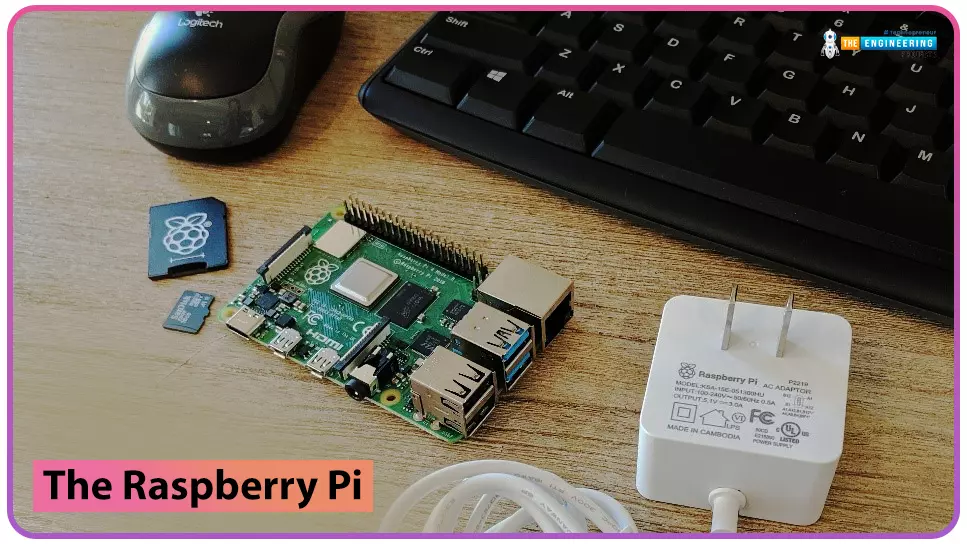
to our new beginner’s course on Raspberry Pi. This course is appropriate for anyone using either a traditional Raspberry Pi board or the new Raspberry Pi 400 board that includes an integrated keyboard and display. Learning how to code, building robots, and doing plenty of other strange and exciting things are all possible with this low-cost computer setup. The Raspberry Pi can do everything a computer can do, from surfing the web to viewing movies and music, and playing video games.
Raspberry Pi is much more than a modern computer. It`s created to educate young people on how to program in languages such as Scratch and Python, and it comes with all of the major programming languages pre-installed. The world is in desperate need of programmers now ...
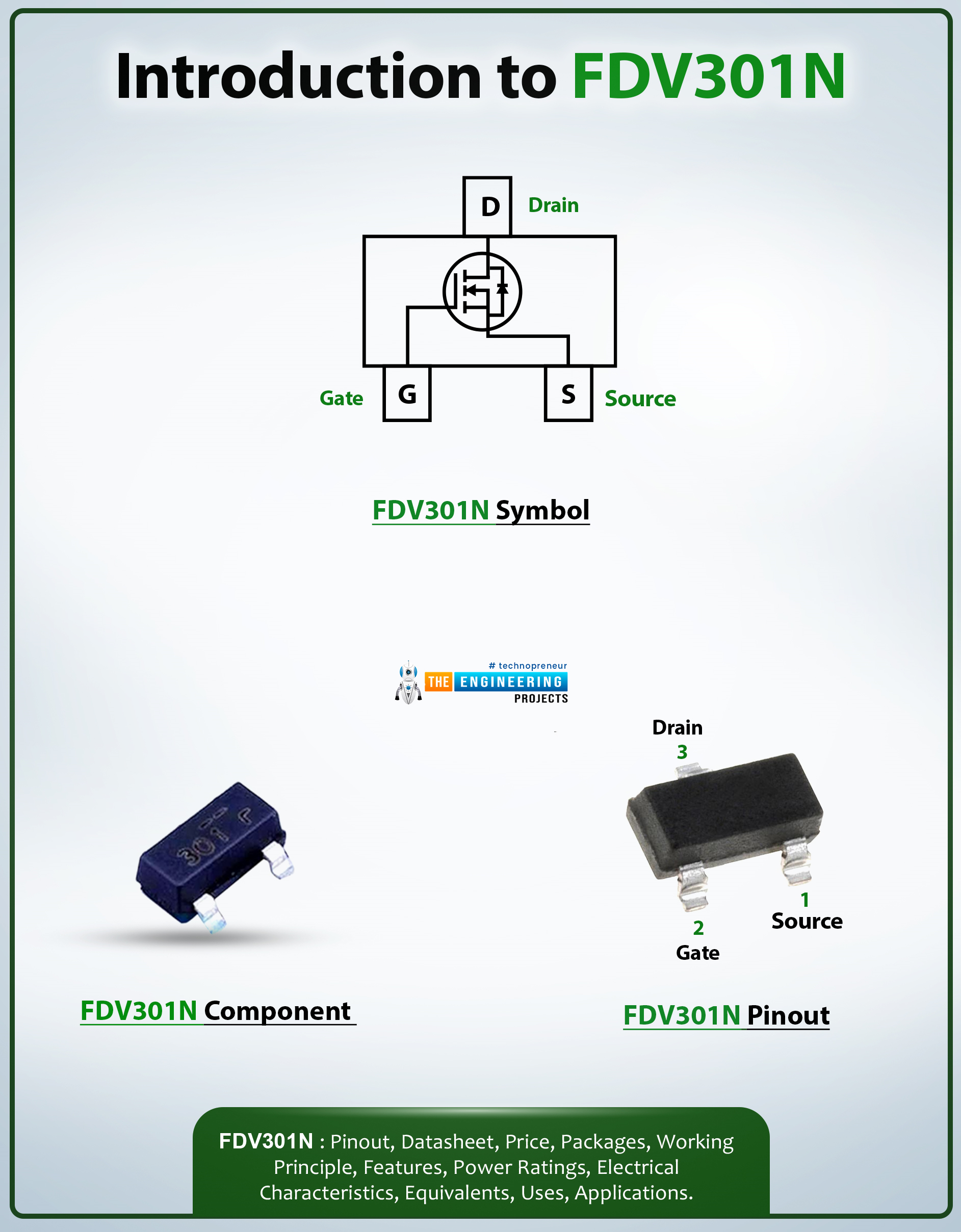
Hello Everyone! I welcome you on board. Happy to see you around. In this post today, I’ll walk you through the Introduction to FDB301N.The FDV301N is an N-channel MOSFET using Fairchild's proprietary and high cell density, DMOS technology. The cell’s high density helps to minimize the on-state resistance. This device is mainly developed for low-voltage applications. This N-channel MOSFET replaces different digital transistors and provides different bias resistor values.
I suggest you read this post all the way through as I’ll detail the complete Introduction to FDV301N covering datasheet, pinout, features and applications.
Let’s jump right in.
Introduction to FDV301N
The FDV301N is an N-channel MOSFET mainly used for switching and low-voltage applications.
It carries low on- ...
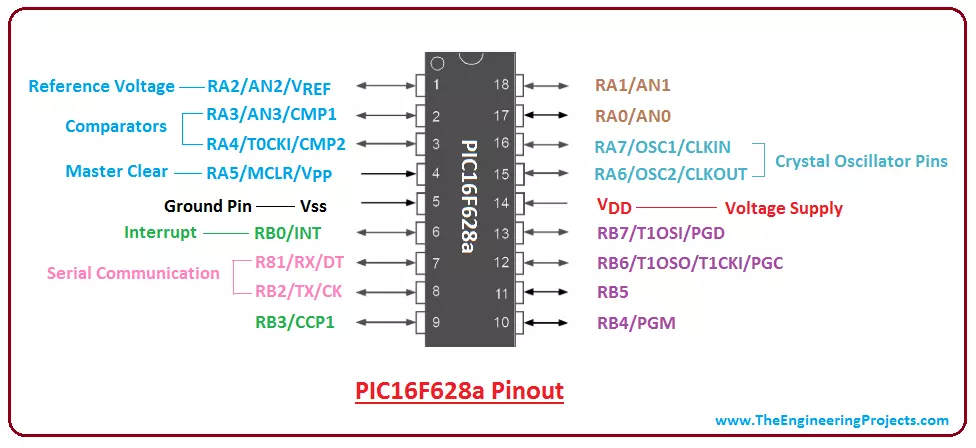
Hi Fellas! I am back to give you have a daily dose of valuable information so you keep coming back for what we have to offer. Today, I will discuss the details on the Introduction to PIC16F628a. It is defined as a self-contained 18-pin PIC Microcontroller that comes with memory, processor, peripherals and mainly used for embedded systems and applications.
Microcontrollers always remain a top priority for experts where automation is the main concern. Before the invention of microcontrollers, microprocessors were widely used for carrying out different functions related to industrial automation and processing applications. Both of them work identical in one way or the other, however, there are some exceptions i.e. microprocessors don't come with ROM ...
Buy This Project
This post is the next part of our previous post Financial Calculations in MATLAB named as Implementation of Black Litterman Approach in MATLAB, so if you haven't read that then you can't understand what's going on here so, its better that you should first have a look at that post. Moreover, as this code is designed after a lot of our team effort so its not free but we have placed a very small cost of $20. So you can buy it easily by clicking on the above button.In the previous post, we have covered five steps in which we first get the financial stock data, then converted it to common currency and after that we calculated the expected returns and covariance matrix and then plot the frontiers with and without risk free rate of 3%. ...
In today's post we are gonna see how to connect Arduino YUN with Putty and access the files on Linux OS in Arduino YUN. In my last post Getting Started With Arduino YUN, I have explained in detail about basics of Arduino YUN. I am recall few important things here. Arduino YUN is a very powerful board with two processors on it. One is Arduino microcontroller used to control the output / input pins. The other processor is named as Atheros and it has Linus operating system on it, so one can easily run python scripts on it and can do any server or client side coding in it.
So, today we are gonna see ow to access this Linux operating system of Arduino YUN using Putty software in Windows. Putty is a third party software used for accessing serial termina ...
LinkedIn is a social media platform where employment opportunities and professional networking is facilitated. With 200+ million users, LinkedIn has become immensely popular where jobs are being sought. While people have learned how to set up their profile and the importance of building connections, being hired is still a nightmare. With a rise in the number of hiring managers and recruiters who keep checking the profile to find a suitable job candidate; the pressure on potential individuals is immense. How to stand out from the crowd? How to get hired? These are some of the questions that haunt individuals. Fret not, for the list below is a small guide on how to get hired on LinkedIn.
Customize your URL Addresses
The address on the website of you ...
Hello friends, I hope you all are doing great. In today’s tutorial, we will discuss What is the Power Diode. The diode is a commonly used module in electrical and electronic engineering. Almost in every electronic device and engineering project diodes are used. It is a PN junction device that has 2 terminals, anode and cathode. The main function of the diode is to convert the alternating current into the direct current, this feature of the diode is called rectification. When it works on the positive cycle of the alternating current its state named as forward biased when it works on the negative cycle of the ac its operating state known as reverse biased. In 1906 the first diode was manufactured by the crystals of the minerals.
Power diode is ident ...
Hi Friends! Happy to see you here. Thank you for viewing this read. Hope you’re well today. In this post, I’m going to discuss the Analog Flex Sensor Library for Proteus. You should also have a look at Digital Flex Sensor Library for Proteus.
I’ve been adding them over the last few days intending to design and share brand new libraries that are not a part of the proteus library database already. I’m adding both simple simulation and simulation with the Arduino board to help you better understand these libraries with microcontrollers and Arduino devices.
Before I go further and walk you through on how to download and simulate Analog Flex Sensor Library for Proteus, let’s get to know what’s Flex sensor first.
Simply put, a flex sensor is used to ...
Hello friends, I hope you all are doing well. Today, I am going to share the 8th tutorial of Section-III in our Raspberry Pi Programming Series. In the previous tutorial, we interfaced the temperature sensor DS18B20 with Raspberry Pi 4. In today's guide, we'll discover another temperature sensor BMP180 and will interface it with Raspberry Pi 4.So, let's get started:
Project DescriptionIn today's tutorial, we will interface the BMP180 sensor with Raspberry Pi 4 and will display the values of temperature, barometric pressure and altitude in the Raspberry Pi Console Window.
Components Required
We will use the following components in today's project:Raspberry pi 4BMP180 sensorFemale-Female Jumper wiresBreadboard
BMP180 Air Pressure Sensor
BMP180 i ...