Even the best tech entrepreneurs have made mistakes while working their way to the top. Many of the past and present entrepreneurs have difficulty making their businesses succeed. It is a rough world for beginners. It is hard to succeed when a person does not know how to grow their business and make a financial gain. The Practical Guide for Entrepreneurs has been written to assist other entrepreneurs. It teaches the steps of what to do and what not to do as a beginner. The guide answers a lot of questions that tech startup has. They are informative and knowledgeable in the steps to take to make a business excel. The valuable information can impact their tech business and help it financially grow into something bigger. The entrepreneur guide has important information that should be followed ...
Hello everyone, I hope you all are fine and having fun with your lives. In today's post, I am going to share all about Arduino Data Types. Arduino Data Types play an important role in Arduino Programming and I have discussed them a little in my tutorial on How to do Arduino Programming. But today, we are gonna discuss it in more detail. I hope you guys are gonna enjoy from them and are gonna get benefit using them. Before going any further I think you must have a llok at Arduino Basic Tutorials in which I have explained everything in a very easy way. Anyways, Till now I hopeo that you have the basic know how of Arduino Programming and you ahave also worked on Arduino LED Example. So, let's get started with Arduino Data Types: What are Data Types ?? If you recall your basic mathematics in w ...
Hello everyone, I hope you all are fine and having fun. In today's tutorial, I am going to show you How to write Arduino code. In the previous tutorial, we have seen the Simple Arduino LED Example so if you haven't read that tutorial then I must suggest you to read it first because I am gonna use the same simulation with some advancements in it. Moreover, you should also have a look at How to do Arduino Serial Communication because we are also gonna use Serial Port in today's tutorial and one more tutorial which you must read is How to use digitalRead in Arduino because we are dealing with digital pins here. So, I hope that you have read those tutorial and are ready to learn How to write Arduino code. So, let's have a look at How to write Arduino Code: How to write Arduino code ? In the pr ...
Hello friends, I hope all are fine and having fun with your projects. We have covered enough Arduino commands in this Arduino Tutorial for Beginners series and now we are ready to create a simple project by interfacing an LED (Light Emitting Diode) . Today, I am going to share a very Simple Arduino LED Example in Proteus ISIS. First I will blink single LED using Arduino UNO and then I will blink multiple LEDs in Proteus. When you start working on Arduino then Arduino LED example is the first example which you must try because its the easiest one. Moreover, we all know that we have a small LED connected to pin # 13 on each Arduino so you can also check your Arduino as well that whether its working or not. So, let's get started with Simple Arduino LED Example in Proteus ISIS: A Simple Arduin ...
Hello friends,I hope you all are fine and having fun with your lives. In today's tutorial, I am going to share a new Proteus Library named as Flex Sensor Library for Proteus . I am quite excited while sharing this one because we are the first one to design this library and share it online. Although, I wanna add one thing here that most of the flex sensors are analog sensors and their resistance changes over bending and believe me I have tried my best to design an analog sensor but despite the efforts we couldn't so I am sharing a digital version of Flex Sensor. So, its not gonna detect how much its bent but it will detect whether its up or bent. So, I thought to share it with you guys. It's better to have something than nothing. You should also have a look at Analog Flex Sensor Library for ...
Hello everyone, I hope you all are fine and having fun with your lives. In today's tutorial, I am going to share How to do Arduino Serial Communication in detail. Recently, I have shared a lot of tutorial on Arduino Serial Communication which contains everything you need for Arduino Serial Communication. So, in today's tutorial, I am actually gonna combine them all and give you a whole picture of How you can easily do the Arduino Serial Communication . I hope you guys are gonna enjoy this. You should also have a look at DC Motor Speed Control using Arduino in which I have controlled the DC Motor via Arduino Serial Communication. I will also share some more tutorials on Arduino Serial Communication in the near future so I will also add their links in today's tutorial. If you guys have any q ...
Hello friends, I hope you all are fine and having fun. In today's tutorial, I am going to show you How to use Arduino Software Serial . In my previous tutorial, we have had a look at How to use Arduino Serial Write and How to use Arduino Serial Read . In both of these tutorials, we have done the hardware Serial Communication. But we all know that Arduino has just one Serial Port placed at pins 0 and 1. So, if you are having two or more serial modules, then there's difficulty in adding two modules because we just have one hardware serial port. So, in such cases, there's a need to add one more serial port and that serial port can be created at any two pins of Arduino and is called software serial . Software Serial is also named Virtual Serial Port . It's really very comfy if you are working ...
Hello friends, I hope you all are fine and having fun with your lives. Today, I am going to share a very quick and basic tutorial in which I will show you How to use Arduino Serial Flush . I hope you guys are going to like it. We have seen How to use Arduino Serial Write? In that tutorial, we have sent some data over the Serial Port so you must recall that tutorial because we are going to use the same example today. Moreover, it's also good if you have a look at How to use Arduino Serial Monitor because that's also related. Moreover, I hope that's going to be my last lecture on Arduino Serial Port because I have covered it in full detail. Although I am going to summarize all the Arduino Serial Post Commands in a single Post. You should also have a look at How to do Arduino Serial communica ...
Hello friends, I hope you all are fine and having fun with your lives. In today's tutorial, I am going to show you How to use Arduino Serial Monitor . It's not gonna be a very big post but its really very essential if you wanna learn Arduino coding. Because Arduino Serial Monitor is a great debugging tool and it helps a lot in Arduino Projects. In the previous post we have seen How to use digitalRead in Arduino and if you recall that tutorial then you must remember that in it we have used some Serial printing. So that's what we are gonna cover in today's tutorial. Before going into the details, I must suggest you to first read these two posts because in those tutorials I have shown the serial communication which is essential for Serial Monitor Working. So, you guys must first read them and ...
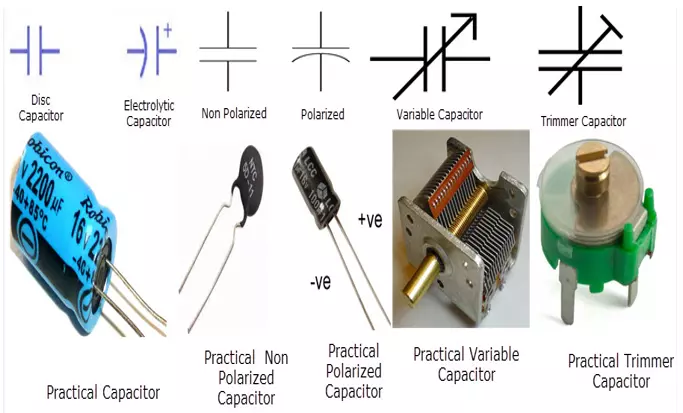
Hello everyone, I hope you all are fine and having fun with your lives. Today's topic is about the Evolution of Capacitors and I have tried my best to explore all about Capacitors. A Capacitor is one of the passive elements. It is a two-terminal electrical component. It stores energy in the form of an electric field. The physical appearance of the practical capacitors varies depending upon their usages. The basic capacitor has two electrical conductors that are separated by a dielectric. The material used in electrical conductors is a conductive electrolyte, thin films, sintered beads of metal and thin foils. And, the material used in the dielectric is plastic, glass, ceramic, Vacuum, mica, paper, oxide layers, etc. A capacitor is also called a condenser. Capacitor mainly depends upon the ...