Hello everyone, I hope you all are doing great. In today's tutorial, we are gonna have a look at How to design a Smoke Detector with Arduino. Its quite a simple project but if you are working on any security project then you must add this feature in it. You should also download this Gas Sensor Library for Proteus, and design its simulation.
I will use gas sensor MQ2 for this project. I have purchased MQ2 Gas Sensor module as its quite easy to interface with Arduino. Arduino board I'm using is Arduino UNO. I have also designed an LPG Gas Leak Detect using Arduino using this MQ2 Sensor. So, let's get started with How to design Smoke Detector with Arduino & MQ2 Sensor.
Smoke Detector with Arduino & MQ2 Sensor
First of all, we need to conn ...
Hey Fellas! Hope you are doing well. Today, I am going to unlock the details on the Introduction to Arduino Mega 2560. It is a microcontroller board based on Atmega 2560 microcontroller. Arduino Boards have revitalized the automation industry with their easy-to-use platform where everyone with little or no technical background can get started with learning some basic skills to program and run the board.
I have updated articles previously on Arduino Uno, Arduino Nano, and Arduino Pro Mini. All these boards function similarly in one way or the other. There are some basic features like PCB layout design, size, number of analog pins and breadboard friendly nature that make them different from each other. In terms of coding, all these boards are progra ...
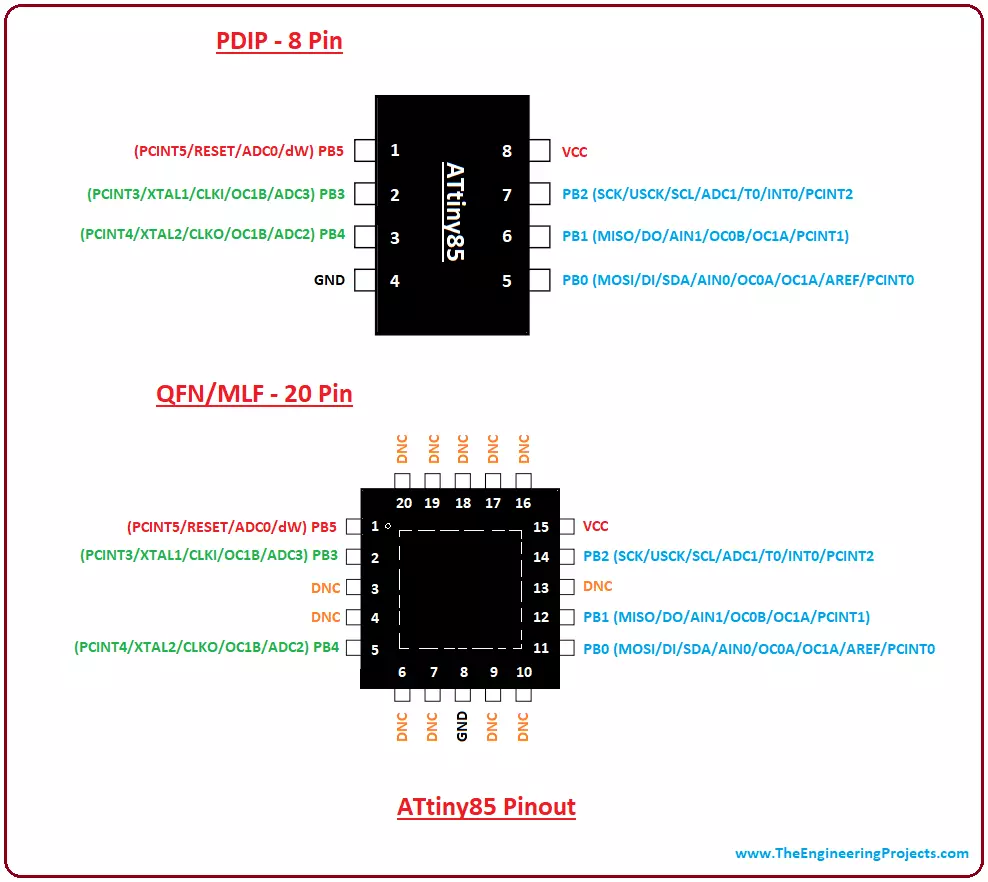
Hey Guys! Hope you are doing well. I am back to give you a daily dose of valuable information. Today, I'll discuss the details on the Introduction to ATtiny85. It is an 8-bit AVR microcontroller, introduced by Microchip, and is based on RISC CPU. It comes with 8-pin interface (PDIP) and falls under the category of low power controllers. Programmable watchdog timer and 10-bit ADC converter are added in the device that makes it suitable for sensor interfacing and resetting the device in case it gets stuck in an infinite loop.
Microchip never fails to satisfy the requirements of any individual by providing flawless microcontroller modules that are directly or remotely connected with automation and embedded systems. With the invention of these tiny o ...
Hello everyone, I hope you all are doing great. In today's tutorial, I am going to give you a detailed Introduction to Arduino YUN, and we will also have a look at its basic functionalities. Arduino YUN is a latest microcontroller board, manufactured by Arduino. It's the most advanced and highly stylish arduino board. The beauty of Arduino YUN lies in having two on board processors, which I haven't seen yet in any other Microcontroller board. One of them is simple Arduino processor which is similar to that of Arduino Leonardo while the second processor is Atheros AR9331. Atheros supports Linux server, which is the new thing in Arduino YUN. Because of these two processors, one now can do anything in the world of automation as well as web servers. ...
In today's post, I am gonna share a new Arduino Library for Seven Segment Display. In my recent project, I got a chance to work on seven segment displays, I have worked on them using PIC microcontroller but haven't got a chance to use them with Arduino. So, now as usual when I started working on them, I started searching for Arduino Library but I kind of got disappointed after getting quite heavy libraries for seven segments, and after a lot of search I thought of designing my own Arduino library for seven segment display, which I am gonna share in this post. :)
It's not very advanced library as we know seven segment displays are not too complex, so its quite simple and using it you can quite easily display any numerical digit on the seven segment ...
Hello friends, I hope you all are doing great. In today's tutorial, I am going to show you How to Interface Arduino with 74HC595 & 74HC165. I have already interfaced these shift registers separately with Arduino. In the first tutorial we have seen Arduino 74HC595 Interfacing in which I have discussed How to increase the output pins of Arduino using 74HC595. After that in second tutorial we have seen Arduino 74HC165 Interfacing where we have increased the input pins of Arduino.
So, now we are gonna interface both of these shift registers with Arduino UNO and will increase both input and output pins of Arduino. I have also given the Proteus simulations for download at the end of this tutorial along with Arduino code. So, lets get started with In ...
Hi Friends! Welcome you onboard. I have been writing these Arduino tutorial for beginners for quite a while now and today we are having the next episode. Today, I'll discuss How to use analogRead in Arduino. The analogRead is mainly used to program and address analog pins on the board. In our previous tutorial, we have seen How to use digitalWrite Arduino Command, which deals with digital pins of Arduino but today's one deals with analog pins.
There are many types of boards available in the market ranging from Arduino UNO, Arduino Mega2560, Arduino Micro and many more, which you can use based on your technical requirements. Arduino Programming is made simple by the Arduino.cc - the manufacturer of Arduino Boards, providing an open source software ...
Hello friends, i hope you all are fine and enjoying. Today i am going to share a new tutorial which is Interfacing Arduino with HC05 Bluetooth module. First of all lets have a little introduction about HC-05 Bluetooth module. HC-05 is a bluetooth module, which was designed for wireless data communication. This little module is capable of both sending and receiving data but it performs only one thing at a time, which means at a particular time it can only send or receive data but can't do the both tasks.
In order to send or to receive data, you have to make one module as a master and the other module as a slave. If both the modules are acting as master then, data will not transmit and if both the modules are acting as a slave then, again data will ...
Hello friends, hope you all are fine and having fun with your lives. In today's post we will have a look at How to interface keypad with Arduino in Proteus ISIS. Keypad is used almost in every engineering project. If you even look around you will find keypad in many electronic appliances. For example, a simple ATM machine has a keypad on it using which enter our pin code and give commands to the ATM machine. Similarly, calculator also has keypad on it. So, in short there are numerous applications of keypad. You should also read the Real Life examples of Embedded Systems and you will find Keypad in them as well.
Keypad is used where you need to used numerical buttons or you need to use lots of buttons for sending commands so like in some applicatio ...
Hello everyone! I hope you all will be absolutely fine and having fun. Today, I am going to provide the detailed discussion on PIR Sensor Arduino Interfacing. PIR basically stands for Passive Infrared Sensor. Basically PIR is an electronic equipment which is often used to measure the infrared light radiating from the different objects in their field of view. It detects the infrared energy released from animals as well as from human beings, when this energy is higher than the certain threshold level PIR sensor shows an indication correspondingly. The energy detected by PIR sensor is usually in the form of heat i.e. emitted by humans as well as from animals.
We can also test and verify our results in Proteus using PIR sensor. I have already shared ...