Hello everyone! I hope you all will be absolutely fine and having fun. Today, I am going to share my knowledge about how to make a simple Virtual Instrument (VI) for Stepper Motor Speed Control in LabVIEW. In my previous tutorials, I have worked on Stepper Motor Speed Control using Arduino in which I have shown how to control the stepper motor speed using Arduino. Today, I am going to share a new tutorial in which I am gonna do the Stepper Motor Speed Control in LabVIEW. Moreover, you should also have a look at Stepper Motor Speed Control in Matlab, where I am sending stepper motor speed control commands from MATLAB.
In this tutorial, I am going to work on the program for Stepper Motor speed Control using NI LabVIEW. So, before going into the de ...
Hello everyone! I hope you all will be absolutely fine and having fun. Today, I would like to provide a complete discussion on introduction to GPS and myRIO as well as myRIO GPS Interfacing as the most related part. First of all I would like to tell you about GPS, from what it is abbreviated, at which principle it works and how it plays its role in our daily life. GPS is basically derived from the word Global Positioning System. GPS is a complete network of satellites which are continuously rotating in their orbits and send information to earth about their accurate position in space. GPS receivers are used to receive the signals, and the received signals help us to estimate the precise time, position and speed of anything moving around. I have sh ...
Hello everyone! I hope you all will be absolutely fine and having fun. Today, I am going to share my knowledge about how to make a simple Virtual Instrument (VI) for Stepper Motor Direction Control in LabVIEW. In my previous tutorial, I have worked on Stepper Motor Direction Control using Arduino, in which I have controlled Stepper Motor Direction Control using Arduino and I am gonna use the same setup but this time I am gonna do the Stepper Motor Direction Control in LabVIEW. Moreover, you should also have a look at Stepper Motor Direction Control using Matlab.
In this tutorial, I going to work on the program for Stepper Motor Direction Control in LabVIEW. So, before going into the details of this tutorial, you must go through my previous tutor ...
Hello friends! I hope you all will be absolutely fine and having fun. Today I am going to share my knowledge with all of you guys that how to make a simple program for Quadratic Roots Calculation in LabVIEW. Quadratic equation is a second order basic equation. It plays a vital role for a lot of mathematical problems. The answer obtained from this equation is knows as its roots (also called quadratic roots). It can not have more than two roots. Roots can be 0,1 or maximum 2 and not more than that. We can solve quadratic equation in three different ways, but in this tutorial we will focus on one of them only. Here, I am going to tell you about form and the different ways of Quadratic Roots Calculation.
Ways to Solve Quadratic Equation
The quadratic ...
Hello friends! Hope you all will be absolutely fine. Today I am going to share my knowledge with you about how to create an algorithm for Water Level Detector in LabVIEW 2015. LabVIEW is an excellent software for simulation purpose as well as for the hardware interfacing (interfacing with the external devices). I support the "Graphical Language" which is usually known as "Field Programmable Gate Array (FPGA) " based language. In other software we have to create logic first and then we need to write a complete syntax for the created logic. This software is very easy to use and is quite helpful. Because, we don't have to write the complete complex syntax, instead we have to just create our logic and implement this logic using FPGA blocks. In this t ...
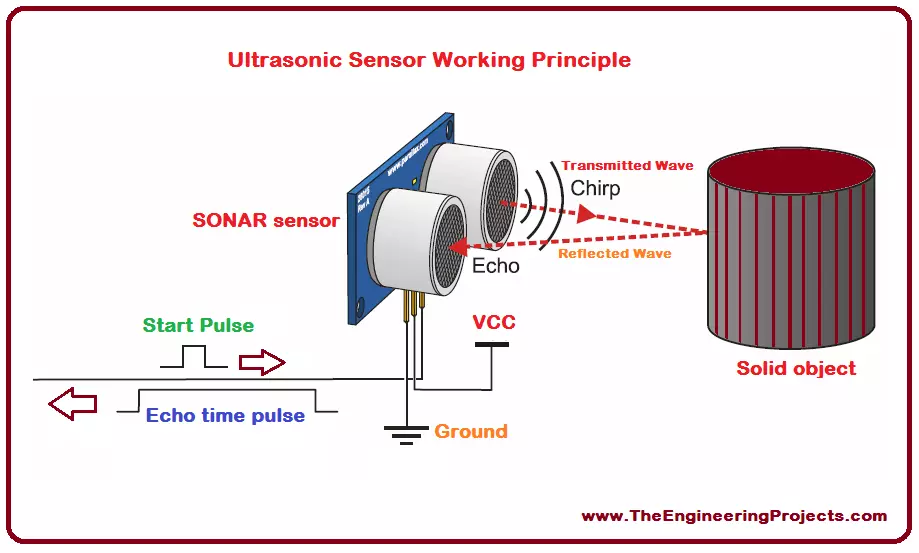
Hello everyone! I hope you all will be absolutely fine and having fun. Today, I will give you a detailed discussion on myRIO Ultrasonic Sensor Interfacing. In this tutorial, you will learn about NI myRIO ultrasonic sensor interfacing. We will go into the details of the ultrasonic sensor and then will move forward towards its interfacing with myRIO. I have already shared many articles on ultrasonic sensors and will share their link in this article as well.
The ultrasonic sensor is also known as SONAR (Sound Navigation and Ranging). As it is clear from its name, it transmits sound waves and these waves are received back to it after getting reflected from any object. It measures the total time elapsed during the entire transmission as well as during the reception of the reflected waves. The ...
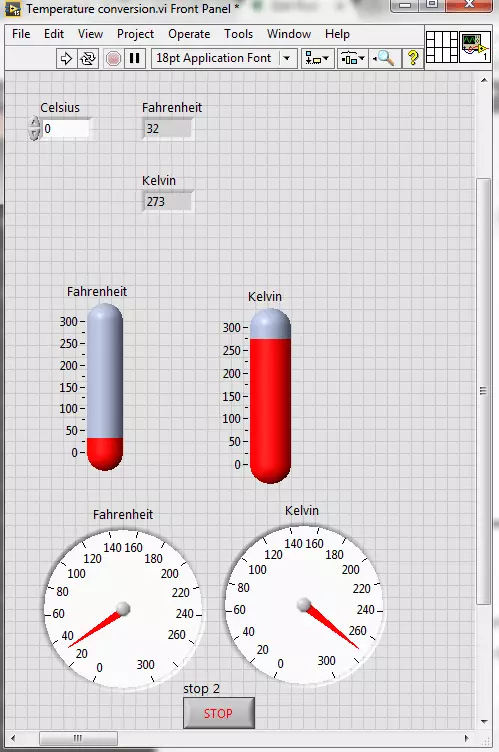
Hello friends! I hope you all will be absolutely fine. Today, I am going to share my knowledge with all of you guys, on how to make a Temperature Conversion in LabVIEW. Temperature is actually measured with different units at different places all across the world. However, there are three basic standard units for measuring the temperature i.e. Celsius, Fahrenheit and Kelvin. We can convert them in each other by performing some mathematical operations. In this tutorial I am going to elaborate only one of these conversions.
I would like to tell the standards of these scales with reference to the freezing and boiling point of water. "Celsius" scale is basically the scale based on 0 degrees for the freezing point of water and 100 degree for the boil ...
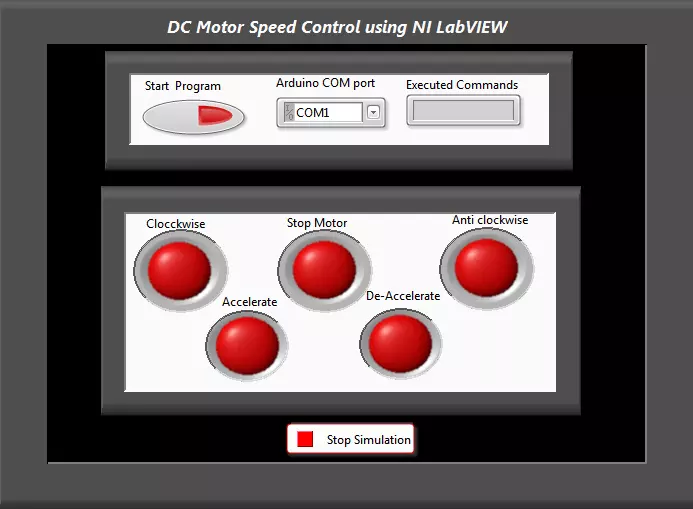
Hello everyone! I hope you all will be absolutely fine and having fun. Today, I am going to share my knowledge with all of you guys, about how to make a simple Virtual Instrument (VI) for DC Motor Speed Control in LabVIEW. In my previous tutorials, I have worked on DC Motor Speed Control using Arduino, in which I have controlled the DC Motor Speed using Arduino and after that I made some advancements in it and then created DC Motor Speed Control in Matlab in which commands were sent from Matlab. So, now we are gonna do the DC Motor Speed Control in LabVIEW.If you are working on DC Motor then you should also have a look at DC Motor Direction Control using Arduino.
In this tutorial, I am going to work on the program for DC Motor speed Control usin ...
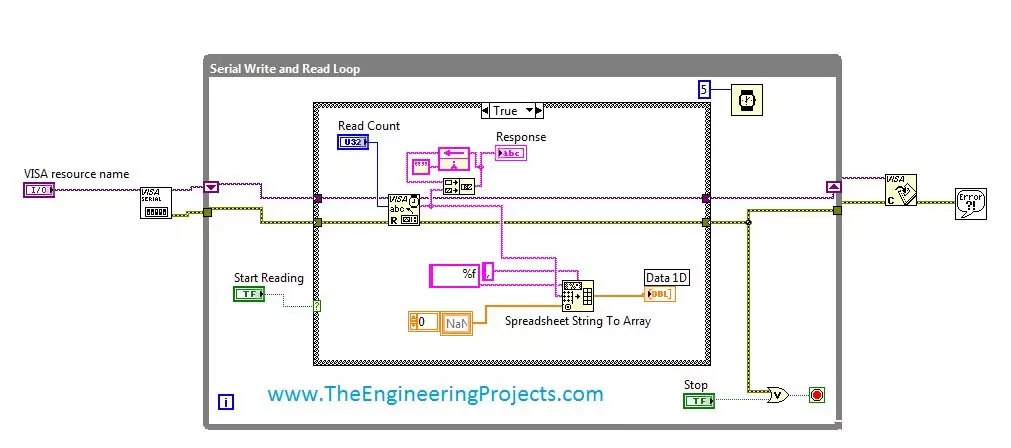
Hello friends, hope you all are fine and enjoying good health. Today's post is my first post on LabView Software. I have worked on LabView quite a lot in past but these days I am continuously working on LabvView so I thought to write some tutorials on it. In today's tutorial, I will explain in detail How to get continuous data from COM Port in LabView software. LabView is a very handy tool for the engineers. One can easily plot graphs and can work on different hardware modules with it. One of the best feature of LabView is its extensive help desk. There are many examples present in it which are ready to run and can help a lot, moreover their online is also very extensive. I got into many problems while working on it and I never get stuck, I just s ...
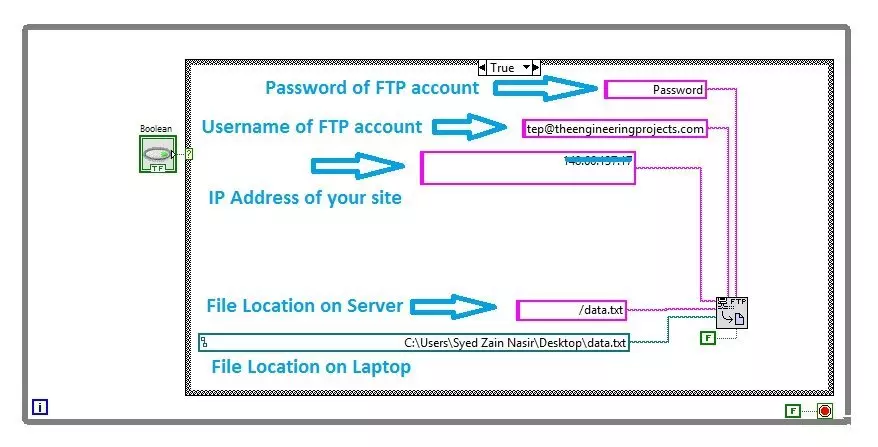
Hello friends, I hope you all are doing great. In today's tutorial, I am gonna show you How to upload Files using FTP in LabView. It's gonna be a quick tutorial as there's not much to do :) but you have to read and follow it carefully because if you made even a small mistake then it won't work.
FTP is an abbreviation of File Transfer Protocol and using FTP we can easily upload or download files from our web server. We can use different FTP clients like FileZilla in order to do it manually but today we are gonna have a look at How to upload files automatically using FTP in LabView. So, let's get started with FTP in LabView:
How to Upload Files using FTP in LabView
When you are working on some Embedded project where you need to upload your sensor ...