Legacy software refers to a business operating software that has been in use for a long time. This is older system software that is still relevant and fulfills the business needs. The software is critical to the business mission and the software operates on specific hardware for this reason.
Generally, the hardware in this situation has a shorter lifespan than the software. With time, the hardware becomes harder to maintain. Such a system will either be too complex or expensive to replace. For that reason, it continues operating.
What is a Legacy System?
Legacy software and legacy hardware are often installed and maintained simultaneously within an organization. The main changes to the legacy system typically only replace the hardware. That helps ...
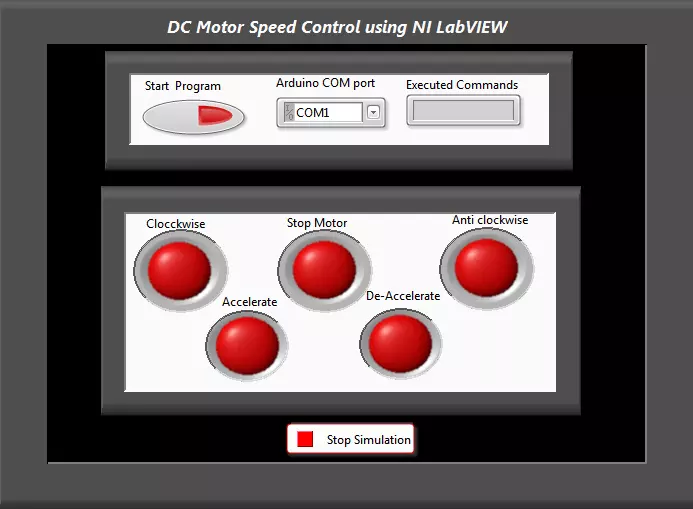
Hello everyone! I hope you all will be absolutely fine and having fun. Today, I am going to share my knowledge with all of you guys, about how to make a simple Virtual Instrument (VI) for DC Motor Speed Control in LabVIEW. In my previous tutorials, I have worked on DC Motor Speed Control using Arduino, in which I have controlled the DC Motor Speed using Arduino and after that I made some advancements in it and then created DC Motor Speed Control in Matlab in which commands were sent from Matlab. So, now we are gonna do the DC Motor Speed Control in LabVIEW.If you are working on DC Motor then you should also have a look at DC Motor Direction Control using Arduino.
In this tutorial, I am going to work on the program for DC Motor speed Control usin ...
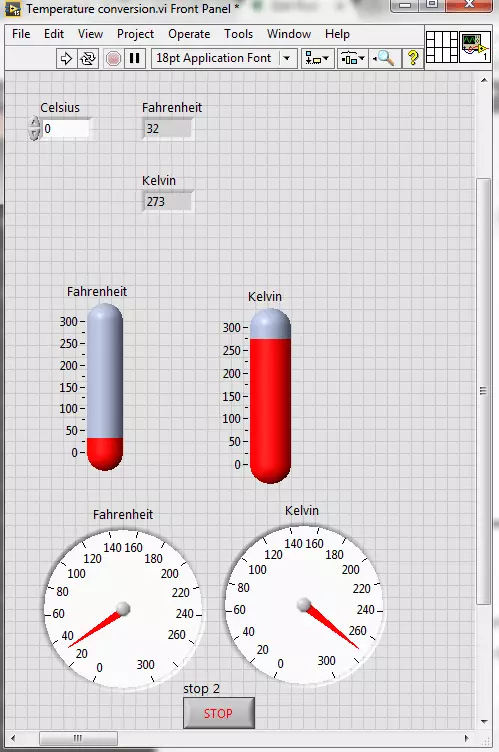
Hello friends! I hope you all will be absolutely fine. Today, I am going to share my knowledge with all of you guys, on how to make a Temperature Conversion in LabVIEW. Temperature is actually measured with different units at different places all across the world. However, there are three basic standard units for measuring the temperature i.e. Celsius, Fahrenheit and Kelvin. We can convert them in each other by performing some mathematical operations. In this tutorial I am going to elaborate only one of these conversions.
I would like to tell the standards of these scales with reference to the freezing and boiling point of water. "Celsius" scale is basically the scale based on 0 degrees for the freezing point of water and 100 degree for the boil ...
Hello everyone. I hope you all will be absolutely fine. Today, I am going to share an Introduction to LabView. LabView is a really exciting software and recently I have worked on many LabView Project so I thought to start this new set of series in which I am gonna explain all about LabView from beginners level to Pro Level. So, today I am gonna upload the first tutorial in this LabVIEW series so that's why I have named it Introduction to LabView and I hope you are gonna like this tutorial. :)
LabVIEW basically stands for “Laboratory Virtual Instrument Engineering Workbench”. This software is designed by the National Instruments (NI) for the control and design of the projects. You can use it for simulation purposes, can also interface hardware with ...
Hello friends, hope you all are fine and having fun with your lives. Today, I am going to share all the LabView Projects, posted on our blog. These LabView projects are entirely designed by the TEP team and I hope they will help you in some way. Rite now the list is quite small but I am gonna post more tutorials and projects related to LabView soon. So, keep visiting or subscribe us via email so that you get these exciting tutorials straight to your inbox.
Moreover, LabView is really a difficult software and it really took us a lot of time in designing these projects so other blogger are more than welcome to share our projects on their blog but do mention the respective link from where you copied as a favor. I am gonna share the complete list here ...
Hello friends! I hope you all will be absolutely and having fun. Today, I am going to share my knowledge with all of you on Area and Volume Calculation of different shapes with the given radius in NI LABVIEW. First of all I want to tell you that the area basically shows the space inside an object having two dimensions. Where as, Volume is the parameter which shows the space occupied by a three dimensional object.
So, we can roughly say that the volume is the area of a three dimensional object. For example you want to go for a trip and you have to pack your bags. So, in this case you have to make some space in your bag to put the clothes inside it. The space that you make for the clothes is basically an application of volume. We can also called i ...
Hello everyone! I hope you all will be absolutely fine and having fun. Today, I am going to share my knowledge with all of you guys, about Communication Signals Generation in LabVIEW. In the previous tutorial, we have seen the Introduction to LabView and after that we have designed our First Project using LabView Programming so if you haven't read them yet then I would suggest you to read them so that you have the basic knowledge of LabView. In earlier days people used to convey their messages or some important notifications using a piece of paper and by delivering it to the other places with the help of the pigeons. It took a lot of time for the message conveying procedure because there are some notifications or messages in which such a huge delay ...
Hello everyone! I hope you all will be absolutely fine and having fun. Today, I am going to share my knowledge about Creating First Program with myRIO. Before doing anything on NI myRIO you must know that how to configure this device. So, before going into the details of this tutorial I would like to suggest you to must visit Getting Started with myRIO and How to Configure myRIO on WiFi for the better understanding of this tutorial.
NI myRIO is an amazing processing tool that has a very high processing speed as compared to other microcontroller e.g. Arduino, raspberry pi, gellilio etc. So, it can be used for the real time projects where there is need to respond very quickly according to the assigned tasks. NI myRIO was launched by National Instr ...
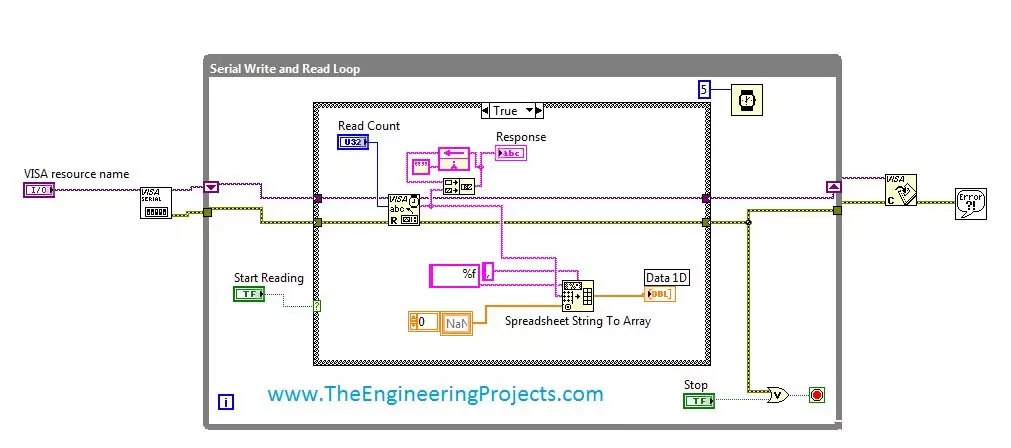
Hello friends, hope you all are fine and enjoying good health. Today's post is my first post on LabView Software. I have worked on LabView quite a lot in past but these days I am continuously working on LabvView so I thought to write some tutorials on it. In today's tutorial, I will explain in detail How to get continuous data from COM Port in LabView software. LabView is a very handy tool for the engineers. One can easily plot graphs and can work on different hardware modules with it. One of the best feature of LabView is its extensive help desk. There are many examples present in it which are ready to run and can help a lot, moreover their online is also very extensive. I got into many problems while working on it and I never get stuck, I just s ...
Hello friends! I hope you all will be absolutely fine and having fun. Today I am going to share my knowledge with all of you guys that how to make a simple program for Quadratic Roots Calculation in LabVIEW. Quadratic equation is a second order basic equation. It plays a vital role for a lot of mathematical problems. The answer obtained from this equation is knows as its roots (also called quadratic roots). It can not have more than two roots. Roots can be 0,1 or maximum 2 and not more than that. We can solve quadratic equation in three different ways, but in this tutorial we will focus on one of them only. Here, I am going to tell you about form and the different ways of Quadratic Roots Calculation.
Ways to Solve Quadratic Equation
The quadratic ...