Hello everyone! I hope you all will be absolutely fine and having fun. Today, I am going to share my knowledge about How to use MATLAB. This is an on demand tutorial. The tutorial will help you to learn the the basics of the MATLAB and will elaborate the use of the different tools of it e.g. command window, m.file, Graphical User Interface (GUI) and simulink. Before into the details of this tutorial you must go through Introduction to MATLAB first for the better understanding of this tutorial. Each of the tools has its own importance while making an algorithm in MATLAB. Command window basically deals with the shorter commands where there is a need of quick execution. Command window shows the result of all of the executed commands if there is no semicolon at the end of the particular statem ...
Hello everyone! I hope you all will be absolutely fine and having fun. Today, I am going to share a list of Stepper Motor Projects using different software e.g. Arduino, Matlab and NI LabVIEW. I have already shared these projects but they are posted randomly. So, today I thought that I should combine all those projects into a single one. So I am going to share the links of all of those tutorials in this tutorial so that it may be helpful for engineering students or anyone who wants to visit. This tutorial will help you to visit all of my Stepper Motor Projects. You should also have a look at this Stepper Motor Simulation in Proteus. The links of all the tutorials will be given and you will be able to download the desired project code or simulation from the corresponding link. I will make s ...
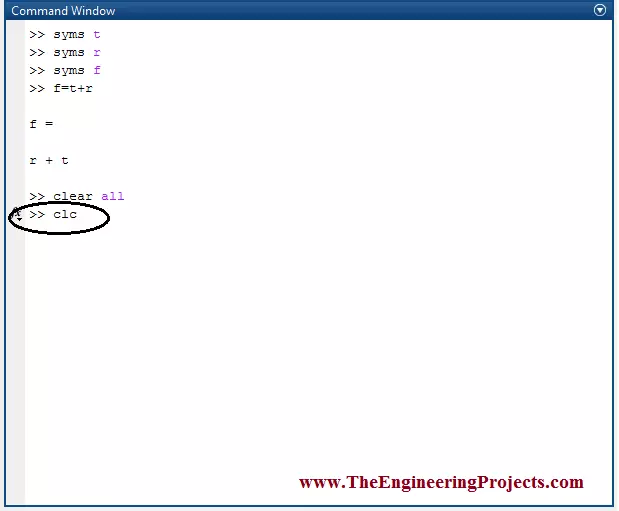
Hello everyone! I hope you all will be absolutely fine and having fun. Today, I am going to share my knowledge with all of you guys about How to Clear MATLAB Windows. If the command window and workspace window are not clear they present a very complicated look and hence the user feel it difficult to write code on command window. Here, I have compiled a list of awesome MATLAB Image Processing Projects so must check them out to get some inspiration. :) So, for the ease of the user we need to clear the both window specially the command window because it contains the entire code for any of the task. Before going into the details of this tutorial, you should go through Introduction to MATLAB and Declaration of Variables in MATLAB for the better understanding of this tutorial. If we want to avoi ...
Hello everyone! I hope you all will be absolutely fine and having fun. Today, I am going to share my knowledge about Creating First Program with myRIO. Before doing anything on NI myRIO you must know that how to configure this device. So, before going into the details of this tutorial I would like to suggest you to must visit Getting Started with myRIO and How to Configure myRIO on WiFi for the better understanding of this tutorial. NI myRIO is an amazing processing tool that has a very high processing speed as compared to other microcontroller e.g. Arduino, raspberry pi, gellilio etc. So, it can be used for the real time projects where there is need to respond very quickly according to the assigned tasks. NI myRIO was launched by National Instrument. It has different models. In this tutor ...
Hello everyone! I hope you all will be absolutely fine and having fun. Today, I am going to share my knowledge about How to Create m File in MATLAB. It is also known as New Script or Editor in the MATLAB. It's an amazing MATLAB tool. We can write the complete source code on editor. If we want to visualize the result of the particular statement we should not put a semicolon after that statement in MATLAB. Before going into the details of this tutorial, you must first have a look at Introduction to MATLAB and if you don't know about MATLAB variables then you must read Declaration of Variables in MATLAB . By doing this and by pressing the Run (Green Color) button at the top of the editor we will be able to see the result on the command window. In other words, we have to write the entire sourc ...
Hello everyone! I hope you all will be absolutely fine and having fun. Today, I am going to share a list of tutorials on DC Motor Projects using different software e.g. Arduino, Matlab and NI LabVIEW. I have already shared these tutorials but they are posted randomly. So, today I thought that I should combine all those tutorials into a single one. So I am going to share the links of all of those tutorials in this tutorial so that it may be helpful for engineering students or anyone who wants to visit. This tutorial will help you to visit all of my tutorials related to DC motor control. The links of all the tutorials will be given and you will be able to download the desired tutorial from the corresponding link. I will make separate sections for each software to control DC motor. In each se ...
Hello everyone! I hope you all will be absolutely fine and having fun. In the tutorial Declaration of variables in MATLAB , I will elaborate you that how to declare different variables in MATLAB and how to manipulate those variables without assigning them with the values. Before going into the details of this tutorial you must go through Introduction to MATLAB , because understanding MATLAB first is better. This will help you in better understanding of this tutorial. Variable declaration is one of the most important and compulsory steps while writing the code to perform any task. Without the declaration of the variables we can not proceed further to perform our task properly. So, if we want to do the different tasks in a proper way we must need to declare the variable before doing anything ...
Hello everyone! I hope you all will be absolutely fine and having fun. In this tutorial, I am going to give you a detailed Introduction to MATLAB . I will explain in detail, step by step procedure of using MATLAB for the first time. First of all, I would like to tell you a bit about the MATLAB software. MATLAB basically works on matrices and it is an excellent software for different kinds of simulation based projects as well as hardware based projects and specially, it is good for the Engineering Projects . MATLAB can be used for the manipulation purpose in order to obtain the proper results. It is very easy to use this software and most of the students prefer to use this software for their projects. So, this shows that MATLAB is a user friendly software as well. MATLAB has a very wide ran ...
Hello everyone! I hope you all will be absolutely fine and having fun. Today, I am going to share my knowledge about how to make a simple Virtual Instrument (VI) for Stepper Motor Speed Control in LabVIEW. In my previous tutorials, I have worked on Stepper Motor Speed Control using Arduino in which I have shown how to control the stepper motor speed using Arduino. Today, I am going to share a new tutorial in which I am gonna do the Stepper Motor Speed Control in LabVIEW. Moreover, you should also have a look at Stepper Motor Speed Control in Matlab , where I am sending stepper motor speed control commands from MATLAB. In this tutorial, I am going to work on the program for Stepper Motor speed Control using NI LabVIEW. So, before going into the details of this tutorial, you must go through ...
Hello everyone! I hope you all will be absolutely fine and having fun. Today, I am going to share my knowledge about how to make a simple Virtual Instrument (VI) for Stepper Motor Direction Control in LabVIEW. In my previous tutorial, I have worked on Stepper Motor Direction Control using Arduino , in which I have controlled Stepper Motor Direction Control using Arduino and I am gonna use the same setup but this time I am gonna do the Stepper Motor Direction Control in LabVIEW. Moreover, you should also have a look at Stepper Motor Direction Control using Matlab . In this tutorial, I going to work on the program for Stepper Motor Direction Control in LabVIEW. So, before going into the details of this tutorial, you must go through my previous tutorials because I am going to use the same har ...