Hello friends, hope you all are fine and enjoying life. Today's post is about removing a small error named as Recognition Failed in EasyVR, which I encountered while working with EasyVR shield with Arduino UNO. I have posted a complete project on EasyVR shield around a year ago in which I haven't mentioned this error because at that time I didn't encountered it. But today while working with EasyVR shield, I encountered this problem so I thought to share it with you guys.
EasyVR shield is a voice recognition module which is used for recognizing voices and operating accordingly. Using this module, one ca quite easily control anything using voice. In the previous project, I have controlled a robot using voice commands like when I say Forward then it ...
Hello friends, today's post as the name suggests is about how to send SMS with Arduino UNO and SIM900D using AT Commands. There are different types of SIM900D modules available in the market, so it doesn't matter which module you are using. All SIM900D modules work at AT commands basically so today I am going to show you how to send an SMS via AT commands without using any Arduino library. You should first read the AT commands manual which will give you an idea about AT commands. AT commands are special sets of commands which are used for communicating with SIM900 module. Using these AT commands we let our GSM work for us. Like if you want to send SMS then there's a specific AT command for sending the SMS similarly if you want to change the PIN co ...
Hello friends, I hope you all are fine and having fun with your lives. In today's post we are gonna see Interfacing of EasyVR with Arduino UNO. In the previous post, we have seen Getting Started with EasyVR Commander. It was quite simple and if you follow the steps carefully you wont stuck anywhere but still if you into some trouble i am here.
Now this tutorial is quite a quick and important one as it contains the real code using which we will control our robot. After adding the voice commands, now close the EasyVR Commander and open the Arduino Software. Connect the arduino board with computer and double check that your jumper J12 in on position SW. You should also read Training Error: Recognition Failed in EasyVR, if you got such error while ...
In the previous post we have seen the project description of Voice Recognition Project using EasyVR shield. Today we will have a look at Getting started with EasyVR commander. EasyVR shield is a module which is used for voice recognition. First of all, we save our commands in the EasyVR shield and then we use these commands to control anything. In this project, I need to control the robot with voice commands like when someone says FORWARD then the robot start moving in forward direction.
Now first of all what I need to do is to save this FORWARD voice in the shield, which we will see today how to save the command in the shield and after that I will show you the Interfacing of EasyVR shield with Arduino UNO. So that when I say Forward the motor sta ...
Hello friends, today's post is, as the name suggests, about the Voice Recognition using EasyVR Shield. Voice recognition is quite a difficult task and usually done on software like MATLAB, but what if someone needs a stand alone project, a kind of autonomous voice recognition project, which doesn't use computer.
EasyVR is the solution for such projects. I recently did one project on this module named as Voice Recognition using EasyVR Shield and it worked really cool so I thought to share this new technology with you guys. I couldn't write the next part of Proteus tutorial, actually firstly I was busy in this project and then I thought to share this one as its quite exciting one. After completing this project, I will come back to Proteus tutorial.
...
Hello friends, I hope you all are doing great. In today's tutorial, I am going to explain the Relay Interfacing with Microcontroller using ULN2003A. In the previous lecture, we have discussed the detailed Introduction to Relay along with its working. Now we are going to practically interface the relay with a microcontroller to design an automatic switch. Relay is a key component in almost every electronic circuit. It can be
used as a switch and can also be used as a voltage regulator.The microcontroller I am going to use here is PIC18F4552 but you can use any other Microcontroller. You just need to change the syntax of coding but the logic will remain the same. Here, I am using ULN2003A to control the relay and from this relay, we can control anything.So, let's get started:
Relay Inte ...
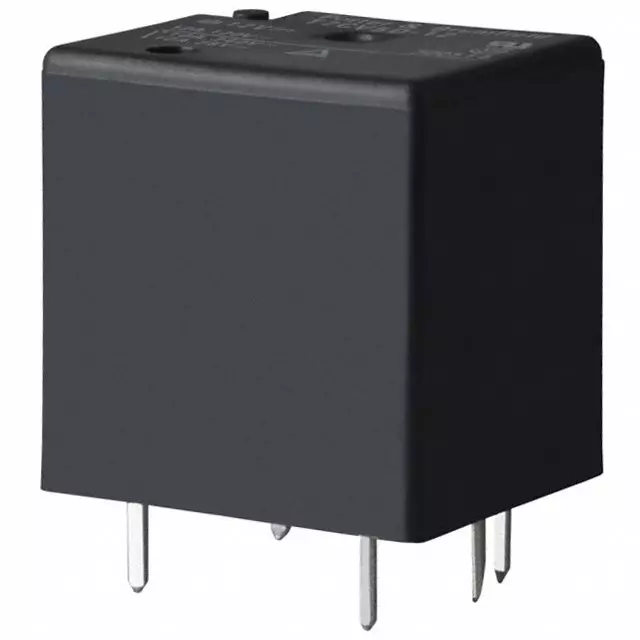
Hello everyone! I hope you will be fine and having fun. Today, I am going to give a detailed Introduction to Relay. In this tutorial, we will learn the basics of relays, the working principle of relays, the types of relays and their applications in detail. A relay is a simple automatic switch that opens and closes the circuit(either electronically or mechanically) based on its input signal. A relay is an electromechanical switch that uses electromagnetism from a small current or voltage to switch higher current or voltage for different appliances. When a relay is in a Normally Open (NO) state, no current passes through it and when the relay is energized, the current starts to flow and we can say the relay is in a Normally Closed state. You should also have a look at Relay Interfacing with ...
Hello friends , I hope you all are fine and having fun with your lives. Today, I am going to share a new project which is XBee Arduino Interfacing. In my previous tutorials in the XBee series, we have had first Introduction to XBee Module and after that we have also discussed How to Interface XBee Module with Computer. Now we are all well aware of XBee Module and can easily do the XBee Arduino Interfacing. We have seen in the previous tutorial that XBee Module works on Serial protocol so we have to use the Serial Pins of Arduino UNO board.
If you want to use any other microcontroller then you can its not a big issue, just see the way how the programming goes and convert it to the language of your microcontroller i.e. PIC Microcontrollers or 805 ...
Hello friends, I hope you all are fine and having fun with your lives. In today's tutorial, I am going to show you the Interfacing of XBee with Computer. In the previous part of this tutorial, I have given the Introduction to XBee Module. Hope you guys have read it and if not then go visit it so that you may have some idea about XBee module.
Now come to the second part about how to interface xbee with computer because its important as if you cant interface the xbee with computer then you cant interface it with any microcontroller and later I will tell you its interfacing with microcontroller. You should also check this XBee Library for Proteus which will help you to simulate XBee module in Proteus.
We will cover arduino with more detail as its ...
XBee modules have become a cornerstone for wireless communication in today's electronics and embedded systems projects. Whether you are building a home automation system, an industrial control network, or simple point-to-point communication between devices, XBee offers a reliable and easy-to-use solution. In this comprehensive introduction, we will explore what the XBee module is, how it works, its core features, and how you can integrate it into microcontroller-based projects.
In future tutorials, we’ll delve deeper into specific interfacing guides, including how to interface the XBee module with a computer and connecting XBee to an Arduino. While Arduino will be our primary focus due to its popularity and accessibility, you can also connect XBee modules to other microcontrollers such as ...