Hello friends! Today, we will generate a PWM signal with an 8051 microcontroller and inspect it in Proteus. We will begin with frequency and duty cycle, then use Timer 0 interrupts to control P2.0 without placing a long delay in the main program. The original project demonstrates software-generated PWM, which is useful for a classic device such as the AT89C51 that does not provide a dedicated PWM peripheral. Other 8051-compatible devices can include hardware PWM, so check the exact processor before deciding that software generation is necessary. We will keep the original circuit, waveforms and download, but make the timing assumptions and endpoint behavior explicit. The revised example uses a fixed timer interval and twenty duty steps, making the relationship between interrupt rate, PWM fr ...
Hello friends! In this tutorial, we will use timer interrupts in an 8051 microcontroller to generate a regular output without placing a delay in the main loop. We will start with Timer 0, calculate its reload value and observe the resulting signal in Proteus. We will then repeat the example with Timer 1 and discuss how to turn a short hardware interval into a slower application task. The calculations below assume a classic twelve-clock 8051 timer and a 12 MHz oscillator. Check those assumptions whenever you select a different 8051-compatible device. The original simulations and screenshots remain attached. One detail in the earlier example needs correction: loading 5 into an eight-bit timer produces 251 counts before overflow, not 250. The revised code uses 6 for a nominal 250-microsecond ...
Hello friends! This page brings our 8051 microcontroller projects together in a learning sequence. We will begin with an LED and a serial connection, then move through displays, keypads, timers and complete applications. Each linked tutorial provides the details for its own circuit and program. The purpose of this collection is to help you choose a useful next project, rather than download several unrelated simulations without understanding them. A small circuit that you can explain, modify and troubleshoot teaches more than a large circuit that only works with an unchanged HEX file. We will also discuss the practical decisions behind these projects: selecting the exact processor, matching its clock, allocating pins and checking timing. Those details determine whether examples can be combi ...
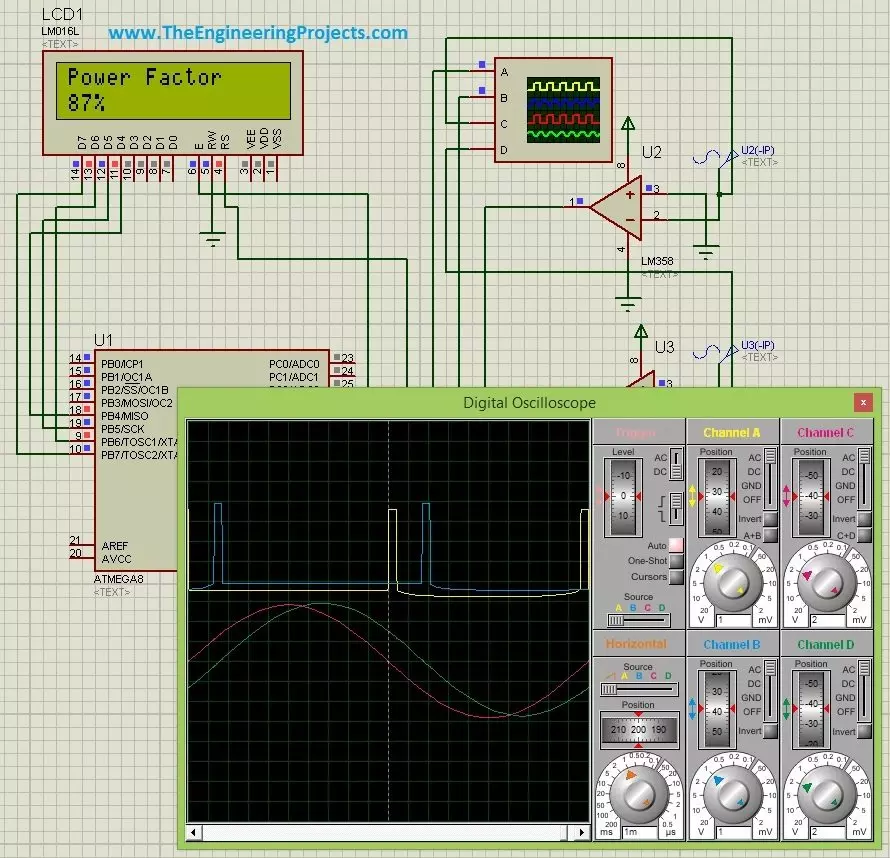
Hello friends! Today, we are going to discuss power factor measurement using a microcontroller in Proteus. We will use the ATmega8 project to understand how the timing difference between voltage and current can be converted into a phase angle, and then into a power factor reading on an LCD. I will start with the electrical meaning of power factor, because a correct calculation is useful only when we understand what it measures. After that, we will examine the zero-crossing stages, choose a timer resolution, work through numerical examples and discuss the changes needed for reliable firmware. The circuit is an educational simulation using separate signals to represent voltage and current. Its timing method is appropriate for sinusoidal waveforms. When a load draws distorted current, we need ...
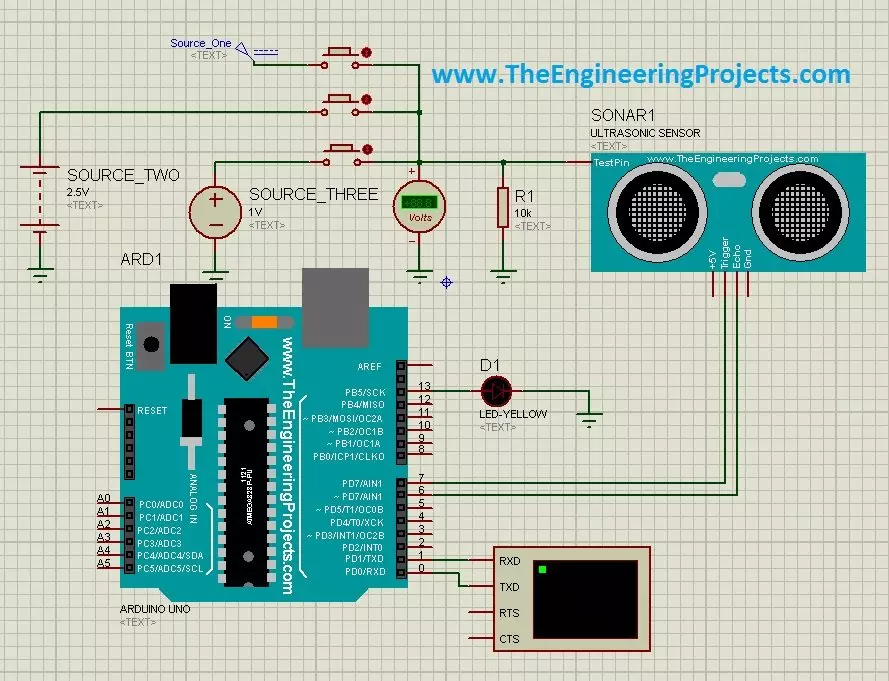
Hello friends! In the Ultrasonic Sensor Library for Proteus tutorial, we installed the model and printed distance readings with an Arduino Uno. Now we will use that same interface in three practical simulations: selecting test distances with buttons, producing a proximity indication, and stepping through test conditions with a switch. Libraries Libraries used in this tutorial Ultrasonic Sensor Library for Proteus: V1.0 (2015, used in this tutorial) · latest version: V2.0 (October 2026) Helping Tools Serial Monitor Advance : a serial terminal window for the UART of your board Serial Monitor Expert : the serial monitor with extra debugging tools LCD Library for Proteus V3.0 : 16x2, 20x4 and I2C LCDs to show your readings The central idea is simple. Our legacy sensor model has an additional a ...
Hello friends! In this tutorial, we will learn how to use the oscilloscope in Proteus ISIS to inspect waveforms, measure voltage and timing, and compare signals at different points in a circuit. In the previous article, we used Virtual Terminal to read serial characters. The oscilloscope lets us examine the electrical waveform behind a signal instead of only its decoded text. We will retain the original inverter demonstration and its screenshots, but begin with the measurement principles needed to interpret them correctly. A waveform that looks smooth is not automatically a verified pure sine wave, and two traces connected to opposite sides of a load do not automatically display the voltage difference across that load. By the end, you should be able to choose a suitable volts-per-division ...