


Project Files of Microchip Cat Flap with ESP32 and EM-18 RFID - Proteus Simulation
 Libraries
 Code
 Projects
 Simulation
c3d1fec1246f43cfb55f0da6f404712b.zip

Microchip Cat Flap with ESP32 and EM-18 RFID - Proteus Simulation V1.0
Microchip Cat Flap with ESP32 and EM-18 RFID - Proteus Simulation V1.0 comes as a ZIP archive of 21 files (4.2 MB, 9.3 MB unpacked) holding Proteus library files, simulation model DLLs, a Proteus simulation, an Arduino sketch and compiled HEX firmware.
- LIBProteus library
- DLLProteus model
- DSNProteus simulation
- INOArduino sketch
- HEXHEX firmware
Description
Microchip-Cat-Flap-ESP32-EM18-RFID-Proteus-Simulation-v1.0.zip: the complete Proteus simulation project (ESP32 DevKit V1, an EM-18 RFID reader, two FC-51 IR beams, two SG90 servos, a 128x32 OLED, the Laptop and Mobile WiFi Monitors), the Arduino sketch ESP32_Cat_Flap.ino with its .hex, every LIB and DLL and a README.

File Structure
 File Structure
8.5 KB82.8 KB36.6 KB229.3 KB39.5 KB13.1 KB78.1 KB24.5 KB334 KB377 KB3.0 MB342.5 KB294.5 KB36.1 KB103 KB334 KB377 KB3.0 MB342.5 KB294.5 KB8.8 KBGallery12 images from the tutorialOpen the tutorial
 Gallery12 images from the tutorial
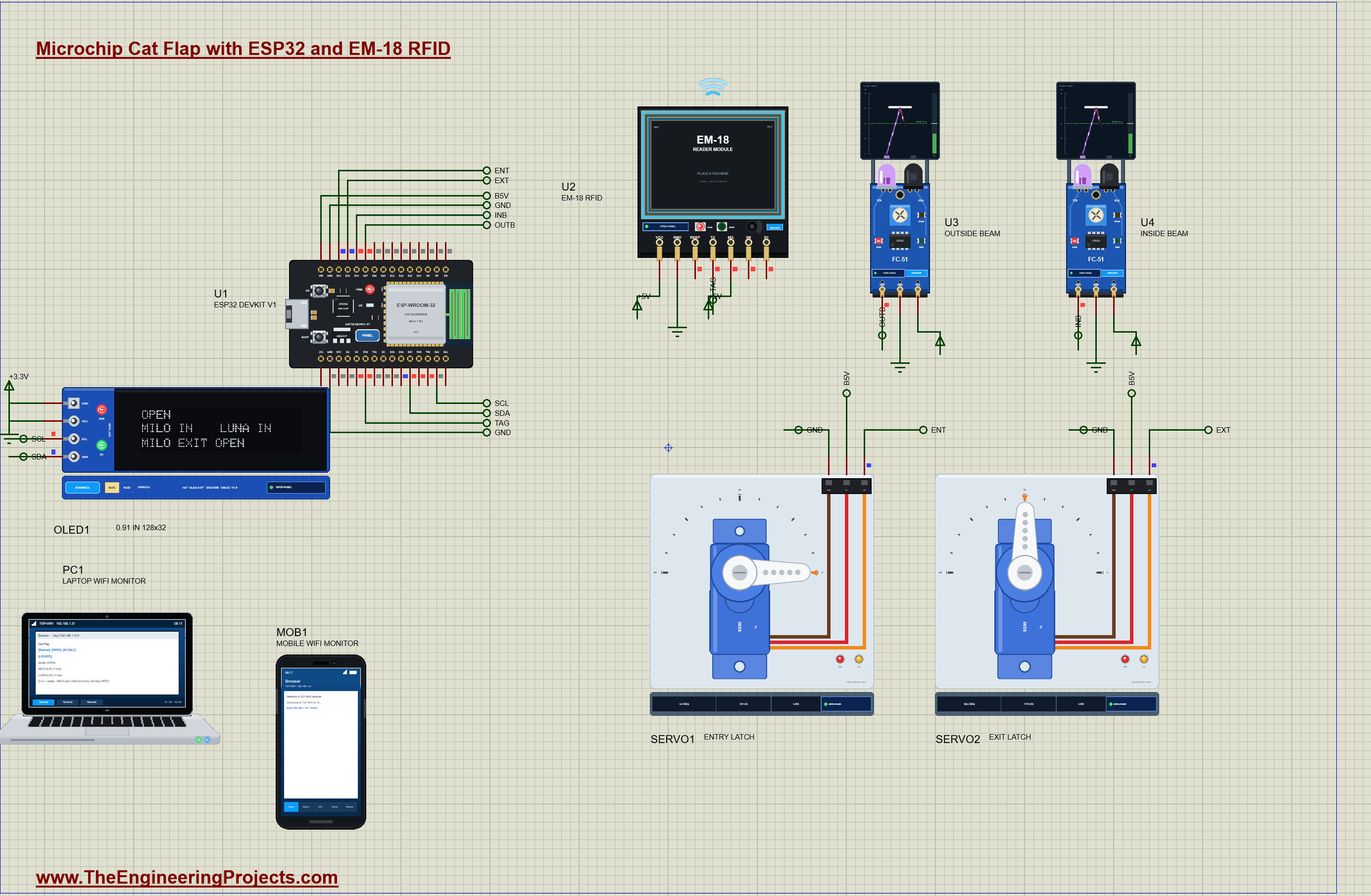
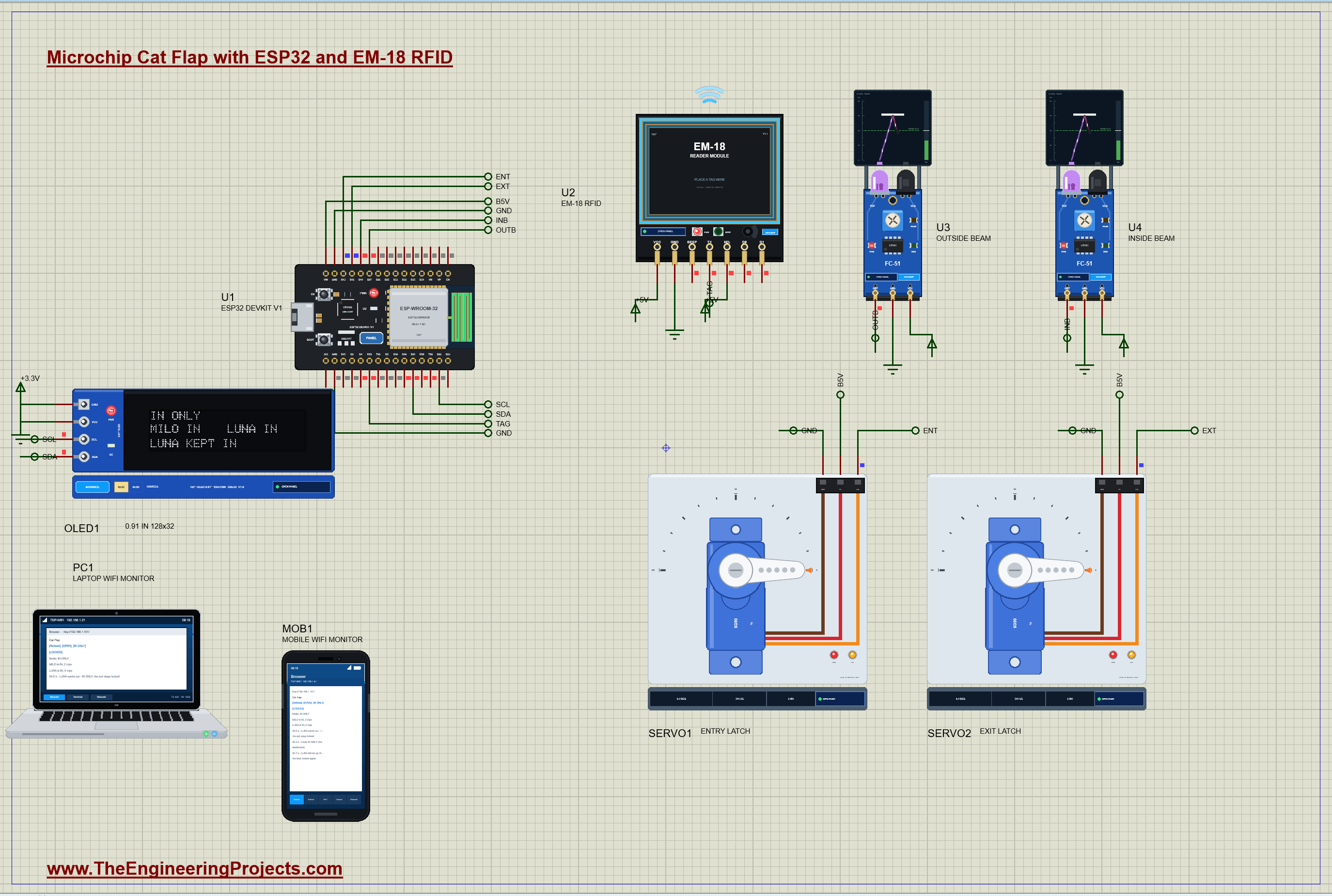
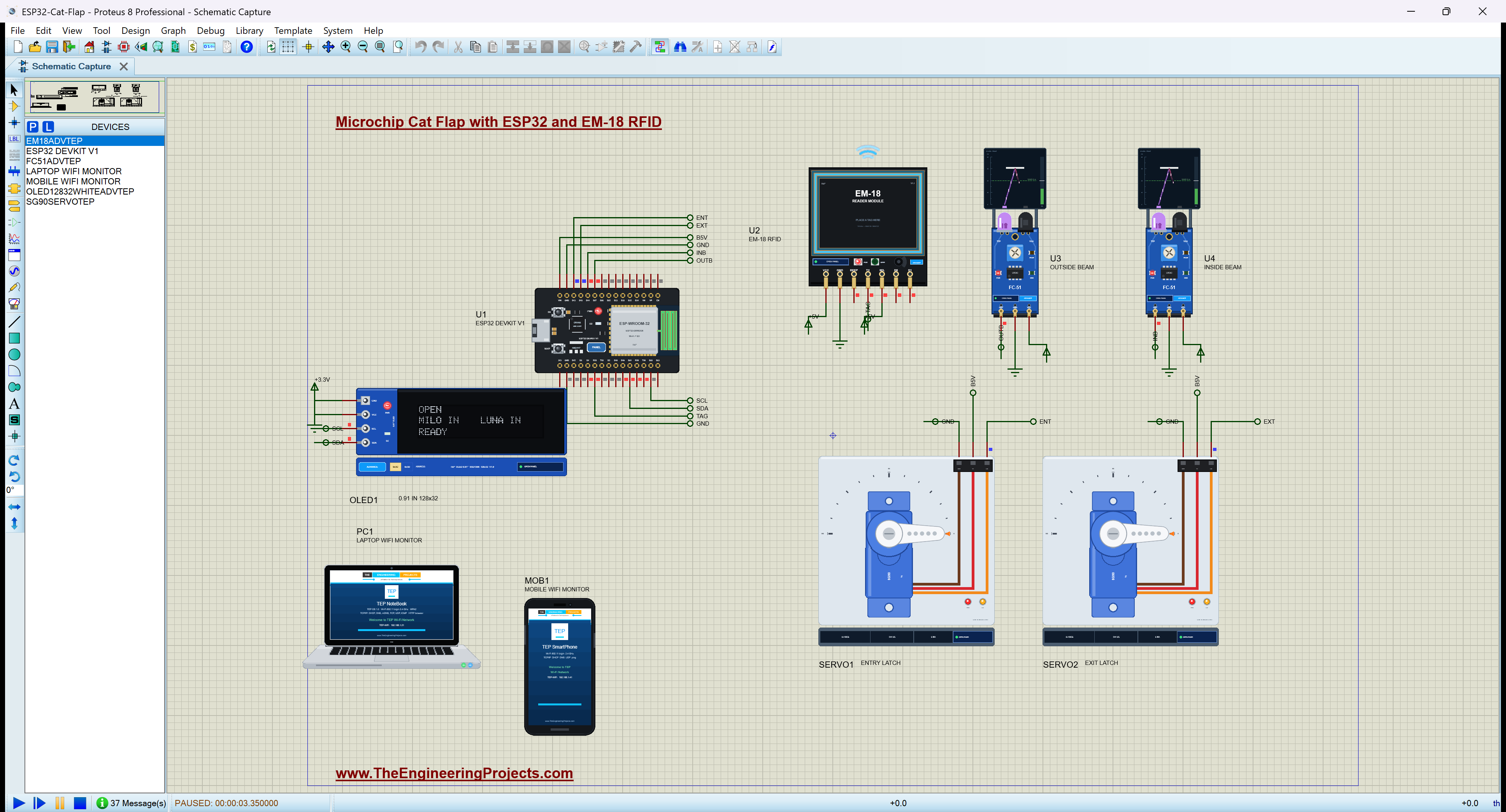
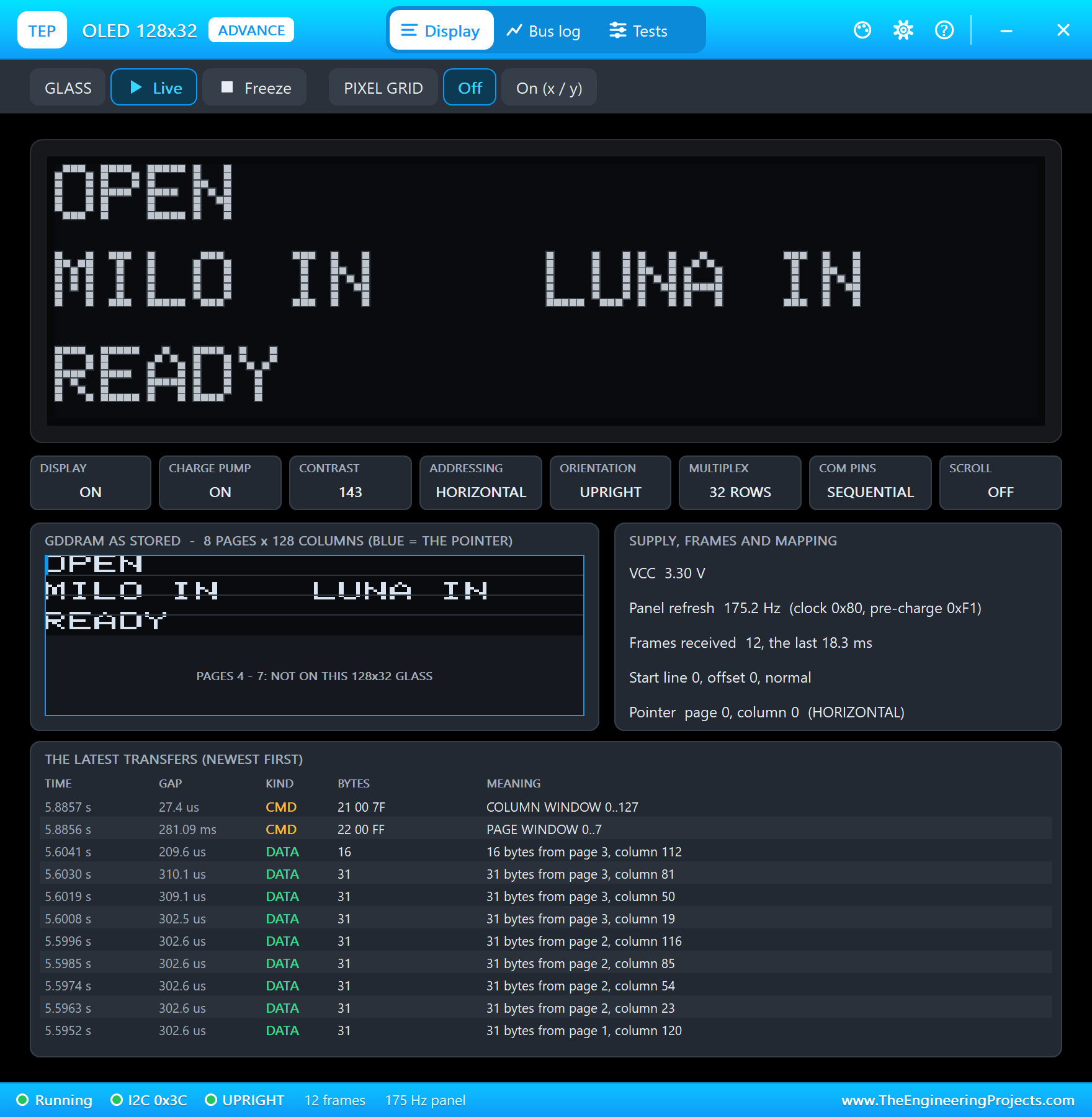
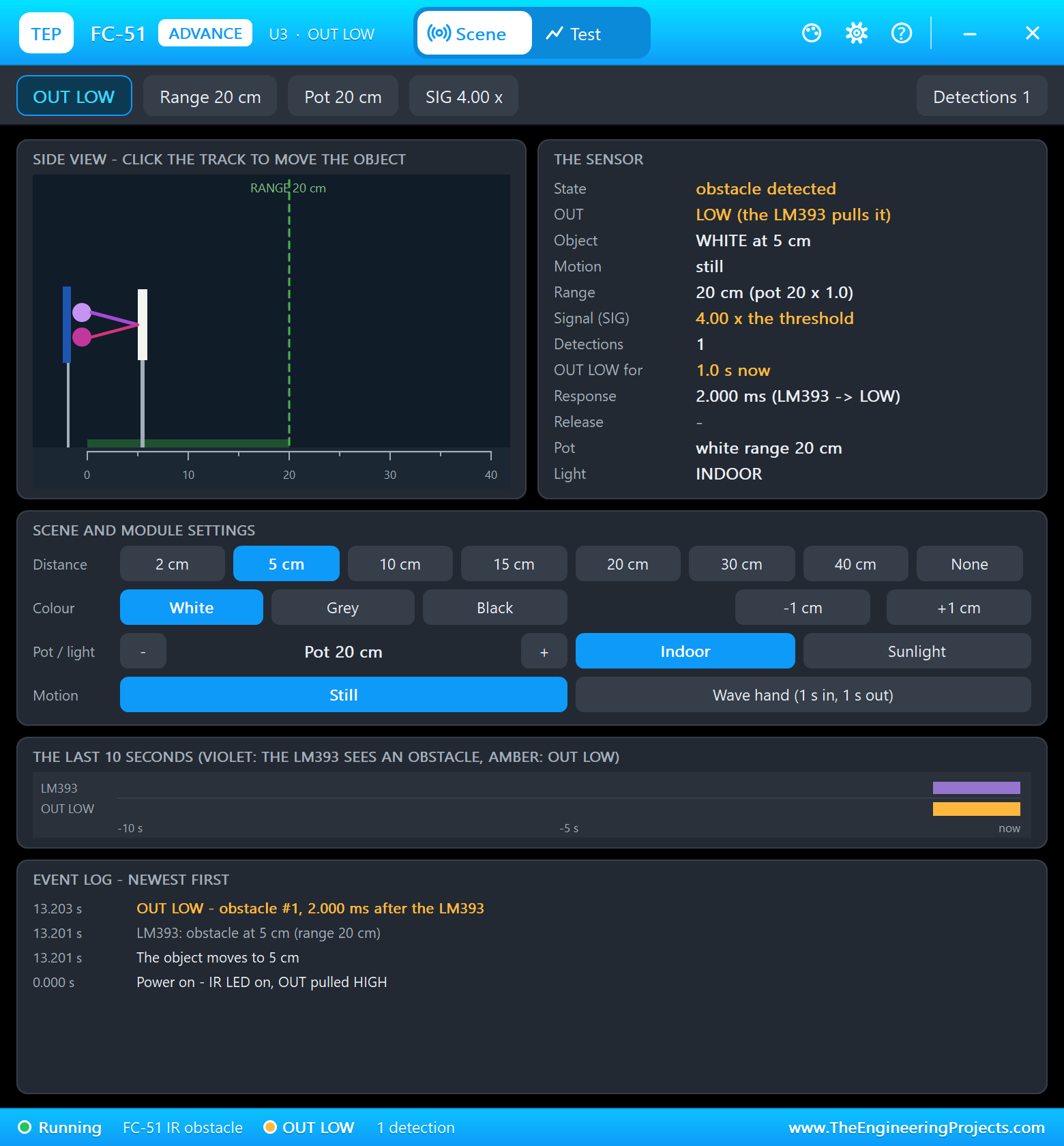
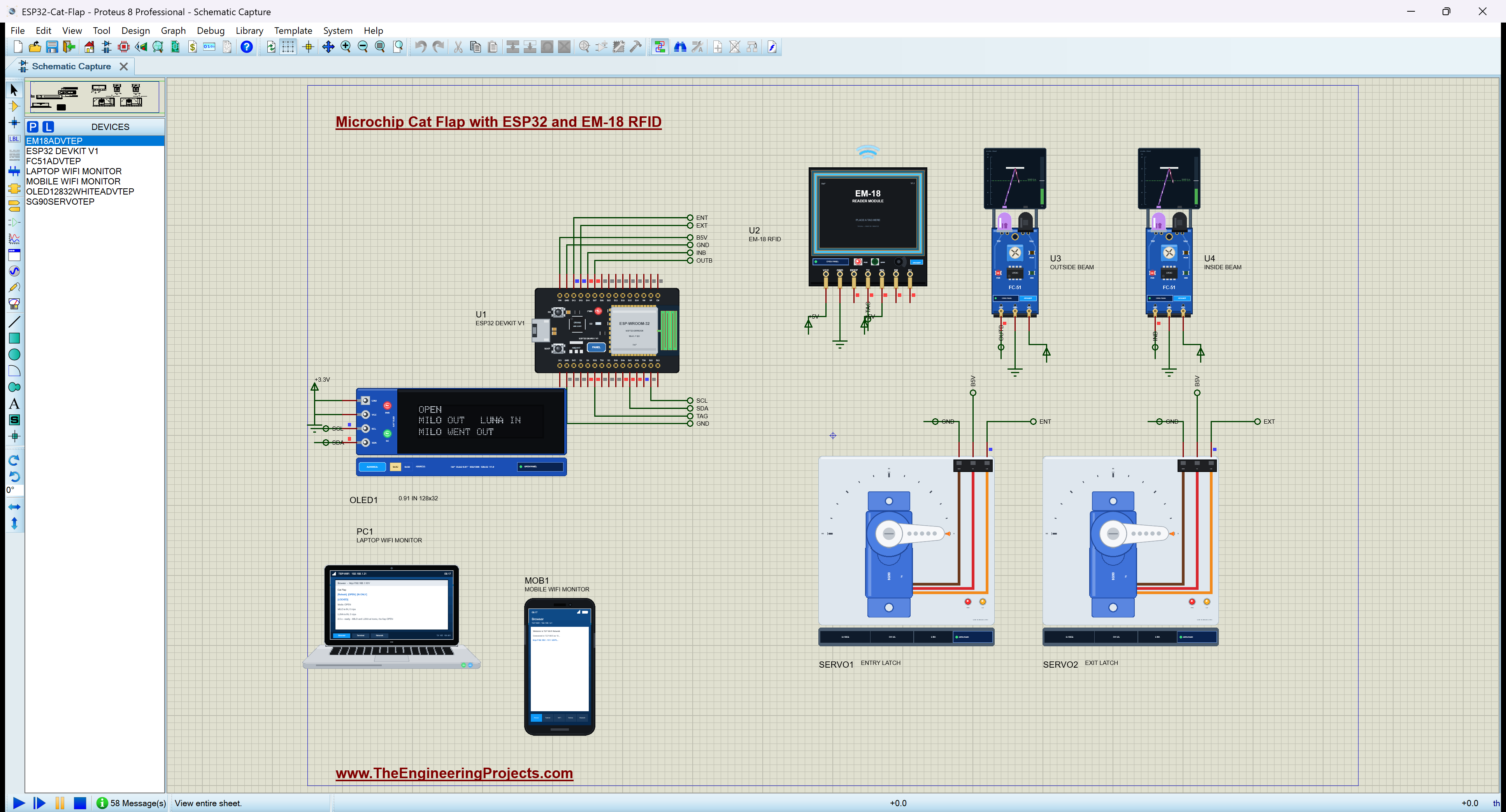
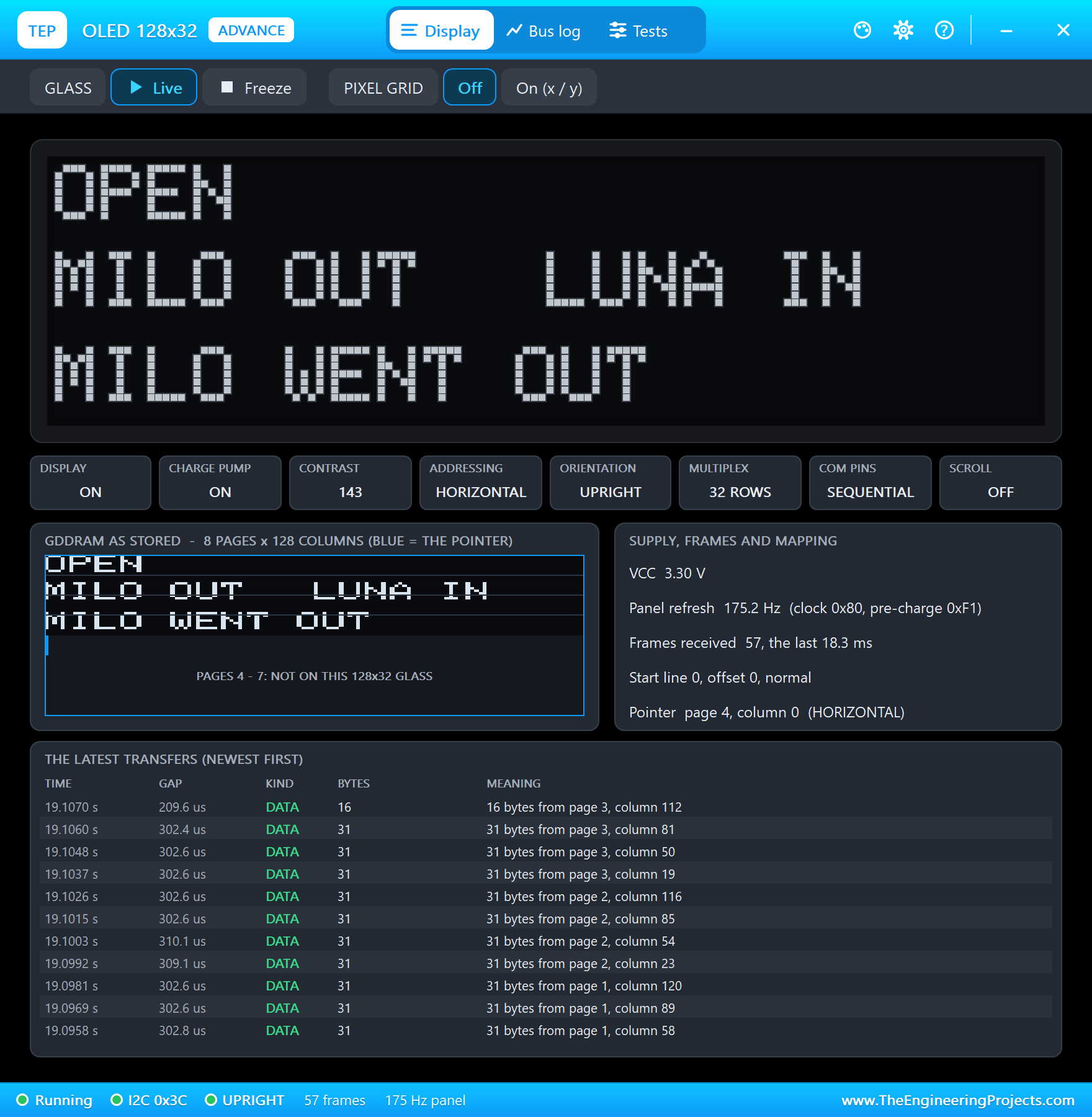
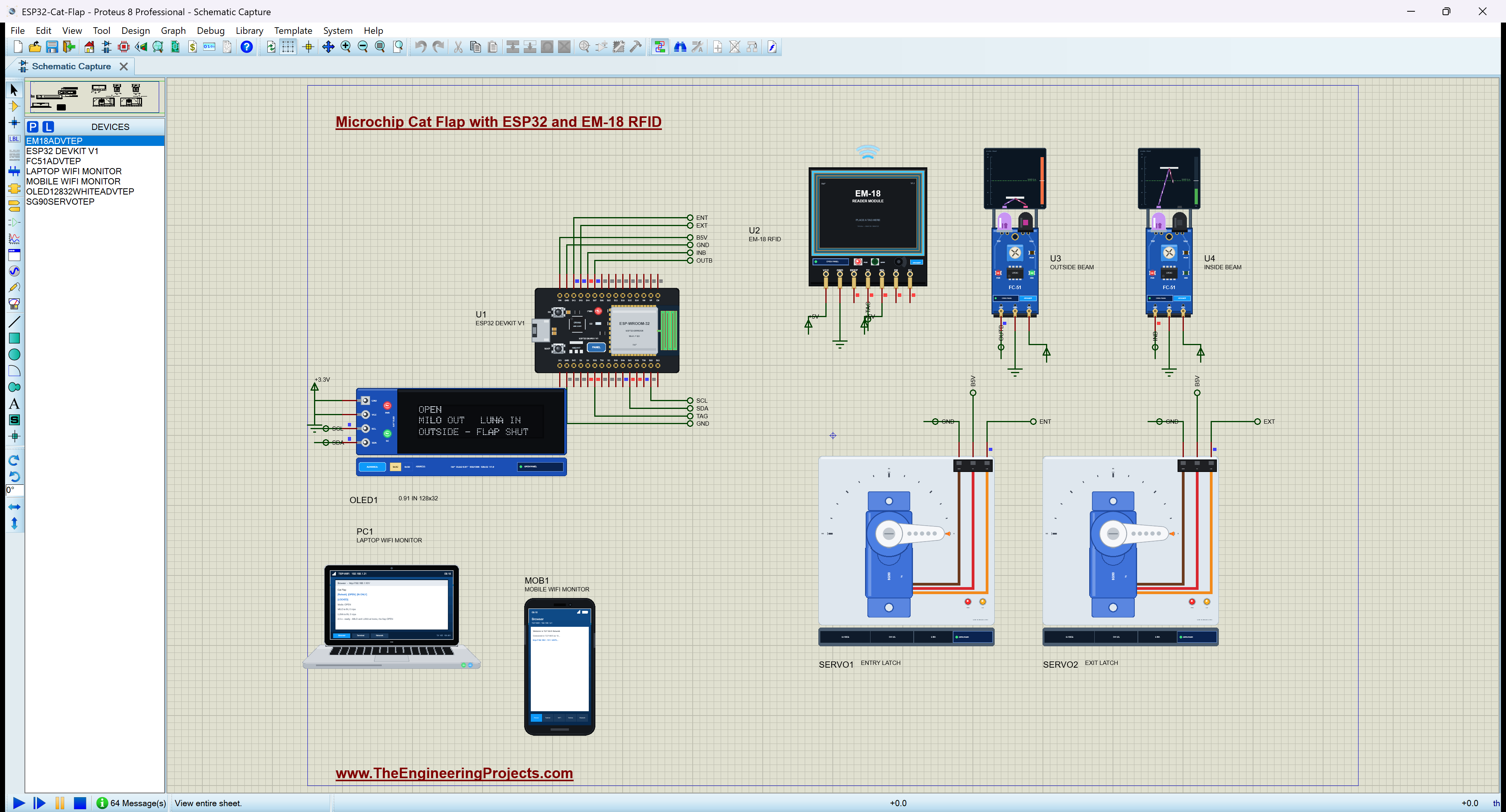
The circuit, the board and the results as they appear in Microchip Cat Flap with ESP32 and EM-18 RFID - Proteus Simulation. Open an image for its full size.
README
 README
===============================================================================================================
  Microchip Cat Flap with ESP32 and EM-18 RFID - Proteus Simulation - Project V1.0
  The Engineering Projects - www.TheEngineeringProjects.com
===============================================================================================================

IMPORTANT LINKS
  The project tutorial (circuit, code, simulation results):
  https://www.theengineeringprojects.com/2026/11/microchip-cat-flap-esp32-em18-rfid-proteus-simulation.html
  The libraries this project is built from (each post has its own full download and tutorial):
    ESP32 DevKit V1 board:
      https://www.theengineeringprojects.com/2026/10/esp32-devkit-v1-library-for-proteus-v2-0.html
    EM-18 RFID reader:
      https://www.theengineeringprojects.com/2026/09/em18-rfid-proteus-library.html
    IR obstacle sensor (FC-51):
      https://www.theengineeringprojects.com/2026/10/infrared-sensor-library-for-proteus-v2-0.html
    SG90 servo motor:
      https://www.theengineeringprojects.com/2026/10/sg90-servo-motor-library-for-proteus-v1-0.html
    OLED 128x32:
      https://www.theengineeringprojects.com/2026/10/oled-128x32-library-for-proteus-v1-0.html
    Laptop WiFi Monitor:
      https://www.theengineeringprojects.com/2026/10/laptop-wifi-monitor-library-for-proteus.html
    Mobile WiFi Monitor:
      https://www.theengineeringprojects.com/2026/10/mobile-wifi-monitor-library-for-proteus.html
  Support our free work: https://www.theengineeringprojects.com/donate

FILE STRUCTURE
ESP32-Cat-Flap-TEP-v1.0/
|-- Proteus Library Files/
|   |-- TEPEM18.LIB                                    82.8 KB   a part of the project -> LIBRARY folder
|   |-- TEPESP32V1.LIB                                 36.6 KB   a part of the project -> LIBRARY folder
|   |-- TEPFC51.LIB                                   229.3 KB   a part of the project -> LIBRARY folder
|   |-- TEPLAPTOP.LIB                                  39.5 KB   a part of the project -> LIBRARY folder
|   |-- TEPMOBILE.LIB                                  13.1 KB   a part of the project -> LIBRARY folder
|   |-- TEPOLED12832.LIB                               78.1 KB   a part of the project -> LIBRARY folder
|   |-- TEPSG90.LIB                                    24.5 KB   a part of the project -> LIBRARY folder
|-- Proteus Model Files/
|   |-- TEPEM18.DLL                                   334.0 KB   a model -> MODELS folder
|   |-- TEPFC51.DLL                                   377.0 KB   a model -> MODELS folder
|   |-- TEPNET.DLL                                     2.99 MB   a model -> MODELS folder
|   |-- TEPOLED.DLL                                   342.5 KB   a model -> MODELS folder
|   |-- TEPSG90.DLL                                   294.5 KB   a model -> MODELS folder
|-- Proteus Simulation/
|   |-- ESP32_Cat_Flap.hex                            103.0 KB   the firmware
|   |-- ESP32-Cat-Flap.pdsprj                          36.1 KB   the project simulation
|   |-- TEPEM18.DLL                                   334.0 KB   copy of the model
|   |-- TEPFC51.DLL                                   377.0 KB   copy of the model
|   |-- TEPNET.DLL                                     2.99 MB   copy of the model
|   |-- TEPOLED.DLL                                   342.5 KB   copy of the model
|   |-- TEPSG90.DLL                                   294.5 KB   copy of the model
|-- Arduino Code/
|   |-- ESP32_Cat_Flap/ESP32_Cat_Flap.ino               8.5 KB   the sketch (source of the .hex)
|-- README.txt                                         ~9.0 KB   this file
Total: 9.25 MB (unzipped). The C++ source code of the models is not included.

WHAT IS IT?
  A cat flap that opens only for its own cats, knows which cat is at home, and keeps them in at night.
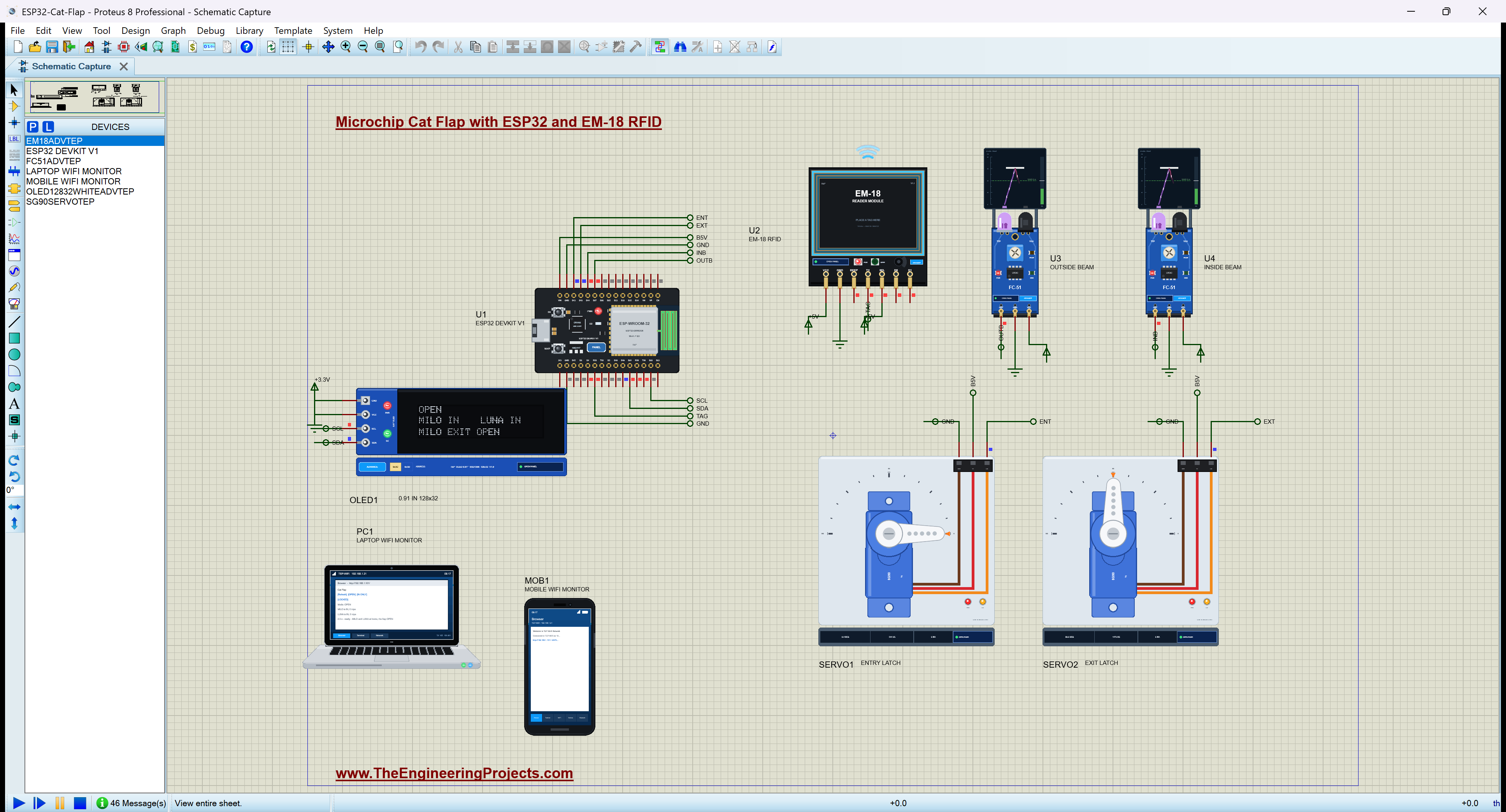
    * U1 ESP32 DEVKIT V1 runs ESP32_Cat_Flap.hex on TEP-WiFi at 192.168.1.101 (port 80).
    * U2 an EM-18 125 kHz RFID reader (EM18ADVTEP) round the tunnel: TX to RX2 (GPIO16) at 9600 baud, SEL on +5V (the
      ASCII format: 10 hex digits of the tag + their XOR checksum), VCC +5V. It reads a collar tag from either side.
    * U3 / U4 two IR beams across the tunnel (FC51ADVTEP, OUT LOW while blocked): OUTSIDE on D27, INSIDE on D14,
      VCC on the 5 V rail. The order a cat breaks them tells which way it went.
    * SERVO1 / SERVO2 the ENTRY / EXIT latches (SG90SERVOTEP): SIG D13 / D12, V+ the board's VIN (5 V); 0 deg locked,
      90 deg open.
    * OLED1 an SSD1306 0.91" 128x32 OLED (OLED12832WHITEADVTEP, 0x3C) on I2C D21 / D22, VCC +3.3V: the mode, who is in,
      the last event.
    * Laptop WiFi Monitor (PC1) and Mobile WiFi Monitor (MOB1) open http://192.168.1.101/.
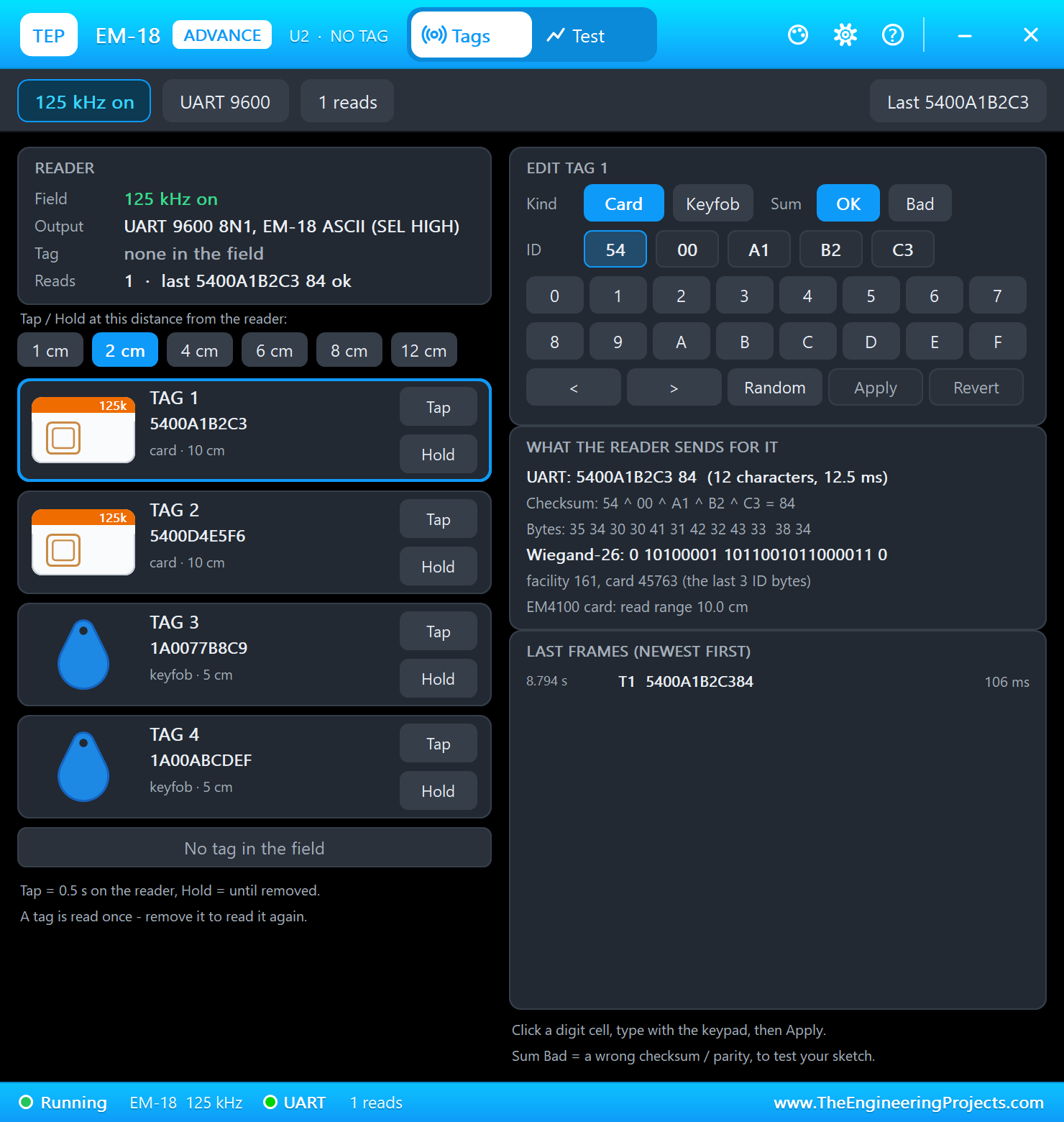
  The cats: MILO (TAG 1, 5400A1B2C3) and LUNA (TAG 2, 5400D4E5F6); any other tag keeps the flap shut.
  Modes: OPEN (in and out), IN ONLY (the night curfew: in yes, out no), LOCKED. A registered tag opens the latch of
  the way the mode allows for 15 s; the two beams in order (within 8 s) record the trip, and the latch locks again.
  The pages:
    /          the dashboard: the mode, who is in, the trips, the last events
    /open      /inonly    /locked    the mode                                           /data    JSON
  Libraries: WiFi and WebServer (part of the ESP32 core), Wire, ESP32Servo, Adafruit SSD1306 and Adafruit GFX.

TEST STATUS
  Tested in Proteus 8 Professional on Windows 11, the run that made the tutorial's screenshots (the sketch's times):
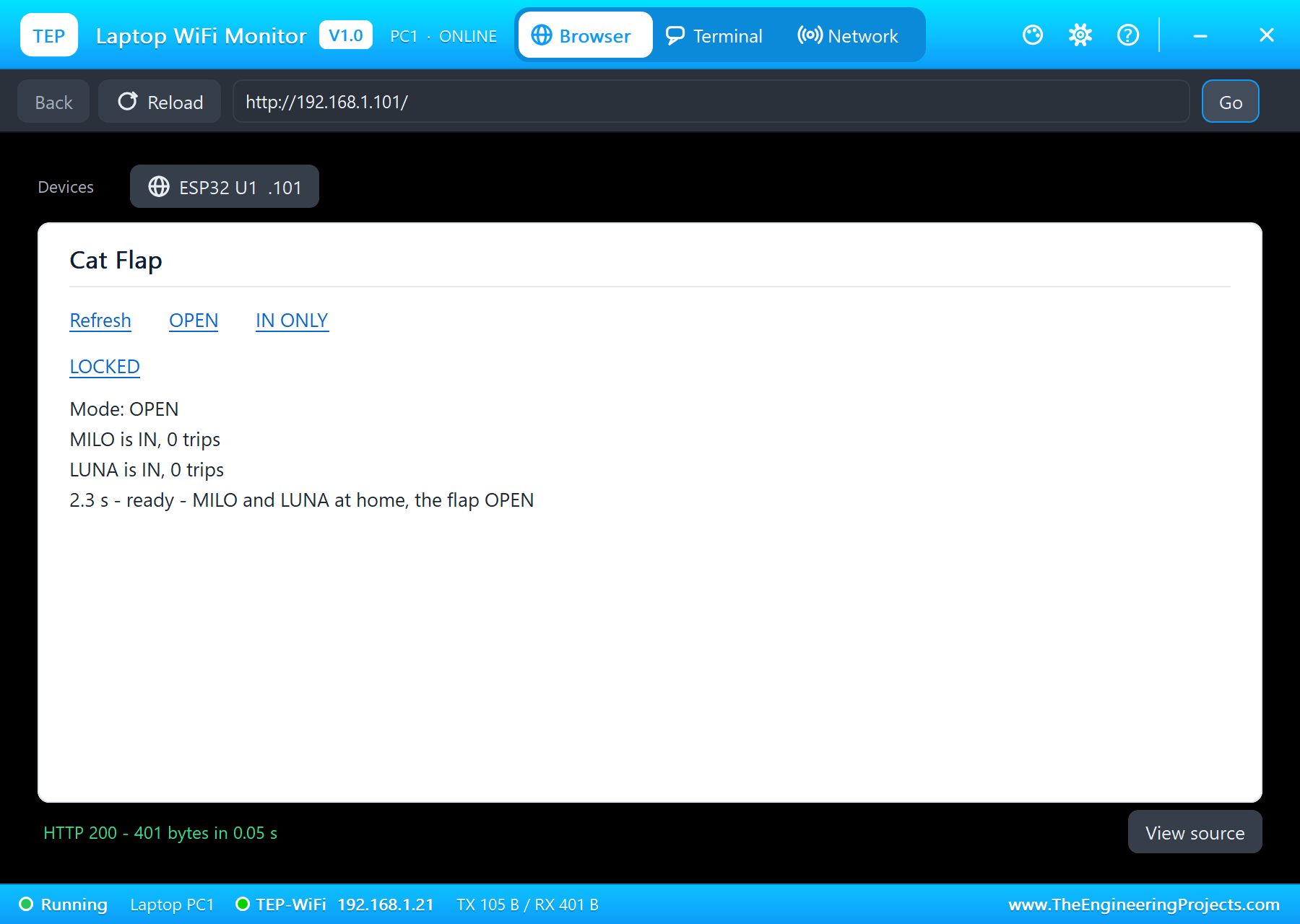
  - 2.3 s "ready - MILO and LUNA at home, the flap OPEN".
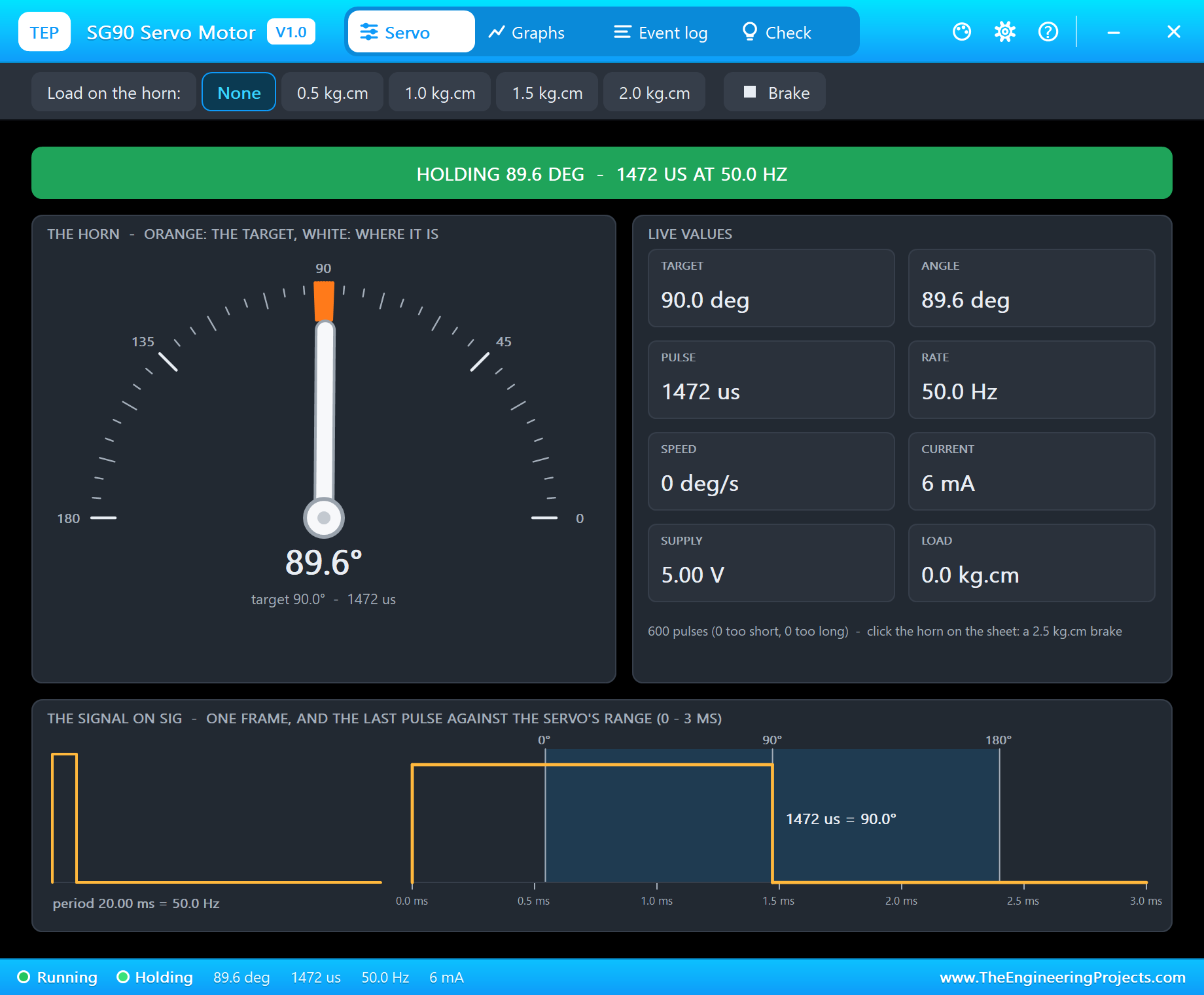
  - TAG 1 (frame 5400A1B2C384): 8.8 s "MILO at the flap - the exit latch open" (SERVO2 at 89.6 deg, 1472 us); the inside
    beam, then the outside beam: 13.2 s "MILO went out (trip 1)", the latch locked again.
  - TAG 3: 20.0 s "unknown tag 1A0077B8C9 - the flap stays shut"; the outside beam: "the flap is shut".
  - TAG 1 again: 26.2 s the entry latch open; the outside beam, then the inside: 28.6 s "MILO came in (trip 2)".
  - TAG 2: 35.7 s LUNA at the flap; no beam: 50.7 s "LUNA did not go through - the latch locked again" (15 s).
  - IN ONLY from the laptop at 52.4 s; TAG 2: 54.0 s "LUNA wants out - IN ONLY, the exit stays locked" (0.4 deg).
  - 62 s of simulation in 407 s.

INSTALLATION
  1. Close Proteus. Extract the WHOLE zip file, for example to your Desktop.
  2. Copy the files from "Proteus Library Files" into the LIBRARY folder of Proteus, for example
     C:\Program Files (x86)\Labcenter Electronics\Proteus 8 Professional\LIBRARY
  3. Copy the files from "Proteus Model Files" into the MODELS folder (next to LIBRARY).
  4. Start Proteus. Press P in the schematic and search for ESP32 DEVKIT V1, EM18ADVTEP or SG90SERVOTEP to check that
     the parts are there.

RUN THE SIMULATION
  1. Open "Proteus Simulation\ESP32-Cat-Flap.pdsprj". Keep the HEX file and the DLL files beside it.
  2. Press Play. The OLED shows OPEN, MILO IN, LUNA IN.
  3. On the EM-18's pop-up (U2) press Tap beside TAG 1: MILO at the flap, the exit latch opens.
  4. On the INSIDE beam's pop-up (U4) press 5 cm, then on the OUTSIDE beam's (U3): MILO went out. Press 30 cm on both.
  5. TAG 3 is a stranger's tag: the flap stays shut. On the dashboard press IN ONLY for the night curfew.
  Your own sketch: compile it, export the compiled binary and set U1's PROGRAM to the new file;
  put your cats' tags in CAT_TAG.

PROPERTIES USED IN THIS PROJECT
  U1 ESP32 DEVKIT V1           PROGRAM=ESP32_Cat_Flap.hex, AUTOOPEN=YES (TEP-WiFi, 192.168.1.101)
  U2 EM18ADVTEP                the default tags (TAG 1 5400A1B2C3, TAG 2 5400D4E5F6, TAG 3 1A0077B8C9)
  U3, U4 FC51ADVTEP;  SERVO1, SERVO2 SG90SERVOTEP;  OLED1 OLED12832WHITEADVTEP
  PC1, MOB1                    HOMEPAGE=http://192.168.1.101/

TROUBLESHOOTING
  * No tag is read: TX to RX2 (GPIO16), SEL high for the ASCII format, the tag within its range (a keyfob 5 cm).
  * "a bad read (checksum)": the 12 characters did not add up - the reader's Bad checksum test does this on purpose.
  * The trip is not recorded: both beams must be broken, in order, within 8 s of each other, while the latch is open.
  * A beam says NO POWER: its VCC must be on the 5 V rail.
  * The latch does not move: SIG on D13 / D12 and V+ on 5 V.

LICENCES
  * The project, the sketch, the parts (LIB files) and the models (DLL files) are made by The Engineering
    Projects and are free for learning and for your own projects. The models use only standard Windows libraries.
    The C++ source code of the models is not included; the source code is not included for any model.
  * Proteus is a product of Labcenter Electronics and is not included. ESP32 is a product of Espressif Systems.
    This project is not made or endorsed by them.

VERSION
  V1.0 - the first release of the project.
===============================================================================================================Development1 release
 Development1 release
-
V1.0Microchip Cat Flap with ESP32 and EM-18 RFID - Proteus Simulation V1.0this page
V1.0 is the only release in the Download Center so far. When a newer version is published, it appears above with its own download page.
Installation8 steps
 Installation8 steps
From the download to a working project, in order. The steps follow what the package contains.
You will need
- Proteus Design SuiteProteus 8 or newer (Labcenter), on Windows
- Arduino IDE1.8 or 2.x, with the board of the tutorial chosen under Tools → Board
- Any archive toolWindows, macOS and Linux extract ZIP files on their own
Steps
- 1
Extract the archive
Right-click c3d1fec1246f43cfb55f0da6f404712b.zip and choose Extract All (or open it with 7-Zip or WinRAR) into a folder you can find again. Keep its folder structure (ESP32-Cat-Flap-TEP-v1.0) as it is.
- 2
Copy the library files into Proteus
Move TEPEM18.LIB, TEPESP32V1.LIB and TEPFC51.LIB and 4 more and the files into the LIBRARY folder of your Proteus installation: C:\Program Files (x86)\Labcenter Electronics\Proteus 8 Professional\LIBRARY for Proteus 8, or the matching Proteus 7 folder. Older versions keep it under ProgramData\Labcenter Electronics. If Proteus is open, close it first.
- 3
Add the simulation model
Copy TEPEM18.DLL, TEPFC51.DLL and TEPNET.DLL and 2 more into the MODELS folder next to LIBRARY, so the component can run, not only be drawn.
- 4
Restart Proteus and place the component
Start Proteus, open a schematic, press P (Pick Devices) and search for the component by the name used in the tutorial. It appears with its pins ready to wire.
- 5
Open the sketch in the Arduino IDE
Open ESP32_Cat_Flap.ino, select your board and port under Tools, then Verify. Sketch → Export Compiled Binary writes the HEX file a simulation needs.
- 6
Load the HEX file
In Proteus double-click the microcontroller, set Program File to ESP32_Cat_Flap.hex and run the simulation. For real hardware, flash the same file with your programmer.
- 7
Open the example simulation
Open ESP32-Cat-Flap.pdsprj in Proteus to see the wiring exactly as in the tutorial. Check the controller's Program File path, then press Play.
- 8
Follow the tutorial
Microchip Cat Flap with ESP32 and EM-18 RFID - Proteus Simulation explains every connection and setting in order; keep it open beside the files while you build.
FAQs9 questionsContact TEP
 FAQs9 questions
How do I download Microchip Cat Flap with ESP32 and EM-18 RFID - Proteus Simulation V1.0?
Wait for the 30-second guest countdown on this page, then press the download button; the file comes straight from our storage. Members who are logged in skip the wait. If the browser opens the file instead of saving it, use its Save as option. The download link is made for you when the countdown ends and works for 15 minutes; a saved or shared link stops working, so share this page instead.
What is inside the archive?
Microchip Cat Flap with ESP32 and EM-18 RFID - Proteus Simulation V1.0 comes as a ZIP archive of 21 files (4.2 MB, 9.3 MB unpacked) holding Proteus library files, simulation model DLLs, a Proteus simulation, an Arduino sketch and compiled HEX firmware. Open the File Structure tab for the full list of 21 files.
What should I do if the download does not start?
Check the browser's download list first; an ad blocker or a company firewall can also hold it back, so try another browser or network. If the file arrives incomplete, download it again. For an installation problem, read the Install tab or tell us in the comments with your software version and the exact error message.
Is this file free?
Yes. Every file in the TEP Download Center is free for learning, personal and student projects. If you share it, link back to this page or the tutorial so others find the latest version.
How do I check that the file arrived complete?
Compare its SHA-256 with the one on this page, 88b266052c56787bcdf2c6c78d112f550a931a0e861b3ec862d2b45652e7666c. In PowerShell run Get-FileHash "c3d1fec1246f43cfb55f0da6f404712b.zip"; on macOS or Linux run shasum -a 256 "c3d1fec1246f43cfb55f0da6f404712b.zip". The same value means the file is exactly the one in our storage; a different one means the download broke off, so download it again.
Do I need WinRAR to open the ZIP file?
No. Windows, macOS and Linux open ZIP archives on their own (Extract All, or double-click). WinRAR and 7-Zip work too. Extract the whole archive before using the files.
Where do I put the LIB and IDX files?
Both files go into the LIBRARY folder of your Proteus installation (Proteus 8: C:\Program Files (x86)\Labcenter Electronics\Proteus 8 Professional\LIBRARY; Proteus 7 has the same folder under its own name). Restart Proteus afterwards and search for the component with P.
Which Proteus version does the library need?
The tutorial names the Proteus version the library was made and tested with. Most TEP libraries work in Proteus 7 and Proteus 8; if the component does not appear after a restart, check that both the LIB and the IDX file were copied and that Proteus was fully closed while copying.
How do I get the HEX file into the simulation?
Compile the sketch in the Arduino IDE (Sketch → Export Compiled Binary gives you the HEX next to the sketch), then in Proteus double-click the board, set Program File to that HEX and run.
Members skip the wait. Log in or join TEP.

- 0Total downloads
- 4%Popularity
- ESP32 ProjectsCategory
- 0Comments
- ssyedzainnasirUploaded by
- 24 Nov 2026Uploaded at


 SHA-256
88b266052c56787bcdf2c6c78d112f550a931a0e861b3ec862d2b45652e7666c


 Need help with this file?
 Tags
Related ESP32 Projects
All ESP32 Projects tutorials




More ESP32 project files
All ESP32 tutorials



Comments
0