


Project Files of Pulse Sensor HRV Monitor on Raspberry Pi 5 - Proteus Simulation
 Libraries
 Code
 Projects
 Simulation
dda30cfa0e8f48f98f43b82751ec0dc2.zip

Pulse Sensor HRV Monitor on Raspberry Pi 5 - Proteus Simulation V1.0
Pulse Sensor HRV Monitor on Raspberry Pi 5 - Proteus Simulation V1.0 comes as a ZIP archive of 144 files (14.5 MB, 28.7 MB unpacked) holding Proteus library files, simulation model DLLs, a Proteus simulation, source code and a nested archive.
- LIBProteus library
- DLLProteus model
- DSNProteus simulation
- SRCSource code
- ZIPNested archive
Description
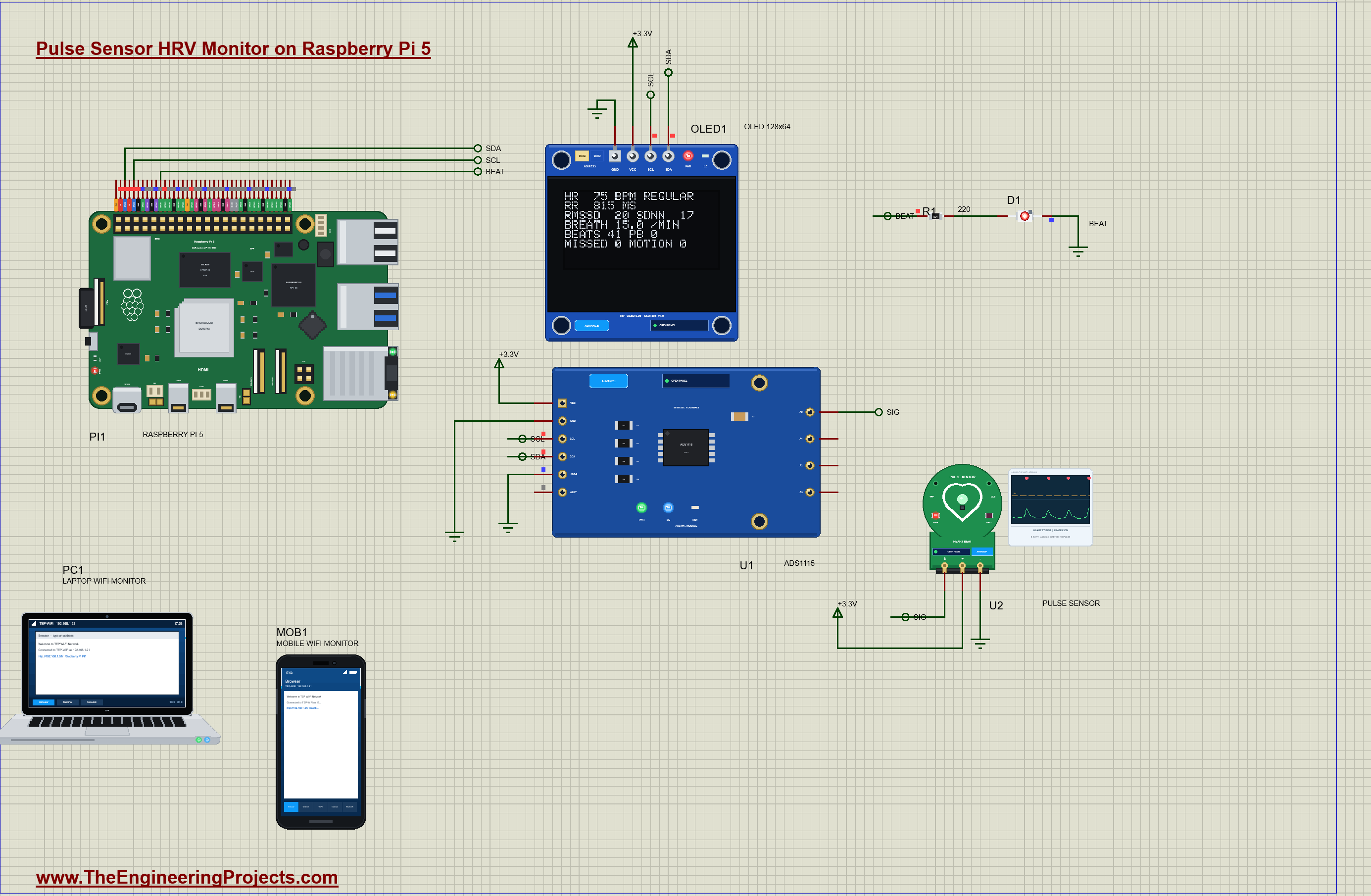
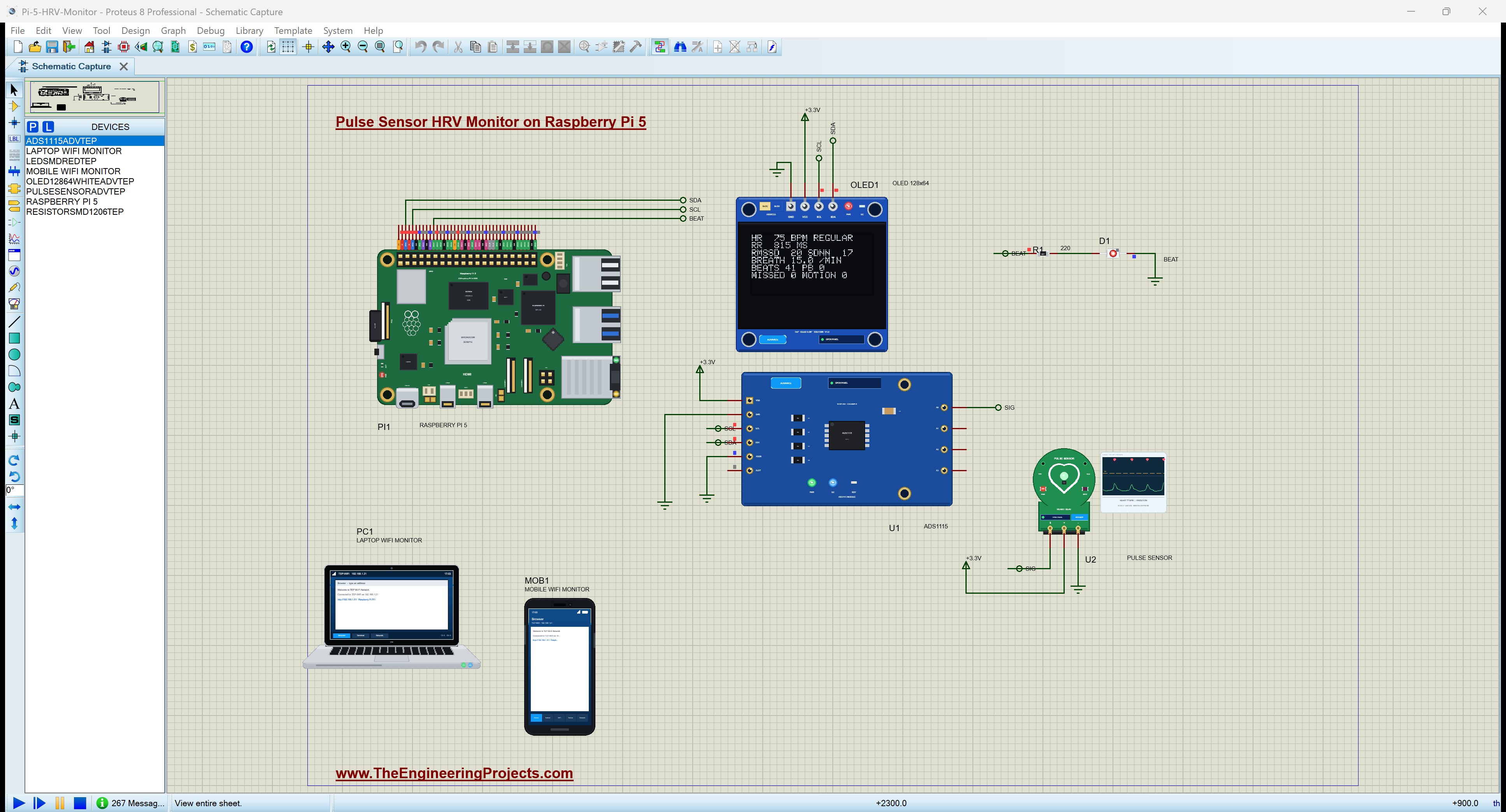
Pulse-Sensor-HRV-Monitor-Raspberry-Pi-5-Proteus-Simulation-v1.0.zip: the complete Proteus simulation project (a Raspberry Pi 5, a heart beat pulse sensor, an ADS1115, a 128x64 OLED, an SMD LED, the Laptop and Mobile WiFi Monitors), the Python program hrv_monitor.py, every LIB and DLL, the TEP Pi runtime and a README.

File Structure
 File Structure
66.3 KB39.5 KB13.1 KB112.4 KB136.3 KB60.5 KB17.7 KB171.9 KB3.3 MB34.3 KB620.8 KB36 KB169.8 KB628.1 KB99.3 KB65.3 KB4.8 MB4.1 MB80 B97.8 KB26.8 KB1.2 MB1.1 MB88.9 KB27.3 KB55.8 KB79.8 KB105.8 KB193.8 KB113.8 KB48.8 KB145.8 KB36.8 KB29.3 KB42.3 KB28.8 KB67.3 KB89.3 KB153.8 KB22.8 KB38.8 KB2.1 KB9.9 KB4.1 KB1.3 KB4.7 KB431 B2.5 KB17.5 KB283 B6.5 KB37.9 KB11.1 KB5.5 KB885 B13.6 KB9 KB878 B1.5 KB4 KB1004 B10 B110 B2.6 KB1.1 KB8.9 KB58.5 KB12.4 KB6.6 KB18.5 KB20.7 KB27.8 KB21.1 KB7.1 KB7.7 KB2.7 KB51.2 KB100.9 KB1.2 KB24.3 KB7.4 KB53.6 KB26.1 KB20.5 KB60.5 KB19.6 KB1.6 KB8.4 KB20.9 KB2.6 KB539 B1.4 KB9.7 KB2.8 KB21 B92 B7.9 KB264 B3.4 KB3.8 KB17.5 KB55.2 KB3.3 KB10.8 KB1.5 KB4.2 KB7.3 KB2.5 KB32.6 KB14.5 KB283 B17.4 KB257 B691 B14.5 KB12.8 KB3.6 KB1.7 KB37 KB418 B6.2 KB7 KB37.3 KB10.6 KB23.7 KB28.7 KB8.8 KB16.9 KB326 KB3.0 MB342.5 KB431 KB290.5 KB305.5 KB20.7 KB36 KB326 KB3.0 MB342.5 KB431 KB290.5 KB305.5 KB20.7 KB10.6 KBGallery12 images from the tutorialOpen the tutorial
 Gallery12 images from the tutorial
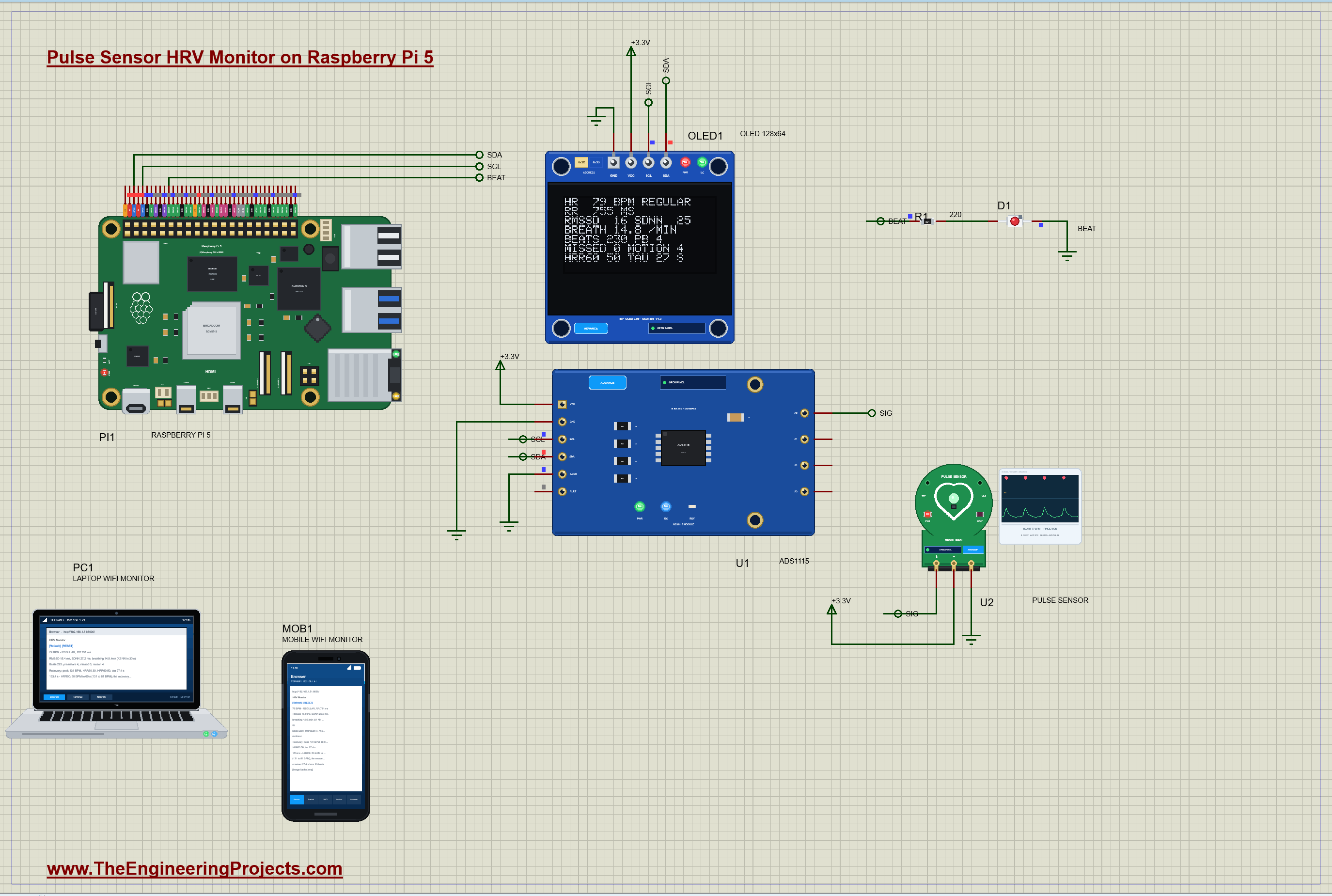
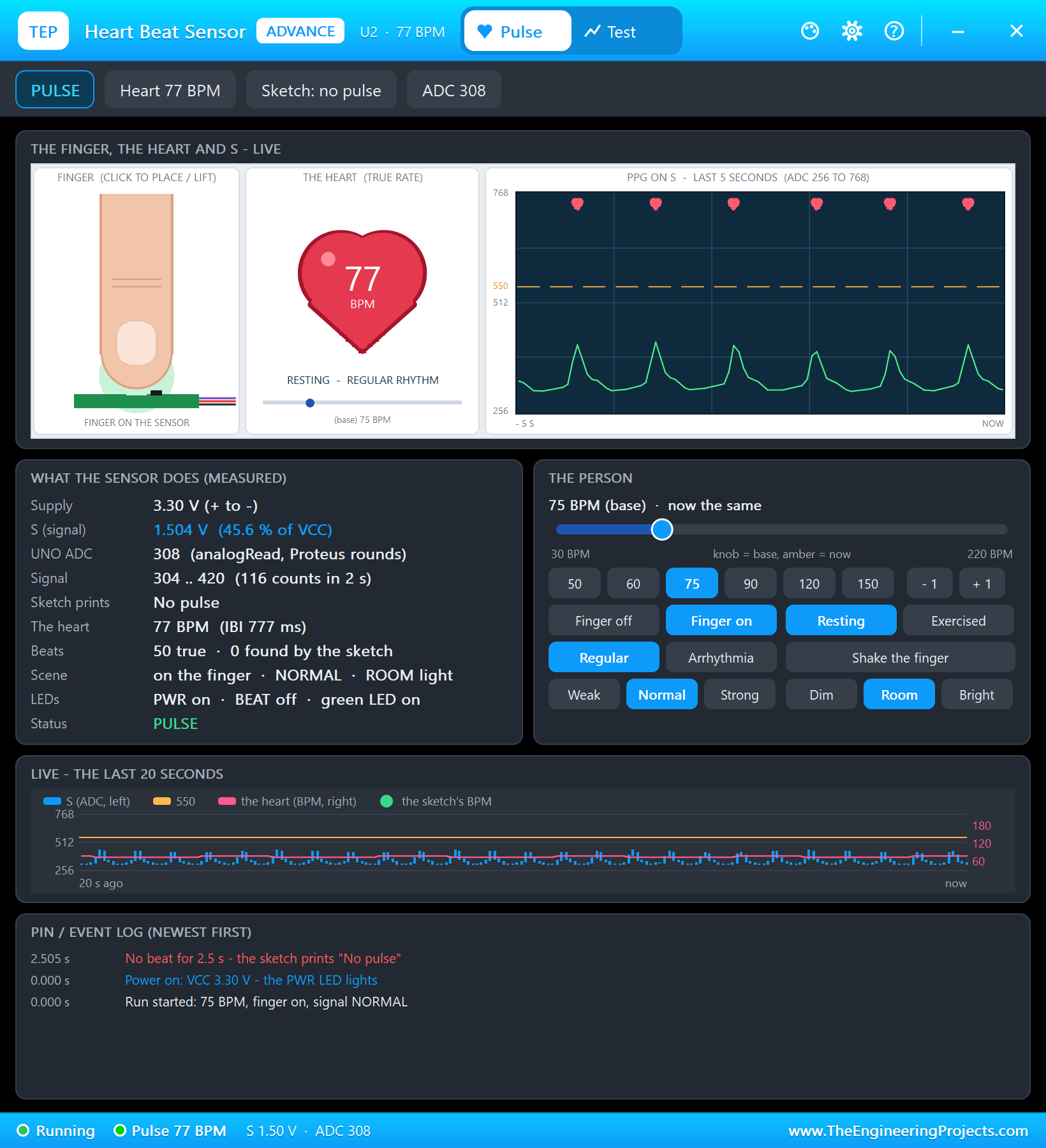
The circuit, the board and the results as they appear in Pulse Sensor HRV Monitor on Raspberry Pi 5 - Proteus Simulation. Open an image for its full size.
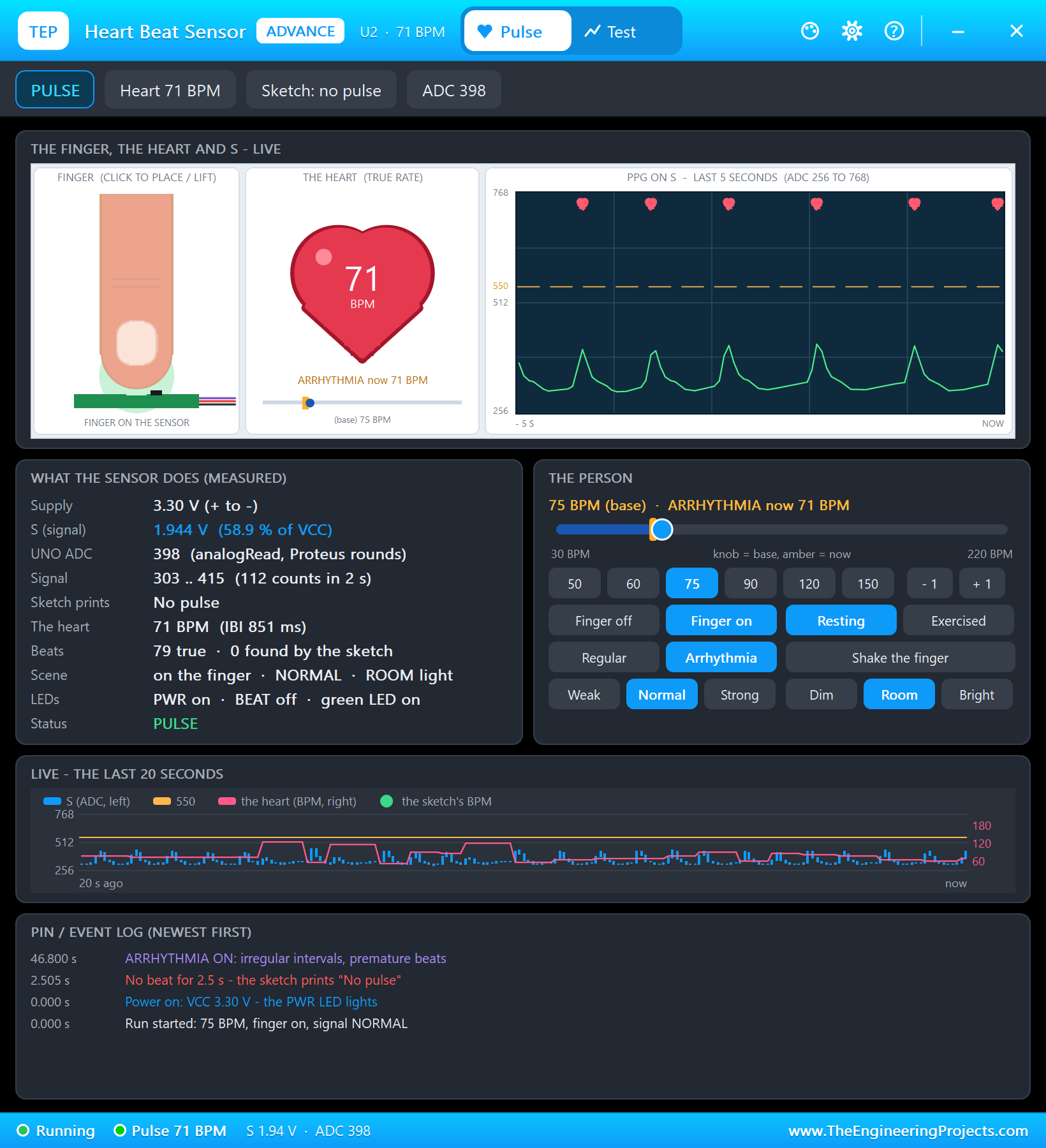
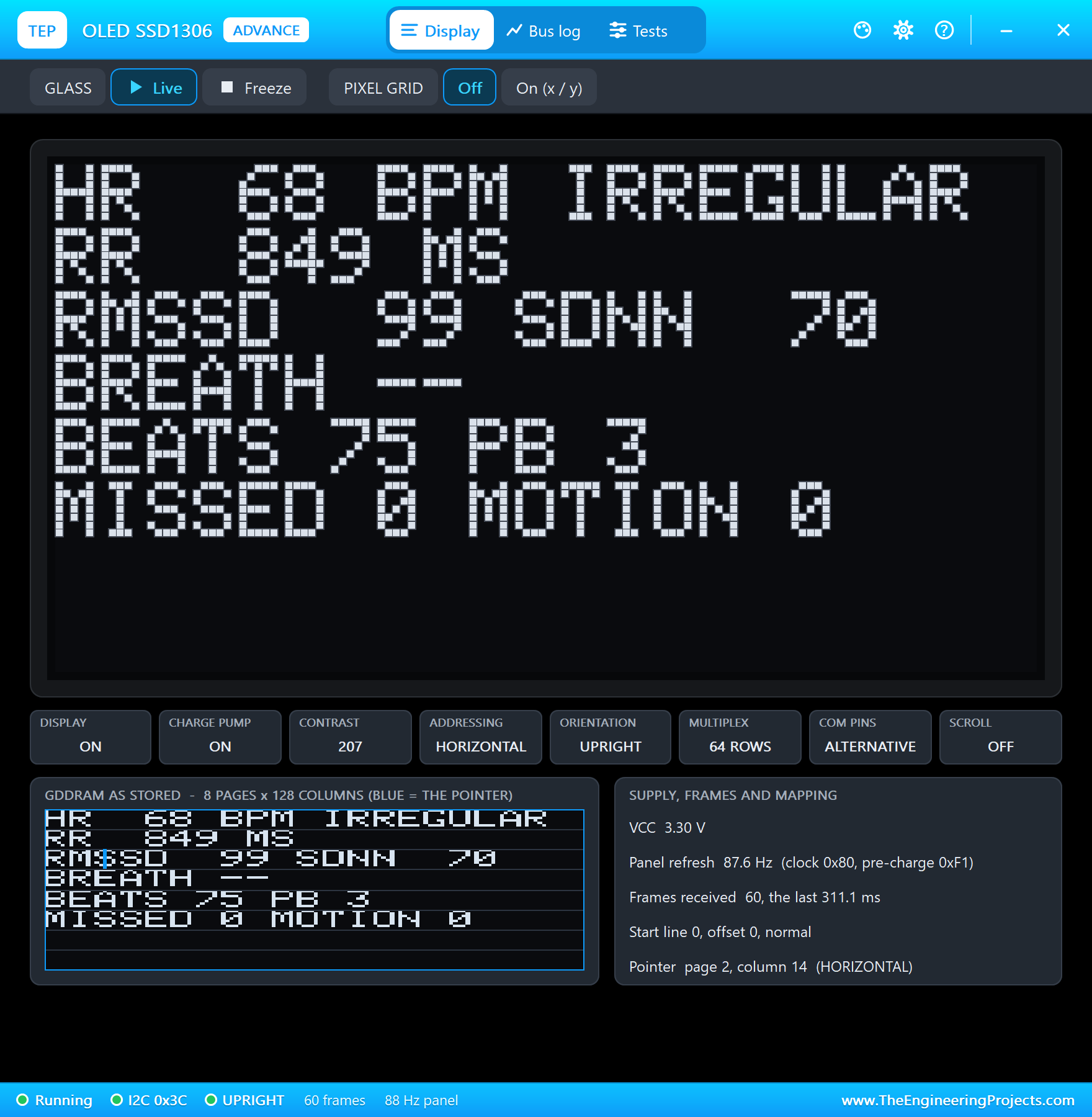
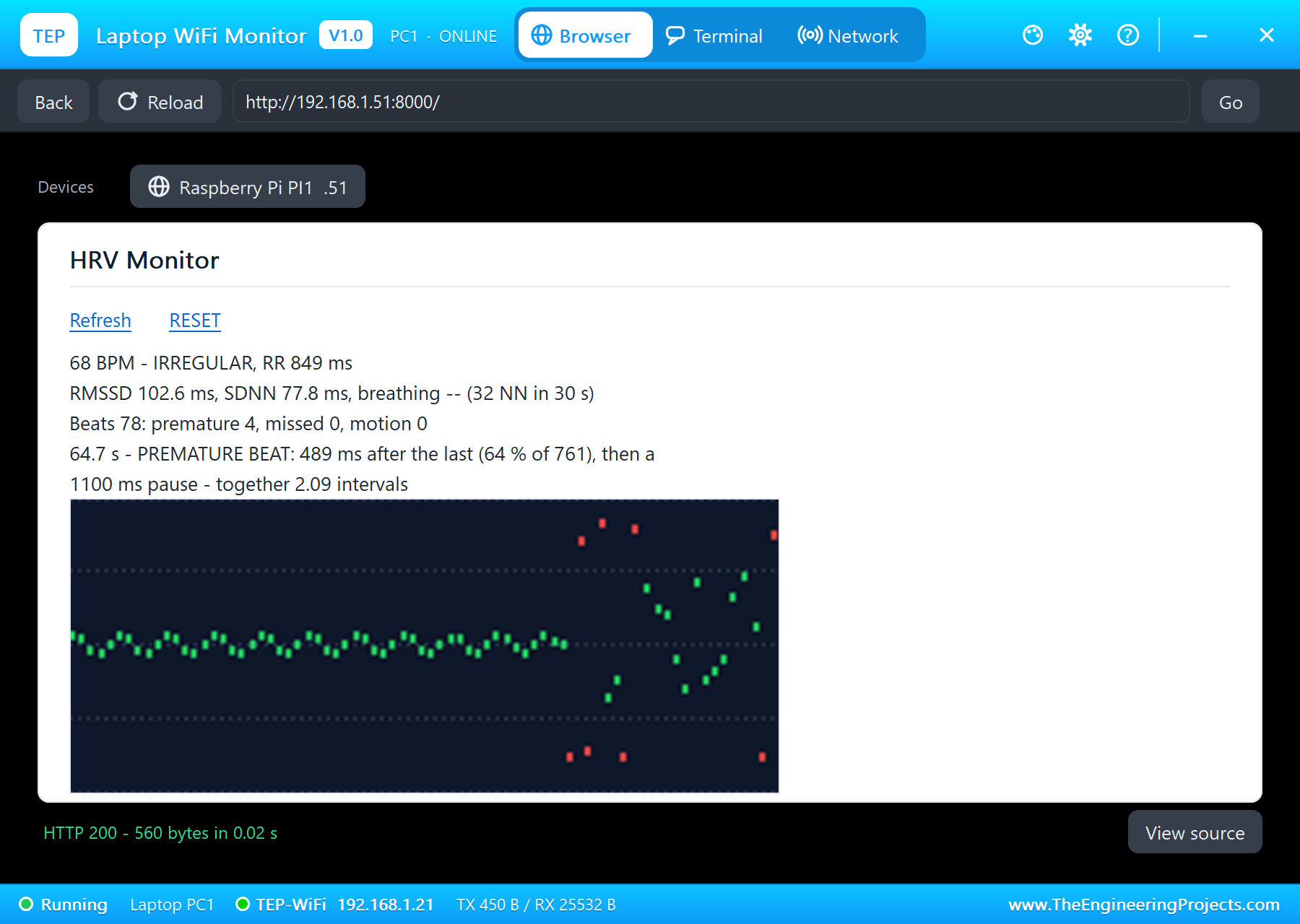
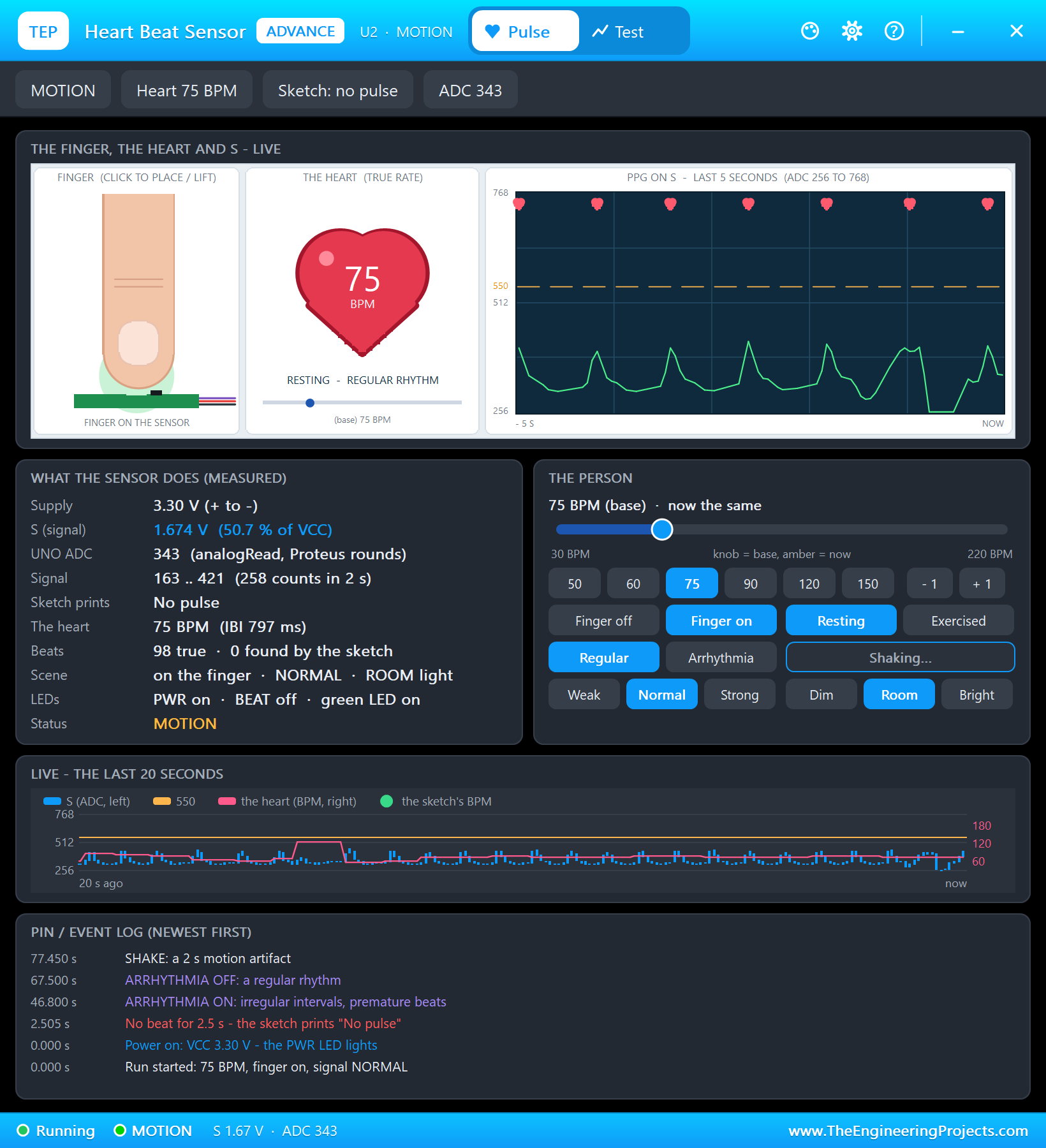
README
 README
===============================================================================================================
  Pulse Sensor HRV Monitor on Raspberry Pi 5 - Proteus Simulation - Project V1.0
  The Engineering Projects - www.TheEngineeringProjects.com
===============================================================================================================

IMPORTANT LINKS
  The project tutorial (circuit, code, simulation results):
  https://www.theengineeringprojects.com/2026/11/pulse-sensor-hrv-monitor-raspberry-pi-5-proteus-simulation.html
  The libraries this project is built from (each post has its own full download and tutorial):
    Raspberry Pi 5 board:
      https://www.theengineeringprojects.com/2026/10/raspberry-pi-5-library-for-proteus.html
    Heart beat pulse sensor:
      https://www.theengineeringprojects.com/2026/10/heart-beat-sensor-library-for-proteus-v3-0.html
    ADS1115 16-bit ADC:
      https://www.theengineeringprojects.com/2026/10/ads1115-adc-library-for-proteus-v1-0.html
    OLED SSD1306:
      https://www.theengineeringprojects.com/2026/10/oled-ssd1306-library-for-proteus-v1-0.html
    SMD LED:
      https://www.theengineeringprojects.com/2026/11/smd-led-library-for-proteus.html
    SMD resistor:
      https://www.theengineeringprojects.com/2026/11/smd-resistor-library-for-proteus.html
    Laptop WiFi Monitor:
      https://www.theengineeringprojects.com/2026/10/laptop-wifi-monitor-library-for-proteus.html
    Mobile WiFi Monitor:
      https://www.theengineeringprojects.com/2026/10/mobile-wifi-monitor-library-for-proteus.html
  Support our free work: https://www.theengineeringprojects.com/donate

FILE STRUCTURE
Pi-5-HRV-Monitor-TEP-v1.0/
|-- Proteus Library Files/
|   |-- TEPADS1115.LIB                                 66.3 KB   a part of the project -> LIBRARY folder
|   |-- TEPLAPTOP.LIB                                  39.5 KB   a part of the project -> LIBRARY folder
|   |-- TEPMOBILE.LIB                                  13.1 KB   a part of the project -> LIBRARY folder
|   |-- TEPOLED12864.LIB                              112.4 KB   a part of the project -> LIBRARY folder
|   |-- TEPPULSESENSOR.LIB                            136.3 KB   a part of the project -> LIBRARY folder
|   |-- TEPRPI5.LIB                                    60.5 KB   a part of the project -> LIBRARY folder
|   |-- TEPSMDLED.LIB                                  17.7 KB   a part of the project -> LIBRARY folder
|   |-- TEPSMDRES.LIB                                 171.9 KB   a part of the project -> LIBRARY folder
|-- Proteus Model Files/
|   |-- TEPADS1115.DLL                                326.0 KB   a model -> MODELS folder
|   |-- TEPNET.DLL                                     3.01 MB   a model -> MODELS folder
|   |-- TEPOLED.DLL                                   342.5 KB   a model -> MODELS folder
|   |-- TEPPULSESENSOR.DLL                            431.0 KB   a model -> MODELS folder
|   |-- TEPSMDLED.DLL                                 290.5 KB   a model -> MODELS folder
|   |-- TEPSMDRES.DLL                                 305.5 KB   a model -> MODELS folder
|   |-- TEPPi/python/                                 17.54 MB   Python 3.11 embeddable -> MODELS\TEPPi (33 files)
|   |-- TEPPi/runtime/                                 1.11 MB   TEP Pi runtime, gpiozero -> MODELS\TEPPi (87 files)
|-- Proteus Simulation/
|   |-- hrv_monitor.py                                 20.7 KB   the program PI1 runs
|   |-- Pi-5-HRV-Monitor.pdsprj                        36.0 KB   the project simulation
|   |-- TEPADS1115.DLL                                326.0 KB   copy of the model
|   |-- TEPNET.DLL                                     3.01 MB   copy of the model
|   |-- TEPOLED.DLL                                   342.5 KB   copy of the model
|   |-- TEPPULSESENSOR.DLL                            431.0 KB   copy of the model
|   |-- TEPSMDLED.DLL                                 290.5 KB   copy of the model
|   |-- TEPSMDRES.DLL                                 305.5 KB   copy of the model
|-- Python Code/
|   |-- hrv_monitor.py                                 20.7 KB   the program (the same file)
|-- README.txt                                        ~10.3 KB   this file
Total: 28.68 MB (unzipped). The C++ source code of the models is not included.

WHAT IS IT?
  A beat-to-beat heart monitor on a Raspberry Pi 5: it times every pulse from a pulse sensor to about a
  millisecond and measures what the intervals between the beats say - the heart rate variability (HRV), the
  breathing, premature beats, movement of the finger and how fast the heart rate recovers after exercise.
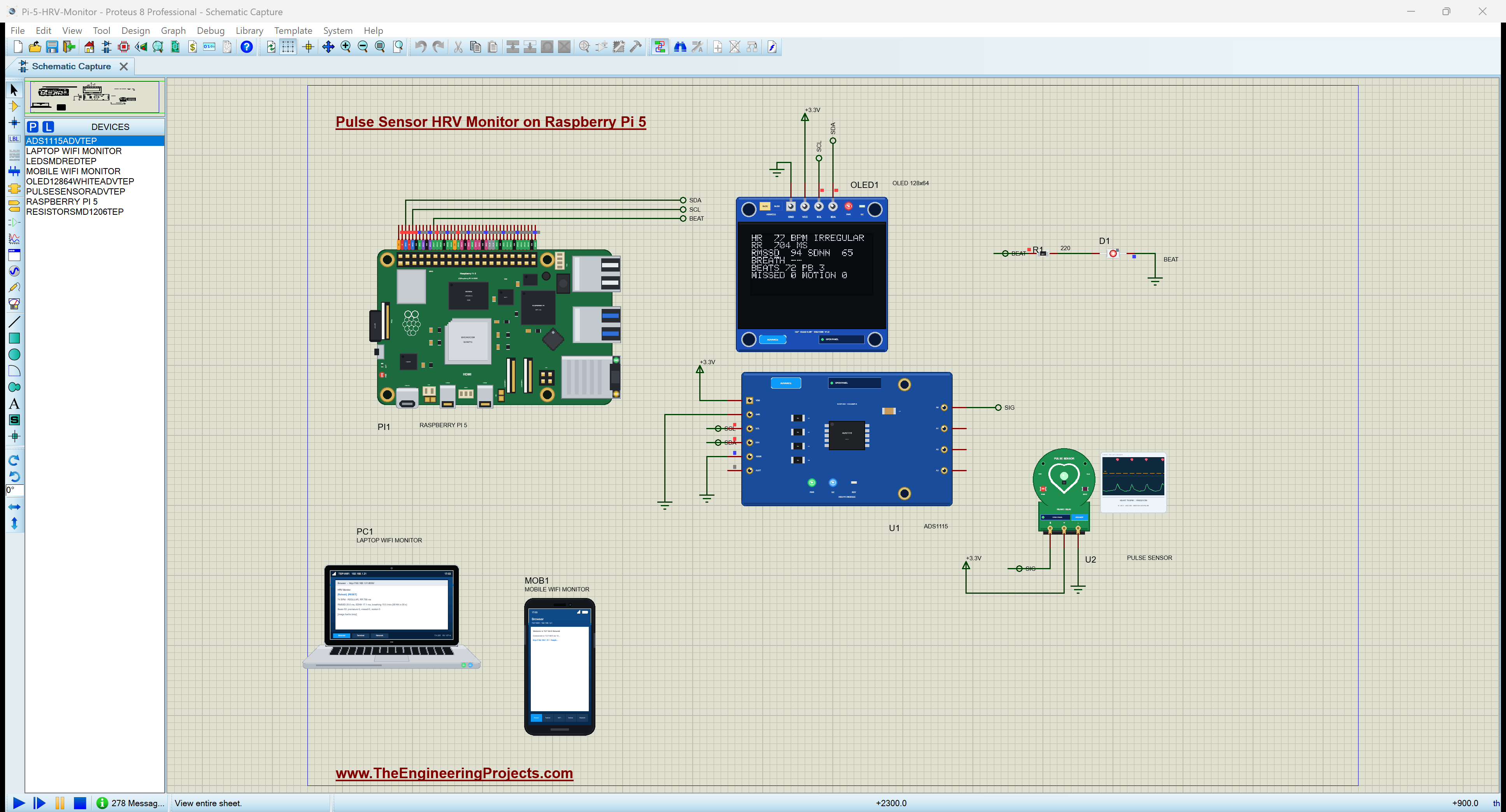
    * U2 a heart beat pulse sensor (PULSESENSORADVTEP): SIG to the ADC, VCC on +3.3V, GND.
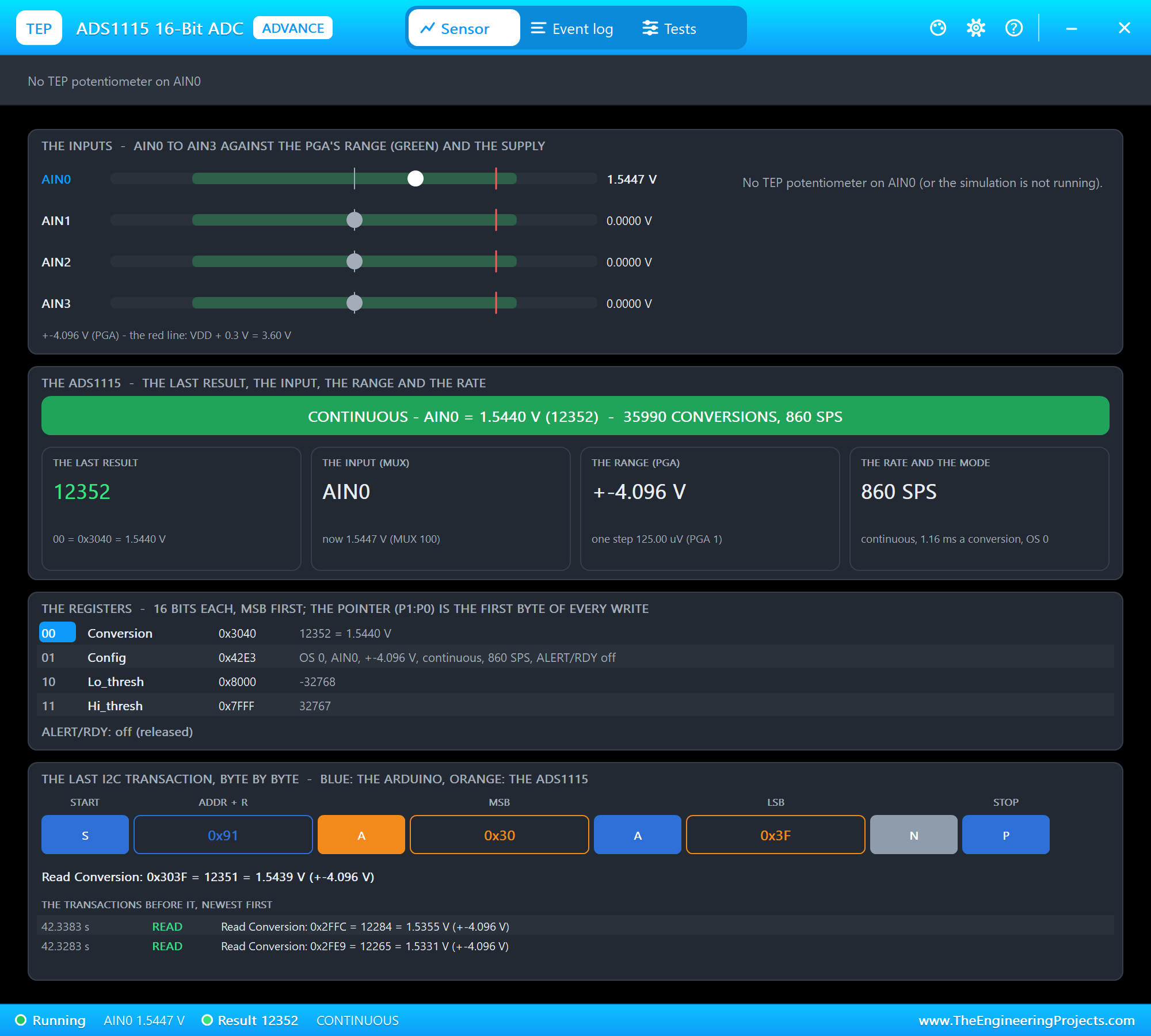
    * U1 an ADS1115 16-bit ADC (ADS1115ADVTEP) on I2C1 (SDA GPIO2, SCL GPIO3, 0x48), VDD +3.3V: A0 = SIG, continuous
      conversions at 860 samples a second, read every 10 ms.
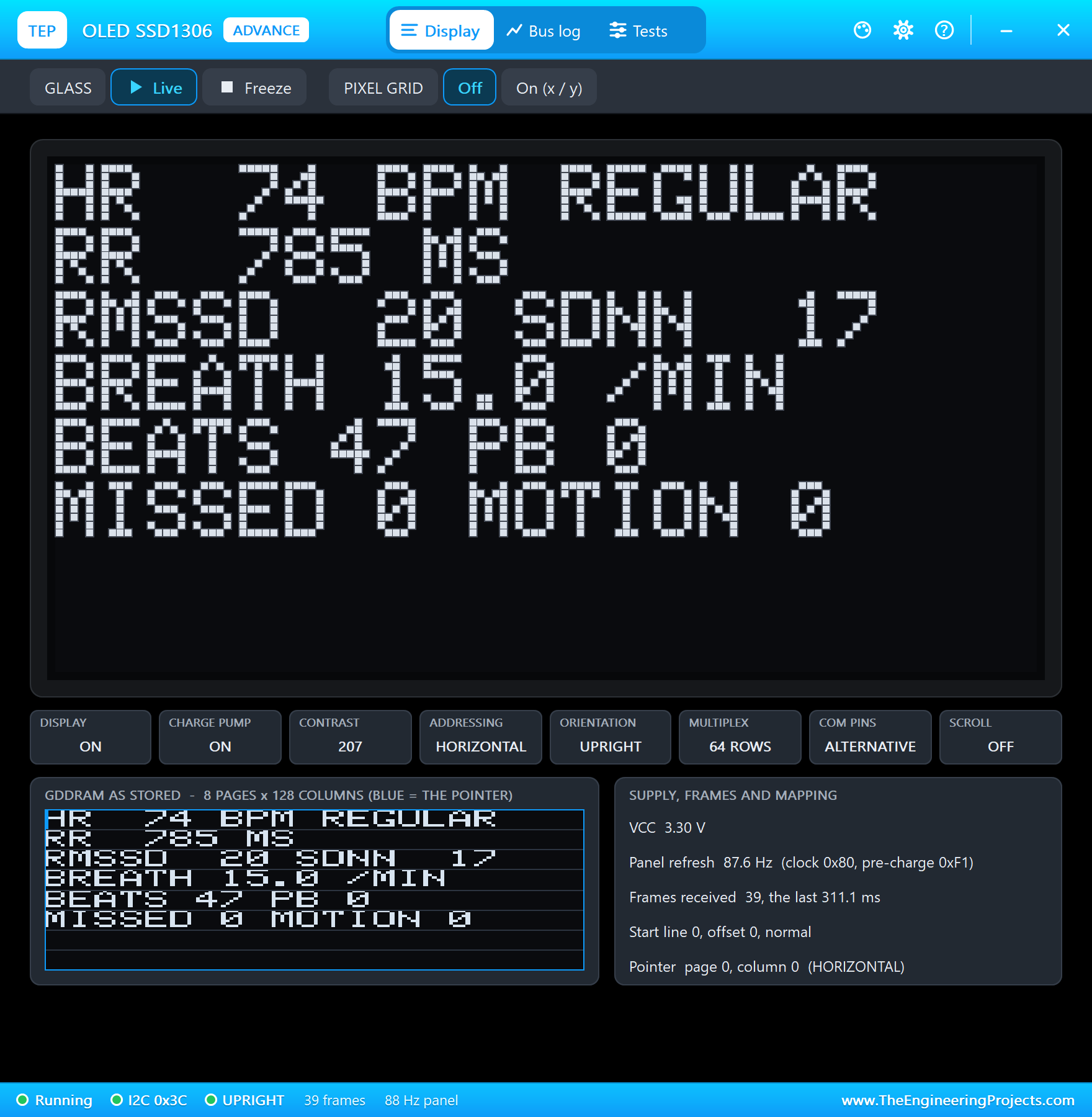
    * U3 an SSD1306 128x64 OLED (OLED12864WHITEADVTEP, 0x3C) on I2C1, VCC +3.3V: the rate, the rhythm, RMSSD / SDNN,
      the breathing, the counts and the recovery.
    * D1 a red SMD LED (LEDSMDREDTEP) through R1 220 ohm on GPIO17 (pin 11): flashes on every beat.
    * RASPBERRY PI 5 (PI1) runs hrv_monitor.py on Ethernet at 192.168.1.51 (port 8000).
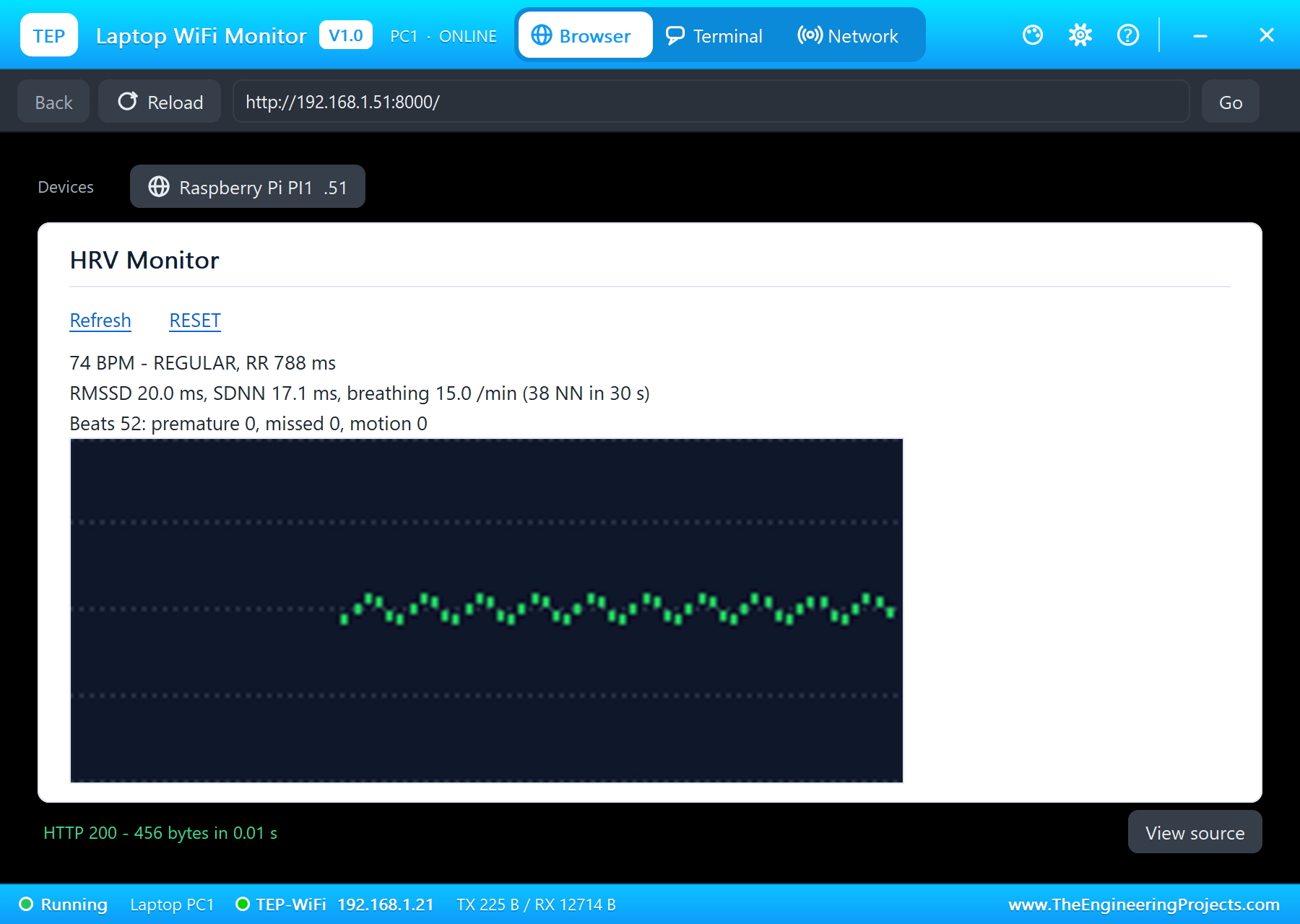
    * Laptop WiFi Monitor (PC1) and Mobile WiFi Monitor (MOB1) open http://192.168.1.51:8000/.
  How it measures:
    a beat         the moment the pulse's upstroke crosses half-way from its foot to its top, between two readings
                   by a straight line (the steepest part of the wave: the noise moves it least)
    the intervals  NORMAL; PREMATURE (short, then a pause, the two = two normal intervals); MISSED (about two);
                   MOTION (a fall steeper than any pulse: the beats until 1 s after it are left out)
    the numbers    over the last 30 s of normal intervals: the heart rate, SDNN, RMSSD, the rhythm (each interval
                   against its neighbours: over 8 % = IRREGULAR) and the breathing (the intervals swing with it)
    recovery       a rise of 25 BPM over the resting rate = exercise; from the peak, the fall in 30 s and 60 s
                   (HRR30, HRR60) and the time constant of the fall
  Its pages:
    /          the dashboard: the rate, the numbers, the counts, the recovery, the intervals of the last 60 s
    /reset     start again        /tacho.bmp   the intervals as a picture        /data   JSON
  No extra Python library: lgpio (in the TEPPi runtime and on Raspberry Pi OS), threading, http.server.
  This is a learning project, not a medical device.

TEST STATUS
  Tested in Proteus 8 Professional on Windows 11, the run that made the tutorial's screenshots (the program's times):
  - Rest at 75 BPM (a breath every 4 s in the sensor's model): RMSSD 20.0 ms, SDNN 17.1 ms, breathing 15.0 per minute,
    REGULAR - the model's own numbers give 19.9 ms, 17.0 ms and 15. The ADS1115: 860 SPS, about 100 reads a second.
  - ARRHYTHMIA at 47 s: "PREMATURE BEAT: 489 ms after the last (61 % of 801), then a 1084 ms pause - together 1.96
    intervals", 4 in all (1.96 / 2.05 / 2.01 / 2.09 intervals); 58.9 s "RHYTHM IRREGULAR - the intervals stray 9.9 %".
    Regular again at 68 s: 74.5 s "RHYTHM REGULAR".
  - SHAKE at 77.5 s: 77.9 s "MOTION - a slope of -6.5 V/s against the beats' 5.9" - 4 intervals left out, 0 false beats.
  - AFTER EXERCISE at 87 s: 89.4 s "EXERCISE - 100 BPM, 26 above the resting 74"; the peak 131 BPM at 92.1 s; "HRR30: 39
    BPM in 30 s"; 153.4 s "HRR60: 50 BPM in 60 s (131 to 81 BPM); the recovery time constant 27.4 s" (the model: 25 s).
  - 166 s of simulation in 715 s.

INSTALLATION
  1. Close Proteus. Extract the WHOLE zip file, for example to your Desktop.
  2. Copy the files from "Proteus Library Files" into the LIBRARY folder of Proteus, for example
     C:\Program Files (x86)\Labcenter Electronics\Proteus 8 Professional\LIBRARY
  3. Copy everything in "Proteus Model Files" - the DLL files and the TEPPi folder - into the MODELS folder (next
     to LIBRARY).
  4. Start Proteus. Press P in the schematic and search for RASPBERRY PI 5, PULSESENSORADVTEP or ADS1115ADVTEP to
     check that the parts are there.

RUN THE SIMULATION
  1. Open "Proteus Simulation\Pi-5-HRV-Monitor.pdsprj". Keep hrv_monitor.py and the DLL files beside it.
  2. Press Play. The finger is on the sensor at a resting 75 BPM; after about 15 s the OLED shows RMSSD, SDNN and the
     breathing (the sensor breathes every 4 s).
  3. On the sensor's pop-up (U2) press ARRHYTHMIA: premature beats are found and the rhythm turns IRREGULAR.
  4. Press SHAKE (the finger moves): the beats of those seconds are left out. Press AFTER EXERCISE: the rate jumps
     and the monitor measures its recovery for 60 s.
  5. Open the Laptop WiFi Monitor (PC1) or the Mobile WiFi Monitor (MOB1) and press Go for the dashboard.

PROPERTIES USED IN THIS PROJECT
  PI1 RASPBERRY PI 5           PROGRAM=hrv_monitor.py, ETHERNET=IN (192.168.1.51)
  U2 PULSESENSORADVTEP         the defaults: 75 BPM, the finger on, NORMAL signal, ROOM light
  U1 ADS1115ADVTEP;  U3 OLED12864WHITEADVTEP;  D1 LEDSMDREDTEP;  R1 220 (RESISTORSMD1206TEP)
  PC1, MOB1                    HOMEPAGE=http://192.168.1.51:8000/

TROUBLESHOOTING
  * No beats: SIG to A0 of the ADS1115; the sensor's VCC needs a real supply (+3.3V), not a net label.
  * The rate is twice the heart's: the threshold follows the beats' slope - give it the first 2.5 s to learn.
  * Everything says MOTION: keep the finger still (SHAKE lasts 2 s).
  * The OLED stays blank: SDA / SCL on GPIO2 / GPIO3, address 0x3C, VCC 3.3 V.
  * The terminal cannot start Python: the TEPPi folder is not in MODELS.

LICENCES
  * The project, the program, the parts (LIB files) and the models (DLL files) are made by The Engineering Projects
    and are free for learning and for your own projects. The models use only standard Windows libraries.
    The C++ source code of the models is not included; the source code is not included for any model.
  * TEPPi\python is the Python 3.11 Windows embeddable package (Python Software Foundation License); TEPPi\runtime
    holds our TEP Pi runtime with gpiozero and colorzero (BSD licences) - their licence files are inside the folders.
  * Proteus is a product of Labcenter Electronics and is not included. Raspberry Pi is a trademark of Raspberry Pi
    Ltd. This project is not made or endorsed by them. It is not a medical device and must not be used to make
    health decisions.

VERSION
  V1.0 - the first release of the project.
===============================================================================================================Development1 release
 Development1 release
-
V1.0Pulse Sensor HRV Monitor on Raspberry Pi 5 - Proteus Simulation V1.0this page
V1.0 is the only release in the Download Center so far. When a newer version is published, it appears above with its own download page.
Installation7 steps
 Installation7 steps
From the download to a working project, in order. The steps follow what the package contains.
You will need
- Proteus Design SuiteProteus 8 or newer (Labcenter), on Windows
- Pythonto build the source files into firmware
- Any archive toolWindows, macOS and Linux extract ZIP files on their own

Steps
- 1
Extract the archive
Right-click dda30cfa0e8f48f98f43b82751ec0dc2.zip and choose Extract All (or open it with 7-Zip or WinRAR) into a folder you can find again. Keep its folder structure (Pi-5-HRV-Monitor-TEP-v1.0) as it is.
- 2
Copy the library files into Proteus
Move TEPADS1115.LIB, TEPLAPTOP.LIB and TEPMOBILE.LIB and 5 more and the files into the LIBRARY folder of your Proteus installation: C:\Program Files (x86)\Labcenter Electronics\Proteus 8 Professional\LIBRARY for Proteus 8, or the matching Proteus 7 folder. Older versions keep it under ProgramData\Labcenter Electronics. If Proteus is open, close it first.
- 3
Add the simulation model
Copy TEPADS1115.DLL, TEPNET.DLL and TEPOLED.DLL and 10 more into the MODELS folder next to LIBRARY, so the component can run, not only be drawn.
- 4
Restart Proteus and place the component
Start Proteus, open a schematic, press P (Pick Devices) and search for the component by the name used in the tutorial. It appears with its pins ready to wire.
- 5
Build the source code
Open hrv_monitor.py, attr.py and color.py and 28 more in the compiler named in the tutorial (MikroC, Keil, MPLAB, Code Composer or the Arduino IDE) and build it to get the firmware.
- 6
Open the example simulation
Open Pi-5-HRV-Monitor.pdsprj in Proteus to see the wiring exactly as in the tutorial. Check the controller's Program File path, then press Play.
- 7
Follow the tutorial
Pulse Sensor HRV Monitor on Raspberry Pi 5 - Proteus Simulation explains every connection and setting in order; keep it open beside the files while you build.
FAQs8 questionsContact TEP
 FAQs8 questions
How do I download Pulse Sensor HRV Monitor on Raspberry Pi 5 - Proteus Simulation V1.0?
Wait for the 30-second guest countdown on this page, then press the download button; the file comes straight from our storage. Members who are logged in skip the wait. If the browser opens the file instead of saving it, use its Save as option. The download link is made for you when the countdown ends and works for 15 minutes; a saved or shared link stops working, so share this page instead.
What is inside the archive?
Pulse Sensor HRV Monitor on Raspberry Pi 5 - Proteus Simulation V1.0 comes as a ZIP archive of 144 files (14.5 MB, 28.7 MB unpacked) holding Proteus library files, simulation model DLLs, a Proteus simulation, source code and a nested archive. Open the File Structure tab for the full list of 144 files.
What should I do if the download does not start?
Check the browser's download list first; an ad blocker or a company firewall can also hold it back, so try another browser or network. If the file arrives incomplete, download it again. For an installation problem, read the Install tab or tell us in the comments with your software version and the exact error message.
Is this file free?
Yes. Every file in the TEP Download Center is free for learning, personal and student projects. If you share it, link back to this page or the tutorial so others find the latest version.
How do I check that the file arrived complete?
Compare its SHA-256 with the one on this page, a585a6de032c78bc04bef541892687fceaee08e5a75078e2fa21530145805feb. In PowerShell run Get-FileHash "dda30cfa0e8f48f98f43b82751ec0dc2.zip"; on macOS or Linux run shasum -a 256 "dda30cfa0e8f48f98f43b82751ec0dc2.zip". The same value means the file is exactly the one in our storage; a different one means the download broke off, so download it again.
Do I need WinRAR to open the ZIP file?
No. Windows, macOS and Linux open ZIP archives on their own (Extract All, or double-click). WinRAR and 7-Zip work too. Extract the whole archive before using the files.
Where do I put the LIB and IDX files?
Both files go into the LIBRARY folder of your Proteus installation (Proteus 8: C:\Program Files (x86)\Labcenter Electronics\Proteus 8 Professional\LIBRARY; Proteus 7 has the same folder under its own name). Restart Proteus afterwards and search for the component with P.
Which Proteus version does the library need?
The tutorial names the Proteus version the library was made and tested with. Most TEP libraries work in Proteus 7 and Proteus 8; if the component does not appear after a restart, check that both the LIB and the IDX file were copied and that Proteus was fully closed while copying.
Members skip the wait. Log in or join TEP.

- 0Total downloads
- 4%Popularity
- Raspberry PiCategory
- 0Comments
- ssyedzainnasirUploaded by
- 24 Nov 2026Uploaded at


 SHA-256
a585a6de032c78bc04bef541892687fceaee08e5a75078e2fa21530145805feb


 Need help with this file?
 Tags
Related Raspberry Pi
All Raspberry Pi tutorials




More Raspberry Pi project files
All Raspberry Pi tutorials


Comments
0