


Project Files of Ultrasonic Sensor Library for Proteus V2.0 (HC-SR04 + Arduino)
 Libraries
 Code
 Projects
 Simulation
ultrasonic-sensor-tep-v2-0-4790e56bbda14db7a10d277dba7f4048.zip
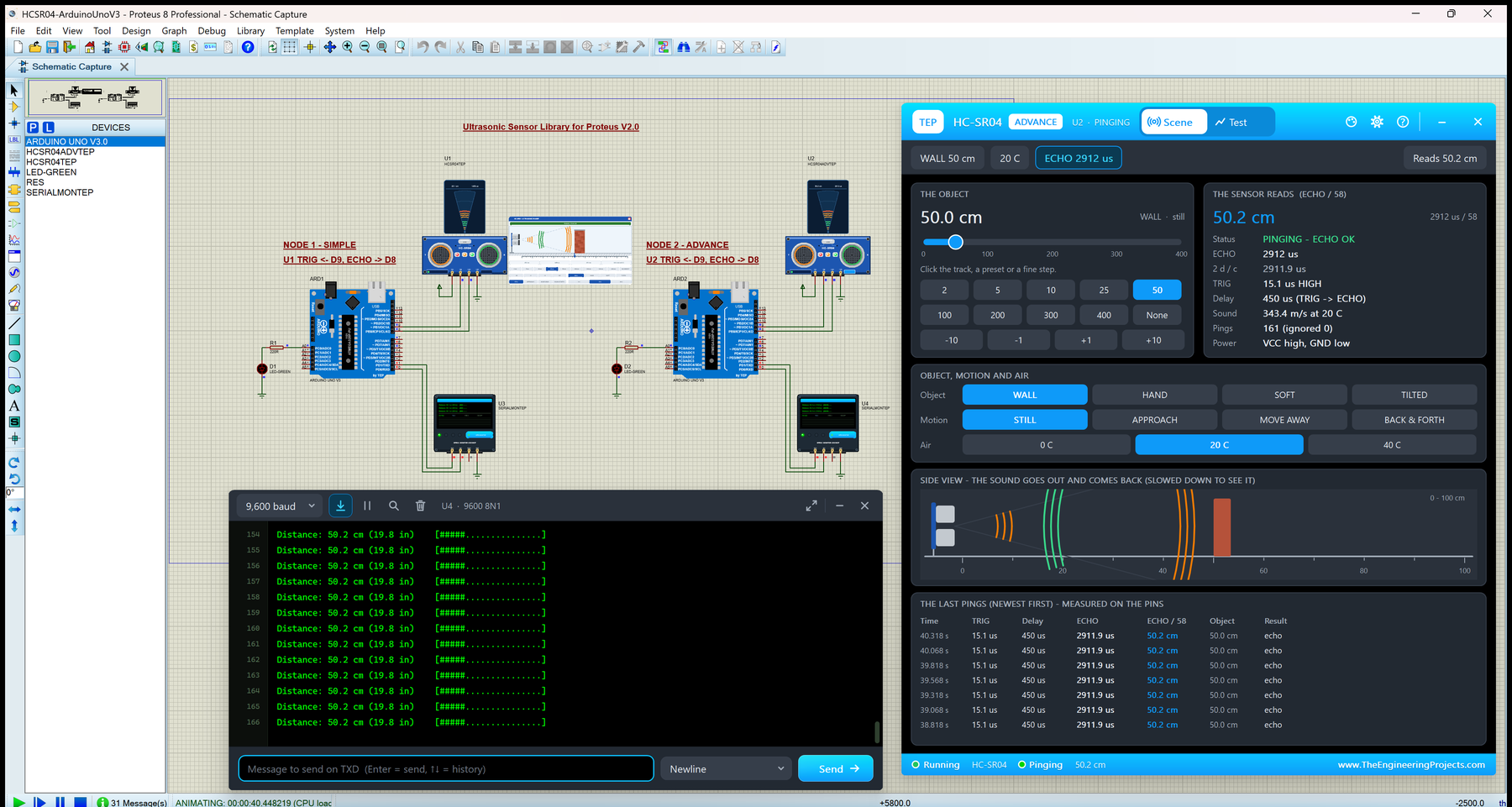
Ultrasonic Sensor Library for Proteus V2.0
Ultrasonic Sensor Library for Proteus V2.0 comes as a ZIP archive of 12 files (1.4 MB, 3.0 MB unpacked) holding Proteus library files, simulation model DLLs, a Proteus simulation, an Arduino sketch and compiled HEX firmware.
- LIBProteus library
- IDXProteus library index
- DLLProteus model
- DSNProteus simulation
- INOArduino sketch
- HEXHEX firmware
Description
This is the download page of Ultrasonic Sensor Library for Proteus V2.0, the file package of the tutorial Ultrasonic Sensor Library for Proteus V2.0 (HC-SR04 + Arduino), published on The Engineering Projects in October 2026. Here you get the ZIP file (1.4 MB) with the Proteus library files (LIB and IDX), the simulation model (DLL), a ready Proteus simulation, an Arduino sketch and the compiled HEX firmware, the list of files it contains, the README when there is one, and the installation steps in order.
What this library is
Ultrasonic-Sensor-Library-for-Proteus-v2.0.zip with HC-SR04 Simple and Advance (TEPHCSR04.LIB and TEPHCSR04.DLL), the TEP Serial Monitor and Arduino UNO libraries for Proteus, the two-UNO distance meter simulation with its HEX file, the demo sketch and a README.
This is version 2.0; older or newer releases, when they exist, are listed in the Development tab.
What is inside the ZIP file
- ArduinoV3TEP.LIB – Proteus library, 95.6 KB
- TEPHCSR04.LIB – Proteus library, 170.1 KB
- TEPSERIALMON.LIB – Proteus library, 11.1 KB
- ArduinoV3TEP.IDX – Library index, 830 B
- TEPHCSR04.DLL – Simulation model, 382.5 KB
- TEPSERIALMON.DLL – Simulation model, 978 KB
- and 6 more, all listed in the File Structure tab
The archive unpacks to 3.0 MB and carries its own README (README.txt), shown in the README tab above.
How to download
Use the download panel at the top of this page: after the counter (30 seconds for guests, 10 for members) the black button unlocks and the ZIP file comes straight from our content network. If the browser opens it instead of saving, use Save as; extract the whole archive before using anything inside it.
How to install
- Step 1: Extract the ZIP file with Windows (Extract All), 7-Zip or WinRAR, keeping its folders.
- Step 2: Close Proteus and copy ArduinoV3TEP.LIB, TEPHCSR04.LIB and TEPSERIALMON.LIB and ArduinoV3TEP.IDX into its LIBRARY folder (Proteus 8: C:\Program Files (x86)\Labcenter Electronics\Proteus 8 Professional\LIBRARY).
- Step 3: Copy TEPHCSR04.DLL and TEPSERIALMON.DLL into the MODELS folder next to it, so the part simulates.
- Step 4: Start Proteus, press P and search for "ArduinoV3TEP"; place and wire it as in the tutorial.
- Step 5: Open HCSR04_Distance.ino in the Arduino IDE, pick board and port and Verify (Export Compiled Binary gives the HEX).
- Step 6: In Proteus set the controller's Program File to HCSR04_Distance.hex; on hardware, flash the same file.
- Step 7: Open HCSR04-ArduinoUnoV3.pdsprj in Proteus and press Play.
Read the detailed guide
This page is for the files. The full tutorial, Ultrasonic Sensor Library for Proteus V2.0 (HC-SR04 + Arduino), explains the circuit and the code step by step and shows the working results and the simulation; read it before you build. Questions about the download or the installation go in the comments below; more Proteus downloads are listed further down this page.

File Structure
 File Structure
14.4 KB830 B95.6 KB170.1 KB11.1 KB382.5 KB978 KB40.9 KB21 KB382.5 KB978 KB30.9 KBGallery12 images from the tutorialOpen the tutorial
 Gallery12 images from the tutorial
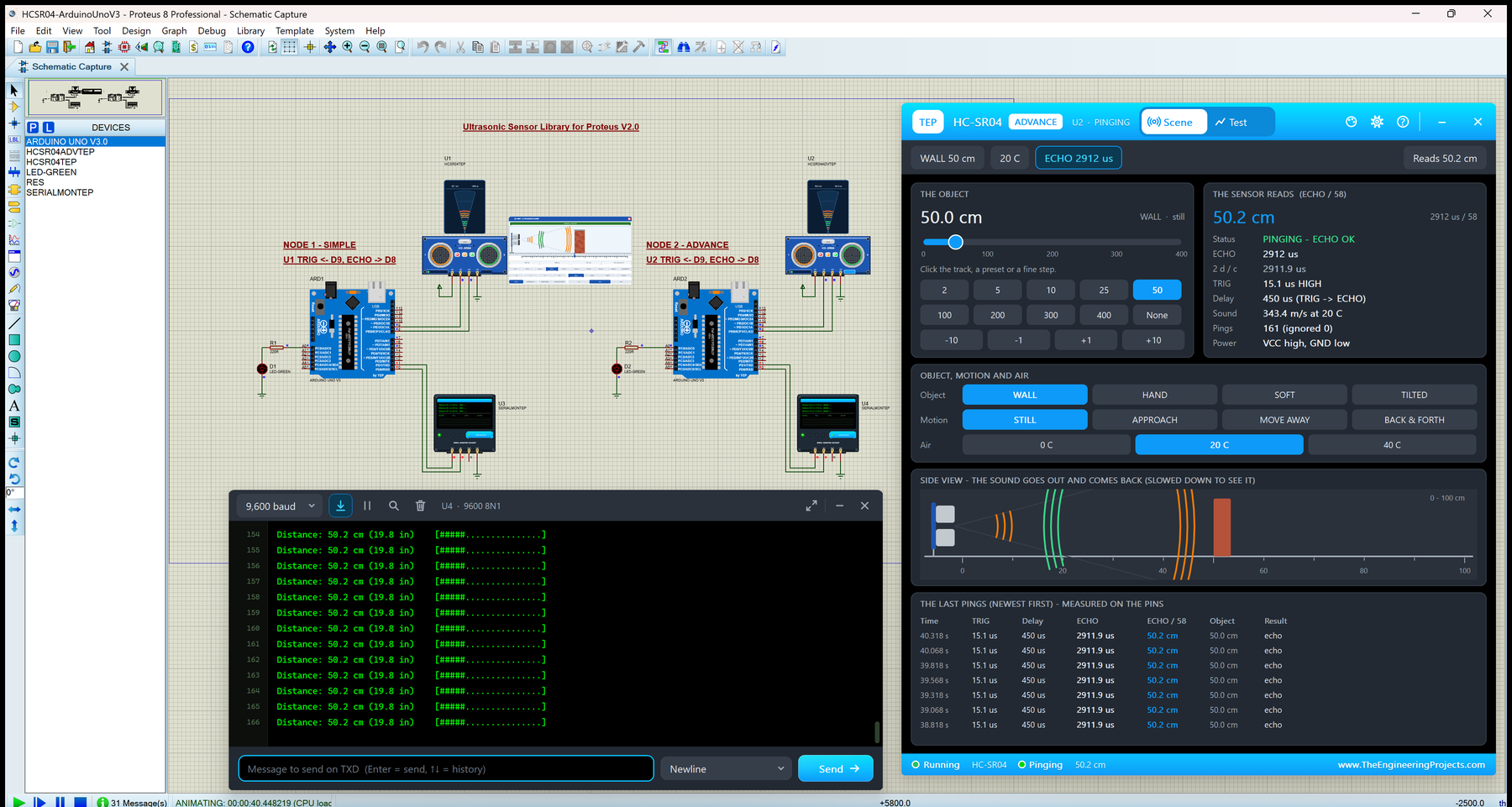
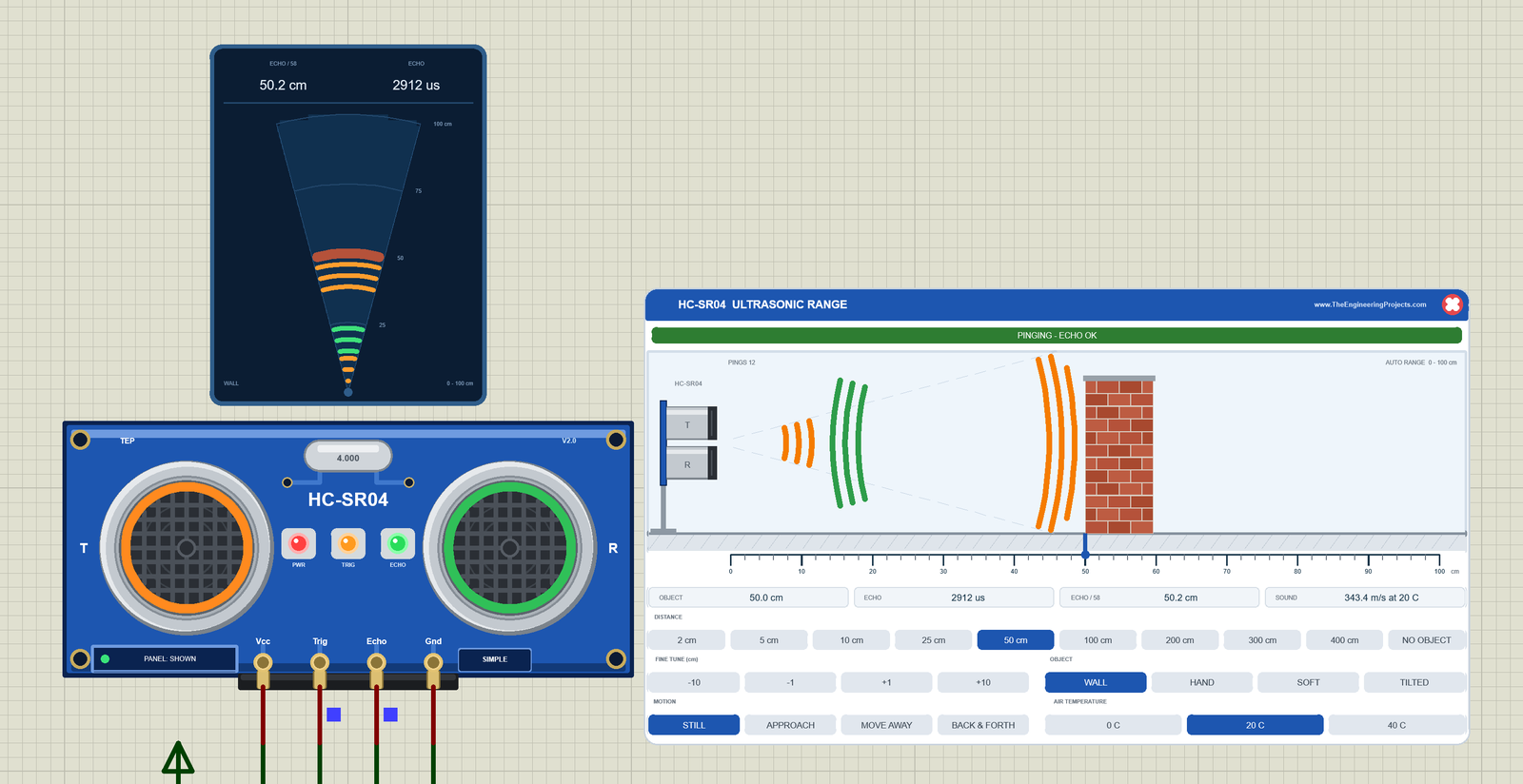
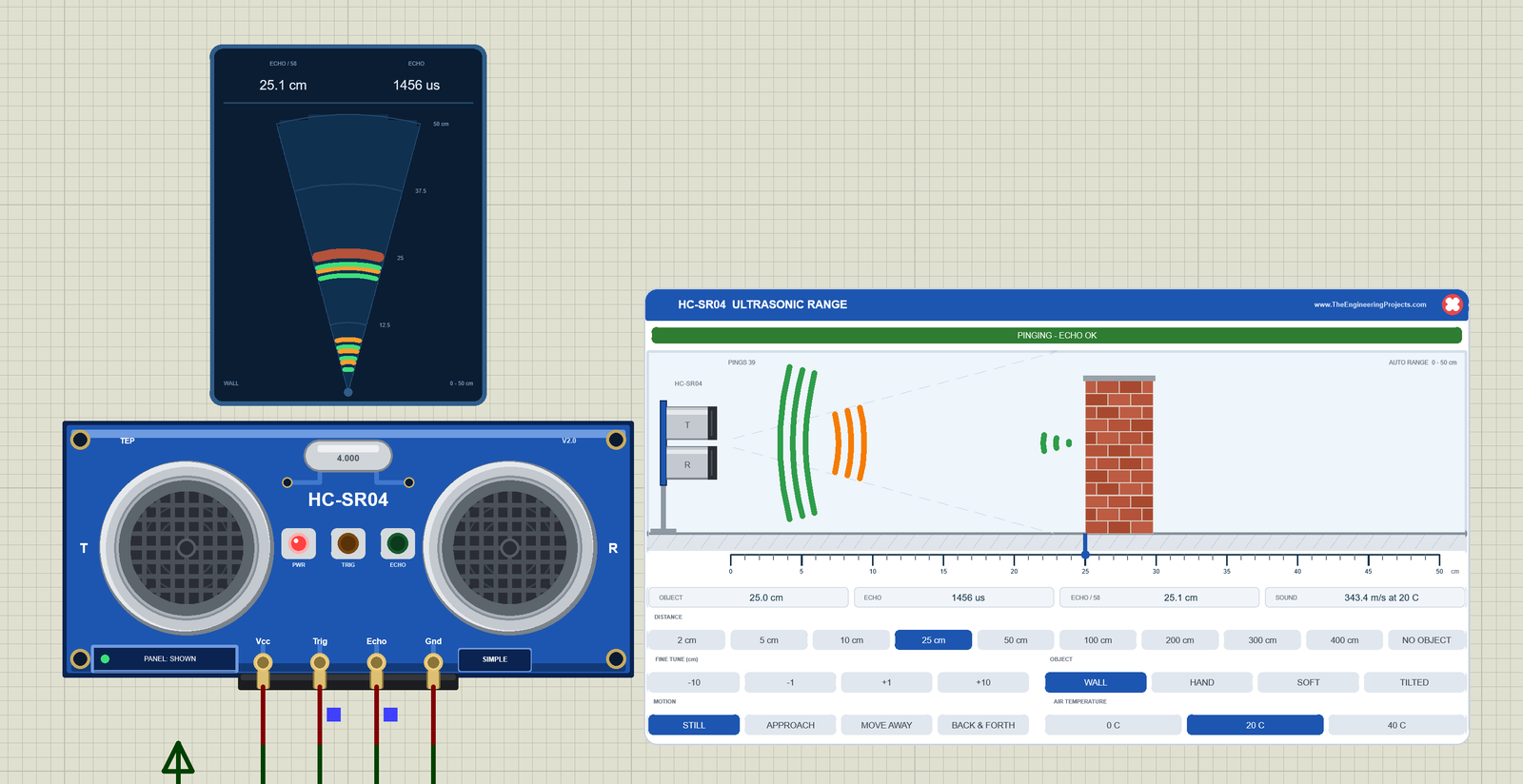
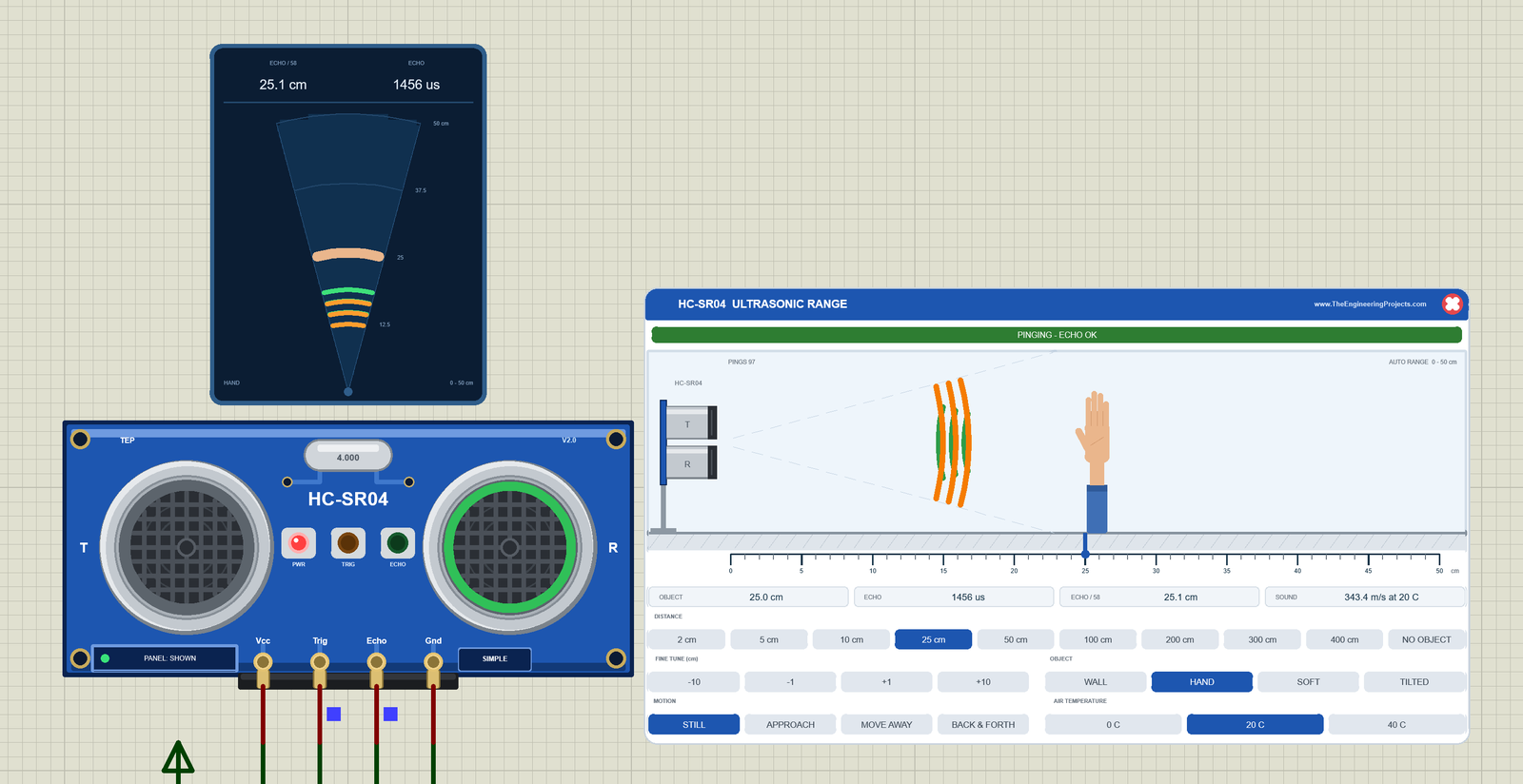
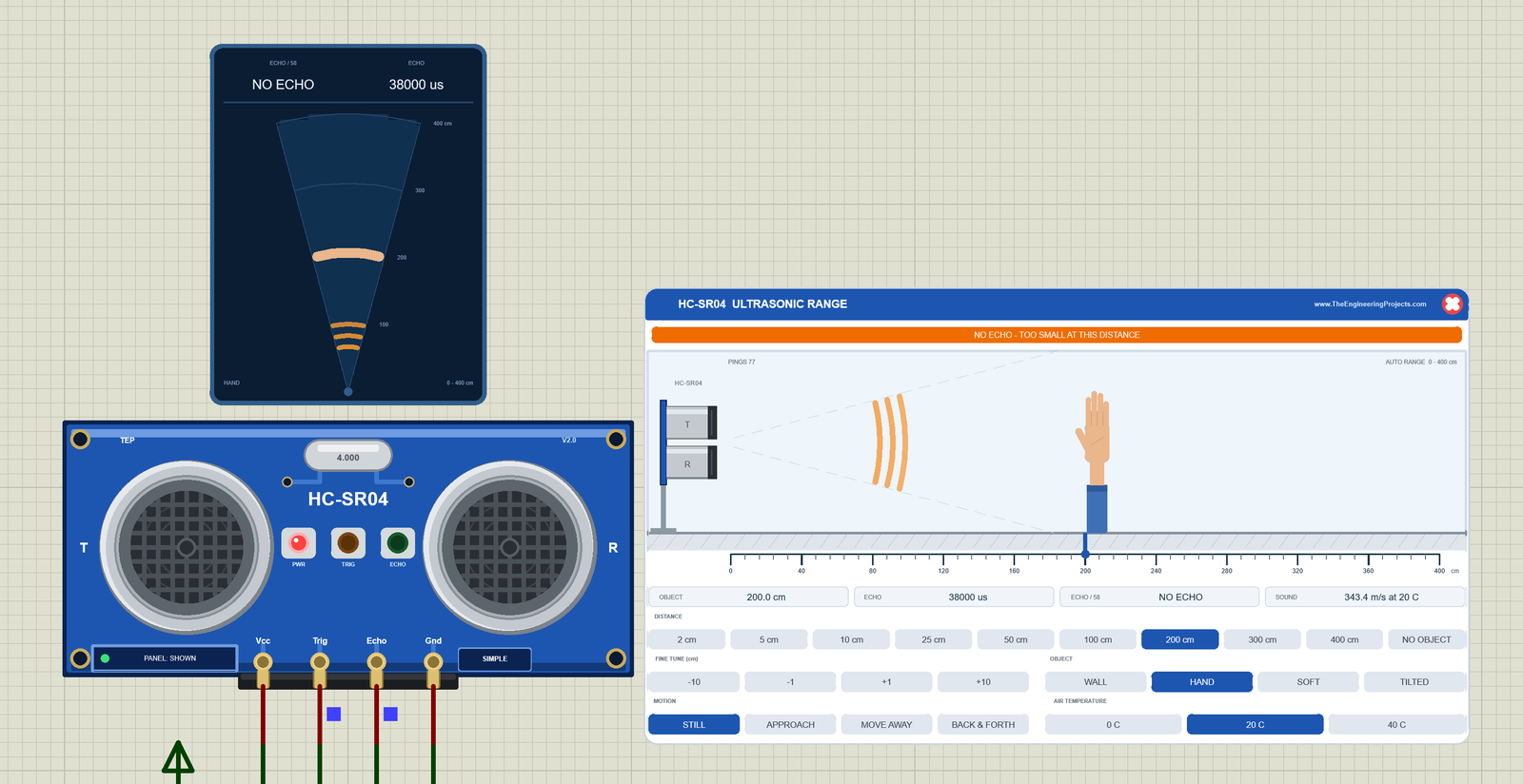
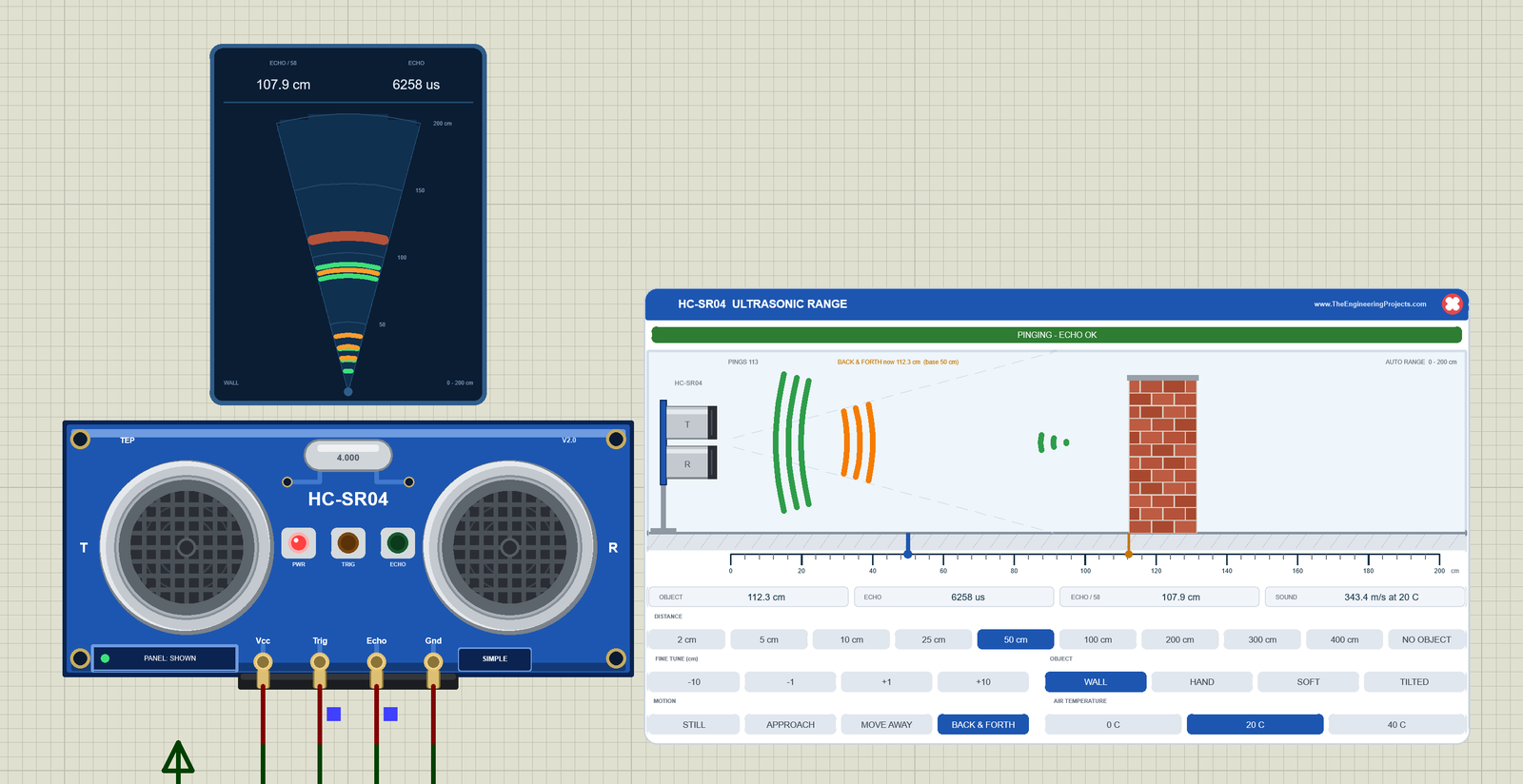
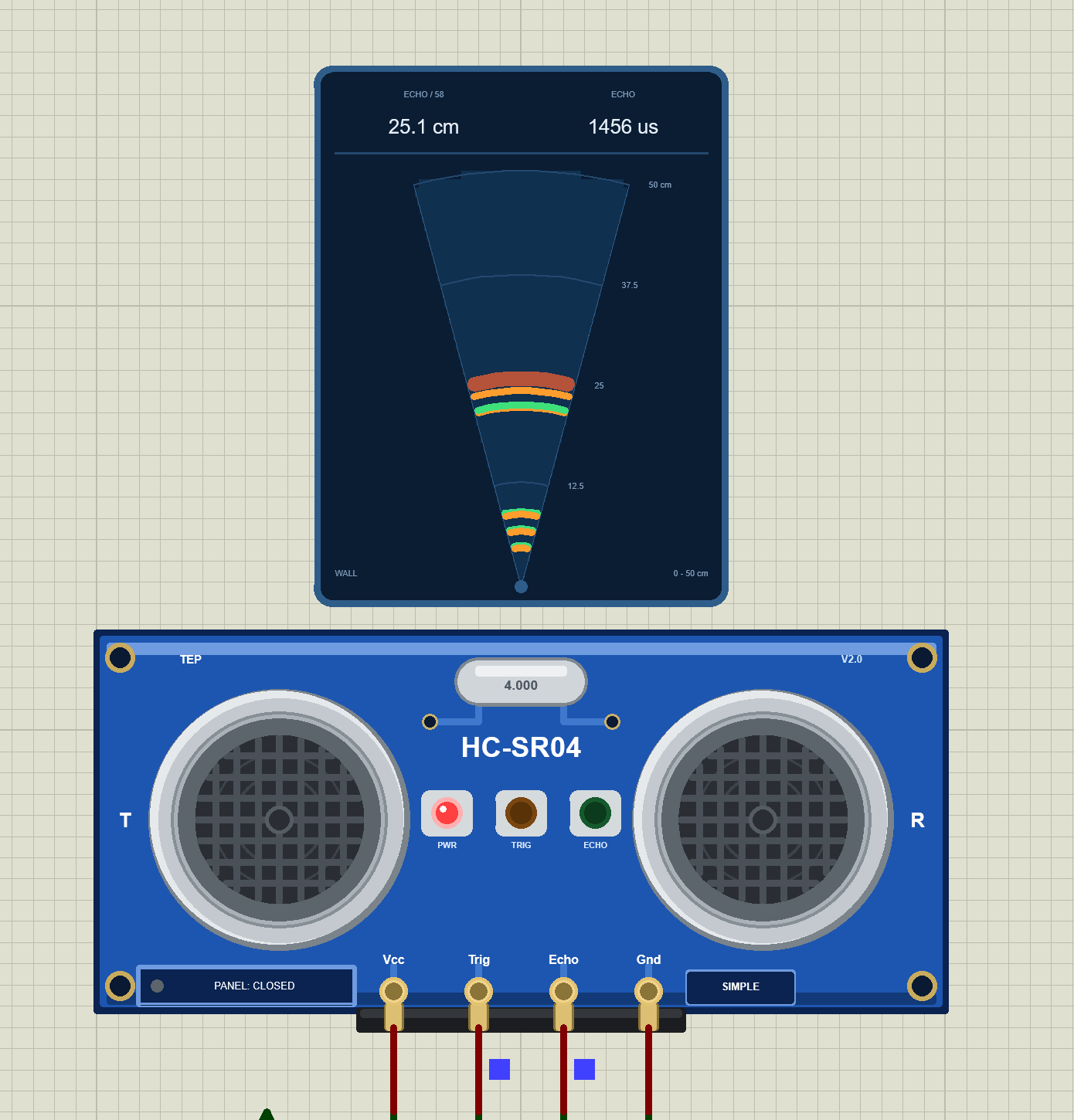
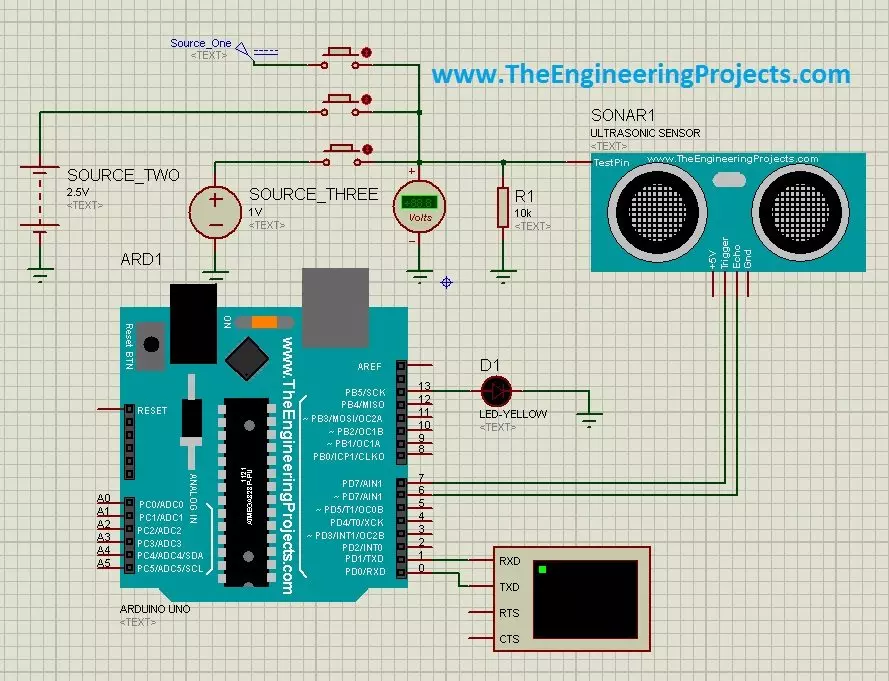
The circuit, the board and the results as they appear in Ultrasonic Sensor Library for Proteus V2.0 (HC-SR04 + Arduino). Open an image for its full size.
README
 README
ULTRASONIC SENSOR (HC-SR04) LIBRARY FOR PROTEUS - V2.0
Designed by The Engineering Projects
www.TheEngineeringProjects.com

IMPORTANT LINKS
Article (read it first - pictures, step by step, every feature explained):
  https://www.theengineeringprojects.com/2026/10/ultrasonic-sensor-library-for-proteus-v2-0.html
Report a bug or suggest a feature (our forum):
  https://www.theengineeringprojects.com/forum/category/ultrasonic-sensor-proteus-library
The demo uses our TEP Serial Monitor Advance (included) instead of Proteus's
Virtual Terminal - its own article:
  https://www.theengineeringprojects.com/2026/10/serial-monitor-advance-proteus-library.html
Support us (the libraries are free):
  https://www.theengineeringprojects.com/donate

FILE STRUCTURE
HCSR04-TEP-v2.0/
|-- Proteus Library Files/
|   |-- ArduinoV3TEP.IDX                0.8 KB   its index -> LIBRARY folder
|   |-- ArduinoV3TEP.LIB               95.6 KB   TEP Arduino UNO (demo) -> LIBRARY folder
|   |-- TEPHCSR04.LIB                 170.1 KB   HC-SR04 Simple + Advance -> LIBRARY folder
|   |-- TEPSERIALMON.LIB               11.1 KB   TEP Serial Monitor Advance -> LIBRARY folder
|-- Proteus Model Files/
|   |-- TEPHCSR04.DLL                 382.5 KB   HC-SR04 model -> MODELS folder
|   |-- TEPSERIALMON.DLL              978.0 KB   Serial Monitor model -> MODELS folder
|-- Proteus Simulation/
|   |-- HCSR04_Distance.hex            21.0 KB   both UNOs (demo sketch v2.0)
|   |-- HCSR04-ArduinoUnoV3.pdsprj     40.9 KB   demo: UNO 1 + HC-SR04 Simple, UNO 2 + Advance
|   |-- TEPHCSR04.DLL                 382.5 KB   copy of the model so the demo runs as is
|   |-- TEPSERIALMON.DLL              978.0 KB   copy of the monitor model
|-- Arduino Code/
|   |-- HCSR04_Distance/HCSR04_Distance.ino   14.4 KB   the demo sketch (source of the .hex)
|-- README.txt                        ~32.2 KB   this file
Total: 3.03 MB (unzipped). The C++ source code of the model is not included.

WHAT IS IT?
A simulation model of the HC-SR04 ultrasonic distance sensor for Proteus 8. Your
Arduino talks to it exactly as to the real module: a HIGH pulse of 10 us on
TRIG starts a measurement, and the module answers with a HIGH pulse on ECHO that
is as long as the sound's trip to the object and back. pulseIn(), Timer1 input
capture and NewPing-style sketches read it unmodified. The model has the
module's timing: the measurement starts when TRIG falls, the eight 40 kHz clicks
go out 250 us later (8 x 25 us = 200 us) and ECHO goes HIGH 450 us after the
TRIG edge; the ECHO pulse is 2 x distance / speed of sound, with the speed of
sound from the air temperature (331.3 + 0.606 x T m/s: 343.4 m/s = 58.24 us per
cm at 20 C). Without an echo ECHO stays HIGH for 38 ms; closer than 2 cm the
reading is random (the blind zone); a TRIG pulse while a measurement is still
running is ignored, as on the real module. You set the object in front of the
sensor - its distance (2 - 400 cm, or none), what it is (a WALL, a HAND, a SOFT
cushion, a TILTED board), how it moves (STILL, APPROACH, MOVE AWAY, BACK &
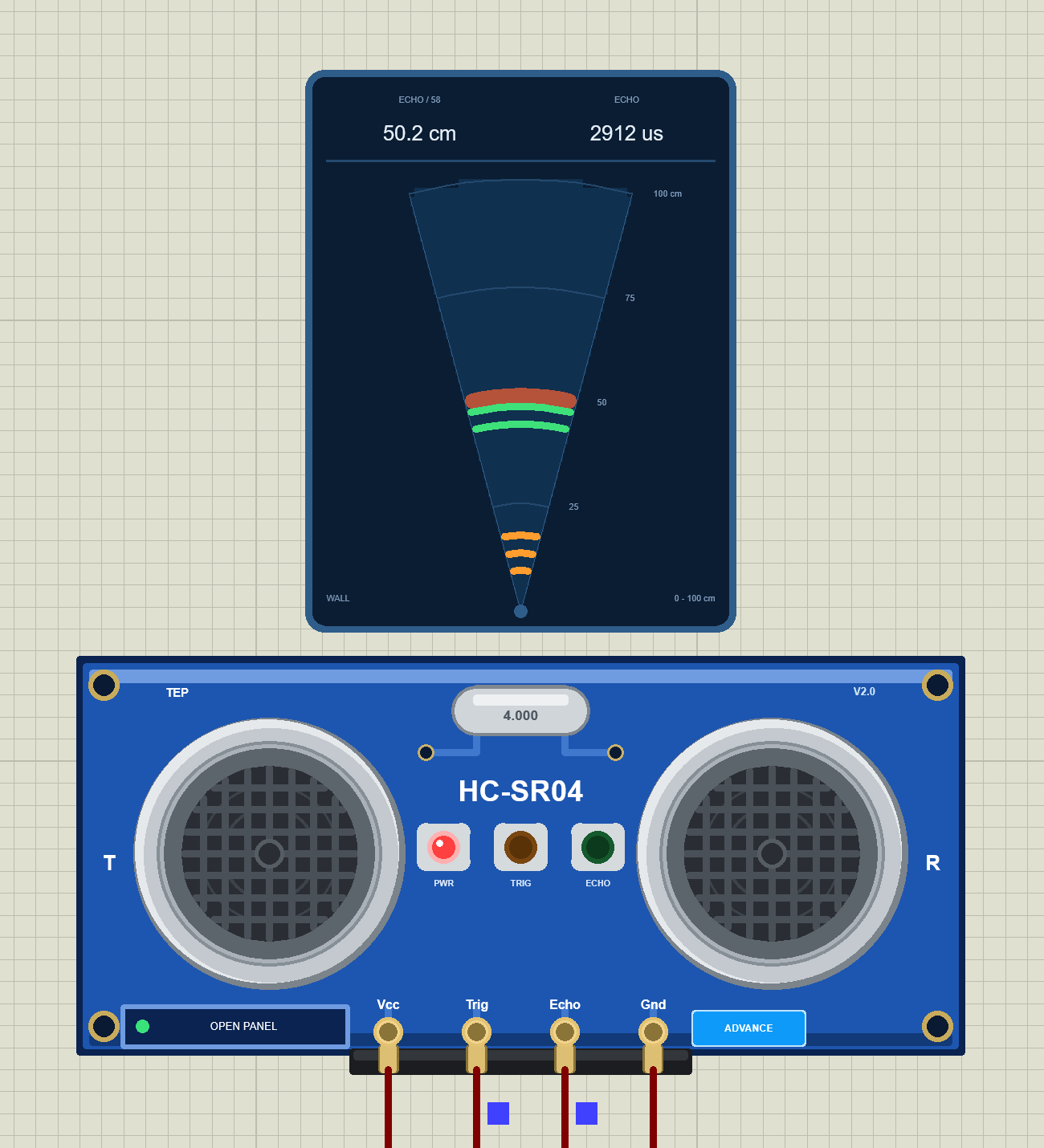
FORTH) and the air temperature (0 / 20 / 40 C). The part looks like the blue
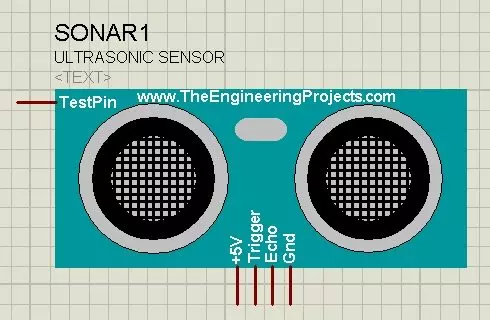
HC-SR04: the two silver transducers T and R, the 4.000 MHz crystal between
them, the 4-pin header at the bottom. While the simulation runs the T ring
glows orange when the clicks go out and the R ring green when the echo comes
back, and a sonar screen above the board shows the beam (15 degrees each side),
the object at its distance and the sound going out and coming back (slowed
down to see it), with ECHO / 58 in cm and the ECHO time in us. Three LEDs sit
between the transducers: PWR (red, the supply), TRIG (orange, a flash on every
accepted TRIG pulse) and ECHO (green, lit while ECHO is HIGH) - all three are
TEP additions: the real HC-SR04 has no LED.

TWO DEVICES IN ONE LIBRARY (search "HC-SR04" in Pick Devices):
  HC-SR04 Simple   device HCSR04TEP
                   "HC-SR04 Ultrasonic Distance Sensor (TEP) - Simple"
                   On-Sheet Panel: a panel on the schematic next to the sensor -
                   the sensor's state (PINGING - ECHO OK / NO ECHO - NOTHING IN
                   RANGE / TOO CLOSE ...), a side view with the sensor, the
                   object, the beam and the sound arcs, a ruler (AUTO range 50 /
                   100 / 200 / 400 cm - click it or the scene to place the
                   object), the readouts OBJECT, ECHO, ECHO / 58 and SOUND, and
                   the buttons: the distances 2 - 400 cm and NO OBJECT, fine
                   tune -10 / -1 / +1 / +10 cm, the object, the motion and the
                   air temperature. The red X in the panel's header closes it,
                   the PANEL button on the board opens it again.
  HC-SR04 Advance  device HCSR04ADVTEP
                   "HC-SR04 Ultrasonic Distance Sensor (TEP) - Advance"
                   Pop-Up Panel: only the sensor board on the schematic; at Run
                   a TEP pop-up window "TEP HC-SR04 Advance" opens - the same
                   look as the TEP Serial Monitor (move it by its header,
                   resize it, minimise it). The tabs Scene and Test sit in the
                   header; the gear and ? icons open Settings and Help; the
                   palette icon switches the theme:
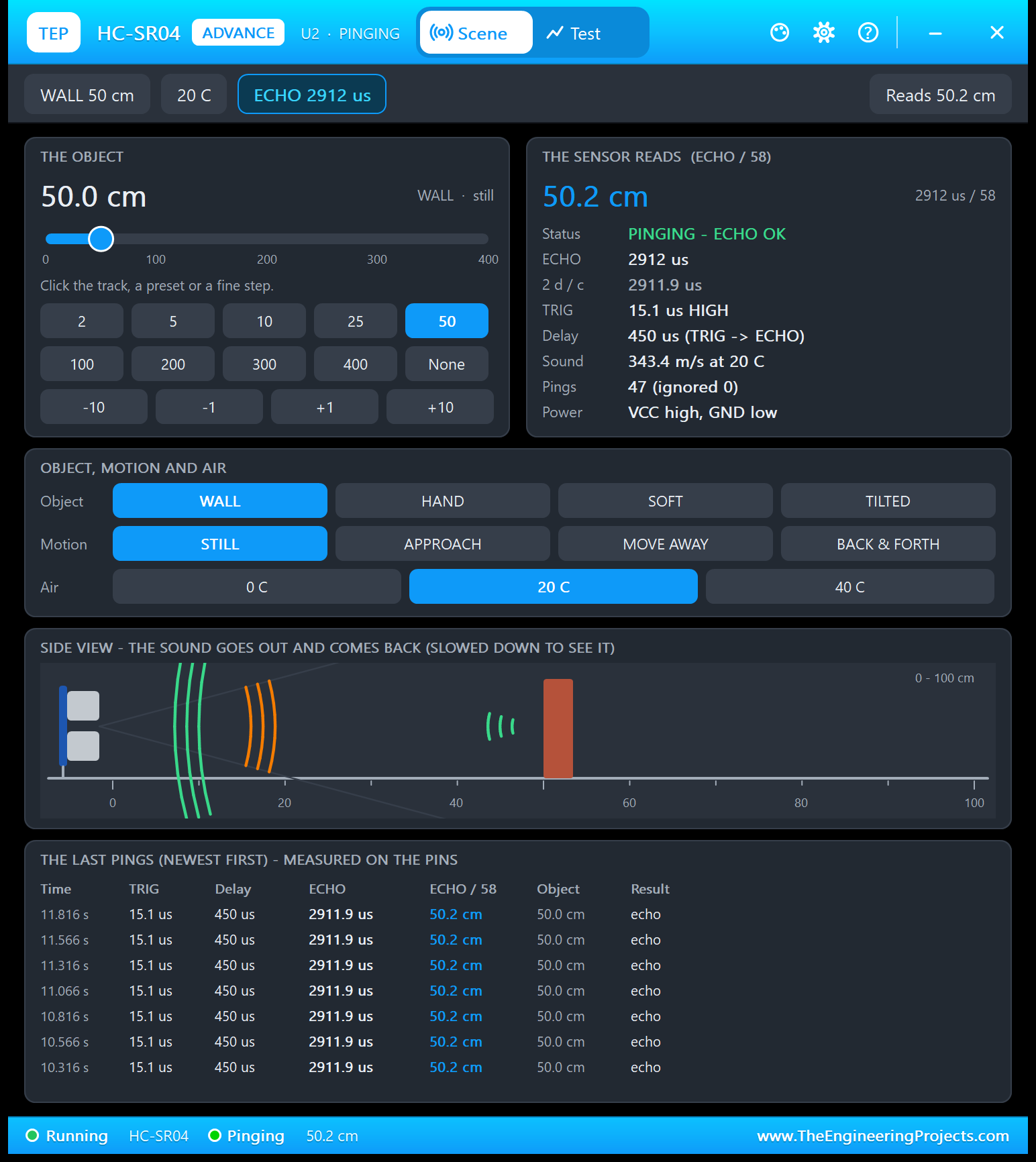
                     Scene     THE OBJECT (distance, a slider 0 - 400 cm, ten
                               presets and fine steps), THE SENSOR READS (ECHO /
                               58 in cm, the status, the ECHO time, 2 d / c, the
                               TRIG pulse, the TRIG -> ECHO delay, the speed of
                               sound, pings and ignored TRIG pulses, power), the
                               object / motion / air buttons, a side view and
                               THE LAST PINGS (time, TRIG, delay, ECHO, ECHO /
                               58, object, result) - all measured on the pins
                     Test      four tools measured on the model with your
                               sketch: Echo timing, Ping timing, Step response,
                               Range test (see THE TEST TOOLS below)
                     Settings  theme (TEP Dark / Light), text size, open at Run,
                               window size - remembered for your Windows user
                     Help      Help & Support like the TEP Serial Monitor:
                               report a bug, suggest a feature, article, user
                               guide, updates, donate, website, forum; Copy
                               diagnostics (sensor, scene, timing, the last
                               pings, test results) for a bug report
                   The OPEN PANEL button on the board opens the window again
                   after you close it.
Both devices use the same model (TEPHCSR04.DLL) and the same properties.

NEW IN V2.0
* Two devices: HC-SR04 Simple (panel on the sheet, close / open) and HC-SR04
  Advance (pop-up window with the scene, four test tools, settings and help) -
  see above.
* Board: the blue HC-SR04 drawn clean and bold - two silver transducers with a
  dark mesh face (T left, R right), the 4.000 MHz crystal, four gold mounting
  holes, the header Vcc Trig Echo Gnd - with glowing rings (T orange when the
  clicks go out, R green when the echo is back), a sonar screen above the board
  (the beam, the object, the sound out and back, ECHO / 58 and the ECHO time),
  a PANEL / OPEN PANEL button and a SIMPLE / ADVANCE badge. LEDs: PWR (red),
  TRIG (orange) and ECHO (green) - TEP additions (the real HC-SR04 has no LED):
  PWR lights with the supply, TRIG for 120 ms (simulation time) after every
  accepted TRIG pulse, ECHO while the ECHO pin is HIGH.
* Model - a pin and event log: every TRIG pulse (its HIGH time, accepted /
  ignored while busy / too short / the module's own ECHO in one-pin mode) and
  every ping (TRIG -> ECHO delay, ECHO time, the object's distance, echo or no
  echo) with the simulation time - the panels, the tools and Copy diagnostics
  show it.
* Model - the readouts use the demo sketch's formula: the panels show ECHO / 58
  (the time the ECHO pin was HIGH, divided by 58), so the panel and the Serial
  Monitor show the same number (50 cm at 20 C: ECHO 2912 us = 50.2 cm).
* Effects: APPROACH, MOVE AWAY and BACK & FORTH keep the distance you set as
  the base - the slider and the ruler mark it "(base)", an amber marker shows
  where the object is now and the panel says "APPROACH now 64.4 cm (base 100
  cm)".
* The demo: ONE project with two UNOs - UNO 1 with HC-SR04 Simple, UNO 2 with
  HC-SR04 Advance - each with the TEP Serial Monitor Advance instead of the
  Virtual Terminal (U3 = UNO 1, U4 = UNO 2, quick buttons) and the green
  "way is clear" LED on A0.
* The demo sketch (v2.0) keeps every line of the earlier demo ("Distance: 50.2
  cm (19.8 in)    [#####...............]", "Out of range") and adds the
  commands HELP, STATUS, READ, EVERY ms, RAW ON / OFF and METHOD CAPTURE /
  PULSEIN. It now times the ECHO pulse with the UNO's Timer1 input capture on
  D8 (exact to 0.5 us) - ECHO moved from D10 to D8 for that (TRIG stays on D9).
  METHOD PULSEIN switches back to pulseIn() to compare (it reads about 0.5 %
  short, see THE DEMO SKETCH).
* Version 2.0 everywhere; the C++ source code is not included.
Earlier versions: The Engineering Projects published earlier versions of an
ultrasonic sensor library for Proteus; V2.0 is a new model with its own part
names (HCSR04TEP / HCSR04ADVTEP) and files (TEPHCSR04.LIB / TEPHCSR04.DLL).

TEST STATUS
V2.0: verified in Proteus 8.5 on 9 Oct 2026 (run 1 + run 2 on this build) with
this package's demo:
  * the project loads; U3 / U4 print the start lines, then "Distance: 50.2 cm
    (19.8 in)    [#####...............]" every 250 ms - read with Timer1 input
    capture, the same 50.2 cm / 2912 us as the panel and the sonar screen;
  * METHOD PULSEIN reads 49.9 cm (pulseIn about 0.5 % short), METHOD CAPTURE
    exact again; HELP, STATUS, READ, EVERY 0 / 250 on U4;
  * 25 cm reads 25.1 cm / 1456 us; HAND at 200 / 300 cm: "NO ECHO - TOO SMALL
    AT THIS DISTANCE" (ECHO 38000 us); BACK & FORTH: "BACK & FORTH now 89.2 cm
    (base 50 cm)", the 50 cm base preset lit, the amber "now" marker;
  * the red X closes the panel, PANEL opens it; no outline around a button or
    the banner after another preset is picked;
  * U2's pop-up without a caption row: Echo timing 58.24 us per cm (ECHO / 58
    0.41 % high at every wall), delay 450 us, TRIG 15.1 us; Ping timing 250.0
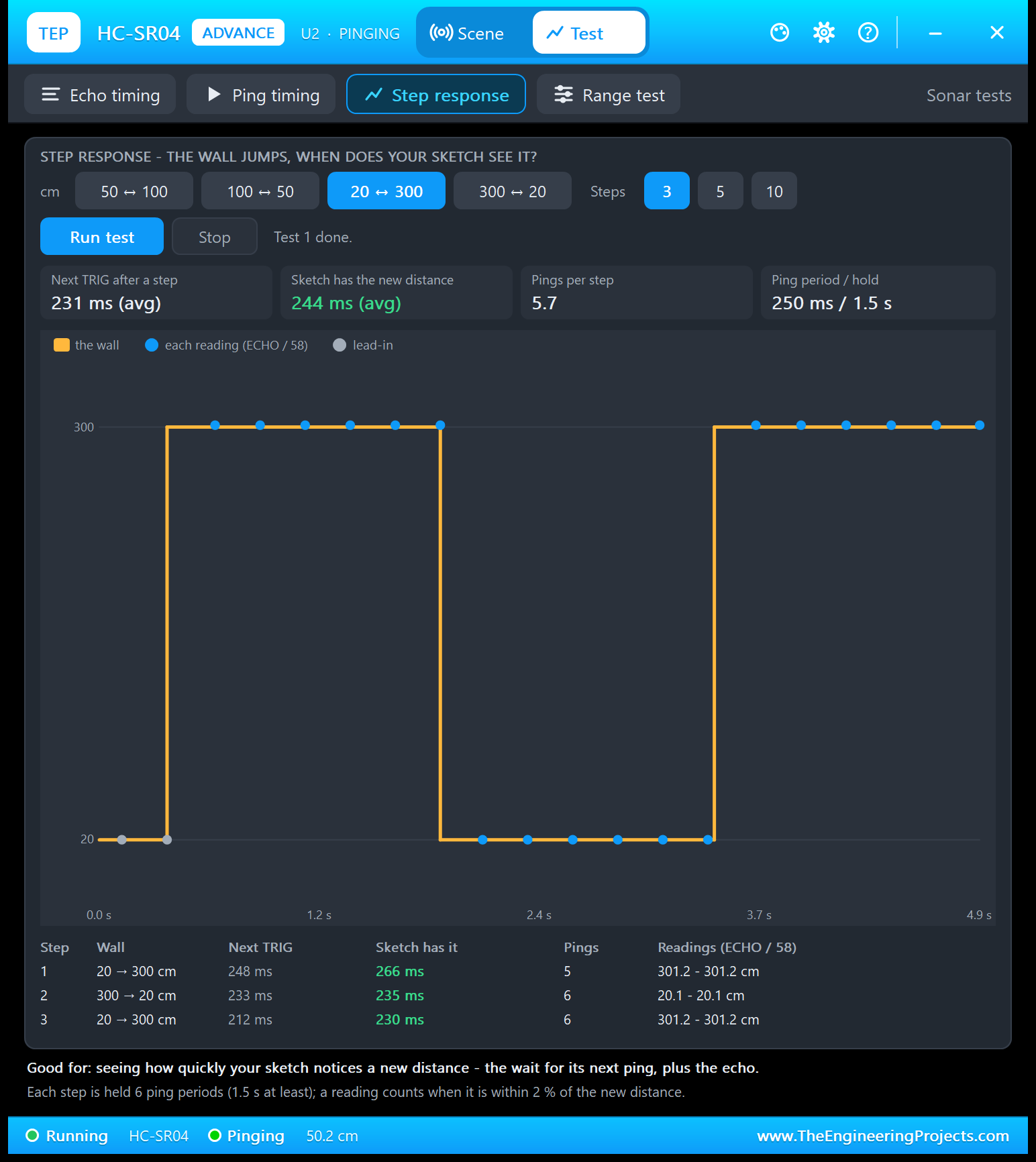
    ms, 0 of 20 ignored, quiet 246.5 ms, "fine"; Step response 20 <-> 300 cm x
    3: the next TRIG 231 ms after a step, the sketch 244 ms (averages); Range
    test (WALL) 2 - 400 cm, no echo from 405 cm (38 ms), 1 cm random;
    Settings and Help;
  * the simulation runs at about 0.4 - 0.5 x real time with both pop-ups open.
  3023 automatic checks on a PC, 0 failed:
  610 on the chip model (the 580 checks of the first build unchanged: TRIG
  rules, the ECHO delay and width against 2 d / c at 0 / 20 / 40 C to 1 ns,
  re-trigger, one-pin mode, NOECHO 38 / 170 ms / STUCK, the blind zone, the
  object limits, MAXRANGE, motion, noise, power, property text; and 30 new: the
  pin / event log, ECHO / 58, the four test tools including a 3-step and a
  10-step step response with readings in every step, stop / timeout / power
  loss); 679 on the complete Proteus model (both devices, the red X / PANEL /
  OPEN PANEL, the pop-up without a caption row, its pages, all 8 Help links,
  the LEDs, the rings, the sonar screen, the effects with their base marker,
  every sheet text ASCII-only and inside its part - clear of the buttons -
  in 73 drawn frames, the tools through the adapter; the library's 133 own
  texts are checked the same way when it is built; no rim of the symbol around
  a button or the banner after another preset is picked); 74 with the real v2.0
  demo sketch on TWO UNOs against the complete
  model (every start-up line, the readings at all ten presets and at 0 / 20 /
  40 C equal to the panel's ECHO / 58, the LEDs, the 250 ms rhythm, no echo,
  every command, pulseIn 0.5 - 0.6 % short, TRIG pulses ignored while ECHO is
  HIGH, the four tools, every line at most 80 characters); 1660 on the
  rendered boards and pop-up windows (every page fits in TEP Dark and Light, at
  Large text and 150 % DPI, no clipped table cell, no empty band over 12 %,
  every tool's hint lines and every header state fit).

INSTALLATION (about 2 minutes)
1. Close Proteus. Extract the WHOLE ZIP to a normal folder (e.g. Desktop).
2. Copy everything in "Proteus Library Files" (TEPHCSR04.LIB with both devices,
   TEPSERIALMON.LIB and the TEP Arduino UNO V3 library ArduinoV3TEP.LIB / .IDX
   used by the demo) to the LIBRARY folder of Proteus, for example:
     C:\Program Files (x86)\Labcenter Electronics\Proteus 8 Professional\LIBRARY
   (on some PCs: C:\ProgramData\Labcenter Electronics\Proteus 8 Professional\
   LIBRARY - use the folder that already holds Proteus's own .LIB files).
3. Copy TEPHCSR04.DLL and TEPSERIALMON.DLL from "Proteus Model Files" to the
   MODELS folder (...\Proteus 8 Professional\MODELS).
4. If the LIBRARY folder has a TEPHCSR04.IDX (an old index of this file),
   delete it - Proteus makes a new one.
5. Start Proteus. In Pick Devices (P) search "HC-SR04": you get the Simple and
   the Advance device (category Sensors > Distance).

RUN THE DEMO
"Proteus Simulation\HCSR04-ArduinoUnoV3.pdsprj" - keep the .hex file and the
two DLLs beside the project.
  UNO 1 (ARD1): HC-SR04 Simple (U1), Serial Monitor U3.
  UNO 2 (ARD2): HC-SR04 Advance (U2), Serial Monitor U4.
  Both run HCSR04_Distance.hex: TRIG on D9, ECHO on D8, VCC on +5V, GND on
  ground. An LED (D1 / D2) with 220 ohm on A0 of each UNO: the way is clear
  (more than 50 cm, or nothing in range).
  1. Press Run. Both monitor windows open (9600 baud) and so does U2's pop-up.
     U3 and U4 show "HC-SR04 ultrasonic distance meter", the website, "TRIG ->
     D9, ECHO -> D8, one reading every 250 ms" and "Demo v2.0 - type HELP for
     the Serial Monitor commands", then four times a second:
       Distance: 50.2 cm (19.8 in)    [#####...............]
     The PWR LEDs are lit, TRIG flashes and ECHO blinks with every ping, the
     rings glow and the sonar screens show the sound going out and coming
     back. At 50 cm the A0 LEDs are off (50 cm is not "more than 50").
  2. U1: click the distances on the panel - 100 cm: "Distance: 100.4 cm (39.5
     in)", LED D1 lights (more than 50 cm); 2 cm: "Distance: 2.0 cm"; 400 cm:
     "Distance: 401.6 cm"; NO OBJECT: "Out of range" (ECHO stays HIGH 38 ms, the
     sketch gives up after 30 ms). Try HAND at 200 cm (no echo - a hand echoes
     to 150 cm), SOFT (to 100 cm), TILTED (never), APPROACH (20 cm/s, it stops
     at 3 cm), 0 C (50 cm reads 52.0 cm) and 40 C (48.5 cm). Close the panel
     with its red X and open it with PANEL on the board.
  3. U3 / U4 quick buttons: U3 STATUS, RAW ON (the echo time under each line),
     METHOD PULSEIN (pulseIn() instead of Timer1: 50 cm reads 49.9 cm), EVERY 60
     (the fastest rhythm the datasheet suggests); U4 STATUS, READ, EVERY 1000,
     HELP. Type METHOD CAPTURE, RAW OFF, EVERY 250, EVERY 0 (stop).
  4. U2 (Advance): Scene page - the slider, the presets, the object, the motion
     and the air; watch THE SENSOR READS and THE LAST PINGS. Test page:
       Echo timing: 9 distances 2 - 400 cm at 20 C: 58.24 us per cm = 343.4 m/s
         (0 C: 60.37 us per cm, 40 C: 56.25); the TRIG -> ECHO delay 450 us.
       Ping timing: Capture 5 s - 20 pings every 250.0 ms, TRIG HIGH about 15
         us (the sketch's digitalWrite + delayMicroseconds(10)), ECHO 2.91
         ms, quiet after ECHO 246.5 ms, none ignored. Type EVERY 20 on U4 and
         capture again: the pings come faster than 60 ms; with NO OBJECT the
         TRIG pulses that arrive during the 38 ms no-echo pulse are ignored.
       Step response: 50 <-> 100 cm, 3 steps - the next TRIG comes up to one
         ping period (250 ms) after the step, the sketch has the new distance
         about 3 ms later (the echo), 6 readings in every step.
       Range test: WALL echoes 2 - 400 cm, no echo from 405 cm (ECHO 38.0 ms);
         HAND 2 - 150 cm, SOFT 2 - 100 cm, TILTED never; 1 cm reads a random
         distance (the blind zone).
  5. Close U2's window and open it again with OPEN PANEL on the board.
Closed a monitor window? Click OPEN MONITOR on the monitor part.

WIRING
HC-SR04 VCC -> +5V, GND -> GND, TRIG -> Arduino D9, ECHO -> Arduino D8.
In the sketch: pinMode(9, OUTPUT); pinMode(8, INPUT); a 10 us HIGH pulse on D9,
then time the HIGH pulse on D8 (Timer1 input capture, or pulseIn(8, HIGH,
30000)); distance in cm = ECHO time in us / 58. Serial 9600.
The "way is clear" LED + 220 ohm from A0 to GND on both UNOs. The sketch also
drives D5 / D6 / D7 (green / yellow / red parking LEDs) if you add them.
Serial Monitor RXD <- Arduino D1 (TX), Serial Monitor TXD -> Arduino D0 (RX),
Serial Monitor GND -> ground. RXD2 is not needed: the HC-SR04 has no serial
line to watch.
Pin order in Proteus: VCC TRIG ECHO GND (the same order as on the module's
header). Any digital pins work for TRIG / ECHO with pulseIn(); D8 is the UNO's
only input capture pin (ICP1). NewPing's one-pin mode (TRIG and ECHO on one
Arduino pin) works too: the module ignores its own ECHO on TRIG.
REAL HARDWARE:
 * Supply: the classic HC-SR04 needs 5 V; the HC-SR04P / RCWL-9610 versions run
   from 3.3 to 5 V. The classic module's ECHO is a 5 V signal - use a divider
   for a 3.3 V board.
 * Range: 2 - 400 cm on a flat, hard surface facing the sensor; a hand, soft
   things (cloth, foam) and surfaces at an angle reflect much less - the model's
   HAND (150 cm), SOFT (100 cm) and TILTED (no echo) are rough guides.
 * The beam is about 15 degrees each side; anything inside it can echo first.
 * Leave 60 ms or more between pings (the datasheet) so an old echo does not
   arrive in the next measurement.
 * The speed of sound changes with temperature (about 0.6 m/s per degree C):
   ECHO / 58 is right at about 22 C; at 0 C it reads about 4 % high (50 cm:
   52.0 cm), at 40 C about 3 % low (48.5 cm) - try the AIR buttons.
 * Without an echo the module holds ECHO HIGH for 38 ms in the datasheet;
   many real modules hold it much longer (about 170 ms) - set NOECHO = REAL to
   try that; keep a timeout in your sketch.

THE SCENE
The panel buttons, the ruler and the slider set the object in front of the
sensor:
  DISTANCE   2, 5, 10, 25, 50, 100, 200, 300, 400 cm or NO OBJECT; the fine
             steps -10 / -1 / +1 / +10 cm; a click on the ruler or the scene
  OBJECT     WALL (echoes to MAXRANGE, 400 cm), HAND (to 150 cm), SOFT (a
             cushion, to 100 cm), TILTED (a board at an angle: never)
  MOTION     STILL, APPROACH (20 cm/s, stops at 3 cm), MOVE AWAY (20 cm/s, to
             450 cm), BACK & FORTH (10 - 150 cm, 8 s a round trip)
  AIR        0, 20, 40 C (the speed of sound 331.3 / 343.4 / 355.5 m/s)
Properties DISTANCE, OBJECT, MOTION and TEMP give the start of every run. While
a test tool runs it owns the object (the scene buttons wait and say why).

THE TEST TOOLS (HC-SR04 Advance, Test tab) - what they really measure
Every tool runs on the live model with your sketch. A tool only places the
object and reads the module's own logs (the TRIG pulses and the pings) - it
never talks to your Arduino - so every time and value is what your sketch and
the module really did, measured with the simulation clock. Each tool shows one
"Good for:" line and one line on how it measures. A tool stops by itself when
your sketch sends no TRIG pulse for 3 s or the sensor loses its power.
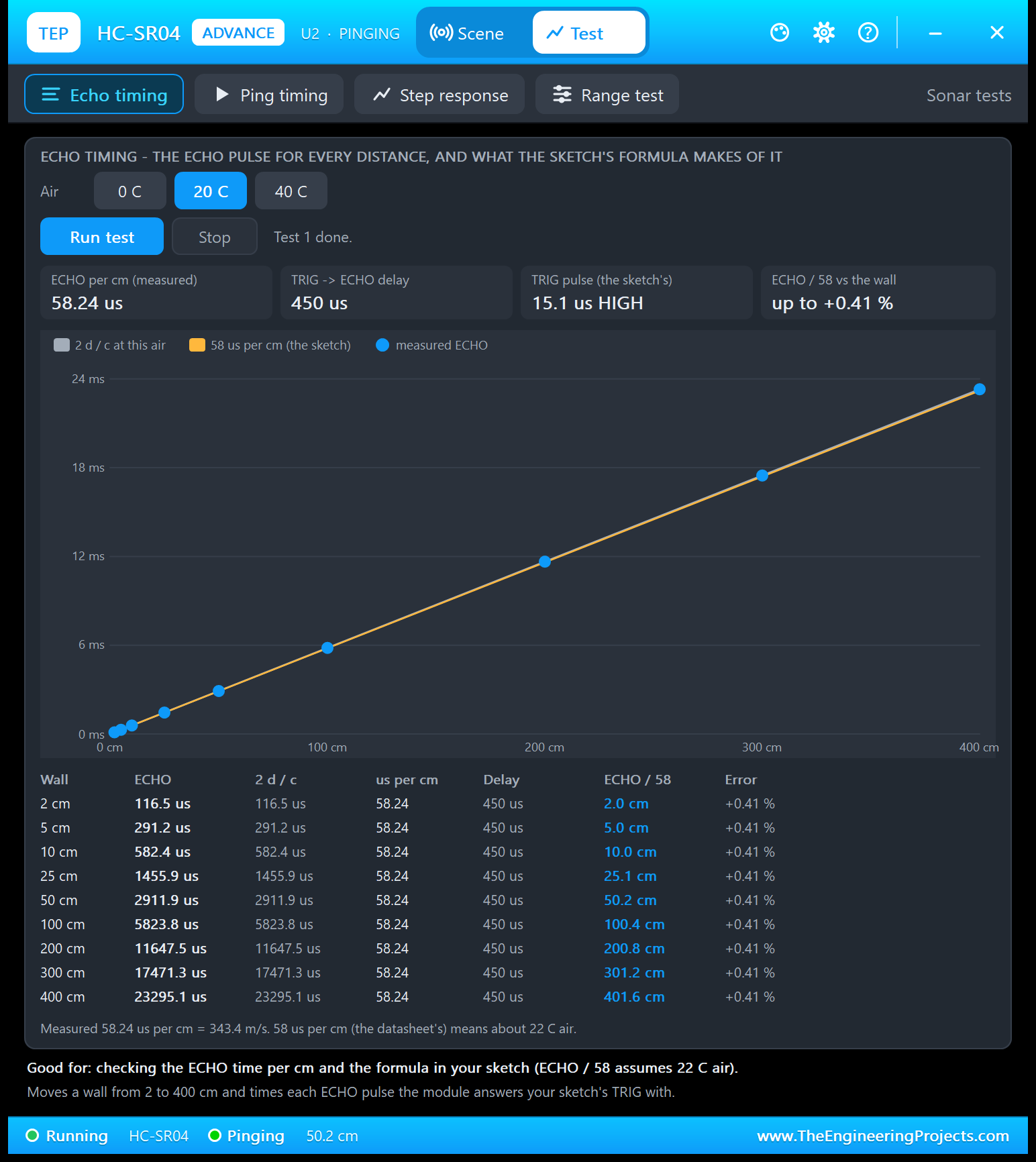
  Echo timing     Good for: checking the ECHO time per cm and the formula in
                  your sketch (ECHO / 58 assumes 22 C air). Moves a wall to 2,
                  5, 10, 25, 50, 100, 200, 300 and 400 cm (air 0, 20 or 40 C)
                  and times the ECHO pulse your sketch's next TRIG gets at each:
                  the ECHO time, the delay after TRIG, the TRIG pulse, ECHO /
                  58 and its error, a chart of ECHO against distance with the
                  measured slope. In Proteus with the demo (20 C): 58.24 us per
                  cm = 343.4 m/s, delay 450 us, TRIG 15.1 us, ECHO / 58 0.41 %
                  high at every wall.
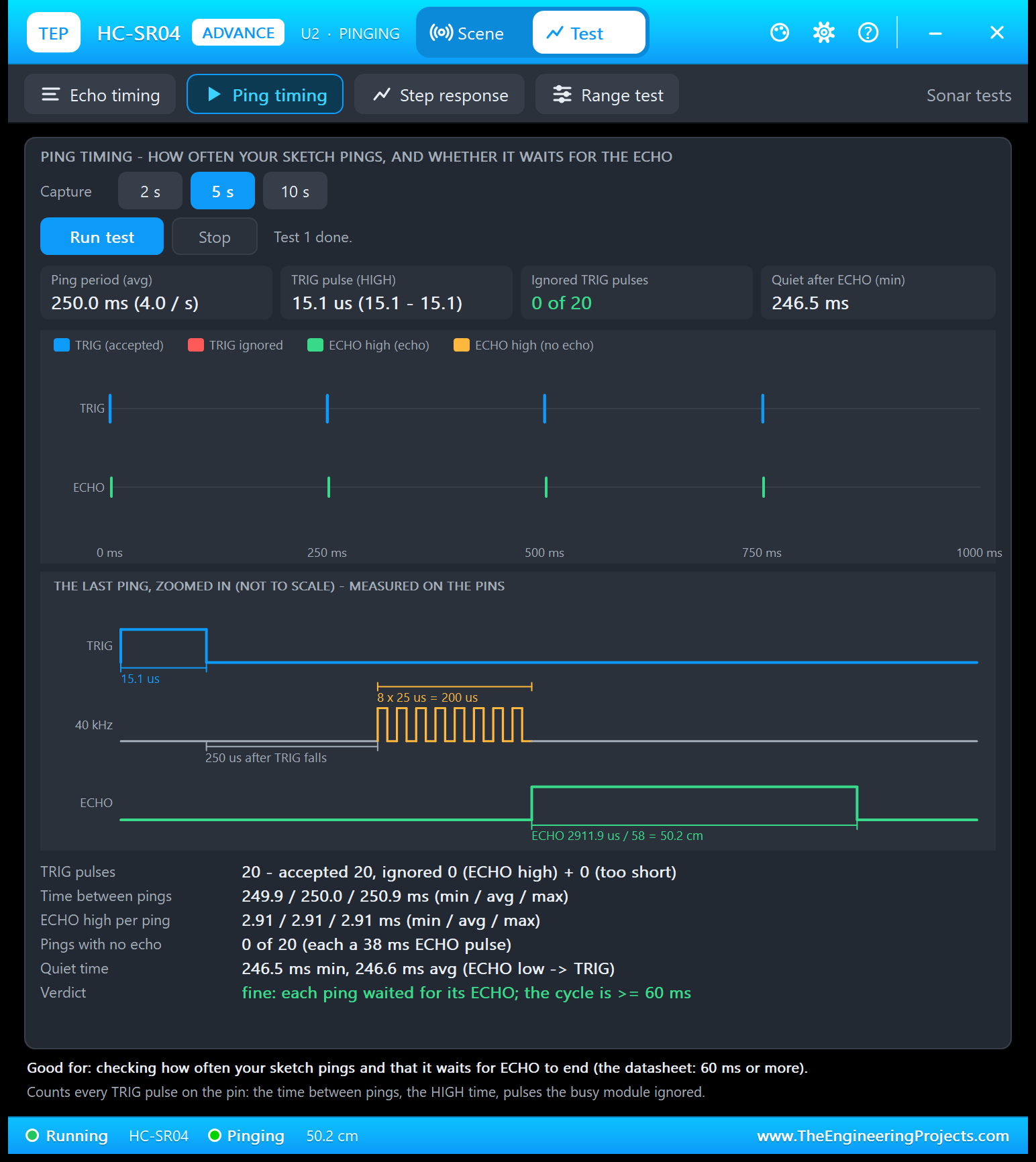
  Ping timing     Good for: checking how often your sketch pings and that it
                  waits for ECHO to end (the datasheet: 60 ms or more).
                  Captures 2, 5 or 10 s of TRIG pulses: the time between
                  pings (min / avg / max), the TRIG HIGH time, the pulses the
                  module ignored (ECHO still HIGH, or too short), the pings with
                  no echo, the quiet time between ECHO and the next TRIG, a 1 s
                  timeline and the last ping zoomed in (TRIG, the 40 kHz
                  clicks, ECHO). In Proteus with the demo (5 s): 20 pings every
                  250.0 ms, none ignored, quiet 246.5 ms, verdict "fine" (ECHO
                  2.91 ms at 50 cm).
  Step response   Good for: seeing how quickly your sketch notices a new
                  distance - the wait for its next ping, plus the echo. Steps
                  the object (50 <-> 100, 100 <-> 50, 20 <-> 300, 300 <-> 20 cm)
                  3, 5 or 10 times after a flat lead-in; each step is held 6
                  ping periods (1.5 s at least) and every reading is kept: the
                  next TRIG after the step, when the sketch had the new
                  distance (a reading within 2 %), the readings per step, a
                  chart. In Proteus with the demo (20 <-> 300 cm x 3): the next
                  TRIG 231 ms after a step, the sketch had the new distance
                  after 244 ms (averages); 6 readings in every step.
  Range test      Good for: seeing where the echo stops for each object and
                  what your sketch reads with none (a 38 ms pulse). Puts the
                  object at 1, 2, 5, 25, 50, 100, 105, 150, 155, 200, 300, 400,
                  405 and 450 cm and records the ECHO pulse of a ping at each:
                  echo / no echo / random (1 cm, the blind zone), a chart and a
                  bar per object. In Proteus (WALL): 2 - 400 cm, no echo from
                  405 cm (ECHO 38 ms HIGH), 1 cm random; on the PC also HAND
                  2 - 150, SOFT 2 - 100, TILTED none.
  The tools refuse to start, with the reason, when the sensor has no power or
  another test runs.

THE DEMO SKETCH ON THE SERIAL MONITOR (HCSR04_Distance v2.0)
  HELP                        the command list
  STATUS                      reading interval, method, formula, timeout, the
                              last echo time and distance, readings, out of
                              range
  READ                        one reading now
  EVERY ms                    the time between readings (10 - 60000 ms;
                              EVERY 0 stops them)
  RAW ON / RAW OFF            also print the echo time of each reading
  METHOD CAPTURE / PULSEIN    Timer1 input capture on D8 (default, exact to
                              0.5 us) or pulseIn()
Monitor quick buttons in the demo: U3 STATUS, RAW ON, METHOD PULSEIN, EVERY 60;
U4 STATUS, READ, EVERY 1000, HELP.
Why pulseIn() reads short: pulseIn() counts loop turns while ECHO is HIGH, and
the millis() interrupt (every 1.024 ms) stops the count for a few
microseconds each time - so long pulses read about 0.5 - 0.6 % short (50 cm:
49.9 cm, 400 cm: 399.3 cm). The real UNO does the same. Timer1 input capture
latches the timer in hardware at each edge and is not disturbed.
Every line the demo prints is shorter than 80 characters (the TEP Serial
Monitor's Simple interface shows about 80).

EXPECTED MONITOR OUTPUT (U3 and U4)
  HC-SR04 ultrasonic distance meter
  www.TheEngineeringProjects.com
  TRIG -> D9, ECHO -> D8, one reading every 250 ms
  Demo v2.0 - type HELP for the Serial Monitor commands

  Distance: 50.2 cm (19.8 in)    [#####...............]
  Distance: 50.2 cm (19.8 in)    [#####...............]
Then on U3:
…Development1 release
 Development1 release
-
V2.0Ultrasonic Sensor Library for Proteus V2.0this page
V2.0 is the only release in the Download Center so far. When a newer version is published, it appears above with its own download page.
Installation8 steps
 Installation8 steps
From the download to a working project, in order. The steps follow what the package contains.
You will need
- Proteus Design SuiteProteus 8 or newer (Labcenter), on Windows
- Arduino IDE1.8 or 2.x, with the board of the tutorial chosen under Tools → Board
- Any archive toolWindows, macOS and Linux extract ZIP files on their own
Steps
- 1
Extract the archive
Right-click ultrasonic-sensor-tep-v2-0-4790e56bbda14db7a10d277dba7f4048.zip and choose Extract All (or open it with 7-Zip or WinRAR) into a folder you can find again. Keep its folder structure (HCSR04-TEP-v2.0) as it is.
- 2
Copy the library files into Proteus
Move ArduinoV3TEP.LIB, TEPHCSR04.LIB and TEPSERIALMON.LIB and ArduinoV3TEP.IDX into the LIBRARY folder of your Proteus installation: C:\Program Files (x86)\Labcenter Electronics\Proteus 8 Professional\LIBRARY for Proteus 8, or the matching Proteus 7 folder. Older versions keep it under ProgramData\Labcenter Electronics. If Proteus is open, close it first.
- 3
Add the simulation model
Copy TEPHCSR04.DLL and TEPSERIALMON.DLL into the MODELS folder next to LIBRARY, so the component can run, not only be drawn.
- 4
Restart Proteus and place the component
Start Proteus, open a schematic, press P (Pick Devices) and search for the component by the name used in the tutorial. It appears with its pins ready to wire.
- 5
Open the sketch in the Arduino IDE
Open HCSR04_Distance.ino, select your board and port under Tools, then Verify. Sketch → Export Compiled Binary writes the HEX file a simulation needs.
- 6
Load the HEX file
In Proteus double-click the microcontroller, set Program File to HCSR04_Distance.hex and run the simulation. For real hardware, flash the same file with your programmer.
- 7
Open the example simulation
Open HCSR04-ArduinoUnoV3.pdsprj in Proteus to see the wiring exactly as in the tutorial. Check the controller's Program File path, then press Play.
- 8
Follow the tutorial
Ultrasonic Sensor Library for Proteus V2.0 (HC-SR04 + Arduino) explains every connection and setting in order; keep it open beside the files while you build.
FAQs9 questionsContact TEP
 FAQs9 questions
How do I download Ultrasonic Sensor Library for Proteus V2.0?
Wait for the 30-second guest countdown on this page, then press the download button; the file comes straight from our storage. Members who are logged in skip the wait. If the browser opens the file instead of saving it, use its Save as option. The download link is made for you when the countdown ends and works for 15 minutes; a saved or shared link stops working, so share this page instead.
What is inside the archive?
Ultrasonic Sensor Library for Proteus V2.0 comes as a ZIP archive of 12 files (1.4 MB, 3.0 MB unpacked) holding Proteus library files, simulation model DLLs, a Proteus simulation, an Arduino sketch and compiled HEX firmware. Open the File Structure tab for the full list of 12 files.
What should I do if the download does not start?
Check the browser's download list first; an ad blocker or a company firewall can also hold it back, so try another browser or network. If the file arrives incomplete, download it again. For an installation problem, read the Install tab or tell us in the comments with your software version and the exact error message.
Is this file free?
Yes. Every file in the TEP Download Center is free for learning, personal and student projects. If you share it, link back to this page or the tutorial so others find the latest version.
How do I check that the file arrived complete?
Compare its SHA-256 with the one on this page, d0124b0df0981a36c11ceb13d462af04dcda136382d0c9b0f9d6f68fde968865. In PowerShell run Get-FileHash "ultrasonic-sensor-tep-v2-0-4790e56bbda14db7a10d277dba7f4048.zip"; on macOS or Linux run shasum -a 256 "ultrasonic-sensor-tep-v2-0-4790e56bbda14db7a10d277dba7f4048.zip". The same value means the file is exactly the one in our storage; a different one means the download broke off, so download it again.
Do I need WinRAR to open the ZIP file?
No. Windows, macOS and Linux open ZIP archives on their own (Extract All, or double-click). WinRAR and 7-Zip work too. Extract the whole archive before using the files.
Where do I put the LIB and IDX files?
Both files go into the LIBRARY folder of your Proteus installation (Proteus 8: C:\Program Files (x86)\Labcenter Electronics\Proteus 8 Professional\LIBRARY; Proteus 7 has the same folder under its own name). Restart Proteus afterwards and search for the component with P.
Which Proteus version does the library need?
The tutorial names the Proteus version the library was made and tested with. Most TEP libraries work in Proteus 7 and Proteus 8; if the component does not appear after a restart, check that both the LIB and the IDX file were copied and that Proteus was fully closed while copying.
How do I get the HEX file into the simulation?
Compile the sketch in the Arduino IDE (Sketch → Export Compiled Binary gives you the HEX next to the sketch), then in Proteus double-click the board, set Program File to that HEX and run.
Members skip the wait. Log in or join TEP.

- 205Total downloads
- 4%Popularity
- ProteusCategory
- 0Comments
- ssyedzainnasirUploaded by
- 8 Oct 2026Uploaded at


 SHA-256
d0124b0df0981a36c11ceb13d462af04dcda136382d0c9b0f9d6f68fde968865


 Need help with this file?
 Tags
Related Proteus
All Proteus tutorials



More Ultrasonic Sensor project files
All Ultrasonic Sensor tutorials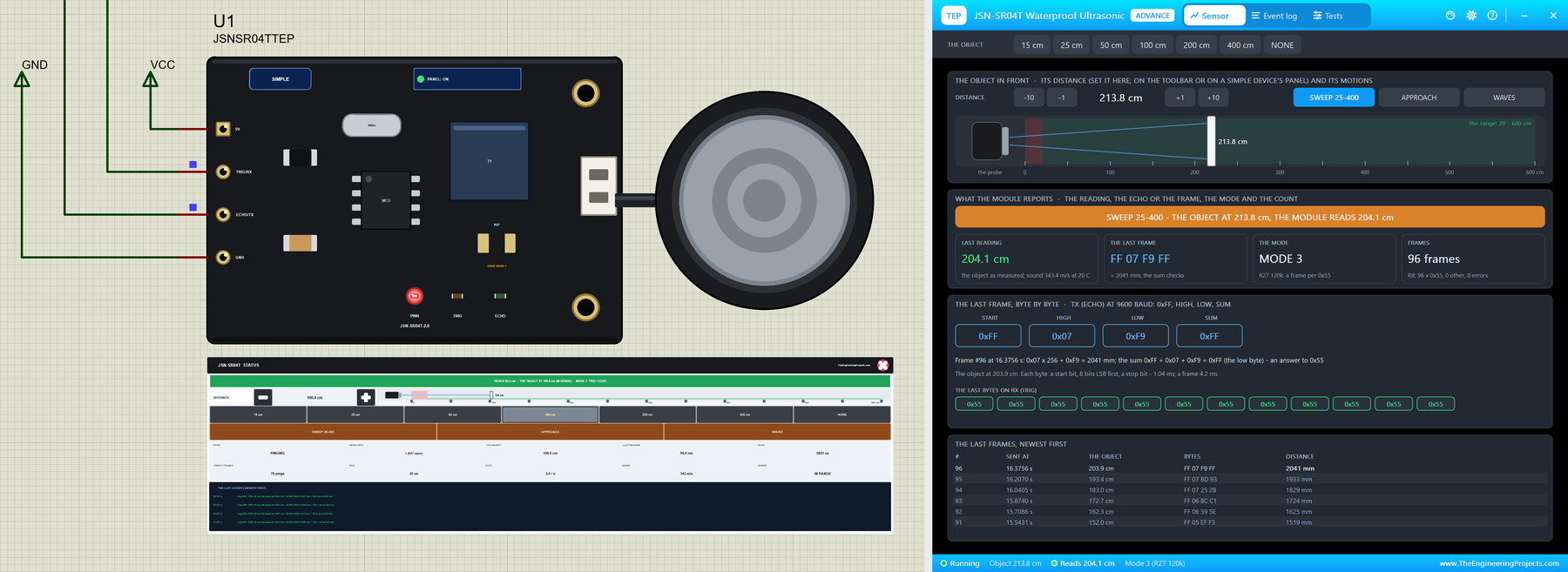


Comments
0