


Project Files of Heltec T114 Library for Proteus: LoRa and BLE Simulation
 Libraries
 Code
 Projects
 Simulation
3b49d8a629574e2fb867d547cba02c2e.zip
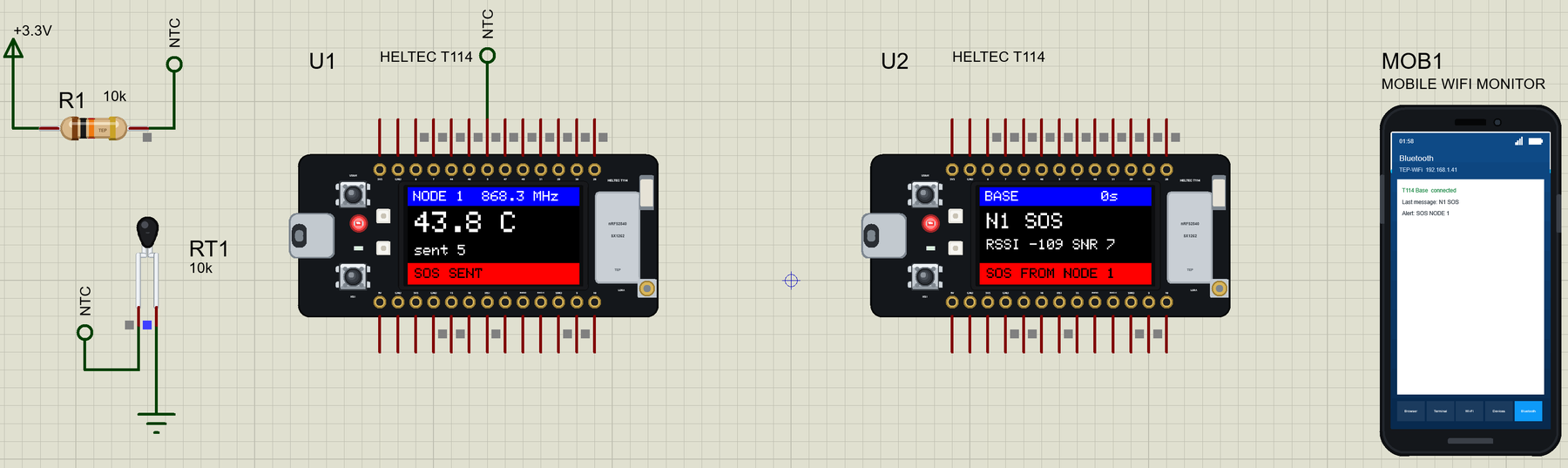
Heltec Mesh Node T114 Library for Proteus V1.0
Heltec Mesh Node T114 Library for Proteus V1.0 comes as a ZIP archive of 336 files (3.9 MB, 9.1 MB unpacked) holding Proteus library files, simulation model DLLs, a Proteus simulation, an Arduino sketch, an Arduino library, compiled HEX firmware and source code.
- LIBProteus library
- DLLProteus model
- DSNProteus simulation
- INOArduino sketch
- LIBArduino library
- HEXHEX firmware
- SRCSource code
Description
Heltec-T114-Library-for-Proteus-v1.0.zip with Heltec's Mesh Node T114 in Proteus (your sketch with LoRa through LoRaWan_APP.h, the 1.14" display through Adafruit_ST7789, the green LED, the USER button, Bluetooth LE to a phone and a serial monitor; TEPT114.LIB, TEPNET.DLL and the TEP Boards for Proteus add-on 1.96.0), the two-board LoRa messenger demo and a README.

File Structure
 File Structure
6.6 KB5.1 KB1.1 KB7.7 KB11 KB8.5 KB1.5 KB1.7 KB1.9 KB5.7 KB4.9 KB1.1 KB5.8 KB9.6 KB7.2 KB2.5 KB2.1 KB1.9 KB2.1 KB4.4 KB1.1 KB3 KB3 KB1.8 KB2.5 KB3.5 KB149 B2.7 KB2 KB6.4 KB3.2 KB1.3 KB963 B8.6 KB5.9 KB6 KB12 KB1.6 KB1.3 KB14.7 KB4.3 KB6.1 KB20.1 KB8.2 KB2 KB4.5 KB311 B12.8 KB6.7 KB6.1 KB2.2 KB3.4 KB5.9 KB1.5 KB1.6 KB16.6 KB9.7 KB6.9 KB2.1 KB533 B5.7 KB7.4 KB514 B1.7 KB896 B481 B1.4 KB1012 B482 B936 B559 B467 B3.6 KB3.8 KB504 B956 B575 B455 B8.3 KB10.9 KB522 B79 B5.5 KB3.1 KB79 B442 B918 B1.4 KB1.8 KB1 KB1.3 KB1.4 KB1.8 KB1.4 KB5.7 KB502 B463 B5 KB6.5 KB3.4 KB3.4 KB500 B1.6 KB368 B406 B466 B404 B444 B460 B477 B739 B448 B1.3 KB350 B5.7 KB4 KB562 B1.5 KB2 KB550 B7.2 KB4.1 KB371 B4.5 KB3.5 KB492 B390 B478 B6.6 KB2.4 KB479 B1.1 KB497 B5.1 KB1.9 KB1.3 KB1.3 KB750 B1.3 KB490 B2.2 KB1.9 KB498 B1.2 KB1.2 KB487 B5.1 KB4.6 KB371 B3.6 KB2.5 KB534 B1.5 KB1.2 KB478 B6.2 KB3 KB1.5 KB1.7 KB469 B1 KB1.7 KB433 B294 B358 B1.3 KB2.5 KB13.2 KB3.8 KB659 B510 B4.4 KB1.9 KB5.8 KB11 KB835 B518 B308 B1.3 KB3.3 KB568 B6.4 KB2.3 KB29 B436 B9.2 KB4.9 KB439 B4.2 KB1.5 KB9.3 KB7.1 KB4.7 KB2.4 KB388 B5.1 KB893 B667 B1.3 KB5.5 KB2.3 KB1.8 KB468 B882 B530 B791 B487 B894 B2 KB730 B646 B2.6 KB977 B702 B20.6 KB1.8 KB11.8 KB3.2 KB596 B406 B6.3 KB5.7 KB9.3 KB7.7 KB7.7 KB6.1 KB6.8 KB5.8 KB5.9 KB6.4 KB6.4 KB5.3 KB5.6 KB5.7 KB7.9 KB7.7 KB6.5 KB6.3 KB6.2 KB6.4 KB5.9 KB10.3 KB7 KB8.5 KB6.2 KB6.6 KB7.6 KB6.7 KB6.1 KB6.7 KB8.3 KB6.2 KB7.2 KB6.2 KB5.9 KB5.6 KB5.7 KB6.7 KB5.9 KB6.2 KB6 KB6 KB6.1 KB6.3 KB6 KB6.1 KB6.2 KB6 KB5.8 KB6.4 KB6.4 KB6.4 KB3.8 KB6.4 KB7.3 KB6.4 KB4 KB6.9 KB7.7 KB6 KB6.8 KB6.9 KB7 KB7 KB6.3 KB6.4 KB6.5 KB6.5 KB6.6 KB6.5 KB5.9 KB6.1 KB5.6 KB6.6 KB5.9 KB5.9 KB7.5 KB3.9 KB3.8 KB4.5 KB4.4 KB5.4 KB7.7 KB7.1 KB5.8 KB5.9 KB5.9 KB6.9 KB5.7 KB5.9 KB5.8 KB5.5 KB5.5 KB7.1 KB5.2 KB5.1 KB47.5 KB25.9 KB1.3 KB8.5 KB38.9 KB39.5 KB13.1 KB14.3 KB306.9 KB28.9 KB3.0 MB288.5 KB311 KB21.8 KB63.8 KB62.8 KB3.0 MB288.5 KB311 KB13.7 KBGallery12 images from the tutorialOpen the tutorial
 Gallery12 images from the tutorial
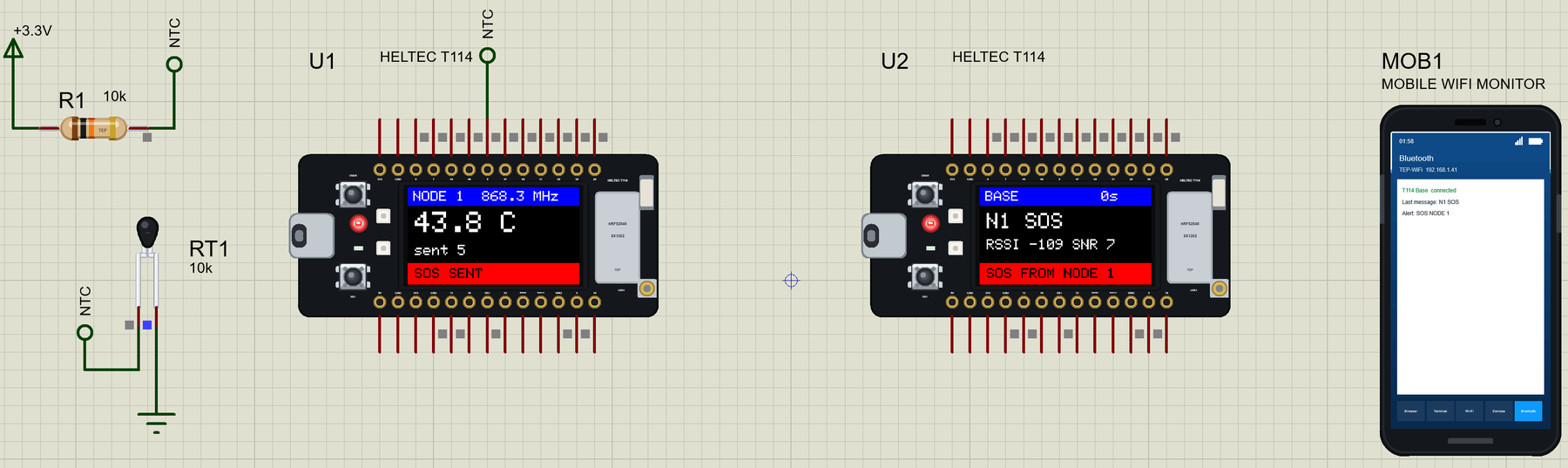
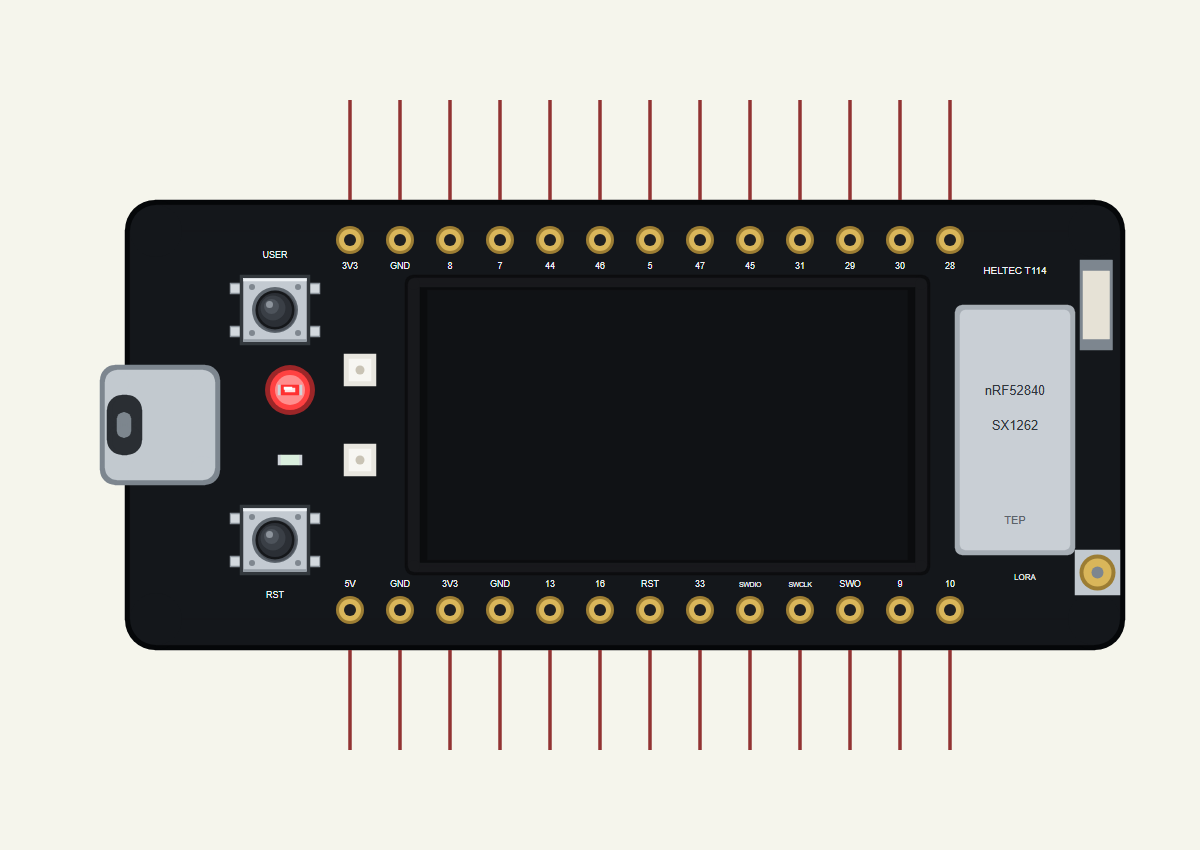
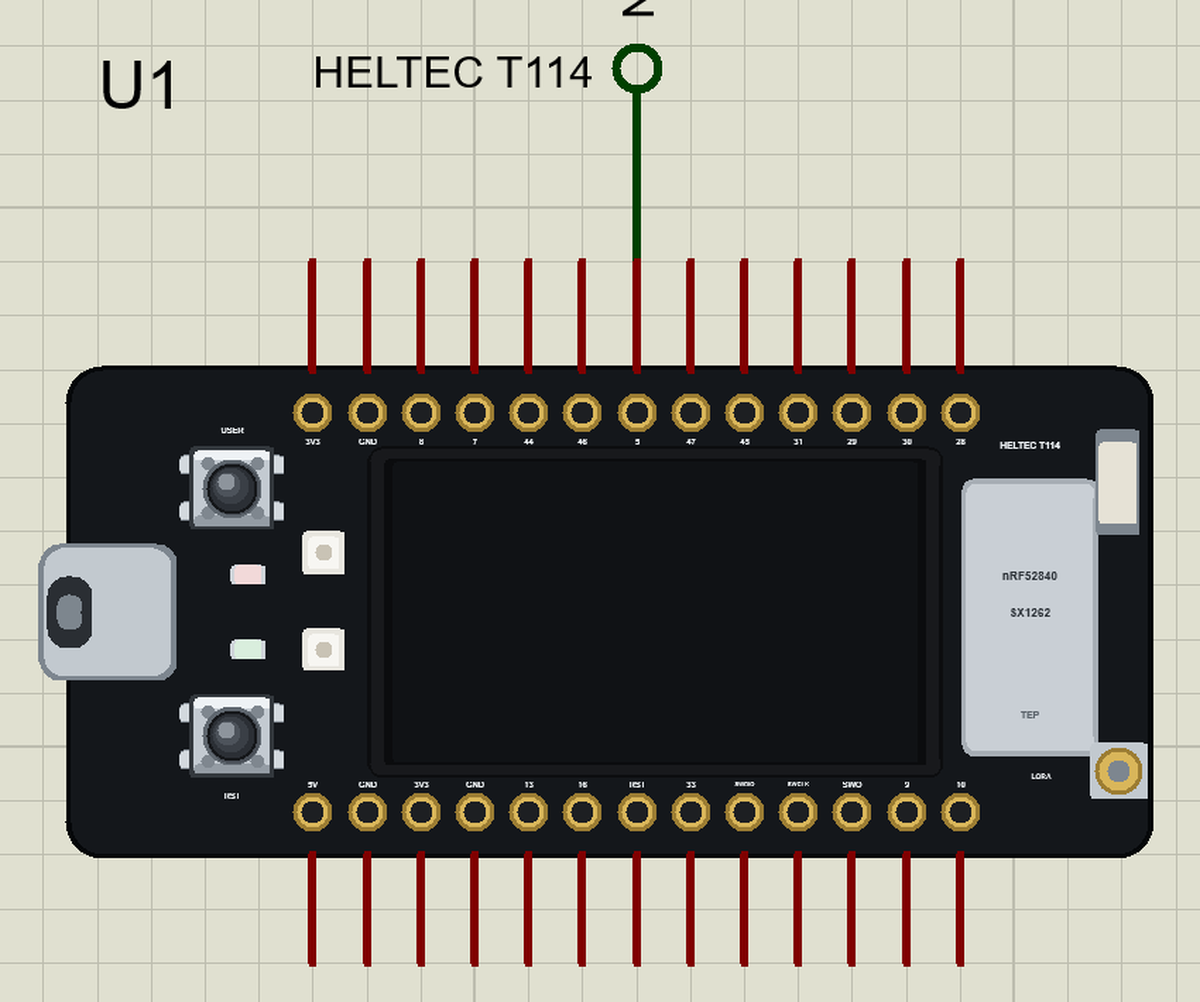
The circuit, the board and the results as they appear in Heltec T114 Library for Proteus: LoRa and BLE Simulation. Open an image for its full size.
README
 README
HELTEC MESH NODE T114 LIBRARY FOR PROTEUS - V1.0 (YOUR ARDUINO SKETCH, LORA, THE 1.14" DISPLAY AND BLUETOOTH LE)
Designed by The Engineering Projects
www.TheEngineeringProjects.com

IMPORTANT LINKS
Article (read it first - pictures, step by step, every feature explained):
  https://www.theengineeringprojects.com/2026/11/heltec-t114-library-for-proteus.html
Report a bug or suggest a feature (our forum):
  https://www.theengineeringprojects.com/forum
The demo's other parts are our libraries (included) - their articles:
  https://www.theengineeringprojects.com/2026/11/ntc-thermistor-library-for-proteus.html
  https://www.theengineeringprojects.com/2026/11/resistor-library-for-proteus.html
  https://www.theengineeringprojects.com/2026/10/mobile-wifi-monitor-library-for-proteus.html
Support us (the libraries are free):
  https://www.theengineeringprojects.com/donate

FILE STRUCTURE
Heltec-T114-TEP-v1.0/
|-- Proteus Library Files/
|   |-- TEPLAPTOP.LIB                                    39.5 KB   the laptop (demo), to LIBRARY
|   |-- TEPMOBILE.LIB                                    13.1 KB   the phone (demo), to LIBRARY
|   |-- TEPNTC.LIB                                       14.3 KB   the NTC thermistor (demo), to LIBRARY
|   |-- TEPRESISTOR.LIB                                 306.9 KB   the resistor (demo), to LIBRARY
|   |-- TEPT114.LIB                                      28.9 KB   the Heltec Mesh Node T114, to LIBRARY
|-- Proteus Model Files/
|   |-- TEPNET.DLL                                       2.99 MB   the board + monitors + network, to MODELS
|   |-- TEPNTC.DLL                                      288.5 KB   the NTC thermistor, to MODELS
|   |-- TEPRESISTOR.DLL                                 311.0 KB   the resistor, to MODELS
|-- Arduino Code/
|   |-- T114_LoRa_Base/T114_LoRa_Base.ino                 6.6 KB   the demo sketch
|   |-- T114_LoRa_Sensor/T114_LoRa_Sensor.ino             5.1 KB   the demo sketch
|   |-- TEP Boards for Proteus/hardware/                 1.36 MB   the Arduino IDE add-on 1.96.0 (319 files)
|-- Proteus Simulation/
|   |-- Heltec-T114-LoRa-Messenger.pdsprj                21.8 KB   the demo: two T114s, LoRa and Bluetooth LE
|   |-- T114_LoRa_Base.hex                               63.8 KB   the demo sketch (U2)
|   |-- T114_LoRa_Sensor.hex                             62.8 KB   the demo sketch (U1)
|   |-- TEPNET.DLL                                       2.99 MB   copy of the model
|   |-- TEPNTC.DLL                                      288.5 KB   copy of the model
|   |-- TEPRESISTOR.DLL                                 311.0 KB   copy of the model
|-- README.txt                                          ~12.9 KB   this file
Total: 9.06 MB (unzipped). The source code of the models is not included.

WHAT IS IT?
Proteus 8 has no nRF52840 or SX1262 model, so this is NOT a real nRF52840 chip. Our team has put a lot of effort into
building this board ourselves: it is Heltec's Mesh Node T114 (Rev. 2.0) - the board of 50.80 x 22.86 mm (drawn at its
real size) with the nRF52840 (an Arm Cortex-M4F, Bluetooth LE) and the Semtech SX1262 LoRa radio under the module's
shield, the 1.14" 240 x 135 TFT, the USB-C, the USER and RST buttons, the green LED, the two RGB LEDs, the Bluetooth
antenna, the LoRa IPEX socket and the two 13-pin headers - and it runs YOUR Arduino sketch in Proteus:
  * You write a normal sketch with the nRF52840 GPIO numbers of Heltec's pin map (n = P0.n, 32 + n = P1.n): the
    headers' 8, 7, 44, 46, 5, 47, 45, 31, 29, 30, 28 and 13, 16, 33, 9, 10; analogRead 0 .. 1023 on 5, 28, 29, 30, 31
    (A3 .. A7); Serial1 RX / TX on 9 / 10, Wire SDA / SCL on 16 / 13 - and compile it in the Arduino IDE with our board
    package "TEP Boards for Proteus" 1.96.0 (in Arduino Code - see INSTALLATION).
  * LoRa works like Heltec's examples: #include "LoRaWan_APP.h", Mcu.begin(HELTEC_BOARD, SLOW_CLK_TPYE), then
    Radio.Init, SetChannel, SetTxConfig / SetRxConfig, Send, Rx with RadioEvents_t. Every TEP LoRa board in the design
    shares one air; the LORADIST property sets the distance (the signal strength follows it).
  * The display is ON the part: Adafruit_ST7789 tft(&SPI1, PIN_TFT_CS, PIN_TFT_DC, PIN_TFT_RST) with tft.init(135, 240)
    and setRotation(1) draws upright with the USB-C on the left.
  * The green LED (LED_BUILTIN, 35, the real P1.03) lights when LOW. The USER button (PIN_BUTTON1, 42, the real P1.10)
    reads LOW while you hold it: click it on the board in the running simulation.
  * Bluetooth LE works through ArduinoBLE: the board advertises as a peripheral, and our Mobile WiFi Monitor's
    Bluetooth app is the central (it lists the board, connects, reads, writes and gets the notifications).
TEP additions: the USB-C opens the serial monitor (the same window as our TEP Serial Monitor Advance).
Limits (say them before you start): the display's backlight is always lit in the simulation (the real one is switched
LOW = on by pin 15) and its power switch (pin 3) is not needed; the two RGB LEDs (NeoPixels on 14), the GPS port, the
battery and solar sockets, the RTC bus (26 / 27) and the QSPI flash are not modelled; LoRa is point-to-point only - no
LoRaWAN join, no Meshtastic; the board cannot be a Bluetooth central. Your sketch gets 8 KB of RAM in the simulation
(the real one: 256 KB), about 256 KB of flash, and int is 16 bits there (use long for big numbers).

ONE DEVICE (search "T114" in Pick Devices):
  HELTEC T114  "Heltec Mesh Node T114" V1.0 (Microprocessor ICs > LoRa Boards), prefix U, model TEPNET.DLL.
  Its TEP window has no Windows title bar: the serial monitor (the USB-C, 115200 baud: Monitor, Plotter and Board tabs).
The same TEPNET.DLL also runs our other sketch boards and the phone; it replaces any older TEPNET.DLL (keep only this
newest one in MODELS).

TEST STATUS
V1.0: verified in Proteus 8.5 on 19 Nov 2026 with the demo project as shipped. What the Proteus run showed:
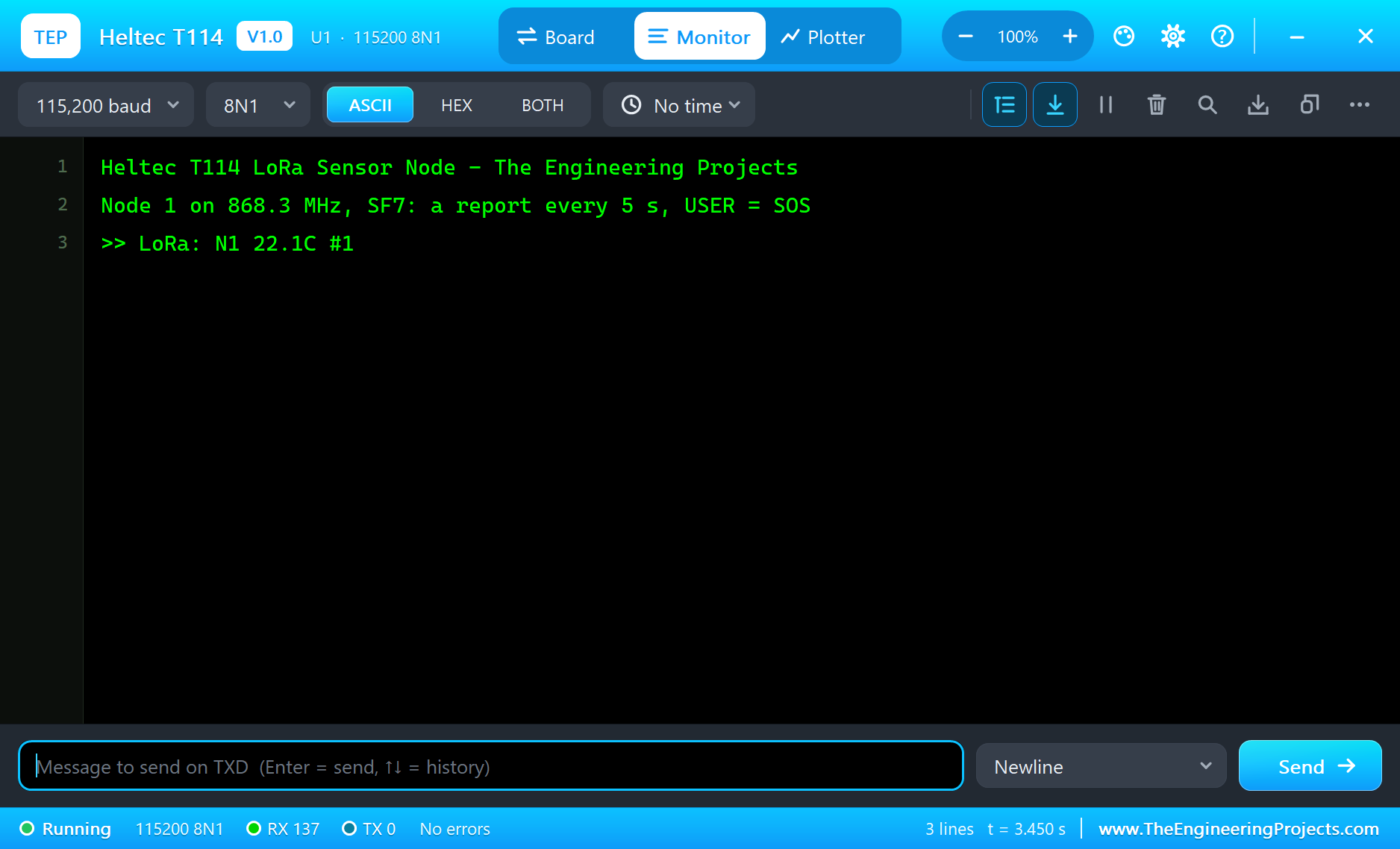
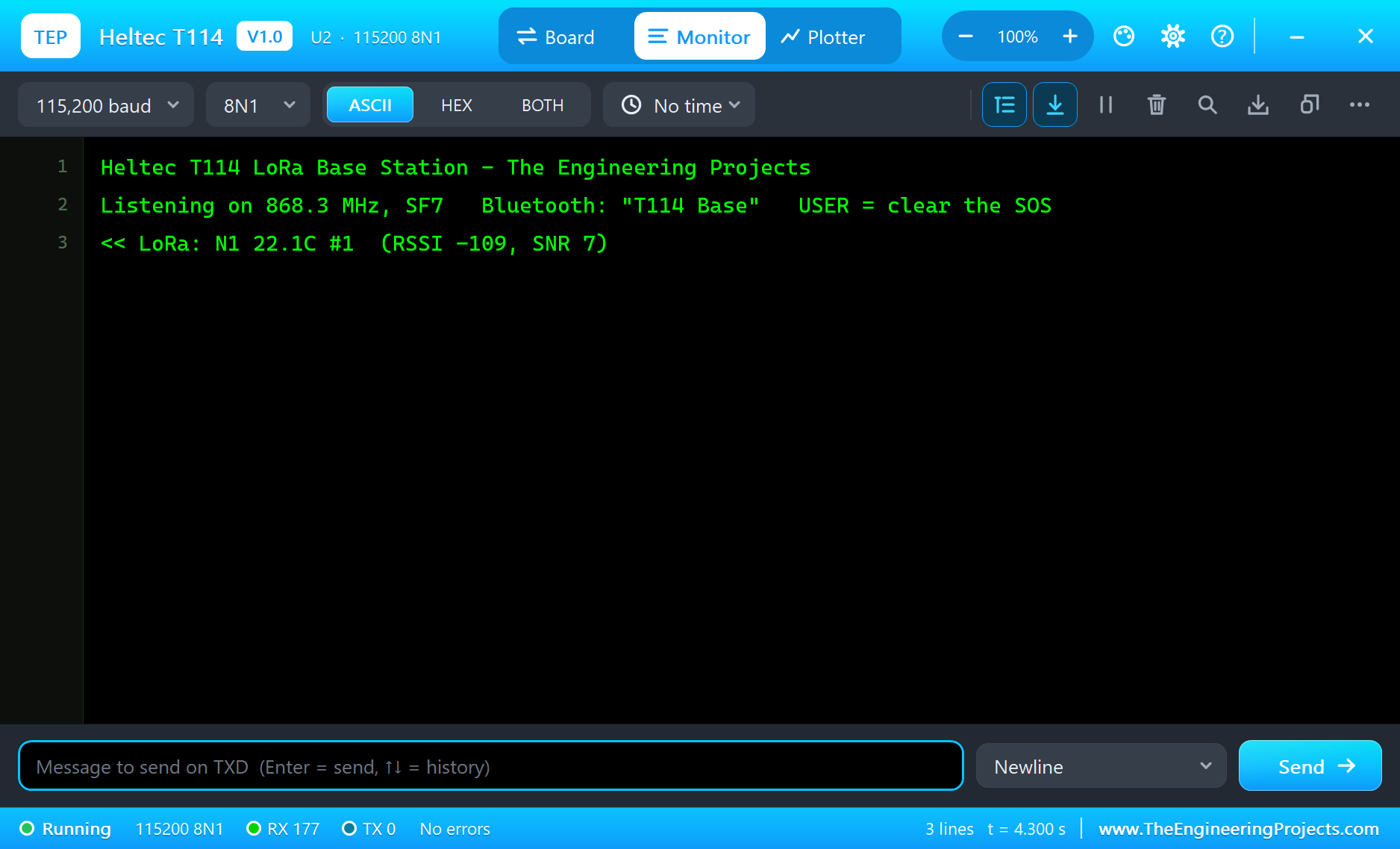
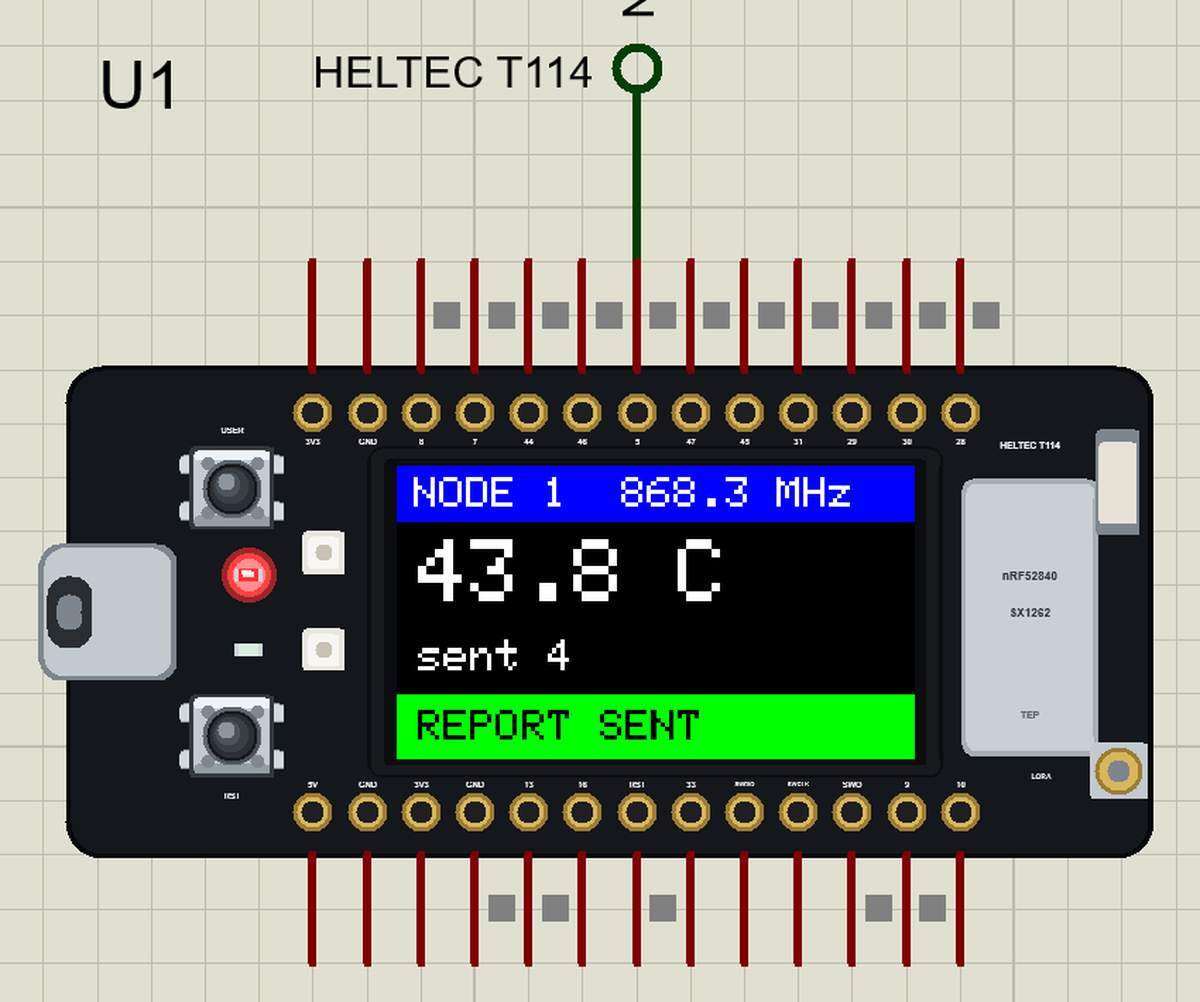
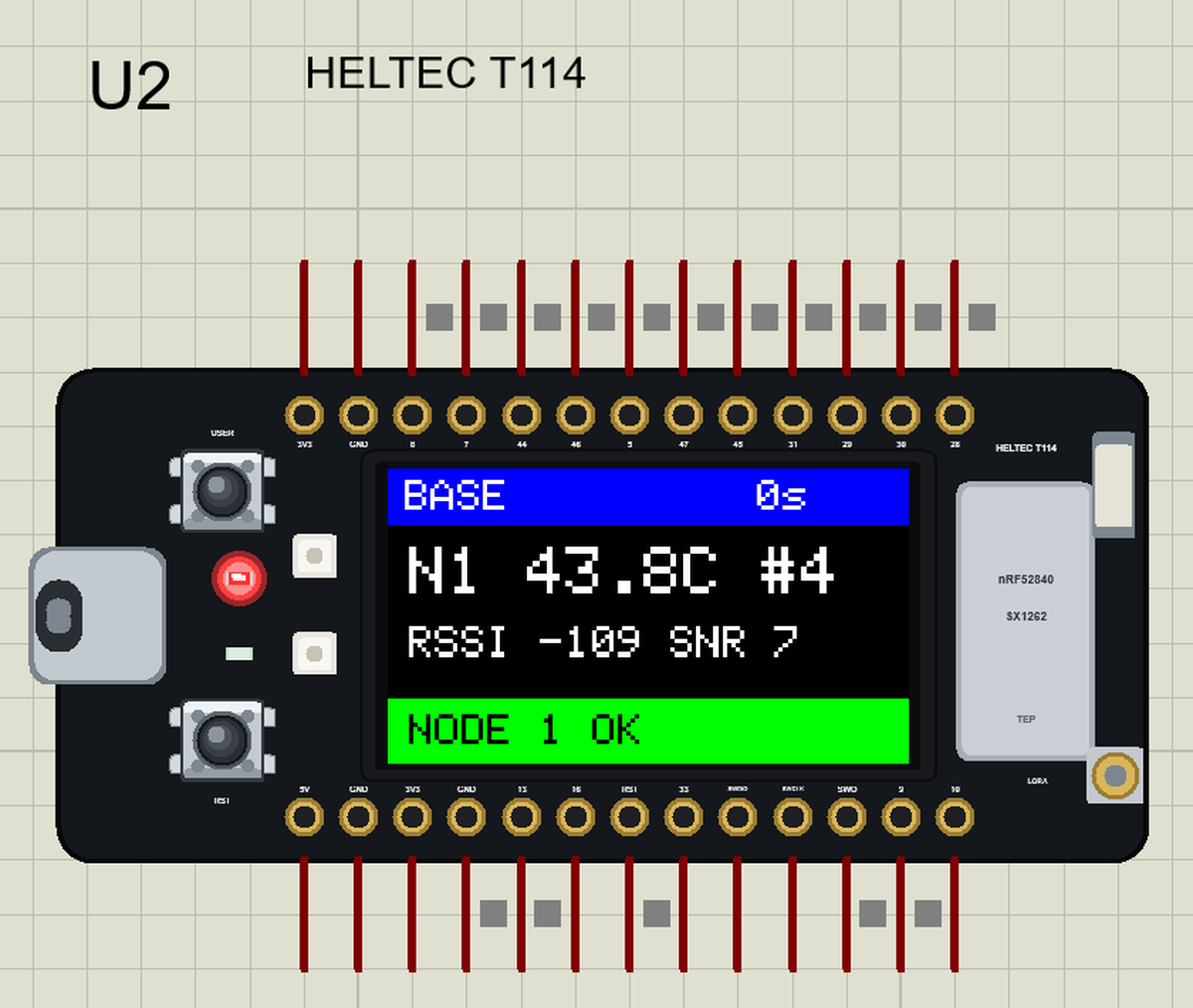
* Heltec-T114-LoRa-Messenger: node 1 (U1) "Node 1 on 868.3 MHz, SF7: a report every 5 s, USER = SOS", the base (U2)
  "Listening on 868.3 MHz, SF7"; ">> LoRa: N1 22.1C #1" on U1, "<< LoRa: N1 22.1C #1  (RSSI -109, SNR 7)" on U2.
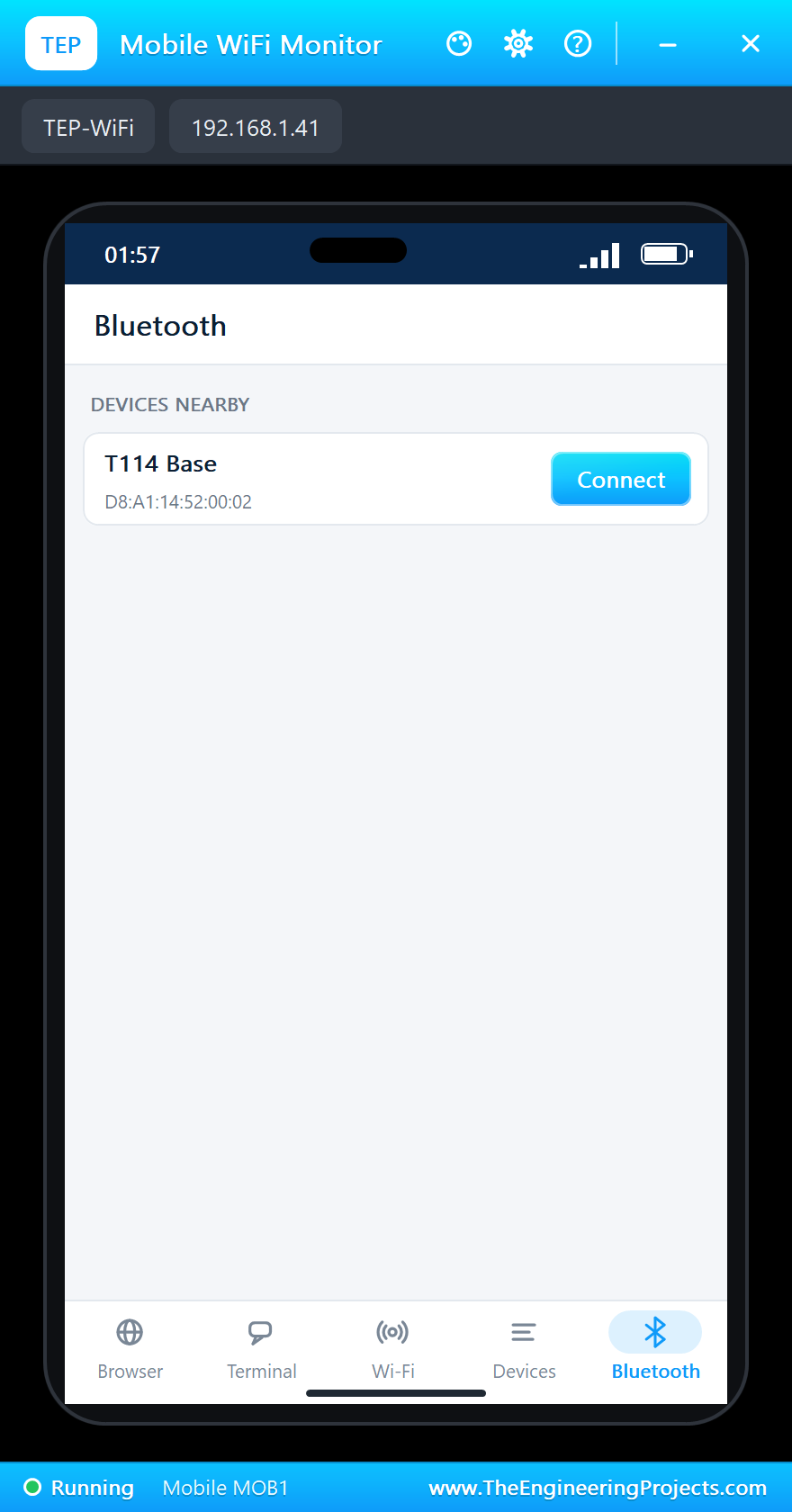
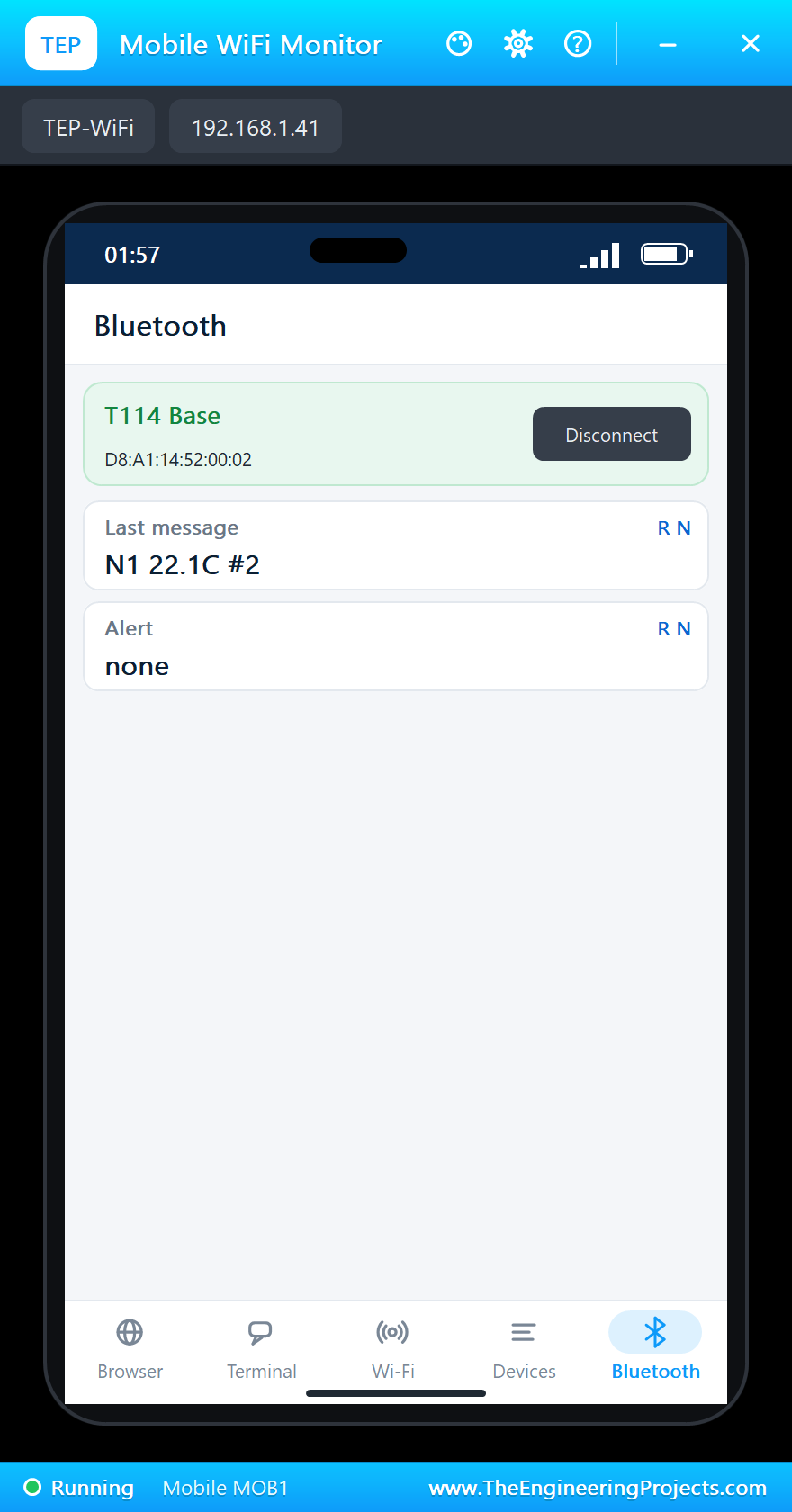
* the phone's Bluetooth app, SCAN, connect to "T114 Base": "Phone connected", the last message from node 1.
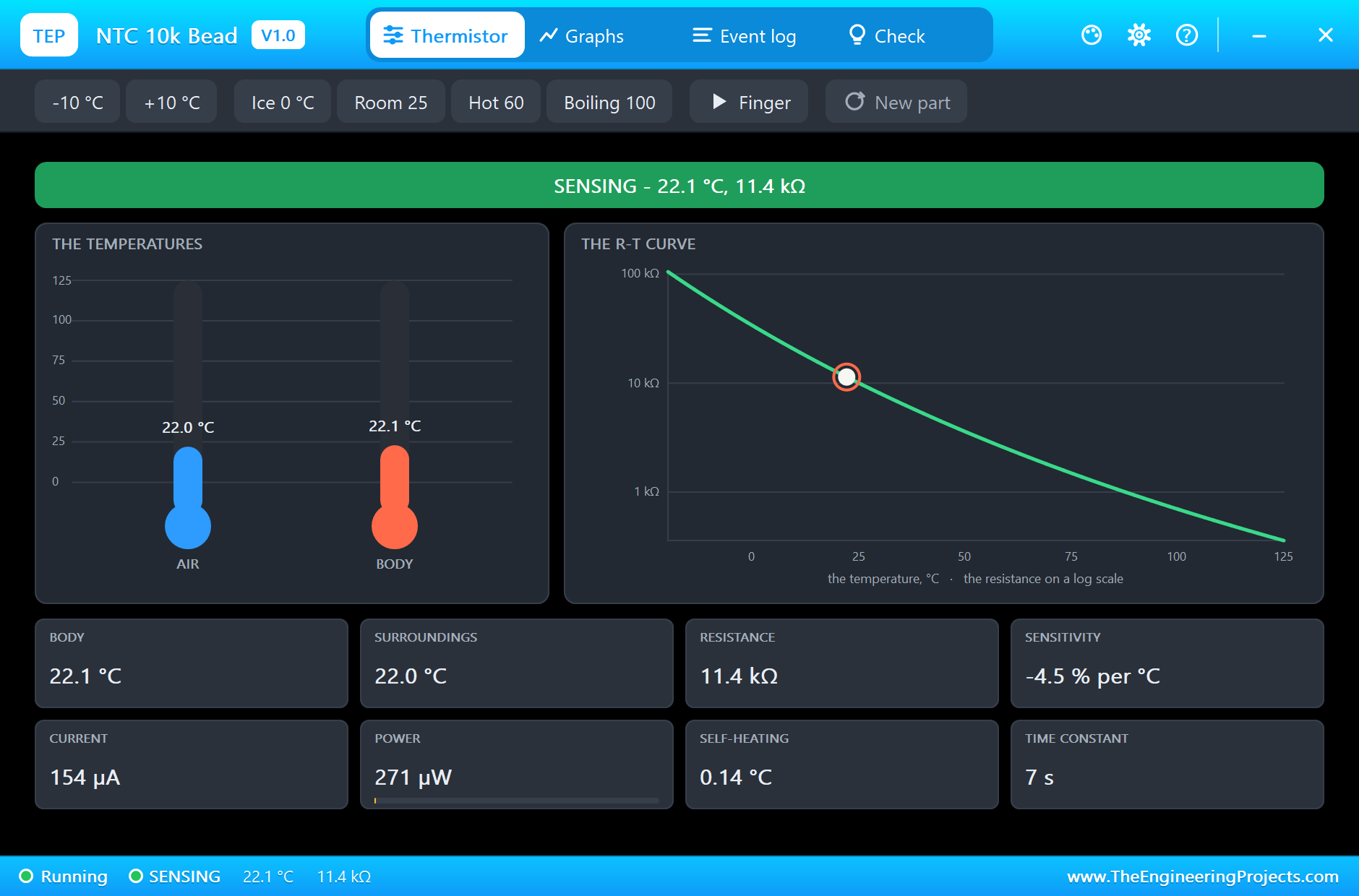
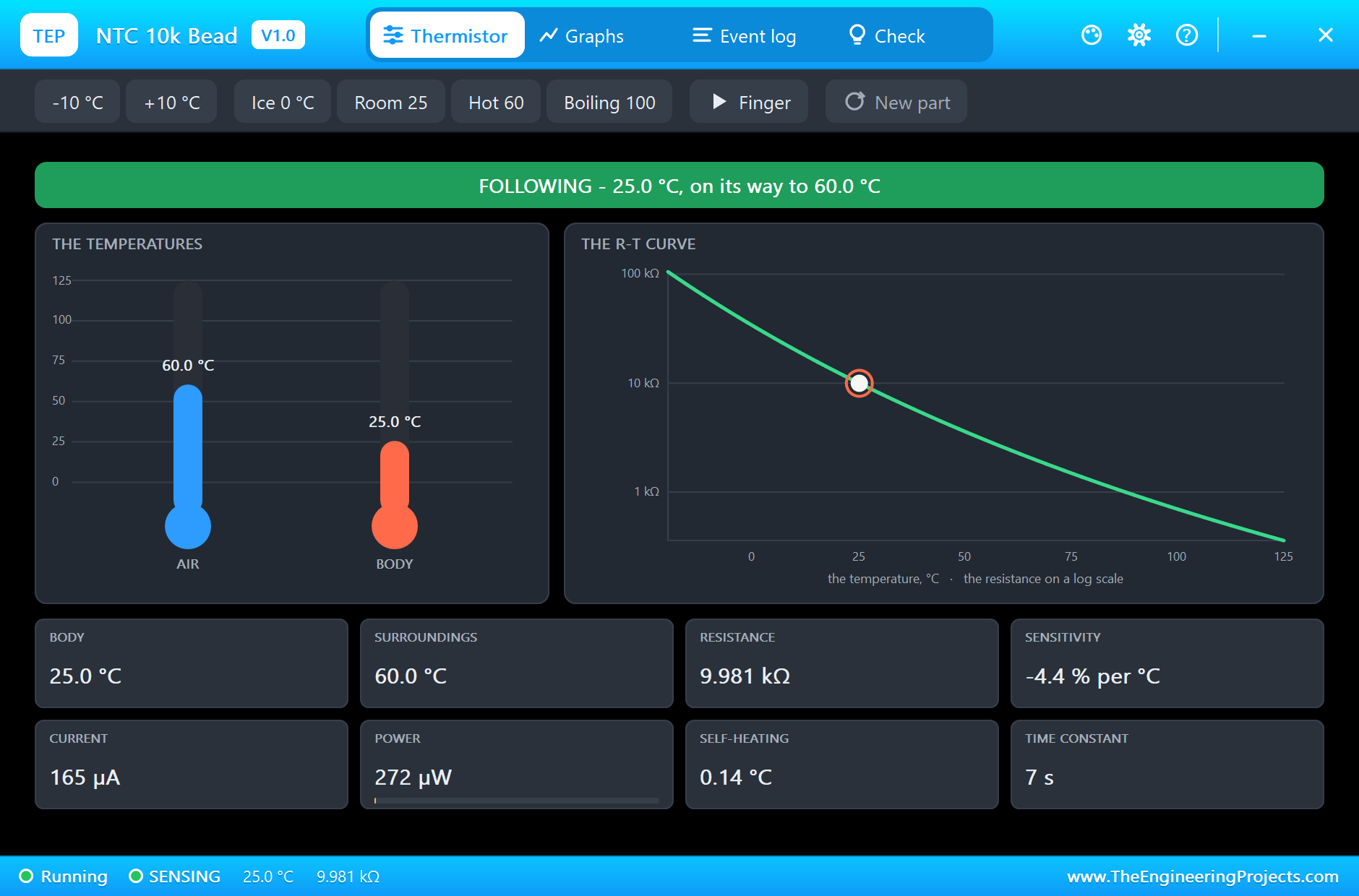
* RT1's Hot chip: the bead warms, the reports climb (26.9C, 43.8C) on both displays and on the phone.
* USER on node 1: ">> LoRa: N1 SOS", the base: ">> SOS from node 1", its bar red, the phone's alert; USER on the
  base: ">> USER: the SOS cleared"; the next report "N1 52.2C #6" arrives.
* about 26 s of simulation, no errors, with both monitors, the phone and the NTC's window open.

INSTALLATION (about 3 minutes)
1. Close Proteus. Extract the WHOLE ZIP to a normal folder (e.g. Desktop).
2. Copy everything in "Proteus Library Files" to the LIBRARY folder of Proteus, for example:
     C:\Program Files (x86)\Labcenter Electronics\Proteus 8 Professional\LIBRARY
   (on some PCs: C:\ProgramData\Labcenter Electronics\Proteus 8 Professional\LIBRARY). TEPT114.LIB is the board;
   TEPNTC.LIB and TEPRESISTOR.LIB are the demo's thermistor and resistor, TEPMOBILE.LIB and TEPLAPTOP.LIB the phone and
   the laptop.
3. Copy the DLLs from "Proteus Model Files" (TEPNET.DLL, TEPNTC.DLL, TEPRESISTOR.DLL) to the MODELS folder
   (...\Proteus 8 Professional\MODELS) - replace an older TEPNET.DLL (this one is the first that knows this board).
4. Delete TEPT114.IDX from the LIBRARY folder if it is there.
5. The Arduino IDE (only to compile your own sketches - the demo has its HEX files): copy the folder
   "Arduino Code\TEP Boards for Proteus\hardware" into your sketchbook folder (normally Documents\Arduino), so that
   Documents\Arduino\hardware\tep\avr\boards.txt exists (replace an older copy); restart the IDE. The Arduino AVR Boards
   platform must be installed (it comes with IDE 1.8.x; in IDE 2.x install "Arduino AVR Boards" from the Boards
   Manager once).
   Tools > Board > TEP Boards for Proteus > Heltec Mesh Node T114 (TEP Proteus). LoRaWan_APP, SX126x-Arduino and
   ArduinoBLE are in the board package; from the Library Manager install Adafruit ST7735 and ST7789, Adafruit GFX and
   Adafruit BusIO.
6. Start Proteus. In Pick Devices (P) search "T114".

RUN THE DEMO
Keep the .hex files and the DLLs beside the project in "Proteus Simulation".
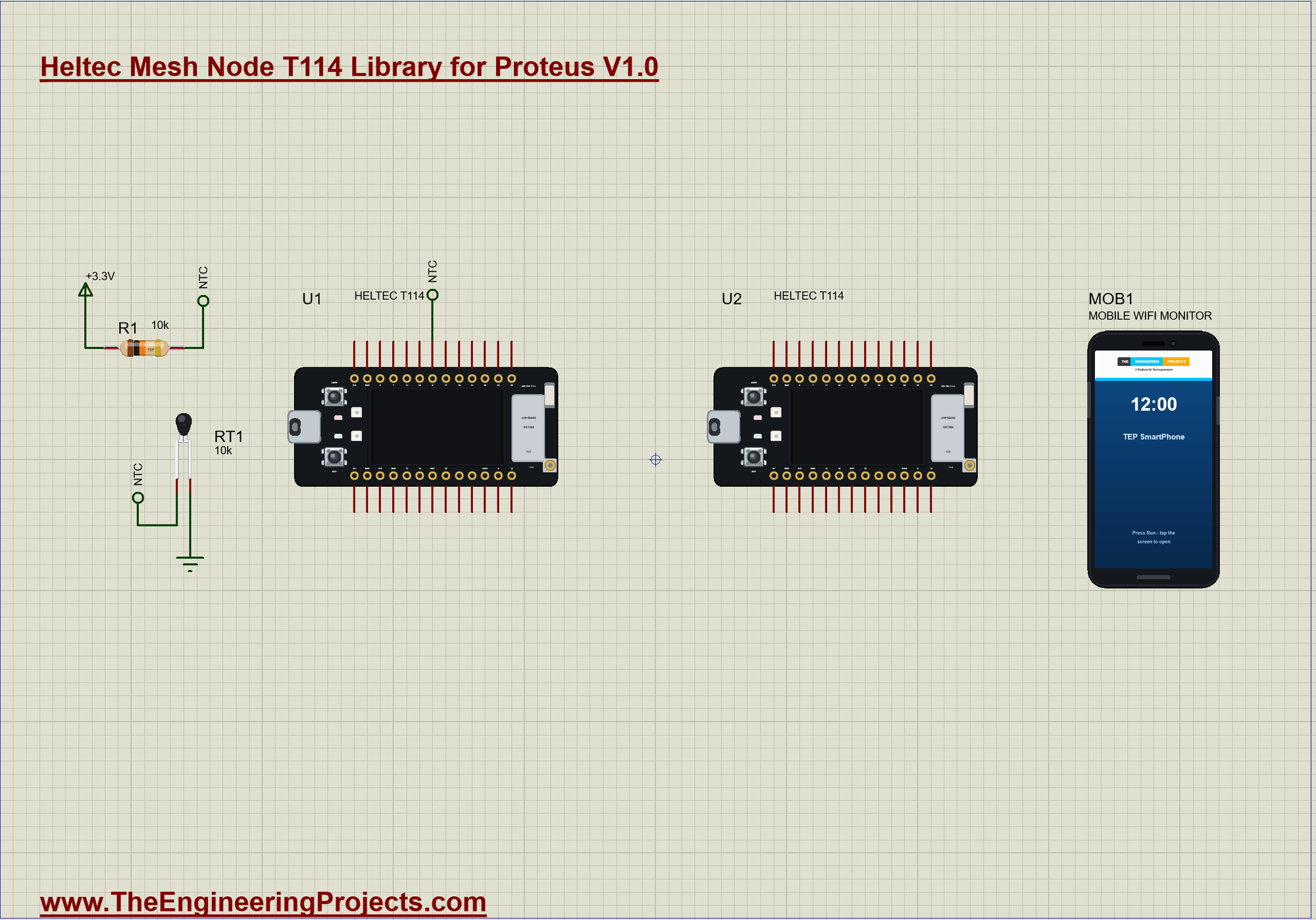
Heltec-T114-LoRa-Messenger.pdsprj - two T114s and no wire between them, only LoRa (LORADIST 2 km): U1 = node 1 in the
field (T114_LoRa_Sensor.hex): R1 (10k, from +3.3V) and RT1 = our 10k NTC thermistor (to GND, its air at 22 C) make a
divider on pin 5 (NTC); U2 = the base (T114_LoRa_Base.hex); MOB1 = the phone (Mobile WiFi Monitor), whose Bluetooth app
connects to the base.
Press Run. Node 1 sends ">> LoRa: N1 22.0C #1" every 5 s and shows it on its display; the base prints "<< LoRa: N1 ...
(RSSI ..., SNR ...)" and shows the message with its signal. On the phone open the Bluetooth app, press SCAN and connect
to "T114 Base": it shows the last message. In RT1's window click Hot (60 C): the reports climb. Click USER on node 1:
"N1 SOS" - the base's bar turns red, "SOS FROM NODE 1"; click USER on the base: the SOS is cleared.
Closed a window? The USB-C opens each board's monitor, a click on the NTC its window, a click on the phone's screen the
phone.

THE PINS (the label on the part = the nRF52840 GPIO number, what it can do in the simulation)
  P2 (top row)    3V3, GND, 8, 7, 44, 46, 5, 47, 45, 31, 29, 30, 28
  P1 (bottom row) 5V, GND, 3V3, GND, 13, 16, RST, 33, SWDIO, SWCLK, SWO, 9, 10
  5, 28 .. 31     analogRead 0 .. 1023 for 0 .. 3.3 V (A3 .. A7), or GPIO, PWM
  9, 10           Serial1 RX / TX, or GPIO
  16, 13          Wire SDA / SCL, or GPIO
  7, 8, 33, 44 .. 47  GPIO, PWM, interrupt, pulse timing
  RST, SWDIO, SWCLK, SWO  drawn, not modelled
On the board: the green LED 35 (lit when LOW), the USER button 42 (LOW when pressed, pinMode INPUT_PULLUP), the display
40 / 41 / 11 / 12 / 2 (SCK, MOSI, CS, DC, RST), the SX1262 24 / 25 / 17 / 20 (NSS, RESET, BUSY, DIO1). Serial is the
USB-C: the board's built-in monitor.

PROPERTIES (double-click the part > Edit Properties)
  PROGRAM      the sketch's HEX (Arduino IDE: Sketch > Export Compiled Binary with the TEP Proteus Heltec T114)
  MONITOR      YES = the built-in serial monitor on Serial;  BAUD  its speed (115200, or AUTO)
  AUTOOPEN     YES = the monitor window opens at Run (the demo: YES)
  LORADIST     the LoRa distance to the other boards: 10 m .. 20 km (the demo: 2 km)

TROUBLESHOOTING
* Nothing arrives: both boards must use the same frequency, spreading factor, bandwidth and coding rate; call
  Radio.Rx(0) again after every packet on the receiver.
* The display stays black: call tft.init(135, 240); with setRotation(1) the picture is upright, USB-C on the left.
* The phone's list is empty: call BLE.begin(), set a local name and BLE.advertise(); call BLE.poll() in loop().
* The LED does the opposite of what you expect: it lights when LOW.
* An integer goes wrong above 32767: int is 16 bits in the simulation - use long.

BUG REPORTS AND FEATURE REQUESTS
Please post them in our forum with a screenshot and the Serial Monitor text:
  https://www.theengineeringprojects.com/forum

LICENCES AND THIRD-PARTY NOTES
* The board model (TEPNET.DLL), the symbols and artwork (TEPT114.LIB) and the thermistor and resistor models are made by
  The Engineering Projects. The source code of the models is not included.
* TEP Boards for Proteus (Arduino Code): its core, the variants and the EEPROM, SPI and Wire libraries are modified
  copies of the Arduino AVR core 1.8.6 - GNU Lesser General Public License 2.1 (LGPL 2.1, the text:
  LICENSE-LGPL-2.1.txt); its ArduinoBLE, SX126x-Arduino, LoRaWan_APP and the others and our core files are MIT
  (LICENSE-MIT.txt).
* Our ArduinoBLE, SX126x-Arduino and LoRaWan_APP have the calls of the libraries of those names; their code is ours.
* The demo sketches use Adafruit ST7735 and ST7789, Adafruit GFX and Adafruit BusIO (MIT / BSD): install them with
  the Library Manager; they are not included.
* Proteus is a product of Labcenter Electronics and is not included. Heltec is a name of Heltec Automation, nRF52840 of
  Nordic Semiconductor ASA, SX1262 and LoRa of Semtech, Arduino of Arduino. The Bluetooth word mark belongs to
  Bluetooth SIG. This library is not made or endorsed by them or by Labcenter.

REBUILDING THE FIRMWARE (OPTIONAL)
The HEX files are supplied. Install TEP Boards for Proteus (INSTALLATION step 5) and the Adafruit display libraries,
open Arduino Code\T114_LoRa_Sensor and Arduino Code\T114_LoRa_Base, select Heltec Mesh Node T114 (TEP Proteus) and use
Sketch > Export Compiled Binary. For a real T114 install Heltec's nRF52 board package; the LoRaWan_APP code is the same.

MODEL SCOPE AND LIMITS
Modelled: the board's pins; digital I/O, analogRead 0 .. 1023, PWM (analogWrite), pulse timing, tone and
attachInterrupt through the board model; Serial (the board's monitor), Serial1 and Wire; the 240 x 135 display (the
ST7789 controller: Adafruit_ST7789 / Adafruit_GFX); the green LED, the USER button and RST; LoRa point-to-point between
TEP LoRa boards (LoRaWan_APP / SX126x-Arduino); Bluetooth LE as a peripheral (ArduinoBLE) with the phone as the central.
Not modelled: the nRF52840 and the SX1262 themselves, LoRaWAN, the RGB LEDs, the GPS port, the battery and solar
sockets, the backlight switch, the board as a central. The simulation runs below real time.
VERSION
TEP Heltec Mesh Node T114 library V1.0 (Nov 2026). Device HELTEC T114 (TEPT114.LIB / TEPNET.DLL), TEP Boards for
Proteus 1.96.0 (adds this board and the LoRaWan_APP library: the display, LoRa, the green LED, the USER button).
Demo sketches T114_LoRa_Sensor and T114_LoRa_Base V1.0. Demo parts: NTCBEAD10KTEP, RESISTOR4BANDTEP and MOBILE WIFI
MONITOR.Development1 release
 Development1 release
-
V1.0Heltec Mesh Node T114 Library for Proteus V1.0this page
V1.0 is the only release in the Download Center so far. When a newer version is published, it appears above with its own download page.
Installation10 steps
 Installation10 steps
From the download to a working project, in order. The steps follow what the package contains.
You will need
- Proteus Design SuiteProteus 8 or newer (Labcenter), on Windows
- Arduino IDE1.8 or 2.x, with the board of the tutorial chosen under Tools → Board
- The compiler named in the tutorialto build the source files into firmware
- Any archive toolWindows, macOS and Linux extract ZIP files on their own

Steps
- 1
Extract the archive
Right-click 3b49d8a629574e2fb867d547cba02c2e.zip and choose Extract All (or open it with 7-Zip or WinRAR) into a folder you can find again. Keep its folder structure (Heltec-T114-TEP-v1.0) as it is.
- 2
Copy the library files into Proteus
Move TEPLAPTOP.LIB, TEPMOBILE.LIB and TEPNTC.LIB and 2 more and the files into the LIBRARY folder of your Proteus installation: C:\Program Files (x86)\Labcenter Electronics\Proteus 8 Professional\LIBRARY for Proteus 8, or the matching Proteus 7 folder. Older versions keep it under ProgramData\Labcenter Electronics. If Proteus is open, close it first.
- 3
Add the simulation model
Copy TEPNET.DLL, TEPNTC.DLL and TEPRESISTOR.DLL into the MODELS folder next to LIBRARY, so the component can run, not only be drawn.
- 4
Restart Proteus and place the component
Start Proteus, open a schematic, press P (Pick Devices) and search for the component by the name used in the tutorial. It appears with its pins ready to wire.
- 5
Install the Arduino library
In the Arduino IDE choose Sketch → Include Library → Add .ZIP Library and pick the library, or copy its folder into Documents\Arduino\libraries. Restart the IDE to see its examples.
- 6
Open the sketch in the Arduino IDE
Open T114_LoRa_Base.ino, T114_LoRa_Sensor.ino and eeprom_clear.ino and 18 more, select your board and port under Tools, then Verify. Sketch → Export Compiled Binary writes the HEX file a simulation needs.
- 7
Build the source code
Open abi.cpp, Arduino.h and binary.h and 52 more in the compiler named in the tutorial (MikroC, Keil, MPLAB, Code Composer or the Arduino IDE) and build it to get the firmware.
- 8
Load the HEX file
In Proteus double-click the microcontroller, set Program File to T114_LoRa_Base.hex and T114_LoRa_Sensor.hex and run the simulation. For real hardware, flash the same file with your programmer.
- 9
Open the example simulation
Open Heltec-T114-LoRa-Messenger.pdsprj in Proteus to see the wiring exactly as in the tutorial. Check the controller's Program File path, then press Play.
- 10
Follow the tutorial
Heltec T114 Library for Proteus: LoRa and BLE Simulation explains every connection and setting in order; keep it open beside the files while you build.
FAQs9 questionsContact TEP
 FAQs9 questions
How do I download Heltec Mesh Node T114 Library for Proteus V1.0?
Wait for the 30-second guest countdown on this page, then press the download button; the file comes straight from our storage. Members who are logged in skip the wait. If the browser opens the file instead of saving it, use its Save as option. The download link is made for you when the countdown ends and works for 15 minutes; a saved or shared link stops working, so share this page instead.
What is inside the archive?
Heltec Mesh Node T114 Library for Proteus V1.0 comes as a ZIP archive of 336 files (3.9 MB, 9.1 MB unpacked) holding Proteus library files, simulation model DLLs, a Proteus simulation, an Arduino sketch, an Arduino library, compiled HEX firmware and source code. Open the File Structure tab for the full list of 336 files.
What should I do if the download does not start?
Check the browser's download list first; an ad blocker or a company firewall can also hold it back, so try another browser or network. If the file arrives incomplete, download it again. For an installation problem, read the Install tab or tell us in the comments with your software version and the exact error message.
Is this file free?
Yes. Every file in the TEP Download Center is free for learning, personal and student projects. If you share it, link back to this page or the tutorial so others find the latest version.
How do I check that the file arrived complete?
Compare its SHA-256 with the one on this page, 03efd51916972e1c0722838c1aad2659e433998e03ac34b724dfcd4d7bdafcbd. In PowerShell run Get-FileHash "3b49d8a629574e2fb867d547cba02c2e.zip"; on macOS or Linux run shasum -a 256 "3b49d8a629574e2fb867d547cba02c2e.zip". The same value means the file is exactly the one in our storage; a different one means the download broke off, so download it again.
Do I need WinRAR to open the ZIP file?
No. Windows, macOS and Linux open ZIP archives on their own (Extract All, or double-click). WinRAR and 7-Zip work too. Extract the whole archive before using the files.
Where do I put the LIB and IDX files?
Both files go into the LIBRARY folder of your Proteus installation (Proteus 8: C:\Program Files (x86)\Labcenter Electronics\Proteus 8 Professional\LIBRARY; Proteus 7 has the same folder under its own name). Restart Proteus afterwards and search for the component with P.
Which Proteus version does the library need?
The tutorial names the Proteus version the library was made and tested with. Most TEP libraries work in Proteus 7 and Proteus 8; if the component does not appear after a restart, check that both the LIB and the IDX file were copied and that Proteus was fully closed while copying.
How do I get the HEX file into the simulation?
Compile the sketch in the Arduino IDE (Sketch → Export Compiled Binary gives you the HEX next to the sketch), then in Proteus double-click the board, set Program File to that HEX and run.
Members skip the wait. Log in or join TEP.

- 0Total downloads
- 4%Popularity
- ProteusCategory
- 0Comments
- ssyedzainnasirUploaded by
- 23 Nov 2026Uploaded at


 SHA-256
03efd51916972e1c0722838c1aad2659e433998e03ac34b724dfcd4d7bdafcbd


 Need help with this file?
 Tags
Related Proteus
All Proteus tutorials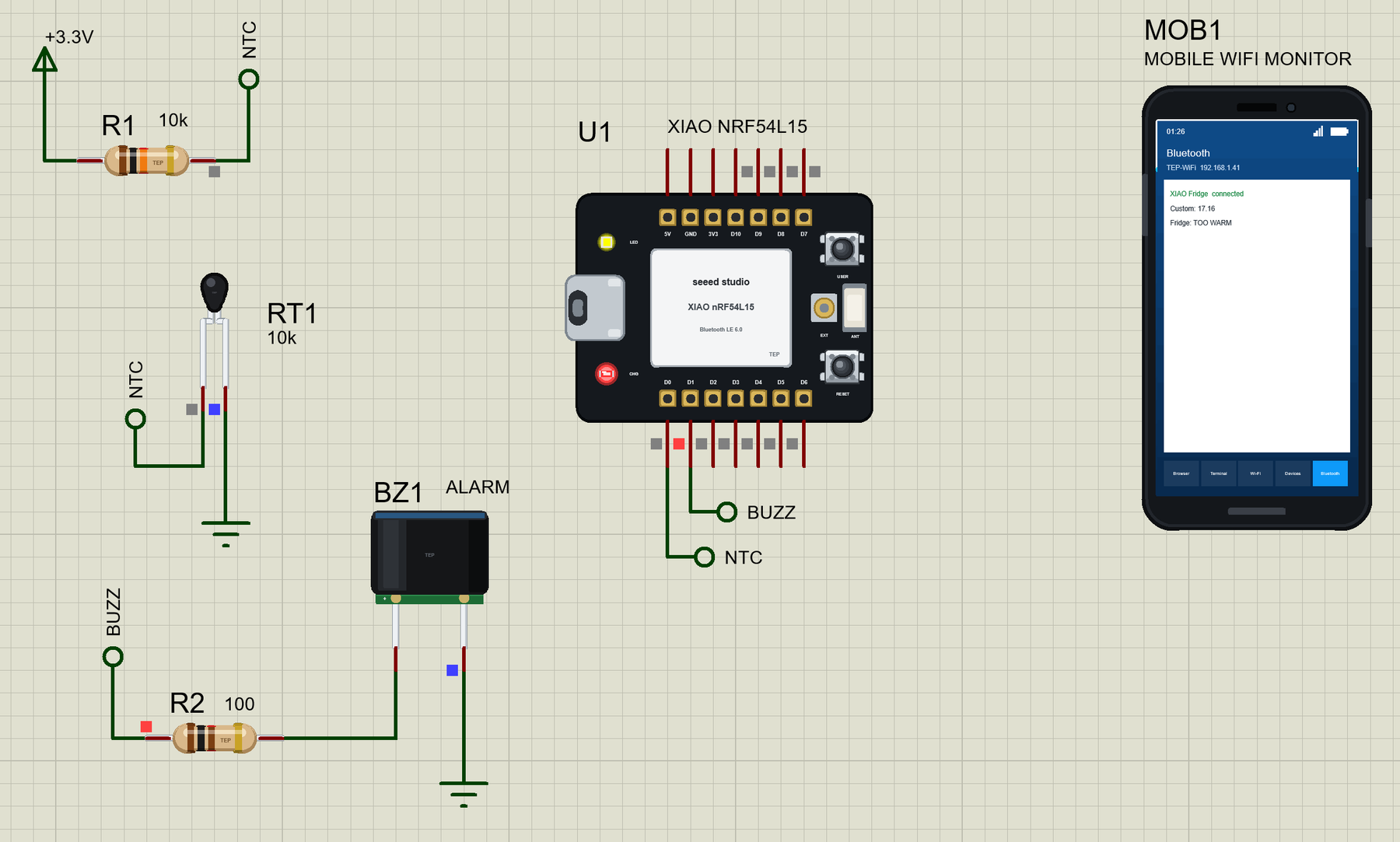




Comments
0