


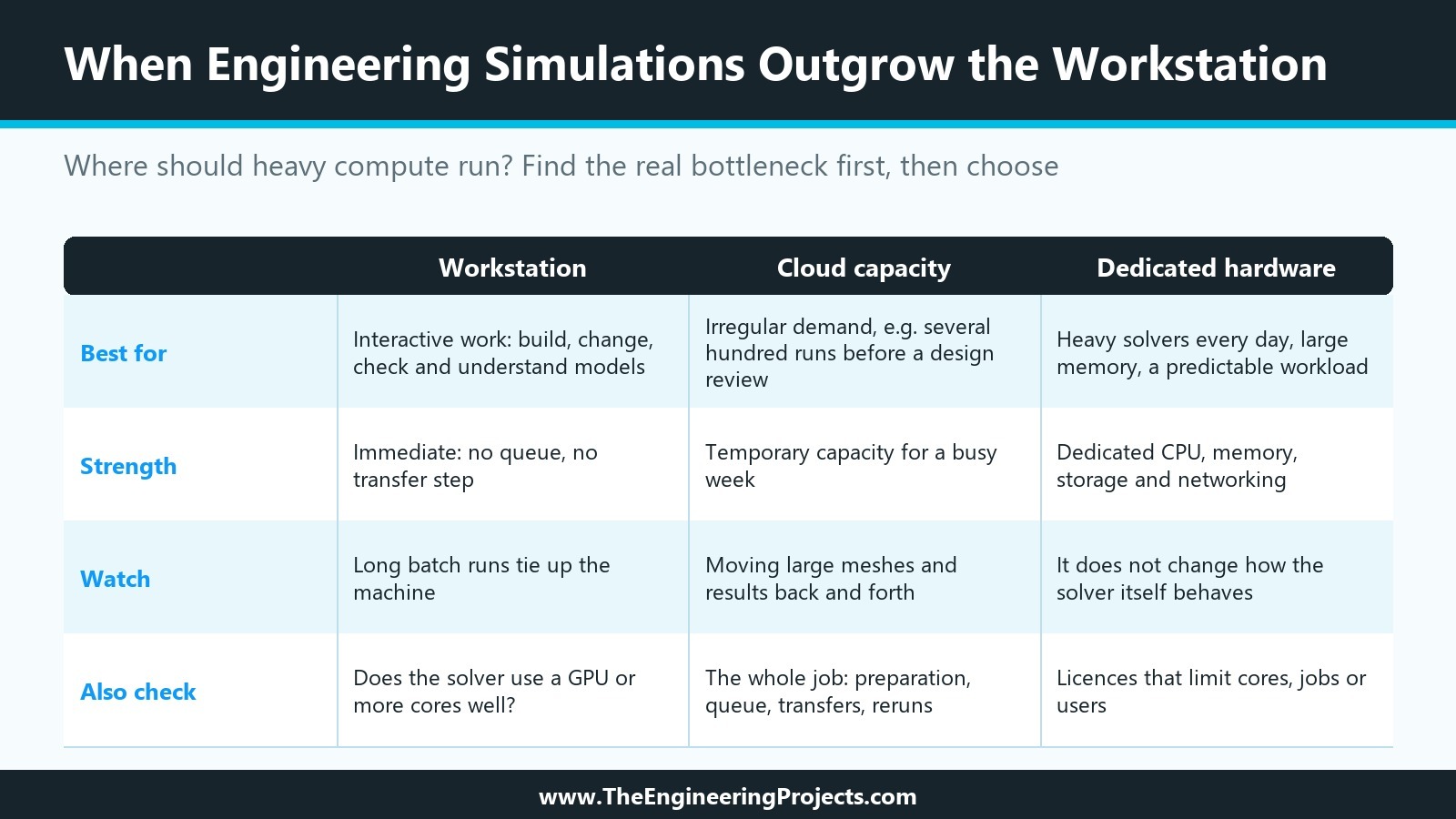
When Engineering Simulations Outgrow the Workstation: Where Should Heavy Compute Run?


Most engineering workstations don’t become obsolete overnight. They get annoying first.
A model that used to finish before lunch now runs into the afternoon. A parameter sweep gets started before everyone leaves and is still chewing through cases the next morning. Someone needs the machine for CAD work, but the solver has 73 percent left and nobody wants to kill the run.
That’s usually the point when people start looking at bigger hardware.
The trouble is that “bigger” can mean almost anything. More cores. More RAM. A GPU. Another workstation. A cloud instance. A physical server sitting somewhere else. Without knowing what’s actually slowing the job down, it’s surprisingly easy to spend a lot of money and end up only slightly faster.
First, figure out what the workstation is struggling with
If a simulation is taking too long, the processor usually gets blamed first. That makes sense. CPU usage is visible, processor names are easy to compare, and adding cores feels like a straightforward upgrade.
Real workloads are messier.
A finite-element model might be starved for memory. Another solver might use eight cores efficiently and barely benefit from the next eight. A large analysis can also spend more time than expected moving data to and from storage. GPU acceleration may look attractive until you discover that the part of the software you use every day doesn’t support it particularly well.
Before moving a workload onto Atlantic’s bare metal hosting or buying another high-end workstation, run one of the jobs that actually causes problems and watch what happens. Dedicated CPU, memory, storage, and networking can remove some resource-sharing issues, but they don’t change the way the solver itself behaves.
Open the same model your team complains about, not a convenient benchmark file.
If memory climbs to 95 percent and stays there, that’s useful information. If all 32 CPU threads are busy, that tells you something else. If CPU utilization keeps dropping while the disk is hammered with reads and writes, adding another expensive processor probably isn’t the first thing to fix.
Scaling matters too.
Suppose a simulation takes 90 minutes on eight cores. If it takes 55 minutes on 16 cores, that’s an improvement, but clearly not a doubling of performance. Moving it to 64 cores and assuming it will finish in twelve minutes would be optimistic.
MATLAB's parallel computing tools show why the distinction matters. Some jobs can be split across multiple workers, GPUs, or cluster resources very effectively. Others contain enough dependent or serial work that throwing more hardware at them brings diminishing returns.
You can see the same difference in relatively simple engineering workflows. A basic step response calculation for an LTI system isn't going to justify a remote compute environment. Run thousands of variations across different controller parameters, plant models, and disturbances, and the conversation changes.
The useful numbers are usually boring ones: peak RAM use, CPU or GPU utilization, storage activity, and actual elapsed time. Get those before shopping.
A workstation is still a very good place to work
There’s a reason engineers like powerful local machines. They’re immediate.
You can change a boundary condition, rerun a quick case, rotate the model, inspect a strange result, change something again, and keep moving. No queue. No transfer step. No waiting for a remote environment to wake up.
That experience matters more than it gets credit for.
Consider someone working on a thermal model. The first rough version might solve in seven minutes. That’s perfect for a workstation. The engineer can make a change, get coffee, come back, and inspect the result.
Then the model gets serious.
The mesh is refined. Radiation gets added. Materials are modeled more carefully. The production version now takes two hours. Someone asks for twenty temperature conditions and three geometry variants.
The workstation hasn’t suddenly become bad hardware. It’s simply being asked to do a different job.
At that point, I’d rather keep interactive work local and send the long batch runs elsewhere. The engineer can keep using the machine instead of watching a progress bar crawl across the screen for half the day.
Memory often becomes the quiet limit in these situations. Large simulation models can consume huge amounts of RAM, especially once matrices, temporary solver data, and result files pile up. Ansys discusses solver memory requirements in detail, including how available memory can affect performance and disk activity.
That’s more useful than simply comparing CPU benchmark scores.
GPU upgrades need the same level of skepticism. GPUs can be incredibly fast for work that maps well to parallel processing. NVIDIA's CUDA programming model is built around running large numbers of parallel operations. But your solver has to know what to do with that hardware. A $5,000 GPU that sits mostly idle during your normal workload is still a $5,000 GPU.
Check the software first. Then spec the machine.
Remote compute starts making sense when waiting becomes routine
The biggest sign that a team needs more compute usually isn’t a benchmark score. It’s behavior.
People stop running certain cases because they take too long.
Someone lowers the mesh density just to get a result before a meeting. A parameter sweep gets reduced from 100 combinations to 20 because nobody wants to occupy the workstation for two days. Engineers start asking each other, “Are you using that machine tonight?”
Those little compromises add up.
Remote compute is useful because it separates the place where the engineer works from the place where the heavy calculation runs. The concept is similar to the distinction discussed in edge computing versus cloud computing: the location of the processing affects latency, available resources, data movement, and the way the system is managed.
Cloud instances work particularly well when demand is irregular.
Imagine a small mechanical team that spends most of the month doing ordinary CAD and analysis work. Five days before a design review, however, they suddenly need several hundred simulation runs. Owning enough hardware for that one busy week could mean leaving expensive machines mostly idle for the rest of the month.
Temporary capacity handles that kind of spike nicely.
The calculation changes when heavy jobs are running every day. If the same solvers run overnight, engineers repeatedly need large memory configurations, and the workload is fairly predictable, dedicated hardware becomes worth comparing against ongoing virtual compute costs.
There’s another issue that doesn’t get discussed enough: moving the data.
A 500 MB input file is easy. A project containing large meshes, restart files, intermediate results, geometry revisions, and hundreds of gigabytes of output is different. If engineers spend half their morning copying results back and forth, a fast solver hasn’t solved the whole problem.
Engineering environments also tend to accumulate software.
One team might use CAD, another structural analysis package, MATLAB scripts, BIM tools, custom Python utilities, and several pieces of vendor software that nobody wants to reinstall twice a month. The variety shown in this roundup of civil design and infrastructure software is a good example of how broad a real engineering stack can become.
The compute location has to work with that stack, not just look impressive on a specification sheet.
The fastest machine can still be the wrong machine
One of the easiest traps is measuring only solver time.
Suppose a new system cuts a four-hour simulation down to three hours. That sounds like a clean 25 percent improvement.
But what happens around those three hours?
If an engineer has to spend 30 minutes preparing files, wait two hours for the machine to become available, manually copy 80 GB of results, and rerun the model because one boundary condition was wrong, the three-hour benchmark starts looking less important.
Engineering work is full of reruns.
A bolt contact was defined incorrectly. Someone used the wrong material. The mesh looked fine until the stress result exposed a problem. A script referenced yesterday's input file. Anyone who has done simulation work for long enough has watched a long run finish and immediately realized it needs to be done again.
That’s why a useful infrastructure test follows the entire job, not just the solver.
How long does preparation take? How long does the job wait? How long does it run? How difficult is it to get the results back? What happens when you need to launch ten more cases?
Licensing belongs in that conversation too. Some engineering applications limit cores, simultaneous jobs, users, or specific solver features. There’s little point paying for 64 cores if your license only lets the software use 16 of them.
And sometimes throughput matters more than speed.
If one machine can finish a case in 45 minutes but only run one at a time, while another setup can process eight cases concurrently in an hour, the second system may get the design team to an answer much sooner.
That’s the number worth caring about: how quickly can the team go from a question to enough reliable results to make a decision?
Wrap-up takeaway
Outgrowing a workstation doesn’t necessarily mean replacing it. For many engineers, the workstation should remain the place where models are built, changed, checked, and understood. The heavier work can move once long simulations start interfering with that process. Look at what the software is actually consuming before deciding whether you need more cores, more memory, GPU acceleration, temporary cloud capacity, or dedicated hardware. Include queue times, file transfers, licensing, and reruns in the calculation because engineers experience all of those, not just solver time. Pick one genuinely troublesome simulation today, run it as you normally would, and record where the machine spends its time before deciding what hardware should come next.
Comments
0