Hello friends, hope you all are fine and having fun with your lives. Today, I am going to share a new project which is Password Protection using PIC Microcontroller. In this project I am going to use keypad and LCD and will be designing a system in which I am gonna drive a motor if the correct password is supplied. If you entered the wrong password then the motor will not move and you will get another chance to enter the correct password. I hope you guys are gonna enjoy this one.
I have used Keypad, LCD and PIC Microcontroller in order to design the simulation in Proteus ISIS software. You should also have a look at Electronic Door Lock using PIC Microcontroller, which is quite similar with the only difference of keypad. In that previous project, ...
Hello friends, hope you all are fine and having fun with your lives. Today, I am going to share all the LabView Projects, posted on our blog. These LabView projects are entirely designed by the TEP team and I hope they will help you in some way. Rite now the list is quite small but I am gonna post more tutorials and projects related to LabView soon. So, keep visiting or subscribe us via email so that you get these exciting tutorials straight to your inbox.
Moreover, LabView is really a difficult software and it really took us a lot of time in designing these projects so other blogger are more than welcome to share our projects on their blog but do mention the respective link from where you copied as a favor. I am gonna share the complete list here ...
Update: Here's the latest version of LCD library: LCD Library for Proteus V2.0.
Hello everyone, I hope you all are fine and having fun with your lives. Today, I am going to share a new LCD Library for Proteus. We all know about LCDs, used for displaying data in embedded projects i.e. sensor values or indications etc. Proteus already have LCDs in it but they are not much good-looking. So, I designed two new LCDs in Proteus that look identical to real-world LCDs.
So, I am going to share these LCD libraries in today's post. I hope you are going to enjoy them as they will add some uniqueness to your project.
I have also used these new LCDs in different projects so if you wanna see these LCDs in action then you should have a look at LCD Interfacing with Microcontrollers. In this tutorial, ...
Hello friends, hope you all are fine and having fun with your lives. Today, I am going to share on How to measure Frequency using Arduino board. Its quite a simple tutorial but is an essential one especially when you are working on some power related project. Because in Power projects, you have to measure the frequency of AC voltages. I was working on a project in which I have to do dimming of AC Lamp so in that project I have to measure the frequency of AC signal.
I have designed this project using Arduino UNO and have simulated in the Proteus software, which you all know is my favorite simulating software. :) The code is also quite simple which I have given below for download. The simulation is also included in download package but again I sugge ...
Hello Everyone, hope you all are fine and having fun with your lives. Today, I am going to interface GPS Module with Arduino in Proteus ISIS software. Recently, I have shared this amazing GPS Library for Proteus, using which you can quite easily simulate your GPS Module in Proteus software. Today, I am going to interface this GPS Module with the Arduino UNO board and will simulate the result in Proteus software. I am going to use TinyGPS Library and will get Longitude and Latitude out of this GPS Module.
So, if you are new to GPS and you haven't yet installed the GPS Library for Proteus, then you must first download that library and install it. I am using Arduino board in today's tutorial but you can use any other microcontroller as well like PIC ...
Hello friends, hope you all are fine and having fun with your lives. Today, I am going to share a new Gas Sensor Library for Proteus. I hope you guys are going to enjoy this one. We are all well aware of Gas Sensors which are used for the detection of different gasses in the atmosphere. These sensors are not available in Proteus so that's why I have designed a library using which now you can use these different gas sensors quite easily in Proteus software. You can interface this Gas Sensor with any Microcontroller i.e. Arduino, PIC Microcontroller or 8051 Microcontroller etc.
In this Gas Sensor Library for Proteus, I have added eight different Gas Sensors, which are used for the detection of different gases. As we all know that Proteus is a simula ...
Hello everyone, today I am going to share a complete project which is DS1307 Arduino based digital Clock in Proteus ISIS. In this project, I have designed a digital clock using Arduino UNO and DS1307 RTC Module. So, first of all, if you haven't yet installed then, you should install Arduino Library for Proteus using which you will be able to easily simulate Arduino baords in Proteus. Along with Arduino Library you will also need to install DS1307 Library for Proteus, which I have shared in my previous post as we are gonna use this RTC Module DS1307 for designing our digital clock.
So, now I hope that you have installed both these libraries successfully and are ready to design this DS1307 Arduino based Digital Clock. I have given the Simulation and ...
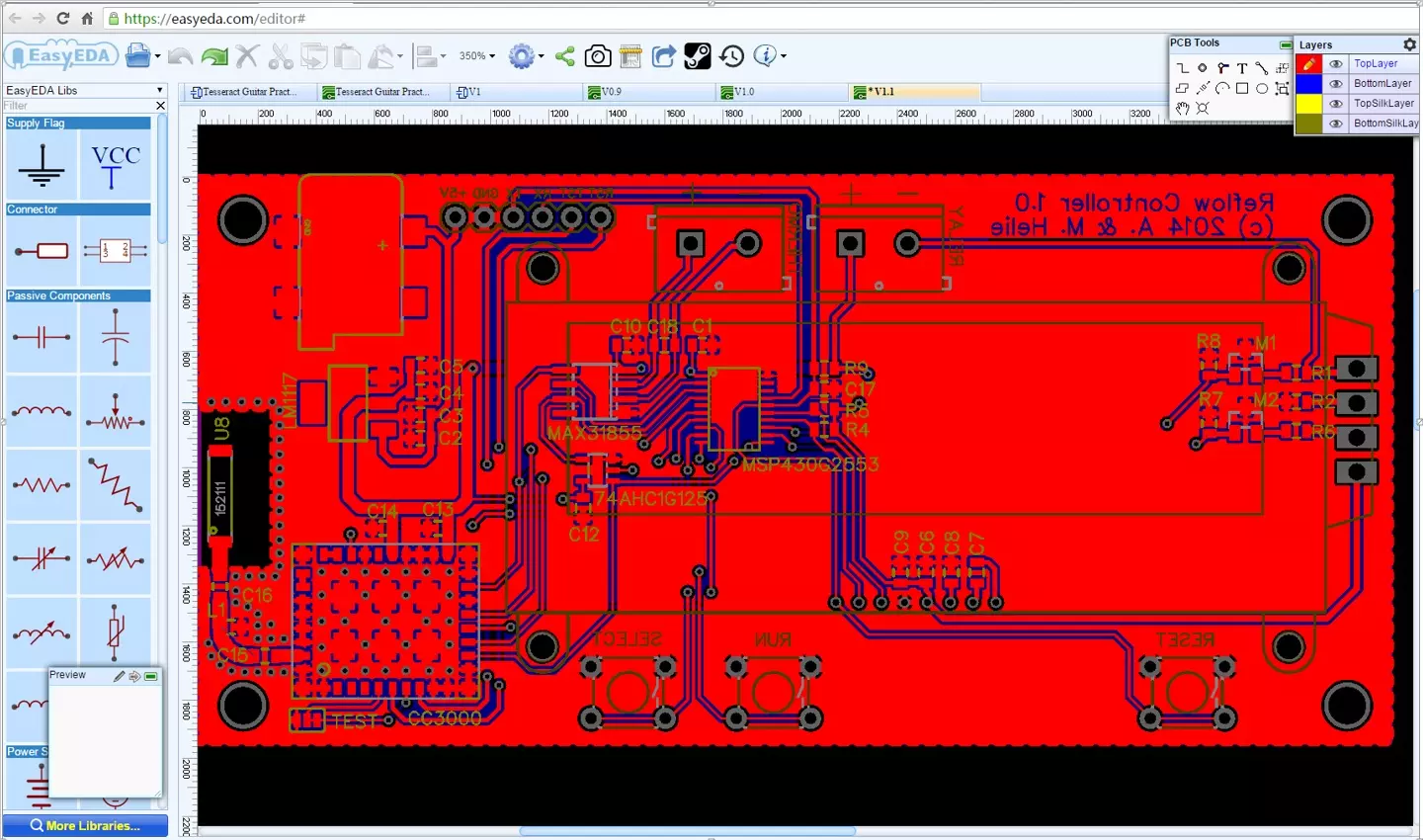
Hello friends, hope you all are fine and having fun with your lives. Today, I am going to share a new circuit simulator and PCB Design software named as EasyEDA. You guys all are well aware of Proteus software which I share quite a lot on my blog for Circuit simulating. No doubt Proteus is quite a cool software but recently I got a chance to work on this amazing EasyEDA software. And I must admit that its better than Proteus software because of its cloud based EDA tools. Yes you have read correctly, in order to use this amazing software, you don't have to do anything you just need to create an account online and start designing your PCB designs. All your designs will be saved online so you dont have any tension about where to save your files. :)
E ...
Hello friends, hope you all are fine and having fun with your lives. In today's post, I am going to share a new DS1307 Library for Proteus. Recently, I have shared the GSM Library for Proteus, which was really appreciated by the readers so I got quite excited and have designed another new Proteus Library. Currently I am working on many Proteus Libraries. In future, I am gonna design almost all the sensors in Proteus. So stay tuned with us.
Anyways coming to today's post, today we are gonna have a look at DS1307 Library for Proteus. Using this library, now you can quite easily simulate DS1307 module in Proteus in a quite stylish way. ;) I have designed it in red color because its available in red color in market. DS1307 module is already available ...
Hello friends, hope you all are fine and having fun with your lives. Today, I am going to share a new exciting post on Send SMS with SIM900D in Proteus ISIS. In my previous post, I have shared the new GSM Library for Proteus, which is the first ever designed library for Proteus, and I am quite excited while sharing its features. So, today, we will use this GSM Lirbary for Proteus and we are gonna send sms with Sim900D module available in that library. We are gonna design this whole project in Proteus ISIS.
If you wanna implement it on hardware then you must have a look at Send SMS with SIM900D module with Arduino which is designed in real hardware but today we are gonna just do the simulation part. Iam not gonna use any Microcontroller today. Inst ...