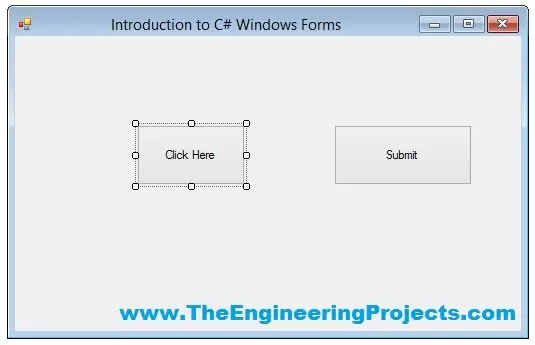
Hello everyone, I hope you guys are having fun with your lives. In today's tutorial, we are gonna have a look at How to use Button in C# Windows Form. In our previous tutorials, we have first discussed the Introduction to C# Windows Forms in which we have created our first C# Windows Forms Project. After that we have discussed How to add C# Controls in Windows Form, in which we have added different C# controls in that Windows form.
So, now we are gonna add back end programming in those Controls one by one. In today's tutorial, I am gonna add the code for the Buttons and you will see that it won't be any difficult to use them in your projects. So, let's get started with How to use Button in C# Windows Form.
How to use Button in C# Windows Form ??? ...
Hello friends, I hope you all are fine. In today's tutorial, we will discuss How to set up the C# environment? This question deserves to get answered in detail, and that is why we wrote this article for you. In the previous tutorial, we have seen a detailed Introduction to C# Programming Language.
So, keep reading to find out everything about how to set up a C# environment.
What is C# And What are its Advantages?
C#, also known as C sharp, is an all-purpose, contemporary, object-intended coding language. Microsoft created the #C programming language as part of the .Net project. It is certified by the European Computer Manufacturers Association (ECMA) as well as the ISO. The updated iteration of the C# programming language is version number 7.2, ...
Hi Guys! Hope you are doing great. Our mission is to give you valuable knowledge related to your field so you keep coming back for what we have to offer. Today, I am going to unlock the details on the C# ListView Control. It displays useful information about list of items by using various views available in the control. You can also have a look at LinkLabel and DateTimePicker that I have discussed previously. I'll try to cover every aspect related to ListView Control so you get a clear idea about this control and you don't need to go anywhere else for finding the information regarding this control. Let's get started.
C# ListView Control
C# ListView Control is used to display list of items by using various views available in the control.
It is ...
Hello everyone, hope you all are fien and having fun with your lives. Today, I am going to post a new C# tutorial in which we will have a Introduction to C# Windows Forms. Till now, we have seen Introduction to C# in which we have designed a console application in C# and after that we have discussed that project and write some code in it in First Code in C# Tutorial. So, till now we have an idea How to create a console application and how to run it easily.
I will continue with this C# console projects but first we have to discuss a little about C# Windows Forms. Microsoft Visual Studio is a very vast software so we can design different types of projects in it and also can use different languages. So, when talking about C#, we not only can design c ...
Hello friends, I hope you all are doing great. In today's tutorial, we will have a detailed Introduction to Structures in C#. It's our 17th tutorial in C# series. Structures are quite similar to classes but have few differences as well, which we will discuss today.
We have discussed C# Classes in 13th lecture, so you must read it once as we will use that knowledge in today's lecture as well. So, let's get started with Introduction to Structures in C#:
Introduction to Structures in C#
Structure in C# is a value type data type, created by using keyword struct, and can have fields, methods, properties, operators etc. just as in C# Classes.
Main difference between C# Class & Structure is that C# Class is a Reference Type Date type while C# St ...
Hello everyone, I hope you are doing great. In this article, we will talk about C# TextBox Control. In the previous articles, you have already get familiar with C# Button Control & C# Label Control, this is the sequence of those. In short C# TextBox Control is just same as the other expect some few changing. Before getting started with C# TextBox you must have knowledge of previous concepts. It's not essential but it will give you the edge to understand the advanced elements of C#.
C# TextBox is used to get input from users or it can also be used to display some values to the user. The textbox is a container for text blocks, you can take inputs or show the text as you required in the form of paragraphs. If you used TextBox as the input field t ...
Hi Everyone! Hope you all are doing great. We always love when you keep coming back for what we have to offer. Today, I am going to give you a Introduction to C# Classes. We have already seen Introduction to Data Types in C# which includes boolean, integer, char and double. However, if you want to make complex custom type, you can make use of classes. I'll give you a brief introduction to classes so you don't have to go anywhere to find information regarding classes in C#. Let's hop on the board and dive in the details of classes.
Introduction to C# Classes
Class in C# is referred as a blueprint of complex data type that describes the behavior and data of type.
If you want to create complex custom type, we use class. What do I mean by complex ...
Hello everyone, hope you all are fine and having fun with your lives. In today's tutorial, we are gonna have a look at How to use C# Array. C# array is quite a simple concept but students normally got confused while using C# array that's why I am gonna explain it in a detail. C# array is used to store similar data in a single variable. Let me explain this with an example. Suppose you have 10 integer variables then what you need to do is to save all of these 10 variables in separate C# Int variables which will not only increase the size of your code but will also make it quite complex. So, instead of creating 10 separate C# Int variables you can simply create a single C# array and can add all of them in it.
Let's take an example for C# arrays from ...
Hello friends, I hope you all are doing great. In today's tutorial, we will have a look at Properties in C#. It's our 20th tutorial in C# Series and a quite important one as we are gonna use properties a lot in our coming lectures.
If you haven't studied C# Methods & C# Classes then I would suggest you to read them first before starting today's tutorial, as we are gonna use methods today. So, let's get started with Properties in C#:
Introduction to Properties in C#
Today I am not gonna start with the definition as I did in previous tutorial, instead we will first understand the concept and then will define it.
So, let's create a new C# Class named StudentsClass shown in figure on right side.
...
Hello friends, hope you all are fine and having fun with your lives. Today, I am going to show you guys How to use C# Double Variable in your projects. In our previous tutorial, we have seen How to use C# Int Variable and we have also discussed about the term Variables in detail. So, I am not gonna discuss it again and gonna come straight to our topic C# Double variable.
It's my second C# tutorial in the series of C# variables. In the coming tutorials, I will discuss the remaining C# variables in detail. I have also provided the project code below but I would suggest you to do it on your own so that you get most out of it. Moreover, you should also have a look at Introduction to C# Windows Forms and How to use C# Control in Widows Forms as I am ...