USART is the acronym for Universal Synchronous-Asynchronous Receiver-Transmitter, and is the advancement of the old UART that was unable to handle synchronous communications; in computers, it deals with the management of communication via the RS-232 interface.
Generally, in the communication between devices, there is a transmitter and receiver that can exchange data bidirectionally, thus it happens for example in the communication between the microcontroller and third-party peripherals.
What is Serial Communication?
In serial communications, the transmitting device sends information (bitstream) through a single channel one bit at a time. Serial communications are distinguished from parallel communications where the bitstream is sent over several d ...
During the era of Covid-19, social distancing has proven to be an efficient method of reducing the spread of contagious viruses. It is recommended that people avoid close contact as much as possible because of the potential for disease transmission. Many public spaces, including workplaces, banks, bus terminals, train stations, etc., struggle with the issue of keeping a safe distance.
The previous guide covered the steps necessary to connect the PCF8591 ADC/DAC Analog Digital Converter Module to a Raspberry Pi 4. On our Terminal, we saw the results displayed as integers. We dug deeper into the topic, figuring out exactly how the ADC produces its output signals. In this article, however, we will use OpenCV and a Raspberry Pi to create a system that can detect when people are trying to avoi ...
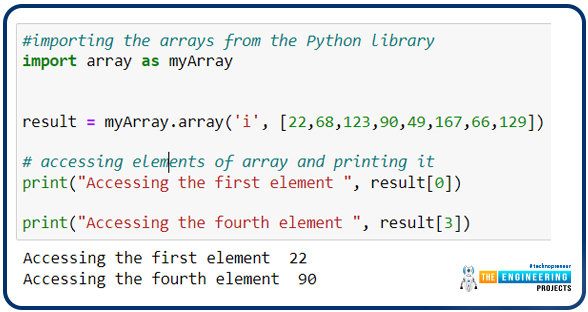
Hello Python programmers! Welcome to the engineering projects where you will find the best learning data in a precise way. We are dealing with Python nowadays, and today, the topic of discussion is the arrays in the language. We have seen different data types in Python and discussed a lot about them in detail till now. In the previous lecture, we saw the details of the procedures in dictionaries. There are certain ways to store the data in the different types of sequences, and we have highlighted a lot about almost all of them. It is time to discuss the arrays, but before this, it is better to understand the objectives of this lecture:
Introduction to arrays
Difference between contiguous and non-contiguous memory locations
One-dimensional arrays
Functions in arrays
What are Arra ...
Welcome to the next tutorial of our python course. We learned about python numbers in the last tutorial, and in this tutorial, Data types in Python include, dictionaries, sets, and Boolean, among others. We'll give a quick overview of the above data types in this section but later in this course, we'll go over each of them in-depth.
Introduction
In the Python programming language, data types are a necessary concept. Python assigns a data type to each value. Data Types are used to classify data objects or to assign a value to a data category. It aids in comprehending the many operations that can be applied to a value.
Python considers everything to be an object. Classes are represented by data types in Python. Variables are the names given to the ...
Hello students! Welcome to the new Python tutorial, where we are learning a lot about this programming language by applying the codes in a Jupyter notebook. It is interesting to see how simple codes with easy syntax can be useful to store, retrieve, and use data in different ways. Many things in Python are so unadorned and pre-defined that programmers may use them in a productive way without any issue.
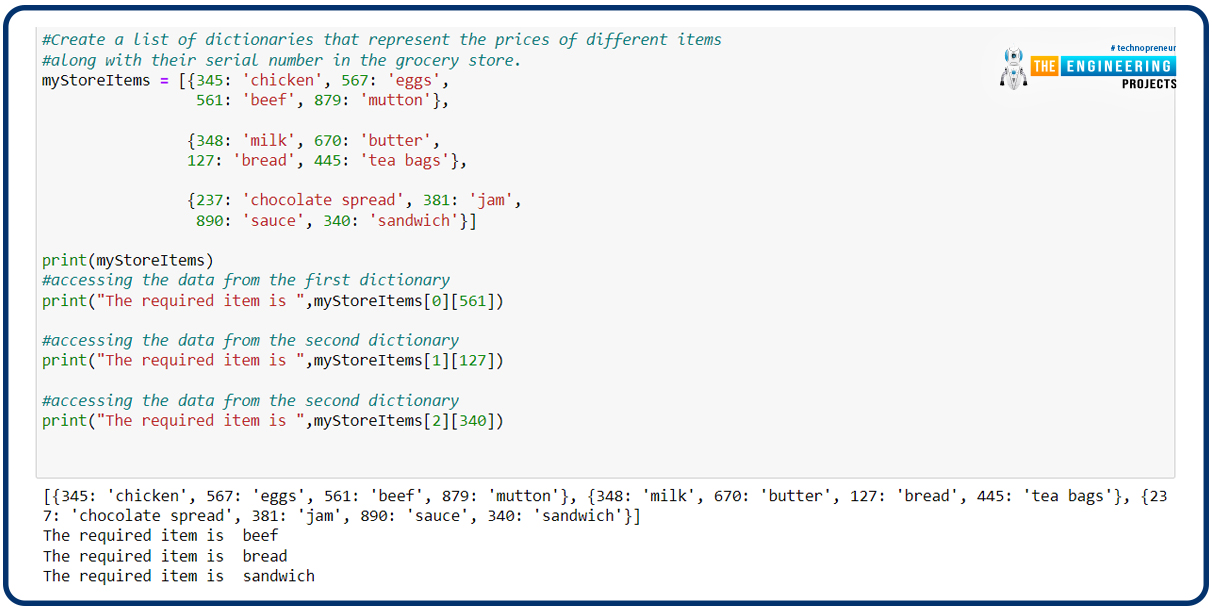
In the previous lecture, we have seen the details of the sets and how different types of mathematical operations are used to get the required results. We have seen many codes, the examples of which were taken from day-to-day life. In the present lecture, the mission is to learn a new topic that is related to the concepts of previous lectures. Yet, it is important to have a glance at t ...
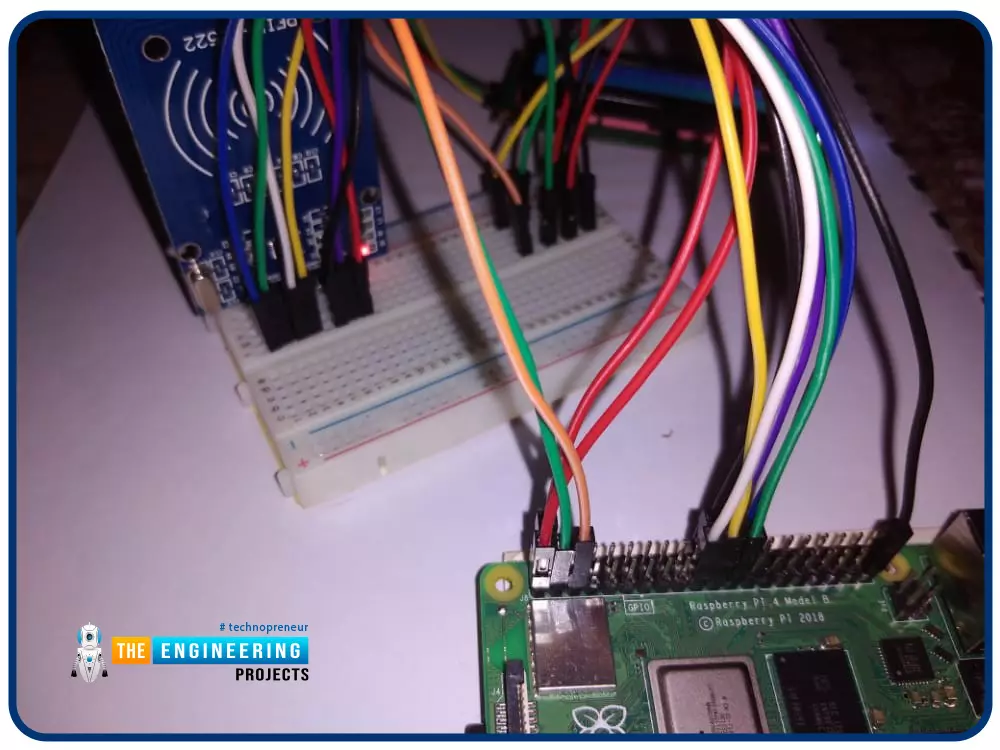
Greetings! This is the complete project of our Raspberry Pi 4 tutorials. In our previous tutorial, we learned to set up our raspberry pi as a virtual private network server. In this tutorial, we will design a smart attendance system using an RFID card reader, which we will use to sign in students in attendance in a class.
First, we will design a database for our website, then we will design the RFID circuit for scanning the student cards and displaying present students on the webpage, and finally, we will design the website that we will use to display the attendees of a class.
Components
RFID card kit
Breadboard
Jumper wires
Raspberry pi 4
I2C LCD screen
Design a database in MySQL server
Additionally, the Database server offers a DBMS ...
Hey, peps! Welcome to the new tutorial on the Jupyter notebook. As we are moving towards a higher level of Python, therefore, it is important to understand other ways of doing the same task. As we read in the previous lecture about 2D arrays, this time it is going to be done with the help of a famous library in Python. This time, you are going to learn different, engaging, and advanced-level concepts that not only help you deal with the 2D array but also the installation and working of the unique library of Python, which is NumPy. This lecture is going to be very useful and interesting, and therefore, we suggest you have a glance at all the goals of this lecture.
Getting the introduction to NumPy
Successfully installation of NumPy and knowing different methods for it
Using the arrays wi ...
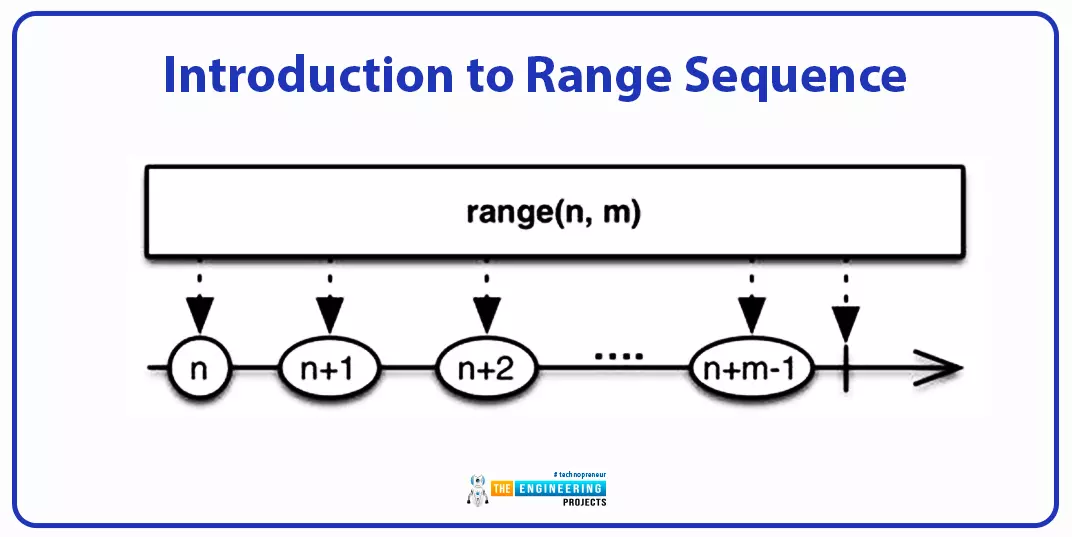
Hey peeps! Welcome to the new lecture on the sequence data type, where we are discussing the range data type. We are interested in working on deep learning, and for this, we are learning the Python programming language from scratch. If we talk about the previous episode, we saw the byte and byte array methods that were amazing for converting the different data types into bytes. The current lecture will discuss the range data type, which is slightly different from the other types of sequences, so students will learn new and interesting concepts in the lecture; however, before we get into the details of our topic, take a look at today's highlights:
What is the range function?
How can you elaborate on the syntax of the range function in detail?
What are the three types of range functions ...
Hello friends, I hope you all are doing great. In today's tutorial, I am going to share a new Proteus Library for Raspberry Pi 3 module. In my previous tutorial, I shared the Raspberry Pi Pico Library for Proteus. Similar to Pico Library, this RPi3 LIbrary won't operate on the Python code. We have just designed the front look to use in the circuit design. Although, we can upload Arduino code to these simulated Raspberry Pi boards.This Raspberry Pi Proteus Library will have only the Raspberry Pi 3 board in it. We will design the other Pi boards soon. So, let's have a look at How to simulate Raspberry Pi in Proteus:
Raspberry Pi 3 Library for Proteus
First of all, we need to download the Raspberry Pi library files, by clicking the below button:Raspberry Pi 3 Library for Proteus(adsbygoog ...
Welcome to the fourth lesson of this python course. Our previous session taught us how to utilize the print function in python, so we have a firm grasp of the terminology and the functions themselves. In this lesson, we'll cover a few more Python terms, such as:
Strings
Operators
Input function
Also, we'll build a simple program to print out an imagined dog so that we may better grasp how these concepts are employed. So, let's get started now.
Why do we need to understand these terms?
Programming is a lot like building a structure out of blocks. Even with just a few types of children's toy blocks and some time and imagination, you can build anything. Because we'll be utilizing these phrases all the time in programming, it's critical that you know what they mean and how to use th ...