Hello friends, hope you all are fine and having fun with your lives. In today's post, I am gonna share How to get Hex File from Arduino. It's quite a simple post and I have already explained it many times in my posts but still, I am getting a lot of messages regarding it that's why I thought to write a separate post for it. First of all, let's have a little introduction about it. If you have worked on PIC Microcontrollers or Atmel etc then you have seen that you always get hex files from their compilers and then you burn that hex file in the respective Microcontroller using their programmer or burner. But that's not the case with Arduino. In Arduino boards, you simply plug it with your computer and you hit the Upload button and the code automatica ...
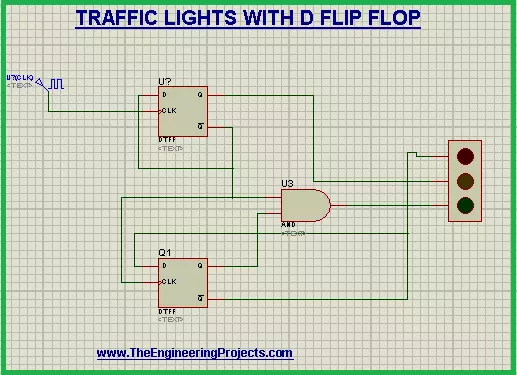
Hi Mentees! we hope you are doing great. Welcome to a super easy yet useful project based upon the simulation in Proteus. We are working on the Traffic Lights project that will work with the help of D Flip Flop. In this simple tutorial, you will be aware of the following concepts:
What are the Traffic Lights using D Flip Flop?
What is the role of D Flip Flop?
How does the circuit of D Flip Flop work in the Traffic Lights?
How can you simulate the circuit of Traffic Lights with D Flip Flop in Proteus?
In addition, you will find some important information about the Traffic Lights circuit in the DID YOU KNOW Sections. Let's start learning.
Traffic Lights with D Flip Flop
Who is not aware of the traffic lights? we all observe and use the Traf ...
Hello friends, I hope you all are doing great. In today's tutorial, we are gonna have a look at detailed Introduction to TIP127. The TIP127 is a PNP type Darlington pair transistor. It is manufactured for universal drive amplifications and less velocity swapping submissions. It is existing in TO-220 kind of cascading. Its corresponding NPN transistor is the TIP122.
This is a common transistor it used in varied engineering schemes. It formed for least time taking swap proposals. In today’s post, we will have a look at its protection, wreck, difference, entitlements, etc. I will also share some links where I have connected it with other microcontrollers. You can also get more material about it in comments, I will guide you more about it. So, let’s g ...
Hello friends, I hope you are all fine will be doing something interesting in your life. In today's tutorial, we are gonna have a look at detailed Introduction to Arduino Zero. Arduino Zero is a Microcontroller device. It is a 32-bit extension of UNO series. Its main features are Atmel Embedded Debugger (EDBG), it provides a full debug interface without additional hardware. This board provides a platform of new inventory projects in smart IoT devices, high technology automation, robotics and much more.
As, Electronic devices coming in our life, they have become cheaper and performing more functions then there predecessor. The microcontroller was introduced in the industry to make our task easy in electronic devices and projects. Arduino Zero is a ...
Hi Guys! Hope you’re well today. Happy to see you around. In this post today, I’ll walk you through the Introduction to Arduino Nano 33 IoT.
Arduino Nano 33 IoT is mainly used in basic IoT applications. The Internet of things is one of the most exciting and robust developments in the field of information technology.
Using this technology you can interface a network of physical things with software, sensors, or other technologies to develop communication and data exchange between devices and other systems using the internet.
For example, you can control the room temperature by interfacing the sensors in your rooms with your smartphone through WiFi. Traditional systems including control systems, wireless sensor networks, embedded systems, and hom ...
Hey Guys! Welcome you onboard. Today, I'll discuss the details on the Introduction to IRF4905. It is a P-Channel HEXFET Power MOSFET available in a TO-220AB package and is based on Advanced Process Technology. It is mainly used for fast switching purpose, capable of providing ultra-low on-resistance.
This tiny device comes with three terminals called gate, drain and source where the gate terminal is used to control the current on remaining two terminals. The area between source and drain is known as a channel that is widely dependent on the voltage applied to the gate terminal.
In this post, I'll cover each and everything related to this P channel MOSFET, its main features, working, pinout and applications. Let's jump right in and explore everyt ...
Hello readers, I hope you all are doing great. In our previous tutorial, we learned SMTP server and how to implement an SMTP server for sending emails with ESP32. In the previous tutorial, we also demonstrated some examples like sharing raw text, HTML text, images and text files.
So, at the transmitter end, we are using the SMTP server.
But, what about the receiver end?
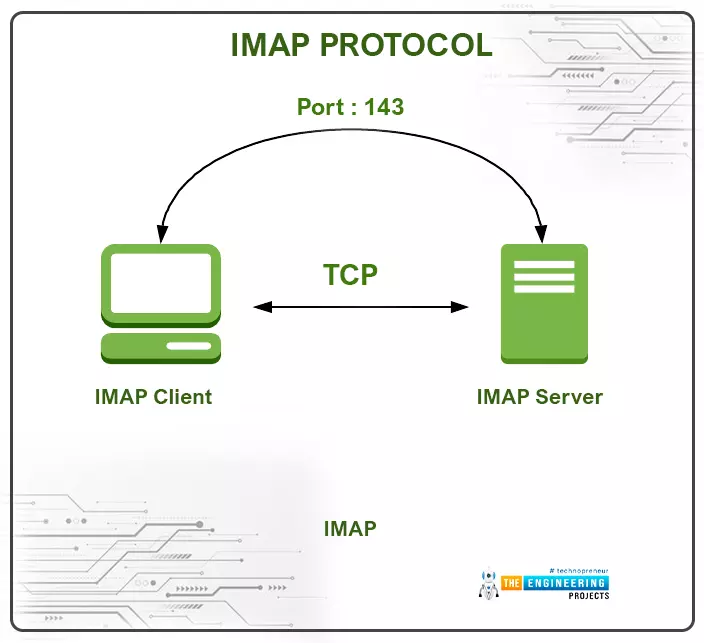
At the receiver end, we use another protocol called IMAP (or Internet Message Access Protocol) and POP3 (Post office Protocol V3) for receiving the emails.
Fig. IMAP and SMTP
What is IMAP Protocol and How does it Work?
IMAP is an application layer (TCP/IP) protocol that is used at the receiver end to receive emails from SMTP server or mail server. IMAP follows the client/server mo ...
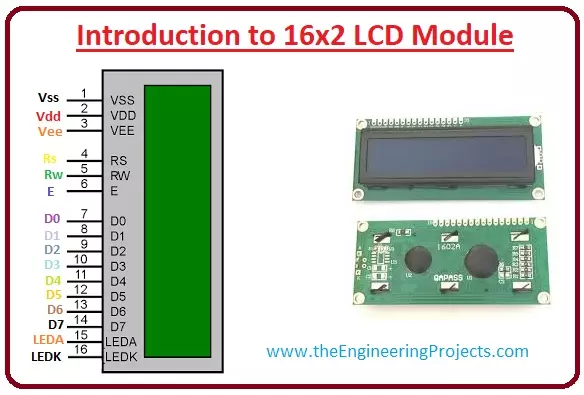
Hello friends, I hope you all are doing great. In today’s tutorial, we will have a look at Introduction to 16x2 LCD Module. LCD stands for liquid crystal display it is mostly used in different electronic projects and devices to display different values. LCD uses liquid crystals for the generation of visible images. 16 x 2 liquid crystal display is a basic LCD module used in DIY electronic projects and circuits. In this LCD module, there are two rows every row consists of sixteen numbers.
With the two rows in this module, there are sixteen columns. The VA dimensions of these modules are (66 x 16) millimeters and the thickness is 13.2 millimeters. Its operating voltage is plus five or plus three volts. In today's post, we will have a look at working, applications, circuits, features, adv ...
We are familiar with multiple features of the ESP32 module. Like Wi-Fi capabilities, classic Bluetooth, Bluetooth low energy (BLE), inbuilt sensors etc.
Hello readers, I hope you all are doing great. We have already mentioned in our previous tutorials that, ESP32 is also featured with a Dual-Core Processor. Which provides better performance and efficiency.
In this tutorial, we will learn how to use ESP32’s dual cores. ESP32 has two (32-bit each) Tensilica Xtensa LX6 microprocessors namely, core0 and core1 which makes it a powerful dual-core microcontroller and hence stands apart from its predecessors.
When we compile and upload a code using Arduino IDE, we do not have to worry about which core executes the code. It just runs.
Fig. 1 ESP32 dual-co ...
Hey Guys! Hope you are doing well. I always take pleasure to keep you updated with valuable information related to information and technology. Today, I'll discuss the detailed Introduction to ULN2803 which is a relay driver that comes with a high-voltage and high-current Darlington transistor array. In order to obtain higher current capability, the Darlington pairs are connected in a parallel configuration.
The component is incorporated with eight NPN Darlington pairs, featuring high-voltage outputs with common-cathode clamp diodes that are directly related to switching inductive loads. Each Darlington pair features a decent amount of collector-current rating i.e. around 500 mA.
You must have a look at ULN2003 which is almost similar to this IC ...