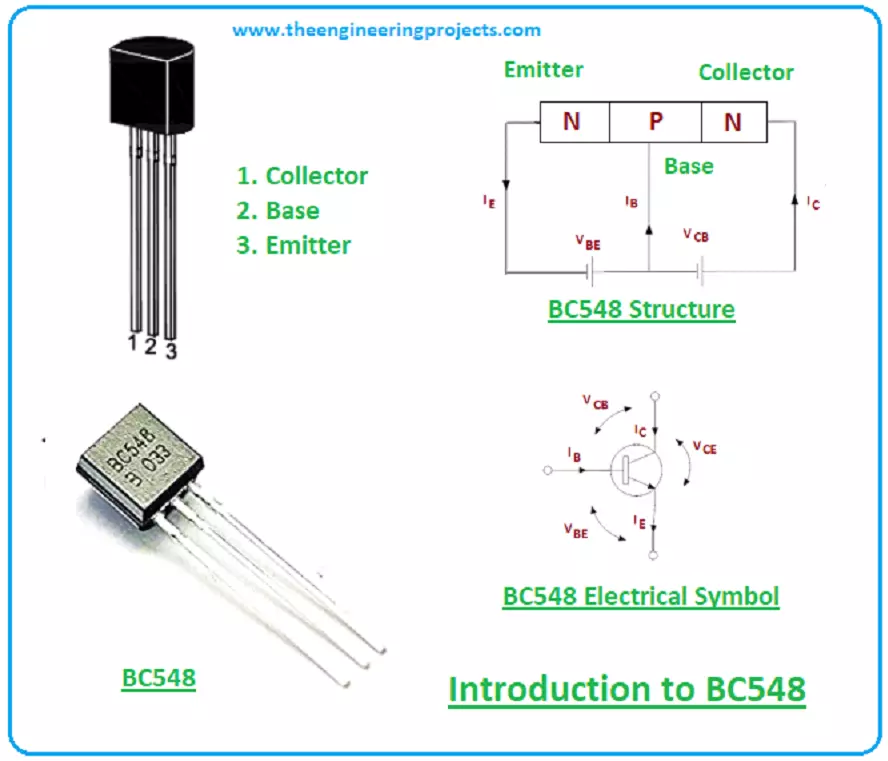
Hi Friends! Glad to see you here. I hope you’re well today. In this post, I’ll walk you through the Introduction to BC548. BC548 is a general-purpose transistor that falls under the family of NPN transistors. It carries three pins that are mainly used for external connection with the circuit. The small current at one terminal is used to control the large current at other terminals. Moreover, it can drive loads under 500mA and is available in TO – 92 package. I suggest you read this post all the way through as you’ll get to know all nuts and bolts of BC548 transistor i.e. pinout, working principle, power ratings, applications, and physical dimensions. Let’s jump right in. Introduction to BC548 BC548 is an NPN general-purpose transistor , comes with three pins named emitter, base and collect ...
Hi everyone! Thank you for viewing this article, I welcome you on board. In this post I’ll walk you through the detailed Introduction to BC546 . BC546 is a low power NPN transistor mainly used for general purpose amplification and switching applications. In this read you’ll study all nitty-gritty of BC546 transistor i.e. from pinout, pin configuration, and working principle to power ratings, key parameters, physical dimensions and applications. Keep reading. Introduction to BC546 BC546 is a bipolar junction NPN transistor that finds applications in switching, amplification, impedance, H-bridge and current mirror circuits. This transistor falls in silicon epitaxial planar transistor category which is generally divided into three groups A, B & C. This BC546 is available in group A & B. BC546 ...
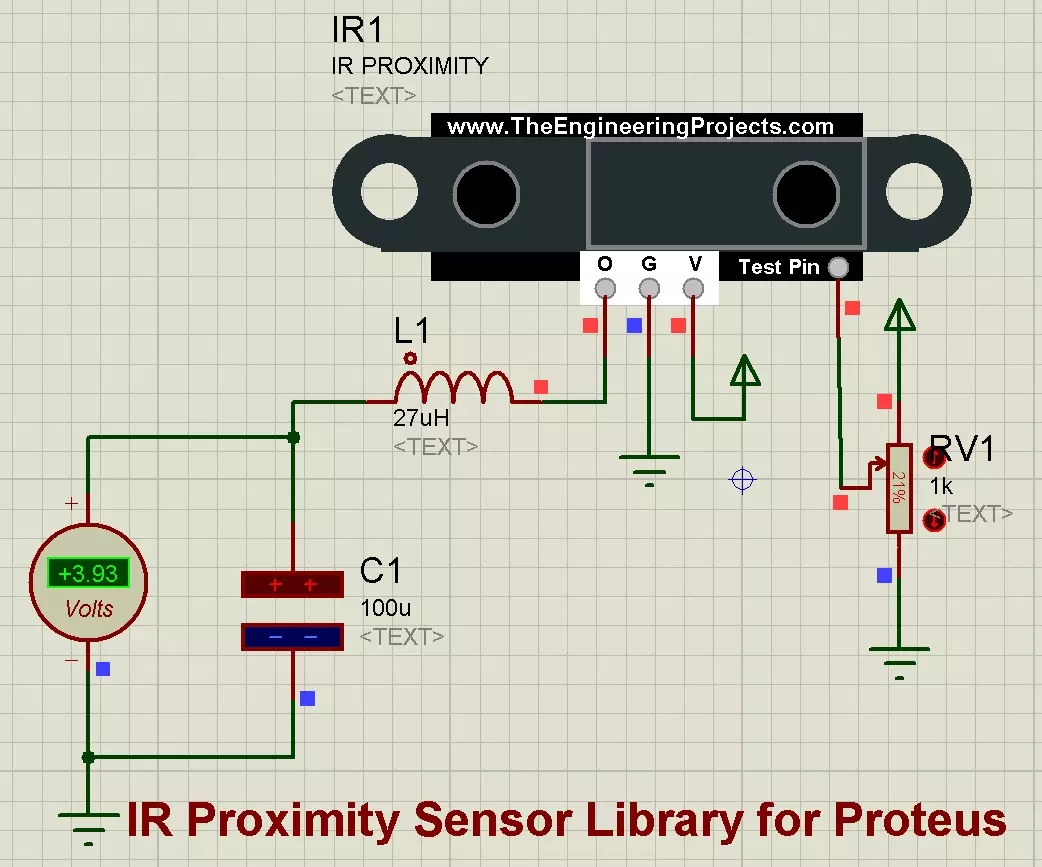
Hello friends, I hope you all are doing great. In today's tutorial, I am going to share a new IR Proximity Sensor Library for Proteus . Proximity Sensors are not available in Proteus and we are sharing its Proteus library for the first time. So far, I have only shared Proteus Libraries of digital sensors but today I am sharing an analog sensor, so too excited about it. Updates IR Proximity Sensor Library for Proteus Latest version: V1.0 (March 2020, this tutorial) Other infrared sensors: IR Obstacle FC-51 · IR Tracker · Sharp IR · IR Remote Distance and motion sensors: Ultrasonic HC-SR04 · JSN-SR04T · TF-Luna LiDAR · VL53L0X · PIR HC-SR501 · RCWL-0516 Helping Tools Serial Monitor Advance : a serial terminal window for the UART of your board Serial Monitor Expert : the serial monitor with e ...
Hello friends, I hope you all are doing great. In today's tutorial, we will have a look at How to use Voltmeter & Ammeter in Proteus ISIS. It's our 4th tutorial in Proteus series. While designing an electronics project, voltage & current measurements are essential debugging features, as they help in understanding circuit behavior. Proteus has builtin instruments for voltage & current measurement. We have have their probes and today we will discuss them in detail. First have a look at Voltmeter in Proteus ISIS: How to use Voltmeter in Proteus ISIS DC Voltmeter is used to measure the voltage difference across any DC component. In order to use DC Voltmeter, we need to click on Virtual Instruments Mode , as shown in the figure. In Instruments list, we have DC voltmeter , so click it and place ...
Hello friends, hope you all are fine and having fun with your lives. Today's post is about How to increase Workspace in Proteus. It's our 3rd tutorial in Proteus series. Its quite a simple tutorial and along with this trick, I will also share few commonly used features or Proteus. Once, I was working on a simulation project in which I have to design a complete load management system in Proteus and it was quite messy as I have to include a lot of components and the area of Proteus got quite small for that and then I encountered this problem i.e. where to place the components. You have seen in Proteus software that there's a blue rectangle which is considered as the workspace in Proteus. This area is constant and doesn't increase or decrease on its own. So if we are dealing with some messy c ...
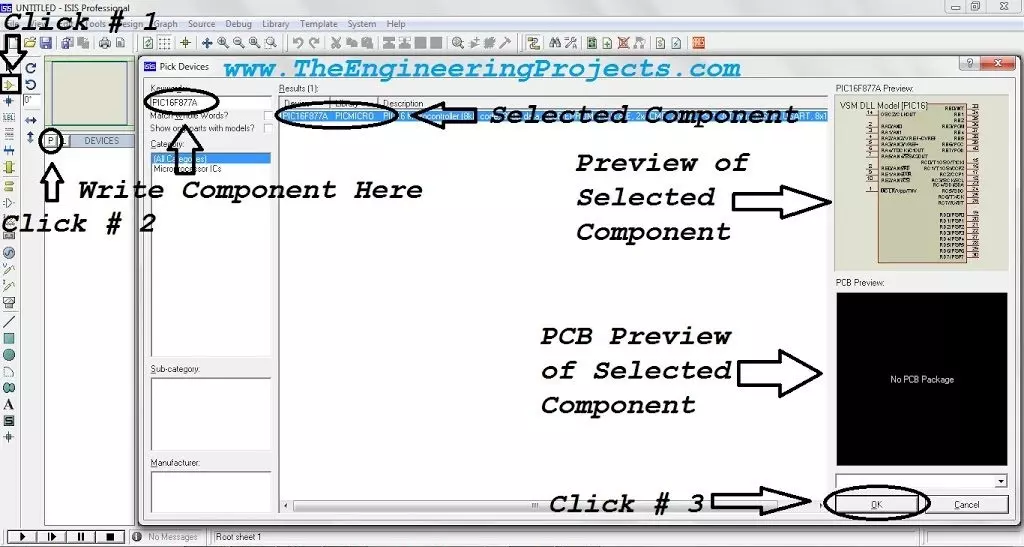
Hello friends, I hope you all are doing great. In today's tutorial, we will simulate our First Electronics Project in Proteus ISIS . It's our 2nd tutorial in Proteus series. In our previous tutorial, we have seen a basic Introduction to Proteus and today, we will design a simple electronics circuit in it and will also simulate it. If you want to work on Proteus, then you must have some prior knowledge about electronics. Proteus doesn't provide any suggestion about circuit designing so if you don't have electronics knowledge then you can't work with Proteus. Throughout this series, I will keep on explaining electronics circuits as well and will also embedded related components' links. So, if you are new to electronics then no need to worry and just follow these instructions and also do read ...
Hello readers, I hope you all are doing great. In today's tutorial, I am going to share a detailed Introduction to Proteus . It's our first tutorial in Proteus series. Today's tutorial is for beginners but still I would suggest you to read it once, as I am going to explain why Proteus? Throughout our Engineering Course, we have to design a lot of electronics or embedded circuits and it's always a best approach to simulate these circuits first on some simulation software i.e. Proteus, PSPice etc., before assembling them on actual hardware. Among these simulation software, Proteus is my favorite one so let's get started with detailed Introduction to Proteus: Introduction to Proteus ISIS Proteus Design Suite (designed by Labcenter Electronics Ltd. ) is a software tool set, mainly used for cre ...
Hello friends, I hope you all are doing great. In today’s tutorial, we will have a look at Introduction to ADC0804. In electronic engineering different modules used to conversion of analog signal into a digital signal. These tools are recognised as analog to digital converter or ADC. Thes signal converter also used to find the value of input current and voltage. Normally the output of these converters are 2 binary numbers but other values are also possible. These analog to digital converter are available in different structure scheme but mostly they are available in integrated circuits packaging. The working ability of these signal converter depends on their bandwidth and signal to noise ration (SNR). Their bandwidth can be fined by their sample rate (sample rat is the elimination of a con ...
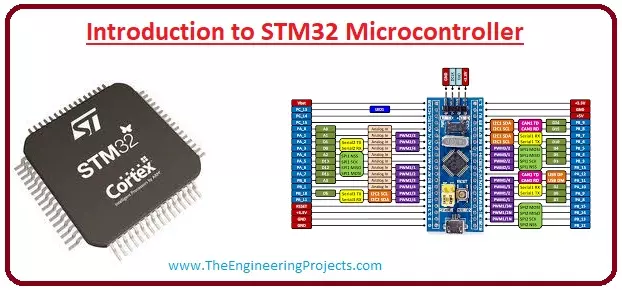
Hello friends, I hope you all are doing great. In today’s tutorial, we will have a look at Introduction to STM32 Microcontroller. This microcontroller is a new category of a microcontroller family it is a thirty-two-bit microcontroller also compatible with the ARM and Cortex M processor. Due to thirty-two bits compatibility, this module provides good performance, processing of digital signal and consumes less power and voltage. The modules used in most of the industries due to their compatibility with the cortex M0, M0+, M3, M4. In today's post, we will have a look at its working, features, pinouts, applications and some other related parameters. So lets with the Introduction to STM32 Microcontroller. Introduction to STM32 Microcontroller The STM32 is a type of microcontroller that offers ...
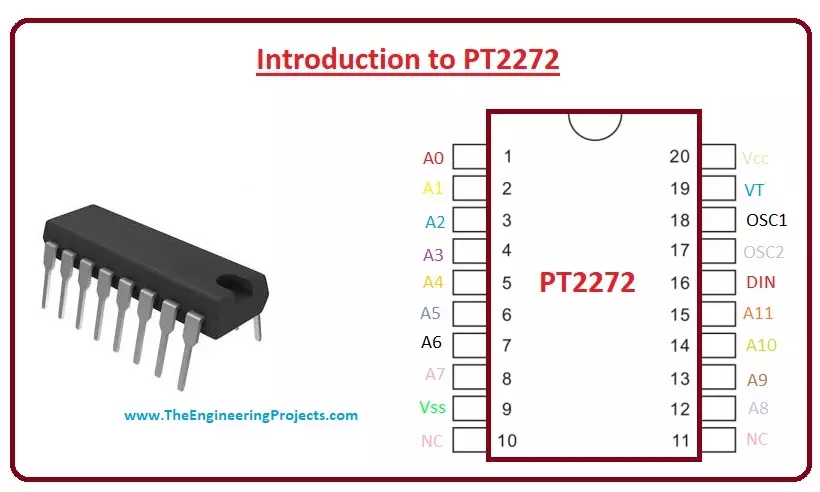
Hello friends, I hope you all are doing great. In today’s tutorial, we will have a look at Introduction to PT2272. It is a CMOS (complementary metal-oxide-semiconductor) that use to design simple wireless controlling of instruments installed at some distance. This module is normally used for controlling the circuits of garage door, speed control of the fan, robots and for monitoring the alarm connected at different places for security purposes. Libraries RF Module Simulation Libraries RF modules: nRF24L01 · nRF24L01 PA LNA · CC1101 · RFM69HCW · HC-12 · 433MHz RF · XBee Helping Tools Serial Monitor Advance : a serial terminal window for the UART of your board Serial Monitor Expert : the serial monitor with extra debugging tools LCD Library for Proteus V3.0 : 16x2, 20x4 and I2C LCDs to show ...