Hello guys! I hope you’re all in a good mood today because we are going to review the design of an interesting project today. We’ll be looking to design 4-way traffic lights in such a way that their delay is variable and is dependent upon the traffic density. This project is of intermediate difficulty level for people studying in undergrad engineering school with electronics, electrical and mechatronics as their major. It is also for the people learning Arduino and basic circuit design on their own or through some course. We have already designed a Simple 4-Way Traffic Light Control using Arduino and today we will make it smart by adding a variable delay.
Variable 4 Way Traffic Light:
As you all already know the importance of traffic lights and t ...
Hi Everyone! Hope you’re well today. Happy to see you around. In this post today, I’ll walk you through the Introduction to TDA2005.TDA2005 is a 20-watt Class B dual audio amplifier integrated chip. It comes in a Multiwatt11 package and is carefully designed for car radio applications. It can support the current up to 3.5A which is quite high which makes it a suitable pick for constructing power booster amplifiers.
I suggest you read this post all the way through as I’ll detail the complete Introduction to TDA2005 covering datasheet, pinout, features, and applications.
Let’s jump right in.
Introduction to TDA2005
TDA2005 is a 20-watt Class B dual audio amplifier integrated chip. It is particularly designed for car radio applications.
...
Hi Guys! Hope you are doing great. Today, we will have a look at an electronic component named Diode. We will discuss Diode working, Symbol, Applications and characteristics in detail.
A diode is an electronic component, that allows the flow of current in one direction only. It exhibits low resistance in one direction and very high resistance in the opposite direction. Whoever has been a science student, knows about diodes. Although it seems to be a tiny component of a circuit, apparently it is true but it has a lot of complexities or you can say, it's a storm in a teacup.
Diodes are normally used in rectifiers, where they convert AC signals to DC signals. They come with a wide range of applications including power conversion, radio modulation, l ...
Hi Guys! Hope you’re well today. I welcome you on board. Happy to see you around. In this post today, I’ll detail the Introduction to TL084.
TL084 is a JFET input Op-Amp that carries low offset current and high input impedance. Available with better offset characteristics and high noise immunity, TL084 comes with a suitable offset voltage that makes it an ideal pick for amplifier applications.
I suggest you read this post all the way through as I’ll walk you through the complete Introduction to TL084 covering datasheet, pinout, features, and applications.
Without further ado, let’s get started.
Introduction to TL084
The TL084 is available in Quad Package which means it comes with four separate op-amps that can operate independently.
This o ...
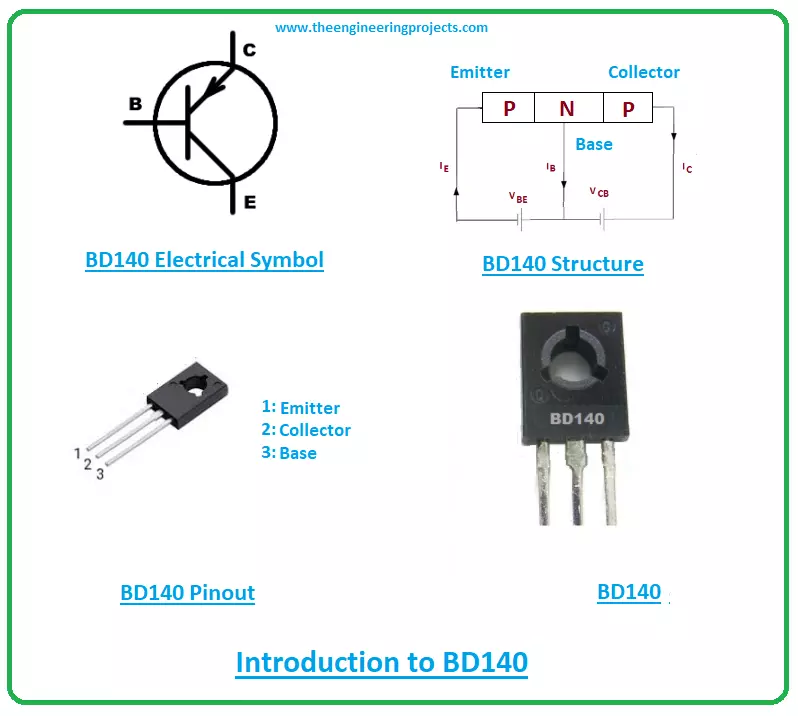
Hello Friends! Hope this finds you well. I welcome you on board. Thank you for clicking this read. In this post today, I’ll walk you through the Introduction to BD140.
BD140 is a medium power bipolar junction transistor that is mainly used for switching and amplification purpose. It belongs to the PNP transistor category and comes in the TO-126 package. It is made up of silicon material with collector current 1.5A which indicates it can support loads under 1.5A. The collector-base and collector-emitter terminal voltages are 80V and emitter-base voltage is 5V which is used to bias the transistor.
In this post, I’ll be detailing the complete introduction to BD140 covering pinout, working, absolute maximum ratings, physical dimensions, alternatives ...
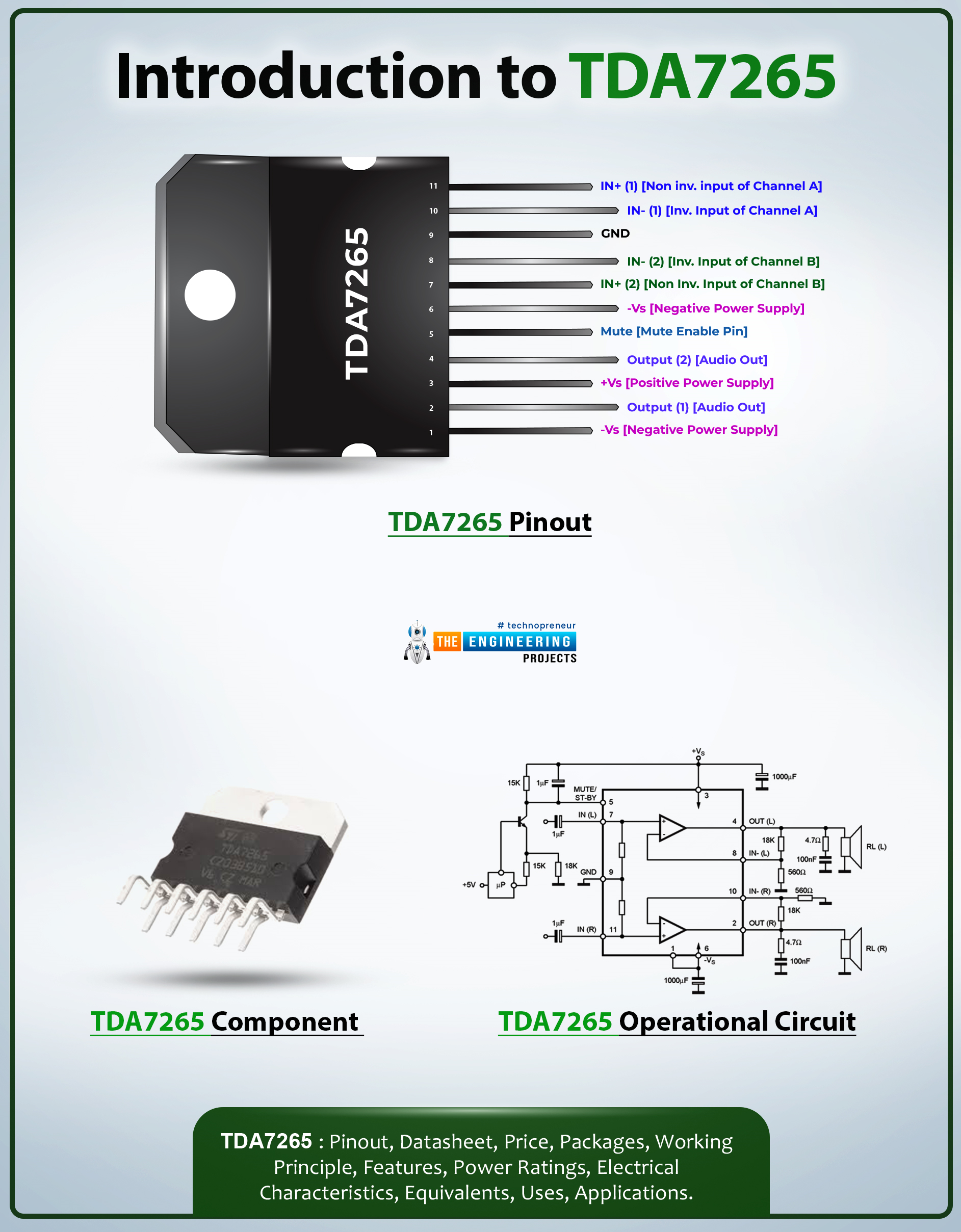
Hi Friends! I hope you’re well today. I welcome you on board. In this post today, I’ll walk you through the Introduction to TDA7265.TDA7265 is a +25-watt class AB dual audio power stereo amplifier. This multi-watt package IC is carefully designed for high-quality audio power amplification applications. This device receives a low-input audio signal and amplifies it into a high-quality audio output.
I suggest you buckle up as I will detail the complete introduction to TDA7265 covering datasheet, pinout, features, and applications.
Let’s jump right in.
Introduction to TDA7265
TDA7265 is a +25-watt class AB dual audio power stereo amplifier that is mainly employed in audio amplifiers and woofer amplifiers.
This device gets a low-input audio signal and converts it into a high-out ...
I hope you all are doing great. In today's tutorial, we are gonna have a look at detailed Introduction to ESP-01. ESP-01 is an inexpensive, small-sized WiFi module, which consists of TCP/IP stack along with a built-in microcontroller. So, we can directly program this small chip and can bring WiFi capability in our Embedded projects. When first time this ship came into the market in August 2014, it got a lot of attention by users. The main reason for it to seek attention is that this module allows the microcontroller to connect with a WiFi available (and programmed to connect) and it follows Hayes Style Commands and develops a TCP/IP network.
ESP-01 chip integrates an antenna, RF balun, power amplifier, filters, and power arrangement module. ESP-01 is used in industry and many projects a ...
Hello friends, hope you all are fine and having fun with your lives. Today, I am going to share a new project in which we are gonna do Arduino Bluetooth communication. The Bluetooth module I have used for this project is HC-05, which is a serial Bluetooth module. We can quite easily perform the Bluetooth communication with this module using Arduino board. I have worked on many projects in which I have to send the data from sensors to my computer via Bluetooth. So, in such projects I normally use this Bluetooth module which is connected with the sensors and then Arduino gets the data from these sensors and then send this data to computer via Bluetooth module. In this project, I have used Arduino board but you can use PIC Microcontroller or 8051 Mic ...
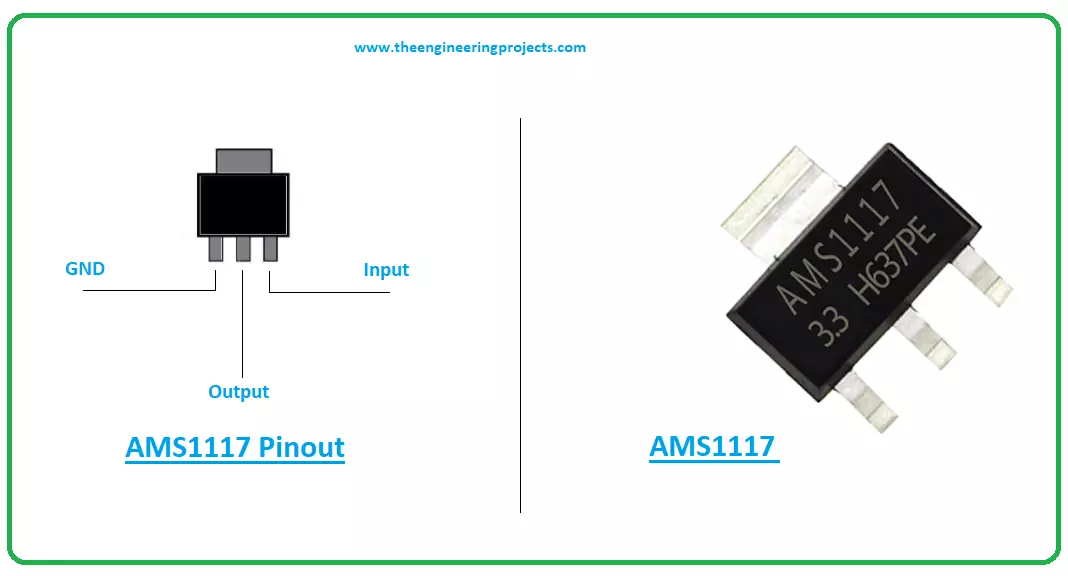
Hello Guys! Hope you’re well today. I welcome you on board. Thank you for clicking this read. In this post today, I’ll walk you through the Introduction to AMS1117.
The AMS1117 is a common voltage regulator that comes with both fixed and customizable voltages. It is a 3-pin device mainly used to drive load under 1A. The output voltage ranges from 1.5V to 5V. When it works at maximum current, it results in a low dropout voltage of 1.3A.
I suggest you read this post all the way through, as I’ll be discussing Pinout, datasheet, features, and applications of this tiny device AMS1117.
Let’s jump right in.
Introduction to AMS1117
The AMS1117 is a common voltage regulator mainly used for high-efficiency linear regulation and post-regulation switchi ...
Hello everyone! I hope you all will be absolutely fine and having fun. Today, I am going to share my knowledge with all of guys about Introduction to IRF540. It is basically an N-Channel power Metal Oxide Silicon Field Effect Transistor (MOSFET) and operates in enhancement mode.
MOSFET is a lot sensitive in comparison to an FET (Field Effect Transistor) due to its very high input impdence. IRF540 can perform very fast switching as compared to the normal transistor. It is based on HEXFET technology and operates on the temperature ranging from -55 degrees celsius to 175 degree celsius. If we need some switching application between different signals or to perform any of amplification process, MOSFET IRF540 will be the best option in this case bec ...