Buy This Simulation
Hello friends, Hope you all are fine and having fun with your lives. In today's post, I am going to show How to display a Scrolling Text on LED Matrix 8x8 using Arduino in Proteus ISIS. We all know about LED Matrix but if you don't know then google it. :P LED Matrix is used to display long messages, the best thing about LED Matrix is you can combine then in serial way and can make it of any size you want. Like in this post I have combined 8 LED matrices and then displayed my message on them. I have given all the details here but as you can see we have done a great effort in designing this simulation so I haven't posted it free but have placed a very small amount of $20 on it and you can buy it quite easily from our shop by cl ...
Hello friends, hope you all are fine and having fun with your lives. In today's post we will have a look at How to interface keypad with Arduino in Proteus ISIS. Keypad is used almost in every engineering project. If you even look around you will find keypad in many electronic appliances. For example, a simple ATM machine has a keypad on it using which enter our pin code and give commands to the ATM machine. Similarly, calculator also has keypad on it. So, in short there are numerous applications of keypad. You should also read the Real Life examples of Embedded Systems and you will find Keypad in them as well.
Keypad is used where you need to used numerical buttons or you need to use lots of buttons for sending commands so like in some applicatio ...
In today's post we are gonna have a look at How to Train Pixy Camera with Computer. We have yet posted three tutorials in the Pixy Camera series. In the first tutorial, we have seen How to Get Started with Pixy Camera in which we have studied the basics of Pixy Camera. After that that we have seen the Installation of Pixy Camera Software which is named as PixyMon and in the third tutorial we have covered How to Upload the Latest Firmware in Pixy Camera because its always the best strategy to deal with latest tools. So until now we have configured our Pixy Camera in all possible ways now the next thing is to train our Pixy Camera with Computer using PixyMon software.
Let's first discuss How the Pixy Camera works. Pixy Camera has on board NXP microc ...
[vc_row][vc_column][vc_column_text]
Hello friends, hope you are fine and having fun with your lives. Till now we have seen two tutorials on Pixy Camera module, in the first tutorial we have seen How to Get started with Pixy Camera and after that we have seen How to Install Pixy Camera software which is named as PixyMon. So, now I hope that you have installed the Pixy camera software and have the Pixy Camera module in hand along with USB to Mini USB cable. Because in this tutorial we are gonna plug our Pixy Camera module with moduter and will upload the latest firmware in our Pixy Camera Module, which isn't much difficult and would be a piece of cake if you followed all the instructions carefully.
Pixy Camera comes with some old firmware which is up ...
[vc_row][vc_column][vc_column_text]
In the previous tutorial, we have seen how to Get Started with Pixy Camera, which was quite a basic tutorial and we have covered just the basic cables required to set up pixy camera. Now along with cables we are also gonna need software for training our Pixy Camera. So in this tutorial we are gonna see how to install Pixy Camera Software which is named as PixyMon. As I explained earlier in previous post that first of all, we need to connect our Pixy Camera with Computer or laptop and then using its software PixyMon we need to train our Pixy Camera so that it can recognize objects present in front of it.
PixyMon is quite a simple software and quite easy to use. In this post, we are not gonna check How to use PixyM ...
Hello friends, hope you all are fine and having fun with your lives. Today's post is about getting started with pixy camera. Now, the first thing comes in mind is what is Pixy Camera so let's first have a little introduction about Pixy Camera on which I recently worked. Pixy Camera is a small camera board which uses NXP microcontroller. Its a very powerful board and can get easily interfaced with simple Arduino UNO board. So, now we can do image processing even on Arduino UNO. Image Processing needs a powerful board that's why we can't interface simple webcam with Arduino UNO or mega etc. Before using pixy camera, when I need to do on board image processing I always used either Arduino YUN, Raspberry Pi or Arduino USB host shield but still it was ...
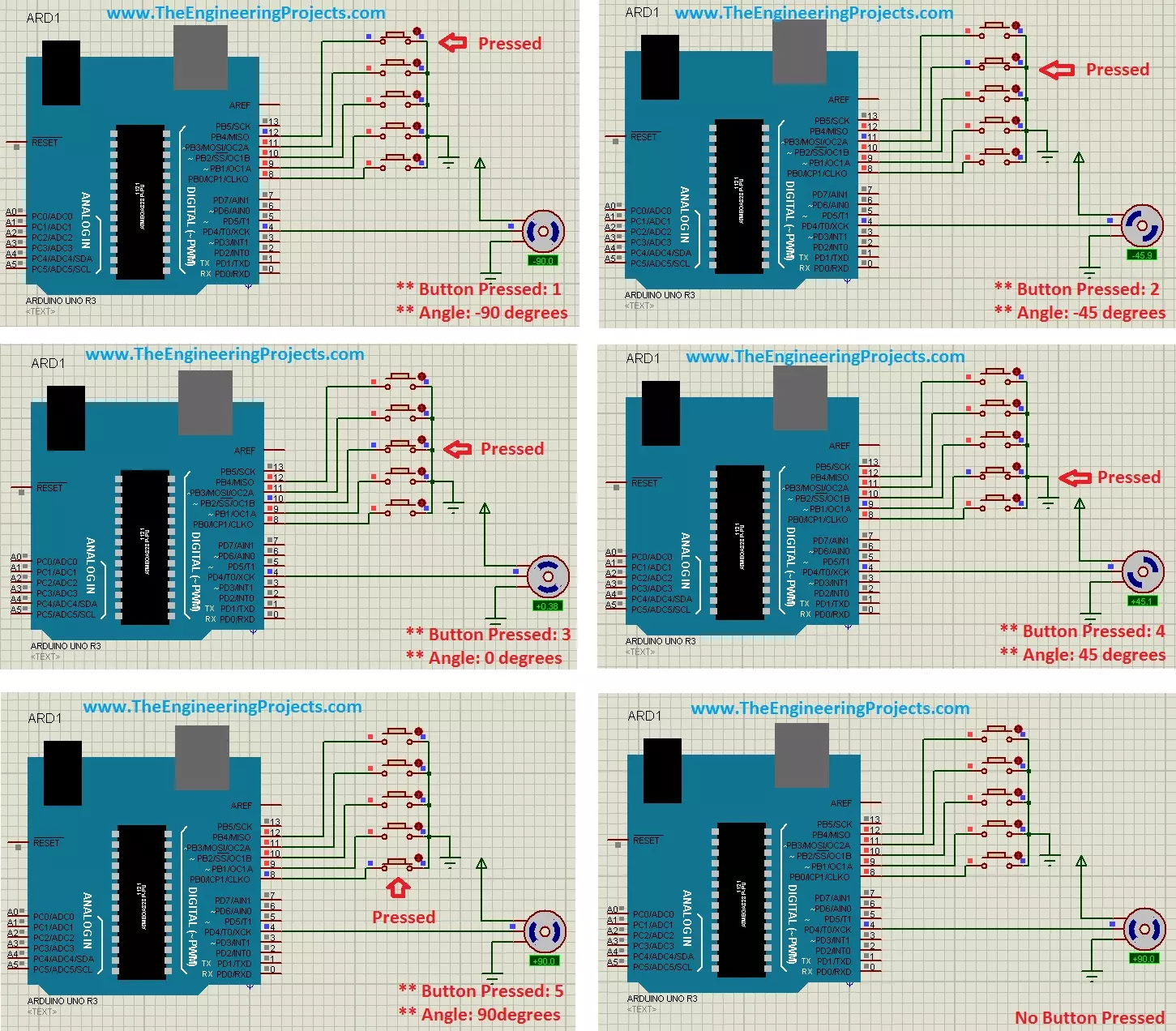
Hello friends, hope you all are fine and having fun with your lives. Today's post is about the Controlling of Servo Motor with Arduino in Proteus ISIS. Servo Motor is a common motor used in engineering projects for precise circular motion. We can move the servo motor at any desired angle, which is not possible in the case of other motors i.e. Stepper or DC.
For example, suppose I want to move an antenna at a precise angle of 47.5 degrees then if I use DC Motor, I have to use an encoder. So, in such cases instead of using a DC motor, I will prefer Servo Motor.
I have already posted Angle Control of Servo Motor using 555 Timer in which I have controlled servo motor using 555 timer and another tutorial about Controlling of Servo Motor using PIC Micro ...
Hello friends, hope you all are fine and having fun with your lives. Today's post is about How to Reset Arduino Programmatically. Sounds a bit weird, yes it is :) but literally in some cases, this technique is the only choice you have. It recently happened to me in one of my projects, that's why I know How important it is. Before going into details, let's first have a look at the resetting feature of Arduino.
If you have worked on any Arduino board, then you must have noticed the RESET pin in Arduino and you may wonder what's the use of this pin. So, today this pin is gonna get useful. Moreover, you have also noticed that when you upload the code to your Arduino board then the Arduino resets, another way of resetting Arduino is by opening the Seri ...
Hello friends,hope you are fine and enjoying your lives. In today's tutorial, we will know How to Upload Bootloader in Atmega328 using Arduino UNO, which is quite simple and easy and a basic level tutorial. We all know that, Arduino UNO uses Atmega328 as a microcontroller and have you ever thought of using ATmega328 alone instead of using complete Arduino UNO. If you haven't thought yet then think now :) Yes we can use Atmega328 alone instead of using it as a whole with Arduino board. But that's not the topic of today's tutorial and I am gonna cover it soon that How can we use Atmega328 alone.
So now the questions arises that what we are gonna do with the rest of the Arduino board? As we have taken the Atmega328 out of it now there's no use of res ...
Hello friends, hope you all are fine and having fun with your lives. Today's post, as the name suggests, is about Arduino UNO PCB Design in Proteus ARES. I have already posted Arduino Library for Proteus on my blog using which one can quite easily run Arduino simulation in Proteus.but what if you wanna do the Arduino UNO PCB design in Proteus, then you are lucky that you are reading this post. :)
In one of my projects, I have to design the PCB for Arduino in Proteus so I thought to also post it here so that others can download it as well. Normally PCB design is not required for Arduino and I usually get Atmega328 out of Arduino and use it separately but sometimes, depending on the requirements of your project, you may also need to place Arduino it ...