Hello everyone! Today I am sharing the Serial Terminal software developed in Visual Basic 2010. It provides a simple window for opening a COM port, sending text, and viewing received data in character, hexadecimal, decimal, and binary forms. We will download the original package and work through a practical communication session. The earlier Visual Basic serial-port tutorial introduced basic transmission and reception. This terminal adds convenient display tabs and optional carriage-return and line-feed characters. Those small features are useful when a microcontroller appears to receive your command but does not respond as expected. We will explain the original interface as it is shown, then cover connection settings, line endings, data representation, and troubleshooting. The download re ...
Hello friends! Today we will add a delay to a Visual Basic application in Visual Studio 2010. The short answer is System.Threading.Thread.Sleep(1000) for a one-second pause, but choosing where to put that statement is just as important as choosing the number. I originally needed this while spacing readings in a database project. That is a useful example because a program often needs to wait between operations while its window remains responsive. We will begin with the simple pause, then build a timer-based Windows Forms example that allows the user to cancel while waiting. The examples retain the Visual Studio 2010 and Visual Basic context. We will distinguish features available in a typical .NET Framework 4 project from later asynchronous programming features, and explain why a fixed dela ...
Hello friends! In this second part of our Visual Basic email tutorial, we will turn the simple sender into a usable Windows Forms application. You will enter the recipient, subject and message on the form instead of changing those values inside the source code. If you have not completed How to Send Email in Microsoft Visual Studio 2010 , start there. That lesson explains SMTP settings, permitted sender accounts, STARTTLS and the limitations of the legacy System.Net.Mail API. Here we will concentrate on the form, input validation and the send operation. We will retain the original controls and the step-by-step teaching flow, then improve the application so that a slow mail server does not freeze its interface. The sender account remains configured separately; allowing someone to type a dest ...
Hello friends! In this tutorial, we will create a small Visual Basic application that sends an email when you click a button. We will begin with a fixed recipient, subject and message so that you can understand the complete sending process before adding more controls. This is the first part of our Visual Studio 2010 email series. In part two, Sending Email in Microsoft Visual Studio 2010 , we will let the user enter the recipient, subject and message in a Windows Forms interface. Here, our main concern is understanding the mail settings and building a clear first example. The original tutorial used a Gmail account password directly in the source code. That is no longer a suitable general instruction. We will keep the original Visual Basic teaching flow, explain which parts are legacy, and ...
Hello friends! In this tutorial, we will update a database table through Visual Basic code. In the previous lessons, we created a contact database and added buttons for editing its records. Now we will let the application locate a particular record, change one of its values and save that change without asking the operator to type into the form. This is useful when information arrives from another part of a system. In the hotel-management example that inspired this lesson, room information reached a central computer wirelessly. The software needed to identify the correct room and update its stored information. The same basic idea applies to a contact import, an instrument reading or a status message received through a serial port. We will continue with the Visual Basic contact database and ...
Hello friends! In this tutorial, we will add Add, Save, Remove and navigation buttons to a Visual Basic database application. We will continue with the contact form from our previous lesson and use its existing dataset, binding source and TableAdapter. If you have not built that form yet, first follow creating a database in Microsoft Visual Studio . This lesson retains the original Visual Studio 2010 Windows Forms example, with clearer event handlers and explanations of what each button changes. The key distinction is that editing a bound form changes in-memory data first. Adding a row, removing a row and moving to another contact do not necessarily write anything to SQL Server. Our Save button is responsible for sending the pending changes to the database. Figure: A database illustration ...
Hello friends! Today we will create a contact database in Microsoft Visual Studio and connect it to a Visual Basic Windows Forms application. We will begin with an empty project, create a table, enter sample contacts and display those contacts in both a grid and a details form. This tutorial retains the original Visual Studio 2010 walkthrough and screenshots. Its main purpose is to explain the database, dataset and data-binding workflow used by that application. If you are maintaining an older VB project or learning how its generated components work, the same distinctions will help you understand where records are loaded, edited and saved. After completing this part, continue with button controls in a VB database application and updating a database table with VB programming . Our earlier V ...
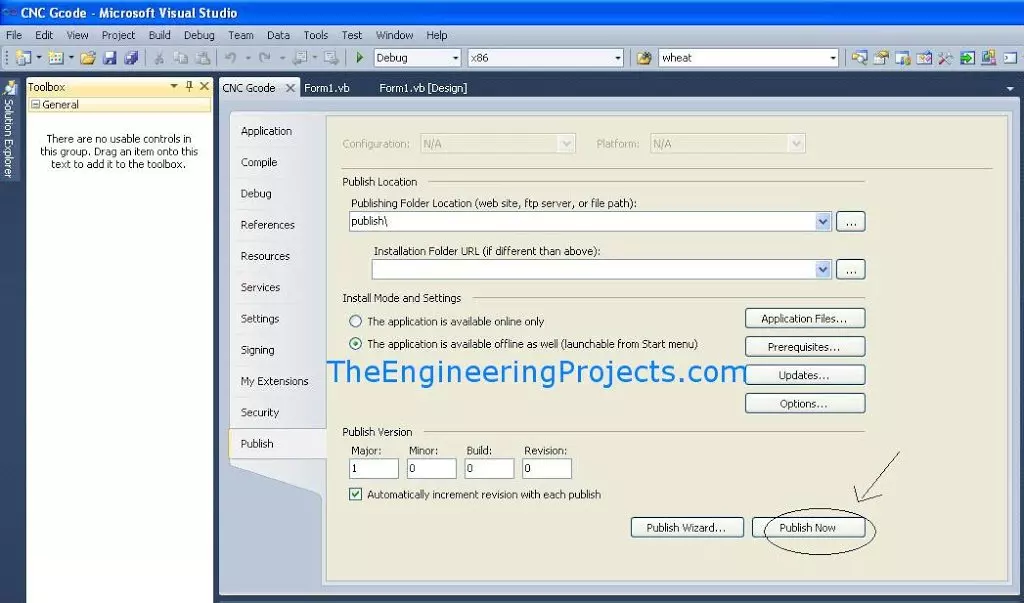
Hello friends, I hope you are doing well. In this tutorial, we will publish a Visual Basic or C# Windows Forms application from Visual Studio 2010 by using ClickOnce. This is useful when you have completed a desktop program, such as the serial terminal from our Serial Port in VB 2010 tutorial , and want to install it on another Windows computer. Visual Studio 2010 is a legacy environment whose Microsoft support ended in July 2020. We are keeping it here because the original project and screenshots use that version. For a new application, use a supported Visual Studio and .NET release and follow the current deployment workflow. Figure: The Publish tab contains the original project's ClickOnce deployment settings. Build Output, ClickOnce and MSI Are Different The phrases EXE file and setup f ...
Hello friends, I hope you are doing well. In this tutorial, we will build a simple serial terminal in Visual Basic 2010. The application will detect the COM ports available on a Windows computer, open a selected port, transmit text, receive incoming data and close the connection cleanly. This article keeps Visual Basic 2010 because that is the environment used in the original project and screenshots. According to the official Microsoft lifecycle record , Visual Studio 2010 reached the end of support in July 2020, so you should use a supported Visual Studio and .NET version for a new production application. However, the serial communication principles explained here still apply to maintenance work, laboratory computers and older engineering projects. We will begin with the electrical and pr ...