


Domain Transfer Without Downtime: What to Check Before You Move



A business changes registrars on Friday. The website still loads, but Monday's customer emails never arrive. The old provider had also been handling DNS, and nobody checked those records.
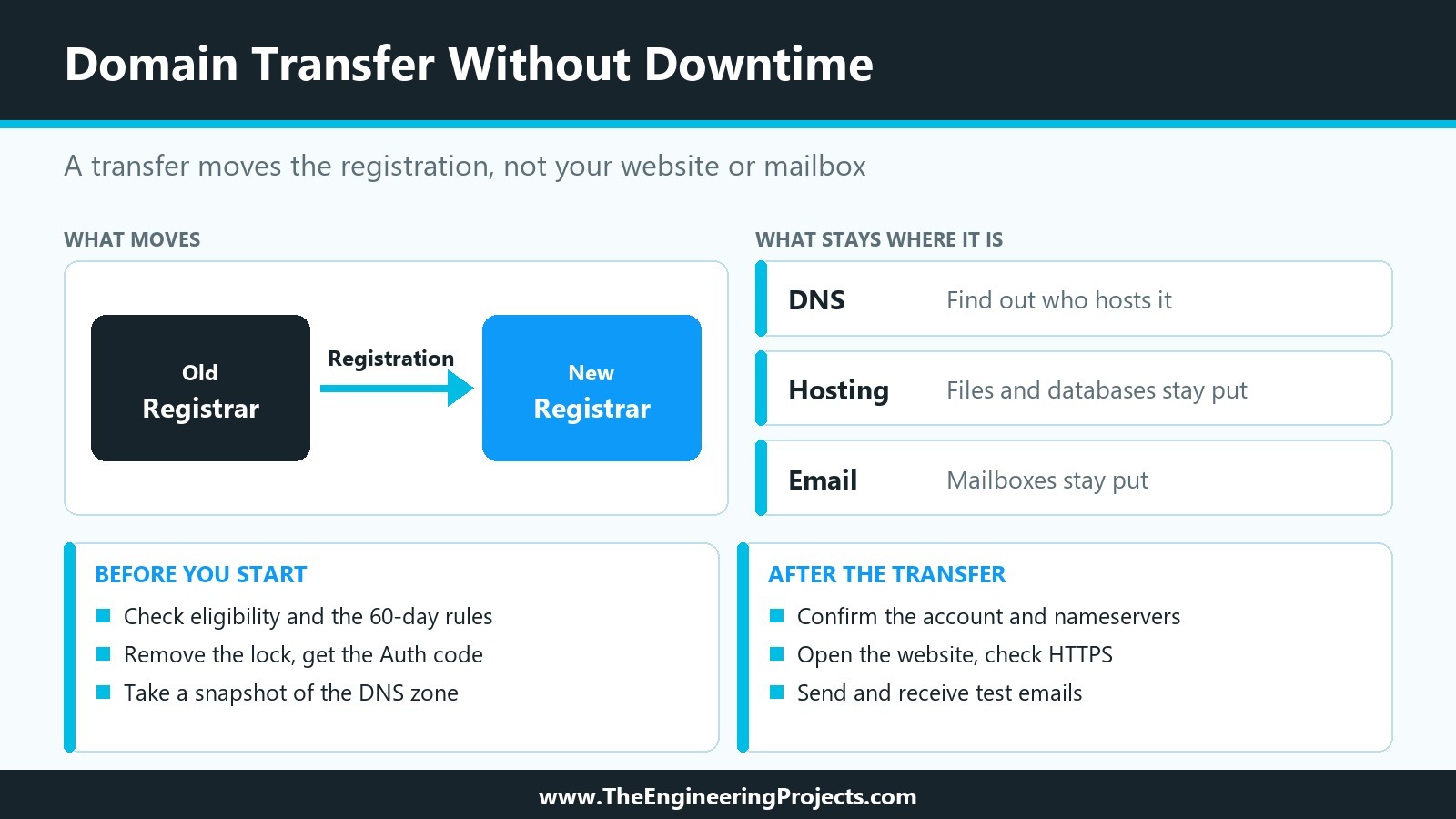
A domain transfer moves a registration between companies. It doesn't move your website or mailbox. Establish which services will stay where before submitting the request.
What Does a Domain Transfer Actually Change?
Your registrar keeps the domain registered and handles renewals. DNS translates domain names into the addresses used by websites and mail services. Hosting stores the website; an email provider handles messages. One company might offer them all.
A domain name transfer changes the registrar of record. Files, databases, and mailboxes stay put. Nameservers generally remain assigned as well, though DNS supplied by your old registrar may not remain available after you leave.
What to Check Before Starting the Transfer
If you need to change domain registrar without interrupting your website, check eligibility first. For many generic top-level domains, including .com, a transfer can be blocked within 60 days of initial registration or an earlier registrar transfer. A recent change of registrant may also trigger a 60-day restriction, unless you opted out beforehand where permitted.
Other domain transfer requirements depend on the extension. Confirm the contact email, expiration date, and any payment or ownership issues. Avoid changing registrant details just before the move.
Unlock the Domain and Get the Auth Code
A domain transfer lock helps prevent unauthorized registrar changes. If you plan to transfer domain to another registrar, remove the lock from your current account before starting.
You'll often need an EPP code, also called an authorization or Auth code. Give it only to the new registrar. Some country-code domains follow different procedures.
Check DNS and Nameservers Before You Move
Take a snapshot of the existing DNS zone. Record A and AAAA entries for website addresses, CNAME aliases, MX records for email, and TXT entries used for verification or authentication.
Find out who hosts DNS, not just who registered the domain. If independent nameservers are staying in service, leave them alone. If the old registrar also hosts the DNS zone, confirm whether that service will continue after the transfer.
Moving DNS too? Build the replacement zone first, then verify the nameserver switch separately, before or after the registrar move. Don't schedule both cutovers together.
How Does the Domain Transfer Process Work?
If you're researching how to transfer a domain, the steps are fairly simple once the preparation is done. Place the order with the new registrar, enter the authorization information, respond to any required confirmation, and follow the request's status until completion.
Domain transfer time depends on the extension and approval procedures. Some requests are approved quickly; others take several days. Don't plan an unrelated DNS change around an assumed completion date.
How to Keep Email Working During the Transfer
A working homepage tells you nothing about whether mail is arriving. MX records direct incoming messages, while SPF, DKIM, and DMARC records help receiving systems evaluate outgoing email.
If you must rebuild DNS, copy those records exactly and keep the existing mail service active. After any nameserver change, test delivery in both directions using an address outside your organization. Check other TXT-based verification services too.
Common Mistakes That Can Cause Downtime
Changing registrar, DNS, hosting, and email together is risky. When something fails, it's hard to identify which change broke it.
An incomplete DNS copy creates a different problem: missing A records can take the website offline, while missing MX or authentication records interrupt mail or cause rejected messages. Review the zone before switching nameservers.
Canceling the old DNS service too early can leave the domain pointing at servers that no longer answer. Starting just before expiration creates another avoidable deadline. Locking the domain again before the transfer finishes may stall the request.
What to Check After the Transfer Is Complete
Keep the confirmation email, then run through this domain transfer checklist:
- Confirm the domain appears in the new registrar account.
- Check that the intended nameservers are assigned.
- Open the website and any important subdomains.
- Send and receive test emails from an outside account.
- Check HTTPS, certificate validity, and connected services.
- Review renewal settings, two-factor authentication, and the transfer lock.
If hosting or DNS was moved separately, keep the previous service active until testing is complete.
Domain Transfer vs Hosting Migration
A registrar transfer changes who manages the domain registration. A hosting migration moves website files, databases, applications, and sometimes email to another environment.
Combining them means coordinating more changes. Moving the website first and transferring the registration afterward, or vice versa, makes troubleshooting easier.
Frequently Asked Questions
Check extension-specific rules with the registrars involved.
How Long Does a Domain Transfer Take?
Several days is common for generic domains. Under ICANN's current policy, the registry normally completes an eligible transfer within five calendar days unless the losing registrar denies it. Authorization and other steps can add time before that.
Does a Domain Transfer Affect the Website?
Not when the hosting and DNS service stay active and correctly configured. Outages generally come from additional changes made during the move.
Does a Domain Transfer Affect Email?
It shouldn't. Problems arise if mail routing records disappear or the previous email service is canceled.
Can You Transfer a Domain Close to Its Expiration Date?
Sometimes. Expiration alone doesn't always prohibit a transfer, but restrictions and recovery procedures can complicate matters. Start earlier if possible.
Do Nameservers Change During a Domain Transfer?
Not as a normal part of the registrar change. Confirm that the current DNS provider will continue serving the zone afterward.
Domain Transfer Checklist at a Glance
The table below sums up the checks described in this article, in the order you would normally work through them.
| Stage | What to check | Why it matters |
|---|---|---|
| Eligibility | The 60-day restrictions, the contact email, the expiration date and any payment or ownership issues | A blocked request costs time, so it is better to find the problem first |
| Unlock | Remove the transfer lock and get the EPP or Auth code | The new registrar needs the code to accept the domain |
| DNS | Save a snapshot of the zone and find out who hosts it | Missing A, MX or TXT records can stop the website or email |
| Transfer | Place the order, confirm the request and follow its status | Some requests are approved quickly; others take several days |
| After the move | Check the registrar account, nameservers, website, HTTPS and test emails | Problems are easier to fix while the previous services are still active |


Comments
0