Hello friends, I hope you all are doing great. Today, I am going to share the new 540 RC Motor Library for Proteus Simulation, the 34th library of our motor series. If you have searched for a Proteus simulation of a 540 motor, this one gives you the classic brushed motor of radio-controlled cars: the 540 can that has powered RC cars, boats and robot drives for decades. It is cheap, tough and strong, and on a 7.2 V pack it spins at over 23,000 RPM. Students and makers meet it in RC projects, line-following racers, combat robots and battery-powered drives.
540 RC Motor Library for Proteus Simulation
Latest version: V1.0 (November 2026, this tutorial)
Other motors: SG90 Servo · TT Gear Motor · 28BYJ-48 Stepper · NEMA 17 Stepper · MG996R Servo · N20 Encoder Motor · JGA25-370 Encoder Motor · FS90R 360 Servo · 130 DC Motor · A2212 Brushless · X27.168 Gauge · Analog Panel Meter · DC Tachogenerator · LM393 Speed Sensor · MG90S Servo · DS3218 Servo · L12 Linear Servo · JGB37-520 Motor · RS-775 Motor · JGY-370 Worm Motor · 12V Linear Actuator · Coin Vibration Motor · Mini Submersible Water Pump · 12V Peristaltic Pump · 4-Pin PC Fan · 12V Push-Pull Solenoid · NEMA 23 Stepper Motor · Micro Linear Stepper · TYJ50 Synchronous Motor · Quartz Clock Movement · Air-Core Gauge · Electromechanical Counter · Split-Flap Display · Electric Bell · Wind Turbine · 8520 Coreless Motor · Car Wiper Motor · Car Door Lock Actuator · 12V Solenoid Water Valve · 12V Holding Electromagnet · Mini Air Pump · Planetary Gear Motor · LRA Vibration Motor · 42BLF Hall BLDC Motor · 2204 Gimbal Motor · 120mm 230V AC Fan · NEMA 17 Closed-Loop Stepper · NEMA 17 Linear Stage · Pan-Tilt Bracket · 4-DOF Robot Arm
Motor drivers: L298 · L9110S · TB6612FNG · BTS7960 · A4988 / DRV8825 · 28BYJ-48 + ULN2003 · PCA9685 Servo · Relay Module · 30A Brushless ESC · TB6600 Stepper Driver · 60A Brushed ESC · DRV2605L Haptic Driver · ZS-X11H BLDC Driver · SimpleFOC Mini Driver · AC Dimmer Module · TMC2209 Stepper Driver · DRV8833 Motor Driver · L293D Motor Shield
Helping Tools
- Serial Monitor Advance: a serial terminal window for the UART of your board
- Serial Monitor Expert: the serial monitor with extra debugging tools
- LCD Library for Proteus V3.0: 16x2, 20x4 and I2C LCDs to show your readings
Our library brings the 540 into your Proteus simulation at its true size, 35.8 mm across and 50 mm long, with its pinion, its end bell and its red and black leads. The simulation model is built from the maker's catalogue data, and the motor does not spin alone: it drives a whole 1/10 RC car. The car has its gears, its wheels, its mass, rolling resistance and air drag, and tyres that slip when the motor out-pushes their grip. The pop-up draws the car on the road and plots the motor's speed, current and efficiency curves with the working point, and it measures the launch, the top speed and every stop. The demo is an Arduino and our BTS7960 driver on a 7.2 V pack: launch, cruise, brake, reverse, climb a 20 % hill and run on a stand.
NOTICE: Our team has put a lot of effort into these small parts: the bodies, the animation and the pop-ups are all our own design, and you get them free. Your feedback is the fuel that keeps us going, so please tell us what you think in the comments below or in the Motor Driver board of our forum. And if our free libraries help you, you can buy us a coffee. So, let's get started with the 540 RC Motor Library for Proteus Simulation:
What is a 540 Motor?
The 540 is a brushed DC motor in a steel can 35.8 mm across and about 50 mm long, with a 3.17 mm (1/8 inch) shaft. Inside, a three-pole armature turns between two ferrite magnets, and two carbon brushes feed it current through the commutator. The name comes from its size class; the smaller 380 and the larger 550 are its neighbours. RC car kits ship it with a small steel pinion on the shaft that meshes with a big spur gear, so the motor can spin fast while the wheels turn slower with more push.
A brushed motor is simple to drive: the speed follows the voltage and the torque follows the current. At a standstill only the winding's resistance limits the current, which for a 540 is well under a tenth of an ohm, so a stalled or launching 540 draws tens of amps. That is why RC cars need an ESC or a strong driver, thick wires and a good battery.
| The 7.2 V 540 at 4.8 V (maker's data) | |
|---|---|
| Rated | 3.6 to 7.2 V |
| Free-running | 15,400 RPM, 2.0 A |
| Best efficiency | 26.0 mN.m at 13,010 RPM and 10.9 A (35.3 W out) |
| Stalled | 167 mN.m, 59 A |
| Size | 35.8 x 50 mm can, 3.17 mm shaft, M3 holes 25 mm apart |
On a 7.2 V pack, six NiMH cells or a two-cell LiPo, everything scales with the voltage: about 23,000 RPM free and well over 80 A for an instant at the start.
Features of the 540 RC Motor Library for Proteus Simulation
- The real motor at true scale: the steel can with its vents, the black end bell, the 20-tooth pinion and the red and black leads; the pinion turns at run time.
- The motor from the data: 81.4 mΩ, 2.86 mN.m per amp, the brush friction and the windage loss: 15,420 RPM and 2.0 A free at 4.8 V, 26.7 mN.m at 13,010 RPM and 11.1 A, 167 mN.m stalled.
- A whole RC car as the load: a 9.9 : 1 final drive, 66 mm wheels, 1.6 kg, rolling resistance, air drag and the slope of the road.
- Tyres with grip: a slip curve, so the wheels spin when the motor pushes harder than the tyres can grip.
- Everything measured: the launch from 0 to 20 km/h, the top speed with its current and efficiency, braking distance, coasting, the free speed on a stand.
- A pop-up: the car on the road with its wheels and lane marks, the motor's speed, current and efficiency curves with the working point, eight live values, graphs, an event log and a check page.
- A complete package: about 1.2 MB with the library, our Arduino UNO V4.0 and the demo, without the source code of the model.
The 540 RC Motor in Proteus
The device is RCMOTOR540TEP in TEPRC540.LIB, under Electromechanical > Motors, with the prefix M and the analog model TEPRC540.DLL. Search RCMOTOR in Pick Devices. Its pins sit at the ends of its leads: + on the red lead and - on the black, 400 thou apart, the same as the M+ and M- outputs of our BTS7960 driver.
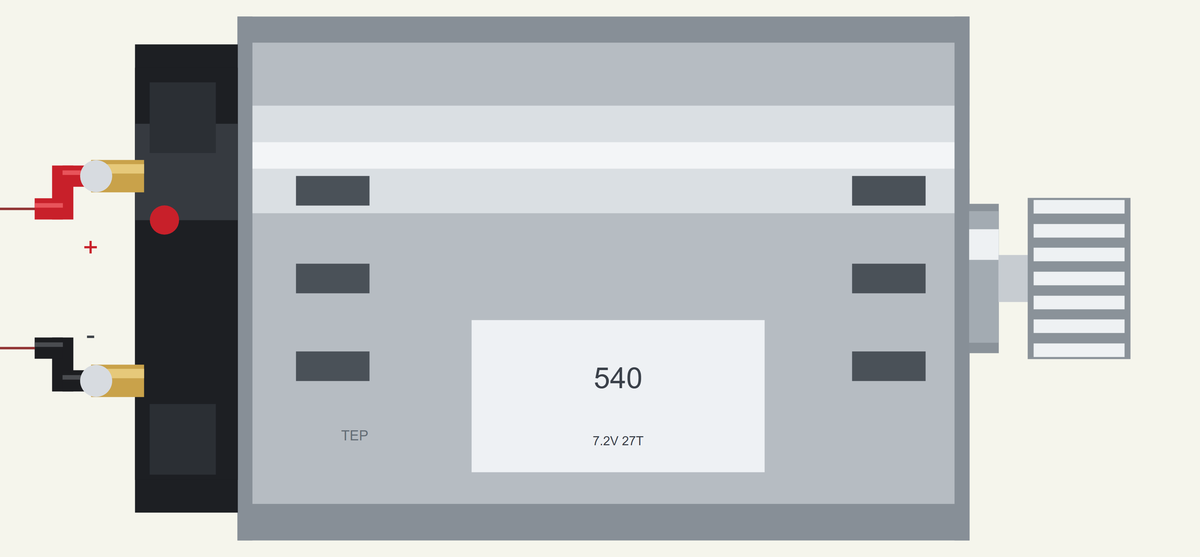
Five properties describe the car. LOAD is CAR, on the road, or STAND, with the wheels in the air. MASS is the car in kilograms (1.6), GEAR the final drive ratio, motor turns per wheel turn (9.9), WHEEL the wheel diameter in millimetres (66) and SLOPE the road in percent, positive uphill (0). While the simulation runs, the chips at the top of the pop-up put the car on a stand or change the road: flat, uphill 10 %, uphill 20 % or downhill 10 %.
Download 540 RC Motor Library for Proteus Simulation
Click the button below to download 540-RC-Motor-Library-for-Proteus-v1.0.zip (about 1.2 MB, without the source code of the models):
540 RC Motor Library for Proteus V1.0- README.txt: installation, the demo, the wiring, troubleshooting and the limits of the simulation.
- Proteus Library Files:
TEPRC540.LIBandArduinoV4TEP.LIB. - Proteus Model Files:
TEPRC540.DLLandTEPARDUINO.DLL. - Arduino Code: the demo sketch.
- Proteus Simulation: the demo project, its HEX file and copies of the DLLs.
No Proteus yet? Read How to Download and Install Proteus 7 and 8. New to libraries? Follow How to Install a New Library in Proteus.
How to Install 540 RC Motor Library for Proteus Simulation
- Close Proteus and extract the whole zip file, for example to your Desktop.
- Copy the files from Proteus Library Files into the LIBRARY folder of Proteus.
- Copy the files from Proteus Model Files into the MODELS folder.
- Delete
TEPRC540.IDXfrom the LIBRARY folder if it is there. - The demo's driver is our separate BTS7960 Motor Driver Library for Proteus: install its LIB and DLL too.
- Start Proteus, press P and search for RCMOTOR.
Proteus Simulation of a 540 Motor in an RC Car
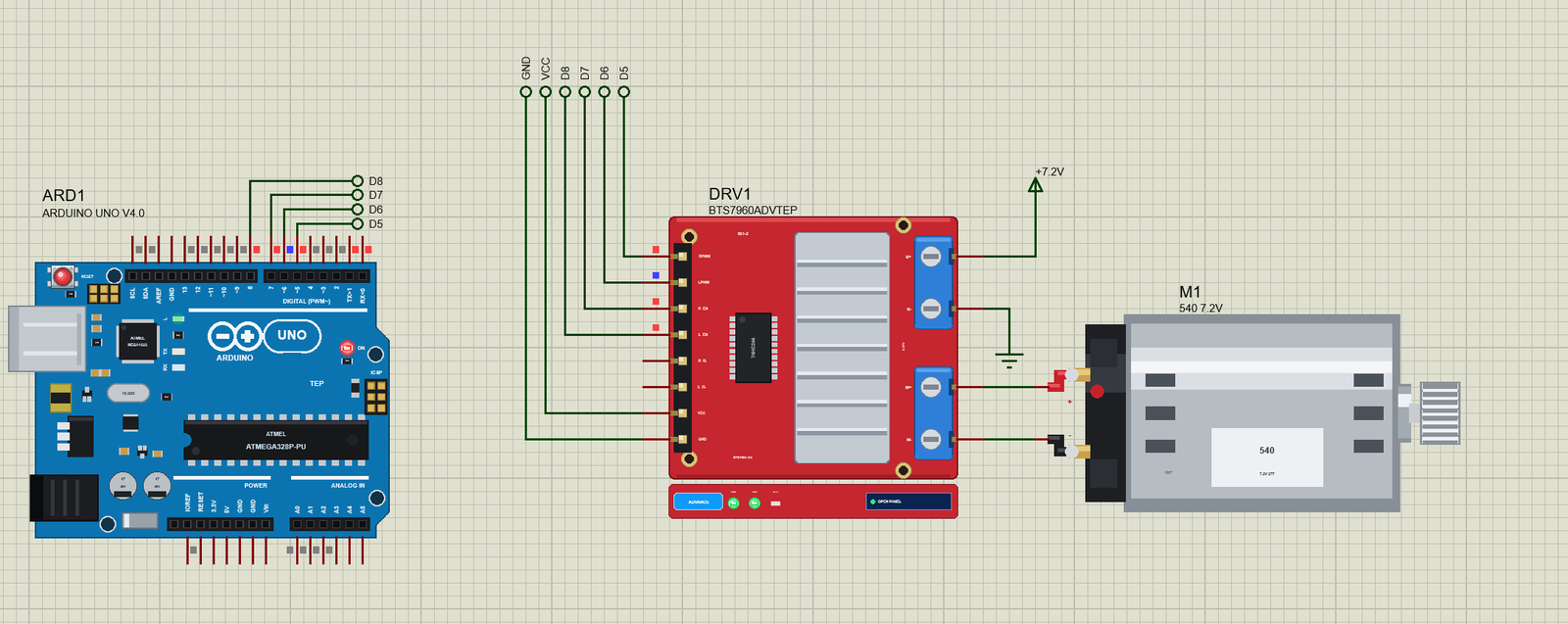
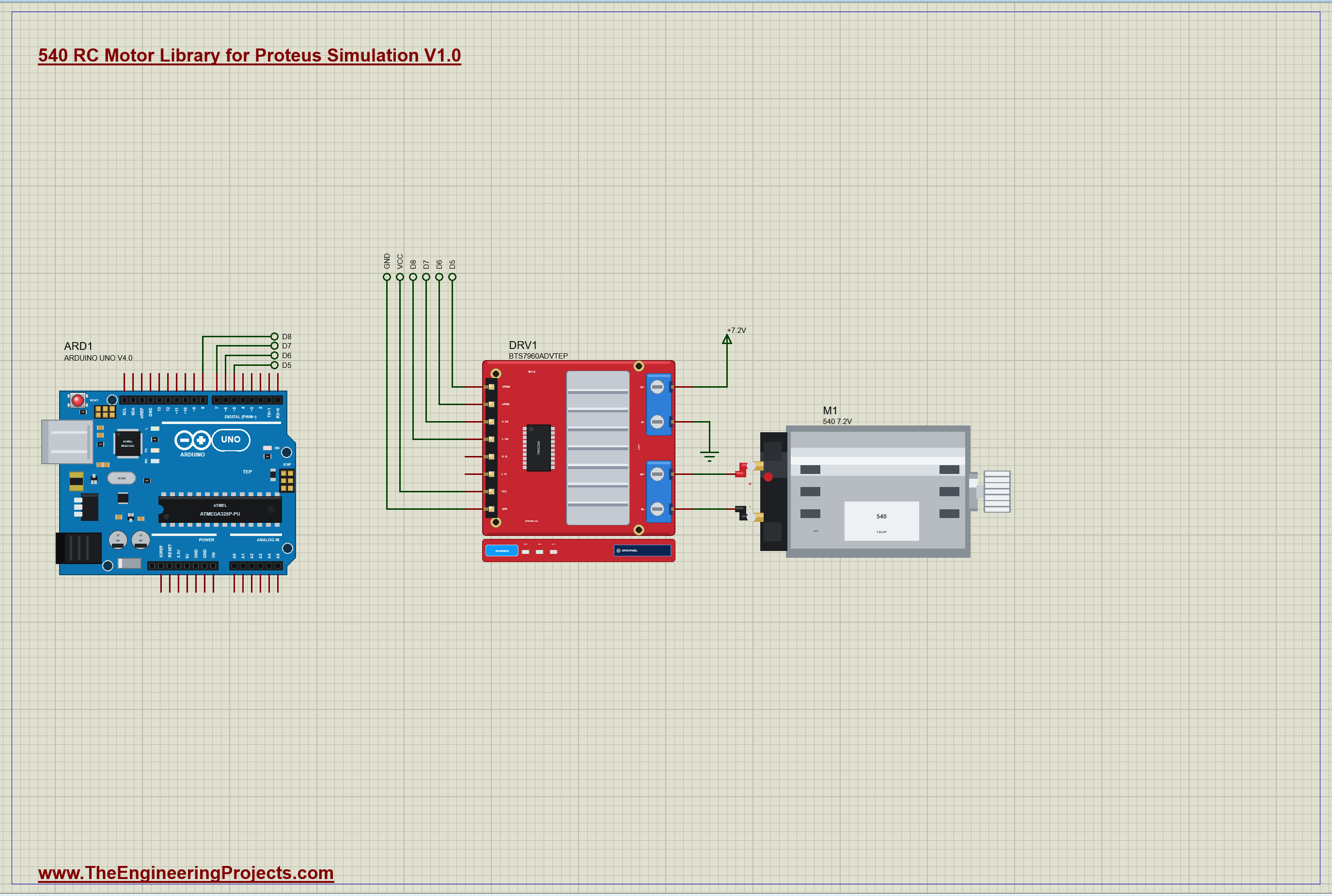
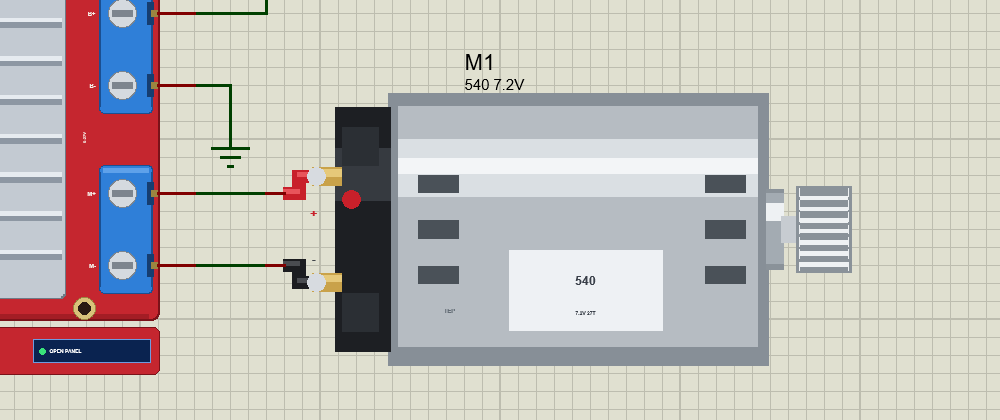
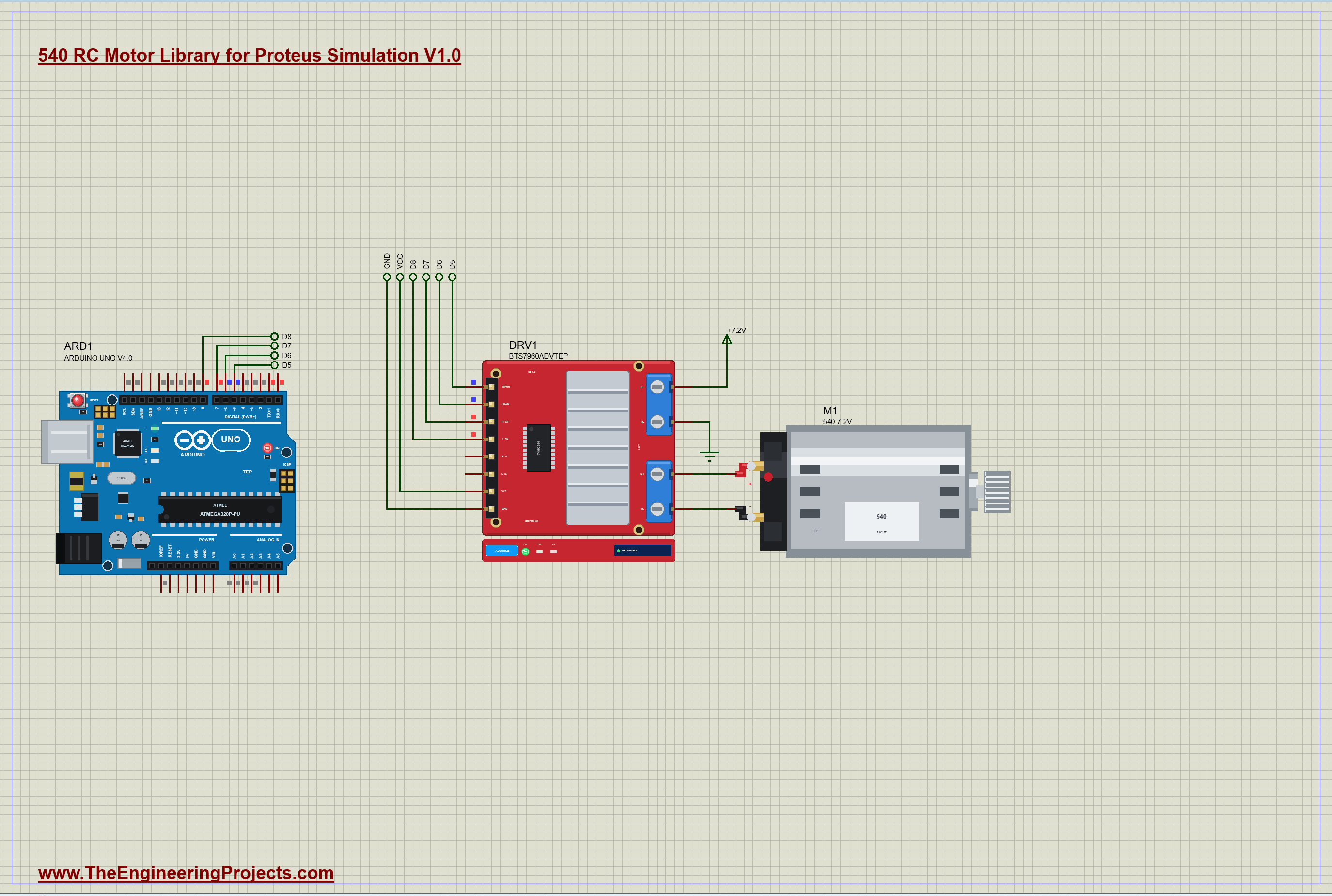
The demo has our Arduino UNO Library for Proteus V4.0 with its built-in monitor, the same window as our TEP Serial Monitor Advance for Proteus, and our BTS7960 (IBT-2) driver with B+ on a 7.2 V pack. The UNO drives RPWM from D5 for forward, LPWM from D6 for reverse, and both enables from D7 and D8. The driver's M+ and M- go straight to the motor M1, which sits in a 1.6 kg car on a flat road. The driver comes from our separate BTS7960 library (TEPBTS7960.LIB and TEPBTS7960.DLL), so install it first. The sheet is A3. Open RC540-Car-BTS7960-ArduinoUnoV4.pdsprj.
The Sketch
One function per action: forward and reverse put a PWM on one input of the BTS7960, braking keeps both enables high with both inputs low, which shorts the motor, and coasting opens the bridge:
void forward(uint8_t duty) { enable(true); analogWrite(LPWM, 0); analogWrite(RPWM, map(duty, 0, 100, 0, 255)); }
void reverse(uint8_t duty) { enable(true); analogWrite(RPWM, 0); analogWrite(LPWM, map(duty, 0, 100, 0, 255)); }
The program is a table of steps, each with its time in tenths of a second:
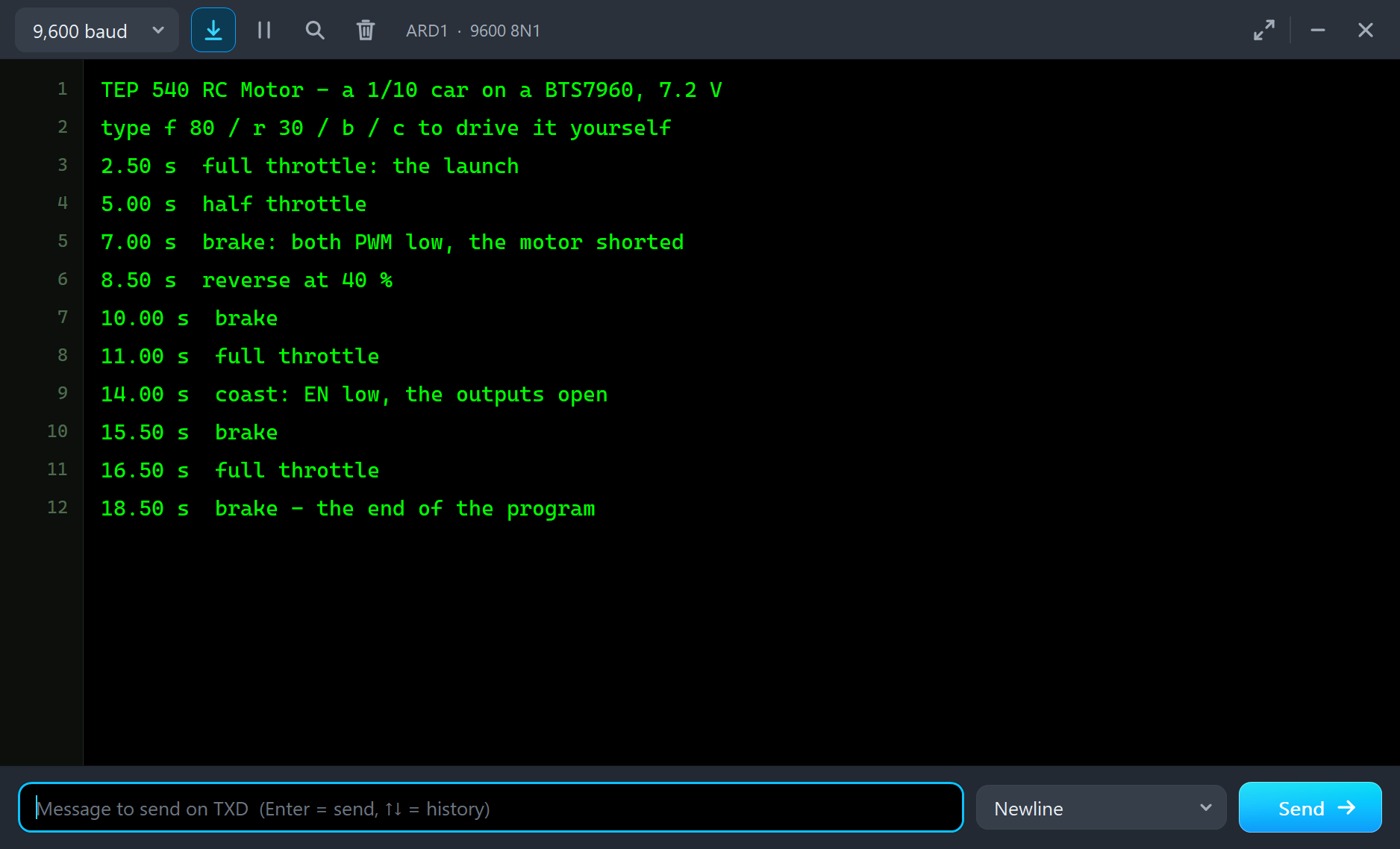
  {25, FWD, 100, "full throttle: the launch"},
  {50, FWD, 50, "half throttle"},
  {70, BRAKE, 0, "brake: both PWM low, the motor shorted"},
After the program you can drive the car yourself: f 80 goes forward at 80 %, r 30 reverses at 30 %, b brakes and c coasts. A typed command ends the program:
if (c == 'f') act(FWD, d); else if (c == 'r') act(REV, d); else if (c == 'b') act(BRAKE, 0); else if (c == 'c') act(COAST, 0);540 RC Motor Simulation Results
Open the project and press Run. The program runs about 19 simulated seconds, which Proteus ran in about four minutes on our PC with the pop-up open and the pictures being taken. Click the motor to open its pop-up. Every number below comes from one simulation run, the demo exactly as it ships.
The Launch: Wheelspin
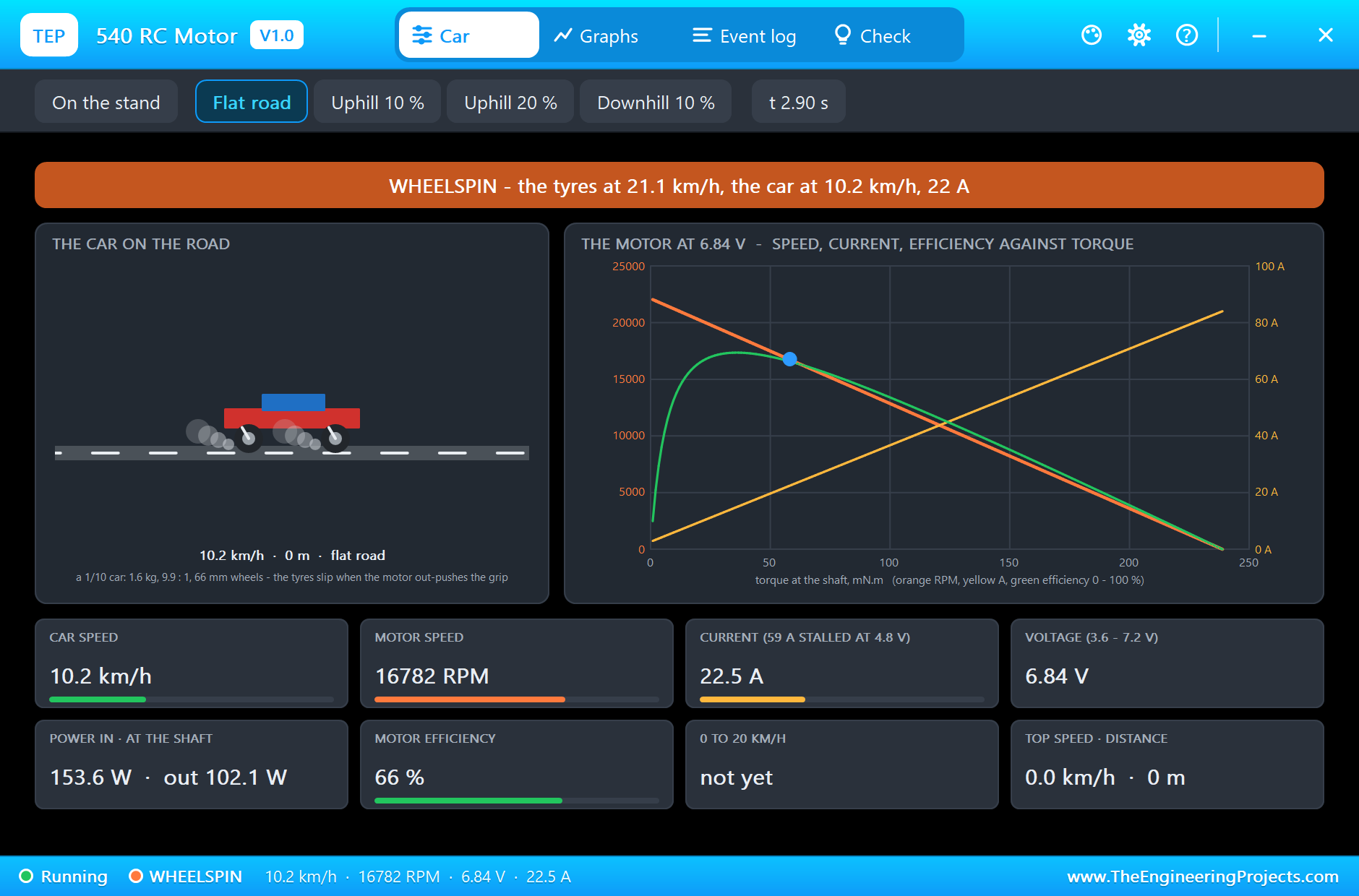
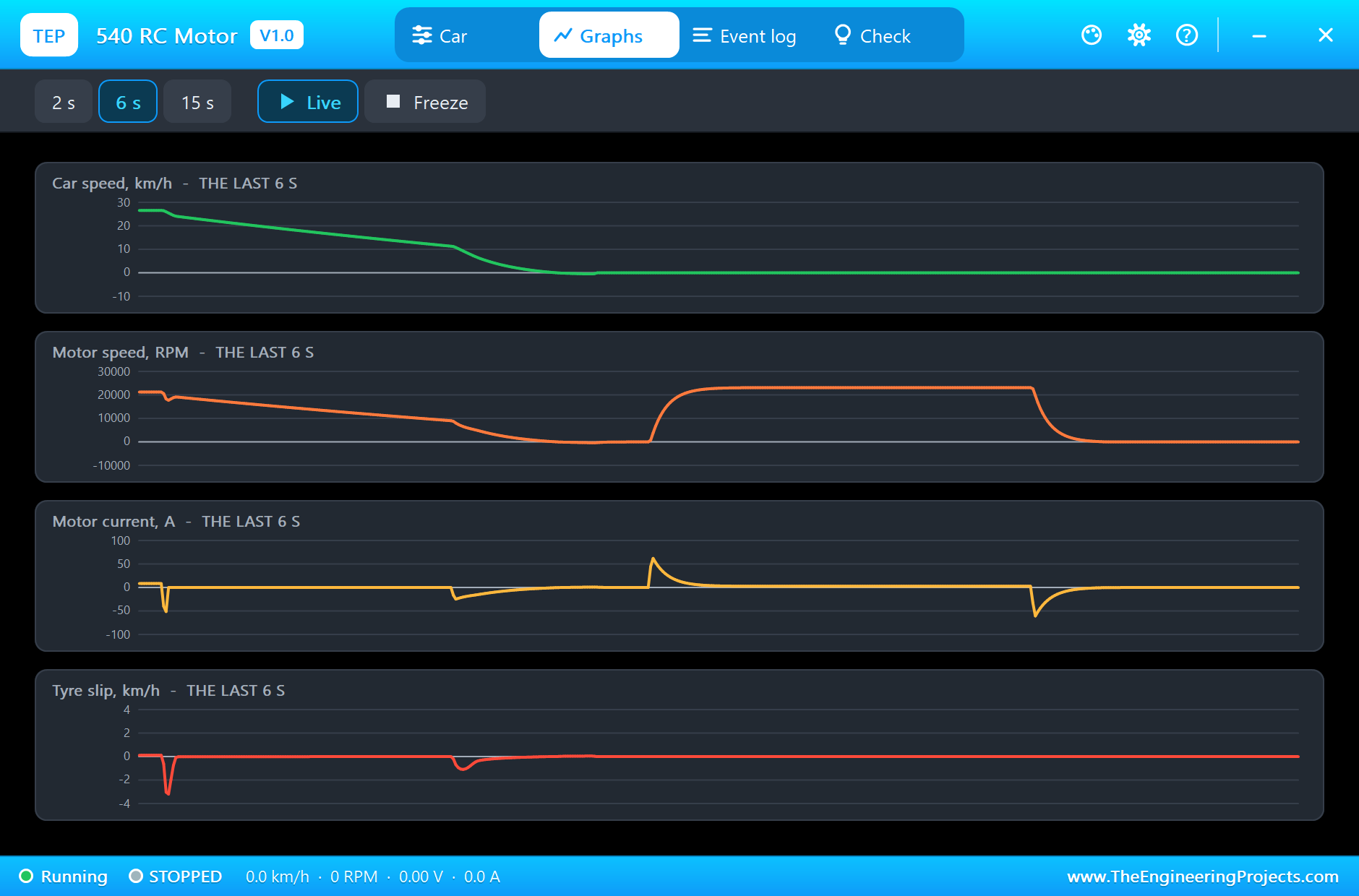
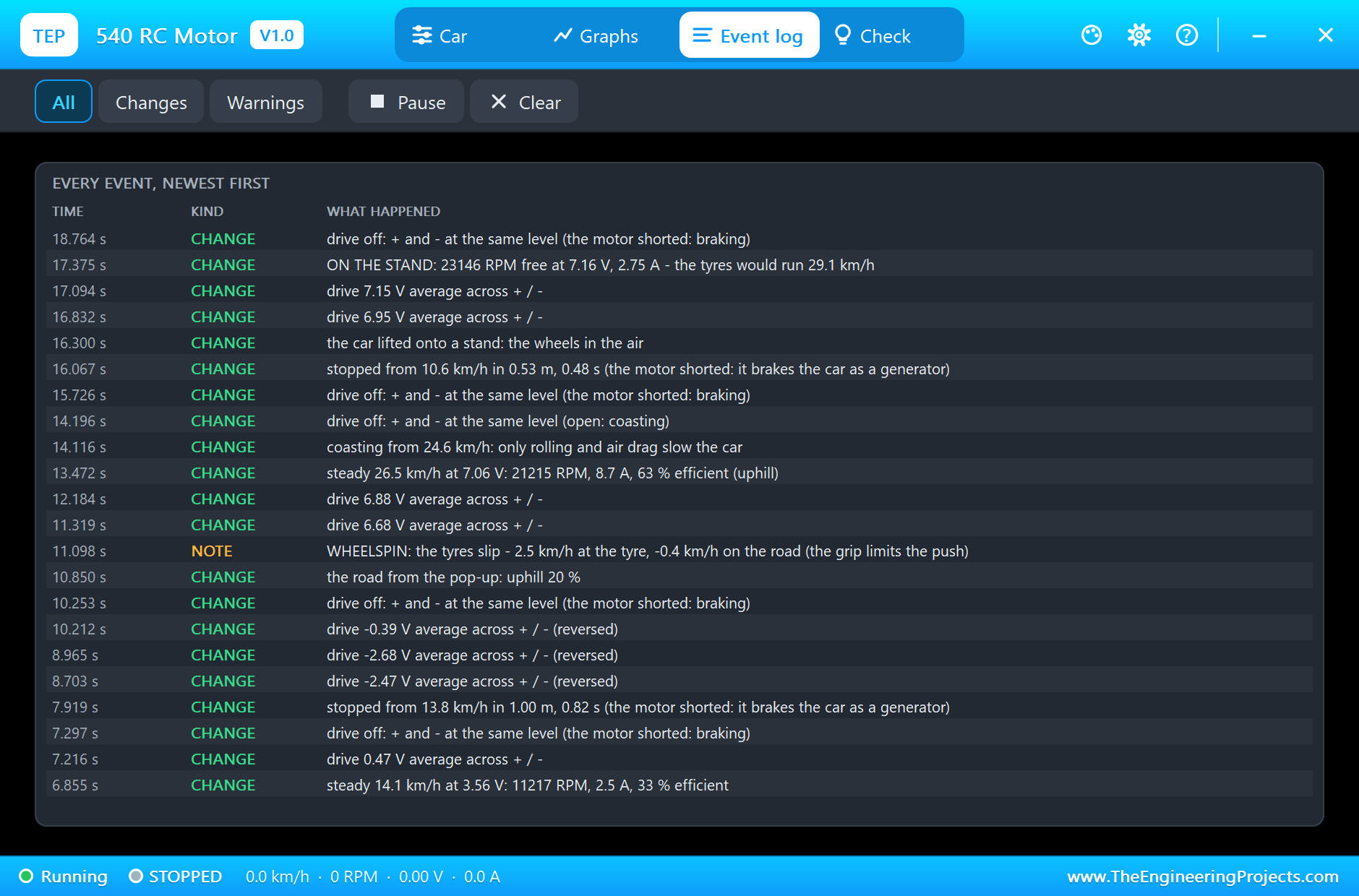
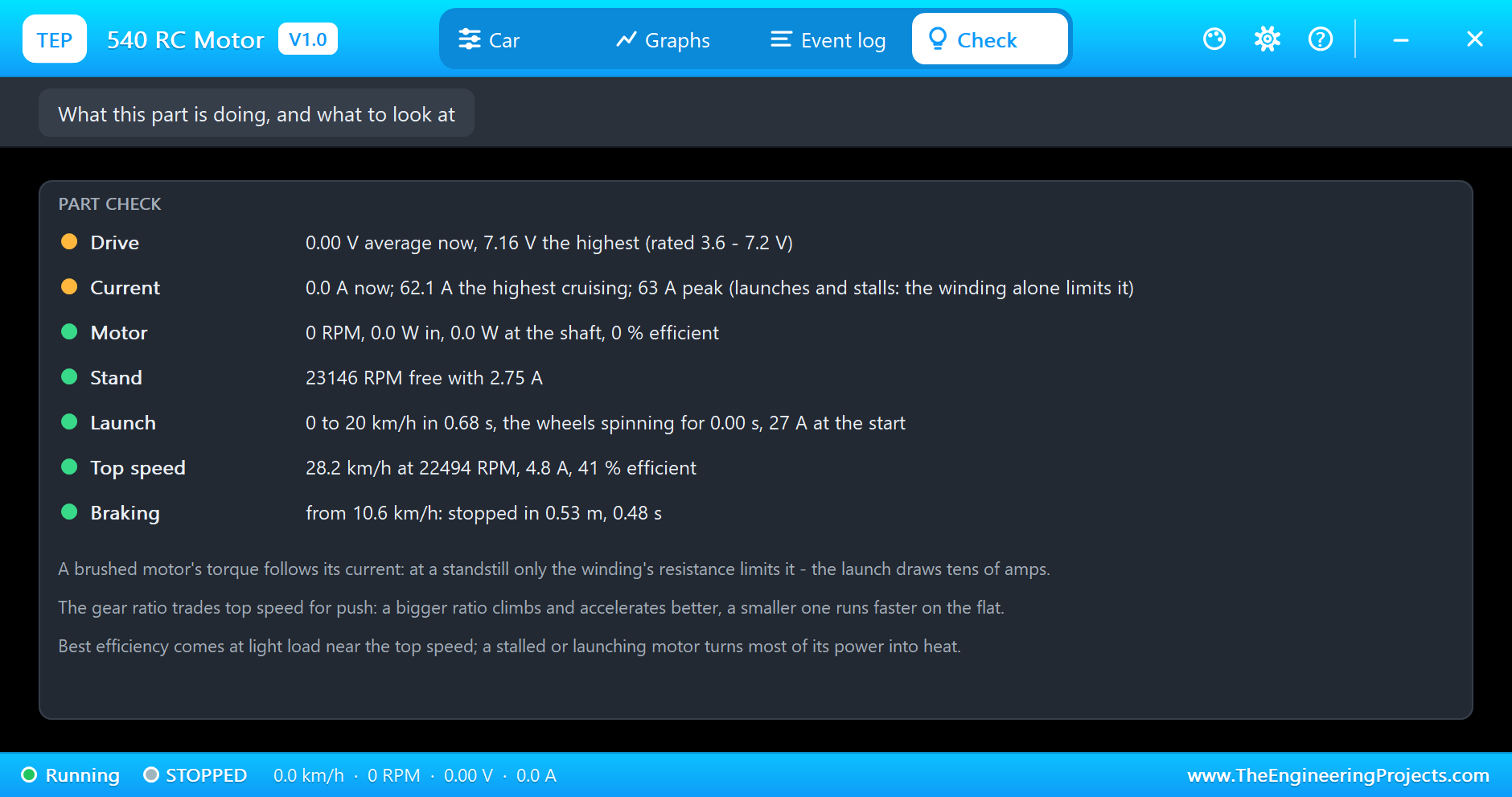
At 2.5 s the sketch gives full throttle. The motor starts from zero speed with no back-EMF, so only its winding limits the current: the Event log records about 63 A in the first moments. That is far more push than the tyres can take, so the wheels spin: the pop-up shows WHEELSPIN, smoke at the wheels, and the tyres running faster than the car. The grip, not the motor, limits the start, and the car still reaches 20 km/h in 0.68 s: the Event log writes LAUNCH: 0 to 20 km/h in 0.68 s. At the moment of the picture the car does 10.1 km/h while the tyres turn 11 km/h faster.
Top Speed
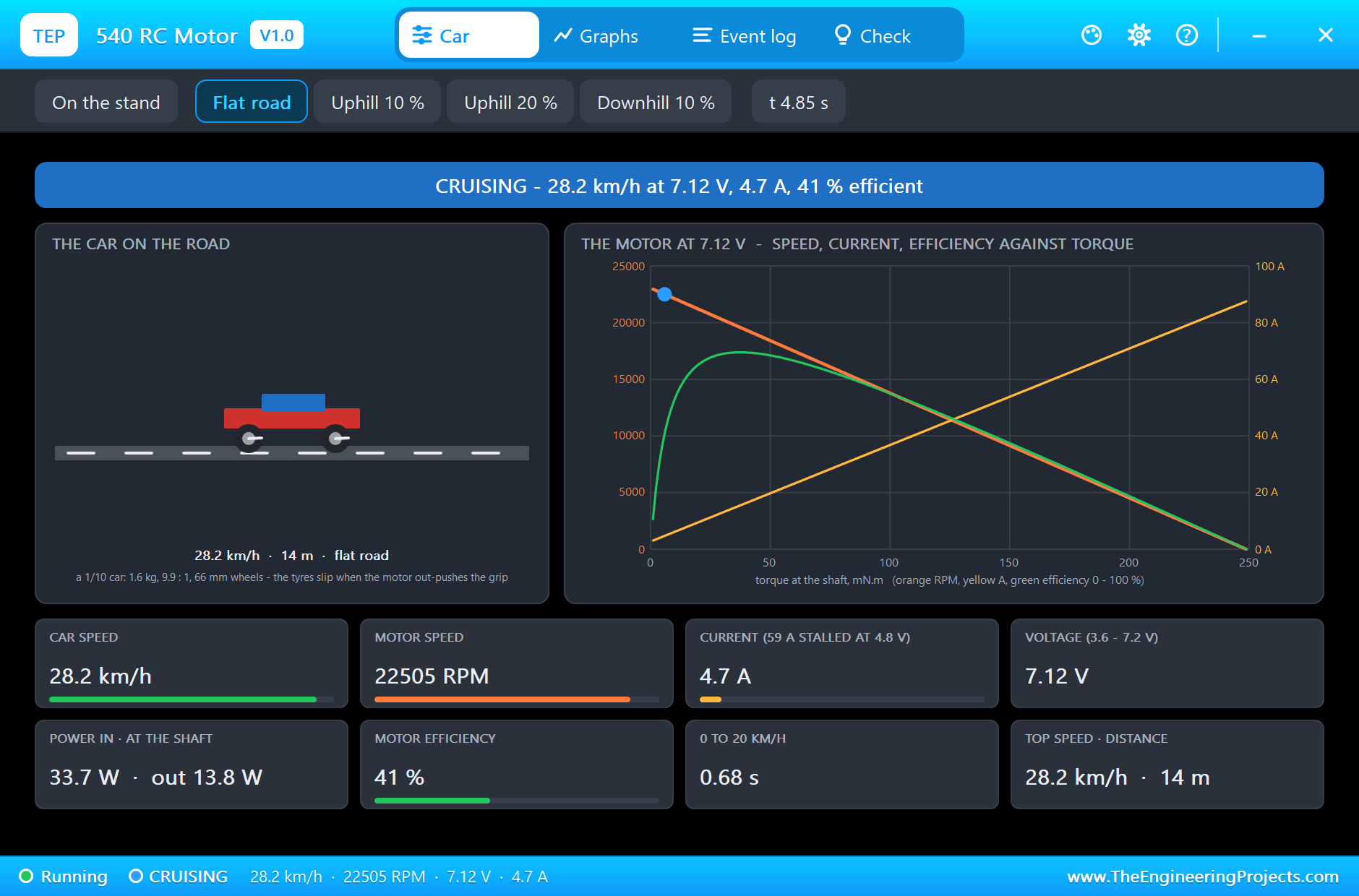
By 4.7 s the car cruises at its top speed: 28.2 km/h. The motor turns at 22,500 RPM with 7.12 V across it and draws only 4.7 A, because at full speed it only has to beat rolling resistance and air drag. The efficiency is just 41 %: a 540 is most efficient near 11 A, and the curves on the right show the working point far up the speed line, where the green efficiency hump is falling. 33.8 W go in and 13.9 W come out at the shaft.
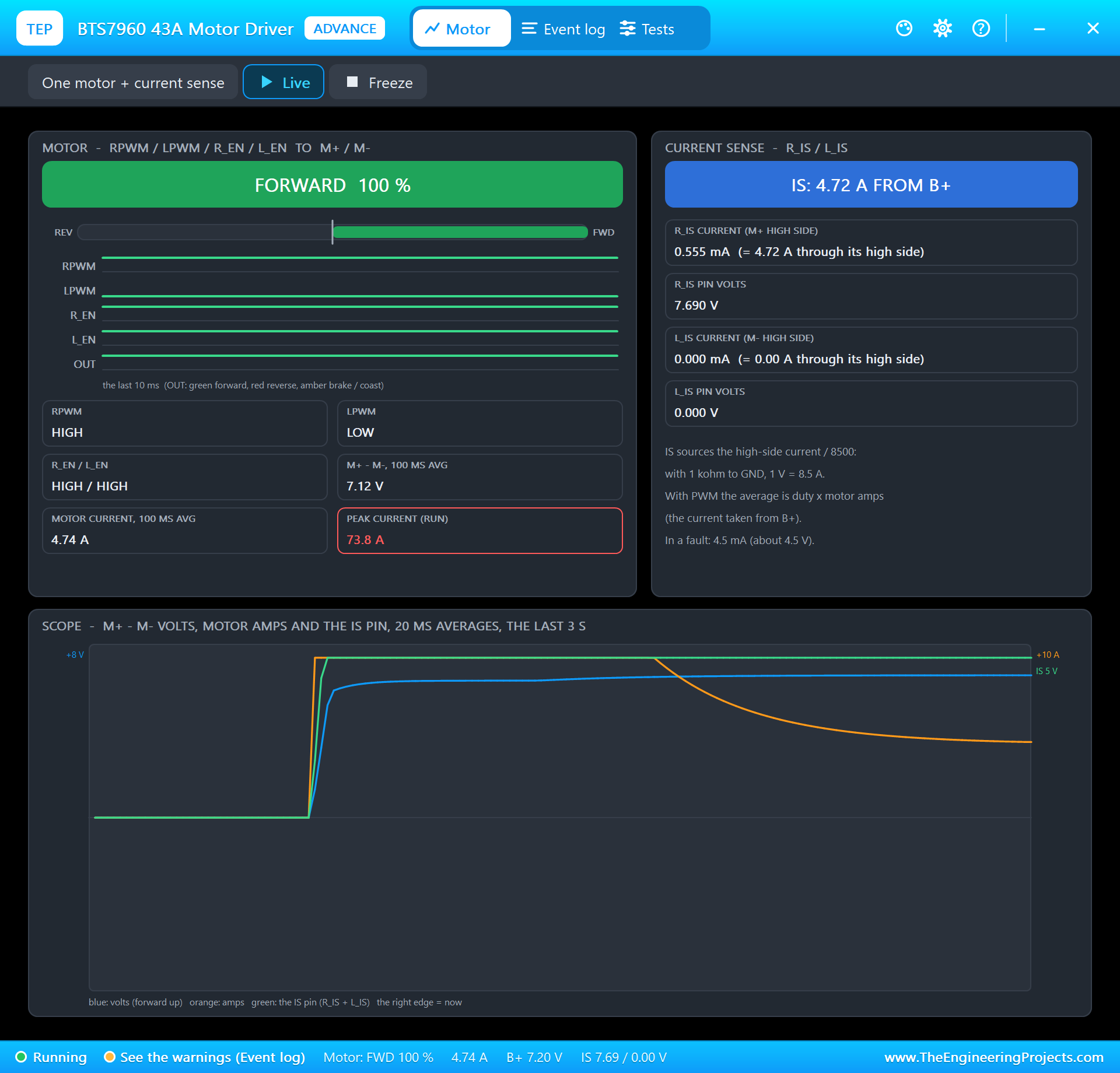
The BTS7960's own pop-up shows the drive from the driver's side: RPWM at 100 % and the current through the bridge.
Half Throttle, Braking and Reverse
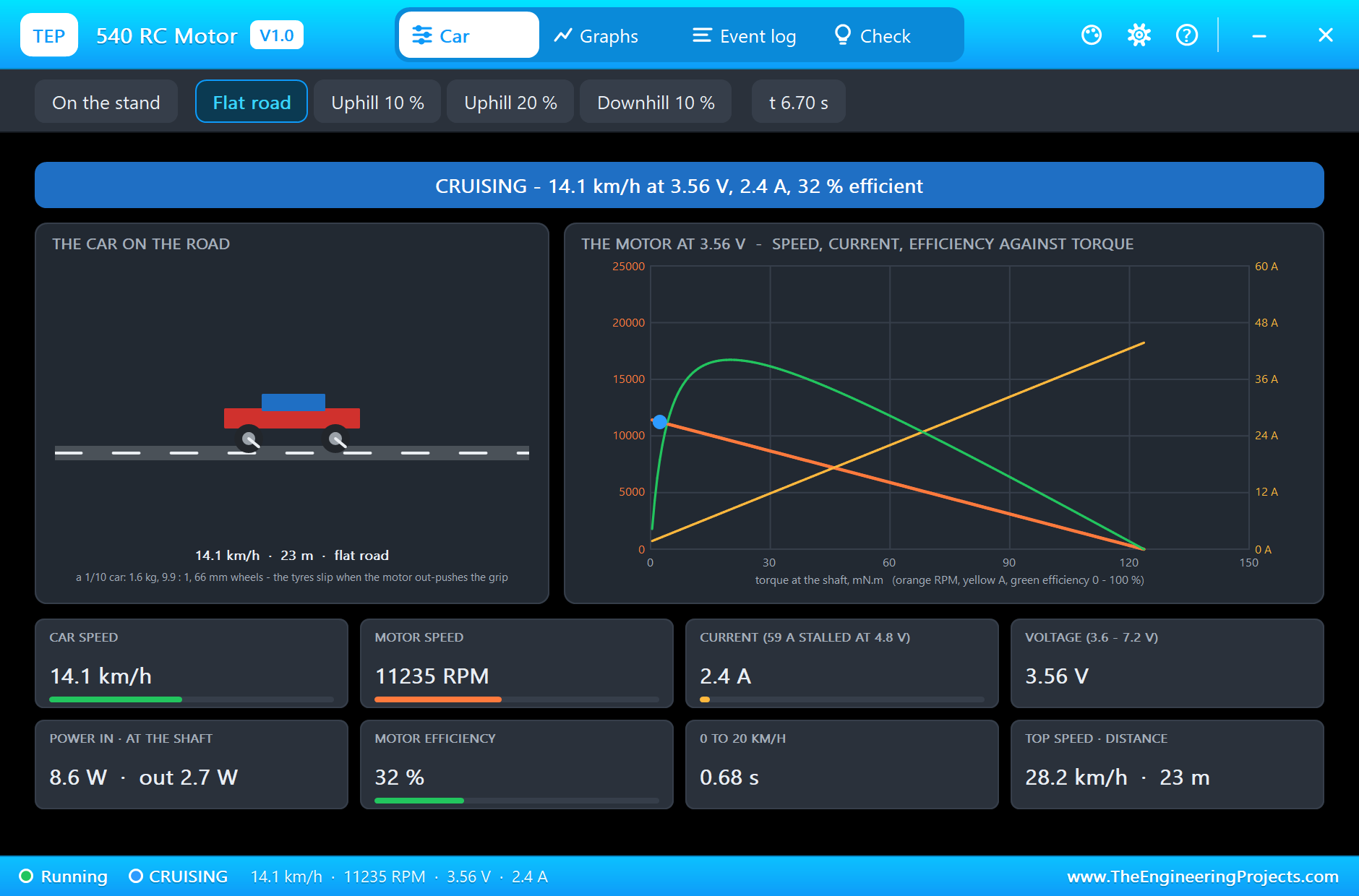
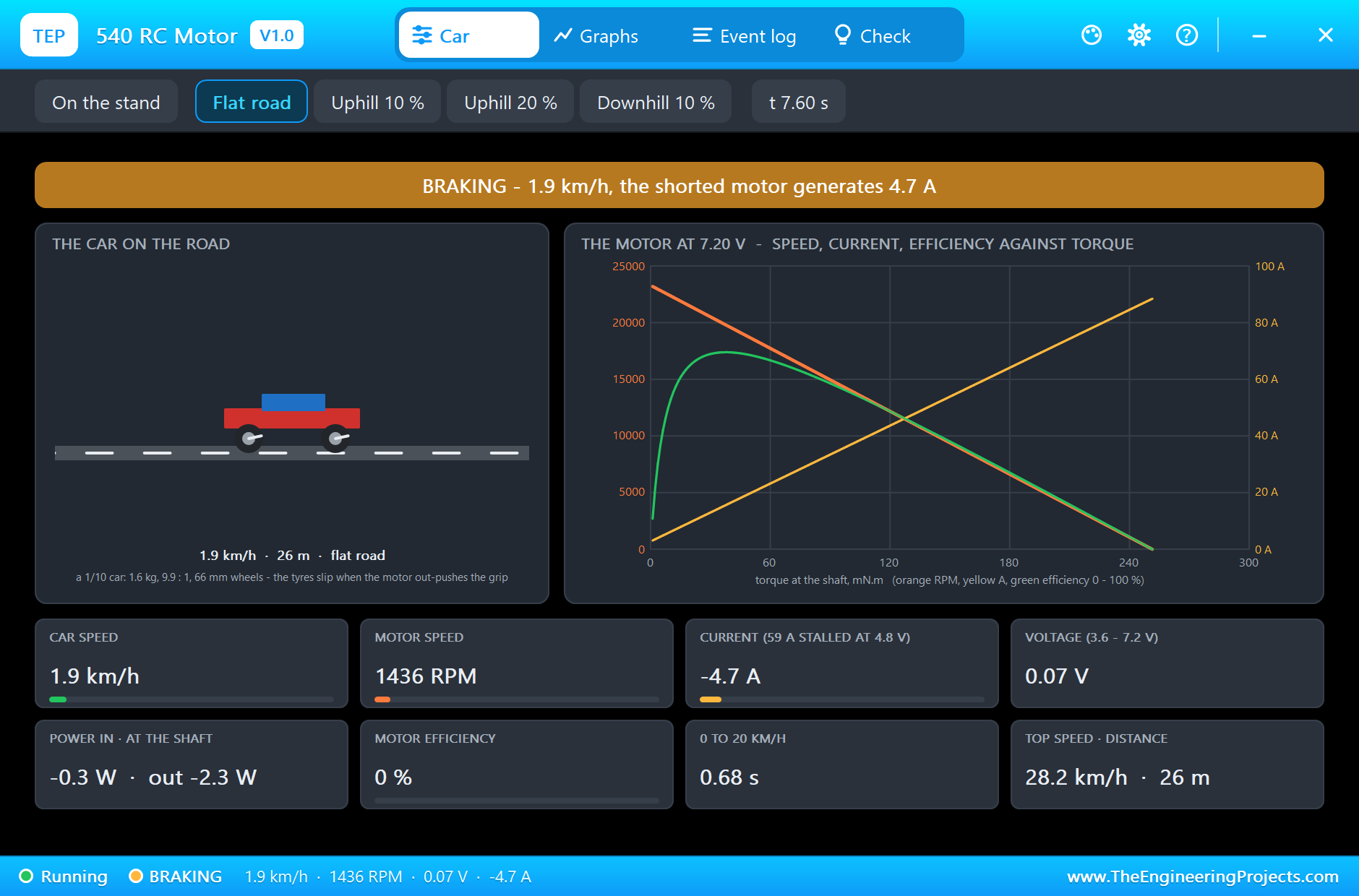
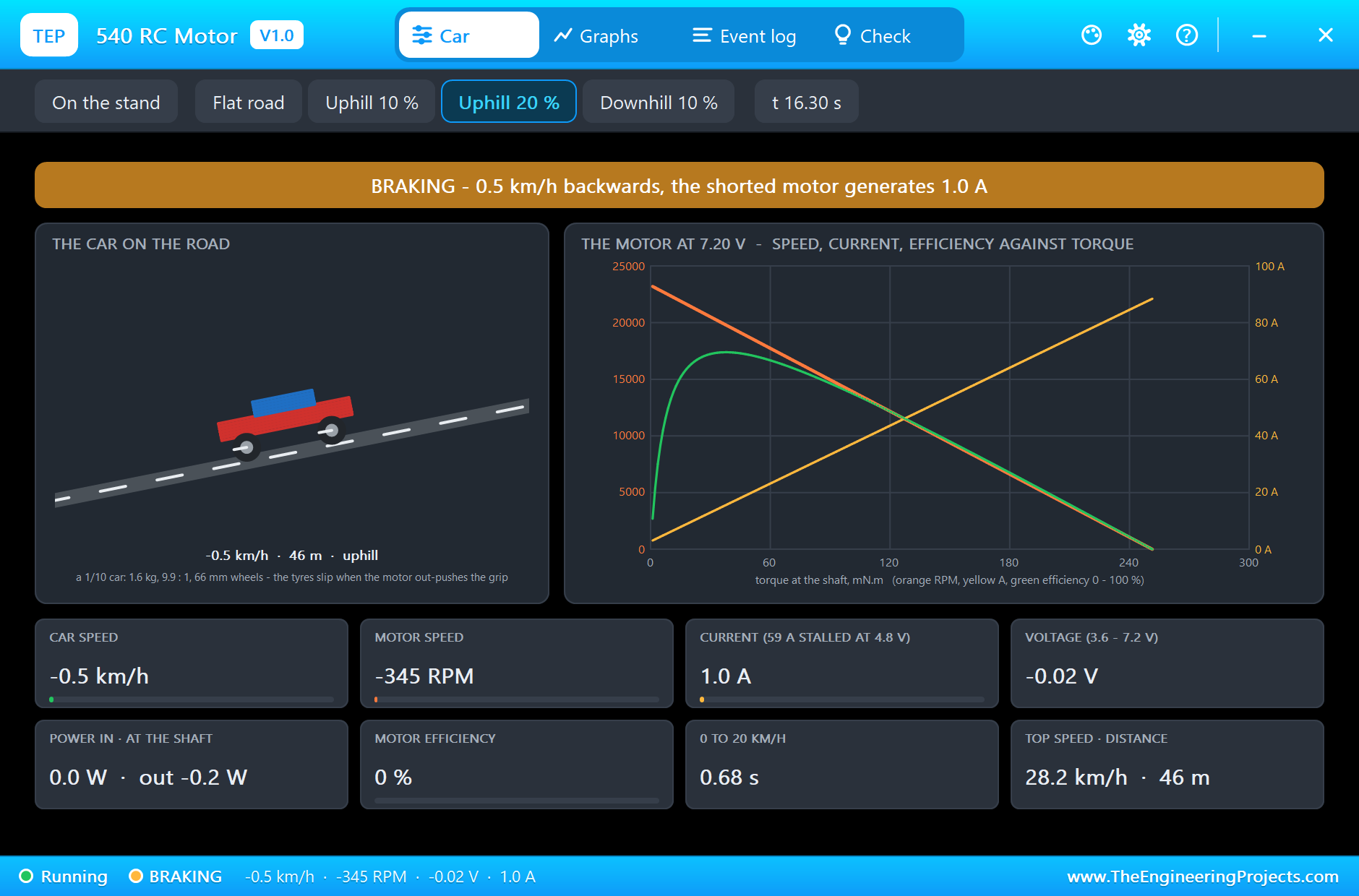
At 5 s the sketch halves the throttle. The average voltage falls to 3.56 V, and the car slows to 14.1 km/h with the motor at 11,220 RPM and 2.5 A. Speed follows voltage: half the voltage, half the speed. At 7 s the sketch brakes, shorting the motor. The spinning motor becomes a generator, and its current brakes the car hard: it stops from 13.8 km/h in 1.00 m and 0.82 s.
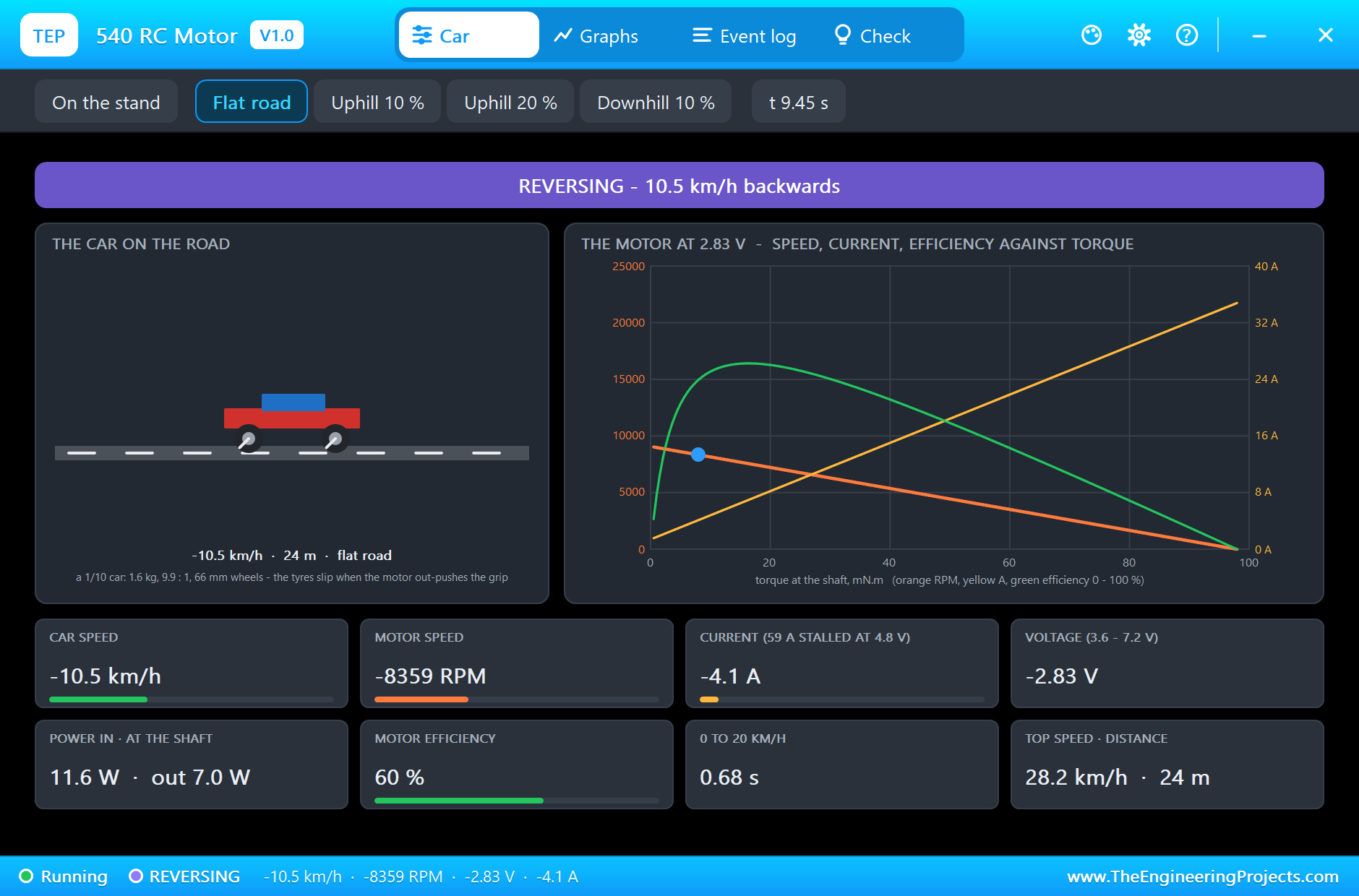
At 8.5 s the sketch reverses at 40 %: the car backs up at 10.5 km/h with the motor at 8,360 RPM the other way. At 10 s it brakes again.
A 20 % Hill
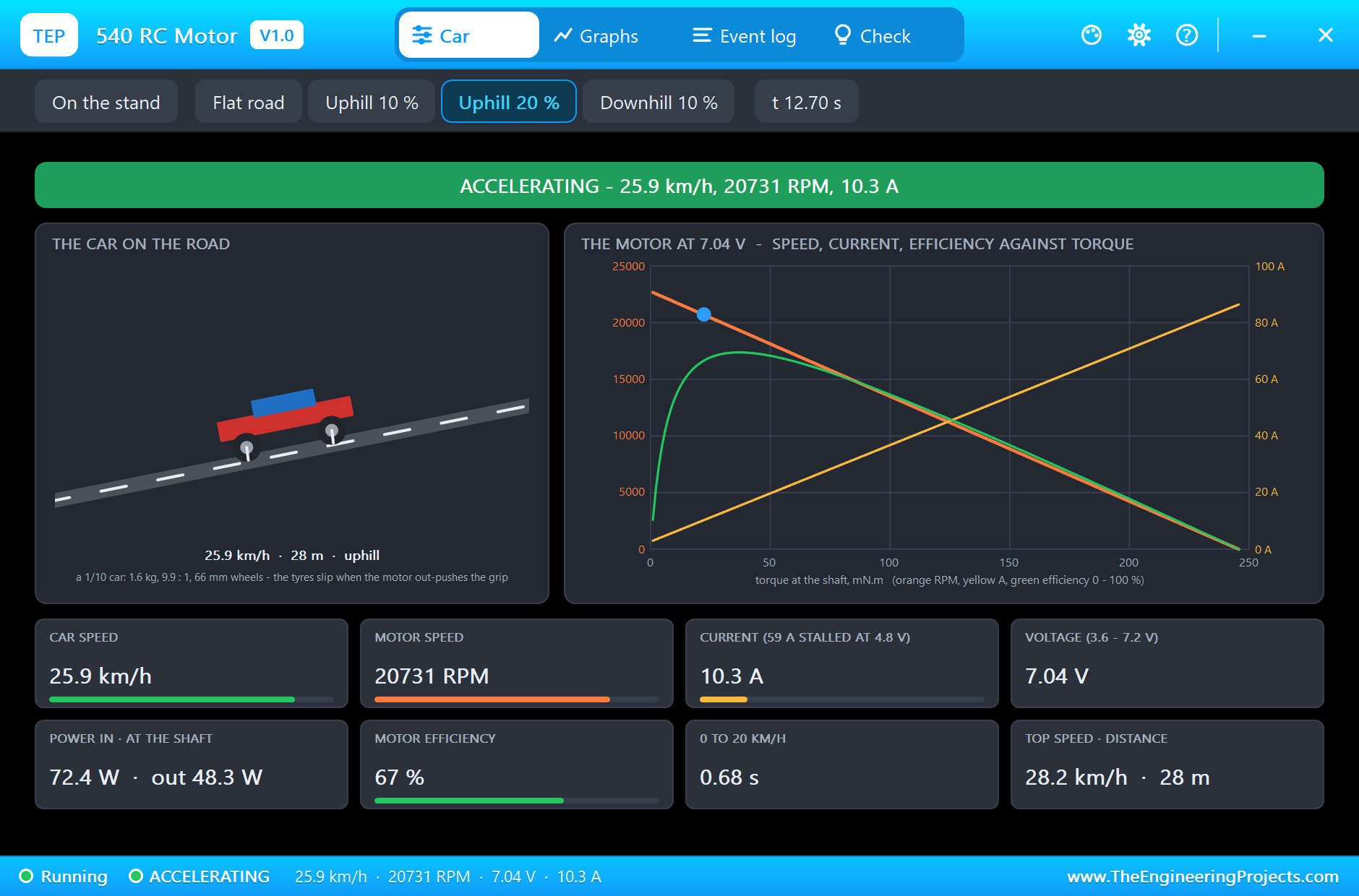
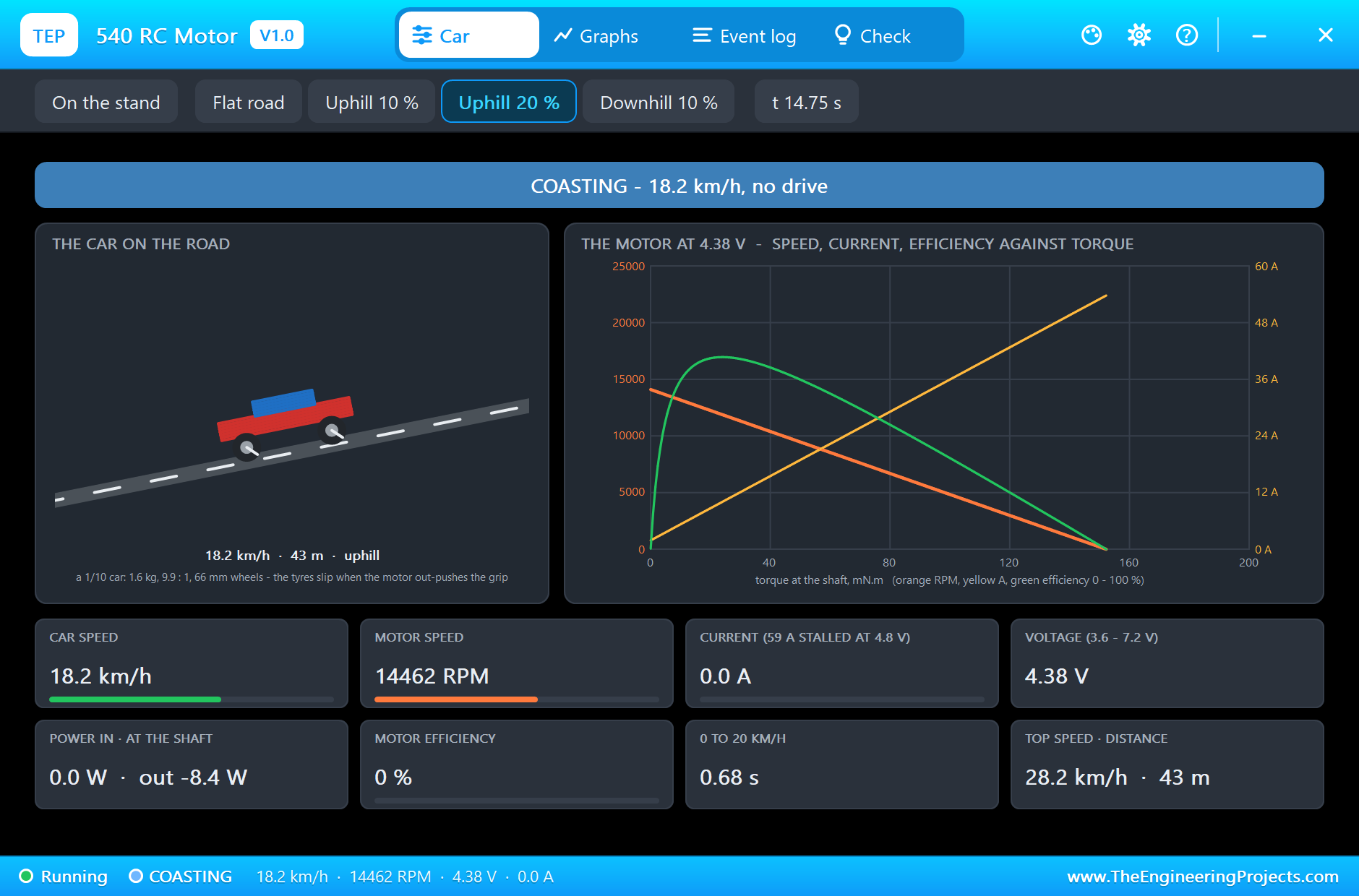
At 10.7 s the run clicks the Uphill 20 % chip, and at 11 s the sketch gives full throttle again. The wheels spin briefly at the start, then the car climbs to a steady 26.5 km/h. Only a little slower than on the flat, but the current nearly doubles to 8.7 A, and the efficiency rises to 63 %, because the motor now works closer to its best point. On the curves, the working point has moved down the speed line towards the green hump.
At 14 s the sketch coasts: the enables go low and the motor is free. On the hill gravity slows the car quickly, from 24.6 km/h down to 18.3 km/h within 0.6 s. At 15.5 s the sketch brakes: the car stops from 10.6 km/h in 0.53 m.
On the Stand
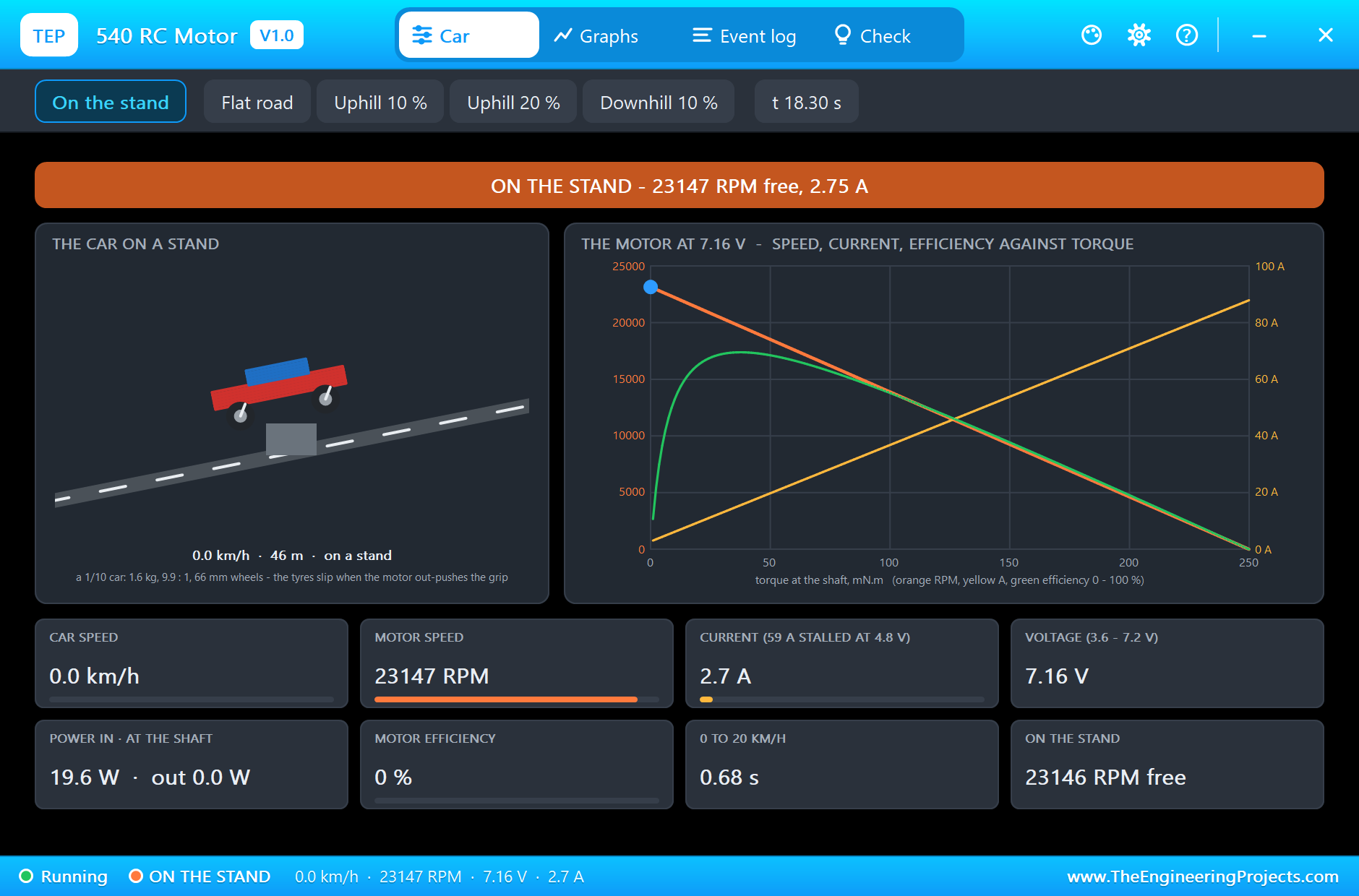
At 16.3 s the run clicks On the stand, lifting the car so the wheels turn in the air, and at 16.5 s the sketch gives full throttle. With no load but its own friction and windage, the motor reaches its free speed, and the pop-up says ON THE STAND: 23,146 RPM at 7.16 V with 2.75 A. The tyres would run 29.1 km/h. The maker's data gives 15,400 RPM and 2.0 A at 4.8 V; scaled to 7.16 V, the speed matches.
The Graphs, the Event Log and the Check Page
The Graphs page plots the car's speed, the motor's RPM, the current and the tyres' slip over the last 2, 6 or 15 simulated seconds. The Event log keeps every change: the launch with its time and peak current, the wheelspin, the steady speeds with their current and efficiency, braking distances, coasting, the road chosen in the pop-up and the free speed on the stand. The Check page sums it up with a verdict for each part.
Try It Yourself
- Type
f 60from a standstill: a gentler throttle spins the wheels less and may launch just as fast. - Set GEAR to 7 and run full throttle on the flat: a taller gear raises the top speed and the current.
- Set GEAR to 14 and climb the 20 % hill: a shorter gear climbs with less current and a lower top speed.
- Set MASS to 3 kg and compare the launch time and the current on the hill.
- Choose Downhill 10 % and coast: watch the car speed up with no drive at all.
- Run on the stand at 50 % and check that the free speed halves.
Ideas to Extend the Demo
- Read a throttle stick on an analog pin and drive the car from it.
- Add traction control: ease the PWM while the tyres slip, and compare the launch times.
- Read the BTS7960's current-sense outputs and limit the launch current.
- Replace the BTS7960 with a brushed ESC driven by RC pulses, as in a real RC car.
Your Own Sketches
The demo sketch is in the zip file, and you can change it in the Arduino IDE. New to Arduino? Start with our Arduino Tutorial for Beginners. Export the compiled binary, and set the UNO's PROGRAM property to the new file. Our guide on How to get the HEX file from Arduino shows you where the file ends up.
Things to Know Before Using a Real 540
- Size the driver for the launch: a 540 draws tens of amps at the start and when stalled; use a driver or ESC rated for it, thick wires and a fuse.
- Suppress the brush noise: fit a 0.1 µF capacitor across the terminals and one from each terminal to the can.
- Gear it sensibly: too tall a gear on a heavy car or a hill overheats the motor.
- Let it cool: brushed motors heat up in hard use, and their brushes and commutator wear.
Troubleshooting
- WHEELSPIN at the launch: normal; the motor out-pushes the tyres. Ease the throttle in for a cleaner start.
- STALLED: a steep hill, a heavy car or too tall a gear; gear it down.
- HIGH CURRENT: over 25 A for 2 s; lower the gearing or the load.
- OVER-VOLTAGE: more than 8.6 V average across the motor; it is rated 3.6 to 7.2 V.
- The part is not simulated:
TEPRC540.DLLis missing from MODELS and from the project folder.
Limitations of the Simulation
- The motor's inductance and the commutation ripple are not modelled; the current is smooth.
- Heating, brush wear and the battery's sag under load are not modelled.
- The car drives straight: no steering, no suspension, no weight shift; the tyres share one grip.
- Arduino is a name of Arduino; this library is not made or endorsed by Arduino, Labcenter or any motor maker.
- Tested in Proteus 8.5 in November 2026 (the demo as shipped). Proteus 7 is not supported.
So, that was all about the 540 RC Motor Library for Proteus Simulation. I hope it helps you choose motors, gears and drivers for your RC and robot projects in a simulation first: a real brushed motor, a real car to push, wheelspin, hills and braking, and a pop-up that shows where the motor works on its curves. If you have any questions, ask in the comments and I will help you out. Till the next tutorial, take care and have fun!