Tablets are great devices for active and busy people. It’s a convenient device to carry with you and if you’re a business person, it can make working on the road a lot more pleasant than simply using your smartphone. However, buying a tablet isn’t necessarily easy, as you have so many options available. It can be even trickier if you are working with a specific budget – you want to make sure you get the best tablet money can buy.
They help you out, here are some tips on how to choose the best Android tablet within your budget.
Set your budget
You must start your tablet hunt by setting yourself a budget. It’s important you look at the bank account and think carefully how much you are able to and willing to spend on the new device.
In terms of the ...
Hello everyone! I hope you all will be absolutely fine and having fun. Today, I am going to share my knowledge about Introduction to LM339. LM339 belongs to the family of devices having 4 independent voltage comparators. Each comparator is designed in such a way that it is capable of operating from a single power source over a wide range of power supplies. It can also operate for split power supplies. There is a unique characteristic of comparators, Input Common-Mode Voltage Range (ICMR) includes a ground even when it is operating from a single power supply voltage.
Basically, LM339 is a comparator IC having four built-in comparators. The basic purpose of a comparator is to rotate the signal between analog and digital domains. At its input termina ...
Hello everyone! I hope you all will be absolutely fine and having fun. Today, I am going to elaborate about the Introduction to LM324. It is an Operational Amplifier (Op-amp) consists of four channels. Its a low cost device having true differential inputs.For single supply applications LM 324 are superior to the other operational amplifiers. LM-324 is capable of operating at the minimum voltage up to 3V and at the high voltage levels up to 32V.
One of the major advantage of LM-324 is that common mode input range includes negative supply which eliminates the need of external biasing. Negative power supply voltage is also included in output voltage range. This device is lead (Pb) free, halogen free and RoHS compliant. It consists of four amplifier ...
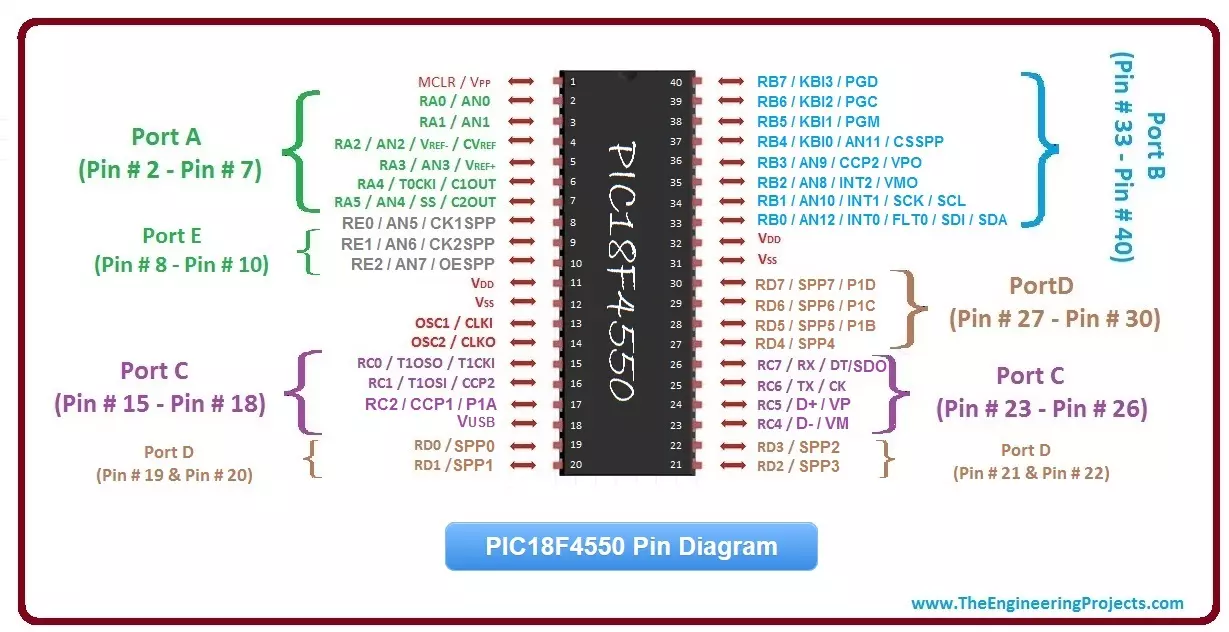
Hello friends I hope you all are doing great. Today, I am going to give you a detailed Introduction to PIC18F4550. Its one of the most renowned PIC Microcontroller and is used in almost every field. You should also have a look at my previous tutorial Introduction to PIC16F877a, as it will also be helpful. PIC18F4550 also has 40 Pins and is quite similar to PIC16F877a with some additional features.
In today's post we will get the general overview of this microcontroller, which is very essential if you wanna start working on it. If you have any problem in any part of it then ask your questions in comments and I will try my best to resolve them out. So, now let's get started with Introduction to PIC18F4550:
Introduction to PIC18F4550
PIC18F4550 is a ...
Hello friends, I hope you all are doing great and having fun with your lives. Today, I am going to give you guys a detailed Introduction to PIC16F877a. It's the most commonly used PIC Microcontroller because of its operational flexibility, availability and low cost. You can buy this PIC Microcontroller from almost every online electronic shop for just $2 - $3.
If you are new to PIC Microcontroller then read this complete post carefully and ask your queries in the comments. You should also have a look at this video in which I have given an Introduction to PIC16F877a:
Note:
You can download PIC16F877a Datasheet by Clicking below button:
Download PIC16F877a Datasheet(adsbygoogle = window.adsbygoogle || []).push({ });
Introduction to PIC16F87 ...
Hello everyone I hope you all will be absolutely fine and having fun. Today, I am going to share my knowledge on Introduction to TL494. It supports all of the functions that are necessary for the Pulse Width Modulation (PWM) control circuits. Power supply control is the basic purpose of the TL494 device. It has an output control circuit, a flipflop, dead time comparator, two different error amplifiers, 5V reference voltage, oscillator and a PWM comparator. TL 494 operates properly between the frequency of 1kHz to 300kHz.
The Dead Time Comparator (DTC) provides around 5% of dead time. Both of the error amplifiers display a common-mode voltage from -0.3V to (Vcc-2)V. If we provide a sawtooth wave at the CT terminal and terminate RT to the referenc ...
Hello everyone! I hope you all will be absolutely fine and having fun. Today, I am going to give you a detailed Introduction to BC547. It is an NPN bipolar junction transistor (BJT), mainly used for switching and current amplification.
Its maximum current gain is around 800. So, let's have a detailed overview of BC 547.
Introduction to BC547
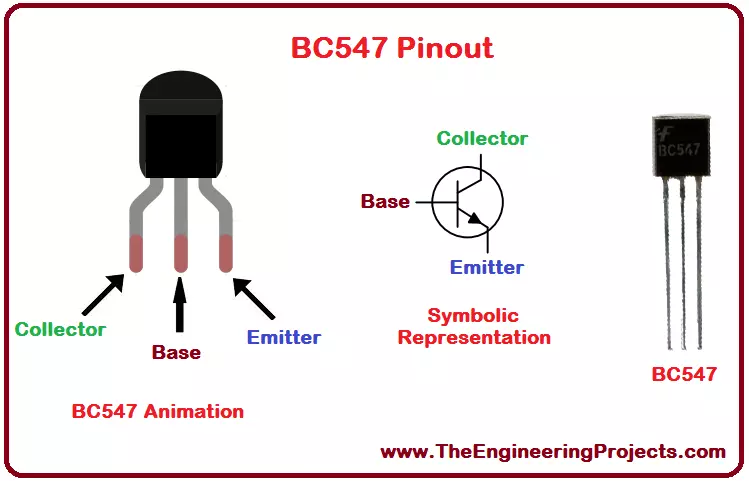
BC547 is a 3-Terminal NPN Bipolar Junction Transistor(BJT), mostly used for switching purposes and current amplification.
BC547 Pins(Terminals) from left to right are called:
Collector.
Base.
Emitter.
Depending on the voltage applied at Base Terminal, BC547 can operate in two states, named:
Forward Biased.
Reverse Biased.
BC547 as Reverse Bias ...
Hello everyone! I hope you all will be absolutely fine and having fun. Today, I am going to give you an Introduction to LM741. It belongs to the series of general purpose amplifiers. It supports larger range of input voltages. LM741 provides high gain and short circuit protection as well. Its pins configuration is very similar to UA709 and there is no need of frequency compression in LM 741.
LM741 can be used as a comparator in order to determine the levels of applied input voltages i.e. either smaller or larger input voltages are applied at its input terminal. LM741 is an op-amp IC having 8 different pins, which will be explained later in this tutorial. LM-741 has a very wide range of applications e.g. function generator, comparator, DC amplifie ...
Hello everyone! I hope you all will be absolutely fine and having fun. Today, I am going to share my knowledge with all of guys about Introduction to IRF540. It is basically an N-Channel power Metal Oxide Silicon Field Effect Transistor (MOSFET) and operates in enhancement mode.
MOSFET is a lot sensitive in comparison to an FET (Field Effect Transistor) due to its very high input impdence. IRF540 can perform very fast switching as compared to the normal transistor. It is based on HEXFET technology and operates on the temperature ranging from -55 degrees celsius to 175 degree celsius. If we need some switching application between different signals or to perform any of amplification process, MOSFET IRF540 will be the best option in this case bec ...
Hello everyone! I hope you all will be absolutely fine and having fun. Today, I am going to explore my knowledge about Introduction to LM317. It is basically a positive voltage regulator having three terminals. It can a supply a current more than 1.5A and voltage in a range of 1.25V to around 37V. You should also have a look at this LM 317 Calculator.
For the adjustment of output voltage only two external resistors are required. It has improved standards of line regulation as well as load regulation. Full overload protection e.g. current limiting, area protection can be achieved using LM317. If its adjusting terminal is disconnected, even then all of the protection circuits will work properly. We can also use LM317 as precision current regulator ...