Hi Guys! I welcome you on board. In this post today, we’ll discuss the KSC1845 NPN Transistor. We will have a look at the KSC1845 Datasheet, Pinout, Power Ratings, Equivalents & Applications in detail. As it's an NPN transistor, electrons are the majority charge carriers and thus play a major role in conductivity. KSC1845 is mainly used for fast-switching and amplification purposes.NPN transistor carries 3 terminals, known as:
Emitter
Collector
Base
If the applied voltage at the base terminal exceeds 0.7V, it will forward bias this NPN transistor and the current will start to flow from Collector to Emitter. If the base voltage is less than 0.7V, KSC1845 will remain in the reverse-biased state.
I suggest you buckle up as I’ll discuss the KSC1845 ...
Hi Friends! I welcome you on board. Thank you for clicking this read. In this post today, I’ll detail the Introduction to IRF740.The IRF740 is an N-channel power MOSFET used for extremely fast switching applications. It comes with a power dissipation of around 125W and can support loads up to 400V. The maximum drain current of this device is 10A and the drain-source capacitance is 1450pF.
I suggest you read this post till the end as I’ll describe the complete Introduction to IRF740 covering datasheet, pinout, features, and applications.
Introduction to IRF740
The IRF740 is an N-channel MOSFET that comes with 125W power dissipation. This is the power device that dissipates during the working of this component.
This device is mainly used for fast switching applications and comes ...
Hello everyone, I hope you are having a fine day. In today’s tutorial, I am going to discuss “Software Testing and Debugging”
During testing and debugging, seek advice for the various techniques of detecting and eliminating mistakes in a program, so that it produces the desired result. Every programmer needs to be aware of the truth that a program does not always run perfectly for the first time. It is consequently vital to make efforts in case you do stumble on the errors. First, determine and note any errors which are found during the very first building and running of the program.
Errors that Occur during Initialization of the Program
Many errors can occur when running a program, some apparent, and others are not. All these mistakes can be grou ...
Indoor positioning technology has become widely available in a variety of configurations and quality levels. It's a jungle out there, and no single established solution, unlike outdoor location using GPS satellite technology, has been adequate for all needs.
Since GPS satellite technology became widely available in the late 1990s, positioning systems have played an increasingly important role in people's lives. Almost, everyone now owns a device with positioning capabilities, whether it's a mobile phone, tablet, GPS tracker, or smartwatch with built-in GPS.
Though GPS transformed outdoor positioning, we're now moving on to inside positioning, which will require new technologies. Because the signal is attenuated and scattered by roofs and walls, sa ...
Hello everyone, I hope you all are doing great. In today's tutorial, we are gonna have a look at usage of Silk Screen technology in Printed Circuit Board (PCB). This article is written by PCBgogo ( a PCB Manufacturing company ) on our request and they have explained this Silk Screen technology in detail. It's always better to hear from the expert and as they are already working on this technology so they have explained it really well.
If you have any questions or queries then ask in comments and I will try to resolve them all. So, let's first have a look at what is Silk Screening:
What is silk screening?
Silkscreen is a layer of ink traces used to identify components, test points, parts of the PCB, warning symbols, logos and marks etc. This silksc ...
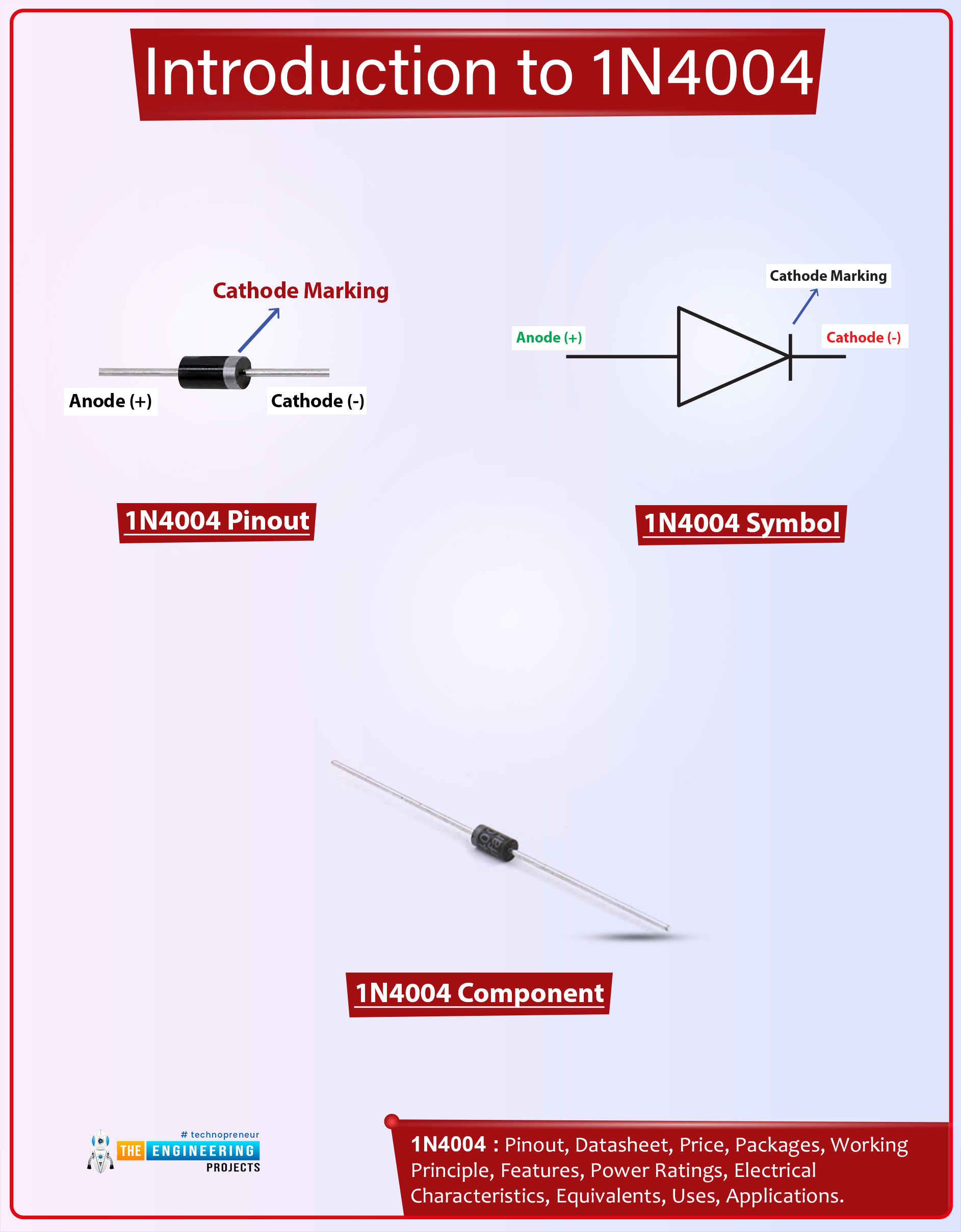
Hi Guys! I welcome you on board. Happy to see you around. In this post today, I’ll walk you through the Introduction to 1n4004.The 1n4004 is a diode that allows the current to flow in one direction only. It blocks the flow of current in the opposite direction. It comes with two terminals called anode and cathode and current always flows from the anode terminal to the cathode terminal. This device comes with a reverse peak voltage of around 400V and it can support loads under 1A.
I’d recommend reading the Introduction to 1n4007 that I’ve uploaded previously. This diode is almost similar to the device 1n4004 that I’m going to stretch in this post.
I suggest you buckle up as I’ll discuss the complete introduction to 1n4004 covering datasheet, pinout, features, equivalents, and applicati ...
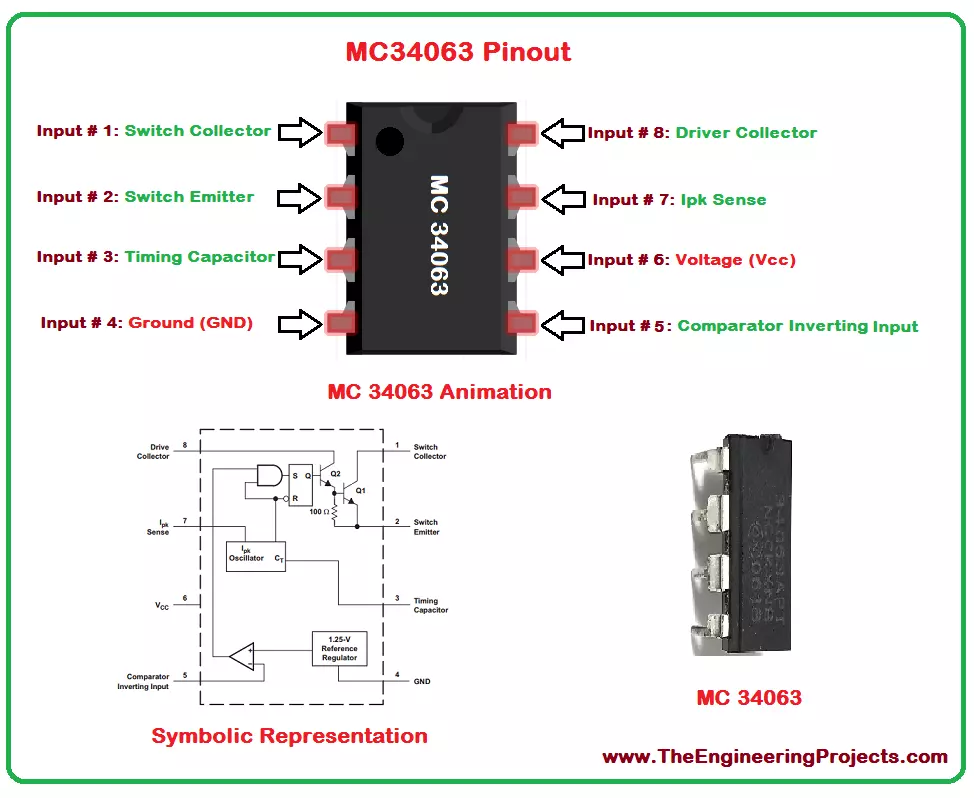
Hello everyone! I hope you all will be absolutely fine and having fun. Today, I am going to share a detailed Introduction to MC34063. It's normally required for the construction of DC to DC converters. MC34063 has a high current output switch, Pulse Width Modulation (PWM) controller with current limiting, compensated reference of internal temperature, a comparator and a driver.
For the inverting, boost and buck applications there is no need of a huge complicated external components, instead they can be performed using minimum external components. MC 34063 operates properly in the temperature ranging from 0 to 70 degree celsius. MC34063 ha s wide range of applications in real life e.g. portable equipment, Human Machine Interface (HMI), test and m ...
Hello friends, hope you all are fine and having fun. Today I am going to share my new tutorial which is Sequential LED Blinking Using 555 Timer in Proteus ISIS. If you recall our one of previous tutorials, which was ‘Multiple LED Flashing Project Using 555 Timer in Proteus ISIS’, but in today’s tutorial we are going to take the same concept to a next level and we are going to make the LEDs blink in either ascending or descending order.
It is a very simple tutorial like the previous one, but the only change is, in this project we have added a Shift Register (4017) next to 555 Timer. 4017 is a Serial IN Parallel OUT Shift Register, which means, at input port it takes data in Serial manner and at output port it will give data in Parallel manner. All ...
Hello friends, hope you all are fine and enjoying good health. In today's tutorial we are gonna have a look at Installation of MPLAB C Compiler in Windows. In the previous part of this chapter, I have explained How to install the MPLAB software in Windows, that part was not much tricky and we did very easily and our software was then ready to use, but as we didn't install the C compiler so we can't do C programming for PIC Microcontroller on MPLAB. We can only do assembly programming on it. Now in this post I will teach you how to install MPLAB C18 compiler so that we can do programming of PIC in C. There are many different compilers available in the market, one of them is MikroC and another famous one is CCS but they are paid compilers means you ...
Update: Here's the latest version of this library: Arduino UNO Library for Proteus(V3.0).
Hello friends! I hope you’re well today. I welcome you on board. Today, I am going to share an update to our previously designed Proteus Library for Arduino UNO. You should also have a look at its previous version i.e. Arduino UNO Library for Proteus(V1.0). We have been receiving many suggestions & bug reports from engineers(mostly students) about our Proteus libraries, so we have thought to upgrade them for better performance. It's the first one getting upgraded and this month, we will be sharing a lot more. It is the more advanced, small-sized and refined version of the previous model.
I’ve given the link below to download this library and shared details on How to use it in your Proteus so ...