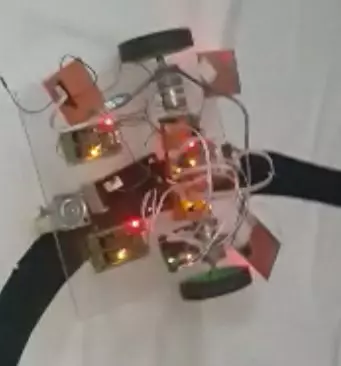
Hello everyone, I hope you all are fine and having fun with your lives. Today, I am going to share a very basic project named as Line Following Robot using Arduino. I have designed a three wheeler robot and have placed IR sensors beneath it to detect the black line and then I have made it move over this Black Line.
This Line Following Robot is not doing any extra feature i.e. turning or rotating back. It will just simply move in the straight line. I have also posted a short video at the botton of this tutorials which will give you better idea of how this robot moves. You should first read this tutorial and design the basic robot and once you are successful in designing the basic Line Following Robot then you should have a look at my recent Project ...
In today's post we are gonna have a look at How to Train Pixy Camera with Computer. We have yet posted three tutorials in the Pixy Camera series. In the first tutorial, we have seen How to Get Started with Pixy Camera in which we have studied the basics of Pixy Camera. After that that we have seen the Installation of Pixy Camera Software which is named as PixyMon and in the third tutorial we have covered How to Upload the Latest Firmware in Pixy Camera because its always the best strategy to deal with latest tools. So until now we have configured our Pixy Camera in all possible ways now the next thing is to train our Pixy Camera with Computer using PixyMon software.
Let's first discuss How the Pixy Camera works. Pixy Camera has on board NXP microc ...
Update: We have created a new version of this library, which you can check here: Arduino Pro Mini Library for Proteus V2.0.
Hello friends, hope you all are fine and having fun with your lives. In today's post, I am gonna share Arduino Pro Mini Library for Proteus. Recently, I have shared Arduino Nano Library for Proteus, and before that I have also posted Arduino UNO Library for Proteus as well as Arduino Mega 2560 Library for Proteus, and now I am gonna share Arduino Pro Mini Library for Proteus. Arduino Pro Mini is another Arduino board which also uses the same Atmega328 Microcontroller and has almost the same number of pins as Arduino UNO and Arduino Nano. Arduino Pro Mini is even more smaller than Arduino Nano board. It doesn't have the pro ...
Hi Friends! Hope you are doing well. Today, I'll give you a detailed Introduction to Arduino LilyPad. It is an Arduino Microcontroller Board, based on ATmega168/ATmega328 and is introduced by Leah Buechley and SparkFun Electronics.
This board is mainly developed for e-textiles and wearables projects. As per the designed purpose, it can be attached to fabric, sensors, power supplies, and actuators. You may need a conductive thread for joining this board with the required object.
In this post, I'll try to cover each and everything related to Arduino LilyPad, what is this about and how it is used for the development of desired projects. Let's jump right in and get down to the nitty-gritty of this board.
Introduction to Arduino LilyPad
Arduino Lil ...
Hello everyone, hope you all are fine and having fun with your lives. In today's post, I am going to share How to generate PWM in 8051 Microcontroller. PWM is an abbreviation of Pulse Width Modulation and is used in many engineering projects. It is used in those engineering projects where you want an analog output. For example, you want to control the speed of your DC motor then you need a PWM pulse. Using PWM signal you can move your motor at any speed from 0 to its max speed. Similarly suppose you wanna dim your LED light, again you are gonna use PWM pulse. So, in short, it has numerous uses. If you are working on Arduino then you should read How to use Arduino PWM Pins.
PWM, as the name suggests, is simply a pulse width modulation. We take a pu ...
Hello everyone! I hope you all will be absolutely fine and having fun. Today, I am going to give you an elaboration on Introduction to LM293 an Integrated Circuit (IC). LM-293 is a dual independent accurate voltage comparator. LM 293 has a capability to perform its operation from a single supply source as well as from split power supply. The purpose to design LM-293 is to permit a common mode range to the ground level and it perform this operation with single power supply source.
LM-293 is the most common device in the market these days due to its high performance and cost effectiveness. This device is considered to be an ideal for a lot of electronics applications. LM-293 has a lot of features which make it different from all other devices. The ...
Hey Guys! Hope you are doing great. Transistors are the fundamental parts of the recent electronic devices. They are available in two types i.e. NPN and PNP transistors. Based on the technical aspect and utilization, both types come with different benefits and advantages. Today, I am going to discuss the details on the Introduction to 2n3792. It is a PNP (positive-negative-positive) silicon bipolar power transistor mainly used for amplification and medium speed switching. It is manufactured using epitaxial planer process and comes in TO-3 casing.
I'll cover each and everything related to this transistor so you don't need to go anywhere and find all information in one place. Let's explore what is this about, its main applications and everything yo ...
Hello friends, I hope you all are fine and having fun with your lives. Today, I am going to share a new tutorial which is Interfacing of Flame Sensor with Arduino. I have recently posted a tutorial in which I have shared the Flame Sensor Library for Proteus. Now in this tutorial, I am gonna use that Flame Sensor Library and will interface this Flame Sensor with Arduino. So, if you haven't downloaded this file then I suggest you to download this Flame Sensor Library so that you can easily simulate this flame Sensor in Proteus.
I am sharing interfacing of this Flame Sensor with Arduino today, but soon I will also post a tutorial on Interfacing of Flame Sensor with PIC Microcontroller. If you guys have any questions then ask in comments. I have also ...
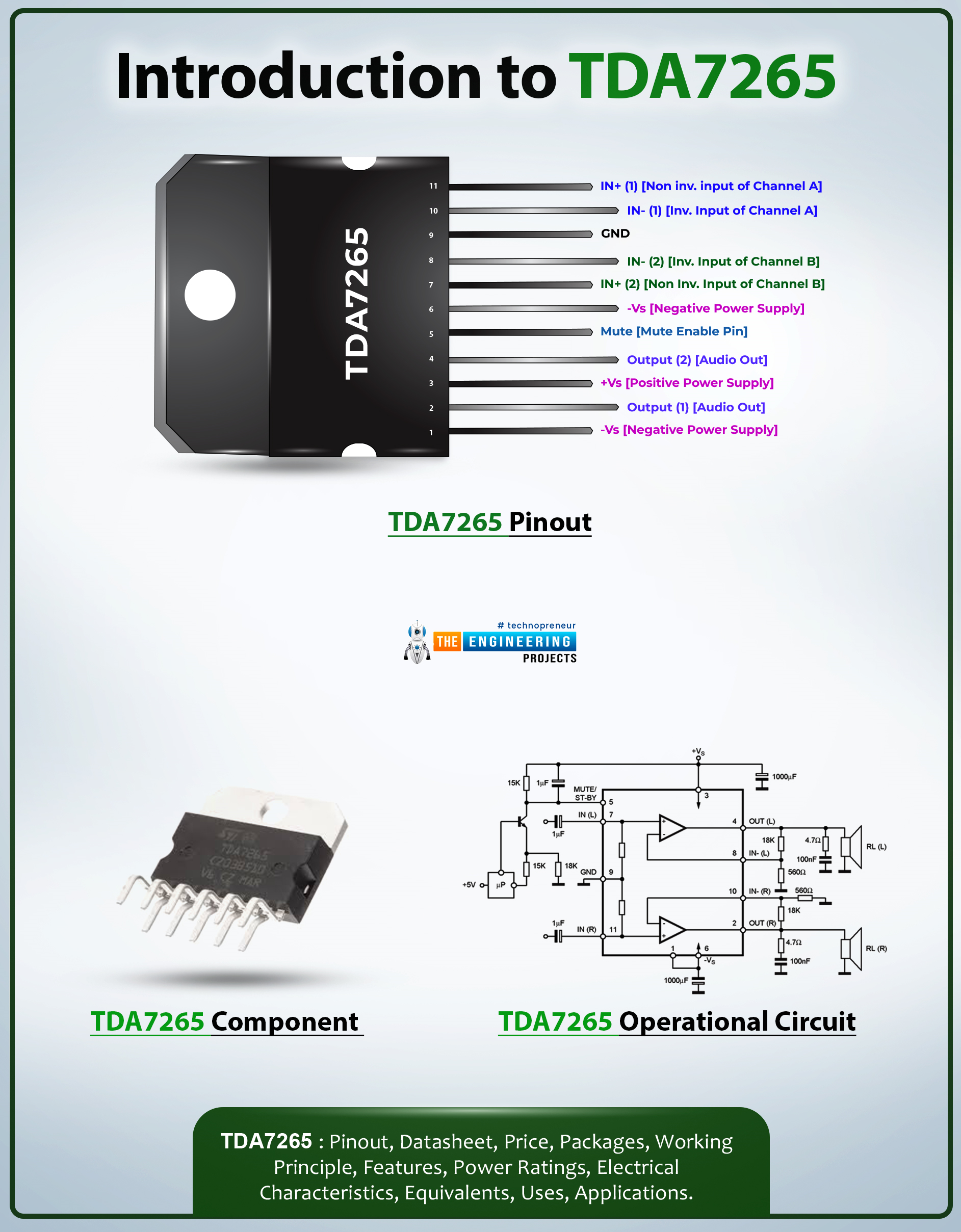
Hi Friends! I hope you’re well today. I welcome you on board. In this post today, I’ll walk you through the Introduction to TDA7265.TDA7265 is a +25-watt class AB dual audio power stereo amplifier. This multi-watt package IC is carefully designed for high-quality audio power amplification applications. This device receives a low-input audio signal and amplifies it into a high-quality audio output.
I suggest you buckle up as I will detail the complete introduction to TDA7265 covering datasheet, pinout, features, and applications.
Let’s jump right in.
Introduction to TDA7265
TDA7265 is a +25-watt class AB dual audio power stereo amplifier that is mainly employed in audio amplifiers and woofer amplifiers.
This device gets a low-input audio signal and converts it into a high-out ...
Hey Fellas! We always strive to give you useful information that resonates with your needs and requirements. Today, I'm going to unlock the details on the Introduction to 4n25. It is a standard single channel 6 pin optocoupler that contains silicon NPN phototransistor and gallium arsenide infrared LED. It is widely used in motor drive and control, communication and networking, and power management.
I'll try to cover every aspect related to this optocoupler so you don't need to go anywhere else and find all information in one place. Let's dive in and explore what it does and what are its main features.
Introduction to 4n25
4n25 is a standard single channel 6 pin industry standard phototransistor coupler that contains silicon NPN phototransistor ...