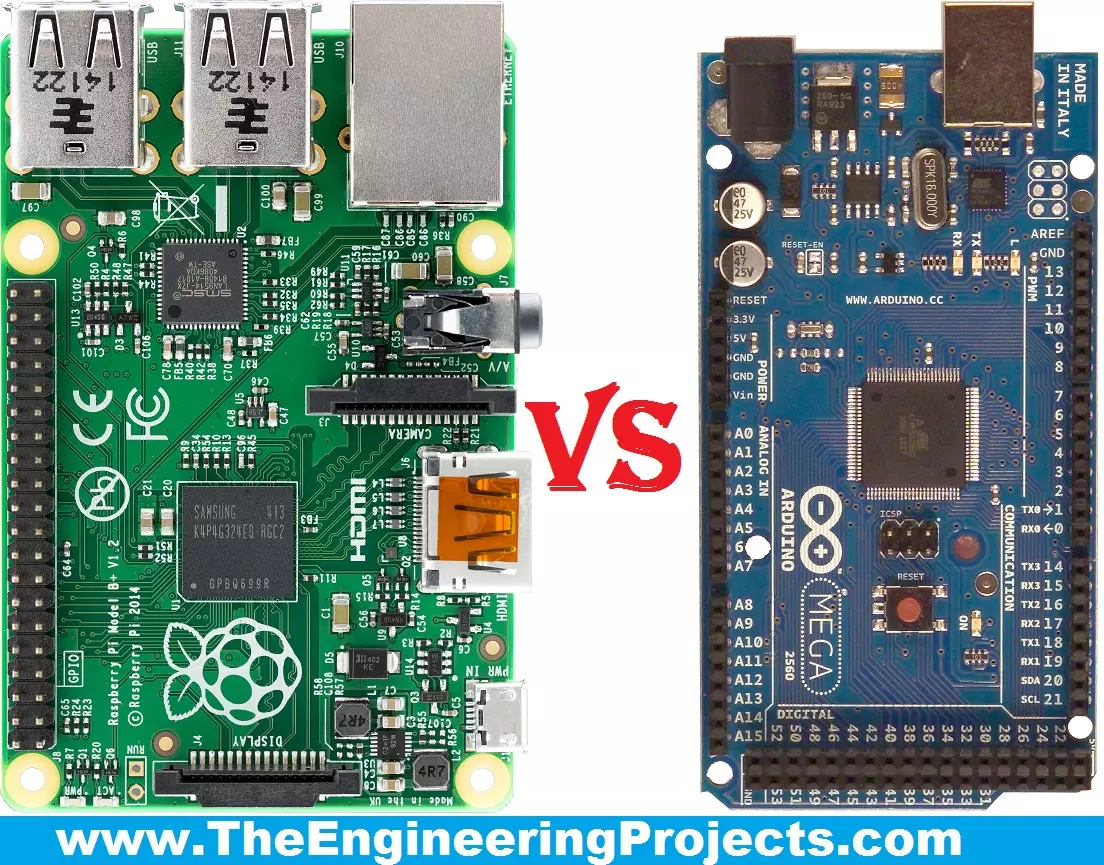
Hello friends, I hope you all are fine and enjoying your lives. Today, I am going to share a comparison titled Arduino Vs Raspberry Pi. Actually, I have been receiving a lot of emails and comments from new engineering students that "we are new in embedded and we want to start our project so please tell us which one is better Arduino or Raspberry Pi?" So, I thought to write a post on Arduino Vs Raspberry Pi and in this post, I am going to make a detailed comparison between the two and will let you know, which one you should use in your project and why?
So, I hope that you are all aware of or at least have heard about these two boards, which are Arduino and Raspberry Pi. If you haven't heard yet then you must have a look at Arduino Official Site and ...
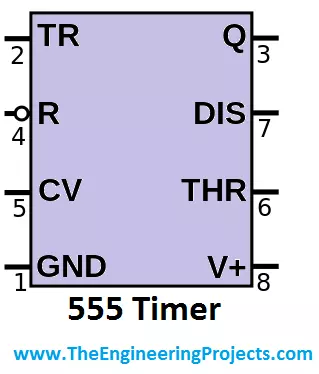
Hello friends, i hope you all are fine and enjoying. Today i am going to share a new tutorial in which I am gonna explain What is 555 timer? We all know about 555 timer, which is an 8-pin IC (integrated circuit), most commonly used in electronic projects, built now a days. As you can see fron its name that it is a timer and designed to generate PWM.
In today's tutorial i am going to explain, what's hidden inside this 555 timer IC and what is 555 timer. A 555 timer is a much compatible electronic device and the biggest feature of this IC is that it able to work on both analogue and digital techniques. Now if we simply consider the output of the 555 timer then, at any particular time, this timer has only 1 definite state. Which means at any time, it ...
Hello friends, I hope you all are doing great. In today's tutorial, we are gonna design a project named DC Motor Control using XBee & Arduino in Proteus ISIS. I have shared the complete code and have also explained it in detail. You can also download the complete working Proteus Simulation given at the end of this tutorial. In this project, I have designed two Proteus Simulations.
The first Simulation is of Remote control in which I have used a keypad. The second simulation contains our two DC Motors and I am controlling the direction of those DC Motors with my Remote Control. XBee Module is used for sending wireless data. The code will also work on hardware as I have tested it myself. So, let's get started with DC Motor Control using XBee &am ...
Hello friends, hope you all are fine and having fun with your lives. Today, I am going to share a new project in which we are gonna do Arduino Bluetooth communication. The Bluetooth module I have used for this project is HC-05, which is a serial Bluetooth module. We can quite easily perform the Bluetooth communication with this module using Arduino board. I have worked on many projects in which I have to send the data from sensors to my computer via Bluetooth. So, in such projects I normally use this Bluetooth module which is connected with the sensors and then Arduino gets the data from these sensors and then send this data to computer via Bluetooth module. In this project, I have used Arduino board but you can use PIC Microcontroller or 8051 Mic ...
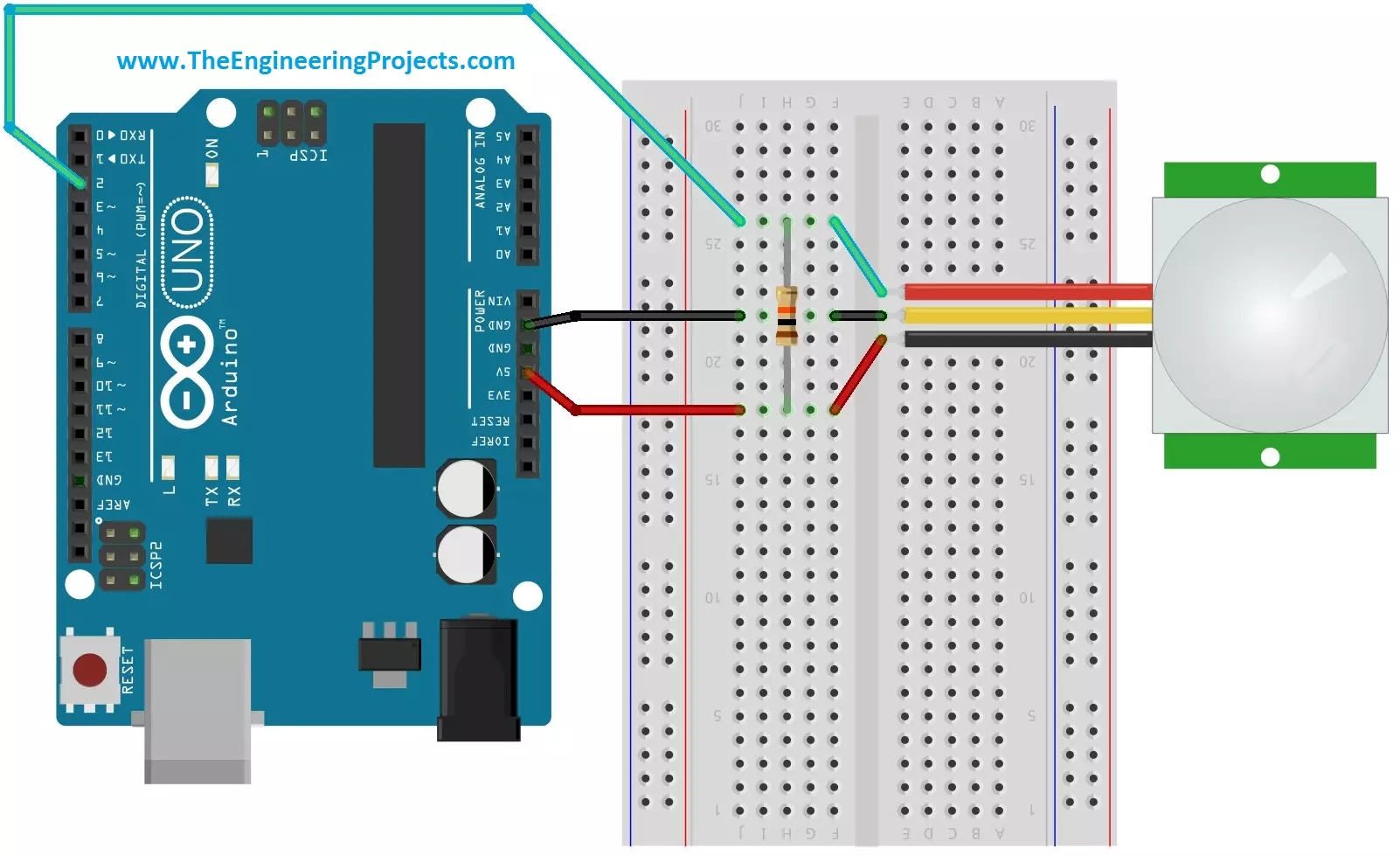
Hello friends, i hope you all are fine and enjoying. Today i am going to share a new project tutorial which is Interfacing PIR sensor with Arduino. First of all lets, have a little introduction about the basics and working of the PIR sensor. PIR sensors are in fact a Passive Infrared Sensor. PIR sensors are actually electronic sensors and they are used for motion detection. They are also used to detect the Infrared waves emitting from a particular object. You should also have a look at PIR Sensor Library for Proteus, using this library now you can easily simulate your PIR Sensor in Proteus software.
PIR sensors are widely used in motion detection projects now a days. Since my today's tutorial is about interfacing of PIR sensor with Arduino micro c ...
Hi Guys! Hope you’re well today. I welcome you on board. Happy to see you around. In this post today, I’ll detail the Introduction to TL084.
TL084 is a JFET input Op-Amp that carries low offset current and high input impedance. Available with better offset characteristics and high noise immunity, TL084 comes with a suitable offset voltage that makes it an ideal pick for amplifier applications.
I suggest you read this post all the way through as I’ll walk you through the complete Introduction to TL084 covering datasheet, pinout, features, and applications.
Without further ado, let’s get started.
Introduction to TL084
The TL084 is available in Quad Package which means it comes with four separate op-amps that can operate independently.
This o ...
Hey Everyone! I hope you all are having fun and looking forward for happy weekend. I am here to give you a daily dose of sound knowledge so you can develop some skills in engineering field. Today, I am going to uncover the details on the Introduction to 2sa1215. It is bipolar silicon PNP (positive-negative-positive) transistor. It is made up of two layers of P doped material and one layer of N doped material. I'll give you the brief overview of this device, what it does and what are its major applications? Let's hop on the board and dive into the details of this PNP transistor.
Introduction to 2sa1215
2sa1215 is a bipolar PNP silicon transistor where one layer of N doped material lies between the two layers of P doped material.
The small cu ...
Hello Everyone! Happy to see you around. Thank you for clicking this read. In this post today, I’ll document the Introduction to MJE13007.
MJE13007 is an NPN bipolar junction transistor that is a semiconductor device made of silicon material. This chip is mainly used for amplification and switching purposes. The collector-base voltage is 700V while the collector-emitter voltage is 400V. The power dissipation at temp 25C is 80W. This means 80W is released during the working of this device. This device can support load up to 8A because the current at the collector side is 8A.
I suggest you read this entire post till the end as I’ll include the complete Introduction to MJE13007 covering datasheet, pinout, working principle, power ratings, applications, and physical dimensions.
Let’s ...
Hello friends, I hope you are all fine and will be doing something interesting in your life. in today's post, I am going to discuss Introduction to DHT22. It is a temperature and humidity measure sensing device. It is easily used but it needs a specific time for an operation. Its temperature measuring range is from -40 to +125 degrees Celsius with +-0.5 accuracy. This sensor measures moisture content and temperature. This sensor is easily connected to other microcontrollers.
DHT22 plays an important role in our environment in measuring temperature and moisture. It is a low cost easy-to-use small sensor. This sensor is used at different weather stations to measure temperature and ratio of moisture in the air, in this way, they tell about tem ...
Hi Friends! Happy to see you here. I welcome you on board. In this post, I’ll walk you through the Introduction to BC639. BC639 is a high current gain bipolar junction transistor that falls under the NPN transistor family. It constitutes a high collector current and low collector-emitter saturation voltage and is widely used for amplification and switching purposes. It is used to drive load under 500mA. Collector Dissipation is 0.625W while DC Current Gain (hfe) ranges from - 40 to 160 with transition frequency 200MHz. In this post, I’m going to discuss all nitty-gritty of the BC639 transistor covering pinout, working, power ratings, alternatives, applications, and physical dimensions.
Continue reading.
Introduction to BC639
BC639 is an NPN bi ...