Hello friends, I hope you all are doing great. In today's tutorial, we are gonna have a look at detailed Introduction to A1015. A1015 is a part of transmissive light sensing sequence which has a high competence GaAs Infrared light discharging diode which actions as the light stemming component, extremely sensitive phototransistor is used as the light sensing element. These two apparatuses are established so as in the opposite of each other, any materials fleeting among them are effortlessly sensed.
The A1015 is made in casing of TO-92. By seeing at its smooth side we can comprehend the three terminals impending out, these three terminals from left to right are emitter, collector and base. In today’s post, we will have a look at its fortification, ...
Hello everyone! I hope you will be absolutely fine and having fun. Today, I am going to give an Introduction to 2N3904. It is basically an NPN transistor made up of silicon material. It acts as a general purpose amplifier and switch. You should also have a look at Introduction to 2N2222, which is also an NPN transistor and considered as 2N3904 equivalent.
It is mostly used for lower power amplifiers and switching applications. Its major functional area is enclosed in TO-92 package. Its a silicon NPN general purpose bipolar junction (BJT) transistor designed for switching purpose as well as for an amplifier. Its can bear lower amount of current, lower power and medium voltage levels. It is most commonly used BJT due to its smaller size, wide avai ...
Hello friends, hope you all are fine and enjoying life. Today's post is about removing a small error named as Recognition Failed in EasyVR, which I encountered while working with EasyVR shield with Arduino UNO. I have posted a complete project on EasyVR shield around a year ago in which I haven't mentioned this error because at that time I didn't encountered it. But today while working with EasyVR shield, I encountered this problem so I thought to share it with you guys.
EasyVR shield is a voice recognition module which is used for recognizing voices and operating accordingly. Using this module, one ca quite easily control anything using voice. In the previous project, I have controlled a robot using voice commands like when I say Forward then it ...
Hi Friends! Hope you’re well today. I welcome you on board. Thank you for clicking this read. In this post today, I’ll detail the Introduction to SB560.
The SB560 is a Schottky diode, also known as a hot-carrier diode, mainly incorporated in extremely fast switching applications. It comes with low forward drop voltage and is used in the high-frequency operation. A highly reliable and efficient device, SB560 is a high forward surge capability component available in the DO-201AD package. This device carries a maximum RMS voltage of 42V while the maximum repetitive peak reverse voltage is 60V.
I suggest you go through this entire post till the end, as I’ll detail the Introduction to SB560 covering datasheet, pinout, features, and applications.
Let ...
Hey learners! Welcome to another exciting electrical experiment in Proteus. At the present day, we'll perform the inversion of voltage. For this purpose, we will use the implementation of Transformer as Step-up Transformer. Prior to start, let's have the basic information about the 12V to 220V Step up inverter using Transformer in Proteus. In this tutorial, we'll learn:
What is a 12V to 220V inverter?
What is the function of the transformer in the 12V to 220V inverter?
How can we implement the Step up inverter using a Transformer in Proteus?
What are some applications of the 12V to 220V inverter?
Moreover, there will be some useful pieces of information in DID YOU KNOW sections.;
12V to 220V inverter
In electronic appliances, the circuitr ...
ESP32 is a powerful chip for Internet of Things applications. This tutorial is also based on another ESP32 application in the field of IoT.
Hello readers, I hope you all are doing great. In the previous tutorial, we learned how to send sensor readings from ESP32 to the cloud (ThingSpeak webserver).
In this tutorial, we will learn to send HTTP POST requests from the ESP32 board to ThingSpeak and IFTTT APIs.
What is HTTP?
Fig. 1 Hypertext Transfer Protocol
HTTP stands for hypertext transfer control and it is a protocol for transferring data between a web client and a web server. Hyper text transfer protocol was invented alongside HTML (Hypertext markup language) to create the first interactive, text-based web browser: the original www or World Wid ...
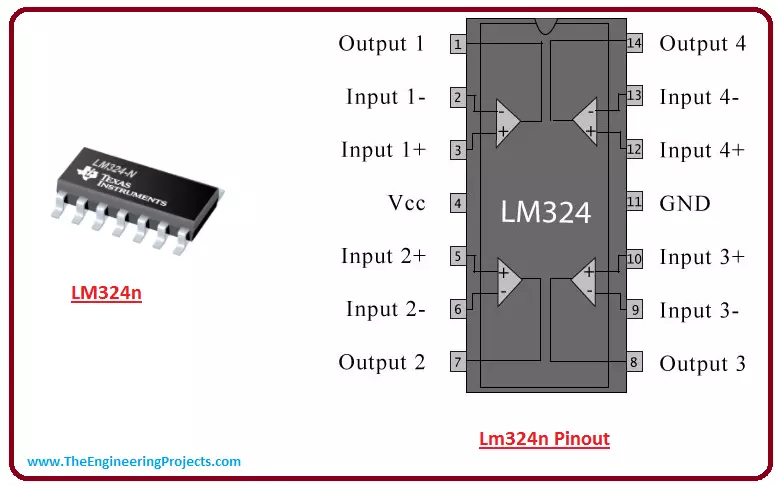
Hey Guys! Hope you are doing great and having fun. Today, I am going to unlock the details on the Introduction to Lm324n. It is a seven pin operational amplifier that comes in discrete and compact single package.
It is a high gain voltage amplifier, where output voltage signal is much higher than the input voltage signal. I'll try my best to cover as many aspects as possible related to this operational amplifier so you don't need to go any where and you find all information at one place. Let's get started.
[otw_is sidebar=otw-sidebar-7]
Introduction to Lm324n
Lm324n is a high gain voltage amplifier that comes with differential input and single ended output.
It is designed in such a way, that the voltage difference between input terminals cr ...
Hello friends, I hope you all are doing great. In today's tutorial, I am going to share a new Infrared Sensor Library for Proteus. This IR sensor is not available in Proteus and we are sharing this library for the first time. I hope it will help in your Embedded Systems Projects particularly related to robotics and automation. So, if you want to work on this IR Sensor then I would suggest you to first design its simulation and then try your luck with hardware.
There are different types of Infrared Sensors & modules available in the market. Some of these modules have transmitter & receiver on separate chips and are mostly get activated when someone interrupts the light. The one we have designed has a transmitter & receiver on a single c ...
Hello everyone I hope you all will be absolutely fine and having fun. Today, I am going to share my knowledge on Introduction to TL494. It supports all of the functions that are necessary for the Pulse Width Modulation (PWM) control circuits. Power supply control is the basic purpose of the TL494 device. It has an output control circuit, a flipflop, dead time comparator, two different error amplifiers, 5V reference voltage, oscillator and a PWM comparator. TL 494 operates properly between the frequency of 1kHz to 300kHz.
The Dead Time Comparator (DTC) provides around 5% of dead time. Both of the error amplifiers display a common-mode voltage from -0.3V to (Vcc-2)V. If we provide a sawtooth wave at the CT terminal and terminate RT to the referenc ...
Hi Friends! I welcome you on board. Happy to see you around. In this post today, I’ll walk you through the Introduction to Arduino Pico.
Arduino Pico is the world’s smallest Arduino compatible board, as said by Arduino Official Page. Because of its small size & low weight, it is normally used in autonomous projects i.e. drones, robots, quadcopters etc. where size is the real issue.
Arduino boards are introduced in modern electronics, to make projects economical and easy to design. A common man with no prior knowledge about programming can get hands-on experience with them. This smallest Pico version is readily available to turn your innovative thoughts into reality.
I suggest you read this post all the way through as I’ll detail the complete I ...